alarm MITSUBISHI LANCER 2016 8.G User Guide
[x] Cancel search | Manufacturer: MITSUBISHI, Model Year: 2016, Model line: LANCER, Model: MITSUBISHI LANCER 2016 8.GPages: 392, PDF Size: 13.12 MB
Page 135 of 392
Brake assist system
Features and controls 5-73
5
N00517600377
Your vehicle is equipped with power brakes for more braking force with minimal brakepedal effort. Your brakes are designed to operate at full capacity, even if the power assist is lost.If the power assist is lost, the effort needed to press the brake pedal is greater. If you should loose the power assist for somereason, the brakes will still work. If the power brake unit or either of the two brake hydraulic systems stops working prop-erly, the rest of the br
ake system will still
work, but the vehicle will not slow down as quickly.You will know this has happened if you find you need to depress the brake pedal down further, or harder when slowing down or stop-ping, or if the brake warning light and the warning display in the multi-information dis- play come on.
N00532500087
The disc brakes have an alarm that makes ametallic squeal when the brake pads haveworn down enough to need service. If you hear this sound, have the brake pads replaced at an authorized Mitsubishi Motors dealer ora repair facility of your choice.
N00567300076
The brake assist system is a device assistingdrivers who cannot depress the brake pedalfirmly such as in emergency stop situations and provides greater braking force. If the brake pedal is depressed suddenly, the brakes will be applied with more force thanusual.
CAUTION It is important not to drive the vehicle with your foot resting on the brake pedal when braking is not required. This practice can result in very high brake temperatures, pre- mature pad and lining wear, and possibledamage to the brakes.
Power brakes
WA R N I N G Never coast downhill with the engine OFF. Keep the engine running whenever your vehicle is in motion. If you turn off the engine while driving, the power brake booster will stop working and your brakeswill not work as well. If the power assist is
lost or if either brake
hydraulic system stops working properly, take your vehicle to an authorized Mit- subishi Motors dealer or a repair facilityof your choice immediately.
Brake pad wear alarm
WA R N I N G Driving with worn brake pads will make it harder to stop, and can cause an accident.
Brake assist system
CAUTION The brake assist system is not a device designed to exercise braking force greater than its capacity. Make sure to always keep asufficient distance between vehicles in front of you without relying too much on the brake assist system.NOTE
Once the brake assist system is operational, it maintains great braking force even if the brake pedal is lightly released. To stop its operation, completely remove your foot from the brake pedal. The brake assist system may become opera- tional when the brake pedal is fullydepressed even if it has not been depressed suddenly.
BK0230300US.bo
ok 73 ページ 2015年7月30日 木曜日 午後8時38分
Page 171 of 392
Multi-information display
Features and controls 5-109
5
5. Press and hold the multi-information meter switch (for about 2 seconds or more) to change the setting to the selected language.
N00557400104
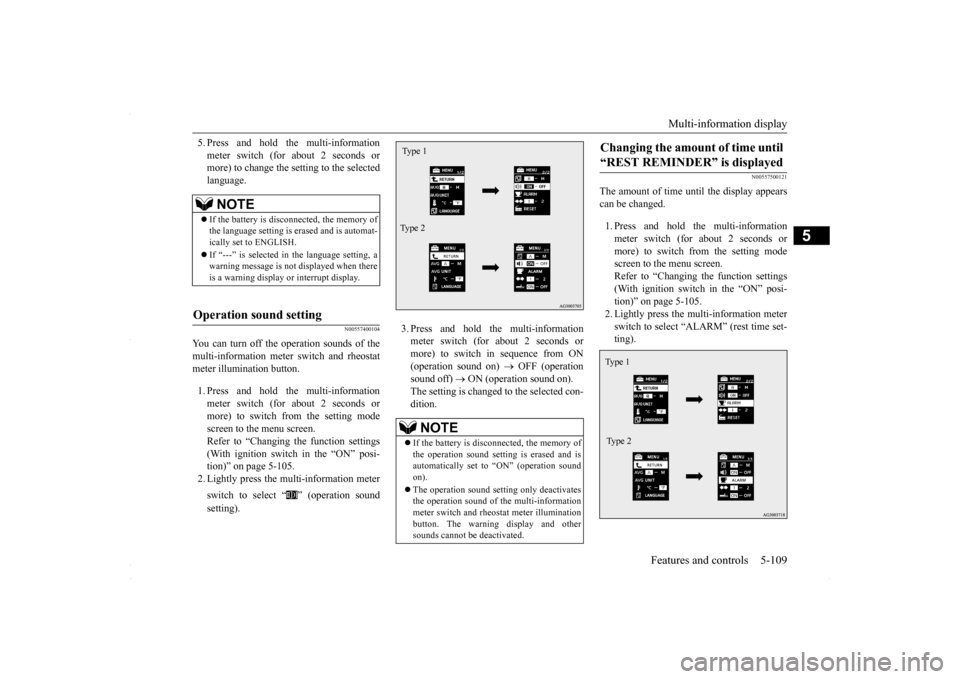
You can turn off the operation sounds of themulti-information meter switch and rheostat meter illumination button. 1. Press and hold the multi-information meter switch (for about 2 seconds ormore) to switch from the setting mode screen to the menu screen. Refer to “Changing the function settings(With ignition switch in the “ON” posi- tion)” on page 5-105. 2. Lightly press the multi-information meter switch to select “ ” (operation sound setting).
3. Press and hold the multi-information meter switch (for about 2 seconds or more) to switch in sequence from ON(operation sound on)
OFF (operation
sound off)
ON (operation sound on).
The setting is changed to the selected con-dition.
N00557500121
The amount of time until the display appears can be changed. 1. Press and hold the multi-information meter switch (for about 2 seconds ormore) to switch from the setting mode screen to the menu screen. Refer to “Changing the function settings(With ignition switch in the “ON” posi-tion)” on page 5-105. 2. Lightly press the multi-information meter switch to select “ALARM” (rest time set-ting).
NOTE
If the battery is disconnected, the memory of the language setting is erased and is automat- ically set to ENGLISH. If “---” is selected in the language setting, a warning message is not displayed when there is a warning display or interrupt display.
Operation sound setting
NOTE
If the battery is disconnected, the memory of the operation sound setting is erased and isautomatically set to “ON” (operation sound on). The operation sound setting only deactivates the operation sound of the multi-information meter switch and rheostat meter illuminationbutton. The warning display and other sounds cannot be deactivated.Type 1 Type 2
Changing the amount of time until “REST REMINDER” is displayed Ty p e 1 Type 2
BK0230300US.book
109 ページ 2015年7月30日 木曜日 午後8時38分
Page 172 of 392
Multi-information display 5-110 Features and controls
5
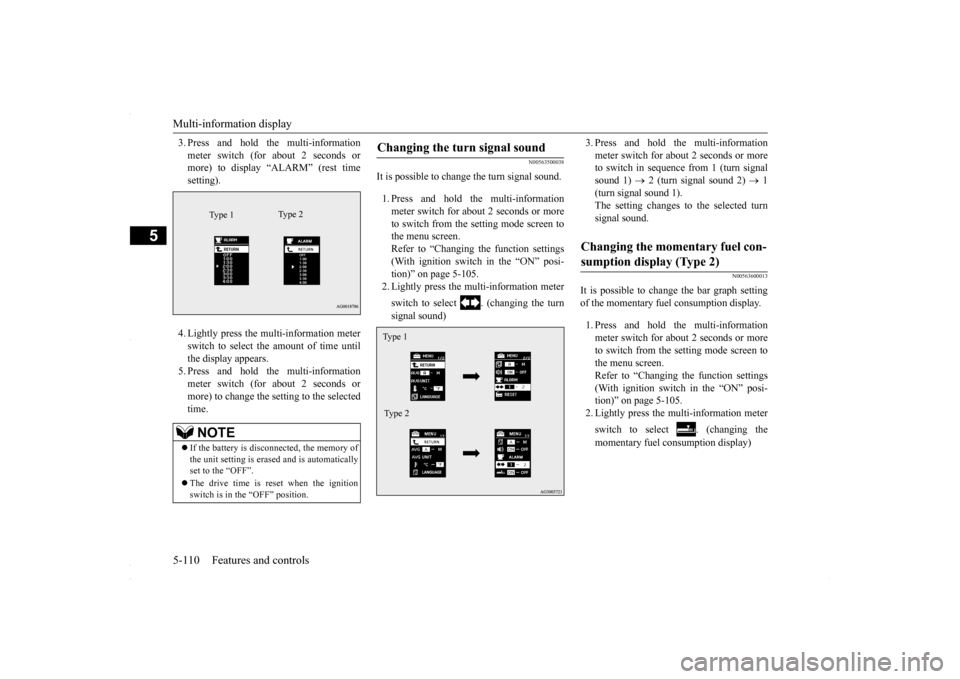
3. Press and hold the multi-information meter switch (for about 2 seconds or more) to display “ALARM” (rest time setting). 4. Lightly press the multi-information meter switch to select the amount of time untilthe display appears.5. Press and hold the multi-information meter switch (for about 2 seconds or more) to change the setting to the selectedtime.
N00563500038
It is possible to change the turn signal sound. 1. Press and hold the multi-information meter switch for about 2 seconds or moreto switch from the setting mode screen to the menu screen. Refer to “Changing the function settings(With ignition switch in the “ON” posi- tion)” on page 5-105. 2. Lightly press the multi-information meter switch to select . (changing the turn signal sound)
3. Press and hold the multi-information meter switch for about 2 seconds or more to switch in sequence from 1 (turn signal sound 1)
2 (turn signal sound 2)
1
(turn signal sound 1). The setting changes to the selected turn signal sound.
N00563600013
It is possible to change the bar graph settingof the momentary fuel consumption display. 1. Press and hold the multi-information meter switch for about 2 seconds or more to switch from the setting mode screen tothe menu screen. Refer to “Changing the function settings (With ignition switch in the “ON” posi-tion)” on page 5-105. 2. Lightly press the multi-information meter switch to select . (changing the momentary fuel consumption display)
NOTE
If the battery is disconnected, the memory of the unit setting is erased and is automatically set to the “OFF”. The drive time is reset when the ignition switch is in the “OFF” position.
Type 1
Ty p e 2
Changing the turn signal sound Type 1 Type 2
Changing the momentary fuel con- sumption display (Type 2)
BK0230300US.book
110 ページ 2015年7月30日 木曜日 午後8時38分
Page 176 of 392
Indicator light, warning light, an
d information screen display list
5-114 Features and controls
5
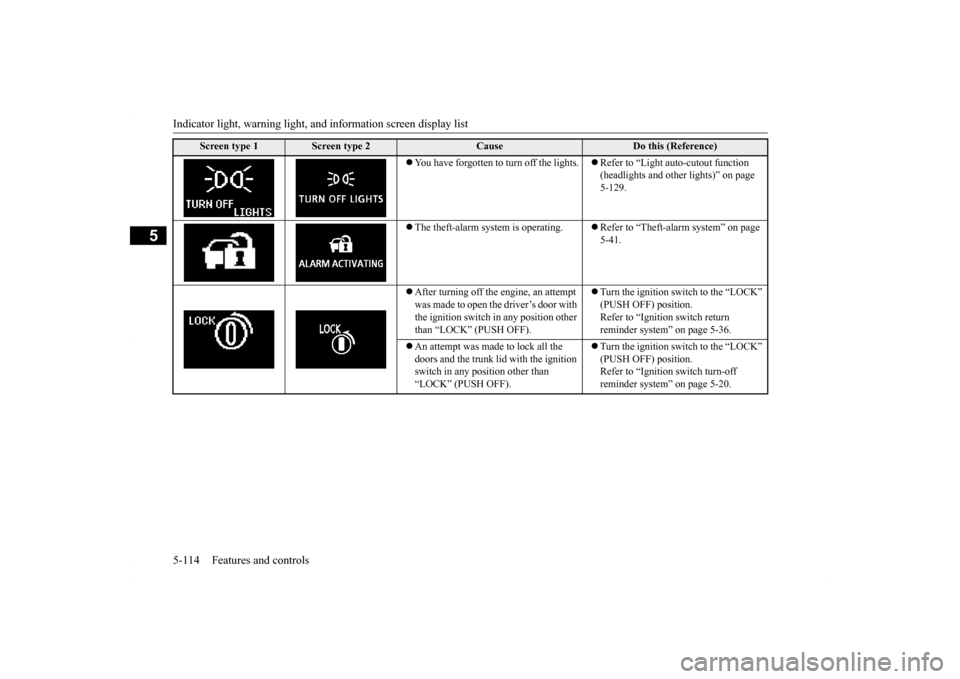
You have forgotten to turn off the lights.
Refer to “Light auto-cutout function (headlights and other lights)” on page 5-129.
The theft-alarm system is operating.
Refer to “Theft-alarm system” on page 5-41.
After turning off the engine, an attempt was made to open the driver’s door with the ignition switch in any position other than “LOCK” (PUSH OFF).
Turn the ignition switch to the “LOCK” (PUSH OFF) position. Refer to “Ignition switch return reminder system” on page 5-36.
An attempt was made to lock all the doors and the trunk li
d with the ignition
switch in any position other than “LOCK” (PUSH OFF).
Turn the ignition switch to the “LOCK” (PUSH OFF) position.Refer to “Ignition switch turn-off reminder system” on page 5-20.
Screen type 1
Screen type 2
Cause
Do this (Reference)
BK0230300US.book
114 ページ 2015年7月30日 木曜日 午後8時38分
Page 193 of 392
Combination headlights and dimmer switch
Features and controls 5-131
5
N00550000198
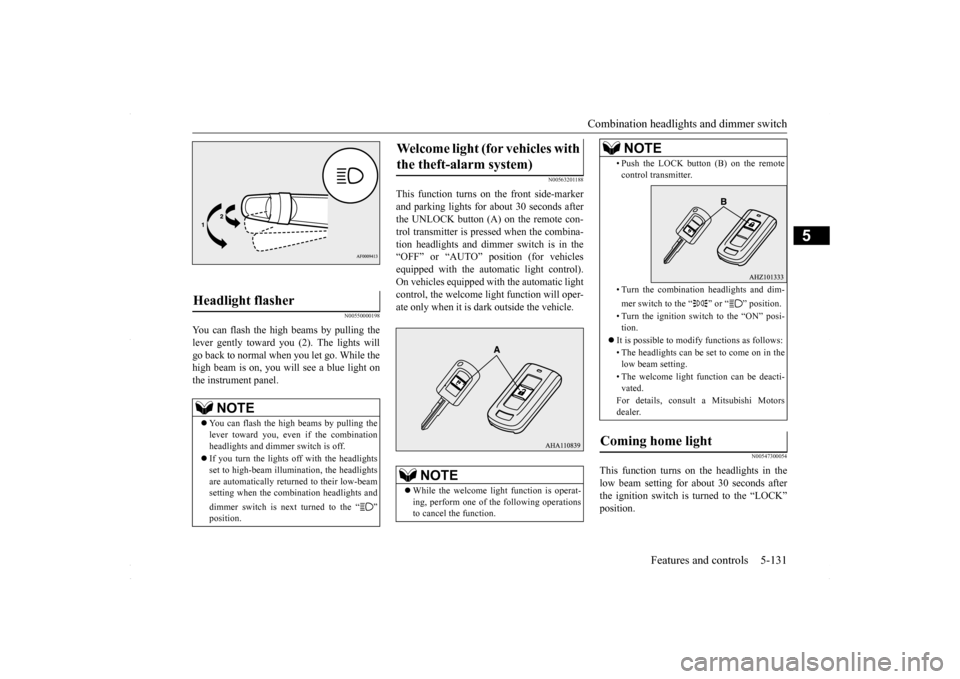
You can flash the high beams by pulling the lever gently toward you (2). The lights will go back to normal when you let go. While the high beam is on, you will see a blue light onthe instrument panel.
N00563201188
This function turns on the front side-markerand parking lights for about 30 seconds after the UNLOCK button (A) on the remote con- trol transmitter is pressed when the combina-tion headlights and dimmer switch is in the “OFF” or “AUTO” position (for vehicles equipped with the automatic light control).On vehicles equipped with the automatic lightcontrol, the welcome light function will oper- ate only when it is dark outside the vehicle.
N00547300054
This function turns on the headlights in thelow beam setting for about 30 seconds after the ignition switch is turned to the “LOCK”position.
Headlight flasher
NOTE
You can flash the high beams by pulling the lever toward you, even if the combination headlights and dimmer switch is off. If you turn the lights off with the headlights set to high-beam illumination, the headlightsare automatically returned to their low-beam setting when the combination headlights and dimmer switch is next turned to the “ ”
Welcome light (for vehicles with the theft-alarm system)
NOTE
While the welcome light function is operat- ing, perform one of the following operations to cancel the function.
• Push the LOCK button (B) on the remote control transmitter. • Turn the combination headlights and dim- mer switch to the “ ” or “ ” position. • Turn the ignition switch to the “ON” posi- tion.
It is possible to modify functions as follows: • The headlights can be se
t to come on in the
low beam setting. • The welcome light function can be deacti- vated. For details, consult a Mitsubishi Motors dealer.
Coming home light
NOTE
BK0230300US.book
131 ページ 2015年7月30日 木曜日 午後8時38分
Page 331 of 392
View of the engine compartment
Vehicle care and maintenance 9-5
9
N00937601752
N00937702066
It is normal for an engi
ne to use oil. You may
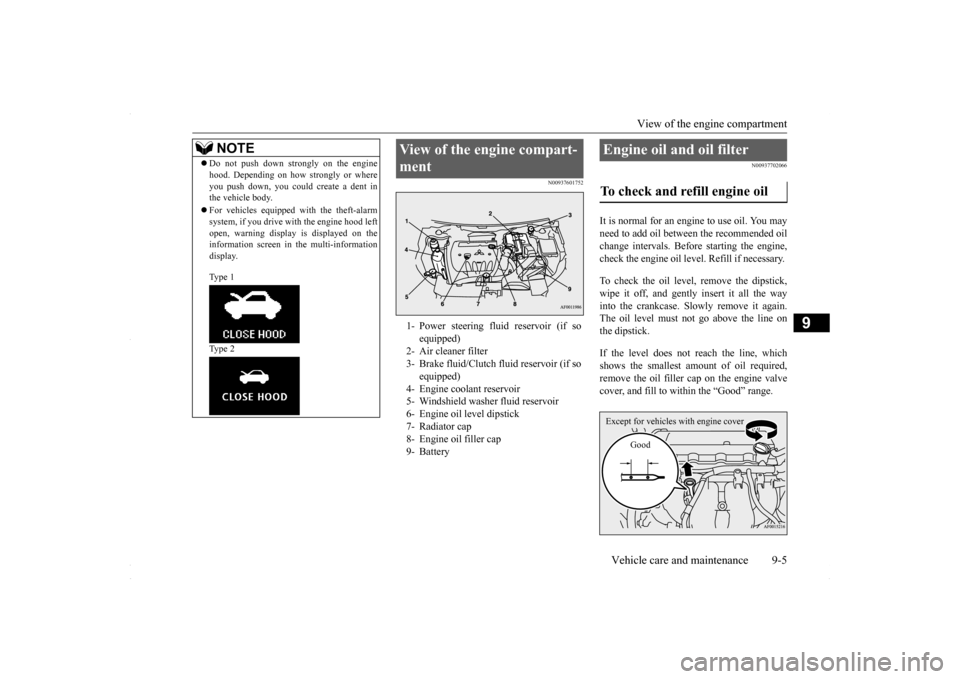
need to add oil between the recommended oilchange intervals. Before starting the engine, check the engine oil level. Refill if necessary. To check the oil level, remove the dipstick, wipe it off, and gently insert it all the way into the crankcase. Slowly remove it again.The oil level must not go above the line on the dipstick. If the level does not reach the line, which shows the smallest amount of oil required,remove the oil filler cap on the engine valve cover, and fill to with
in the “Good” range.
Do not push down strongly on the engine hood. Depending on how strongly or where you push down, you could create a dent in the vehicle body. For vehicles equipped with the theft-alarm system, if you drive with the engine hood left open, warning display is displayed on theinformation screen in the multi-information display. Type 1 Type 2NOTE
View of the engine compart- ment 1- Power steering fluid reservoir (if so
equipped)
2- Air cleaner filter 3- Brake fluid/Clutch
fluid reservoir (if so
equipped)
4- Engine coolant reservoir 5- Windshield washer fluid reservoir 6- Engine oil level dipstick 7- Radiator cap8- Engine oil filler cap 9- Battery
Engine oil and oil filter To check and refill engine oil Except for vehicles with engine cover
Good
BK0230300US.bo
ok 5 ページ 2015年7月30日 木曜日 午後8時38分
Page 391 of 392
Alphabetical index
12-5
12
T
Tank capacity
..............................
3-4
, 11-6
Theft-alarm system
System
......................
.....................
5-41
Time Setting
..................
.....................
7-51
Tire pressure monitoring system
...........
5-84
Warning light/display
......................
5-84
Tires
..........................
........................
9-14
How to change a tire
.........................
8-6
Inflation pressure
............................
9-17
Maintenance
..................
.................
9-19
Quality grading
...............................
10-2
Replacing tires and wheels
...............
9-18
Rotation
....................
.....................
9-19
Size (tire and wheel)
.......................
11-5
Snow tires
.....................
.................
9-20
Tire and loading information placard
.6-7
,
11-3 Tire chains
....................
.................
9-20
Tread wear indicators
......................
9-19
Tissue holder
.....................
...............
5-171
Tools
.........................
..........................
8-5
Storage
.........................
...................
8-5
Towing
......................
........................
8-12
Trailer towing
....................
.................
6-11
Transfer oil
...................
.....................
9-10
Trunk area light
Replacement
.................
.................
9-41
Trunk lid
.........................
..................
5-39
Turn signal light
Indicators
....................
.................
5-123
Turn signal lights
Bulb capacity
..................
...............
9-30
Lever
......................
.....................
5-133
Replacement
...................
...............
9-35
Twin Clutch SST (Sportronic Shift Transmission) Fluid
.......................
......................
11-6
U
USB input terminal
............................
5-162
How to connect an iPod
.................
5-163
USB input terminal device
How to connect a USB memory
......
5-163
V
Vanity mirror
...................
.................
5-166
Vehicle care precautions
.....................
9-41
Vehicle dimensions
............................
11-4
Vehicle labeling
..................
...............
11-2
Vehicle preparation before driving
.........
6-3
Vehicle weights
...................
...............
11-4
Vents
..........................
........................
7-2
W
Warning lights
...................
...............
5-124
Washer
Fluid
..................
...................
9-10
, 11-6
Switch
......................
...................
5-137
Windshield washer
........................
5-137
Waxing
......................
........................
9-44
Weights
........................
.....................
11-4
Welcome light
...................
...............
5-131
Wheel
Covers
......................
.....................
8-11
Specification
.................
.................
11-5
Wiper
Rain sensor
...................
...............
5-135
Windshield
....................
...............
5-134
Wiper blades
.................
.................
9-21
BK0230300US.bo
ok 5 ページ 2015年7月30日 木曜日 午後8時38分