headlights MITSUBISHI LANCER 2016 8.G User Guide
[x] Cancel search | Manufacturer: MITSUBISHI, Model Year: 2016, Model line: LANCER, Model: MITSUBISHI LANCER 2016 8.GPages: 392, PDF Size: 13.12 MB
Page 141 of 392
Power steering system
Features and controls 5-79
5
N00546300015
N00518000310
The power steering system operates while the engine is running. It helps reduce the effortneeded to turn the steering wheel. The power steering system has mechanical steering capability in case the power assist islost. If the power assist is lost for some rea- son, you will still be able to steer your vehi- cle, but you will notice it takes much moreeffort to steer. If this happens, have your vehi-cle inspected at an authorized Mitsubishi Motors dealer or a repair facility of your choice.
N00547100052
N00547200053
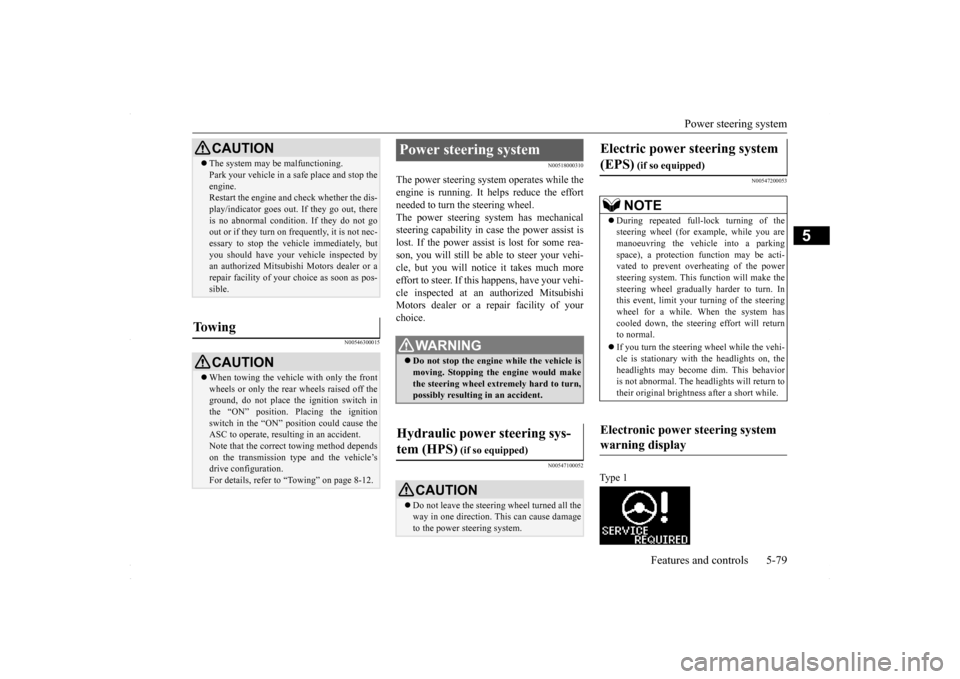
Type 1
CAUTION The system may be malfunctioning. Park your vehicle in a safe place and stop the engine. Restart the engine and check whether the dis- play/indicator goes out. If they go out, thereis no abnormal condition. If they do not go out or if they turn on frequently, it is not nec- essary to stop the vehicle immediately, butyou should have your vehicle inspected by an authorized Mitsubishi Motors dealer or a repair facility of your choice as soon as pos-sible.
To w i n g
CAUTION When towing the vehicle with only the front wheels or only the rear wheels raised off theground, do not place the ignition switch in the “ON” position. Placing the ignition switch in the “ON” position could cause theASC to operate, resulting in an accident. Note that the correct towing method depends on the transmission type and the vehicle’s drive configuration. For details, refer to “Towing” on page 8-12.
Power steering system
WA R N I N G Do not stop the engine while the vehicle is moving. Stopping the engine would make the steering wheel extremely hard to turn,possibly resulting in an accident.
Hydraulic power steering sys- tem (HPS)
(if so equipped)
CAUTION Do not leave the steering wheel turned all the way in one direction. This can cause damage to the power steering system.
Electric power steering system (EPS)
(if so equipped)NOTE
During repeated full-lock turning of the steering wheel (for example, while you are manoeuvring the vehicle into a parkingspace), a protection function may be acti- vated to prevent overheating of the power steering system. This function will make thesteering wheel gradually harder to turn. In this event, limit your turning of the steering wheel for a while. When the system hascooled down, the steering effort will return to normal. If you turn the steering wheel while the vehi- cle is stationary with the headlights on, the headlights may become dim. This behavioris not abnormal. The headlights will return to their original brightness after a short while.
Electronic power steering system warning display
BK0230300US.bo
ok 79 ページ 2015年7月30日 木曜日 午後8時38分
Page 152 of 392
Instrument cluster 5-90 Features and controls
5
N00519000333
N00519100190
The speedometer shows the vehicle speed in miles per hour (mph) or kilometers per hour (km/h).
N00519201329
The tachometer shows engine revolutions perminute. This allows the driver to determinethe most efficient shift position (manual transaxle), selector position {continuously variable transmission (CVT)} and enginespeed combinations. This gauge also assists in evaluating engine performance.
NOTE
On vehicles equipped with Mitsubishi Multi- Communication System, it is possible to change the display language of the screen. For details, please refer to the separate owner’s manual. Under certain circumstances, it may become difficult to see an image on the screen, evenwhen the system is functioning correctly. • In a dark area, such as at night. • When water drops or condensation are on the lens. • When sun light or headlights shine directly into the lens.
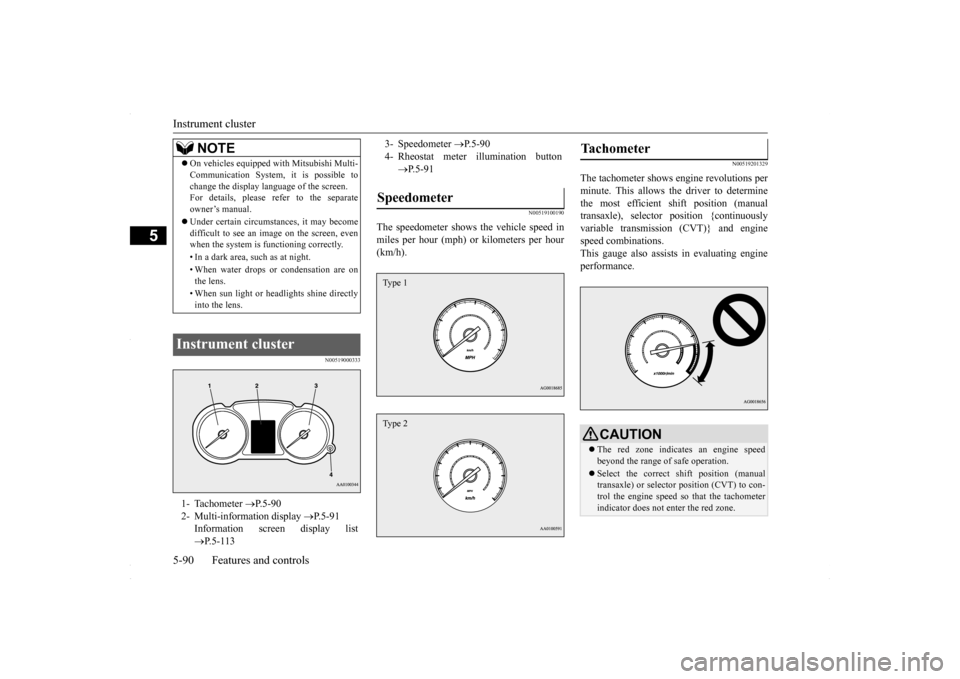
Instrument cluster 1- Tachometer
P.5-90
2- Multi-information display
P.5-91
Information screen display list P.5-113
3- Speedometer
P.5-90
4- Rheostat meter illumination button
P.5-91
Speedometer Type 1Type 2
Tachometer
CAUTIONThe red zone indicates an engine speed beyond the range of safe operation. Select the correct shift position (manual transaxle) or selector position (CVT) to con- trol the engine speed so that the tachometerindicator does not enter the red zone.
BK0230300US.bo
ok 90 ページ 2015年7月30日 木曜日 午後8時38分
Page 176 of 392
Indicator light, warning light, an
d information screen display list
5-114 Features and controls
5
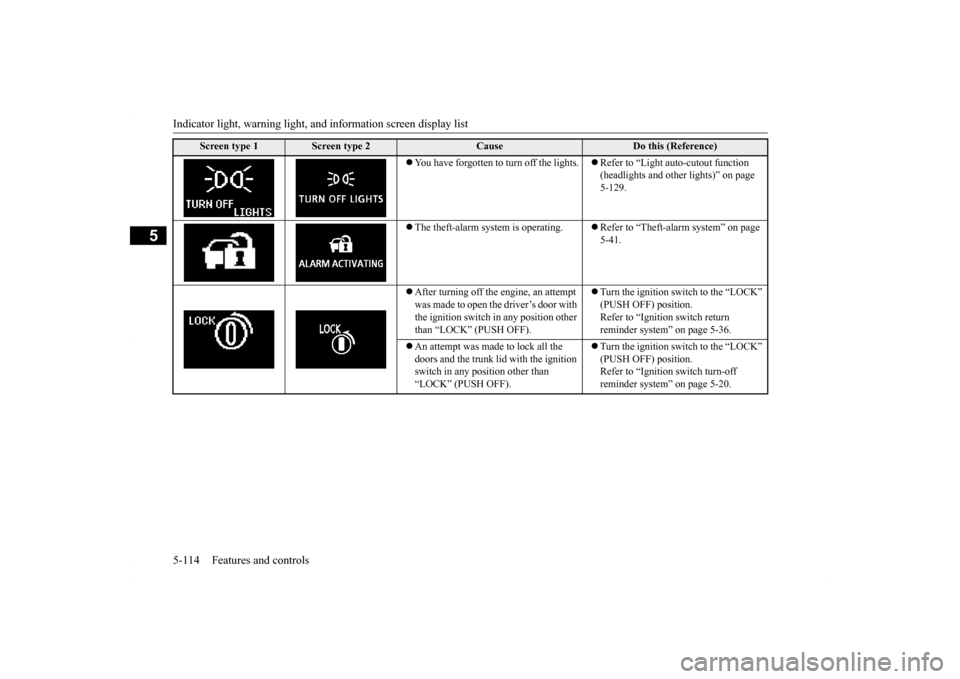
You have forgotten to turn off the lights.
Refer to “Light auto-cutout function (headlights and other lights)” on page 5-129.
The theft-alarm system is operating.
Refer to “Theft-alarm system” on page 5-41.
After turning off the engine, an attempt was made to open the driver’s door with the ignition switch in any position other than “LOCK” (PUSH OFF).
Turn the ignition switch to the “LOCK” (PUSH OFF) position. Refer to “Ignition switch return reminder system” on page 5-36.
An attempt was made to lock all the doors and the trunk li
d with the ignition
switch in any position other than “LOCK” (PUSH OFF).
Turn the ignition switch to the “LOCK” (PUSH OFF) position.Refer to “Ignition switch turn-off reminder system” on page 5-20.
Screen type 1
Screen type 2
Cause
Do this (Reference)
BK0230300US.book
114 ページ 2015年7月30日 木曜日 午後8時38分
Page 185 of 392
Indicators
Features and controls 5-123
5
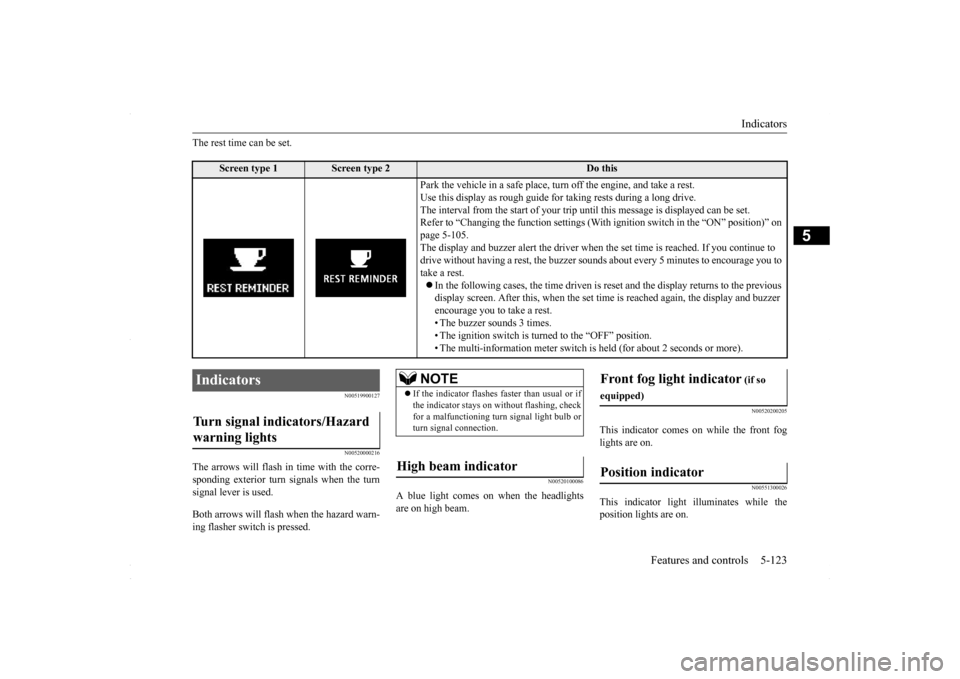
The rest time can be set.
N00519900127 N00520000216
The arrows will flash in
time with the corre-
sponding exterior turn signals when the turnsignal lever is used. Both arrows will flas
h when the hazard warn-
ing flasher switch is pressed.
N00520100086
A blue light comes on when the headlightsare on high beam.
N00520200205
This indicator comes on while the front fog lights are on.
N00551300026
This indicator light illuminates while theposition lights are on.
Screen type 1
Screen type 2
Do this
Park the vehicle in a safe place, turn off the engine, and take a rest. Use this display as rough guide for taking rests during a long drive. The interval from the start of your trip un
til this message is displayed can be set.
Refer to “Changing the function settings (With
ignition switch in the “ON” position)” on
page 5-105. The display and buzzer alert the driver when the set time is reached. If you continue to drive without having a rest, the buzzer sounds
about every 5 minutes to encourage you to
take a rest. In the following cases, the time driven is re
set and the display returns to the previous
display screen. After this, when the set time
is reached again, the display and buzzer
encourage you to take a rest. • The buzzer sounds 3 times.• The ignition switch is turned to the “OFF” position. • The multi-information meter switch is
held (for about 2 seconds or more).
Indicators Turn signal indicators/Hazard warning lights
NOTE
If the indicator flashes faster than usual or if the indicator stays on without flashing, checkfor a malfunctioning turn signal light bulb or turn signal connection.
High beam indicator
Front fog light indicator
(if so
equipped)Position indicator
BK0230300US.book
123 ページ 2015年7月30日 木曜日 午後8時38分
Page 189 of 392
Combination headlights and dimmer switch
Features and controls 5-127
5
Type 2 If the engine oil pressure drops while the engine is running, the warning display is dis- played on the information screen in the multi-information display.
N00522501850
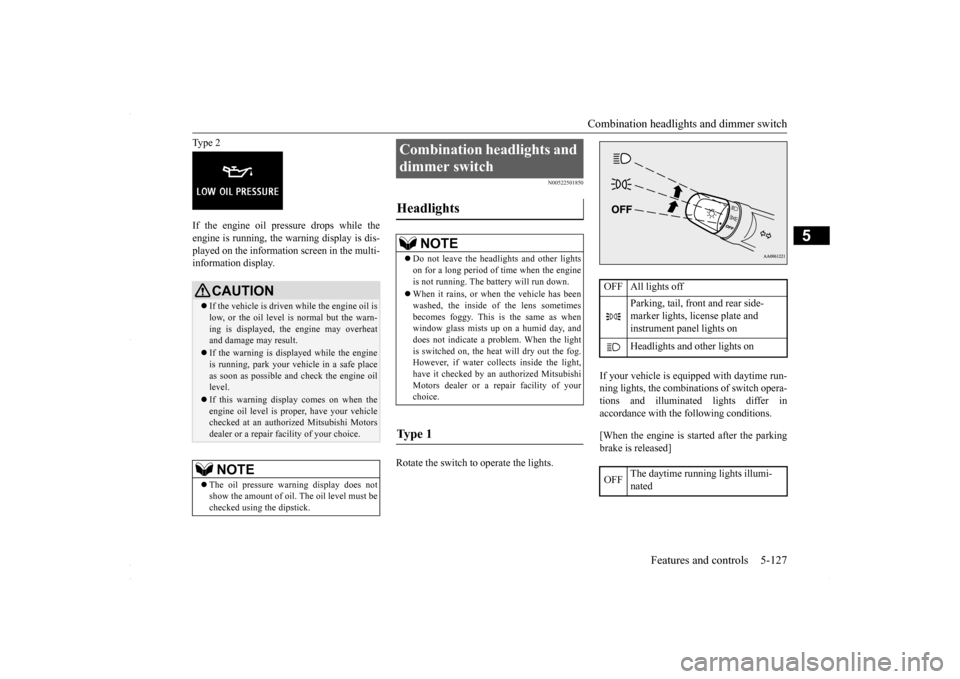
Rotate the switch to operate the lights.
If your vehicle is equipped with daytime run- ning lights, the combinations of switch opera- tions and illuminated lights differ inaccordance with the following conditions. [When the engine is started after the parking brake is released]
CAUTION If the vehicle is driven while the engine oil is low, or the oil level is normal but the warn- ing is displayed, the engine may overheat and damage may result. If the warning is displayed while the engine is running, park your vehicle in a safe place as soon as possible and check the engine oil level. If this warning display comes on when the engine oil level is proper, have your vehiclechecked at an authorized Mitsubishi Motors dealer or a repair facility of your choice.NOTE
The oil pressure warning display does not show the amount of oil. The oil level must be checked using the dipstick.
Combination headlights and dimmer switch Headlights
NOTE
Do not leave the headlights and other lights on for a long period of time when the engine is not running. The battery will run down. When it rains, or when the vehicle has been washed, the inside of the lens sometimes becomes foggy. This is the same as whenwindow glass mists up on a humid day, and does not indicate a problem. When the light is switched on, the heat will dry out the fog.However, if water collects inside the light, have it checked by an authorized Mitsubishi Motors dealer or a repair facility of yourchoice.
Ty p e 1
OFF All lights off
Parking, tail, front and rear side- marker lights, license plate and instrument panel lights on Headlights and other lights on
OFF
The daytime running lights illumi- nated
BK0230300US.book
127 ページ 2015年7月30日 木曜日 午後8時38分
Page 190 of 392
![MITSUBISHI LANCER 2016 8.G User Guide Combination headlights and dimmer switch 5-128 Features and controls
5
[When the engine is not running, or when the engine is started before the parking brake is released]
Rotate the switch to operat](/img/19/7463/w960_7463-189.png "MITSUBISHI LANCER 2016 8.G User Guide Combination headlights and dimmer switch 5-128 Features and controls
5
[When the engine is not running, or when the engine is started before the parking brake is released]
Rotate the switch to operat")
Combination headlights and dimmer switch 5-128 Features and controls
5
[When the engine is not running, or when the engine is started before the parking brake is released]
Rotate the switch to operate the lights.
If your vehicle is equipped with daytime run- ning lights, the combinations of switch opera- tions and illuminated lights differ in accordance with the following conditions. [When the engine is started after the parking brake is released]
The daytime running lights illumi- nated Parking (vehicles with daytime run-ning lights on the headlights), tail, front and rear side-marker lights, license plate and instrument panel lights on Headlights and other lights onNOTE
Once the daytime running light come on, they do not go out until the key is turned to the “LOCK” or “ACC” position.
OFF All lights off
Parking, tail, front and rear side- marker lights, license plate and instrument panel lights on Headlights and other lights onNOTE
Even if the daytime running lights are not on, they will come on once the vehicle starts moving.
Once the daytime running light come on, they do not go out until the key is turned to the “LOCK” or “ACC” position.
Ty p e 2 OFF All lights off AUTO
Headlights and other lights turn on and off automatically in accor- dance with outside light level. Parking, tail, front and rear side- marker lights, license plate and instrument panel lights on Headlights and other lights on
NOTE
OFF
The daytime running lights illumi- nated
AUTO
The daytime running lights illumi- nated (when it is light outside the vehicle) Headlights and other lights turn on and off automatically in accor- dance with outside light level. The daytime running lights illumi- natedParking (vehicles with daytime running lights on the headlights), tail, front and rear side-marker lights, license plate and instrument panel lights on Headlights and other lights on
NOTE
Once the daytime running light come on, they do not go out until the key is turned to the “LOCK” or “ACC” position.
BK0230300US.book
128 ページ 2015年7月30日 木曜日 午後8時38分
Page 191 of 392
![MITSUBISHI LANCER 2016 8.G User Guide Combination headlights and dimmer switch
Features and controls 5-129
5
[When the engine is not running, or when the engine is started before the parking brake is released]
N00532601607
If the ign](/img/19/7463/w960_7463-190.png "MITSUBISHI LANCER 2016 8.G User Guide Combination headlights and dimmer switch
Features and controls 5-129
5
[When the engine is not running, or when the engine is started before the parking brake is released]
N00532601607
If the ign")
Combination headlights and dimmer switch
Features and controls 5-129
5
[When the engine is not running, or when the engine is started before the parking brake is released]
N00532601607
If the ignition key is turned to “LOCK” or “ACC” position or removed from the ignition switch and the driver’s door is opened with the combination headlights and dimmer switch in the “ ” or “ ” [When using a key to start the engine]
• If the driver’s door is opened after the key is removed from the ignition switch, a high-pitched constant tone will sound to remind you to turn off the lights.• If the driver’s door is opened with the key in the ignition switch, a low-pitched tone will sound to remind you to removethe key. [When using the F.A.S.T.-key to start the engine] • If the ignition switch is turned to the“LOCK” position and the driver’s dooris opened, a high-pitched constant buzzer will sound to remind you to turn off the lights.• If the ignition switch is turned to any position other than “LOCK” and the driver’s door is opened, a low-pitchedconstant buzzer will sound to remind you to return the ignition switch.
If the ignition switch is turned to “LOCK” or “ACC” position with the driver’s doorclosed and the combination headlights and dimmer switch in the “ ” or “ ” minutes and then turn off automatically.
OFF All lights off AUTO
Headlights and other lights turn on and off automatically in accor- dance with outside light level. Parking, tail, front and rear side- marker lights, license plate and instrument panel lights on Headlights and other lights on
NOTE
Even if the daytime running lights are not on, they will come on once the vehicle starts moving. Once the daytime running light come on, they do not go out until the key is turned tothe “LOCK” or “ACC” position. The sensitivity of the automatic on/off con- trol can be adjusted. For further information, please contact your authorized Mitsubishi Motors dealer or arepair facility of your choice.
Do not cover the sensor (A) for the automatic on/off control by affixing a sticker or label to the windshield. If the lights do not turn on or off with the switch in the “AUTO” position, manually operate the switch and we recommend you to have your vehicle checked.
Light auto-cutout function (headlights and other lights)
NOTE
BK0230300US.book
129 ページ 2015年7月30日 木曜日 午後8時38分
Page 192 of 392
Combination headlights and dimmer switch 5-130 Features and controls
5
If the combination headlights and dimmer switch is turned to the “ ” or “ ” posi- tion again after the engine is turned off, the about 3 minutes auto-cutout function described above will not work. The lights (theparking lights, tail lights and license plate lights) will stay on and will not turn off auto- matically.
N00549800196
If the driver’s door is opened with the key inthe “LOCK” or “ACC” position or removed from the ignition switch while the lights are on, the buzzer will sound to remind you toturn off the lights. If the driver’s door is opened with the ignition switch in the “LOCK” or “ACC” position, or
if the ignition switch is moved to the “LOCK” position while the lights are on, the buzzer will sound to remind you to turn off the lights. In either case, the li
ghts and buzzer will turn
off automatically. Or you can turn the combination headlights and dimmer switch to the “OFF” position tostop the buzzer.
N00549900155
To change the headlights from high beam tolow beam and vice versa, pull the turn signal lever to fully toward you (1). Switch the headlights to low beam as a courtesy when-ever there are oncoming vehicles, or when there is traffic moving ahead of you. An illu- minated blue light in the instrument clusterindicates when the headlights are on high beam.
NOTE
The light auto-cutout function can be deacti- vated. See your authorized Mitsubishi Motors dealer for details.
When you want to keep the lights on:
NOTE
When the engine is started using the key, if the driver’s door is opened and the key is removed, the headlight reminder buzzer intermittently emits a high-pitched sound. If the key is still in the ignition the keyreminder buzzer intermittently emits a low- pitched sound. The buzzer stops when the driver’s door isclosed. (A warning is also displayed in the multi-information display.)
operation function, if the driver’s door is opened and the ignition switch is in the “LOCK” position, the headlight reminder buzzer intermittently emits a high-pitchedsound. If the ignition sw
itch is in any posi-
tion other than “LOCK”, the ignition switch on reminder buzzer intermittently emits alow-pitched sound. The buzzer stops when the driver’s door is closed. (A warning is also displayed in themulti-information display.)
When using a key to start the engine When using the F.A.S.T.-key to start the engine
NOTE
Dimmer (high/low beam change)
BK0230300US.book
130 ページ 2015年7月30日 木曜日 午後8時38分
Page 193 of 392
Combination headlights and dimmer switch
Features and controls 5-131
5
N00550000198
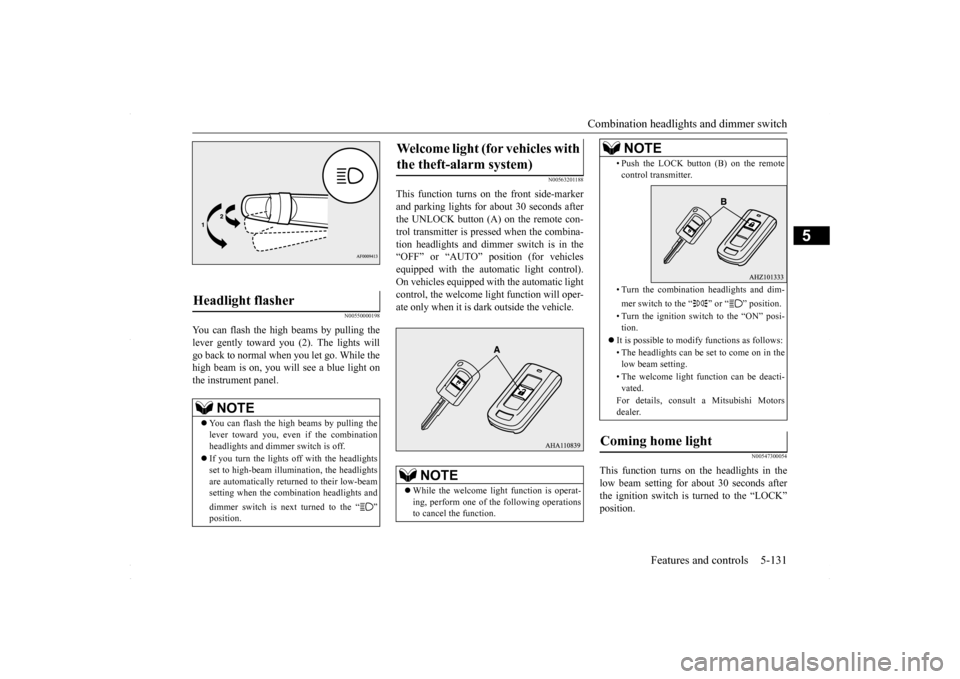
You can flash the high beams by pulling the lever gently toward you (2). The lights will go back to normal when you let go. While the high beam is on, you will see a blue light onthe instrument panel.
N00563201188
This function turns on the front side-markerand parking lights for about 30 seconds after the UNLOCK button (A) on the remote con- trol transmitter is pressed when the combina-tion headlights and dimmer switch is in the “OFF” or “AUTO” position (for vehicles equipped with the automatic light control).On vehicles equipped with the automatic lightcontrol, the welcome light function will oper- ate only when it is dark outside the vehicle.
N00547300054
This function turns on the headlights in thelow beam setting for about 30 seconds after the ignition switch is turned to the “LOCK”position.
Headlight flasher
NOTE
You can flash the high beams by pulling the lever toward you, even if the combination headlights and dimmer switch is off. If you turn the lights off with the headlights set to high-beam illumination, the headlightsare automatically returned to their low-beam setting when the combination headlights and dimmer switch is next turned to the “ ”
Welcome light (for vehicles with the theft-alarm system)
NOTE
While the welcome light function is operat- ing, perform one of the following operations to cancel the function.
• Push the LOCK button (B) on the remote control transmitter. • Turn the combination headlights and dim- mer switch to the “ ” or “ ” position. • Turn the ignition switch to the “ON” posi- tion.
It is possible to modify functions as follows: • The headlights can be se
t to come on in the
low beam setting. • The welcome light function can be deacti- vated. For details, consult a Mitsubishi Motors dealer.
Coming home light
NOTE
BK0230300US.book
131 ページ 2015年7月30日 木曜日 午後8時38分
Page 194 of 392
Headlight leveling switch (if so equipped) 5-132 Features and controls
5
1. Turn the combination headlights and dim- mer switch to the “OFF” or “AUTO” automatic light control).2. Turn the ignition switch to the “LOCK” position. Also, if a key was used to start the engine, remove the key from the igni-tion switch. 3. Within 60 seconds of turning the ignition switch to the “LOCK” position, pull theturn signal lever toward you.
4. The headlights will come on in the low beam setting for about 30 seconds. After the headlights go off, the headlights can be turned on again in the low beam settingfor about 30 seconds by pulling the turn signal lever toward you within 60 seconds of turning the ignition switch to the“LOCK” position. To turn on the head- lights again after 60 seconds of turning the ignition switch to the “LOCK” posi-tion, repeat the process from step 1.
N00537100088
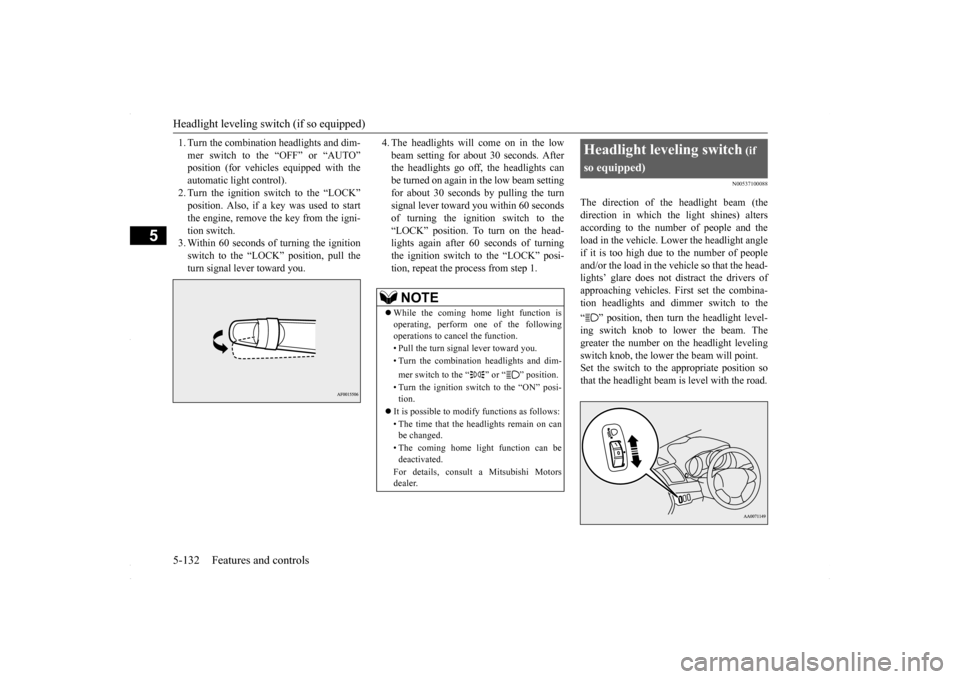
The direction of the headlight beam (thedirection in which the light shines) alters according to the number of people and the load in the vehicle. Lower the headlight angleif it is too high due to the number of people and/or the load in the vehicle so that the head- lights’ glare does not distract the drivers ofapproaching vehicles. First set the combina-tion headlights and dimmer switch to the “ ” position, then turn the headlight level- ing switch knob to lower the beam. The greater the number on the headlight levelingswitch knob, the lower the beam will point. Set the switch to the appropriate position so that the headlight beam is level with the road.
NOTE
While the coming home light function is operating, perform one of the following operations to cancel the function. • Pull the turn signal lever toward you. • Turn the combination headlights and dim- mer switch to the “ ” or “ ” position. • Turn the ignition switch to the “ON” posi- tion.
It is possible to modify functions as follows: • The time that the headlights remain on can be changed. • The coming home light function can be deactivated. For details, consult a Mitsubishi Motors dealer.
Headlight leveling switch
(if
so equipped)
BK0230300US.book
132 ページ 2015年7月30日 木曜日 午後8時38分