trunk MITSUBISHI LANCER 2016 8.G User Guide
[x] Cancel search | Manufacturer: MITSUBISHI, Model Year: 2016, Model line: LANCER, Model: MITSUBISHI LANCER 2016 8.GPages: 392, PDF Size: 13.12 MB
Page 78 of 392
Free-hand Advanced Security Transmitter (F.A.S.T.-key) (if so equipped)5-16
Features and controls
5
While
carrying
the
F.A.S.T
.-key
within
the
operating
range
to
open
the
trunk
lid,
press
and
hold
down
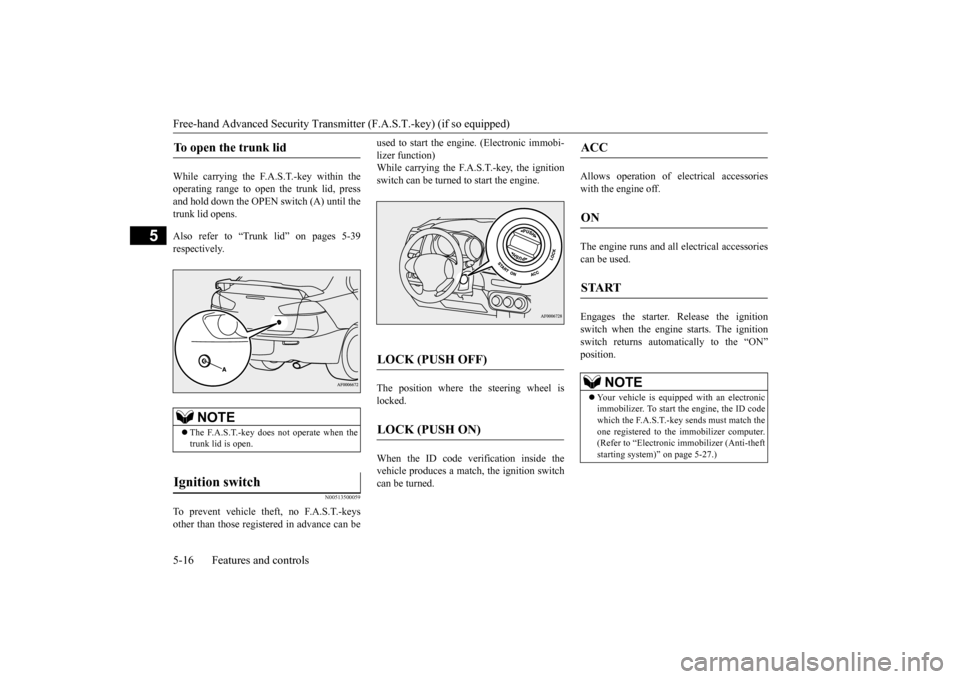
the OPEN
switch
(A)
until
the
trunk lid open
s.
Also
refer
to
“Trunk
lid”
on
pages
5-39
respectivel
y.
N0051350
0059
To prevent
vehicle
theft,
no
F.A.S.T
.-keys
other
than
those
registered
in advance
can
be
used
to start
the
engine.
(Electronic
immobi-
lizer function)While
carrying
the
F.A.S.T
.-key
, the
ignition
switch can be turned to start the engine.The
position
where
the
steering
wheel
is
locked. When
the
ID
code
verification
inside
the
vehicle
produces
a match,
the
ignition
switch
can be turned.
Allows
operation
of
electrical
accessories
with the engine o
ff.
The
engine
runs
and
all
electrical
accessories
can be used. Engages
the
starter
. Release
the
ignition
switch
when
the
engine
starts.
The
ignition
switch
returns
automatically
to
the
“ON”
positi
on.
To open the trunk lid
NOTE
The
F.A.S.T
.-key
does
not
operate
when
the
trunk lid is open.
Ignition switch
LOCK (PUSH OFF)
LOCK (PUSH ON)
ACC
ON
START
NOTE
Your vehicle
is equipp
ed with an electr
onic
immobilizer
. To start the engi
ne, the ID
code
which
the
F.A.S.T
.-key
sends
must
match
the
one
registered
to the
immobilizer
computer
.
(Refer
to “Electronic
immobilizer
(Anti-theft
starting system)” on page 5-27.)
Page 92 of 392
Free-hand Advanced Security Transmitter (F.A.S.T.-key) (if so equipped)5-30
Features and controls
5
N0051550
0141
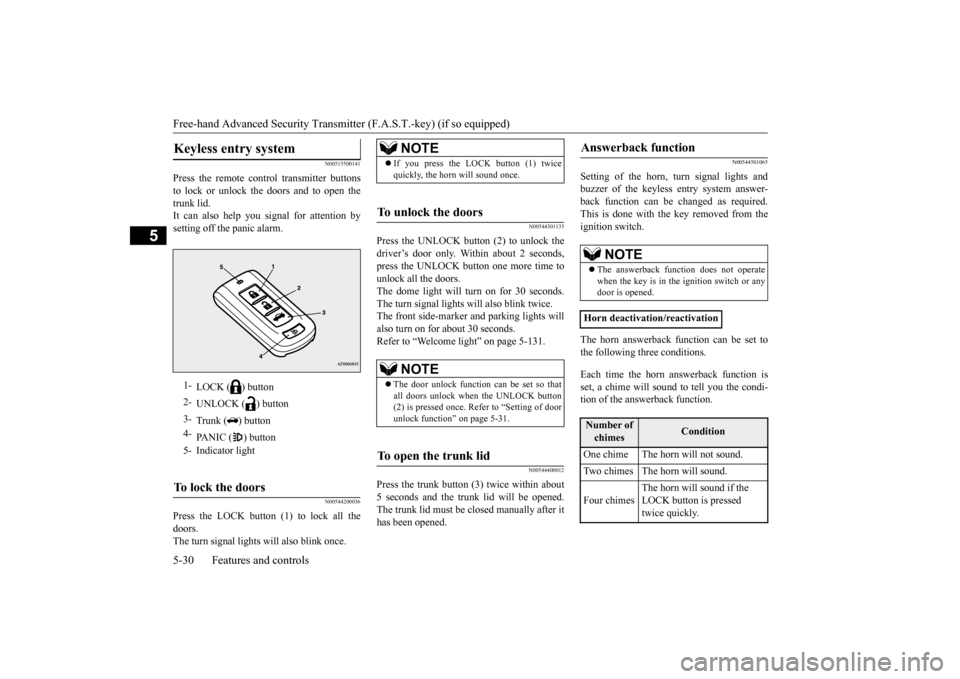
Press
the
remote
control
transmitter
buttons
to
lock
or
unlock
the
doors
and
to
open
the
trunk
lid.
It can
also
help
you
signal
for
attention
by
setting
off the
panic
alarm.
N0054420
0036
Press
the
LOCK
button
(1)
to
lock
all
the
doors. The turn signal lights will also blink once.
N005443
01135
Press
the
UNLOCK
button
(2)
to
unlock
the
driver
’s door
only
. Within
about
2 seconds,
press
the
UNLOCK
button
one
more
time
to
unlock all the doors.The
dome
light
will
turn
on
for
30
seconds.
The turn signal lights will also blink twice.The
front
side-marker
and
parking
lights
will
also turn on for about 30 seconds. Refer to “W
elcome light” on page 5-131.
N0054440
0012
Press
the
trunk
button
(3)
twice
within
about
5 seconds
and
the
trunk
lid
will
be
opened.
The
trunk
lid
must
be
closed
manually
after
it
has
been
opened.
N0054450
1065
Setting
of
the
horn,
turn
signal
lights
and
buzzer
of
the
keyless
entry
system
answer
-
back
function
can
be
changed
as
required.
This
is done
with
the
key
removed
from
the
ignition switch.The
horn
answerback
function
can
be
set
to
the
following
three
conditions.
Each
time
the
horn
answerback
function
is
set,
a chime
will
sound
to tell
you
the
condi-
tion of the answerback function.
Keyless entry system
1-
LOCK (
) button
2-
UNLOCK (
) button
3-
Trunk (
) butto
n
4-
PANIC (
) button
5-
Indicator light
To lock the doors
NOTE
If
you
press
the
LOCK button (1) twice
quickly
, the horn will sound once.
To unlock the doors
NOTE
The
door
unlock
function
can
be
set
so
that
all
doors
unl
ock
whe
n the UNL
OCK butto
n
(2) is pre
ssed once.
Ref
er to “Settin
g of doo
r
unlock function
” on pa
ge 5-3
1.
To open the trunk lid
Answerback
function
NOTE
The answe
rback
function
doe
s not
ope
rate
whe
n the key is in the ignition
switch
or any
door
is opened.
Horn deactivation/r
eactivation
Number
of
chimes
Condition
One chime
The horn will not sound.
Two chimes
The horn w
ill s
ound.
Four chimes
The horn will sound if the LOCK button is pressed twi
ce qui
ckly.
Page 95 of 392
Free-hand Advanced Security Transmit
ter (F.A.S.T.-key) (if so equipped)
Features and controls
5-33
5
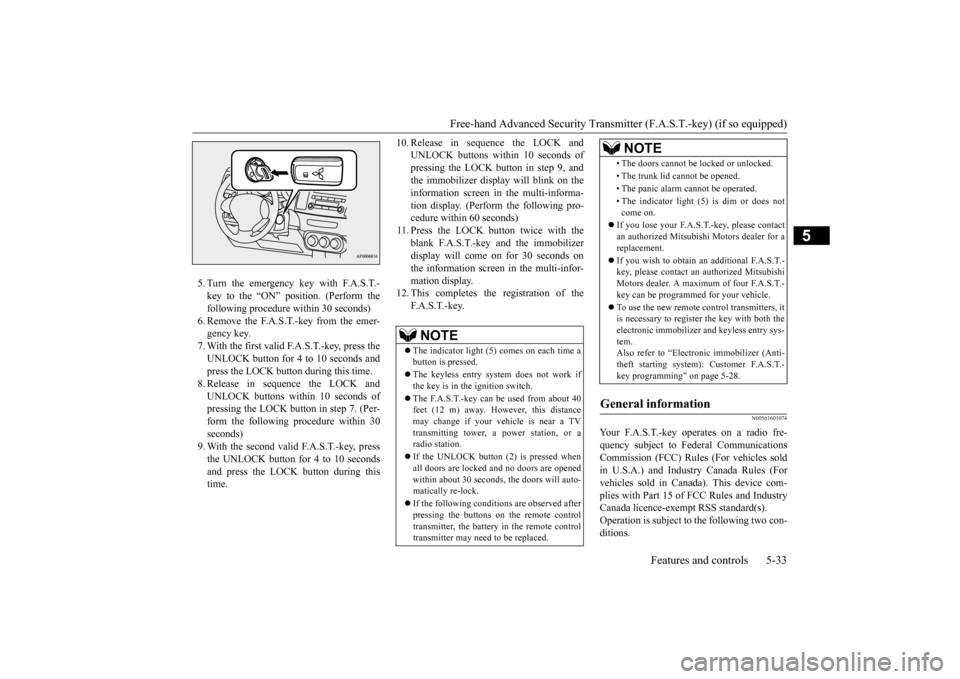
5.Turn
the
emer
gency
key
with
F.A.S.T
.-
key
to
the
“ON”
position.
(Perform
the
following procedure within 30 seconds)6.Remove
the
F.A.S.T
.-key
from
the
emer
-
gency key
.
7.With
the
first
valid
F.A.S.T
.-key
, press
the
UNLOCK
button
for
4 to 10
seconds
and
press the LOCK button during this time.8.Release
in
sequence
the
LOCK
and
UNLO
CK
buttons
within
10
seconds
of
pressing
the
LOCK
button
in step
7. (Per
-
form
the
following
procedure
within
30
seconds
)
9.With
the
second
valid
F.A.S.T
.-key
, press
the
UNLOCK
button
for
4 to 10
seconds
and
press
the
LOCK
button
during
this
time.
10.
Release
in
sequence
the
LOCK
and
UNLO
CK
buttons
within
10
seconds
of
pressing
the LO
CK
butt
on
in
step
9, and
the
immobilizer
display
will
blink
on
the
information
screen
in
the
multi-informa-
tion
display
. (Perform
the
following
pro-
cedure within 60 seconds)
11.Press
the
LOCK
button
twice
with
the
blank
F.A.S.T
.-key
and
the
immobilizer
display
will come
on
for
30
seconds
on
the
information
screen
in the
multi-infor
-
mation displa
y.
12.
This
completes
the
registration
of
the
F.A.S.T.-key.
N00561601
074
Your
F.A.S.T
.-key
operates
on
a radio
fre-
quency
subject
to
Federal
Communications
Commission
(FCC)
Rules
(For
vehicles
sold
in
U.S.A.)
and
Industry
Canada
Rules
(For
vehicles
sold
in
Canada).
This
device
com-
plies
with
Part
15
of
FCC
Rules
and
Industry
Canada licence-exempt RSS standard(s). Operation
is subject
to the
following
two
con-
ditions
.
NOTE
The
ind
icator
light
(5)
comes
on each
time
a
button
is pre
ssed.
The
keyless
entry
system
does
not
work
if
the
key
is in the
ignition switch.
The
F.A.S.
T.-key
can
be
used
from
about 40
feet
(12
m)
away
. However
, this
distance
may
change
if your
vehicle
is near
a TV
trans
mitting
tow
er, a pow
er
station,
or
a
radio
station.
If the UNL
OCK
button
(2)
is pre
ssed whe
n
all
doors
are
locked
and
no
doors
are
opened
within
about
30
seconds
, the
doors
will auto-
matically
re-lock.
If the followi
ng
conditions
are obse
rve
d after
pressing
the
buttons
on
the
remote
control
transmitter
, the battery
in the remo
te cont
rol
transmitter
may need
to be replaced
.
•The doors cannot
be locked or unl
ocked.
•The trunk
lid cannot
be ope
ned.
•The panic alar
m cannot
be ope
rated
.
•The
indicator
light
(5)
is dim
or
does
not
come
on.
If you
lose your
F.A.S.T.-key
, pleas
e contact
an authorized
Mitsubis
hi Motors
dealer
for
a
replacement.If you
wish
to obtain
an
additional
F.A.S.T
.-
key, pleas
e con
tact
an authorized
Mitsubi
shi
Motors
dealer
. A max
imu
m of four
F.A.S.T
.-
key can be
pro
grammed fo
r your vehicle.
To use
the
new
remote
control
transmitters,
it
is necessary
to register
the
key
with
both
the
electronic
immobilizer
and
keyless
entry
sys-
tem. Also refer to “Electronic
immobilizer
(Anti-
theft
starting
system):
Customer
F.A.S.T
.-
key programming” on page 5-28.
General
information
NOTE
Page 101 of 392
Trunk lid
Features and controls 5-39
5
N00509501198
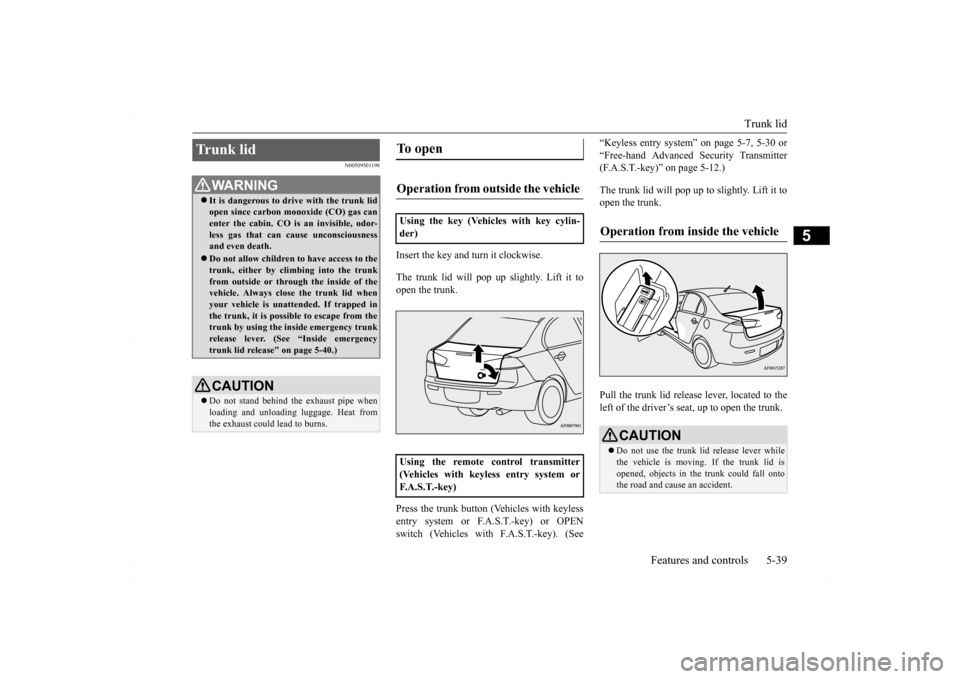
Insert the key and turn it clockwise. The trunk lid will pop up
slightly. Lift it to
open the trunk. Press the trunk button (Vehicles with keyless entry system or F.A.S.T.-key) or OPEN switch (Vehicles with F.A.S.T.-key). (See
“Keyless entry system” on page 5-7, 5-30 or “Free-hand Advanced Security Transmitter (F.A.S.T.-key)” on page 5-12.) The trunk lid will pop up
to slightly. Lift it to
open the trunk. Pull the trunk lid release lever, located to the left of the driver’s seat, up to open the trunk.
Trunk lid
WA R N I N G It is dangerous to drive with the trunk lid open since carbon monoxide (CO) gas can enter the cabin. CO is an invisible, odor- less gas that can cause unconsciousnessand even death. Do not allow children to have access to the trunk, either by climbing into the trunk from outside or through the inside of the vehicle. Always close the trunk lid whenyour vehicle is unattended. If trapped in the trunk, it is possible to escape from the trunk by using the in
side emergency trunk
release lever. (See “Inside emergency trunk lid release” on page 5-40.)CAUTION Do not stand behind the exhaust pipe when loading and unloading luggage. Heat from the exhaust could lead to burns.
To open Operation from outside the vehicle Using the key (Vehicles with key cylin- der) Using the remote control transmitter (Vehicles with keyless entry system orF. A . S . T. - k e y )
CAUTION Do not use the trunk lid release lever while the vehicle is moving. If the trunk lid is opened, objects in the trunk could fall ontothe road and cause an accident.
BK0230300US.bo
ok 39 ページ 2015年7月30日 木曜日 午後8時38分
Page 102 of 392
Inside emergency trunk lid release 5-40 Features and controls
5
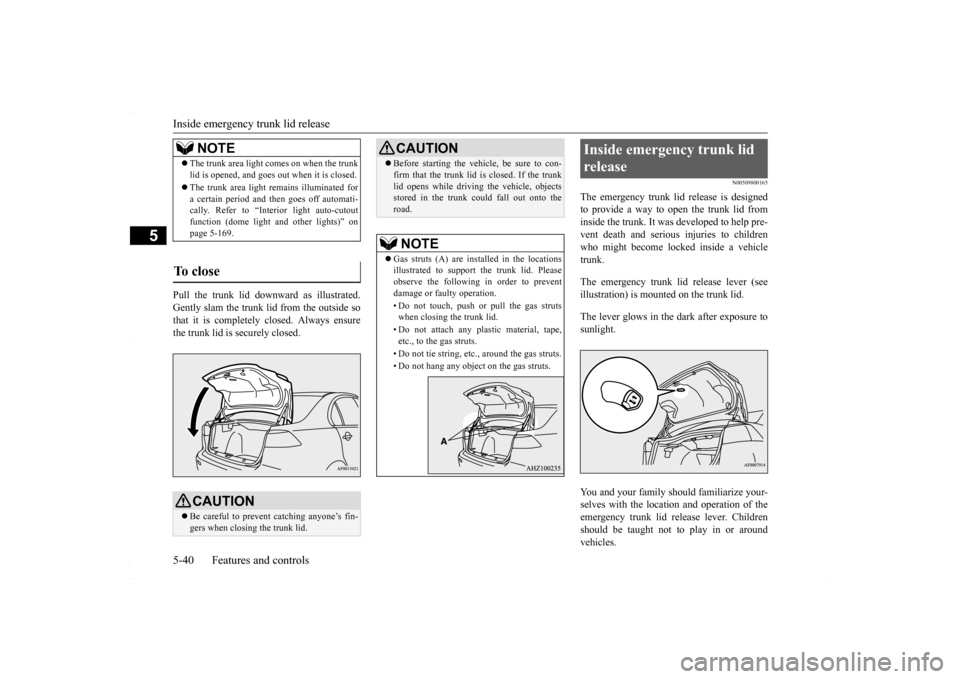
Pull the trunk lid downward as illustrated. Gently slam the trunk lid from the outside sothat it is completely closed. Always ensure the trunk lid is securely closed.
N00509800165
The emergency trunk lid release is designed to provide a way to open the trunk lid frominside the trunk. It was developed to help pre- vent death and serious injuries to children who might become locked inside a vehicletrunk. The emergency trunk lid release lever (see illustration) is mounted on the trunk lid. The lever glows in the dark after exposure to sunlight. You and your family should familiarize your- selves with the location and operation of the emergency trunk lid release lever. Childrenshould be taught not to play in or around vehicles.
NOTE
The trunk area light comes on when the trunk lid is opened, and goes out when it is closed. The trunk area light remains illuminated for a certain period and then goes off automati-cally. Refer to “Interior light auto-cutout function (dome light and other lights)” on page 5-169.
To close
CAUTION Be careful to prevent catching anyone’s fin- gers when closing the trunk lid.
Before starting the vehicle, be sure to con- firm that the trunk lid is closed. If the trunk lid opens while driving the vehicle, objects stored in the trunk could fall out onto the road.NOTE
Gas struts (A) are installed in the locations illustrated to support the trunk lid. Please observe the following in order to prevent damage or faulty operation. • Do not touch, push or pull the gas struts when closing the trunk lid. • Do not attach any plastic material, tape, etc., to the gas struts. • Do not tie string, etc., around the gas struts. • Do not hang any object on the gas struts.CAUTION
Inside emergency trunk lid release
BK0230300US.bo
ok 40 ページ 2015年7月30日 木曜日 午後8時38分
Page 103 of 392
Theft-alarm system
Features and controls 5-41
5
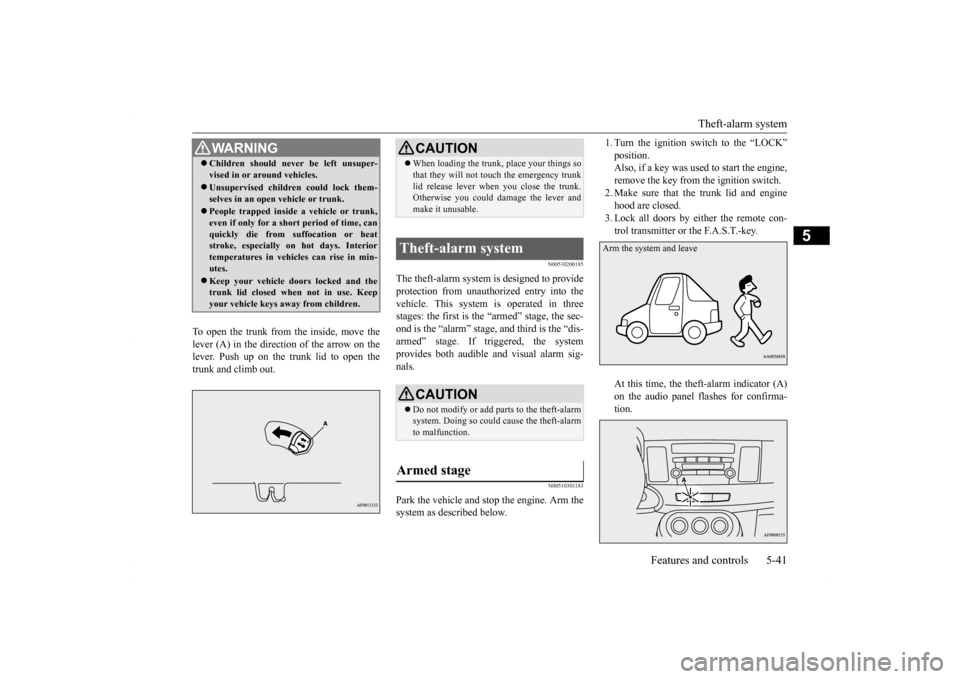
To open the trunk from the inside, move the lever (A) in the direction of the arrow on the lever. Push up on the trunk lid to open the trunk and climb out.
N00510200185
The theft-alarm system is designed to provideprotection from unauthorized entry into the vehicle. This system is operated in three stages: the first is the “armed” stage, the sec-ond is the “alarm” stage,
and third is the “dis-
armed” stage. If triggered, the system provides both audible and visual alarm sig-nals.
N00510301183
Park the vehicle and stop the engine. Arm the system as described below.
1. Turn the ignition switch to the “LOCK” position. Also, if a key was used to start the engine, remove the key from the ignition switch.2. Make sure that the trunk lid and engine hood are closed. 3. Lock all doors by either the remote con-trol transmitter or the F.A.S.T.-key. At this time, the theft-alarm indicator (A) on the audio panel flashes for confirma-tion.
WA R N I N G Children should never be left unsuper- vised in or around vehicles. Unsupervised children could lock them- selves in an open vehicle or trunk. People trapped inside a vehicle or trunk, even if only for a short period of time, canquickly die from suffocation or heat stroke, especially on hot days. Interior temperatures in vehicles can rise in min-utes. Keep your vehicle doors locked and the trunk lid closed when not in use. Keep your vehicle keys away from children.
CAUTION When loading the trunk, place your things so that they will not touch the emergency trunk lid release lever when you close the trunk. Otherwise you could damage the lever and make it unusable.
Theft-alarm system
CAUTION Do not modify or add parts to the theft-alarm system. Doing so could cause the theft-alarm to malfunction.
Armed stage
Arm the system and leave
BK0230300US.bo
ok 41 ページ 2015年7月30日 木曜日 午後8時38分
Page 104 of 392
Theft-alarm system 5-42 Features and controls
5
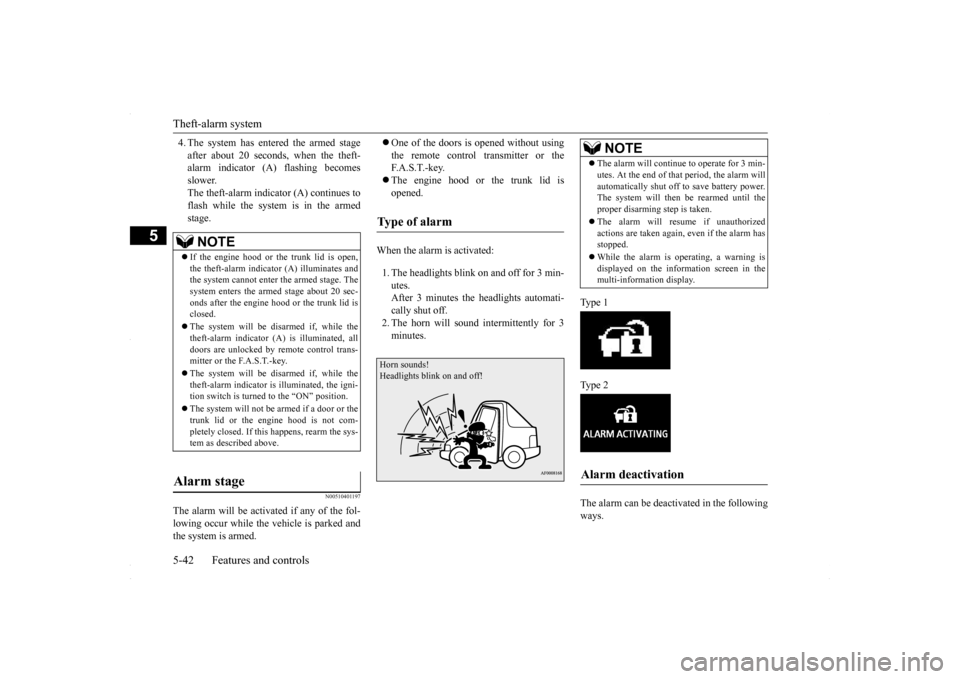
4. The system has entered the armed stage after about 20 seconds, when the theft- alarm indicator (A) flashing becomes slower.The theft-alarm indicator (A) continues to flash while the system is in the armed stage.
N00510401197
The alarm will be activated if any of the fol-lowing occur while the vehicle is parked andthe system is armed.
One of the doors is opened without using the remote control transmitter or the F. A . S . T. - k e y. The engine hood or the trunk lid is opened.
When the alarm is activated: 1. The headlights blink on and off for 3 min- utes.After 3 minutes the headlights automati- cally shut off. 2. The horn will sound intermittently for 3minutes.
Ty p e 1 Ty p e 2 The alarm can be deactivated in the following ways.
NOTE
If the engine hood or the trunk lid is open, the theft-alarm indicator (A) illuminates and the system cannot enter the armed stage. The system enters the armed stage about 20 sec-onds after the engine hood or the trunk lid is closed. The system will be disarmed if, while the theft-alarm indicator (A) is illuminated, all doors are unlocked by remote control trans-mitter or the F.A.S.T.-key. The system will be disarmed if, while the theft-alarm indicator is illuminated, the igni- tion switch is turned to the “ON” position. The system will not be
armed if a door or the
trunk lid or the engine hood is not com- pletely closed. If this happens, rearm the sys-tem as described above.
Alarm stage
Type of alarm Horn sounds!Headlights blink on and off!
NOTE
The alarm will continue to operate for 3 min- utes. At the end of that period, the alarm will automatically shut off to save battery power. The system will then
be rearmed until the
proper disarming step is taken. The alarm will resume if unauthorized actions are taken again, even if the alarm hasstopped. While the alarm is operating, a warning is displayed on the information screen in the multi-information display.
Alarm deactivation
BK0230300US.bo
ok 42 ページ 2015年7月30日 木曜日 午後8時38分
Page 150 of 392
Rear-view camera (if so equipped) 5-88 Features and controls
5
N00546201239
When the gearshift lever or the selector lever is in the “R” (REVERSE) position with theignition switch in the “ON” position, the rear- view image will be displayed on the screen of the Mitsubishi Multi-Communication Sys-tem or the DISPLAY AUDIO in the center panel. When the gearshift lever or the selector leveris shifted out of the “R” (REVERSE) posi- tion, the rear-view image will go off.
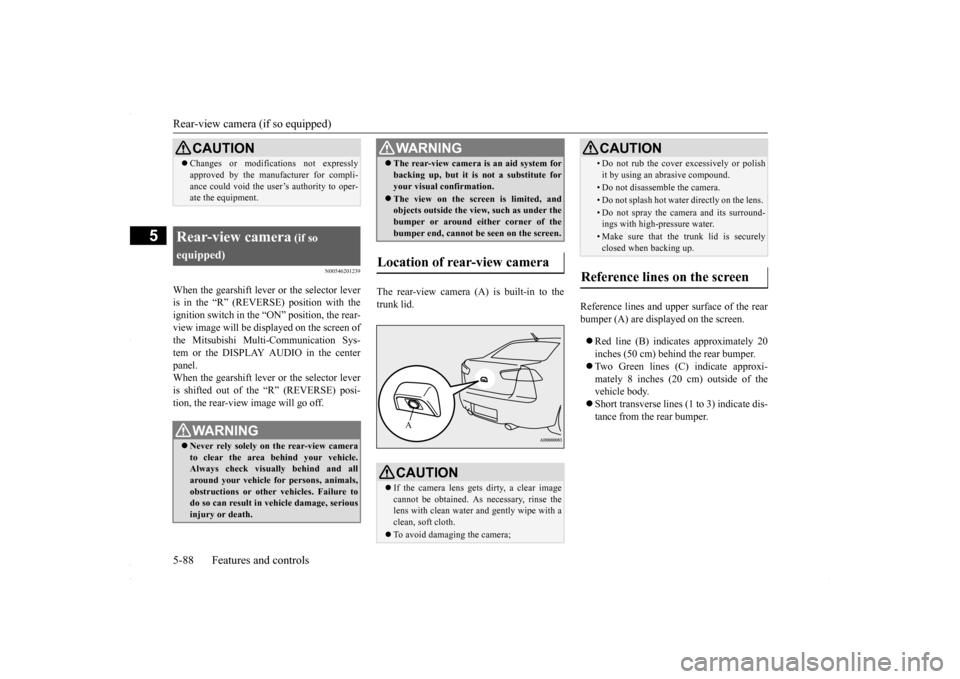
The rear-view camera (A) is built-in to the trunk lid.
Reference lines and upper surface of the rear bumper (A) are displayed on the screen. Red line (B) indicates approximately 20 inches (50 cm) behind the rear bumper. Two Green lines (C) indicate approxi- mately 8 inches (20 cm) outside of the vehicle body. Short transverse lines (1 to 3) indicate dis- tance from the rear bumper.
CAUTION Changes or modifications not expressly approved by the manufacturer for compli- ance could void the user’s authority to oper- ate the equipment.
Rear-view camera
(if so
equipped)
WA R N I N G Never rely solely on the rear-view camera to clear the area behind your vehicle. Always check visually behind and all around your vehicle for persons, animals,obstructions or other vehicles. Failure to do so can result in vehicle damage, serious injury or death.
The rear-view camera is an aid system for backing up, but it is not a substitute for your visual confirmation. The view on the screen is limited, and objects outside the view, such as under the bumper or around either corner of the bumper end, cannot be seen on the screen.
Location of rear-view camera
CAUTION If the camera lens gets dirty, a clear image cannot be obtained. As necessary, rinse the lens with clean water and gently wipe with a clean, soft cloth. To avoid damaging the camera;WA R N I N GA
• Do not rub the cover excessively or polish it by using an abrasive compound. • Do not disassemble the camera.• Do not splash hot water directly on the lens. • Do not spray the camera and its surround- ings with high-pressure water.• Make sure that the trunk lid is securelyclosed when backing up.
Reference lines on the screen
CAUTION
BK0230300US.bo
ok 88 ページ 2015年7月30日 木曜日 午後8時38分
Page 158 of 392
Multi-information display 5-96 Features and controls
5
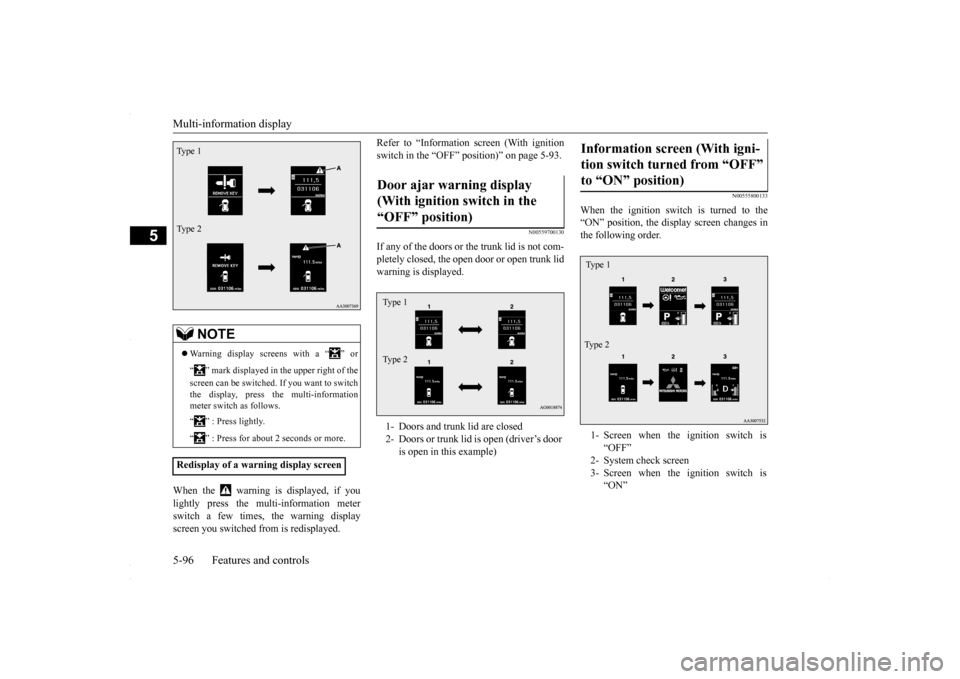
When the warning is displayed, if you lightly press the multi-information meter switch a few times, the warning displayscreen you switched from is redisplayed.
Refer to “Information screen (With ignition switch in the “OFF” position)” on page 5-93.
N00559700130
If any of the doors or
the trunk lid is not com-
pletely closed, the open door or open trunk lidwarning is displayed.
N00555800133
When the ignition switch is turned to the “ON” position, the display screen changes in the following order.
NOTE
Warning display screens with a “ ” or “ ” mark displayed in the upper right of the screen can be switched. If you want to switch the display, press the multi-information meter switch as follows. “ ” : Press lightly. “ ” : Press for about 2 seconds or more.
Redisplay of a warning display screenType 1 Type 2
Door ajar warning display (With ignition switch in the “OFF” position) 1- Doors and trunk lid are closed 2- Doors or trunk lid is open (driver’s door
is open in this example)
Type 1 Type 2
Information screen (With igni- tion switch turned from “OFF” to “ON” position) 1- Screen when the ignition switch is
“OFF”
2- System check screen 3- Screen when the ignition switch is
“ON”
Ty p e 1 Type 2
BK0230300US.bo
ok 96 ページ 2015年7月30日 木曜日 午後8時38分
Page 166 of 392
Multi-information display 5-104 Features and controls
5
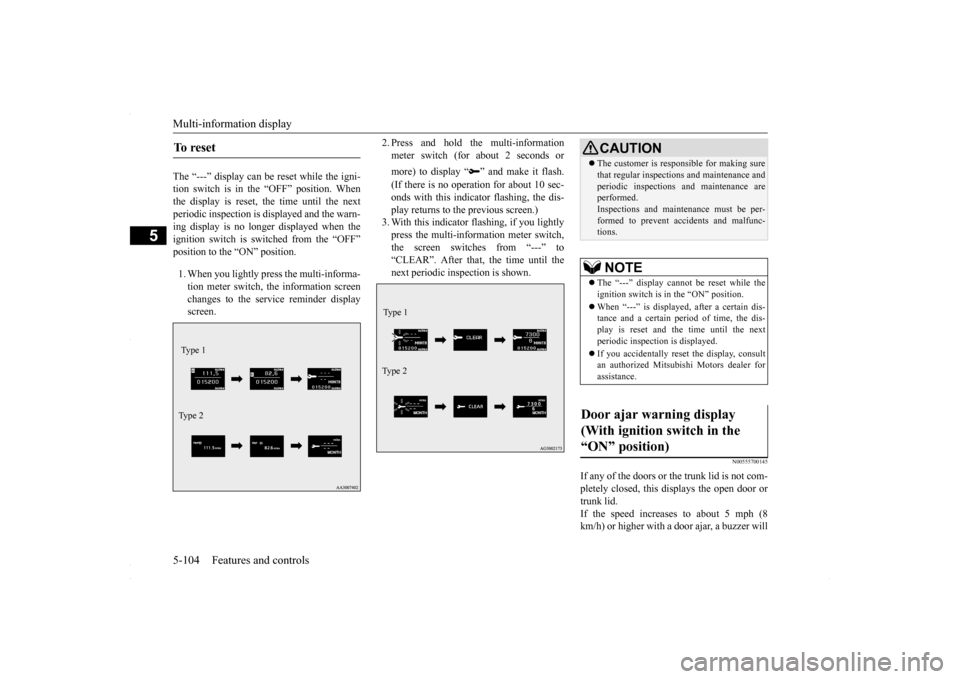
The “---” display can be reset while the igni- tion switch is in the “OFF” position. Whenthe display is reset, the time until the next periodic inspection is displayed and the warn- ing display is no longer displayed when theignition switch is switched from the “OFF” position to the “ON” position. 1. When you lightly press the multi-informa- tion meter switch, the information screen changes to the service reminder displayscreen.
2. Press and hold the multi-information meter switch (for about 2 seconds or more) to display “ ” and make it flash. (If there is no operation for about 10 sec- onds with this indicator flashing, the dis-play returns to the previous screen.) 3. With this indicator flashing, if you lightly press the multi-information meter switch,the screen switches from “---” to “CLEAR”. After that, the time until the next periodic inspection is shown.
N00555700145
If any of the doors or the trunk lid is not com- pletely closed, this displays the open door or trunk lid.If the speed increases to about 5 mph (8 km/h) or higher with a door ajar, a buzzer will
To r e s e t Type 1 Ty p e 2
Type 1 Ty p e 2
CAUTION The customer is responsible for making sure that regular inspections and maintenance and periodic inspections and maintenance are performed. Inspections and maintenance must be per-formed to prevent accidents and malfunc- tions.NOTE
The “---” display cannot be reset while the ignition switch is in the “ON” position. When “---” is displayed, after a certain dis- tance and a certain period of time, the dis- play is reset and the time until the next periodic inspection is displayed. If you accidentally reset the display, consult an authorized Mitsubishi Motors dealer forassistance.
Door ajar warning display (With ignition switch in the “ON” position)
BK0230300US.book
104 ページ 2015年7月30日 木曜日 午後8時38分