ECU MITSUBISHI LANCER 2017 8.G Repair Manual
[x] Cancel search | Manufacturer: MITSUBISHI, Model Year: 2017, Model line: LANCER, Model: MITSUBISHI LANCER 2017 8.GPages: 385, PDF Size: 14.34 MB
Page 267 of 385
Audio Files (MP3/WMA/AAC) 7-20 Comfort controls
7
Discs that have not been finalized cannot be played back. Even if recorded using the correct format on a recorder or computer, applicationsoftware settings and environments; disc peculiarities, damage, or marking; or dirt or condensation on the lens inside theproduct may render the disc unplayable. Depending on the disc, some functions may not be used, or the disc may not playback. Do not use discs with cracks or warps. If the disc has stickers affixed, remains from removed stickers, or affixed adhe-sive, then do not use the disc. Discs that have decorative labels or stick- ers may not be used.
This product will play back audio CDs, how- ever please be aware of
the following points
regarding CD standards. Ensure that you use discs with on the label surface. Playback of other than standard CDs is not guaranteed. Even if the audio can be played back, the audio quality cannot be guaranteed. When playing back other than standard CDs, the following may occur.
• There may be noise during playback. • There may be jumping in the audio. • The disc may not be recognized. • The first track may not be played back.• It may take longer than usual until start of playback of tracks. • Playback may start from within thetrack. • Some parts may not be played back. • Tracks may freeze during playback.• Tracks may be displayed erroneously.
N00715600027
This product can play back MP3/WMA/AACformat audio files recorded on CD-ROM,CD-R/RW, and USB devices. There are limitations on the files and media that can be used, therefore read the following prior to recording MP3/WMA/AAC formataudio files on discs or USB devices. Additionally, ensure you read the user manu- als for your CD-R/RW drive and the writingsoftware, and ensure these are used correctly. If the MP3/WMA/AAC format audio files includes title information or other data, thenthis can be displayed.
Nonstandard CDs
Audio Files (MP3/WMA/AAC)
CAUTION CD-ROM and CD-R/RW media can only play back MP3 format audio files. Actions such as copying audio CDs or files and either distributing these to others for freeor for charge, or uploading files via the Inter- net or other means to servers is an infringe- ment of the law. Do not append the file extensions “.mp3”, “.wma”, or “.m4a”, to other thanMP3/WMA/AAC format files. Playing back discs with these types of files recorded upon them may cause the files to be incorrectlyidentified for playback, which may lead to loud noise, resulting in speaker damage or accident.NOTE
Depending on the condition of the disc recorder or recording software used, correct playback may not be possible. In these cases,refer to the user manual for your product or software. Depending on your computer’s operating system, version, software, or settings, files may not have a file extension appended. In these cases, append the file extensions “.mp3”, “.wma”, or “.m4a” when copyingthe files. Files larger than 2GB in size cannot be played back.
BK0237700US.bo
ok 20 ページ 2016年4月15日 金曜日 午前11時28分
Page 298 of 385
Antenna
Comfort controls 7-51
7
N00734200426
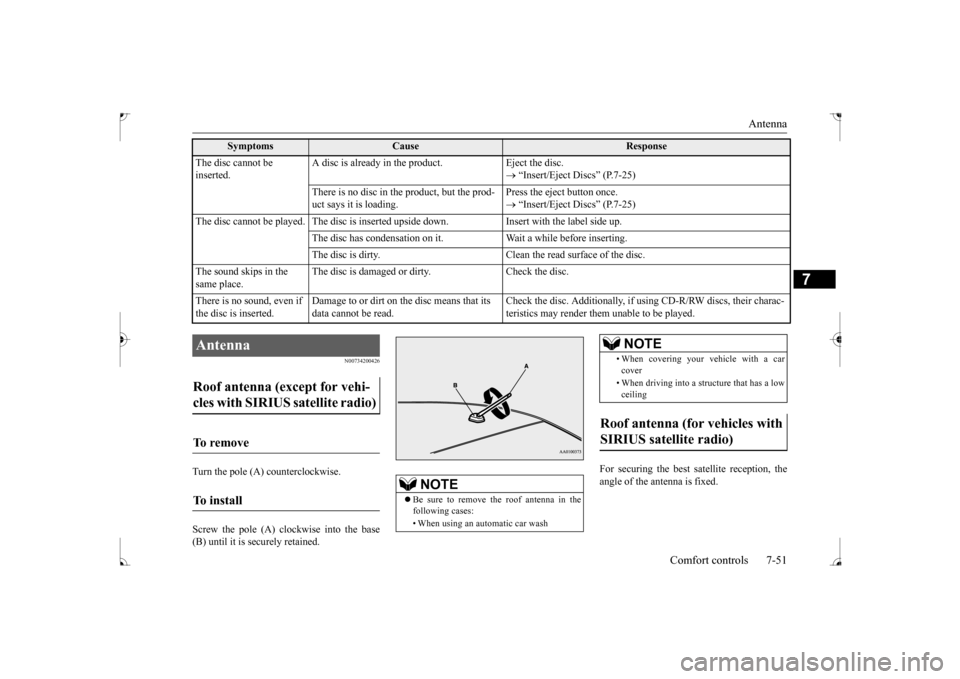
Turn the pole (A) counterclockwise. Screw the pole (A) clockwise into the base (B) until it is securely retained.
For securing the best satellite reception, the angle of the antenna is fixed.
The disc cannot be inserted.
A disc is already in the product. Eject the disc.
“Insert/Eject Discs” (P.7-25)
There is no disc in the product, but the prod- uct says it is loading.
Press the eject button once. “Insert/Eject Discs” (P.7-25)
The disc cannot be played. The disc is inserted upside down. Insert with the label side up.
The disc has condensation on it. Wait a while before inserting.The disc is dirty. Clean the read surface of the disc.
The sound skips in the same place.
The disc is damaged or dirty. Check the disc.
There is no sound, even if the disc is inserted.
Damage to or dirt on the disc means that its data cannot be read.
Check the disc. Additionally, if using CD-R/RW discs, their charac- teristics may render them unable to be played.
Symptoms
Cause
Response
Antenna Roof antenna (except for vehi- cles with SIRIUS satellite radio) To remove To install
NOTE
Be sure to remove the roof antenna in the following cases: • When using an automatic car wash
• When covering your vehicle with a car cover • When driving into a structure that has a low ceiling
Roof antenna (for vehicles with SIRIUS satellite radio)
NOTE
BK0237700US.bo
ok 51 ページ 2016年4月15日 金曜日 午前11時28分
Page 299 of 385
Clock (if so equipped) 7-52 Comfort controls
7
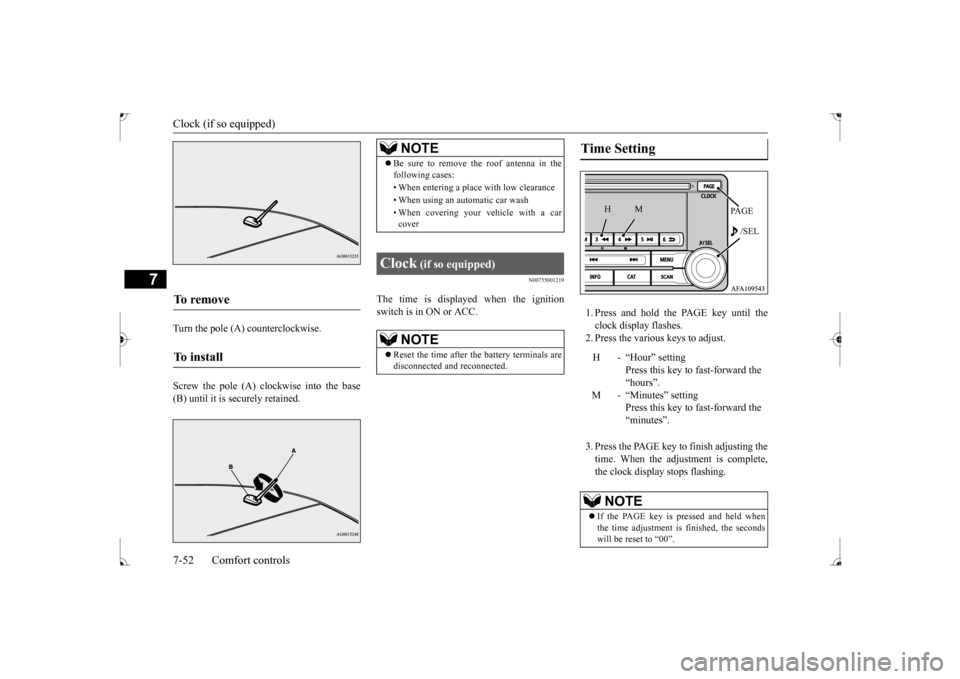
Turn the pole (A) counterclockwise. Screw the pole (A) clockwise into the base (B) until it is securely retained.
N00755001219
The time is displayed when the ignitionswitch is in ON or ACC.
1. Press and hold the PAGE key until the clock display flashes.2. Press the various keys to adjust. 3. Press the PAGE key to finish adjusting the time. When the adjustment is complete, the clock display stops flashing.
To remove To i n s t a l l
NOTE
Be sure to remove the roof antenna in the following cases: • When entering a place with low clearance • When using an automatic car wash • When covering your vehicle with a car cover
Clock
(if so equipped)
NOTE
Reset the time after the battery terminals are disconnected and reconnected.
Time Setting
H - “Hour” setting
Press this key to fast-forward the“hours”.
M - “Minutes” setting
Press this key to fast-forward the “minutes”.
NOTE
If the PAGE key is pressed and held when the time adjustment is finished, the seconds will be reset to “00”.
PA G E /SEL
M
H
BK0237700US.bo
ok 52 ページ 2016年4月15日 金曜日 午前11時28分
Page 315 of 385
Towing 8-12 For emergencies
8
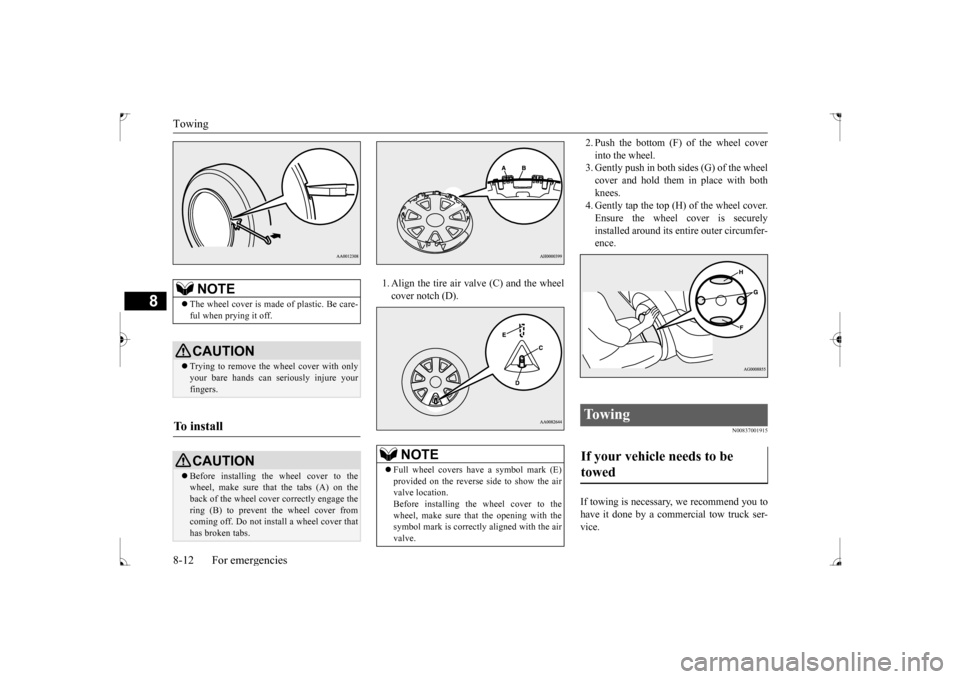
1. Align the tire air valve (C) and the wheel cover notch (D).
2. Push the bottom (F) of the wheel cover into the wheel. 3. Gently push in both sides (G) of the wheel cover and hold them in place with bothknees. 4. Gently tap the top (H) of the wheel cover. Ensure the wheel cover is securelyinstalled around its entire outer circumfer- ence.
N00837001915
If towing is necessary, we recommend you to have it done by a commercial tow truck ser-vice.
NOTE
The wheel cover is made of plastic. Be care- ful when prying it off. CAUTION Trying to remove the wheel cover with only your bare hands can seriously injure your fingers.
To i n s t a l l
CAUTION Before installing the wheel cover to the wheel, make sure that the tabs (A) on the back of the wheel cover correctly engage the ring (B) to prevent the wheel cover fromcoming off. Do not install a wheel cover that has broken tabs.
NOTE
Full wheel covers have a symbol mark (E) provided on the reverse side to show the air valve location.Before installing the wheel cover to the wheel, make sure that the opening with the symbol mark is correctly aligned with the airvalve.
To w i n g If your vehicle needs to be towed
BK0237700US.bo
ok 12 ページ 2016年4月15日 金曜日 午前11時28分
Page 317 of 385
Operation under adverse driving conditions 8-14 For emergencies
8
Place the gearshift lever in the “Neutral” position. Turn the ignition switch to the “ACC” posi-tion and secure the steering wheel in a straight-ahead position with a rope or tie- down strap. Never place the ignition switch inthe “LOCK” position when towing.
Release the parking brake. Place the gearshift lever in the “Neutral” position (manual transaxle) or the selectorlever in the “N” (NEUTRAL) position (CVT).
N00837200662
If your vehicle becomes stuck in snow, sand, or mud, it can often be
moved by a rocking
motion. Rock your vehicle back and forth to free it. Do not rev the engine or spin the wheels.Constant efforts to free a stuck vehicle can cause overheating and transaxle failure. Let
the engine idle for a few minutes to cool the transaxle before trying again. If your vehicle is still stuck after several rock- ing attempts, call for a commercial tow truckservice.
[For front-wheel drive vehicle equipped with the active stability control (ASC)] If the vehicle is towed with the ignition switch in the “ON” position and only the front wheels or only the rear wheels raisedoff the ground, the ASC may operate, result- ing in an accident. When towing the vehicle with only the front wheels or only the rearwheels raised, keep the ignition switch in the “LOCK” or “ACC” position. [For vehicle equipped with the Electronically controlled 4WD system] Even in “2WD” mode, the vehicle cannot betowed with the front or the rear wheels on the ground.
Towing manual transaxle vehicles with rear wheels off the ground (Type B)
CAUTION
Towing with front wheels off the ground (Type C)
WA R N I N G To prevent entry of exhaust gas from the towing vehicle, set the selection switch to the recirculation position.
Operation under adverse driving conditions If your vehicle becomes stuck in sand, mud or snow
WA R N I N G When trying to rock your vehicle out of a stuck position, make sure that there are no people nearby. The rocking motion canmake your vehicle suddenly lurch forward or backward, and injure any bystanders.
On wet roads
CAUTION Avoid flooded roads. Water is often deeper than it looks, and you could be seriously hurt by driving into flood water. When driving in rain, on water-covered roads, or through a car wash, water could get into the brake discs and make them fail tem-porarily. In such cases, lightly press the brake pedal to see if they are working prop- erly. If they are not, press the pedal lightly several times while driving to dry the brake pads or linings, then check them again.
BK0237700US.bo
ok 14 ページ 2016年4月15日 金曜日 午前11時28分
Page 323 of 385
Engine hood 9-4 Vehicle care and maintenance
9
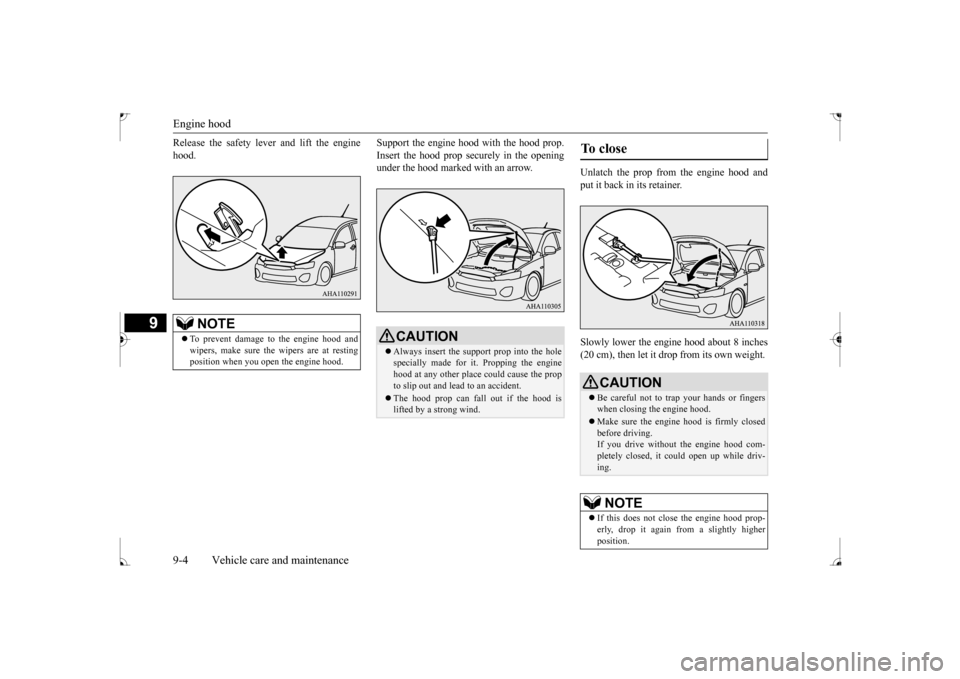
Release the safety lever and lift the engine hood.
Support the engine hood with the hood prop. Insert the hood prop securely in the opening under the hood marked with an arrow.
Unlatch the prop from the engine hood and put it back in its retainer. Slowly lower the engine hood about 8 inches (20 cm), then let it drop from its own weight.
NOTE
To prevent damage to the engine hood and wipers, make sure the wipers are at resting position when you open the engine hood.
CAUTION Always insert the support prop into the hole specially made for it. Propping the enginehood at any other place could cause the prop to slip out and lead to an accident. The hood prop can fall out if the hood is lifted by a strong wind.
To close
CAUTION Be careful not to trap your hands or fingers when closing the engine hood. Make sure the engine hood is firmly closed before driving.If you drive without the engine hood com- pletely closed, it could open up while driv- ing.NOTE
If this does not close the engine hood prop- erly, drop it again from a slightly higher position.
BK0237700US.bo
ok 4 ページ 2016年4月15日 金曜日 午前11時28分
Page 331 of 385
Power steering fluid (if so equipped) 9-12 Vehicle care and maintenance
9
N00939000388
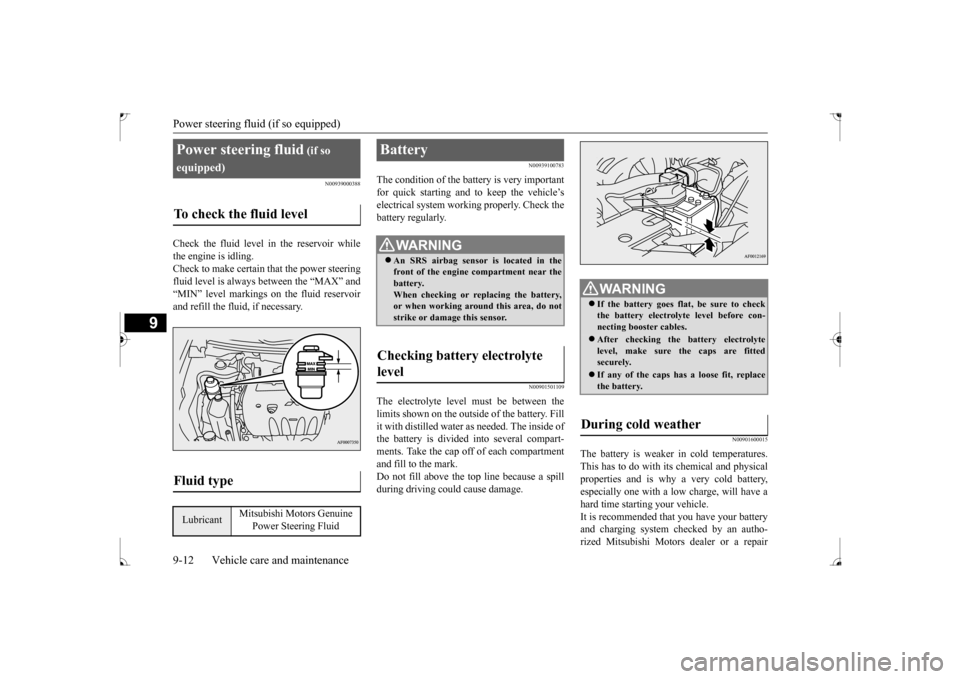
Check the fluid level in the reservoir while the engine is idling. Check to make certain that the power steering fluid level is always between the “MAX” and“MIN” level markings on the fluid reservoirand refill the fluid, if necessary.
N00939100783
The condition of the battery is very importantfor quick starting and to keep the vehicle’selectrical system working properly. Check the battery regularly.
N00901501109
The electrolyte level must be between the limits shown on the outside of the battery. Fillit with distilled water as needed. The inside of the battery is divided into several compart- ments. Take the cap off of each compartmentand fill to the mark. Do not fill above the top line because a spill during driving could cause damage.
N00901600015
The battery is weaker in cold temperatures.This has to do with its chemical and physical properties and is why a very cold battery, especially one with a low charge, will have ahard time starting your vehicle. It is recommended that you have your battery and charging system checked by an autho-rized Mitsubishi Motors dealer or a repair
Power steering fluid
(if so
equipped)To check the fluid level
Fluid type
Lubricant
Mitsubishi Motors Genuine
Power Steering Fluid
Battery
WA R N I N G An SRS airbag sensor is located in the front of the engine compartment near the battery. When checking or replacing the battery,or when working around this area, do not strike or damage this sensor.
Checking battery electrolyte level
WA R N I N G If the battery goes flat, be sure to check the battery electrolyte level before con- necting booster cables. After checking the battery electrolyte level, make sure the caps are fitted securely. If any of the caps has a loose fit, replace the battery.
During cold weather
BK0237700US.bo
ok 12 ページ 2016年4月15日 金曜日 午前11時28分
Page 332 of 385
Battery
Vehicle care and maintenance 9-13
9
facility of your choice before the start of cold weather. If necessary, have it charged. This will guarantee more reliable starting, and lon- ger battery life.
N00901701143
To disconnect the battery cable, stop theengine. Disconnect the negative (-) terminalfirst, then the positive (+) terminal. To recon-nect the battery, first connect the positive (+) terminal and then the negative (-) terminal, before starting the vehicle. Disconnection and connection
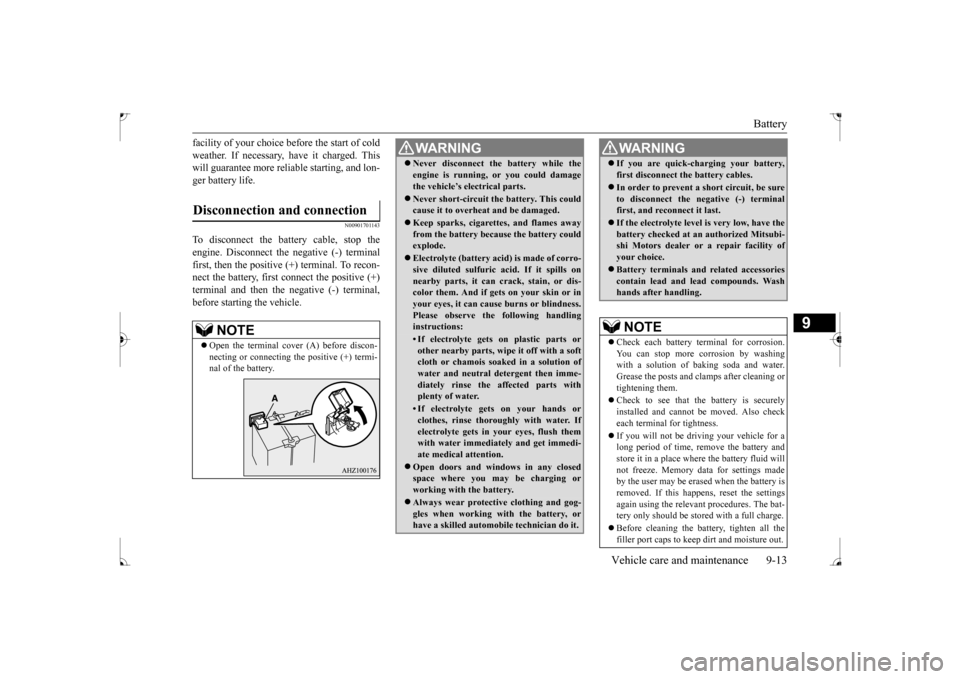
NOTE
Open the terminal cover (A) before discon- necting or connecting the positive (+) termi- nal of the battery.
WA R N I N G Never disconnect the battery while the engine is running, or you could damage the vehicle’s electrical parts. Never short-circuit the battery. This could cause it to overheat and be damaged. Keep sparks, cigarettes, and flames away from the battery because the battery could explode. Electrolyte (battery acid) is made of corro- sive diluted sulfuric
acid. If it spills on
nearby parts, it can crack, stain, or dis-color them. And if gets on your skin or in your eyes, it can cause burns or blindness. Please observe the following handlinginstructions:• If electrolyte gets on plastic parts orother nearby parts, wi
pe it off with a soft
cloth or chamois soaked in a solution of water and neutral detergent then imme-diately rinse the affected parts with plenty of water.• If electrolyte gets on your hands orclothes, rinse thoroughly with water. If electrolyte gets in your eyes, flush themwith water immediately and get immedi- ate medical attention.
Open doors and windows in any closed space where you may be charging or working with the battery. Always wear protective clothing and gog- gles when working with the battery, or have a skilled automobile technician do it.
If you are quick-charging your battery, first disconnect the
battery cables.
In order to prevent a short circuit, be sure to disconnect the negative (-) terminalfirst, and reconnect it last. If the electrolyte level is very low, have the battery checked at an authorized Mitsubi- shi Motors dealer or a repair facility of your choice. Battery terminals and related accessories contain lead and lead compounds. Washhands after handling. NOTE
Check each battery terminal for corrosion. You can stop more corrosion by washing with a solution of baking soda and water.Grease the posts and clamps after cleaning or tightening them. Check to see that the battery is securely installed and cannot be moved. Also check each terminal for tightness. If you will not be driving your vehicle for a long period of time, remove the battery and store it in a place where the battery fluid will not freeze. Memory data for settings madeby the user may be erased when the battery is removed. If this happens, reset the settings again using the relevant procedures. The bat-tery only should be stored with a full charge. Before cleaning the battery, tighten all the filler port caps to keep dirt and moisture out.WA R N I N G
BK0237700US.bo
ok 13 ページ 2016年4月15日 金曜日 午前11時28分
Page 341 of 385
Emission-control system maintenance 9-22 Vehicle care and maintenance
9
N00940800201
Your vehicle is equipped with an emission- control system that meets all the requirementsof the U.S. Environmental Protection Agency and Environment Canada. The emission-con- trol system is made of: a positive crankcase ventilation system an evaporative emission-control system an exhaust emission-control system
The maintenance services listed in the “WARRANTY AND MAINTENANCE MANUAL” must be performed at the timesor mileages listed to keep the emission-con- trol system working properly. These, and all the other “general” maintenance serviceslisted in this manual, need to be performed to keep your vehicle running properly and reli- ably. You may need more frequent maintenance if you drive your vehicle in harsh conditions such as dusty areas or do a lot of start-and- stop driving. To be sure the emission-control system works properly, have your vehicle inspected and maintained by an authorized Mitsubishi Motors dealer or a repair facility of your
choice following the schedule in the “WAR- RANTY AND MAINTENANCE MAN- UAL”. You should also have an inspection and ser-vice any time you suspect a malfunction.
N00940900215
Spark plugs must fire properly for goodengine performance and emission-control. Do not reuse them by cleaning or regapping. Change them at the mileage listed in the“WARRANTY AND MAINTENANCE MANUAL”.
N00941000037
Check the hose surfaces for any heat and mechanical damage, hard and brittle rubber, cracking, tears, cuts and abrasions. Pay spe- cial attention to the hoses closest to high heatsources such as the exhaust manifold. Check all the hose connections, such as clamps and couplings, to make sure they are secure andthat there are no leaks. If you see any wear or damage, replace the hoses immediately.
N00950100050
Have the valve clearance checked at anauthorized Mitsubishi Motors dealer at the mileage specified in the “WARRANTY ANDMAINTENANCE MANUAL”. If the engine sounds abnormally loud, have adjustments made by an authorizedMitsubishi Motors dealer.
Emission-control system maintenance
NOTE
To meet government regulations and pro- mote cleaner air, your vehicle is equipped with an onboard diagnostic system (OBD).The engine electronic control module that controls OBD functions stores various data (especially about the exhaust emissions).This data will be erased if the battery cable is disconnected, which could make a rapid diagnosis difficult. Do not disconnect thebattery cable when the engine malfunction indicator (“SERVICE ENGINE SOON” or “Check engine light”) is on.
Spark plugs
NOTE
Use the spark plugs listed under “Engine specifications” on page 11-5 or plugs that are exactly the same. Other plugs could cause engine damage, performance problems or radio noise.
Fuel hoses Intake valve clearance
BK0237700US.bo
ok 22 ページ 2016年4月15日 金曜日 午前11時28分
Page 346 of 385
Fuses
Vehicle care and maintenance 9-27
9
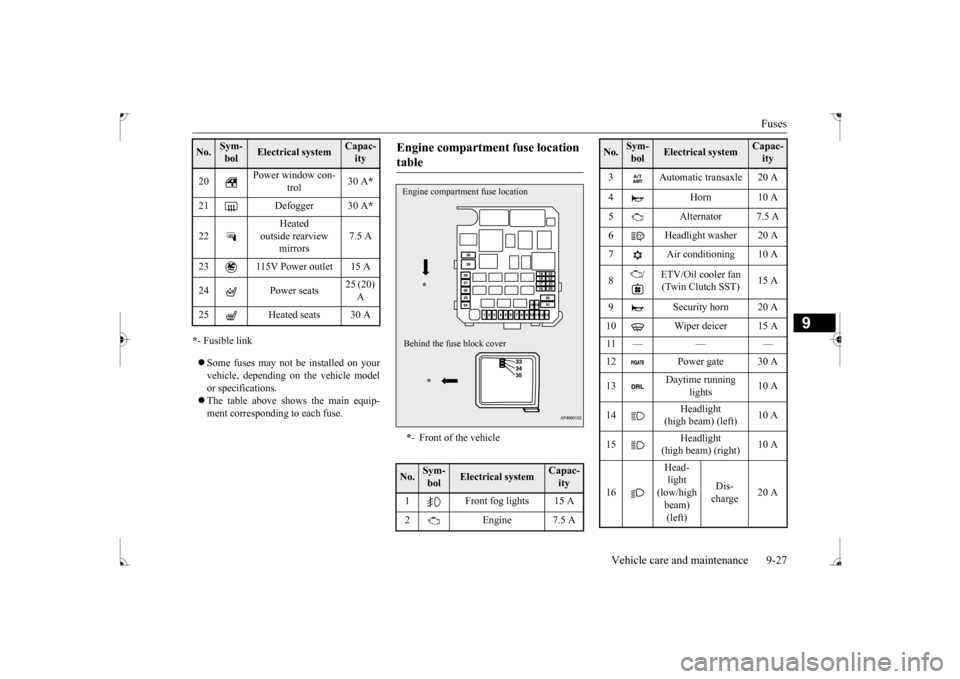
* - Fusible link Some fuses may not be installed on your vehicle, depending on the vehicle model or specifications. The table above shows the main equip- ment corresponding to each fuse. 20
Power window con-
trol
30 A
*
21 Defogger 30 A
*
22
Heated
outside rearview
mirrors
7.5 A
23 115V Power outlet 15 A 24 Power seats
25 (20) A
25 Heated seats 30 ANo.
Sym- bol
Electrical system
Capac-ity
Engine compartment fuse location table * - Front of the vehicle
No.
Sym- bol
Electrical system
Capac-ity
1 Front fog lights 15 A 2 Engine 7.5 AEngine compartment fuse location
*
Behind the fuse block cover
*
3 Automatic transaxle 20 A 4 Horn 10 A 5 Alternator 7.5 A 6 Headlight washer 20 A 7 Air conditioning 10 A 8
/ ETV/Oil cooler fan
(Twin Clutch SST)
15 A
9 Security horn 20 A 10 Wiper deicer 15 A 11 — — — 13
Daytime running
lights
10 A
14
Headlight
(high beam) (left)
10 A
15
Headlight
(high beam) (right)
10 A
16
Head- light (low/high beam) (left)
Dis- charge
20 A
No.
Sym- bol
Electrical system
Capac-ity
BK0237700US.bo
ok 27 ページ 2016年4月15日 金曜日 午前11時28分