USB MITSUBISHI LANCER 2017 8.G Owners Manual
[x] Cancel search | Manufacturer: MITSUBISHI, Model Year: 2017, Model line: LANCER, Model: MITSUBISHI LANCER 2017 8.GPages: 385, PDF Size: 14.34 MB
Page 5 of 385
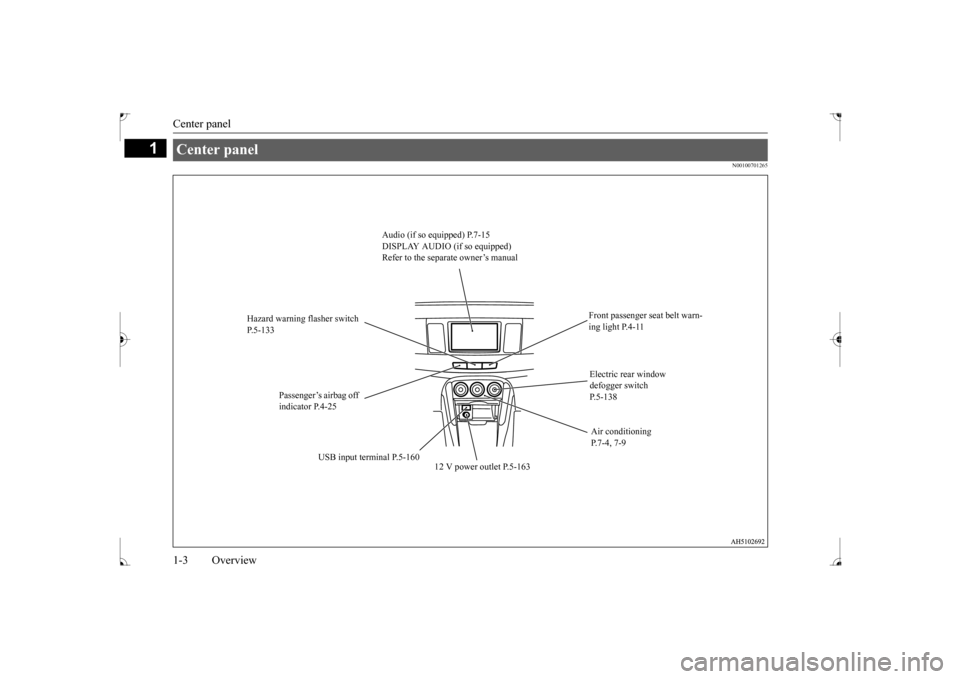
Center panel 1-3 Overview
1
N00100701265
Center panel
Audio (if so equipped) P.7-15 DISPLAY AUDIO (if so equipped) Refer to the separate owner’s manual
Hazard warning flasher switch P.5-133
Front passenger seat belt warn- ing light P.4-11
Passenger’s airbag off indicator P.4-25
Electric rear window defogger switch P.5-138 Air conditioning P.7-4, 7-9
12 V power outlet P.5-163
USB input terminal P.5-160
BK0237700US.bo
ok 3 ページ 2016年4月15日 金曜日 午前11時28分
Page 66 of 385
5
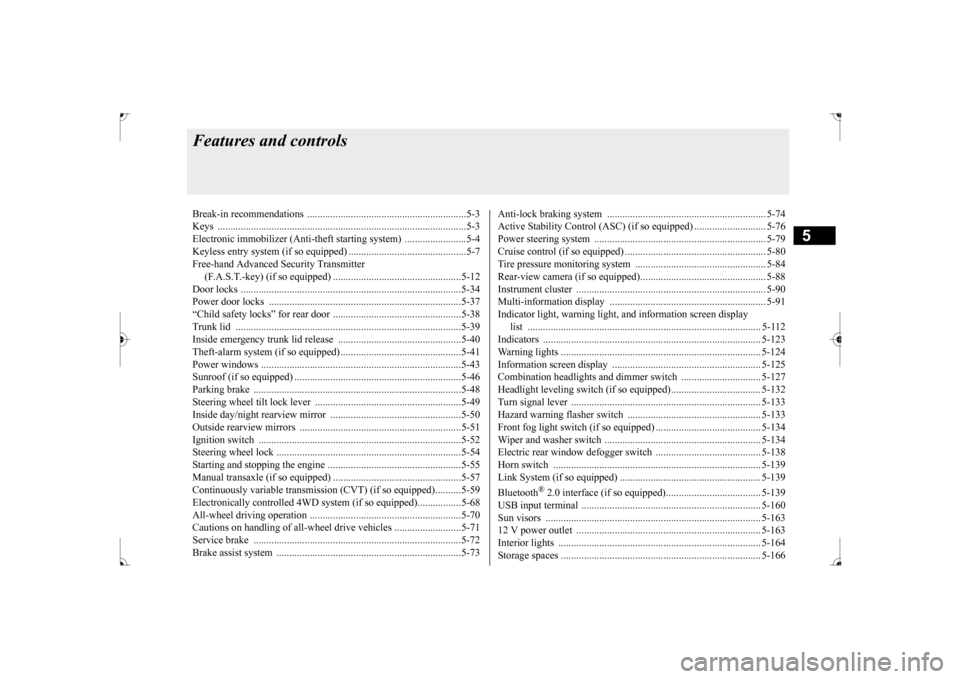
Features and controlsBreak-in recommendation
s ..............................................................5-3
Keys ..........................................
.......................................................5-3
Electronic immobilizer (Anti-thef
t starting system) ........................5-4
Keyless entry system (if so equipped) ..............................................5-7Free-hand Advanced Security Transmitter (F.A.S.T.-key) (if so
equipped) ..................................................5-12
Door locks .......................
...............................................................5-34
Power door locks ............
...............................................................5-37
“Child safety locks” for
rear door ..................................................5-38
Trunk lid ...................................
.....................................................5-39
Inside emergency trunk lid
release ................................................5-40
Theft-alarm system (if so
equipped) ...............................................5-41
Power windows ...............
...............................................................5-43
Sunroof (if so equipped
) .........................................
........................5-46
Parking brake ..................
...............................................................5-48
Steering wheel tilt lock lever .........................................................5-49Inside day/night rearview
mirror ...................................................5-50
Outside rearview mirr
ors ...............................................................5-51
Ignition switch ......
.................................................
........................5-52
Steering wheel lock
................................................
........................5-54
Starting and stopping the e
ngine ....................................................5-55
Manual transaxle (if so equipped) ..................................................5-57Continuously variable transmissi
on (CVT) (if so equipped)..........5-59
Electronically controlled 4WD system (if so equipped).................5-68 All-wheel driving opera
tion ...........................................................5-70
Cautions on handling of all-wheel drive vehicles ..........................5-71Service brake ..................
...............................................................5-72
Brake assist system
................................................
........................5-73
Anti-lock braking syst
em .....................................
......................... 5-74
Active Stability Control (ASC
) (if so equipped) ............................ 5-76
Power steering system
..........................................
......................... 5-79
Cruise control (if so eq
uipped) ....................................................... 5-80
Tire pressure monitoring
system ................................................... 5-84
Rear-view camera (if so
equipped)..............
................................... 5-88
Instrument cluster
.................................................
......................... 5-90
Multi-information disp
lay ....................................
......................... 5-91
Indicator light, warning light, and information screen display list .................................................
.......................................... 5-112
Indicators .................................
.................................................... 5-123
Warning lights ................
.................................................
............. 5-124
Information screen disp
lay ...................................
....................... 5-125
Combination headlights and dimmer switch ............................... 5-127 Headlight leveling switch (if
so equipped)................................... 5-132
Turn signal lever ..
.................................................
....................... 5-133
Hazard warning flasher
switch .................................................... 5-133
Front fog light switch (if so
equipped) ......................................... 5-134
Wiper and washer swit
ch ......................................
....................... 5-134
Electric rear window def
ogger switch ......................................... 5-138
Horn switch .............................
.................................................... 5-139
Link System (if so equi
pped) ....................................................... 5-139
Bluetooth
® 2.0 interface (if so
equipped)..................................... 5-139
USB input terminal
...............................................
....................... 5-160
Sun visors ......................
.................................................
............. 5-163
12 V power outlet ..........
.................................................
............. 5-163
Interior lights .................
.................................................
............. 5-164
Storage spaces ................
.................................................
............. 5-166
BK0237700US.bo
ok 1 ページ 2016年4月15日 金曜日 午前11時28分
Page 204 of 385
Horn switch
Features and controls 5-139
5
N00523801225
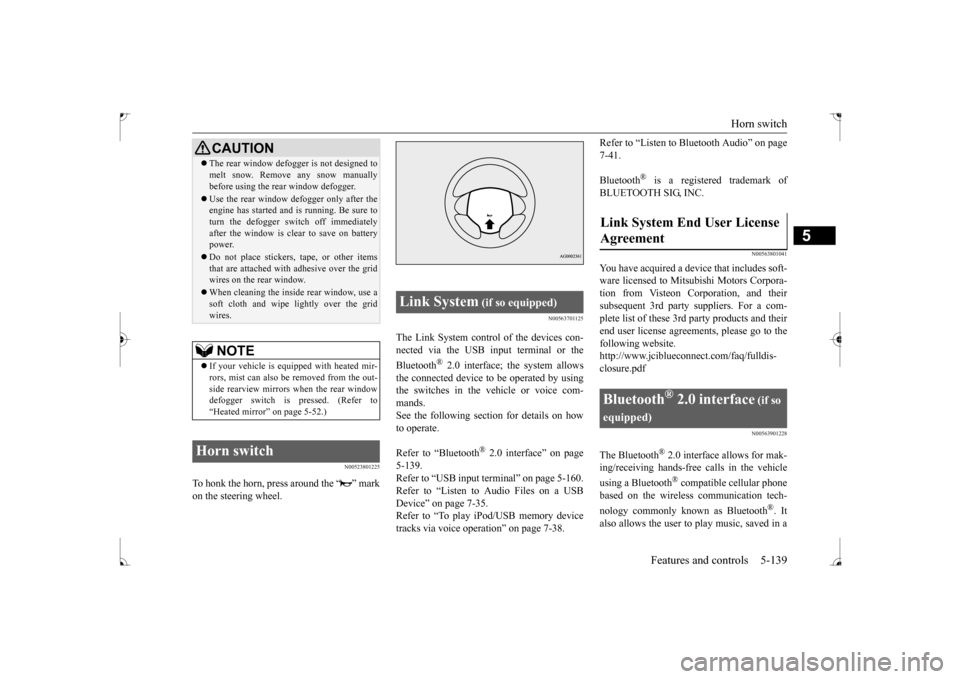
To honk the horn, press around the “ ” mark on the steering wheel.
N00563701125
The Link System control of the devices con-nected via the USB input terminal or the Bluetooth
® 2.0 interface; the system allows
the connected device to be operated by usingthe switches in the vehicle or voice com-mands. See the following section for details on how to operate. Refer to “Bluetooth
® 2.0 interface” on page
5-139. Refer to “USB input terminal” on page 5-160. Refer to “Listen to Audio Files on a USBDevice” on page 7-35. Refer to “To play iPod/USB memory device tracks via voice operation” on page 7-38.
Refer to “Listen to Bluetooth Audio” on page 7-41. Bluetooth
® is a registered trademark of
BLUETOOTH SIG, INC.
N00563801041
You have acquired a device that includes soft- ware licensed to Mitsubishi Motors Corpora-tion from Visteon Corporation, and theirsubsequent 3rd party suppliers. For a com- plete list of these 3rd party products and their end user license agreements, please go to thefollowing website. http://www.jciblueconnect.com/faq/fulldis- closure.pdf
N00563901228
The Bluetooth
® 2.0 interface allows for mak-
ing/receiving hands-free calls in the vehicle using a Bluetooth
® compatible cellular phone
based on the wireless communication tech- nology commonly known as Bluetooth
®. It
also allows the user to
play music, saved in a
CAUTIONThe rear window defogger is not designed to melt snow. Remove any snow manually before using the rear window defogger. Use the rear window defogger only after the engine has started and is running. Be sure to turn the defogger switch off immediately after the window is clear to save on batterypower. Do not place stickers, tape, or other items that are attached with adhesive over the grid wires on the rear window. When cleaning the inside rear window, use a soft cloth and wipe lightly over the grid wires.NOTE
If your vehicle is equipped with heated mir- rors, mist can also be removed from the out- side rearview mirrors when the rear windowdefogger switch is pressed. (Refer to “Heated mirror” on page 5-52.)
Horn switch
Link System
(if so equipped)
Link System End User License Agreement
Bluetooth
® 2.0 interface
(if so
equipped)
BK0237700US.book
139 ページ 2016年4月15日 金曜日 午前11時28分
Page 225 of 385
USB input terminal 5-160 Features and controls
5
Consult the dealer or an experienced radio/TV technician for help.
ICES Notice: This Class B digital apparatus complies with Canadian ICES-003.
N00566401110 N00566701113
You can connect your USB memory device or iPod* to play music files stored in the USBmemory device or iPod.This section explains how to connect and remove a USB memory device or iPod. See the following section fordetails on how to play music files. Refer to “Listen to an iPod” on page 7-33. Refer to “Listen to Audio Files on a USBDevice” on page 7-35.
Refer to “To play iPod/USB memory device tracks via voice operation” on page 7-38.
N00566801127
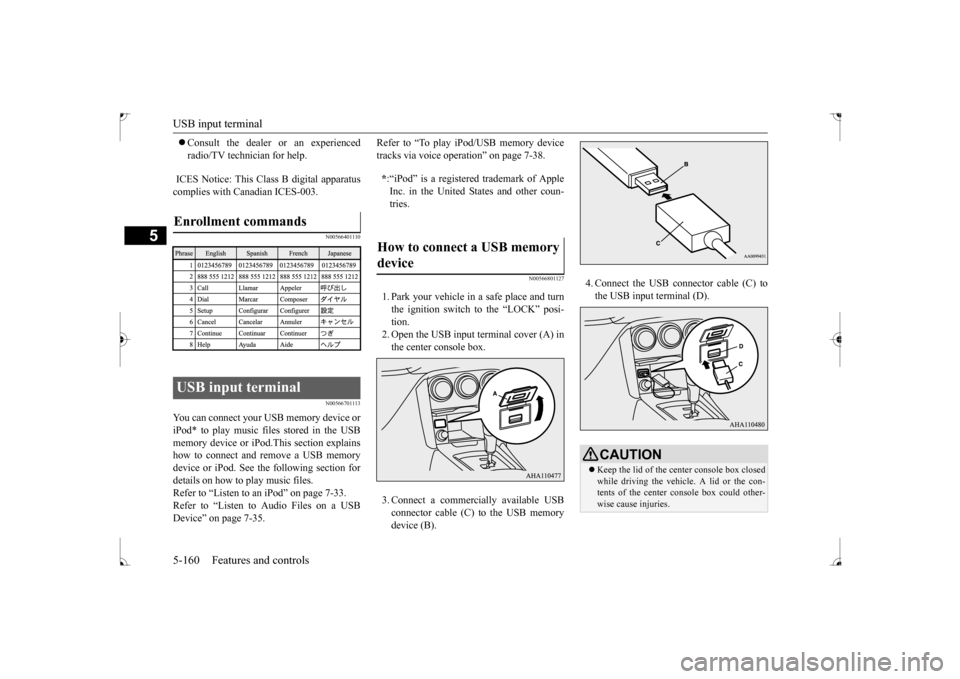
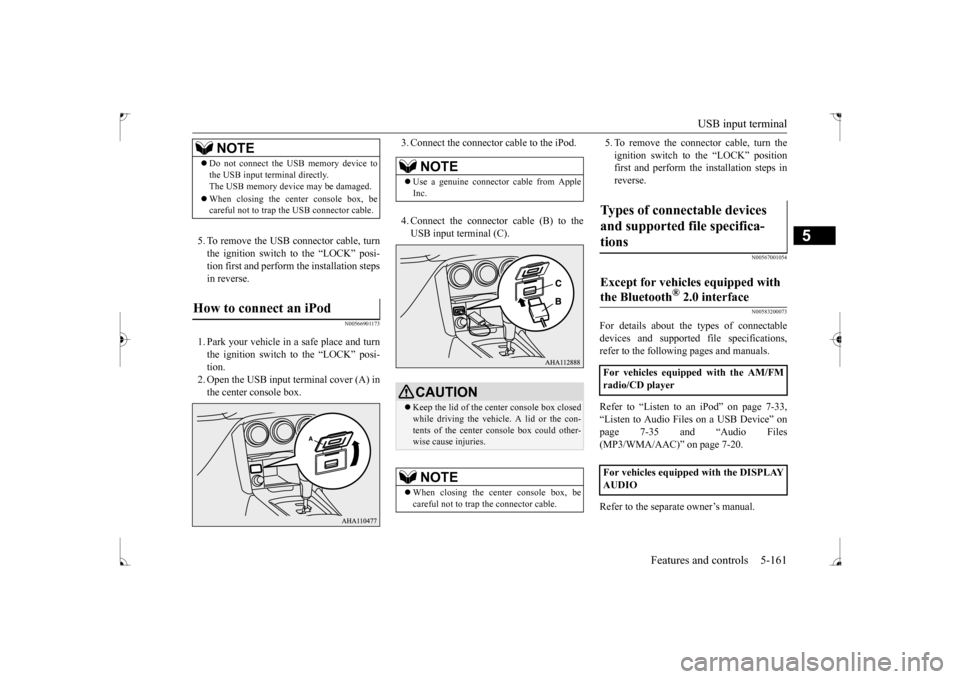
1. Park your vehicle in a safe place and turnthe ignition switch to the “LOCK” posi-tion. 2. Open the USB input terminal cover (A) in the center console box. 3. Connect a commercially available USB connector cable (C) to the USB memorydevice (B).
4. Connect the USB connector cable (C) to the USB input terminal (D).
Enrollment commands
USB input terminal
* :“iPod” is a registered trademark of Apple Inc. in the United States and other coun- tries.
How to connect a USB memory device
CAUTION Keep the lid of the center console box closed while driving the vehicle. A lid or the con- tents of the center console box could other-wise cause injuries.
BK0237700US.book
160 ページ 2016年4月15日 金曜日 午前11時28分
Page 226 of 385
USB input terminal
Features and controls 5-161
5
5. To remove the USB connector cable, turn the ignition switch to the “LOCK” posi- tion first and perform the installation stepsin reverse.
N00566901173
1. Park your vehicle in a safe place and turnthe ignition switch to the “LOCK” posi- tion. 2. Open the USB input terminal cover (A) inthe center console box.
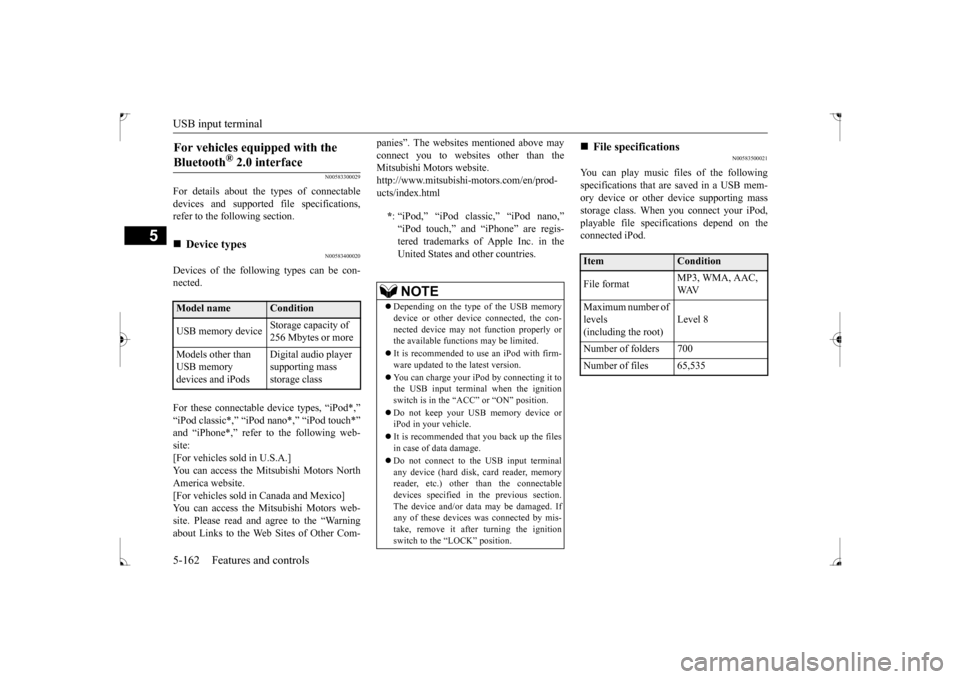
3. Connect the connector cable to the iPod. 4. Connect the connector cable (B) to the USB input terminal (C).
5. To remove the connector cable, turn the ignition switch to the “LOCK” position first and perform the installation steps in reverse.
N00567001054 N00583200073
For details about the types of connectable devices and supported file specifications,refer to the following pages and manuals. Refer to “Listen to an iPod” on page 7-33, “Listen to Audio Files on a USB Device” on page 7-35 and “Audio Files (MP3/WMA/AAC)” on page 7-20. Refer to the separate owner’s manual.
NOTE
Do not connect the USB memory device to the USB input terminal directly. The USB memory device may be damaged. When closing the center console box, be careful not to trap the USB connector cable.
How to connect an iPod
NOTE
Use a genuine connector cable from Apple Inc.CAUTION Keep the lid of the center console box closed while driving the vehicle. A lid or the con- tents of the center console box could other- wise cause injuries.NOTE
When closing the center console box, be careful not to trap the connector cable.
Types of connectable devices and supported file specifica- tions Except for vehicles equipped with the Bluetooth
® 2.0 interface
For vehicles equipped with the AM/FM radio/CD player For vehicles equipped with the DISPLAY AUDIO
BK0237700US.book
161 ページ 2016年4月15日 金曜日 午前11時28分
Page 227 of 385
USB input terminal 5-162 Features and controls
5
N00583300029
For details about the types of connectable devices and supported file specifications, refer to the following section.
N00583400020
Devices of the following types can be con-nected. For these connectable device types, “iPod*,” “iPod classic*,” “iPod nano*,” “iPod touch*” and “iPhone*,” refer to the following web- site:[For vehicles sold in U.S.A.] You can access the Mitsubishi Motors North America website.[For vehicles sold in Canada and Mexico] You can access the Mitsubishi Motors web- site. Please read and agree to the “Warningabout Links to the Web Sites of Other Com-
panies”. The websites mentioned above may connect you to websites other than the Mitsubishi Motors website. http://www.mitsubishi-motors.com/en/prod-ucts/index.html
N00583500021
You can play music files of the following specifications that are saved in a USB mem- ory device or other device supporting massstorage class. When you connect your iPod, playable file specifications depend on the connected iPod.
For vehicles equipped with the Bluetooth
® 2.0 interface
Device types Model name
Condition
USB memory device
Storage capacity of 256 Mbytes or more
Models other than USB memory devices and iPods
Digital audio player supporting mass storage class
* : “iPod,” “iPod classic,” “iPod nano,” “iPod touch,” and “iPhone” are regis- tered trademarks of Apple Inc. in the United States and other countries.NOTE
Depending on the type of the USB memory device or other device connected, the con- nected device may not function properly or the available functions may be limited. It is recommended to use an iPod with firm- ware updated to the latest version. You can charge your iPod by connecting it to the USB input terminal when the ignitionswitch is in the “ACC” or “ON” position. Do not keep your USB memory device or iPod in your vehicle. It is recommended that you back up the files in case of data damage. Do not connect to the USB input terminal any device (hard disk, card reader, memory reader, etc.) other than the connectabledevices specified in the previous section. The device and/or data may be damaged. If any of these devices
was connected by mis-
take, remove it after turning the ignition switch to the “LOCK” position.
File specifications Item
Condition
File format
MP3, WMA, AAC, WAV
Maximum number of levels(including the root)
Level 8
Number of folders 700 Number of files 65,535
BK0237700US.book
162 ページ 2016年4月15日 金曜日 午前11時28分
Page 232 of 385
Storage spaces
Features and controls 5-167
5
There is a card holder on the inside of the glove compartment.
N00546401114
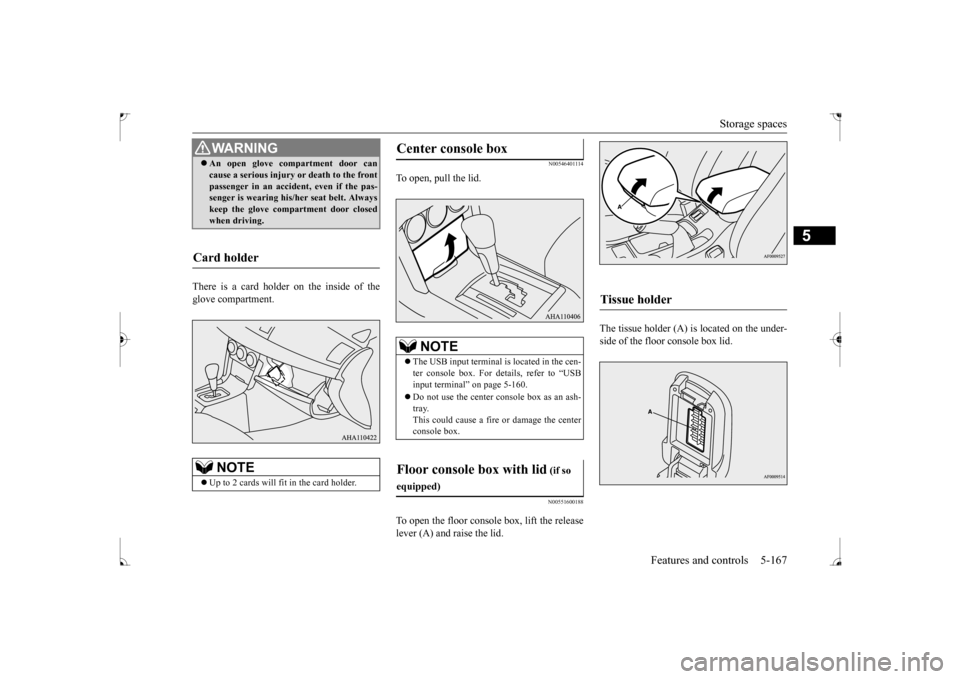
To open, pull the lid.
N00551600188
To open the floor console box, lift the releaselever (A) and raise the lid.
The tissue holder (A) is located on the under- side of the floor console box lid.
WA R N I N G An open glove compartment door can cause a serious injury or death to the front passenger in an accident, even if the pas- senger is wearing his/her seat belt. Always keep the glove compartment door closedwhen driving.
Card holder
NOTE
Up to 2 cards will fit in the card holder.
Center console box
NOTE
The USB input terminal is located in the cen- ter console box. For details, refer to “USBinput terminal” on page 5-160. Do not use the center console box as an ash- tray. This could cause a fire or damage the center console box.
Floor console box with lid
(if so
equipped)
Tissue holder
BK0237700US.book
167 ページ 2016年4月15日 金曜日 午前11時28分
Page 248 of 385
7
Comfort controlsVents .........................................
.......................................................7-2
Automatic air conditioning
with Fahrenheit scale
(if so equipped) .
.................................................
..........................7-4
Automatic air conditioning with Cels
ius scale (if so equipped) .......7-9
Important air conditioning op
erating tips ......................................7-14
Air purifier ......................
...............................................................7-15
AM/FM radio/CD player (if so equipped) .....................................7-15Handling of Discs .
.................................................
........................7-18
Audio Files (MP3/WMA/
AAC) ....................................................7-20
Important Points on Safety fo
r the Customer ................................7-24
Operation Keys ...............
...............................................................7-24
Listen to Radio ......
.................................................
........................7-28
Listen to Satellite Radio (if so equipped) .......................................7-29Listen to CDs ..................
...............................................................7-31
Listen to MP3s ......
.................................................
........................7-32
Listen to an iPod ...
.................................................
........................7-33
Listen to Audio Files on
a USB Device .........................................7-35
To play iPod/USB memory device tracks via voice operation (vehicles with Bluetooth 2.0
interface) ......................................7-38
Listen to Bluetooth Audio (i
f so equipped) ....................................7-41
Display Indicator ..
.................................................
........................7-43
Audio Quality and Volume Balance Adjustment ...........................7-44System Settings .....
.................................................
........................7-45
Troubleshooting ..............
...............................................................7-49
Antenna .....................................
.....................................................7-51
Clock (if so equipped)
............................................
........................7-52
General information about
your radio ...........................................7-53
BK0237700US.bo
ok 1 ページ 2016年4月15日 金曜日 午前11時28分
Page 267 of 385
Audio Files (MP3/WMA/AAC) 7-20 Comfort controls
7
Discs that have not been finalized cannot be played back. Even if recorded using the correct format on a recorder or computer, applicationsoftware settings and environments; disc peculiarities, damage, or marking; or dirt or condensation on the lens inside theproduct may render the disc unplayable. Depending on the disc, some functions may not be used, or the disc may not playback. Do not use discs with cracks or warps. If the disc has stickers affixed, remains from removed stickers, or affixed adhe-sive, then do not use the disc. Discs that have decorative labels or stick- ers may not be used.
This product will play back audio CDs, how- ever please be aware of
the following points
regarding CD standards. Ensure that you use discs with on the label surface. Playback of other than standard CDs is not guaranteed. Even if the audio can be played back, the audio quality cannot be guaranteed. When playing back other than standard CDs, the following may occur.
• There may be noise during playback. • There may be jumping in the audio. • The disc may not be recognized. • The first track may not be played back.• It may take longer than usual until start of playback of tracks. • Playback may start from within thetrack. • Some parts may not be played back. • Tracks may freeze during playback.• Tracks may be displayed erroneously.
N00715600027
This product can play back MP3/WMA/AACformat audio files recorded on CD-ROM,CD-R/RW, and USB devices. There are limitations on the files and media that can be used, therefore read the following prior to recording MP3/WMA/AAC formataudio files on discs or USB devices. Additionally, ensure you read the user manu- als for your CD-R/RW drive and the writingsoftware, and ensure these are used correctly. If the MP3/WMA/AAC format audio files includes title information or other data, thenthis can be displayed.
Nonstandard CDs
Audio Files (MP3/WMA/AAC)
CAUTION CD-ROM and CD-R/RW media can only play back MP3 format audio files. Actions such as copying audio CDs or files and either distributing these to others for freeor for charge, or uploading files via the Inter- net or other means to servers is an infringe- ment of the law. Do not append the file extensions “.mp3”, “.wma”, or “.m4a”, to other thanMP3/WMA/AAC format files. Playing back discs with these types of files recorded upon them may cause the files to be incorrectlyidentified for playback, which may lead to loud noise, resulting in speaker damage or accident.NOTE
Depending on the condition of the disc recorder or recording software used, correct playback may not be possible. In these cases,refer to the user manual for your product or software. Depending on your computer’s operating system, version, software, or settings, files may not have a file extension appended. In these cases, append the file extensions “.mp3”, “.wma”, or “.m4a” when copyingthe files. Files larger than 2GB in size cannot be played back.
BK0237700US.bo
ok 20 ページ 2016年4月15日 金曜日 午前11時28分
Page 268 of 385
Audio Files (MP3/WMA/AAC)
Comfort controls 7-21
7
N00715700028
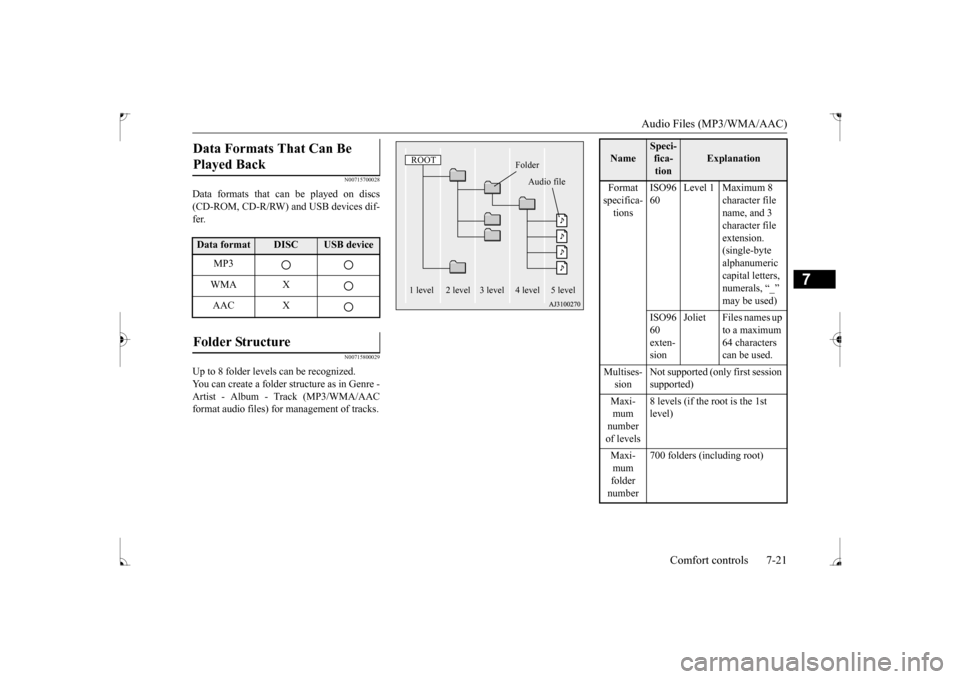
Data formats that can be played on discs (CD-ROM, CD-R/RW) and USB devices dif- fer.
N00715800029
Up to 8 folder levels can be recognized.You can create a folder structure as in Genre - Artist - Album - Track (MP3/WMA/AACformat audio files) for management of tracks.Data Formats That Can Be Played Back Data format
DISC
USB device
MP3 WMA XAAC X
Folder Structure
ROOT
Folder
Audio file
1 level 2 level 3 level 4 level 5 level
Name
Speci- fica- tion
Explanation
Format specifica- tions
ISO96 60
Level 1 Maximum 8
character file name, and 3 character file extension. (single-byte alphanumeric capital letters, numerals, “_” may be used)
ISO96 60 exten- sion
Joliet Files names up
to a maximum 64 characters can be used.
Multises- sion
Not supported (only first session supported)
Maxi- mum number of levels
8 levels (if the root is the 1st level)
Maxi- mum folder number
700 folders (including root)
BK0237700US.bo
ok 21 ページ 2016年4月15日 金曜日 午前11時28分