lock MITSUBISHI LANCER EVOLUTION 2015 10.G Owners Manual
[x] Cancel search | Manufacturer: MITSUBISHI, Model Year: 2015, Model line: LANCER EVOLUTION, Model: MITSUBISHI LANCER EVOLUTION 2015 10.GPages: 338, PDF Size: 43.12 MB
Page 190 of 338
Turn signal lever
Features and controls 5-129
5
4. The headlights will come on in the low beam setting for about 30 seconds. Afterthe headlights go off, the headlights can be turned on again in the low beam setting for about 30 seconds by pulling the turnsignal lever toward you within 60 seconds of turning the ignition switch to the “LOCK” position. To turn on the head-lights again after 60 seconds of turningthe ignition switch to the “LOCK” posi- tion, repeat the process from step 1.
N00542800038
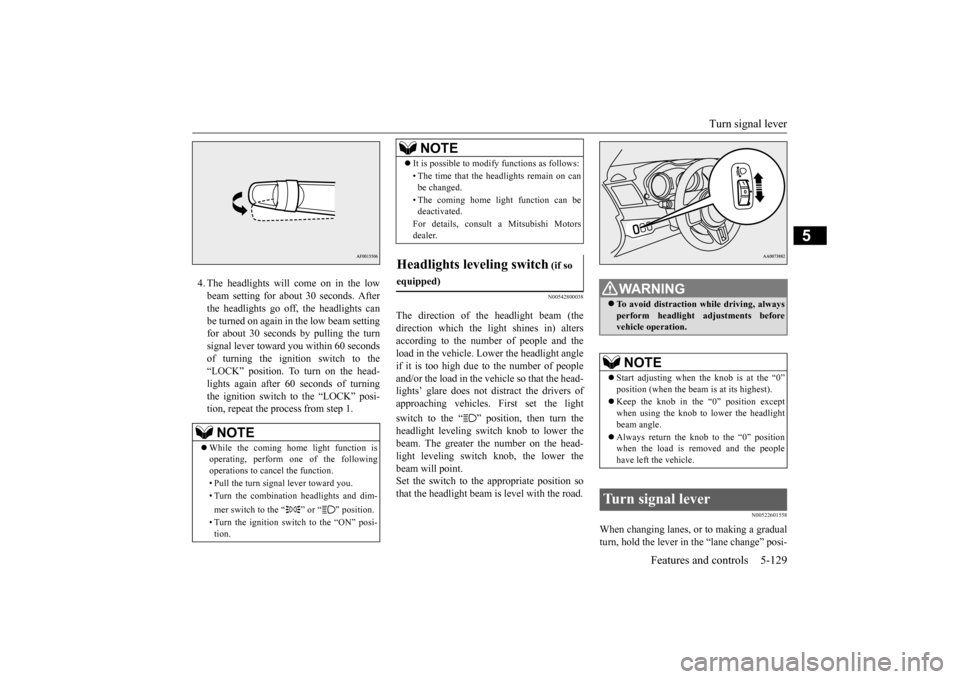
The direction of the headlight beam (the direction which the light shines in) altersaccording to the number of people and the load in the vehicle. Lower the headlight angle if it is too high due to the number of peopleand/or the load in the vehicle so that the head- lights’ glare does not distract the drivers of approaching vehicles. First set the light switch to the “ ” position, then turn the headlight leveling switch knob to lower the beam. The greater the number on the head- light leveling switch knob, the lower thebeam will point. Set the switch to the appropriate position so that the headlight beam is level with the road.
N00522601558
When changing lanes, or to making a gradualturn, hold the lever in
the “lane change” posi-
NOTE
While the coming home light function is operating, perform one of the following operations to cancel the function. • Pull the turn signal lever toward you. • Turn the combination headlights and dim- mer switch to the “ ” or “ ” position. • Turn the ignition switch to the “ON” posi- tion.
It is possible to modify functions as follows: • The time that the headlights remain on can be changed. • The coming home light function can be deactivated. For details, consult a Mitsubishi Motors dealer.
Headlights leveling switch
(if so
equipped)
NOTE
WA R N I N G To avoid distraction while driving, always perform headlight adjustments before vehicle operation.NOTE
Start adjusting when
the knob is at the “0”
position (when the beam is at its highest). Keep the knob in the “0” position except when using the knob to lower the headlight beam angle. Always return the knob to the “0” position when the load is removed and the peoplehave left the vehicle.
Turn signal lever
BK0210800US.book
129 ページ 2014年4月8日 火曜日 午前11時28分
Page 196 of 338
Electric rear window defogger switch
Features and controls 5-135
5
N00523500212
N00523701442
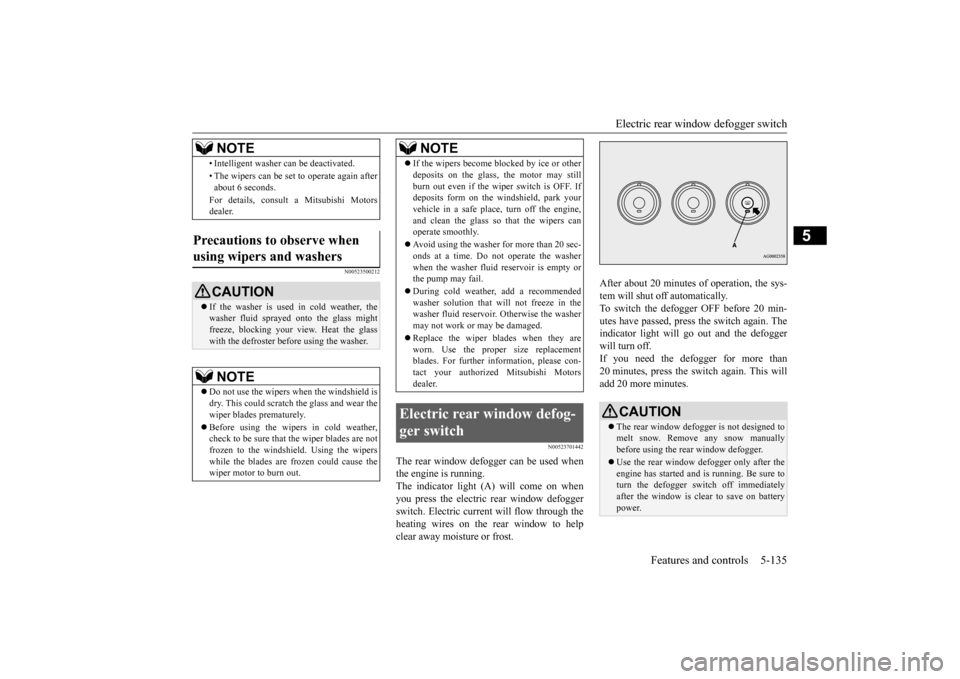
The rear window defogger can be used when the engine is running.The indicator light (A) will come on when you press the electric rear window defogger switch. Electric current will flow through theheating wires on the rear window to help clear away moisture or frost.
After about 20 minutes of operation, the sys- tem will shut off automatically. To switch the defogger OFF before 20 min-utes have passed, press the switch again. The indicator light will go out and the defogger will turn off.If you need the defogger for more than20 minutes, press the switch again. This will add 20 more minutes.
• Intelligent washer can be deactivated. • The wipers can be set to operate again after about 6 seconds. For details, consult a Mitsubishi Motors dealer.
Precautions to observe when using wipers and washers
CAUTION If the washer is used in cold weather, the washer fluid sprayed onto the glass might freeze, blocking your view. Heat the glass with the defroster before using the washer.NOTE
Do not use the wipers when the windshield is dry. This could scratch the glass and wear the wiper blades prematurely. Before using the wipers in cold weather, check to be sure that the wiper blades are not frozen to the windshield. Using the wipers while the blades are frozen could cause thewiper motor to burn out.NOTE
If the wipers become blocked by ice or other deposits on the glass, the motor may still burn out even if the wiper switch is OFF. If deposits form on the windshield, park your vehicle in a safe place, turn off the engine,and clean the glass so that the wipers can operate smoothly. Avoid using the washer for more than 20 sec- onds at a time. Do not operate the washer when the washer fluid reservoir is empty orthe pump may fail. During cold weather, add a recommended washer solution that will not freeze in the washer fluid reservoir. Otherwise the washer may not work or may be damaged. Replace the wiper blades when they are worn. Use the proper size replacementblades. For further information, please con- tact your authorized Mitsubishi Motors dealer.
Electric rear window defog- ger switch
NOTE
CAUTION The rear window defogger is not designed to melt snow. Remove any snow manuallybefore using the rear window defogger. Use the rear window defogger only after the engine has started and is running. Be sure to turn the defogger switch off immediately after the window is clear to save on batterypower.
BK0210800US.book
135 ページ 2014年4月8日 火曜日 午前11時28分
Page 202 of 338
Bluetooth® 2.0 interface
Features and controls 5-141
5
If a passcode has been set and the security function is enabled, the voice guide will say “Hands-free system is locked. State the pass- code to continue” when the SPEECH button(except for vehicles with Mitsubishi Multi- Communication System) or PICK-UP button (for vehicles with Mi
tsubishi Multi-Commu-
nication System) is pressed to enter voice rec- ognition mode. Say the 4-digit passcode number to enter the passcode. If the entered passcode is wrong, the voice guide will say “<4-digit passcode>, Incorrectpasscode. Please try again.” Enter the correct passcode. Use the following procedure to turn off the security function by disabling the passcode.
1. Press the SPEECH button (except for vehicles with Mits
ubishi Multi-Commu-
nication System) or PICK-UP button (for vehicles with Mits
ubishi Multi-Commu-
nication System).2. Say “Setup.”3. Say “Passcode.” 4. The voice guide will say “Passcode is enabled. Would you like to disable it?”Answer “Yes.” Answer “No” to cancel the disabling of the passcode and return to the main menu. 5. When the disabling of the passcode is completed, the voice guide will say “Pass- code is disabled” and the system willreturn to the main menu.
N00564700011
The Bluetooth
® 2.0 interface can use the
speaker enrollment function to create a voice model for one person per language. This makes it easier for the Bluetooth
® 2.0
interface to recognise voice commands said by you.
You can turn a voice model registered with the speaker enrollment function on and off whenever you want.
N00564801107
It takes about 2 to 3 minutes to complete thespeaker enrollment process. To ensure the best results, run through theprocess while in the driver’s seat, in an envi-ronment that is as quiet as possible (when there is no rain or strong winds and the vehi- cle windows are closed). Please turn off yourphone while in speaker enrollment to prevent interruption of the process. Use the following procedure for speakerenrollment. 1. Stop your vehicle in a safe area, put the gearshift lever in the “N” (Neutral) posi- tion (manual transaxle), or the gearshiftlever in the “P” (PARK) position (Twin Clutch SST) and pull the parking brake lever.
Entering the passcode
NOTE
You can reenter the passcode as many times as you want. If you have forgotten your passcode, say “Cancel” to quit the voice input mode andthen check with an authorized Mitsubishi Motors dealer.
Disabling the passcode
NOTE
System must be unlocked to disable the pass- code.
Speaker enrollment function
Speaker enrollment
NOTE
Speaker enrollment is not possible unless the vehicle is parked. Make sure you park the vehicle in a safe area before attempting speaker enrollment.
BK0210800US.book
141 ページ 2014年4月8日 火曜日 午前11時28分
Page 218 of 338
USB input terminal
Features and controls 5-157
5
Connect the equipment into an outlet on a circuit different from that to which the receiver is connected. Consult the dealer or an experienced radio/TV technician for help.
ICES Notice: This Class B digital apparatus complies with Canadian ICES-003.
N00566401093 N00566701096
You can connect your USB memory device or iPod
* to play music files stored in the USB
memory device or iPod. The following explains how to connect and remove a USB memory device or iPod.
N00566800074
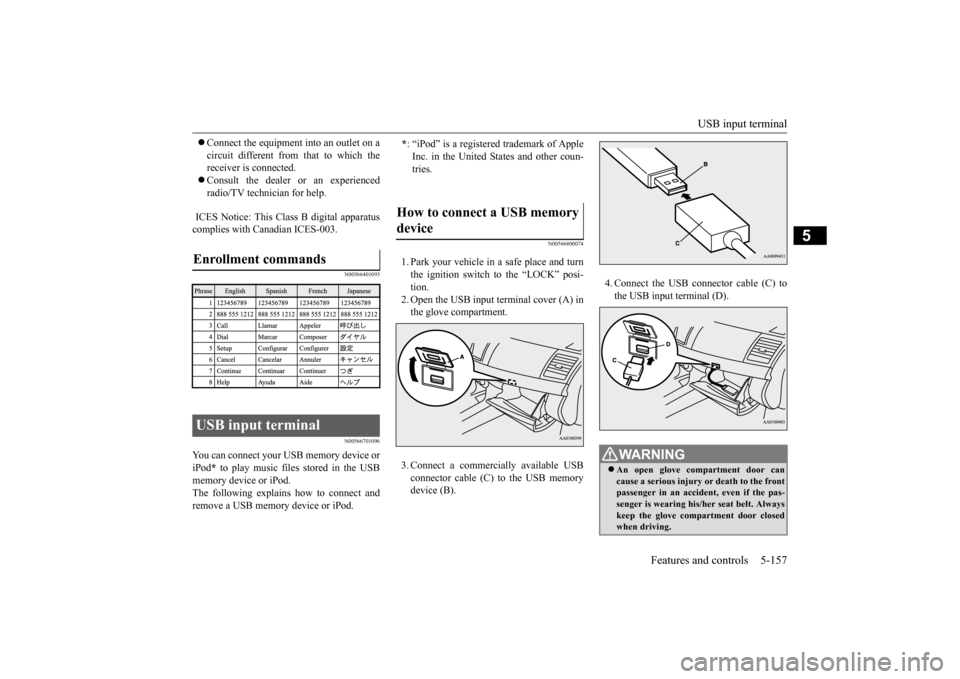
1. Park your vehicle in a safe place and turnthe ignition switch to the “LOCK” posi-tion.2. Open the USB input terminal cover (A) in the glove compartment. 3. Connect a commercially available USB connector cable (C)
to the USB memory
device (B).
4. Connect the USB connector cable (C) to the USB input terminal (D).
Enrollment commands USB input terminal
* : “iPod” is a registered trademark of Apple Inc. in the United States and other coun-tries.
How to connect a USB memory device
WA R N I N G An open glove compartment door can cause a serious injury or death to the front passenger in an accident, even if the pas- senger is wearing his/her seat belt. Alwayskeep the glove compartment door closed when driving.
BK0210800US.book
157 ページ 2014年4月8日 火曜日 午前11時28分
Page 219 of 338
USB input terminal 5-158 Features and controls
5
5. To remove the USB connector cable, turn the ignition switch to the “LOCK” posi- tion first and perform the installation stepsin reverse.
N00566900046
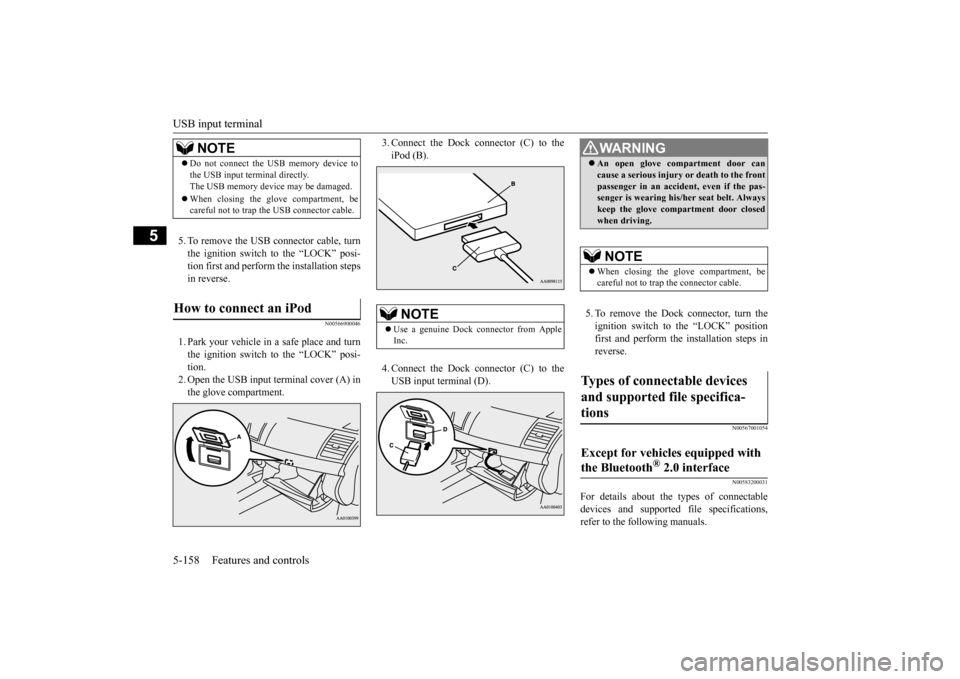
1. Park your vehicle in a safe place and turnthe ignition switch to the “LOCK” posi- tion. 2. Open the USB input terminal cover (A) inthe glove compartment.
3. Connect the Dock connector (C) to the iPod (B). 4. Connect the Dock connector (C) to the USB input terminal (D).
5. To remove the Dock connector, turn the ignition switch to the “LOCK” position first and perform the installation steps inreverse.
N00567001054 N00583200031
For details about the types of connectable devices and supported file specifications, refer to the following manuals.
NOTE
Do not connect the USB memory device to the USB input terminal directly. The USB memory device may be damaged. When closing the glove compartment, be careful not to trap the USB connector cable.
How to connect an iPod
NOTE
Use a genuine Dock connector from Apple Inc.
WA R N I N G An open glove compartment door can cause a serious injury or death to the front passenger in an accident, even if the pas- senger is wearing his/her seat belt. Always keep the glove compartment door closedwhen driving.NOTE
When closing the glove compartment, be careful not to trap the connector cable.
Types of connectable devices and supported file specifica- tions Except for vehicles equipped with the Bluetooth
® 2.0 interface
BK0210800US.book
158 ページ 2014年4月8日 火曜日 午前11時28分
Page 220 of 338
USB input terminal
Features and controls 5-159
5
Refer to the separate owner’s manual. Refer to the separate owner’s manual.
N00583300029
For details about the types of connectable devices and supported file specifications, refer to the following section.
N00583400033
Devices of the following types can be con- nected.
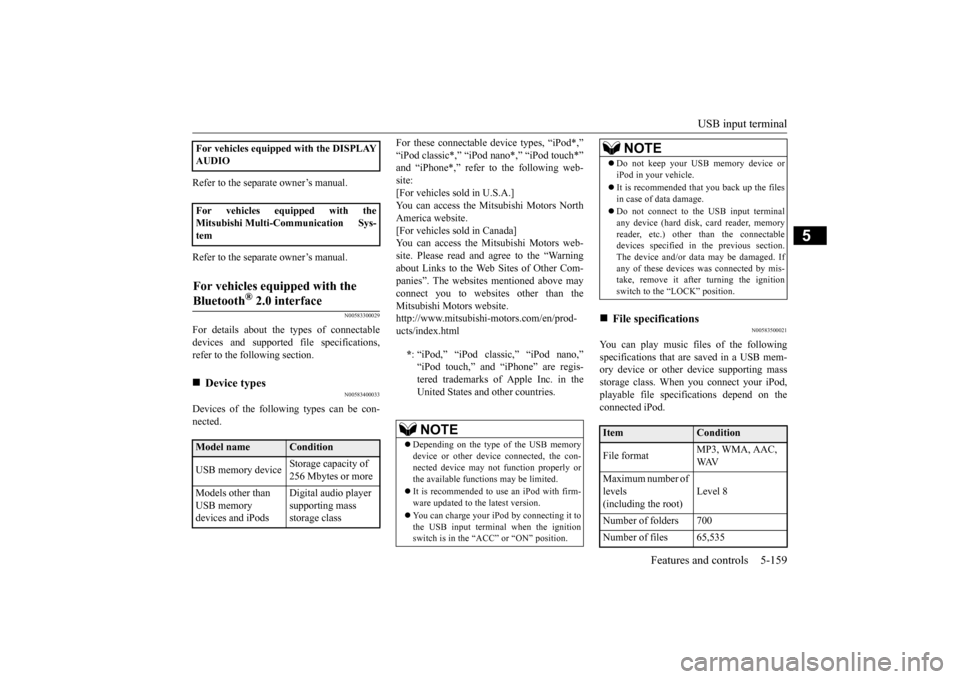
For these connectable device types, “iPod*,” “iPod classic*,” “iPod nano*,” “iPod touch*” and “iPhone*,” refer to the following web- site:[For vehicles sold in U.S.A.] You can access the Mitsubishi Motors North America website.[For vehicles sold in Canada] You can access the Mitsubishi Motors web- site. Please read and agree to the “Warningabout Links to the Web Sites of Other Com-panies”. The websites mentioned above may connect you to websites other than the Mitsubishi Motors website.http://www.mitsubishi-motors.com/en/prod- ucts/index.html
N00583500021
You can play music files of the followingspecifications that are saved in a USB mem- ory device or other device supporting massstorage class. When you connect your iPod, playable file specifications depend on the connected iPod.
For vehicles equipped with the DISPLAY AUDIO For vehicles equipped with the Mitsubishi Multi-Communication Sys-temFor vehicles equipped with the Bluetooth
® 2.0 interface
Device types Model name
Condition
USB memory device
Storage capacity of 256 Mbytes or more
Models other than USB memory devices and iPods
Digital audio player supporting mass storage class
* : “iPod,” “iPod classic,” “iPod nano,” “iPod touch,” and “iPhone” are regis- tered trademarks of Apple Inc. in theUnited States and other countries.NOTE
Depending on the type of the USB memory device or other device connected, the con- nected device may not function properly or the available functions may be limited. It is recommended to use an iPod with firm- ware updated to the latest version. You can charge your iPod by connecting it to the USB input terminal when the ignition switch is in the “ACC” or “ON” position.
Do not keep your USB memory device or iPod in your vehicle. It is recommended that
you back up the files
in case of data damage. Do not connect to the USB input terminal any device (hard disk, card reader, memoryreader, etc.) other than the connectable devices specified in
the previous section.
The device and/or data may be damaged. Ifany of these devices was connected by mis- take, remove it after turning the ignition switch to the “LOCK” position.
File specifications Item
Condition
File format
MP3, WMA, AAC, WAV
Maximum number of levels(including the root)
Level 8
Number of folders 700 Number of files 65,535
NOTE
BK0210800US.book
159 ページ 2014年4月8日 火曜日 午前11時28分
Page 222 of 338
Interior lights
Features and controls 5-161
5
N00525300429
N00525801274
The dome light can be turned on by sliding the dome light switch.
CAUTION Be aware that using electronic equipment with the engine off may run the battery down. When the 12 V power outlet is not in use, be sure that the plug is installed. This will pre- vent the 12 V power outlet from becoming dirty and possibly short-circuiting. Be sure to use a “plug-in” type accessory operating at 12 V and 120 W or less.
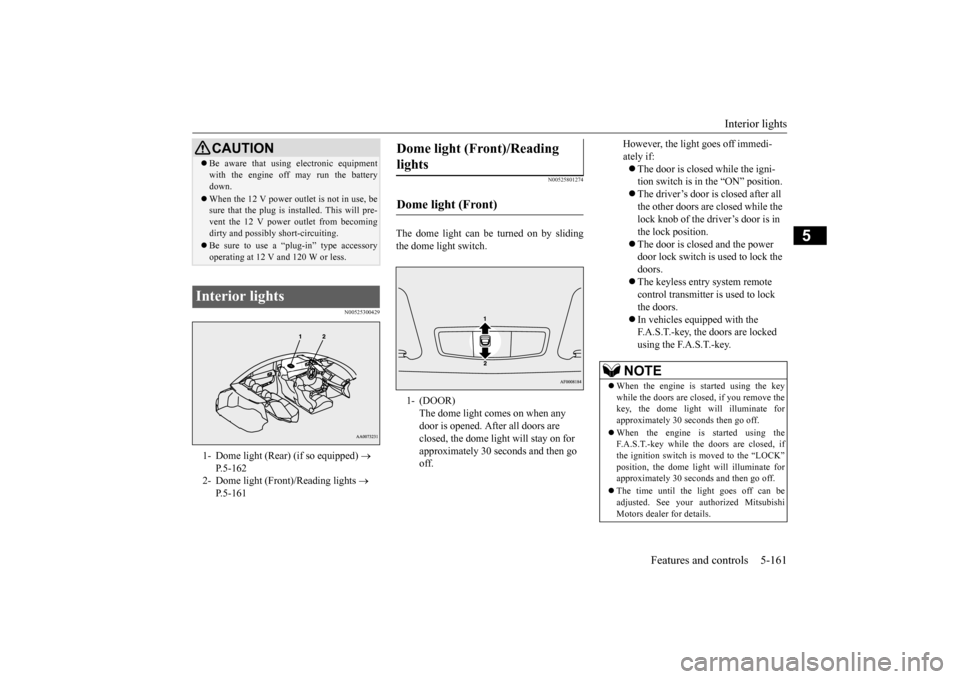
Interior lights 1- Dome light (Rear) (if so equipped)
P.5-162
2- Dome light (Front)/Reading lights
P.5-161
Dome light (Front)/Reading lights Dome light (Front) 1- (DOOR)
The dome light comes on when any door is opened. After all doors are closed, the dome light will stay on for approximately 30 seconds and then go off.
However, the light goes off immedi- ately if: The door is closed while the igni- tion switch is in the “ON” position. The driver’s door is closed after all the other doors are closed while the lock knob of the driver’s door is in the lock position. The door is closed and the power door lock switch is used to lock the doors. The keyless entry system remote control transmitter is used to lock the doors. In vehicles equipped with the F.A.S.T.-key, the doors are locked using the F.A.S.T.-key.
NOTE
When the engine is started using the key while the doors are closed, if you remove thekey, the dome light will illuminate for approximately 30 seconds then go off. When the engine is started using the F.A.S.T.-key while the doors are closed, if the ignition switch is moved to the “LOCK” position, the dome light will illuminate for approximately 30 seconds and then go off. The time until the light goes off can be adjusted. See your authorized MitsubishiMotors dealer for details.
BK0210800US.book
161 ページ 2014年4月8日 火曜日 午前11時28分
Page 223 of 338
Interior lights 5-162 Features and controls
5
N00553800025
Regardless of the dome light switch position, when you press the lens, the light on the sidethat is pressed illuminates; when you press the lens again, the light goes out.
N00525401498
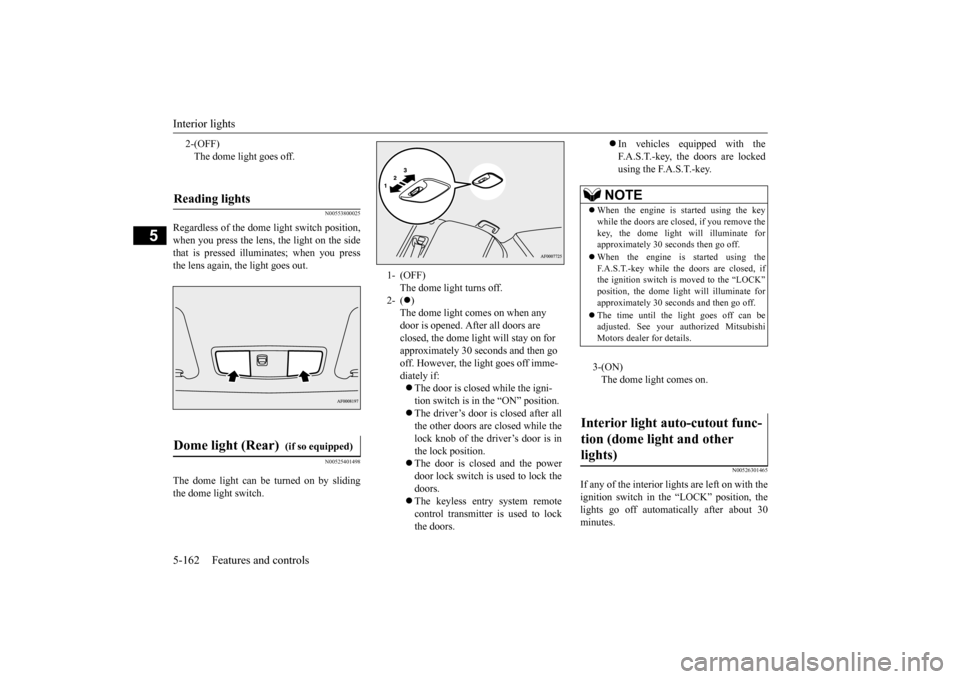
The dome light can be turned on by sliding the dome light switch.
N00526301465
If any of the interior lights are left on with the ignition switch in the “LOCK” position, the lights go off automatically after about 30minutes.
2-(OFF) The dome light goes off.
Reading lights Dome light (Rear)
(if so equipped)
1- (OFF)
The dome light turns off.
2- (
) The dome light comes on when any door is opened. After all doors are closed, the dome light will stay on for approximately 30 seconds and then go off. However, the light goes off imme-diately if: The door is closed while the igni- tion switch is in the “ON” position. The driver’s door is closed after all the other doors are closed while the lock knob of the driver’s door is inthe lock position. The door is closed and the power door lock switch is used to lock thedoors. The keyless entry system remote control transmitter is used to lockthe doors.
In vehicles equipped with the F.A.S.T.-key, the doors are lockedusing the F.A.S.T.-key.
NOTE
When the engine is started using the key while the doors are closed, if you remove the key, the dome light will illuminate forapproximately 30 seconds then go off. When the engine is started using the F.A.S.T.-key while the doors are closed, if the ignition switch is moved to the “LOCK” position, the dome light will illuminate forapproximately 30 seconds and then go off. The time until the light goes off can be adjusted. See your authorized Mitsubishi Motors dealer for details.3-(ON) The dome light comes on.
Interior light auto-cutout func- tion (dome light and other lights)
BK0210800US.book
162 ページ 2014年4月8日 火曜日 午前11時28分
Page 232 of 338
Vehicle preparation before driving
Driving safety 6-3
6
N00629001712
For a safer and more enjoyable trip, always observe the following: Before starting the vehicle, make certain that you and all passengers are seated and wearing their seat belts properly (with children in the rear seat, in appropriaterestraints), and that all the doors are locked.
Move the driver’s seat as far backward as possible, while still keeping good visibil- ity, and good control of the steering wheel, brakes, accelerator, and controls.Check the instrument panel indicators and multi-information display for any possible problem. Move the front passenger seat as far back as possible. Make sure that infants and small children are properly restrained in accordance withall laws and regulations.
Check these by selecting the defroster mode, and set the blower switch on high. You should be able to feel the air blowing against the windshield.{Refer to “Defrosting or defogging (wind- shield, door window)” on page 7-8, 7-13.} Check all the tires for heavy tread wear or uneven wear patterns. Look for stones, nails, glass, or other objects stuck in the tread. Lookfor any tread cuts or sidewall cracks. Check the wheel nuts for tightness, and the tires (including spare tire) for proper pressures.
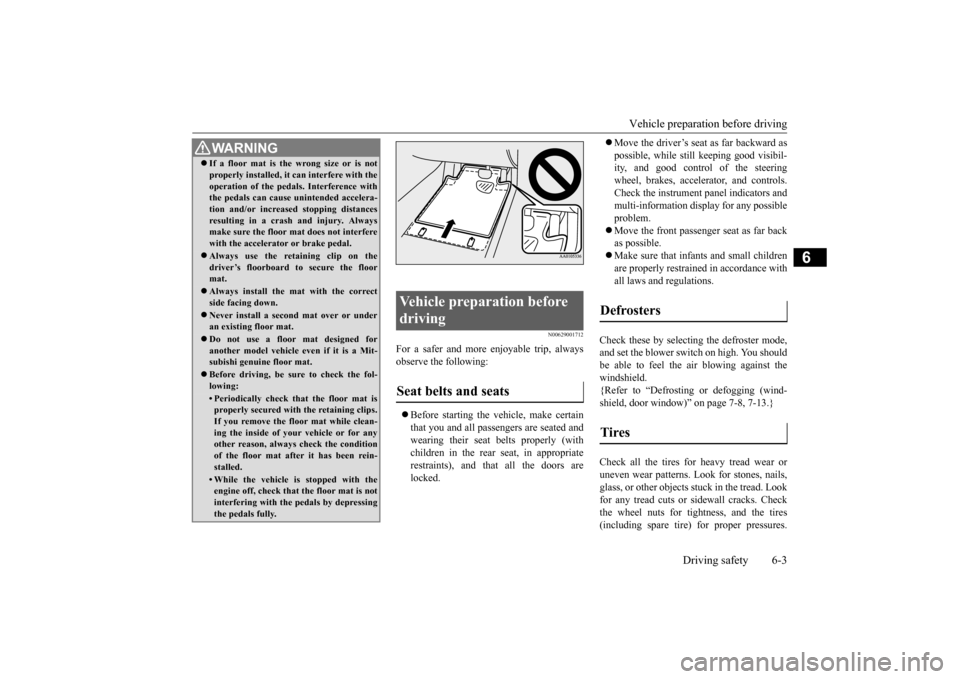
WA R N I N G If a floor mat is the wrong size or is not properly installed, it can interfere with the operation of the pedals. Interference with the pedals can cause unintended accelera- tion and/or increased stopping distancesresulting in a crash and injury. Always make sure the floor mat does not interfere with the accelerator or brake pedal. Always use the retaining clip on the driver’s floorboard to secure the floormat. Always install the mat with the correct side facing down. Never install a second mat over or under an existing floor mat. Do not use a floor mat designed for another model vehicle ev
en if it is a Mit-
subishi genuine floor mat. Before driving, be sure to check the fol- lowing:• Periodically check that the floor mat isproperly secured with the retaining clips. If you remove the floor mat while clean-ing the inside of your vehicle or for any other reason, always check the condition of the floor mat after it has been rein-stalled.• While the vehicle is stopped with the engine off, check that the floor mat is not interfering with the pedals by depressingthe pedals fully.
Vehicle preparation before driving Seat belts and seats
Defrosters Tires
BK0210800US.bo
ok 3 ページ 2014年4月8日 火曜日 午前11時28分
Page 235 of 338
Loading information 6-6 Driving safety
6
Be sure that the parking brake is firmly set when parked and that the gearshift lever is inthe “P” (PARK) position. When parking on a hill, it is important to set the parking brake before moving the gearshiftlever to the “P” (PARK) position. This pre- vents loading the parking brake against the transmission gear. When this happens, it isdifficult to move the gearshift lever out of the“P” (PARK) position. Never leave the engi
ne running while you
take a short sleep/rest. Also, never leave the engine running in a closed or poorly venti-lated place.
Your front bumper can be damaged if you scrape it over curbs or parking stop blocks.Be careful when traveling up or down steep slopes where your bumper can scrape the road. When leaving the vehicle unattended, always carry the key and lock all doors. Always try to park your vehicle in a well litarea.
N00629900365
It is very important to know how muchweight your vehicle can carry. This weight is called the vehicle capacity weight and includes the weight of all occupants, cargo(including the roof load) and non-factory- installed options. The tire and loading infor-
mation placard located on the driver’s door sill of your vehicle will show how much weight it may properly carry. It is important to familiarize yourself with the following terms before loading your vehicle: Vehicle maximum load on the tire: load on an individual tire that is determined bydistributing to each axle its share of the maximum loaded vehicle weight and dividing by two. Vehicle normal load on the tire: load on an individual tire that is determined by dis- tributing to each axle its share of the curbweight, accessory weight, and normal occupant weight and dividing by two. Maximum loaded vehicle weight: the sum of - (a) Curb weight; (b) Accessory weight;(c) Vehicle capacity weight; and (d) Production options weight.
For vehicles with Twin Clutch SST Parking with the engine run- ning
WA R N I N G Leaving the engine running risks injury or death from accidentally moving the gear- shift lever (manual transaxle) or the gear-shift lever (Twin Clutch SST) or from the accumulation of toxic exhaust fumes in the passenger compartment.
Where you park
WA R N I N G Do not park your vehicle in areas where combustible materials such as dry grass orleaves can come in contact with a hot exhaust, since a fire could occur.
When leaving the vehicle Loading information
WA R N I N G Never overload your vehicle. Overloading can damage your vehicle, adversely affect vehicle performance, including handling and braking, cause tire failure, and resultin an accident.
BK0210800US.bo
ok 6 ページ 2014年4月8日 火曜日 午前11時28分