clock MITSUBISHI LANCER EVOLUTION 2015 10.G User Guide
[x] Cancel search | Manufacturer: MITSUBISHI, Model Year: 2015, Model line: LANCER EVOLUTION, Model: MITSUBISHI LANCER EVOLUTION 2015 10.GPages: 338, PDF Size: 43.12 MB
Page 264 of 338
How to change a tire
For emergencies 8-7
8
N00849701326
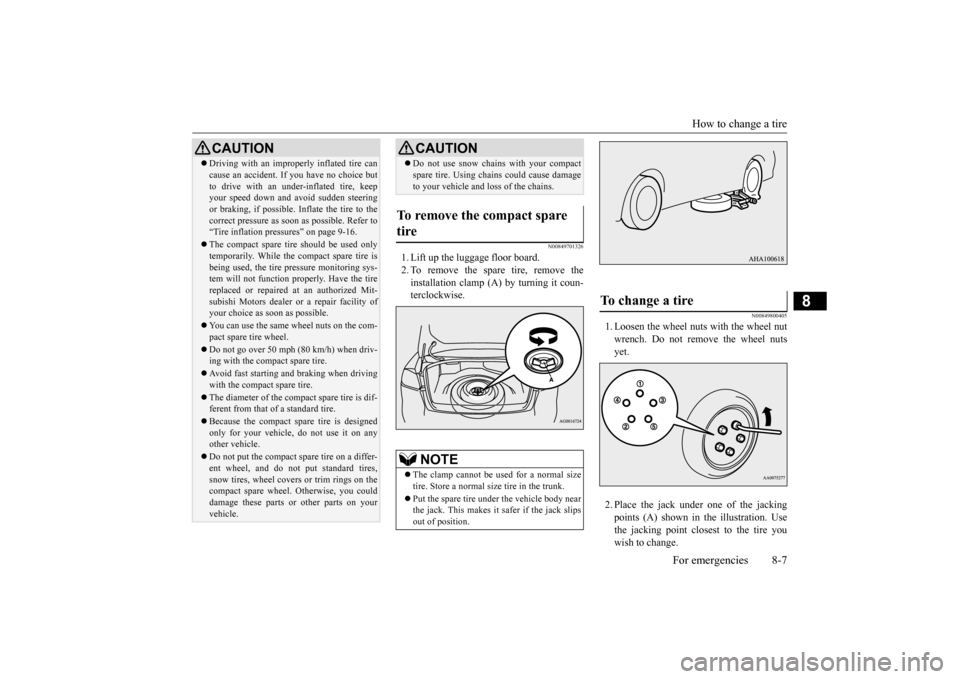
1. Lift up the luggage floor board. 2. To remove the spare tire, remove theinstallation clamp (A) by turning it coun- terclockwise.
N00849800405
1. Loosen the wheel nuts with the wheel nut wrench. Do not remove the wheel nutsyet. 2. Place the jack under
one of the jacking
points (A) shown in the illustration. Usethe jacking point closest to the tire you wish to change.
Driving with an improperly inflated tire can cause an accident. If you have no choice but to drive with an under-inflated tire, keep your speed down and avoid sudden steering or braking, if possible
. Inflate the tire to the
correct pressure as soon as possible. Refer to “Tire inflation pressures” on page 9-16. The compact spare tire should be used only temporarily. While the compact spare tire is being used, the tire pressure monitoring sys-tem will not function properly. Have the tire replaced or repaired at an authorized Mit- subishi Motors dealer
or a repair facility of
your choice as soon as possible. You can use the same wheel nuts on the com- pact spare tire wheel. Do not go over 50 mph (80 km/h) when driv- ing with the compact spare tire. Avoid fast starting and braking when driving with the compact spare tire. The diameter of the compact spare tire is dif- ferent from that of a standard tire. Because the compact spare tire is designed only for your vehicle, do not use it on any other vehicle. Do not put the compact spare tire on a differ- ent wheel, and do not put standard tires, snow tires, wheel covers or trim rings on the compact spare wheel. Otherwise, you could damage these parts or other parts on yourvehicle.CAUTION
Do not use snow chains with your compact spare tire. Using chains could cause damage to your vehicle and loss of the chains.
To remove the compact spare tire
NOTE
The clamp cannot be us
ed for a normal size
tire. Store a normal size tire in the trunk. Put the spare tire under the vehicle body near the jack. This makes it safer if the jack slipsout of position.CAUTION
To change a tire
BK0210800US.bo
ok 7 ページ 2014年4月8日 火曜日 午前11時28分
Page 266 of 338
How to change a tire
For emergencies 8-9
8
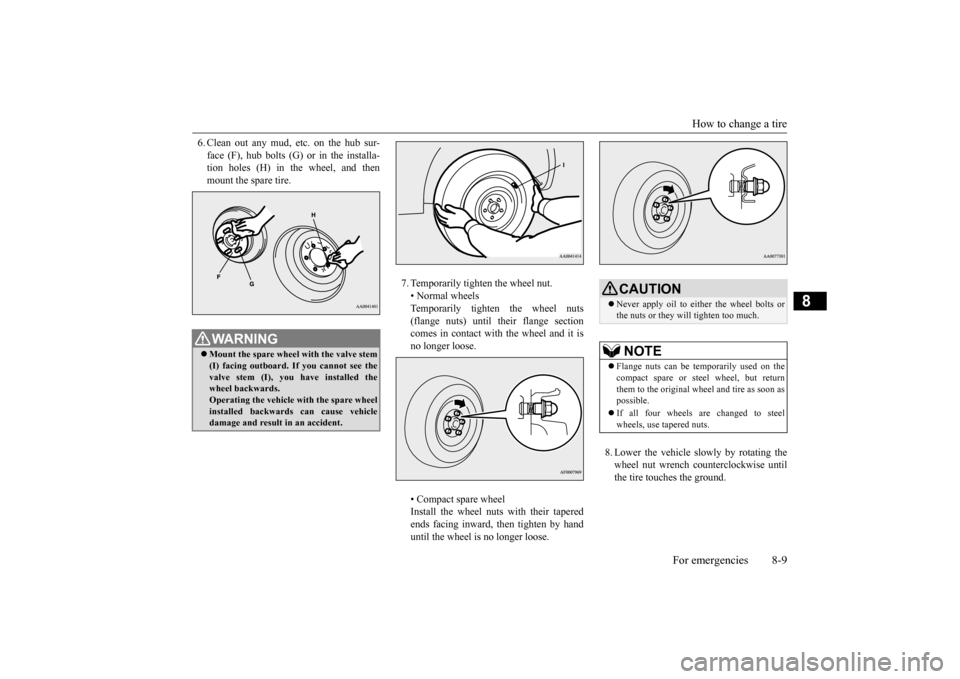
6. Clean out any mud, etc. on the hub sur- face (F), hub bolts (G) or in the installa- tion holes (H) in the wheel, and then mount the spare tire.
7. Temporarily tighten the wheel nut. • Normal wheels Temporarily tighten the wheel nuts(flange nuts) until their flange section comes in contact with the wheel and it is no longer loose. • Compact spare wheel Install the wheel nuts with their taperedends facing inward, then tighten by hand until the wheel is no longer loose.
8. Lower the vehicle slowly by rotating the wheel nut wrench counterclockwise until the tire touches the ground.
WA R N I N G Mount the spare wheel with the valve stem (I) facing outboard. If you cannot see the valve stem (I), you have installed the wheel backwards.Operating the vehicle with the spare wheel installed backwards can cause vehicle damage and result in an accident.
CAUTION Never apply oil to either the wheel bolts or the nuts or they will tighten too much.NOTE
Flange nuts can be temporarily used on the compact spare or steel wheel, but returnthem to the original wheel and tire as soon as possible. If all four wheels are changed to steel wheels, use tapered nuts.
BK0210800US.bo
ok 9 ページ 2014年4月8日 火曜日 午前11時28分
Page 301 of 338
Replacement of light bulbs 9-30 Vehicle care and maintenance
9
N00950400558 N00901800105
1. When replacing th
e bulb on the driver’s
side, remove the bo
lt (A) holding down
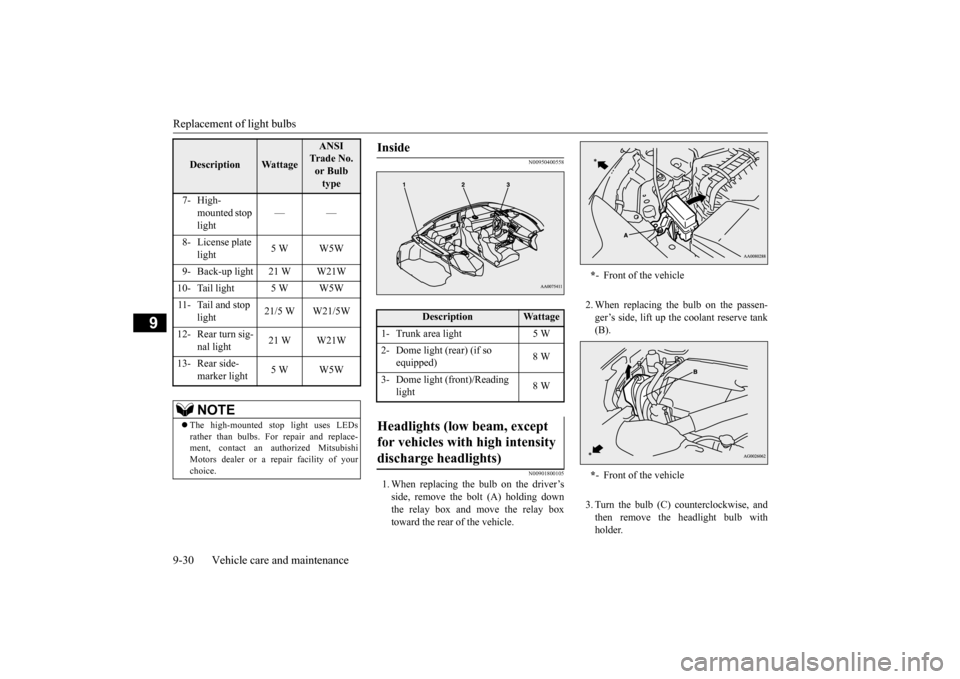
the relay box and move the relay boxtoward the rear of the vehicle.
2. When replacing the bulb on the passen- ger’s side, lift up the coolant reserve tank (B). 3. Turn the bulb (C) counterclockwise, and then remove the headlight bulb withholder.
Description
Wattage
ANSI Trade No. or Bulb type
7- High-
mounted stop light
——
8- License plate
light
5 W W5W
9- Back-up light 21 W W21W 10- Tail light 5 W W5W11- Tail and stop
light
21/5 W W21/5W
12- Rear turn sig-
nal light
21 W W21W
13- Rear side-
marker light
5 W W5W
NOTE
The high-mounted stop light uses LEDs rather than bulbs. For repair and replace- ment, contact an authorized Mitsubishi Motors dealer or a repair facility of yourchoice.
Inside
Description
Wattage
1- Trunk area light 5 W2- Dome light (rear) (if so
equipped)
8 W
3- Dome light (front)/Reading
light
8 W
Headlights (low beam, except for vehicles with high intensity discharge headlights)
* - Front of the vehicle * - Front of the vehicle
BK0210800US.bo
ok 30 ページ 2014年4月8日 火曜日 午前11時28分
Page 302 of 338
Replacement of light bulbs
Vehicle care and maintenance 9-31
9
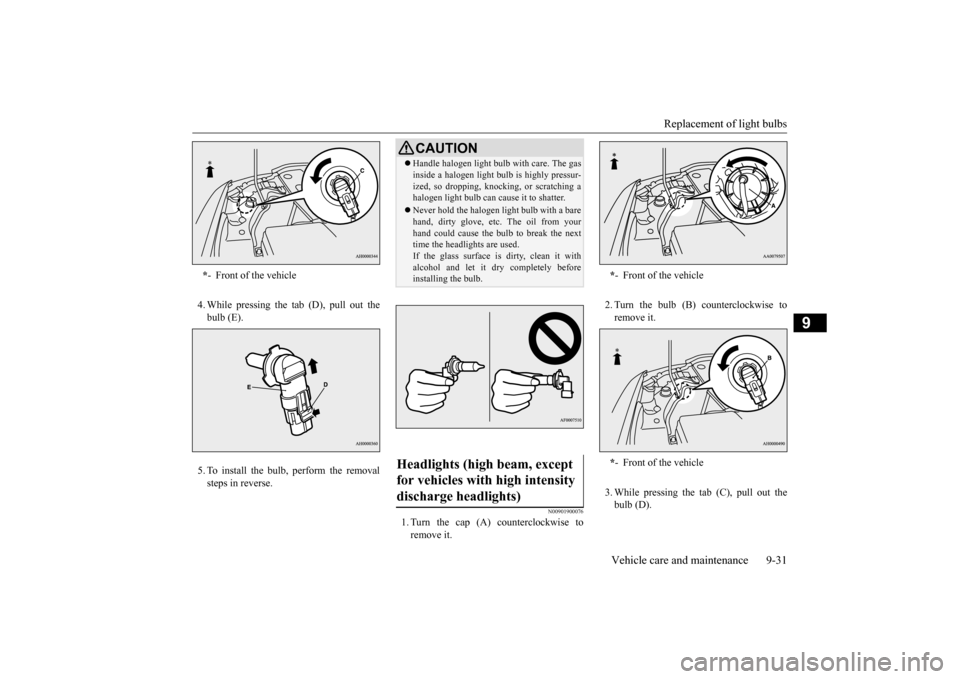
4. While pressing the tab (D), pull out the bulb (E). 5. To install the bulb, perform the removal steps in reverse.
N00901900076
1. Turn the cap (A) counterclockwise toremove it.
2. Turn the bulb (B) counterclockwise to remove it. 3. While pressing the tab (C), pull out the bulb (D).
* - Front of the vehicle
CAUTIONHandle halogen light bulb with care. The gas inside a halogen light bulb is highly pressur- ized, so dropping, knocking, or scratching a halogen light bulb can cause it to shatter. Never hold the halogen light bulb with a bare hand, dirty glove, etc. The oil from your hand could cause the bulb to break the nexttime the headlights are used. If the glass surface is dirty, clean it with alcohol and let it dry completely beforeinstalling the bulb.
Headlights (high beam, except for vehicles with high intensity discharge headlights)
* - Front of the vehicle * - Front of the vehicle
BK0210800US.bo
ok 31 ページ 2014年4月8日 火曜日 午前11時28分
Page 303 of 338
Replacement of light bulbs 9-32 Vehicle care and maintenance
9
4. To install the bulb, perform the removal steps in reverse.
N00902000016
Do not attempt to disassemble or repair head- lights, and do not attempt to replace theirbulbs.
N00943200121
The alignment of the headlights should bechecked by an authorized Mitsubishi Motorsdealer or a repair facility of your choice.
N00900300129
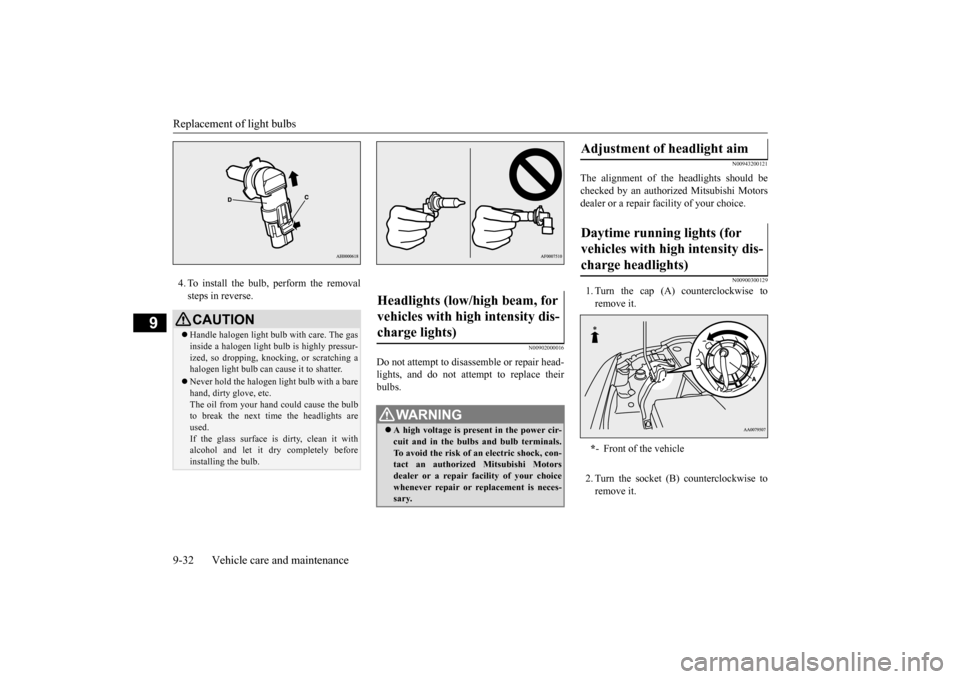
1. Turn the cap (A) counterclockwise to remove it. 2. Turn the socket (B) counterclockwise to remove it.
CAUTION Handle halogen light bulb with care. The gas inside a halogen light bulb is highly pressur- ized, so dropping, knocking, or scratching ahalogen light bulb can cause it to shatter. Never hold the halogen light bulb with a bare hand, dirty glove, etc. The oil from your hand could cause the bulb to break the next time the headlights areused. If the glass surface is dirty, clean it with alcohol and let it dry completely beforeinstalling the bulb.
Headlights (low/high beam, for vehicles with high intensity dis- charge lights)
WA R N I N G A high voltage is present in the power cir- cuit and in the bulbs and bulb terminals. To avoid the risk of an electric shock, con-tact an authorized Mitsubishi Motors dealer or a repair facility of your choice whenever repair or replacement is neces-sary.
Adjustment of headlight aim Daytime running lights (for vehicles with high intensity dis- charge headlights) * - Front of the vehicle
BK0210800US.bo
ok 32 ページ 2014年4月8日 火曜日 午前11時28分
Page 304 of 338
Replacement of light bulbs
Vehicle care and maintenance 9-33
9
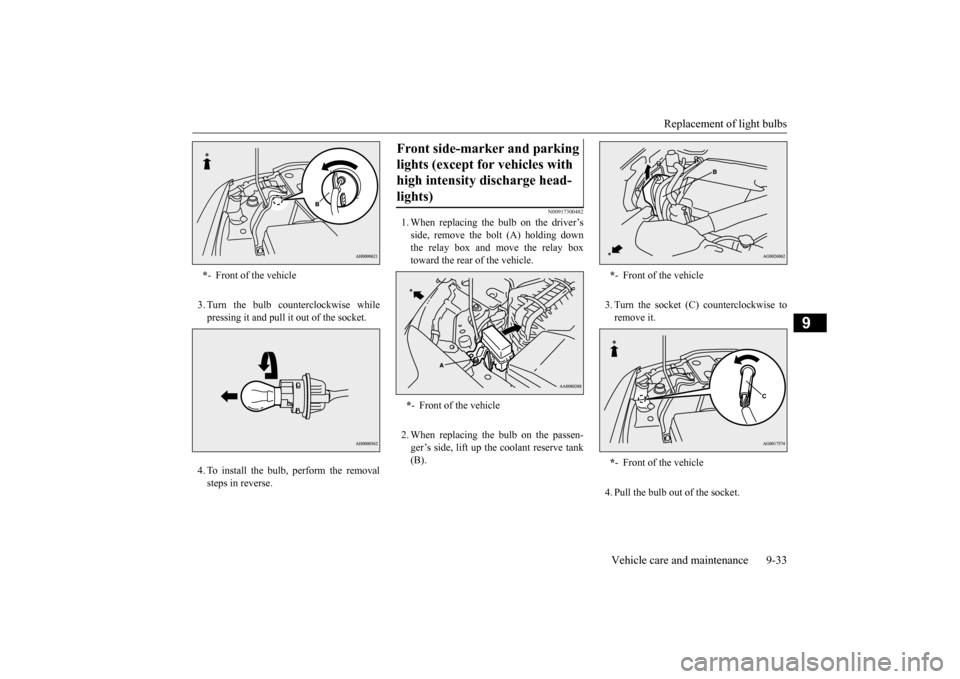
3. Turn the bulb counterclockwise while pressing it and pull it out of the socket. 4. To install the bulb, perform the removal steps in reverse.
N00917300482
1. When replacing the bulb on the driver’sside, remove the bolt (A) holding downthe relay box and move the relay box toward the rear of the vehicle. 2. When replacing the bulb on the passen- ger’s side, lift up the coolant reserve tank(B).
3. Turn the socket (C) counterclockwise to remove it. 4. Pull the bulb out of the socket.
* - Front of the vehicle
Front side-marker and parking lights (except for vehicles with high intensity discharge head- lights) * - Front of the vehicle
*- Front of the vehicle * - Front of the vehicle
BK0210800US.bo
ok 33 ページ 2014年4月8日 火曜日 午前11時28分
Page 305 of 338
Replacement of light bulbs 9-34 Vehicle care and maintenance
9
5. To install the bulb, perform the removal steps in reverse.
N00917300466
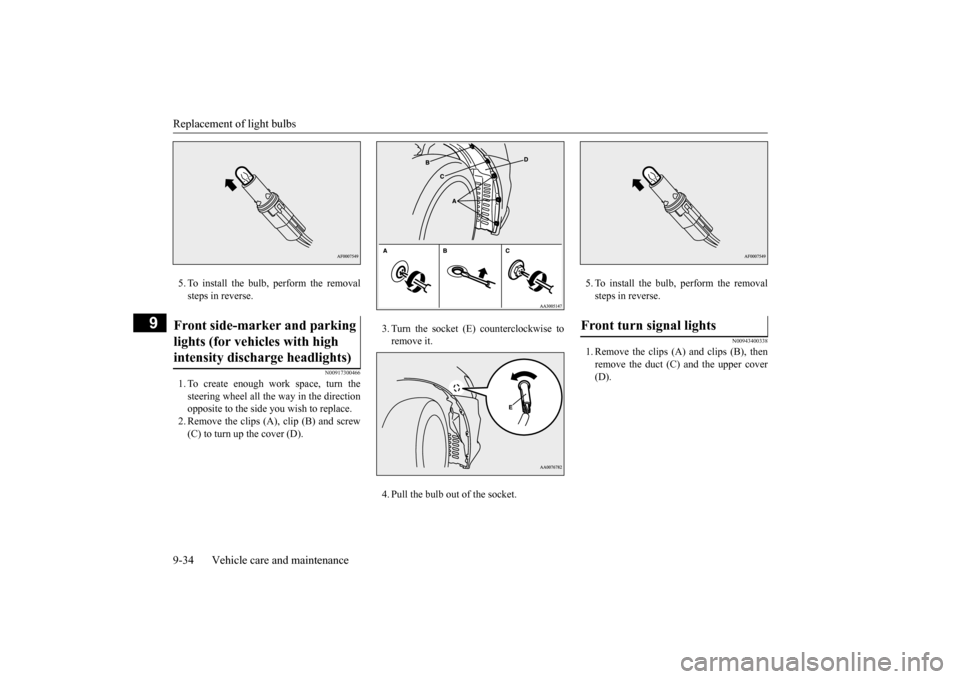
1. To create enough work space, turn thesteering wheel all the way in the direction opposite to the side you wish to replace. 2. Remove the clips (A), clip (B) and screw(C) to turn up the cover (D).
3. Turn the socket (E) counterclockwise to remove it. 4. Pull the bulb out of the socket.
5. To install the bulb, perform the removal steps in reverse.
N00943400338
1. Remove the clips (A) and clips (B), thenremove the duct (C) and the upper cover(D).
Front side-marker and parking lights (for vehicles with high intensity discharge headlights)
Front turn signal lights
BK0210800US.bo
ok 34 ページ 2014年4月8日 火曜日 午前11時28分
Page 306 of 338
Replacement of light bulbs
Vehicle care and maintenance 9-35
9
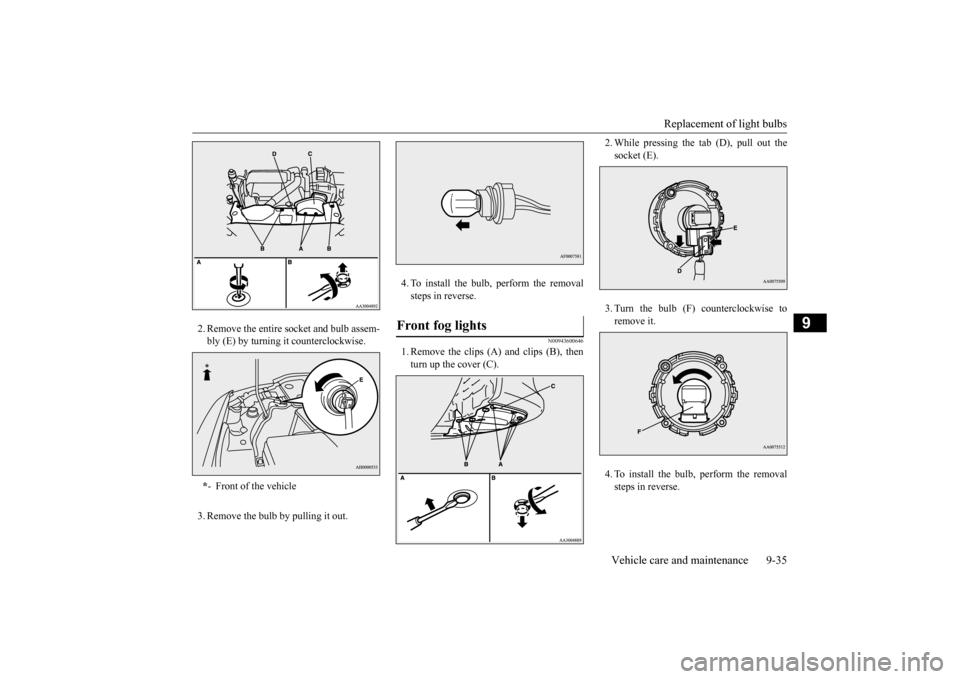
2. Remove the entire socket and bulb assem- bly (E) by turning it counterclockwise. 3. Remove the bulb by pulling it out.
4. To install the bulb, perform the removal steps in reverse.
N00943600646
1. Remove the clips (A) and clips (B), thenturn up the cover (C).
2. While pressing the tab (D), pull out the socket (E). 3. Turn the bulb (F) counterclockwise to remove it. 4. To install the bulb, perform the removal steps in reverse.
* - Front of the vehicle
Front fog lights
BK0210800US.bo
ok 35 ページ 2014年4月8日 火曜日 午前11時28分
Page 307 of 338
Replacement of light bulbs 9-36 Vehicle care and maintenance
9
N00943700399
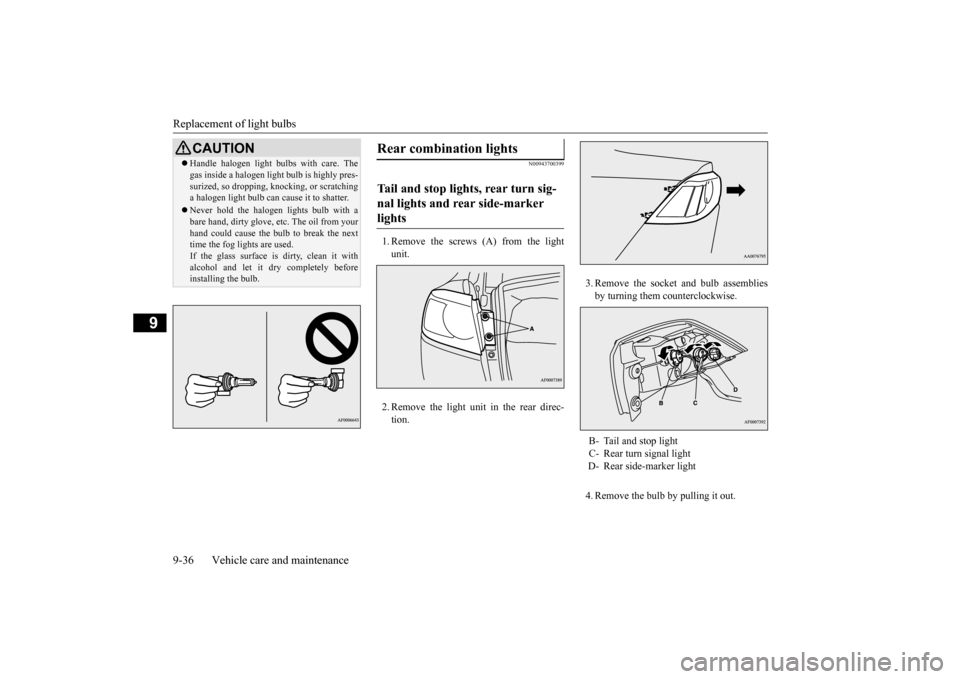
1. Remove the screws (A) from the light unit. 2. Remove the light unit in the rear direc- tion.
3. Remove the socket and bulb assemblies by turning them counterclockwise. 4. Remove the bulb by pulling it out.
CAUTION Handle halogen light bulbs with care. The gas inside a halogen light bulb is highly pres- surized, so dropping, knocking, or scratching a halogen light bulb can cause it to shatter. Never hold the halogen lights bulb with a bare hand, dirty glove, etc. The oil from your hand could cause the bulb to break the nexttime the fog lights are used. If the glass surface is dirty, clean it with alcohol and let it dry completely beforeinstalling the bulb.
Rear combination lights Tail and stop lights, rear turn sig- nal lights and rear side-marker lights
B- Tail and stop light C- Rear turn signal light D- Rear side-marker light
BK0210800US.bo
ok 36 ページ 2014年4月8日 火曜日 午前11時28分
Page 308 of 338
Replacement of light bulbs
Vehicle care and maintenance 9-37
9
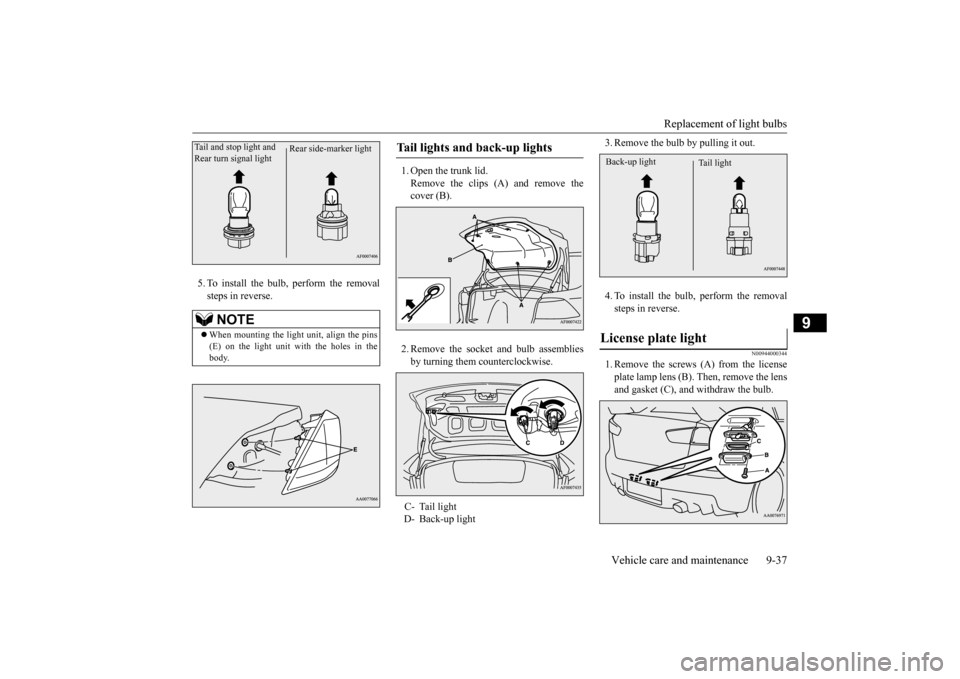
5. To install the bulb, perform the removal steps in reverse.
1. Open the trunk lid. Remove the clips (A) and remove the cover (B). 2. Remove the socket and bulb assemblies by turning them counterclockwise.
3. Remove the bulb by pulling it out. 4. To install the bulb, perform the removal steps in reverse.
N00944000344
1. Remove the screws (A) from the licenseplate lamp lens (B). Then, remove the lensand gasket (C), and withdraw the bulb.
NOTE
When mounting the light unit, align the pins (E) on the light unit with the holes in the body.
Rear side-marker light
Tail and stop light and Rear turn signal light
Tail lights and back-up lights C- Tail light D- Back-up light
License plate light
Tail light
Back-up light
BK0210800US.bo
ok 37 ページ 2014年4月8日 火曜日 午前11時28分