remote control MITSUBISHI LANCER EVOLUTION 2015 10.G User Guide
[x] Cancel search | Manufacturer: MITSUBISHI, Model Year: 2015, Model line: LANCER EVOLUTION, Model: MITSUBISHI LANCER EVOLUTION 2015 10.GPages: 338, PDF Size: 43.12 MB
Page 91 of 338
Free-hand Advanced Security Transmitter (F.A.S.T.-key) (if so equipped) 5-30 Features and controls
5
2. Open the driver’s door and turn the com- bination headlights and dimmer switch to the “OFF” position. 3. Press the LOCK button (1) for 4 to 10 sec-onds and press the UNLOCK button (2) during this time. 4. Release in sequence the UNLOCK andLOCK buttons within 10 seconds of pressing the UNLOCK button in step 3.
The turn signal lights answerback function can be set to the following seven conditions. Each time the turn signal lights answerback function is set, a chime will sound to tell you the condition of the answerback function.
1. Turn the ignition switch to the “LOCK” position. If you started the engine with the key, remove the key from the ignition switch.2. Open the driver’s door and turn the com- bination headlights and dimmer switch to the “OFF” position.3. Press the UNLOCK button (2) for 4 to 10 seconds and press the LOCK button (1) during this time.4. Release in sequence the UNLOCK andLOCK buttons within 10 seconds of pressing the LOCK button in step 3.
The buzzer answerback function can be turned ON or OFF as required.
N00544601112
The door unlock function can be set to thefollowing two conditions.Each time the door unlock function is set, a chime will sound to te
ll you the condition of
the door unlock function.
1. Turn the ignition switch to the “LOCK” position. If you started the engine with the key, remove the key from the ignition switch.2. Open the driver’s door and turn the com- bination headlights and dimmer switch to the “OFF” position.3. Press the LOCK button (1) for 4 to 10 sec- onds and press the UNLOCK button (2) during this time.4. Release in sequence the LOCK andUNLOCK buttons within 10 seconds of pressing the LOCK button in step 3.
N00544700044
If you are near your vehicle and feel threat-ened, you can activate the alarm to call atten- tion as follows: 1. Press the PANIC button (4) for more than 1 second. 2. The headlights will blink on and off and the horn will sound intermittently forabout 3 minutes. 3. To turn off the alarm, press any button on the remote control transmitter.
Changing the setting of the turn signal lights answerback functionNumber of chimes
Condition
To l o c k
To u n l o c k
One chime One flash Two flashesTwo chimes One flash No flashThree chimes No flash Two flashesFour chimes Two flashes One flashFive chimes No flash One flashSix chimes Two flashes No flashSeven chimes
No flash No flash
Buzzer deactivation/reactivationSetting of door unlock function
Number of chimes
Condition
One chime All doors unlock Two chimes Driver’s door unlock only
Using the panic alarm
BK0210800US.bo
ok 30 ページ 2014年4月8日 火曜日 午前11時28分
Page 93 of 338
Free-hand Advanced Security Transmitter (F.A.S.T.-key) (if so equipped) 5-32 Features and controls
5
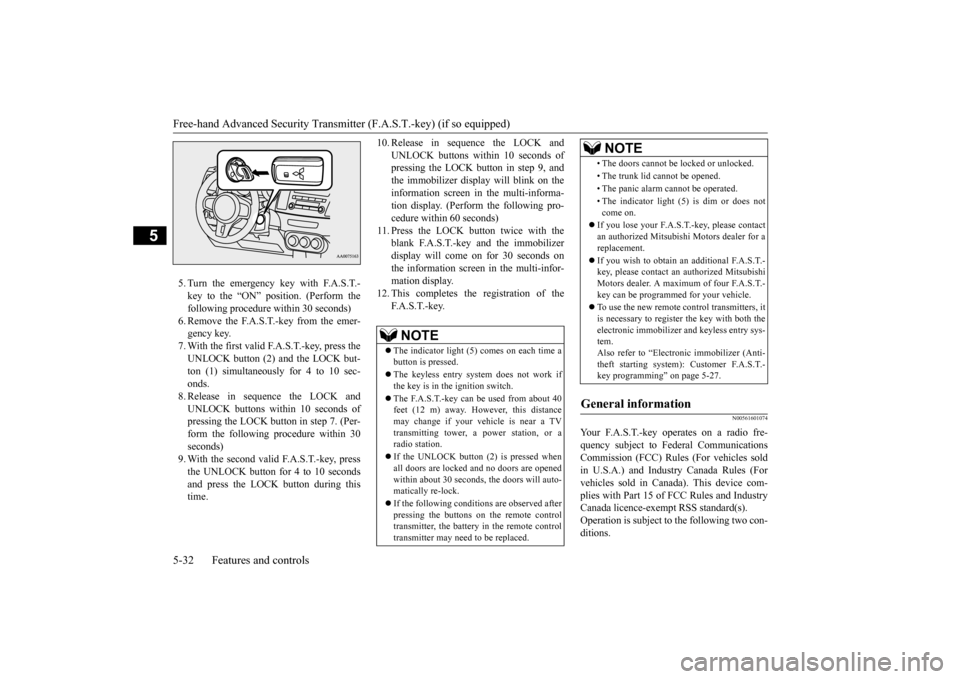
5. Turn the emergency key with F.A.S.T.- key to the “ON” position. (Perform the following procedure within 30 seconds)6. Remove the F.A.S.T.-key from the emer- gency key. 7. With the first valid F.A.S.T.-key, press theUNLOCK button (2) and the LOCK but- ton (1) simultaneously for 4 to 10 sec- onds.8. Release in sequence the LOCK andUNLOCK buttons within 10 seconds of pressing the LOCK button in step 7. (Per- form the following procedure within 30seconds) 9. With the second valid F.A.S.T.-key, press the UNLOCK button for 4 to 10 secondsand press the LOCK button during this time.
10. Release in sequence the LOCK and
UNLOCK buttons within 10 seconds of pressing the LOCK button in step 9, and the immobilizer display will blink on theinformation screen in the multi-informa- tion display. (Perform the following pro- cedure within 60 seconds)
11. Press the LOCK button twice with the
blank F.A.S.T.-key and the immobilizer display will come on for 30 seconds onthe information screen in the multi-infor-mation display.
12. This completes the registration of the
F. A . S . T. - k e y.
N00561601074
Your F.A.S.T.-key operates on a radio fre-quency subject to Federal Communications Commission (FCC) Rules (For vehicles sold in U.S.A.) and Industry Canada Rules (Forvehicles sold in Canada). This device com- plies with Part 15 of FCC Rules and Industry Canada licence-exempt RSS standard(s).Operation is subject to the following two con- ditions.
NOTE
The indicator light (5) comes on each time a button is pressed. The keyless entry system does not work if the key is in the ignition switch. The F.A.S.T.-key can be used from about 40 feet (12 m) away. However, this distance may change if your vehicle is near a TVtransmitting tower, a power station, or a radio station. If the UNLOCK button (2) is pressed when all doors are locked and no doors are openedwithin about 30 seconds, the doors will auto- matically re-lock. If the following conditions are observed after pressing the buttons on the remote control transmitter, the battery in the remote controltransmitter may need to be replaced.
• The doors cannot be locked or unlocked. • The trunk lid cannot be opened.• The panic alarm cannot be operated.• The indicator light (5) is dim or does not come on.
If you lose your F.A.S.T.-key, please contact an authorized Mitsubishi Motors dealer for areplacement. If you wish to obtain an
additional F.A.S.T.-
key, please contact an authorized Mitsubishi Motors dealer. A maximum of four F.A.S.T.- key can be programmed for your vehicle. To use the new remote control transmitters, it is necessary to register the key with both theelectronic immobilizer and keyless entry sys- tem. Also refer to “Electr
onic immobilizer (Anti-
theft starting system): Customer F.A.S.T.- key programming” on page 5-27.
General information
NOTE
BK0210800US.bo
ok 32 ページ 2014年4月8日 火曜日 午前11時28分
Page 94 of 338
Door locks
Features and controls 5-33
5
This device may not cause harmful inter- ference. This device must accept any interference received, including interference that maycause undesired operation.
N00561700094
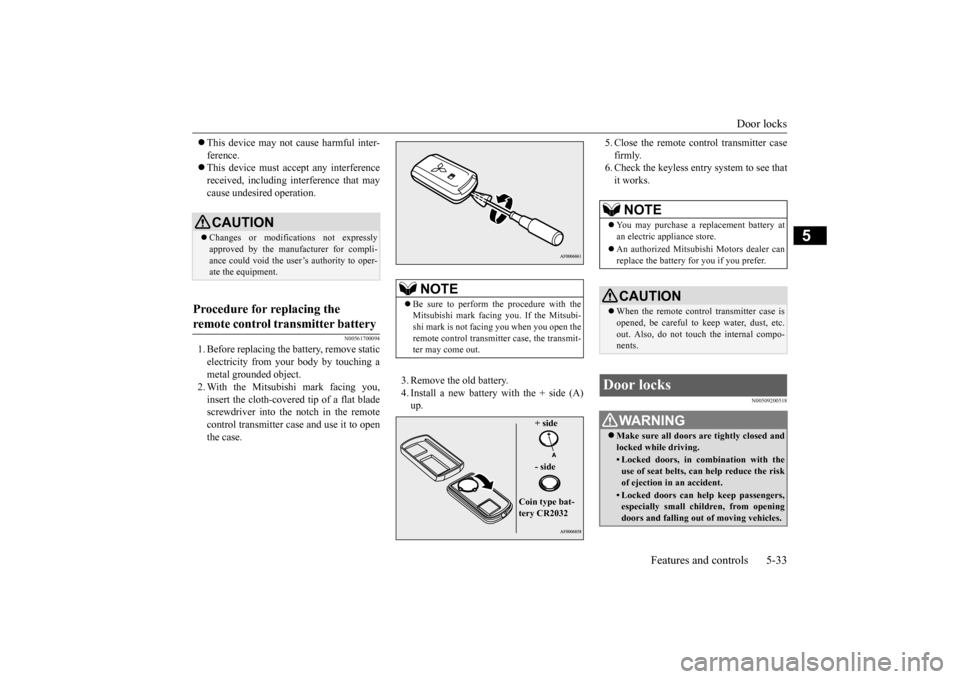
1. Before replacing the battery, remove static electricity from your body by touching a metal grounded object.2. With the Mitsubishi mark facing you, insert the cloth-covered tip of a flat blade screwdriver into the notch in the remotecontrol transmitter case and use it to open the case.
3. Remove the old battery. 4. Install a new battery with the + side (A) up.
5. Close the remote control transmitter case firmly. 6. Check the keyless entry system to see that it works.
N00509200518
CAUTION Changes or modifications not expressly approved by the manufacturer for compli- ance could void the user’s authority to oper-ate the equipment.
Procedure for replacing the remote control transmitter battery
NOTE
Be sure to perform the procedure with the Mitsubishi mark facing you. If the Mitsubi- shi mark is not facing you when you open the remote control transmitter case, the transmit-ter may come out.
+ side - side
Coin type bat- tery CR2032
NOTE
You may purchase a replacement battery at an electric appliance store. An authorized Mitsubishi Motors dealer can replace the battery for you if you prefer.CAUTION When the remote control transmitter case is opened, be careful to keep water, dust, etc. out. Also, do not touch the internal compo-nents.
Door locks
WA R N I N G Make sure all doors are tightly closed and locked while driving.• Locked doors, in combination with theuse of seat belts, can help reduce the risk of ejection in an accident.• Locked doors can help keep passengers,especially small children, from opening doors and falling out of moving vehicles.
BK0210800US.bo
ok 33 ページ 2014年4月8日 火曜日 午前11時28分
Page 98 of 338
Trunk lid
Features and controls 5-37
5
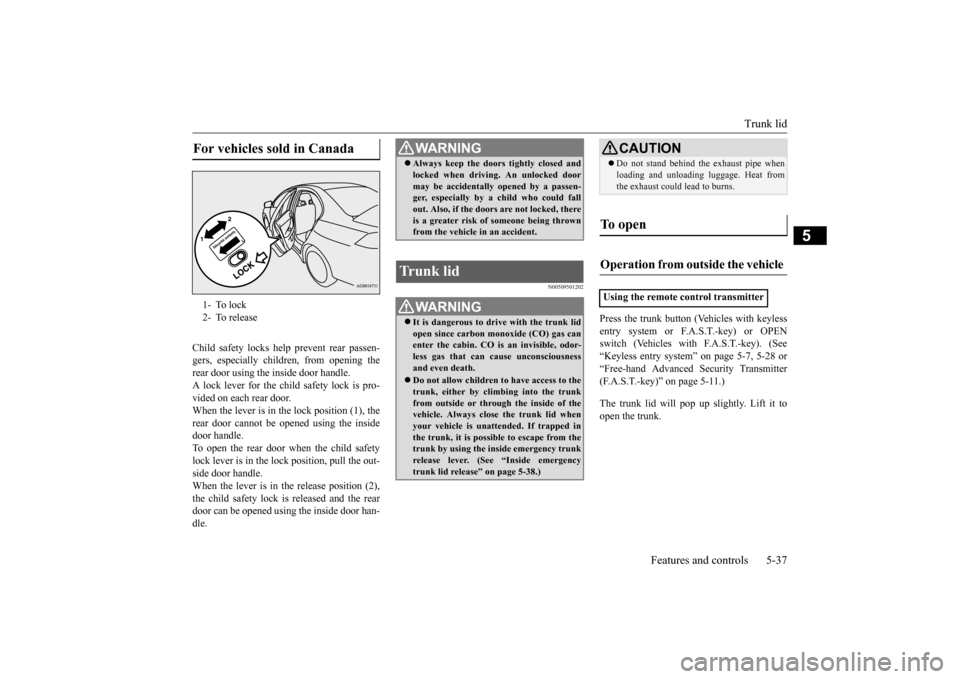
Child safety locks help prevent rear passen- gers, especially children, from opening therear door using the inside door handle. A lock lever for the child safety lock is pro- vided on each rear door.When the lever is in the lock position (1), the rear door cannot be opened using the inside door handle.To open the rear door when the child safety lock lever is in the lock position, pull the out- side door handle.When the lever is in th
e release position (2),
the child safety lock is released and the rear door can be opened using the inside door han-dle.
N00509501202
Press the trunk button (Vehicles with keyless entry system or F.A.S.T.-key) or OPEN switch (Vehicles with F.A.S.T.-key). (See“Keyless entry system” on page 5-7, 5-28 or “Free-hand Advanced Security Transmitter (F.A.S.T.-key)” on page 5-11.) The trunk lid will pop up
slightly. Lift it to
open the trunk.
For vehicles sold in Canada 1- To lock 2- To release
WA R N I N G Always keep the doors tightly closed and locked when driving. An unlocked door may be accidentally opened by a passen- ger, especially by a child who could fall out. Also, if the doors are not locked, thereis a greater risk of someone being thrown from the vehicle in an accident.
Trunk lid
WA R N I N G It is dangerous to drive with the trunk lid open since carbon monoxide (CO) gas can enter the cabin. CO is an invisible, odor- less gas that can cause unconsciousnessand even death. Do not allow children to have access to the trunk, either by climbing into the trunk from outside or through the inside of the vehicle. Always clos
e the trunk lid when
your vehicle is unattended. If trapped in the trunk, it is possible to escape from the trunk by using the inside emergency trunk release lever. (See “Inside emergency trunk lid release” on page 5-38.)
CAUTION Do not stand behind the exhaust pipe when loading and unloading luggage. Heat from the exhaust could lead to burns.
To open Operation from outside the vehicle Using the remote control transmitter
BK0210800US.bo
ok 37 ページ 2014年4月8日 火曜日 午前11時28分
Page 189 of 338
Combination headlights and dimmer switch 5-128 Features and controls
5
N00550000185
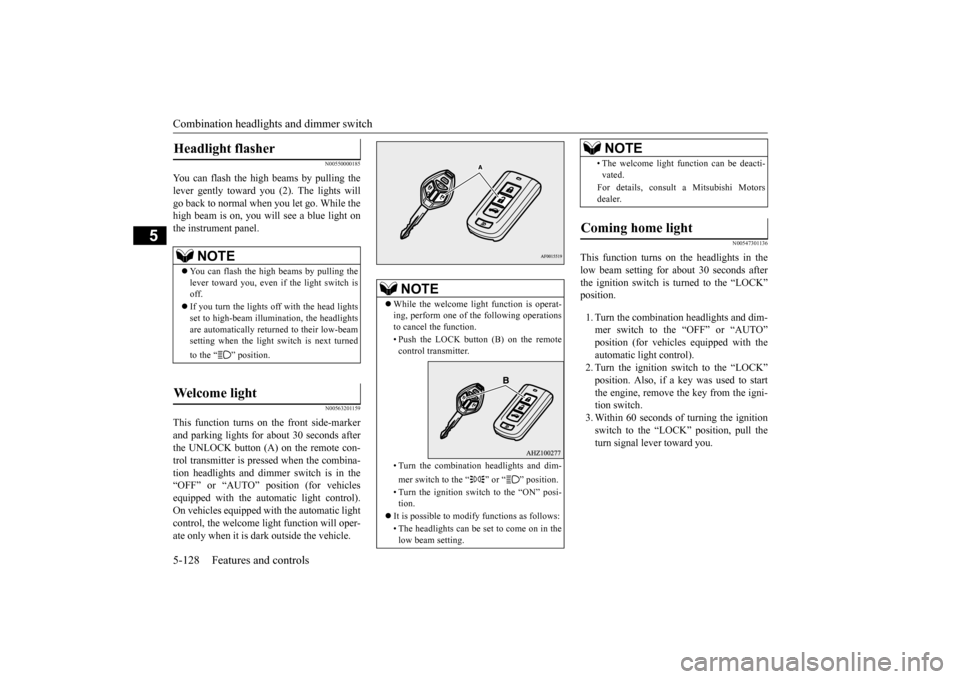
You can flash the high beams by pulling the lever gently toward you (2). The lights willgo back to normal when you let go. While the high beam is on, you will see a blue light on the instrument panel.
N00563201159
This function turns on the front side-marker and parking lights for about 30 seconds after the UNLOCK button (A) on the remote con-trol transmitter is pressed when the combina-tion headlights and dimmer switch is in the “OFF” or “AUTO” position (for vehicles equipped with the automatic light control).On vehicles equipped with the automatic light control, the welcome light function will oper- ate only when it is dark outside the vehicle.
N00547301136
This function turns on the headlights in thelow beam setting for about 30 seconds afterthe ignition switch is turned to the “LOCK” position. 1. Turn the combination headlights and dim- mer switch to the “OFF” or “AUTO”position (for vehicles equipped with the automatic light control). 2. Turn the ignition switch to the “LOCK”position. Also, if a key was used to start the engine, remove the key from the igni- tion switch.3. Within 60 seconds of turning the ignition switch to the “LOCK” position, pull the turn signal lever toward you.
Headlight flasher
NOTE
You can flash the high beams by pulling the lever toward you, even if the light switch isoff. If you turn the lights off with the head lights set to high-beam illumin
ation, the headlights
are automatically returned to their low-beam setting when the light switch is next turned to the “ ” position.
Welcome light
NOTE
While the welcome light function is operat- ing, perform one of the following operations to cancel the function. • Push the LOCK button (B) on the remote control transmitter. • Turn the combination headlights and dim- mer switch to the “ ” or “ ” position. • Turn the ignition switch to the “ON” posi- tion.
It is possible to modify functions as follows: • The headlights can be set to come on in the low beam setting.
• The welcome light function can be deacti- vated. For details, consult a Mitsubishi Motors dealer.
Coming home light
NOTE
BK0210800US.book
128 ページ 2014年4月8日 火曜日 午前11時28分
Page 222 of 338
Interior lights
Features and controls 5-161
5
N00525300429
N00525801274
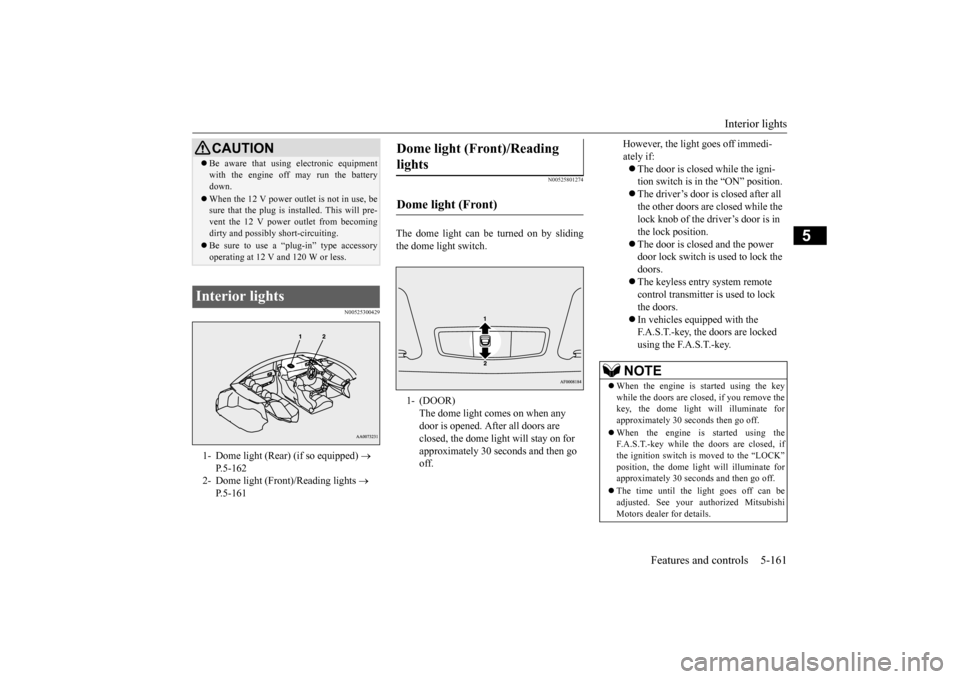
The dome light can be turned on by sliding the dome light switch.
CAUTION Be aware that using electronic equipment with the engine off may run the battery down. When the 12 V power outlet is not in use, be sure that the plug is installed. This will pre- vent the 12 V power outlet from becoming dirty and possibly short-circuiting. Be sure to use a “plug-in” type accessory operating at 12 V and 120 W or less.
Interior lights 1- Dome light (Rear) (if so equipped)
P.5-162
2- Dome light (Front)/Reading lights
P.5-161
Dome light (Front)/Reading lights Dome light (Front) 1- (DOOR)
The dome light comes on when any door is opened. After all doors are closed, the dome light will stay on for approximately 30 seconds and then go off.
However, the light goes off immedi- ately if: The door is closed while the igni- tion switch is in the “ON” position. The driver’s door is closed after all the other doors are closed while the lock knob of the driver’s door is in the lock position. The door is closed and the power door lock switch is used to lock the doors. The keyless entry system remote control transmitter is used to lock the doors. In vehicles equipped with the F.A.S.T.-key, the doors are locked using the F.A.S.T.-key.
NOTE
When the engine is started using the key while the doors are closed, if you remove thekey, the dome light will illuminate for approximately 30 seconds then go off. When the engine is started using the F.A.S.T.-key while the doors are closed, if the ignition switch is moved to the “LOCK” position, the dome light will illuminate for approximately 30 seconds and then go off. The time until the light goes off can be adjusted. See your authorized MitsubishiMotors dealer for details.
BK0210800US.book
161 ページ 2014年4月8日 火曜日 午前11時28分
Page 223 of 338
Interior lights 5-162 Features and controls
5
N00553800025
Regardless of the dome light switch position, when you press the lens, the light on the sidethat is pressed illuminates; when you press the lens again, the light goes out.
N00525401498
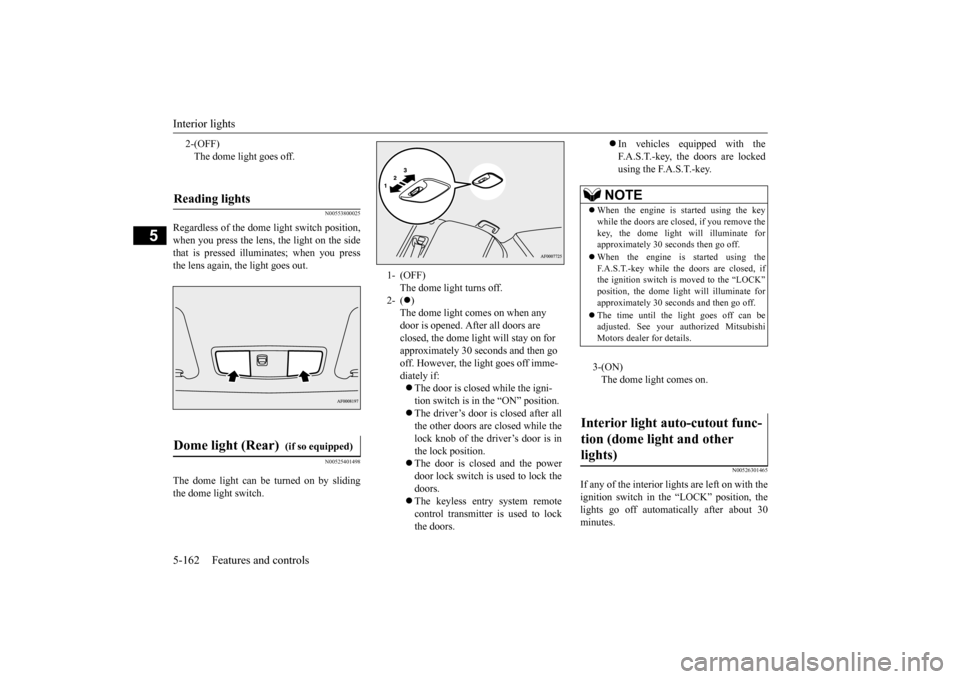
The dome light can be turned on by sliding the dome light switch.
N00526301465
If any of the interior lights are left on with the ignition switch in the “LOCK” position, the lights go off automatically after about 30minutes.
2-(OFF) The dome light goes off.
Reading lights Dome light (Rear)
(if so equipped)
1- (OFF)
The dome light turns off.
2- (
) The dome light comes on when any door is opened. After all doors are closed, the dome light will stay on for approximately 30 seconds and then go off. However, the light goes off imme-diately if: The door is closed while the igni- tion switch is in the “ON” position. The driver’s door is closed after all the other doors are closed while the lock knob of the driver’s door is inthe lock position. The door is closed and the power door lock switch is used to lock thedoors. The keyless entry system remote control transmitter is used to lockthe doors.
In vehicles equipped with the F.A.S.T.-key, the doors are lockedusing the F.A.S.T.-key.
NOTE
When the engine is started using the key while the doors are closed, if you remove the key, the dome light will illuminate forapproximately 30 seconds then go off. When the engine is started using the F.A.S.T.-key while the doors are closed, if the ignition switch is moved to the “LOCK” position, the dome light will illuminate forapproximately 30 seconds and then go off. The time until the light goes off can be adjusted. See your authorized Mitsubishi Motors dealer for details.3-(ON) The dome light comes on.
Interior light auto-cutout func- tion (dome light and other lights)
BK0210800US.book
162 ページ 2014年4月8日 火曜日 午前11時28分