Starting MITSUBISHI LANCER EVOLUTION 2015 10.G Owner's Manual
[x] Cancel search | Manufacturer: MITSUBISHI, Model Year: 2015, Model line: LANCER EVOLUTION, Model: MITSUBISHI LANCER EVOLUTION 2015 10.GPages: 338, PDF Size: 43.12 MB
Page 115 of 338
Starting and stopping the engine 5-54 Features and controls
5
1. Make sure that all electric devices, such as lights, air conditioning blower and rear window defogger, are turned off. 2. While depressing the brake pedal on vehi-cles equipped with Twin Clutch SST or the clutch pedal on the vehicles equipped with manual transaxle, press the accelera-tor pedal halfway and hold it there, then crank the engine. Release the accelerator pedal, immediately after the engine starts.3. If the engine still will not start, the enginecould be flooded with too much gasoline. While depressing the brake pedal on vehi- cles equipped with Twin Clutch SST orthe clutch pedal on the vehicles equipped with manual transaxle, push the accelera- tor pedal all the way down and hold itthere, then crank the engine for 5 to 6 sec- onds. Return the ignition switch to the “LOCK” position and release the acceler-ator pedal. Wait a few seconds, and then crank the engine again for 5 to 6 seconds while depressing the brake pedal or theclutch pedal, but do not push the accelera- tor pedal. Release the ignition key if the engine starts. If the engine fails to start,repeat these procedures. If the engine still will not start, contact your local Mitsubishi Motors dealer or a repair facil-ity of your choice for assistance.
When the ambient temperature is -22 °F (-30 °C) or lower, it may not be possible to start from a standstill even with the gearshift lever in the “D” (DRIVE) or “R”(REVERSE) position. This phenomenon occurs because the trans- mission has not warmed up sufficiently; itdoes not indicate a problem. If it occurs,place the gearshift lever in the “P” (PARK) position and let the engine idle for at least 10 minutes.The transmission will warm up, and you will be able to start normally. Do not leave the vehicle during warm-upoperation.
N00547600031
At high altitude locations, the idle speed maybe higher. This is done in order to stabilize the idle speed when the power steering sys- tem and other systems operate. It does notindicate a malfunction.
N00542300075
1. Bring the vehicle to a complete stop. 2. Fully engage the parking brake whiledepressing the brake pedal. 3. For vehicles with a manual transaxle, turn the ignition switch to the “LOCK” posi-tion to stop the engine, and then move the gearshift lever to the 1st (on a uphill) or “R” (Reverse) (on a downhill) position.For vehicles with Twin Clutch SST, placethe gearshift lever in the “P” (PARK) position, and then turn the ignition switch to the “LOCK” position to stop theengine.
Startability of Twin Clutch SST vehicle with ambient temperature of -22 °F (-30 °C) or lower Idle speed in high altitude area
Stopping the engine
BK0210800US.bo
ok 54 ページ 2014年4月8日 火曜日 午前11時28分
Page 116 of 338
Turbocharger operation
Features and controls 5-55
5
N00537300077
The turbocharger increases engine power by pushing large amounts of air into the engine’s cylinders. The finned parts inside the turbo-charger turn at extremely high speeds and are subjected to extremely high temperatures. They are lubricated by engine oil and cooledby engine oil and coolan
t. If the engine oil is
not replaced at the specified intervals, the bearings may seize or emit abnormal noise.
NOTE
For vehicles with Twin Clutch SST, the engine will stop and the vehicle power will turn off approximately 1 second after the ignition switch is turned to the “LOCK” position. The reason for this is that, in the time from when the ignition switch is turned to the“LOCK” position until the engine stops, the gears inside the Twin Clutch SST disengage so that the engine will start smoothly thenext time it is started. Two clutches installed in the Twin Clutch SST alternately engage and disengage toachieve smooth shifting. In addition, the gear on the side with the free clutch is engaged, therefore, quick shifting isperformed. If the engine was stopped with the gear engaged like this, it would provide resistancethe next time the engine is started. Therefore, the gear disengages in the approximately 1- second period until the engine stops. For vehicles with Twin Clutch SST, do not operate the gearshift lever or the acceleratorpedal for approximately 1 second until the engine stops.
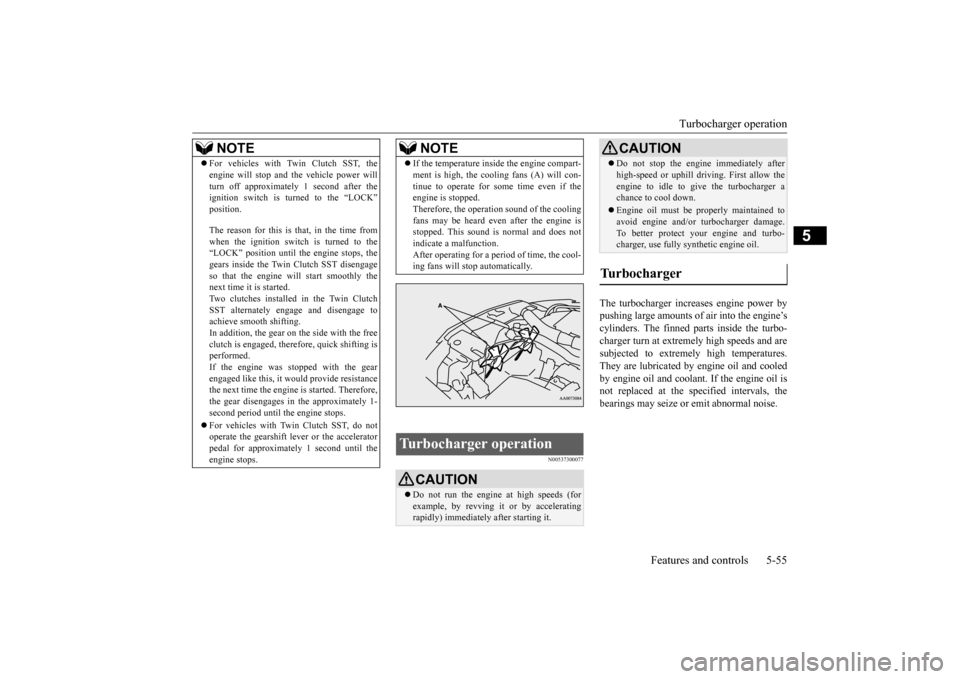
If the temperature inside the engine compart- ment is high, the cooling fans (A) will con- tinue to operate for some time even if the engine is stopped. Therefore, the operation sound of the coolingfans may be heard even after the engine is stopped. This sound is normal and does not indicate a malfunction.After operating for a period of time, the cool- ing fans will stop automatically.
Turbocharger operation
CAUTION Do not run the engine at high speeds (for example, by revving it or by accelerating rapidly) immediately after starting it.NOTE
Do not stop the engine immediately after high-speed or uphill driv
ing. First allow the
engine to idle to give the turbocharger a chance to cool down. Engine oil must be properly maintained to avoid engine and/or turbocharger damage. To better protect your engine and turbo-charger, use fully synthetic engine oil.
Turbocharger
CAUTION
BK0210800US.bo
ok 55 ページ 2014年4月8日 火曜日 午前11時28分
Page 117 of 338
Clutch pedal operation (if so equipped) 5-56 Features and controls
5
N00537700042
Observe the following cautions when using the clutch pedal. Not observing them couldresult in rapid clutch wear or in clutch dam- age. Press the clutch pedal all the way down while shifting gears. Press and hold the clutch pedal all the way down before starting the engine. Do not rest your foot on the clutch pedal.
On hills and other gradients, do not hold the vehicle in position by slipping the clutch without using the brakes. Make sure the space under the clutch pedal is free of objects that could obstruct the pedal.
N00512700139
The shift pattern below is shown on the gear- shift lever. Press the clutch pedal all the way down while shifting gears. Press the clutch pedal all the way down and shift into 1st. Then gradually release the
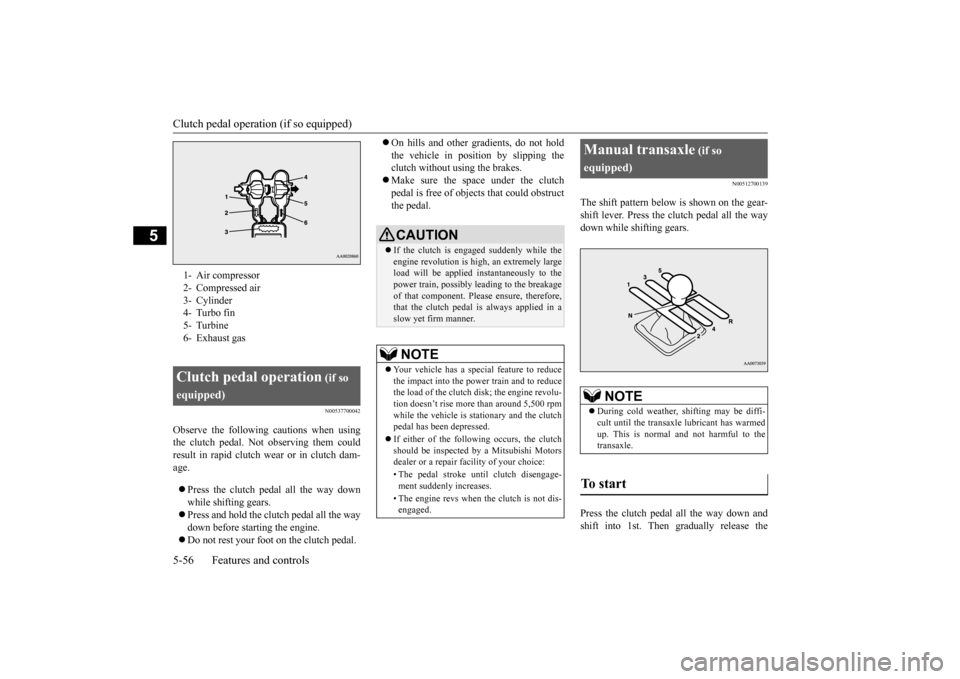
1- Air compressor 2- Compressed air3- Cylinder 4- Turbo fin 5- Turbine6- Exhaust gasClutch pedal operation
(if so
equipped)
CAUTION If the clutch is engaged suddenly while the engine revolution is high, an extremely large load will be applied instantaneously to the power train, possibly leading to the breakageof that component. Please ensure, therefore, that the clutch pedal is always applied in a slow yet firm manner.NOTE
Your vehicle has a special feature to reduce the impact into the power train and to reduce the load of the clutch disk; the engine revolu-tion doesn’t rise more than around 5,500 rpm while the vehicle is stationary and the clutch pedal has been depressed. If either of the following occurs, the clutch should be inspected by a Mitsubishi Motors dealer or a repair facility of your choice: • The pedal stroke until clutch disengage- ment suddenly increases. • The engine revs when the clutch is not dis- engaged.
Manual transaxle
(if so
equipped)
NOTE
During cold weather, shifting may be diffi- cult until the transaxle lubricant has warmed up. This is normal and not harmful to thetransaxle.
To start
BK0210800US.bo
ok 56 ページ 2014年4月8日 火曜日 午前11時28分
Page 135 of 338
Anti-lock braking system 5-74 Features and controls
5
N00517900295
The anti-lock braking system helps prevent the wheels from locking up when braking.This helps maintain vehicle drivability and steering wheel handling. Always keep a safe distance from the vehicle in front of you. Even if your vehi-cle is equipped with the anti-lock braking system, leave a greater braking distance when:• Driving on gravel or snow-covered roads. • Driving on uneven road surfaces. Operation of anti-lock braking system is not restricted to situations where brakes are applied suddenly. This system mayalso prevent the wheels from locking when you drive over manholes, steel roadwork plates, road markings, or anyuneven road surface. When the anti-lock braking system is in use, you may feel the brake pedal pulsa-tion and the vibrations of the vehicle body and steering wheel. It may also feel as if the pedal resists being pressed.
In this situation, simply hold the brake pedal down firmly. Do not pump the brake, which will result in reduced braking performance. An operation noise is emitted from the engine compartment or feel a shock from the brake pedal when start driving imme-diately after starting the engine. These are normal sound or operation that the anti- lock braking system makes when per-forming a self-check. It does not indicatea malfunction. The anti-lock braking system can be used after the vehicle has reached a speed overapproximately 6 mph (10 km/h). It stops working when the vehicle slows below approximately 3 mph (5 km/h).
CAUTION The system may be malfunctioning. Park your vehicle in a safe place and stop the engine. Restart the engine and check whether the warning display and “SERVICE REQUIRED” go out. If the warning display and “SERVICE REQUIRED” go out, there is no abnormal condition. If the warning display and “SERVICE REQUIRED” do not go out or appear frequently, it is not necessary to stop the vehicle immediately, but we recommendthat you have your vehicle inspected.NOTE
If the ambient temperature drops and the vis- cosity of the AWC control fluid increases,the warning may be displayed. At this time, S-AWC control is temporarily suspended, but this will not affect normaldriving. After the vehicle is driven for a while, if the engine is restarted after the AWC controlfluid warms up or the ambient temperature increases, the S-AWC control will start oper- ating again if the warning display goes out.
Anti-lock braking system Driving hints
CAUTION The anti-lock braking system cannot prevent accidents. It is your responsibility to take safety precautions and to drive carefully. To prevent failure of the anti-lock braking system, be sure all 4 wheels and tires are thesame size and the same type. Do not install any aftermarket limited-slip differential (LSD) on your vehicle. The anti- lock braking system may stop functioningproperly.
BK0210800US.bo
ok 74 ページ 2014年4月8日 火曜日 午前11時28分
Page 136 of 338
Anti-lock braking system
Features and controls 5-75
5
N00531600632
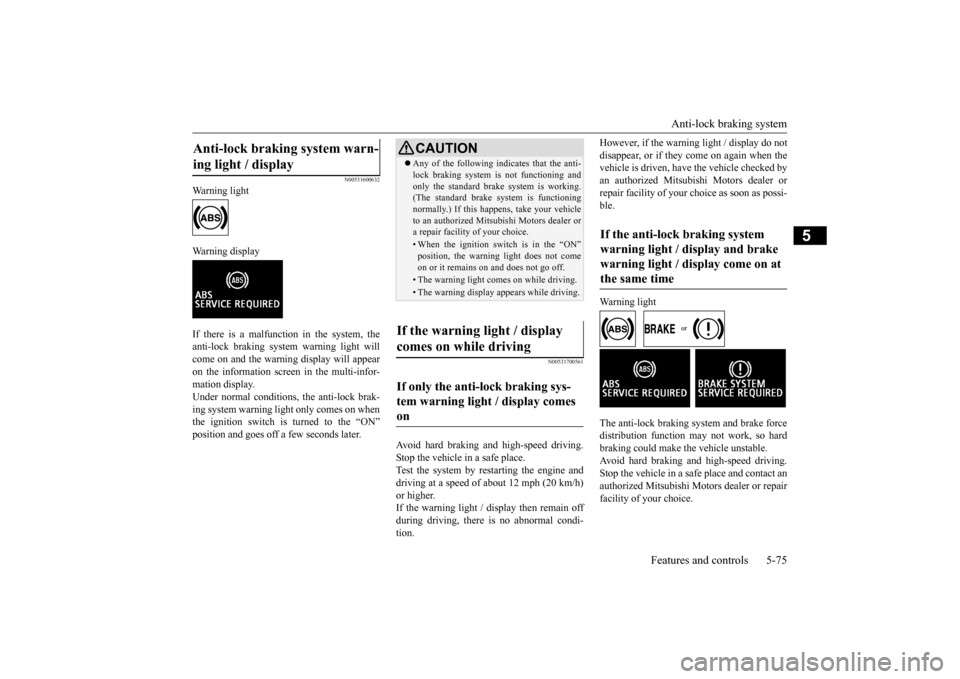
Warning light Warning display If there is a malfunction in the system, the anti-lock braking system warning light will come on and the warning display will appearon the information screen in the multi-infor- mation display. Under normal conditions
, the anti-lock brak-
ing system warning light only comes on when the ignition switch is turned to the “ON” position and goes off a few seconds later.
N00531700561
Avoid hard braking and high-speed driving. Stop the vehicle in a safe place. Test the system by restarting the engine anddriving at a speed of about 12 mph (20 km/h) or higher. If the warning light / display then remain offduring driving, there is no abnormal condi- tion.
However, if the warning light / display do not disappear, or if they come on again when the vehicle is driven, have the vehicle checked by an authorized Mitsubishi Motors dealer orrepair facility of your choice as soon as possi- ble. Warning light
The anti-lock braking system and brake force distribution function may not work, so hard braking could make the vehicle unstable.Avoid hard braking and high-speed driving.Stop the vehicle in a safe place and contact an authorized Mitsubishi Motors dealer or repair facility of your choice.
Anti-lock braking system warn- ing light / display
CAUTION Any of the following indicates that the anti- lock braking system is not functioning and only the standard brak
e system is working.
(The standard brake system is functioning normally.) If this happens, take your vehicleto an authorized Mitsubishi Motors dealer or a repair facility of your choice.• When the ignition switch is in the “ON”position, the warning light does not come on or it remains on and does not go off.• The warning light comes on while driving.• The warning display appears while driving.
If the warning light / display comes on while driving If only the anti-lock braking sys- tem warning light / display comes on
If the anti-lock braking system warning light / display and brake warning light / display come on at the same time
BK0210800US.bo
ok 75 ページ 2014年4月8日 火曜日 午前11時28分
Page 205 of 338
Bluetooth® 2.0 interface 5-144 Features and controls
5
7. The voice guide will say “Start pairing procedure on the device. See the device manual for instructions.” Enter in the Bluetooth
® device the 4-digit number you
have registered in Step 6.
8. The voice guide will say “Please say the name of the device after the beep.” You can assign a desired name for the Blue- tooth
® device and register it as a device
tag. Say the name you want to register after the beep. 9. The voice guide will say “Pairing com- plete,” and the pairing process will end.
N00565101077
If multiple paired Bluetooth
® devices are
available in the vehicle, the cellular phone ormusic player most recently connected is auto-
matically connected to the Bluetooth
® 2.0
interface. You can connect to the other paired cellular phone or music player by following settingchange procedures.
N00582200021
1. Press the SPEECH button (except forvehicles with Mitsubishi Multi-Commu-nication System) or PICK-UP button (forvehicles with Mitsubishi Multi-Commu- nication System). 2. Say “Setup.”3. Say “Select phone.” 4. After the voice guide says “Please say,” the numbers of the cellular phones anddevice tags of corresponding cellular phones will be read out in order, starting with the cellular phone that has been mostrecently connected. Say the number of the cellular phone that you want to connect to.When the confirmation function is on, the system will ask you again whether the phone that you want to connect to is cor-rect. Answer “Yes” to continue and con- nect to the cellular phone. Answer “No,” and the voice guide willsay “Please say.” Say the number of the phone that you want to connect to.
The pairing code entered here is only used for the Bluetooth
® connection certification.
It is any 4-digit number the user would like to select. Remember the pairing code as it needs to be keyed into the Bluetooth
® device later in the
pairing process. Depending on the connection settings of the Bluetooth
® device, this code may have to be
entered each time you connect the Blue- tooth
® device to the Bluetooth
® 2.0 inter-
face. For the default connection settings, refer to the instructions for the device.NOTE
Depending on the Bluetooth
® device, it may
take a few minutes to pair it with the Blue- tooth
® 2.0 interface.
If the Bluetooth
® 2.0 interface cannot recog-
nize the Bluetooth
® device, the voice guide
will say “Pairing has timed out” and the pair-ing process will be cancelled. Confirm that the device you are pairing sup- ports Bluetooth
®, and try pairing it again.
NOTE
If you enter the wrong number, the voice guide will say “Pairing failed” and the pair- ing process will be cancelled. Confirm the number is right, and try pairing it again.NOTE
When the confirmation function is on, after repeating the device tag you have said, the voice guide will ask “Is this correct?” Answer “Yes.”To change the device tag, answer “No” and then say the device tag again.
Selecting a device
NOTE
To select a cellular phone
BK0210800US.book
144 ページ 2014年4月8日 火曜日 午前11時28分
Page 206 of 338
Bluetooth® 2.0 interface
Features and controls 5-145
5
5. The selected phone will be connected to the Bluetooth
® 2.0 interface. The voice
guide will say “
N00582300022
1. Press the SPEECH button (except for vehicles with Mitsubishi Multi-Commu- nication System) or PICK-UP button (forvehicles with Mitsubishi Multi-Commu- nication System). 2. Say “Setup.”3. Say “Select music player.” 4. After the voice guide says “Please say,” the numbers of the music players anddevice tags of corresponding music play- ers will be read out in order, starting with the music player that has been mostrecently connected. Say the number of the music player that you want to connect to.
When the confirmation function is on, the system will ask you again whether the music player that you want to connect to is correct. Answer “Yes” to continue andconnect to the music player. Answer “No,” and the voice guide will say “Please say.” Say the number of themusic player that you want to connect to. 5. The selected music player will be con- nected to the Bluetooth
® 2.0 interface.
The voice guide will say “
N00582400023
Use the following procedure to delete a paired Bluetooth
® device from the Blue-
tooth
® 2.0 interface.
1. Press the SPEECH button (except for vehicles with Mitsubishi Multi-Commu- nication System) or PICK-UP button (for vehicles with Mitsubishi Multi-Commu-nication System). 2. Say “Setup.” 3. Say “Pairing Options.”4. The voice guide will say “Select one of the following: pair, edit, delete, or list.” Say “Delete.”5. After the voice guide says “Please say,”the numbers of the devices and device tags of corresponding devices will be read out in order, starting with the device thathas been most recently connected. After it completes reading all pairs, the voice guide will say “or all.”Say the number of the device that you want to delete from the system. If you want to delete all paired phonesfrom the system, say “All.” 6. For confirmation purposes, the voice guide will say “Deleting
NOTE
You can connect to a phone at any time by pressing the SPEECH button and saying the number, even before all of the paired num- bers and device tags of corresponding cellu- lar phones are read out by the system.
To select a music player
NOTE
You can connect to a music player at any time by pressing the SPEECH button andsaying the number, even before all of the paired numbers and device tags of corre- sponding music players are read out by thesystem.
Deleting a device
BK0210800US.book
145 ページ 2014年4月8日 火曜日 午前11時28分
Page 207 of 338
Bluetooth® 2.0 interface 5-146 Features and controls
5
N00565201023
You can check a paired Bluetooth
® device by
following the steps below. 1. Press the SPEECH button (except for vehicles with Mitsubishi Multi-Commu- nication System) or PICK-UP button (forvehicles with Mitsubishi Multi-Commu- nication System). 2. Say “Setup.”3. Say “Pairing Options.” 4. The voice guide will say “Select one of the following: pair, edit, delete, or list.”Say “List.” 5. The voice guide will read out device tags of corresponding devices in order, starting with the Bluetooth
® device that has been
most recently connected. 6. After the device tags of all paired Blue- tooth
® devices have been read, the system
will say “End of list, would you like to start from the beginning?”
To hear the list again from the beginning, answer “Yes.” When you are done, answer “No” to return to the main menu.
N00565301024
You can change the device tag of a paired cel- lular phone or music player. Follow the steps below to change a devicetag.
1. Press the SPEECH button (except for vehicles with Mitsubishi Multi-Commu- nication System) or PICK-UP button (for vehicles with Mitsubishi Multi-Commu-nication System). 2. Say “Setup.” 3. Say “Pairing Options.”4. The voice guide will say “Select one of the following: pair, edit, delete, or list.” Say “Edit.”5. The voice guide will say “Please say,” and read out the numbers of the Bluetooth
®
devices and device tags of corresponding devices in order, starting with the Blue- tooth
® that has been most recently con-
nected. After all paired device tags have beenread, the voice guide will say “Which device, please?” Say the number of the device tag you want to change. 6. The voice guide will say “New name, please.” Say the name you want to regis-ter as a new device tag.
NOTE
If the device deletion process fails for some reason, the voice guide will say “Delete failed” and then the system will cancel delet- ing the device.
To check a paired Bluetooth
®
device
NOTE
If you press and release the SPEECH button and say “Continue” or “Previous” while thelist is being read, the system will advance or rewind the list. Say “Continue” to proceed to the device withthe next highest number or “Previous” to return to the phone with the previous num- ber. You can change the device tag by pressing and releasing the SPEECH button and thensaying “Edit” while the list is being read. You can change the phone to be connected by pressing and releasing the SPEECH but- ton and then saying “S
elect phone” while the
list is being read. You can change the music player to be con- nected by pressing and releasing theSPEECH button and then saying “Select music player” while the list is being read.
Changing a device tag
NOTE
You can press and release the SPEECH but- ton while the list is being read, and immedi-ately say the number of the device tag you want to change.
BK0210800US.book
146 ページ 2014年4月8日 火曜日 午前11時28分
Page 232 of 338
Vehicle preparation before driving
Driving safety 6-3
6
N00629001712
For a safer and more enjoyable trip, always observe the following: Before starting the vehicle, make certain that you and all passengers are seated and wearing their seat belts properly (with children in the rear seat, in appropriaterestraints), and that all the doors are locked.
Move the driver’s seat as far backward as possible, while still keeping good visibil- ity, and good control of the steering wheel, brakes, accelerator, and controls.Check the instrument panel indicators and multi-information display for any possible problem. Move the front passenger seat as far back as possible. Make sure that infants and small children are properly restrained in accordance withall laws and regulations.
Check these by selecting the defroster mode, and set the blower switch on high. You should be able to feel the air blowing against the windshield.{Refer to “Defrosting or defogging (wind- shield, door window)” on page 7-8, 7-13.} Check all the tires for heavy tread wear or uneven wear patterns. Look for stones, nails, glass, or other objects stuck in the tread. Lookfor any tread cuts or sidewall cracks. Check the wheel nuts for tightness, and the tires (including spare tire) for proper pressures.
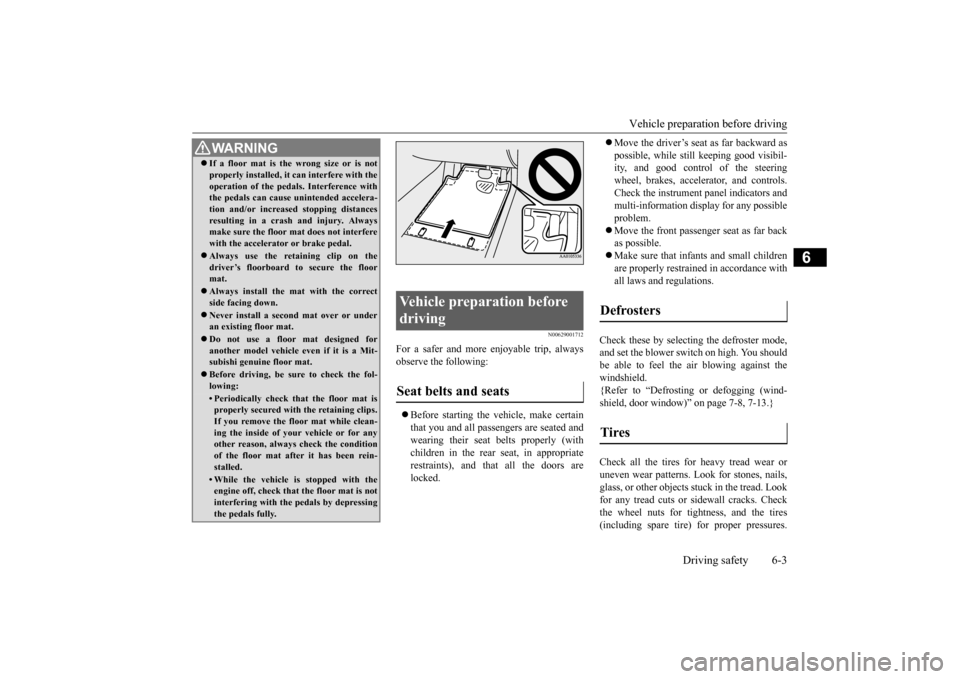
WA R N I N G If a floor mat is the wrong size or is not properly installed, it can interfere with the operation of the pedals. Interference with the pedals can cause unintended accelera- tion and/or increased stopping distancesresulting in a crash and injury. Always make sure the floor mat does not interfere with the accelerator or brake pedal. Always use the retaining clip on the driver’s floorboard to secure the floormat. Always install the mat with the correct side facing down. Never install a second mat over or under an existing floor mat. Do not use a floor mat designed for another model vehicle ev
en if it is a Mit-
subishi genuine floor mat. Before driving, be sure to check the fol- lowing:• Periodically check that the floor mat isproperly secured with the retaining clips. If you remove the floor mat while clean-ing the inside of your vehicle or for any other reason, always check the condition of the floor mat after it has been rein-stalled.• While the vehicle is stopped with the engine off, check that the floor mat is not interfering with the pedals by depressingthe pedals fully.
Vehicle preparation before driving Seat belts and seats
Defrosters Tires
BK0210800US.bo
ok 3 ページ 2014年4月8日 火曜日 午前11時28分
Page 233 of 338
Safe driving techniques 6-4 Driving safety
6
Replace your tires before they are heavily worn out. As your vehicle is equipped with a tire pres- sure monitoring system, there is a risk ofdamage to the tire inflation pressure sensors when the tire is replaced on the rim. Tire replacement should, therefore, be performedonly by an authorized Mitsubishi Motors dealer. Have someone watch while you turn all the exterior lights on and off. Also check the turn signal indicators and high-beam indicators on the instrument panel. Check the ground under the vehicle after parking overnight, for fuel, water, oil, orother leaks. Make sure all the fluid levels are correct. Also, if you can smell fuel, you need to find out why immediately and have itfixed.
N00629200108
Even this vehicle’s safety equipment, andyour safest driving, cannot guarantee that you
can avoid an accident or injury. However, if you give extra attention to the following areas, you can better protect yourself and your passengers: Drive defensively. Be aware of traffic, road and weather conditions. Leave plenty of stopping distance between your vehicle and the vehicle ahead. Before changing lanes, check your mir- rors and use your turn signal light. While driving, keep a tight grip on the steering wheel. While driving, watch the behavior of other drivers, bicyclists, and pedestrians. Always obey applicable laws and regula- tions. Be a polite and alert driver. Always leave room for unexpected events, such as sudden braking. If you plan to drive in another country, obey their vehicle registration laws and make sure you will be able to get the rightfuel.
N00629400432
Check the battery, including terminals and cables. During extremely cold weather, the battery will not be as strong. Also, the battery power level may drop becausemore power is used for cold starting and driving.
Before driving the vehicle, check to see if the engine runs at the proper speed and if the headlights are as bright as normally. Charge or replace the battery if necessary.During extreme cold weather, it is possi- ble that a very low battery could freeze. Warm the engine sufficiently. After start- ing the engine, allow a short warm-up time to distribute oil
to all cylinders and
turbocharger. Then drive your vehicle slowly. Stay at low speeds at first so that the transaxle, transfer case and rear axle oil have time to spread to all the lubrication points. Manual transaxle can be harder to shift in cold weather conditions. This is normal and shifting will get easier as the transaxlewarms up. Check the engine antifreeze.
Lights Fluid leaks Safe driving techniques
Driving during cold weather
WA R N I N G The battery gives off explosive hydrogen gas. Any spark or flame can cause the bat- tery to explode, which could cause seriousinjury or death. Always wear protective clothes and a face mask when working with your battery, orlet a skilled mechanic do it.
BK0210800US.bo
ok 4 ページ 2014年4月8日 火曜日 午前11時28分