ad blue MITSUBISHI LANCER EVOLUTION 2015 10.G Owners Manual
[x] Cancel search | Manufacturer: MITSUBISHI, Model Year: 2015, Model line: LANCER EVOLUTION, Model: MITSUBISHI LANCER EVOLUTION 2015 10.GPages: 338, PDF Size: 43.12 MB
Page 3 of 338
Instruments and controls (Driver’s area) 1-1
1
Overview
N00100202515
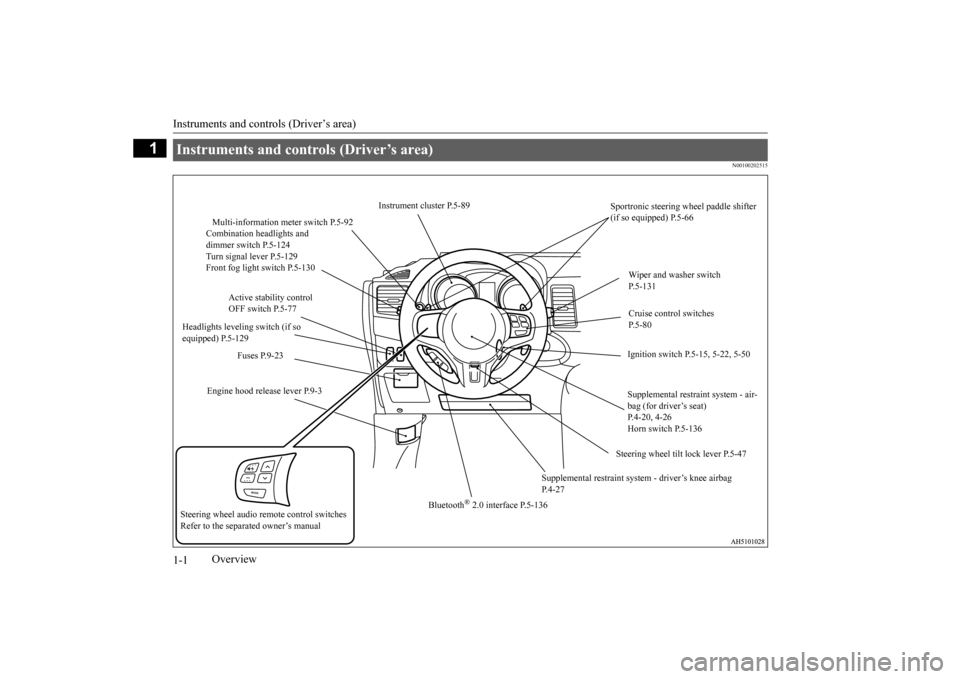
Instruments and controls (Driver’s area)
Instrument cluster P.5-89
Sportronic steering wheel paddle shifter (if so equipped) P.5-66
Multi-information meter switch P.5-92 Combination headlights and dimmer switch P.5-124Turn signal lever P.5-129 Front fog light switch P.5-130
Wiper and washer switch P.5-131
Active stability control OFF switch P.5-77
Cruise control switches P. 5 - 8 0
Headlights leveling switch (if so equipped) P.5-129
Ignition switch P.5-15, 5-22, 5-50
Fuses P.9-23
Engine hood release lever P.9-3
Supplemental restraint system - air- bag (for driver’s seat) P.4-20, 4-26Horn switch P.5-136
Steering wheel tilt lock lever P.5-47
Supplemental restraint system
- driver’s knee airbag
P.4-27
Bluetooth
® 2.0 interface P.5-136
Steering wheel audio remote control switches Refer to the separa
ted owner’s manual
BK0210800US.bo
ok 1 ページ 2014年4月8日 火曜日 午前11時28分
Page 6 of 338
Interior
Overview 1-4
1
N00100302330
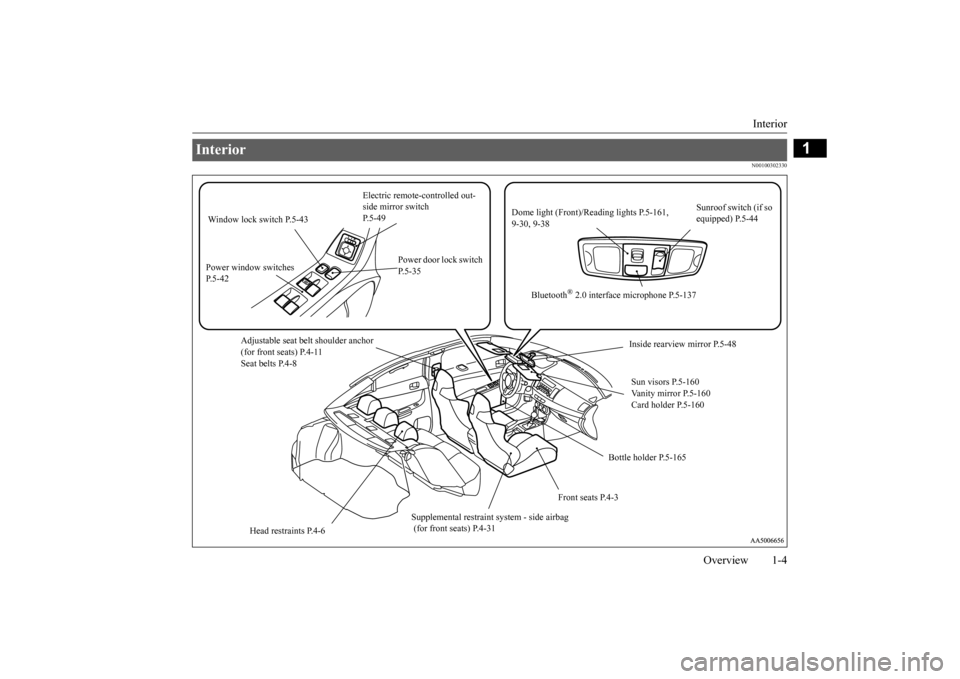
Interior
Electric remote-controlled out- side mirror switch P.5-49
Sunroof switch (if so equipped) P.5-44
Dome light (Front)/R
eading lights P.5-161,
9-30, 9-38
Window lock switch P.5-43 Power window switches P.5-42
Power door lock switch P.5-35
Bluetooth
® 2.0 interface microphone P.5-137
Adjustable seat belt shoulder anchor (for front seats) P.4-11 Seat belts P.4-8
Inside rearview mirror P.5-48 Sun visors P.5-160 Vanity mirror P.5-160Card holder P.5-160
Bottle holder P.5-165
Front seats P.4-3
Supplemental restraint
system - side airbag
(for front seats) P.4-31
Head restraints P.4-6
BK0210800US.bo
ok 4 ページ 2014年4月8日 火曜日 午前11時28分
Page 62 of 338
5
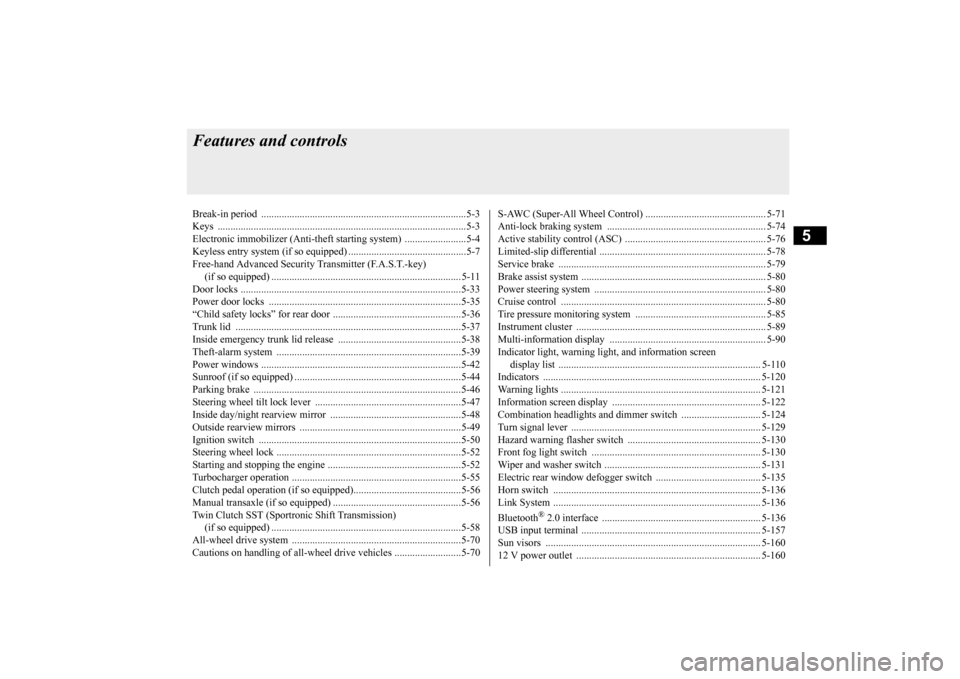
Features and controlsBreak-in period ...............
.................................................................5-3
Keys ..........................................
.......................................................5-3
Electronic immobilizer (Anti-thef
t starting system) ........................5-4
Keyless entry system (if so equipped) ..............................................5-7Free-hand Advanced Security Transmitter (F.A.S.T.-key) (if so equipped) .
.................................................
........................ 5-11
Door locks .......................
...............................................................5-33
Power door locks ............
...............................................................5-35
“Child safety locks” for
rear door ..................................................5-36
Trunk lid ...................................
.....................................................5-37
Inside emergency trunk lid
release ................................................5-38
Theft-alarm system
................................................
........................5-39
Power windows ...............
...............................................................5-42
Sunroof (if so equipped
) .........................................
........................5-44
Parking brake ..................
...............................................................5-46
Steering wheel tilt lock lever .........................................................5-47Inside day/night rearview
mirror ...................................................5-48
Outside rearview mirr
ors ...............................................................5-49
Ignition switch ......
.................................................
........................5-50
Steering wheel lock
................................................
........................5-52
Starting and stopping the e
ngine ....................................................5-52
Turbocharger operation
..........................................
........................5-55
Clutch pedal operation (if so equipped)..........................................5-56Manual transaxle (if so equipped) ..................................................5-56 Twin Clutch SST (Sportronic Shift Transmission) (if so equipped) .
.................................................
........................5-58
All-wheel drive system
..........................................
........................5-70
Cautions on handling of all-wheel drive vehicles ..........................5-70
S-AWC (Super-All Wheel C
ontrol) ............................................... 5-71
Anti-lock braking syst
em .....................................
......................... 5-74
Active stability control
(ASC) ....................
................................... 5-76
Limited-slip differenti
al ..............................
................................... 5-78
Service brake .................
.................................................
............... 5-79
Brake assist system
...............................................
......................... 5-80
Power steering system
..........................................
......................... 5-80
Cruise control ................
.................................................
............... 5-80
Tire pressure monitoring
system ................................................... 5-85
Instrument cluster
.................................................
......................... 5-89
Multi-information disp
lay ....................................
......................... 5-90
Indicator light, warning light, and information screen display list ...........................
.................................................... 5-110
Indicators .................................
.................................................... 5-120
Warning lights ................
.................................................
............. 5-121
Information screen disp
lay ...................................
....................... 5-122
Combination headlights and dimmer switch ............................... 5-124 Turn signal lever ..
.................................................
....................... 5-129
Hazard warning flasher
switch .................................................... 5-130
Front fog light switch
...........................................
....................... 5-130
Wiper and washer swit
ch ......................................
....................... 5-131
Electric rear window def
ogger switch ......................................... 5-135
Horn switch .............................
.................................................... 5-136
Link System .............................
.................................................... 5-136
Bluetooth
® 2.0 interface ..........
.................................................... 5-136
USB input terminal
...............................................
....................... 5-157
Sun visors ......................
.................................................
............. 5-160
12 V power outlet ..........
.................................................
............. 5-160
BK0210800US.bo
ok 1 ページ 2014年4月8日 火曜日 午前11時28分
Page 181 of 338
Indicators 5-120 Features and controls
5
The rest time can be set.
N00519900127 N00520000216
The arrows will flash in time with the corre- sponding exterior turn signals when the turnsignal lever is used. Both arrows will flas
h when the hazard warn-
ing flasher switch is pressed.
N00520100086
A blue light comes on when the headlightsare on high beam.
N00520200191
This indicator comes on while the front foglights are on.
N00551300026
This indicator light illuminates while theposition lights are on.
Screen
Do this
Park the vehicle in a safe place, turn off the engine, and take a rest. Use this display as rough guide for taking rests during a long drive. The interval from the start of your trip until this message is displayed can be set.Refer to “Changing the function settings (When
the ignition switch is in the “ON” position)”
on page 5-103. The display and buzzer alert the driver when the
set time is reached. If you continue to drive
without having a rest, the buzzer sounds about
every 5 minutes to encourage you to take a
rest. In the following cases, the time driven is reset and the display returns to the previous dis- play screen. After this, when the set time is reached again, the display and buzzer encourage you to take a rest. • The buzzer sounds 3 times.• The ignition switch is tu
rned to the “OFF” position.
• The multi-information meter switch is
held (for about 2 seconds or more).
Indicators Turn signal indicators/Hazard warning lights
NOTE
If the indicator flashes faster than usual or if the indicator stays on without flashing, checkfor a malfunctioning turn signal light bulb or turn signal connection.
High beam indicator
Front fog light indicator Position indicator
BK0210800US.book
120 ページ 2014年4月8日 火曜日 午前11時28分
Page 188 of 338
Combination headlights and dimmer switch
Features and controls 5-127
5
If the combination headlights and dimmer switch is turned to the “ ” or “ ” posi- tion again after the engine is turned off, the about 3-minute auto-cutout function described above will not work. The lights (theparking lights, tail lights and license plate lights) will stay on and will not turn off auto- matically.
N00549800183
[When using a key to start the engine] If the driver’s door is opened with the key in the “LOCK” or “ACC” position or removedfrom the ignition switch while the lights are on, the tone will sound to remind you to turn off the lights. [When using the F.A.S.T.-key to start the engine] If the driver’s door is opened with the ignition switch in the “LOCK” or “ACC” position, orif the ignition switch is moved to the “LOCK” position while the lights are on, the tone will sound to remind
you to turn off the
lights.
In either case, the lights will turn off automat- ically and so will the tone. Or you can turn the light
switch to the “OFF”
position to stop the tone.
N00549900142
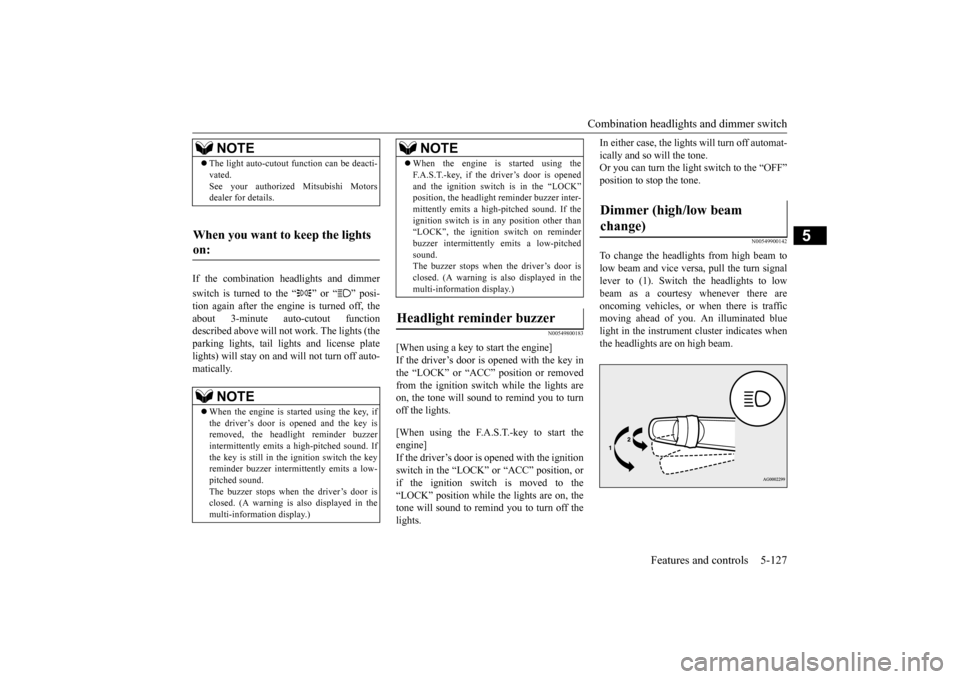
To change the headlights from high beam tolow beam and vice versa, pull the turn signallever to (1). Switch the headlights to low beam as a courtesy whenever there are oncoming vehicles, or when there is trafficmoving ahead of you. An illuminated blue light in the instrument cluster indicates when the headlights are on high beam.
NOTE
The light auto-cutout function can be deacti- vated. See your authorized Mitsubishi Motors dealer for details.
When you want to keep the lights on:
NOTE
When the engine is started using the key, if the driver’s door is opened and the key is removed, the headlight reminder buzzer intermittently emits a high-pitched sound. If the key is still in the ignition switch the keyreminder buzzer intermittently emits a low- pitched sound. The buzzer stops when the driver’s door isclosed. (A warning is also displayed in the multi-information display.)
When the engine is started using the F.A.S.T.-key, if the driver’s door is opened and the ignition switch is in the “LOCK” position, the headlight reminder buzzer inter- mittently emits a high-pitched sound. If theignition switch is in any position other than “LOCK”, the ignition switch on reminder buzzer intermittently emits a low-pitchedsound. The buzzer stops when the driver’s door is closed. (A warning is also displayed in themulti-information display.)
Headlight reminder buzzer
NOTE
Dimmer (high/low beam change)
BK0210800US.book
127 ページ 2014年4月8日 火曜日 午前11時28分
Page 189 of 338
Combination headlights and dimmer switch 5-128 Features and controls
5
N00550000185
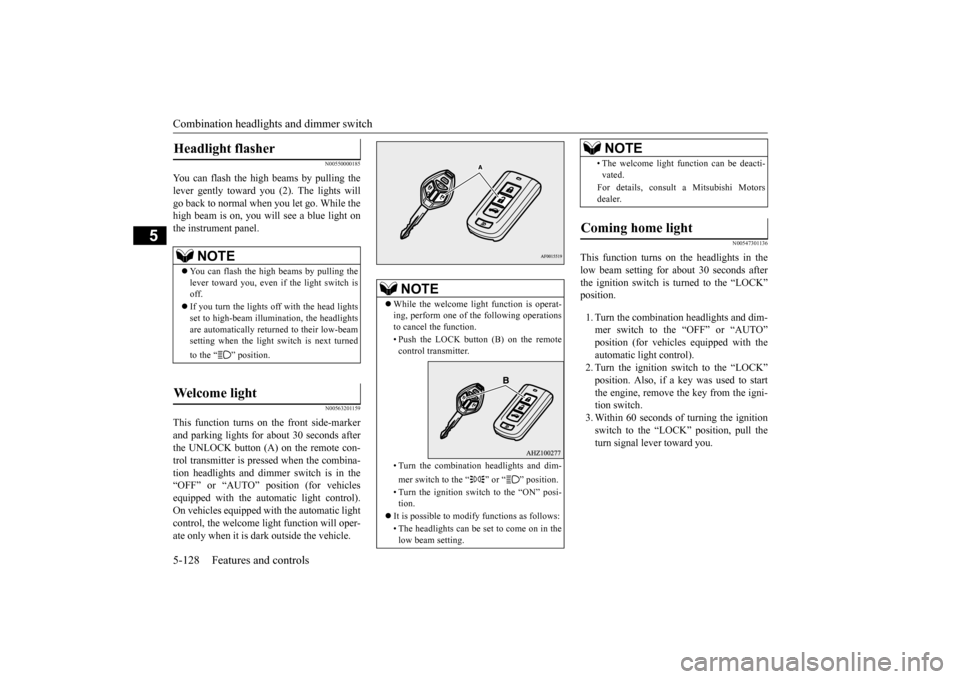
You can flash the high beams by pulling the lever gently toward you (2). The lights willgo back to normal when you let go. While the high beam is on, you will see a blue light on the instrument panel.
N00563201159
This function turns on the front side-marker and parking lights for about 30 seconds after the UNLOCK button (A) on the remote con-trol transmitter is pressed when the combina-tion headlights and dimmer switch is in the “OFF” or “AUTO” position (for vehicles equipped with the automatic light control).On vehicles equipped with the automatic light control, the welcome light function will oper- ate only when it is dark outside the vehicle.
N00547301136
This function turns on the headlights in thelow beam setting for about 30 seconds afterthe ignition switch is turned to the “LOCK” position. 1. Turn the combination headlights and dim- mer switch to the “OFF” or “AUTO”position (for vehicles equipped with the automatic light control). 2. Turn the ignition switch to the “LOCK”position. Also, if a key was used to start the engine, remove the key from the igni- tion switch.3. Within 60 seconds of turning the ignition switch to the “LOCK” position, pull the turn signal lever toward you.
Headlight flasher
NOTE
You can flash the high beams by pulling the lever toward you, even if the light switch isoff. If you turn the lights off with the head lights set to high-beam illumin
ation, the headlights
are automatically returned to their low-beam setting when the light switch is next turned to the “ ” position.
Welcome light
NOTE
While the welcome light function is operat- ing, perform one of the following operations to cancel the function. • Push the LOCK button (B) on the remote control transmitter. • Turn the combination headlights and dim- mer switch to the “ ” or “ ” position. • Turn the ignition switch to the “ON” posi- tion.
It is possible to modify functions as follows: • The headlights can be set to come on in the low beam setting.
• The welcome light function can be deacti- vated. For details, consult a Mitsubishi Motors dealer.
Coming home light
NOTE
BK0210800US.book
128 ページ 2014年4月8日 火曜日 午前11時28分
Page 197 of 338
Horn switch 5-136 Features and controls
5
N00523800130
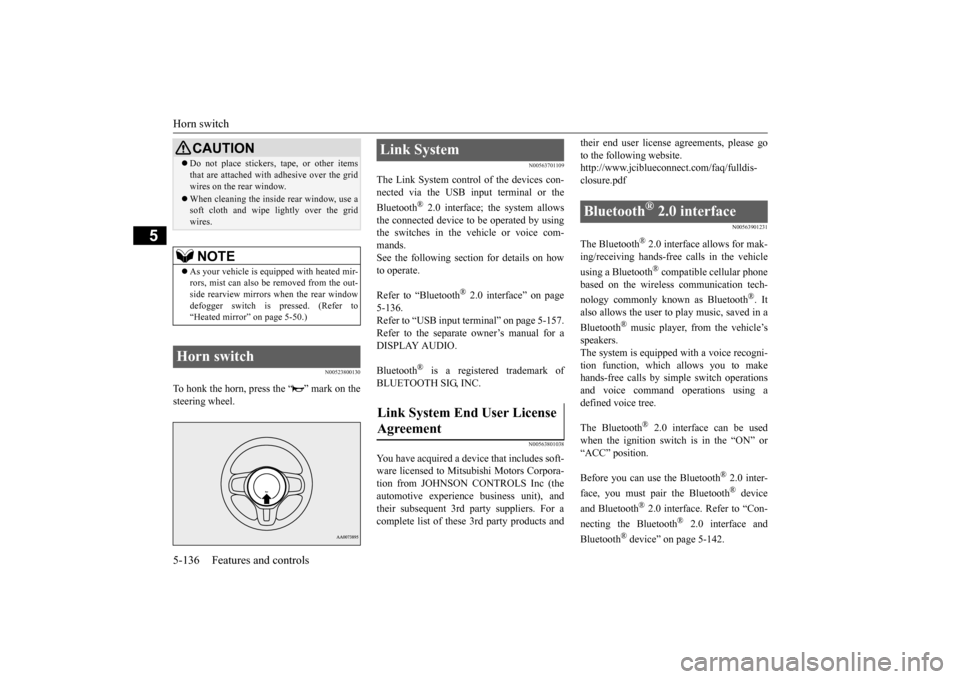
To honk the horn, press the “ ” mark on the steering wheel.
N00563701109
The Link System control of the devices con-nected via the USB input terminal or the Bluetooth
® 2.0 interface; the system allows
the connected device to be operated by using the switches in the vehicle or voice com-mands. See the following section for details on how to operate. Refer to “Bluetooth
® 2.0 interface” on page
5-136.Refer to “USB input terminal” on page 5-157. Refer to the separate owner’s manual for a DISPLAY AUDIO. Bluetooth
® is a registered trademark of
BLUETOOTH SIG, INC.
N00563801038
You have acquired a device that includes soft- ware licensed to Mitsubishi Motors Corpora- tion from JOHNSON CONTROLS Inc (theautomotive experience business unit), and their subsequent 3rd party suppliers. For a complete list of these 3rd party products and
their end user license agreements, please go to the following website. http://www.jciblueconn
ect.com/faq/fulldis-
closure.pdf
N00563901231
The Bluetooth
® 2.0 interface allows for mak-
ing/receiving hands-free calls in the vehicle using a Bluetooth
® compatible cellular phone
based on the wireless communication tech- nology commonly known as Bluetooth
®. It
also allows the user to
play music, saved in a
Bluetooth
® music player, from the vehicle’s
speakers. The system is equipped with a voice recogni-tion function, which allows you to make hands-free calls by simple switch operations and voice command operations using adefined voice tree. The Bluetooth
® 2.0 interface can be used
when the ignition switch is in the “ON” or “ACC” position. Before you can use the Bluetooth
® 2.0 inter-
face, you must pair the Bluetooth
® device
and Bluetooth
® 2.0 interface. Refer to “Con-
necting the Bluetooth
® 2.0 interface and
Bluetooth
® device” on page 5-142.
Do not place stickers, tape, or other items that are attached with adhesive over the grid wires on the rear window. When cleaning the inside rear window, use a soft cloth and wipe lightly over the grid wires.NOTE
As your vehicle is equipped with heated mir- rors, mist can also be removed from the out-side rearview mirrors when the rear window defogger switch is pressed. (Refer to “Heated mirror” on page 5-50.)
Horn switch
CAUTION
Link System Link System End User License Agreement
Bluetooth
® 2.0 interface
BK0210800US.book
136 ページ 2014年4月8日 火曜日 午前11時28分
Page 198 of 338
Bluetooth® 2.0 interface
Features and controls 5-137
5
Bluetooth
® is a registered trademark of
BLUETOOTH SIG, INC.
Steering control switch and microphone P.5-137 Voice recognition function
P.5-139
Useful voice commands
P.5-139
Speaker enrollment function
P.5-141
Connecting the Bluetooth
® 2.0 interface and
the Bluetooth
® device
P.5-142
Operating a music player connected via Blue- tooth
® P.5-147
How to make or receive hands-free calls P.5-147 Phonebook function
P.5-149
N00564001141
WA R N I N GAlthough the Bluetooth
® 2.0 interface
allows you to make hands-free calls, if you choose to use the cellular phone whiledriving, you must not allow yourself to be distracted from the safe operation of your vehicle. Anything, including cellularphone usage, that distracts you from the safe operation of your vehicle increases your risk of an accident. Refer to and comply with all state and local laws in your area regarding cellularphone usage while driving.NOTE
If the ignition switch is left in the “ACC” position, the accessory power will automati- cally turn off after a
certain period of time
and you will no longer be able to use the Bluetooth
® 2.0 interface. The accessory
power comes on again if the ignition switch is turned from the “ACC” position. Refer to“ACC power auto-cutout function” on page 5-51. The Bluetooth
® 2.0 interface cannot be used
if the Bluetooth
® device has a dead battery
or the device power is turned off. Hands-free calls will not be possible if your phone does not have service available.
Some Bluetooth
® devices are not compatible
with the Bluetooth
® 2.0 interface.
You can confirm the Link System software version by pressing the HANG-UP button3 times (press and hold 2 times and then press briefly) within 10 seconds. For detail of the Bluetooth
® 2.0 interface,
refer to the following website:[For vehicles sold in U.S.A.] You can access the Mitsubishi Motors North America website.[For vehicles sold in Canada] You can access the Mitsubishi Motors web- site.Please read and agree to the “Warning about Links to the Web Sites of Other Companies”, the websites mentioned above may connectyou to websites other than the Mitsubishi Motors website. http://www.mitsubishi-motors.com/en/prod-ucts/index.html Software updates by cellular phone/digital audio device manufacturers may change/alter device connectivity.NOTE
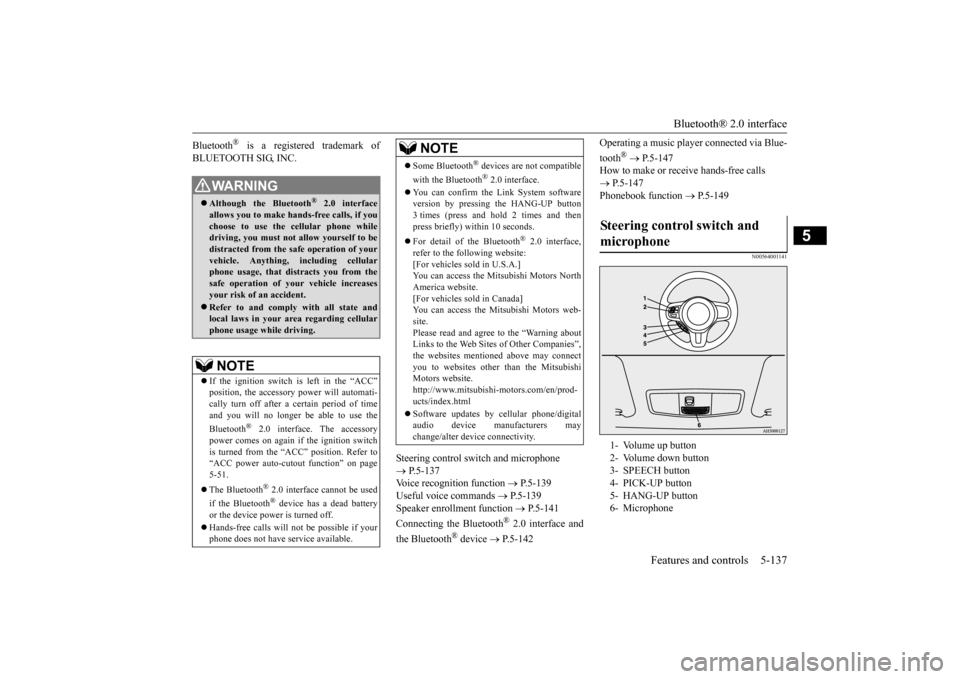
Steering control switch and microphone 1- Volume up button 2- Volume down button 3- SPEECH button 4- PICK-UP button5- HANG-UP button 6- Microphone
BK0210800US.book
137 ページ 2014年4月8日 火曜日 午前11時28分
Page 199 of 338
Bluetooth® 2.0 interface 5-138 Features and controls
5
Press this button to increase the volume. Press this button to decrease the volume. Press this button to change to voice recog- nition mode. While the system is in voice recognitionmode, “Listening” will appear on the audio display. If you press the button briefly while in voice recognition mode, it will interrupt prompting and allow voice commandinput. Pressing the button longer will deactivate the voice recognition mode.
Pressing this button briefly during a call will enable voice recognition and allow voice command input. Press this button when an incoming call is received to answer the telephone. When another call is received during a call, press this button to put the first calleron hold and talk to the new caller. • In such circumstances, you can press the button briefly to switch between callers.You will switch to the first caller and the other caller will be put on hold. • To establish a three-way call in such situ-ations, press the SPEECH button (exceptfor vehicles with Mitsubishi Multi-Com- munication System) or PICK-UP button (for vehicles with Mitsubishi Multi-Communication System) to enter voice recognition mode and then say “Join calls.”
Press this button when an incoming call is received to refuse the call. Press this button during a call to end the current call. When another call is on hold, you will switch to that call. If this button is pressed in the voice recog- nition mode, the voice recognition mode will be deactivated.
N00575800025
Your voice will be recognized by a micro-phone in the overhead console, allowing you
Volume up button Volume down button SPEECH button
NOTE
On vehicles equipped with the Mitsubishi Multi-Communication System, pressing the SPEECH button will activate the voice rec- ognition mode (a beep will sound when suc-cessfully activated). To use the voice recognition of the Bluetooth
® 2.0 interface,
press the PICK-UP button.
PICK-UP button
NOTE
When not receiving incoming calls, pressing the PICK-UP button on vehicles equippedwith the Mitsubishi Multi-Communication System, will activate the voice recognition of the Bluetooth
® 2.0 interface.
HANG-UP button
NOTE
When you press the SPEECH button to enter voice recognition mode with a cellular phonepaired to the system, current information on the cellular phone, such as “remaining bat- tery life,” “signal strength” or “roaming,”will be displayed on the audio display.
*
* : Some cellular phones will not send this information to the Bluetooth
® 2.0 interface.
Call waiting and three-way calls can be used by the Bluetooth
® 2.0 interface, only if it is
possible to use those services with your cel- lular phone.
Microphone
BK0210800US.book
138 ページ 2014年4月8日 火曜日 午前11時28分
Page 200 of 338
Bluetooth® 2.0 interface
Features and controls 5-139
5
to make hands-free calls with voice com- mands.
N00564101100
The Bluetooth
® 2.0 interface is equipped
with a voice recognition function.Simply say voice commands and you can per- form various operations and make or receive hands-free calls. With the Bluetooth
® 2.0 interface, voice rec-
ognition is possible for US English, North American Spanish and Canadian French. The factory setting is “English.”
1. Press the SPEECH button (except for vehicles with Mits
ubishi Multi-Commu-
nication System) or PICK-UP button (for vehicles with Mits
ubishi Multi-Commu-
nication System). 2. Say “Setup.” 3. Say “Language.”4. The voice guide will say “Select a lan- guage: English, Spanish or French.” Say the desired language. (Example: “Eng-lish”) 5. The voice guide will say “English (Span- ish or French) selected. Is this correct?”Say “Yes.” If you say “No,” the system will return to Step 4.
6. When the voice guide says “English (Spanish or French) selected,” the lan-guage change process will be completed and the system will return to the main menu.
N00564200016 N00564300017
The Bluetooth
® 2.0 interface is equipped
with a help function. If you say “Help” when the system is waitingfor a voice command input, the system will tell you a list of the commands that can be used under the circumstances.
NOTE
If a cellular phone is within close proximity of the microphone, it may distort the sound quality. In this case, place the cellular phoneas far as possible from the microphone.
Voice recognition function
NOTE
If the voice command that you say differs from the predefined command or cannot berecognized due to ambient noise or some other reason, the Bluetooth
® 2.0 interface
will ask you for the voice command again upto 3 times.
For best performance and further reduction of ambient noise, the vehicle windows should be closed, lower the blower speed and refrain from conversation with your passen- gers while engaging the voice recognitionfunction. Some voice commands have alternative commands. Depending on the selected language, some functions may not be available.
Selecting the language
NOTE
NOTE
The voice guide will repeat the same mes- sage twice. The first message is in the cur- rent language, and the second message is in the selected language. If many entries are registered in the vehicle phonebook, changing the language will take a longer time. Changing the language deletes the mobile phonebook imported to the Bluetooth
® 2.0
interface. If you wish to use it, you will have to import it again.
Useful voice commands Help function
BK0210800US.book
139 ページ 2014年4月8日 火曜日 午前11時28分