power steering MITSUBISHI LANCER EVOLUTION 2015 10.G Owners Manual
[x] Cancel search | Manufacturer: MITSUBISHI, Model Year: 2015, Model line: LANCER EVOLUTION, Model: MITSUBISHI LANCER EVOLUTION 2015 10.GPages: 338, PDF Size: 43.12 MB
Page 62 of 338
5
Features and controlsBreak-in period ...............
.................................................................5-3
Keys ..........................................
.......................................................5-3
Electronic immobilizer (Anti-thef
t starting system) ........................5-4
Keyless entry system (if so equipped) ..............................................5-7Free-hand Advanced Security Transmitter (F.A.S.T.-key) (if so equipped) .
.................................................
........................ 5-11
Door locks .......................
...............................................................5-33
Power door locks ............
...............................................................5-35
“Child safety locks” for
rear door ..................................................5-36
Trunk lid ...................................
.....................................................5-37
Inside emergency trunk lid
release ................................................5-38
Theft-alarm system
................................................
........................5-39
Power windows ...............
...............................................................5-42
Sunroof (if so equipped
) .........................................
........................5-44
Parking brake ..................
...............................................................5-46
Steering wheel tilt lock lever .........................................................5-47Inside day/night rearview
mirror ...................................................5-48
Outside rearview mirr
ors ...............................................................5-49
Ignition switch ......
.................................................
........................5-50
Steering wheel lock
................................................
........................5-52
Starting and stopping the e
ngine ....................................................5-52
Turbocharger operation
..........................................
........................5-55
Clutch pedal operation (if so equipped)..........................................5-56Manual transaxle (if so equipped) ..................................................5-56 Twin Clutch SST (Sportronic Shift Transmission) (if so equipped) .
.................................................
........................5-58
All-wheel drive system
..........................................
........................5-70
Cautions on handling of all-wheel drive vehicles ..........................5-70
S-AWC (Super-All Wheel C
ontrol) ............................................... 5-71
Anti-lock braking syst
em .....................................
......................... 5-74
Active stability control
(ASC) ....................
................................... 5-76
Limited-slip differenti
al ..............................
................................... 5-78
Service brake .................
.................................................
............... 5-79
Brake assist system
...............................................
......................... 5-80
Power steering system
..........................................
......................... 5-80
Cruise control ................
.................................................
............... 5-80
Tire pressure monitoring
system ................................................... 5-85
Instrument cluster
.................................................
......................... 5-89
Multi-information disp
lay ....................................
......................... 5-90
Indicator light, warning light, and information screen display list ...........................
.................................................... 5-110
Indicators .................................
.................................................... 5-120
Warning lights ................
.................................................
............. 5-121
Information screen disp
lay ...................................
....................... 5-122
Combination headlights and dimmer switch ............................... 5-124 Turn signal lever ..
.................................................
....................... 5-129
Hazard warning flasher
switch .................................................... 5-130
Front fog light switch
...........................................
....................... 5-130
Wiper and washer swit
ch ......................................
....................... 5-131
Electric rear window def
ogger switch ......................................... 5-135
Horn switch .............................
.................................................... 5-136
Link System .............................
.................................................... 5-136
Bluetooth
® 2.0 interface ..........
.................................................... 5-136
USB input terminal
...............................................
....................... 5-157
Sun visors ......................
.................................................
............. 5-160
12 V power outlet ..........
.................................................
............. 5-160
BK0210800US.bo
ok 1 ページ 2014年4月8日 火曜日 午前11時28分
Page 78 of 338
Free-hand Advanced Security Transmit
ter (F.A.S.T.-key) (if so equipped)
Features and controls 5-17
5
N00513700077
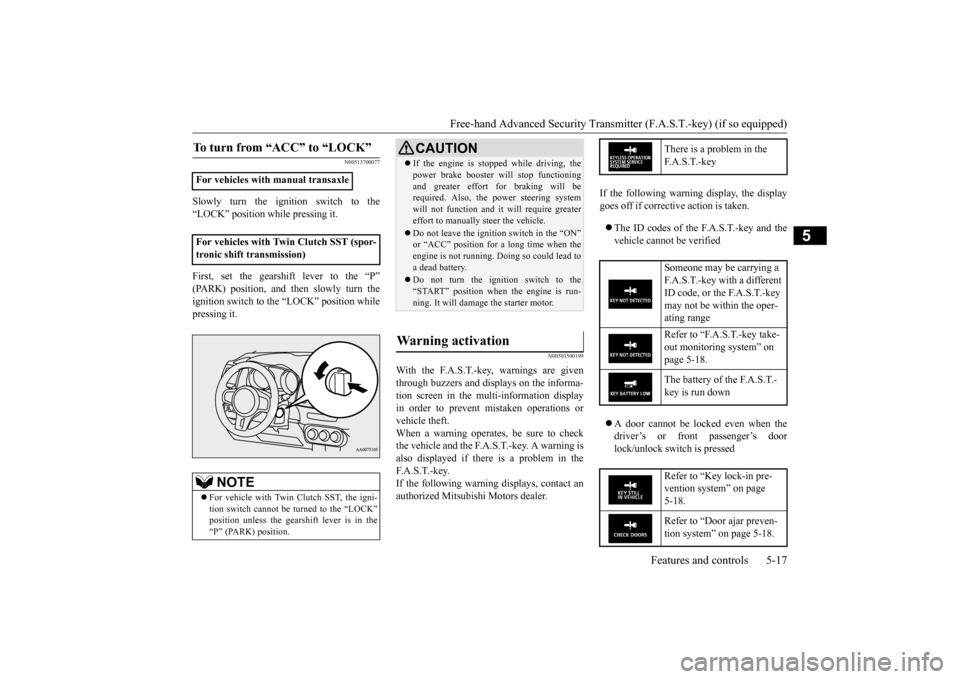
Slowly turn the ignition switch to the “LOCK” position while pressing it. First, set the gearshift lever to the “P” (PARK) position, and then slowly turn theignition switch to the “LOCK” position while pressing it.
N00503500199
With the F.A.S.T.-key, warnings are given through buzzers and displays on the informa-tion screen in the multi-information display in order to prevent mistaken operations or vehicle theft.When a warning operates, be sure to check the vehicle and the F.A.S.T.-key. A warning is also displayed if there is a problem in theF. A . S . T. - k e y. If the following warning displays, contact an authorized Mitsubishi Motors dealer.
If the following warning display, the display goes off if corrective action is taken. The ID codes of the F.A.S.T.-key and the vehicle cannot be verified A door cannot be locked even when the driver’s or front passenger’s door lock/unlock switch is pressed
To turn from “ACC” to “LOCK”
For vehicles with manual transaxle For vehicles with Twin Clutch SST (spor- tronic shift transmission)
NOTE
For vehicle with Twin Clutch SST, the igni- tion switch cannot be turned to the “LOCK” position unless the gearshift lever is in the“P” (PARK) position.
CAUTION If the engine is stopped while driving, the power brake booster will stop functioning and greater effort for braking will be required. Also, the power steering system will not function and it will require greatereffort to manually steer the vehicle. Do not leave the ignition switch in the “ON” or “ACC” position for a long time when the engine is not running. Doing so could lead to a dead battery. Do not turn the ignition switch to the “START” position when the engine is run-ning. It will damage the starter motor.
Warning activation
There is a problem in the F. A . S . T. - k e y Someone may be carrying a F.A.S.T.-key with a different ID code, or the F.A.S.T.-key may not be within the oper- ating range Refer to “F.A.S.T.-key take- out monitoring system” on page 5-18. The battery of the F.A.S.T.- key is run down Refer to “Key lock-in pre- vention system” on page 5-18. Refer to “Door ajar preven- tion system” on page 5-18.
BK0210800US.bo
ok 17 ページ 2014年4月8日 火曜日 午前11時28分
Page 84 of 338
![MITSUBISHI LANCER EVOLUTION 2015 10.G Owners Manual Free-hand Advanced Security Transmit
ter (F.A.S.T.-key) (if so equipped)
Features and controls 5-23
5
1. [For vehicles with manual transaxle] Push the emergency key in at the “ACC”position and ke](/img/19/7477/w960_7477-83.png "MITSUBISHI LANCER EVOLUTION 2015 10.G Owners Manual Free-hand Advanced Security Transmit
ter (F.A.S.T.-key) (if so equipped)
Features and controls 5-23
5
1. [For vehicles with manual transaxle] Push the emergency key in at the “ACC”position and ke")
Free-hand Advanced Security Transmit
ter (F.A.S.T.-key) (if so equipped)
Features and controls 5-23
5
1. [For vehicles with manual transaxle] Push the emergency key in at the “ACC”position and keep it
depressed until it is
turned to the “LOCK” position, and remove.[For vehicles with Twin Clutch SST (sportronic shift transmission)] First, set the gearshift lever to the “P”(PARK) position, and then slowly turn the ignition switch to the “LOCK” position while pressing it.
2. Install the cover of the ignition switch. 3. Reinsert the emergency key into the F. A . S . T. - k e y.
Steering wheel lock
NOTE
When the ignition switch cannot be turned from the “LOCK” position to the “ACC” position, turn the ignition switch while turn- ing the steering wheel in both directions.
To turn from “ACC” to “LOCK”
NOTE
For vehicles with Twin Clutch SST, the emergency key cannot be removed unless the gearshift lever is set to the “P” (PARK) posi-tion.NOTE
Always install the cover of the ignition switch when not using the emergency key. Not doing so could cause damage if foreign material such as dust gets into the keyhole ofthe ignition switch.
CAUTION Do not turn the ignition switch to the LOCK position while the vehicle is moving. This will cause the steering wheel to lock, making it impossible to operate the vehicle. If the engine is stopped while driving, the power brake booster will stop functioning and greater effort for braking will berequired. Also, the power steering system will not function and it will require greater effort to manually steer the vehicle. Do not leave the ignition switch in the “ON” or “ACC” position for a long time when theengine is not running. The battery will run down. Do not turn the ignition switch to the “START” position when the engine is run- ning. It will damage the starter motor.
BK0210800US.bo
ok 23 ページ 2014年4月8日 火曜日 午前11時28分
Page 112 of 338
Ignition switch
Features and controls 5-51
5
Engages the starter. After the engine starts, release the key and it will return automati-cally to the “ON” position.
N00539601101
After about 30 minutes has elapsed with theignition switch in the “ACC” position, the function automatically cuts out the power for the audio system and other electric devicesthat can be operated with that position. When the ignition switch is turned from “ACC” to the “ON” position, the power issupplied again to those devices.
N00550900139
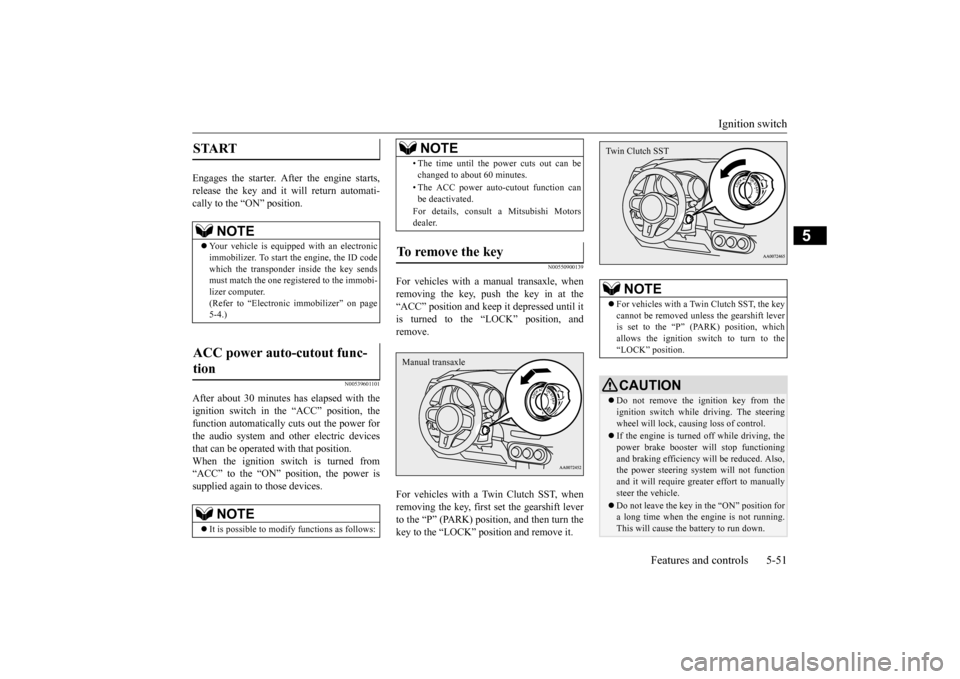
For vehicles with a manual transaxle, whenremoving the key, push the key in at the“ACC” position and keep it depressed until it is turned to the “LOCK” position, and remove. For vehicles with a Twin Clutch SST, when removing the key, first set the gearshift leverto the “P” (PARK) position, and then turn the key to the “LOCK” position and remove it.
START
NOTE
Your vehicle is equipped with an electronic immobilizer. To start the engine, the ID code which the transponder inside the key sendsmust match the one registered to the immobi- lizer computer. (Refer to “Electronic immobilizer” on page5-4.)
ACC power auto-cutout func- tion
NOTE
It is possible to modify functions as follows:
• The time until the power cuts out can be changed to about 60 minutes. • The ACC power auto-cutout function can be deactivated. For details, consult a Mitsubishi Motors dealer.
To remove the key
NOTE
Manual transaxle
NOTE
For vehicles with a Twin Clutch SST, the key cannot be removed unless the gearshift lever is set to the “P” (PARK) position, whichallows the ignition switch to turn to the “LOCK” position.CAUTION Do not remove the ignition key from the ignition switch while driving. The steering wheel will lock, causing loss of control. If the engine is turned off while driving, the power brake booster will stop functioning and braking efficiency will be reduced. Also,the power steering system will not function and it will require greater effort to manually steer the vehicle. Do not leave the key in the “ON” position for a long time when the engine is not running.This will cause the battery to run down.Twin Clutch SST
BK0210800US.bo
ok 51 ページ 2014年4月8日 火曜日 午前11時28分
Page 115 of 338
Starting and stopping the engine 5-54 Features and controls
5
1. Make sure that all electric devices, such as lights, air conditioning blower and rear window defogger, are turned off. 2. While depressing the brake pedal on vehi-cles equipped with Twin Clutch SST or the clutch pedal on the vehicles equipped with manual transaxle, press the accelera-tor pedal halfway and hold it there, then crank the engine. Release the accelerator pedal, immediately after the engine starts.3. If the engine still will not start, the enginecould be flooded with too much gasoline. While depressing the brake pedal on vehi- cles equipped with Twin Clutch SST orthe clutch pedal on the vehicles equipped with manual transaxle, push the accelera- tor pedal all the way down and hold itthere, then crank the engine for 5 to 6 sec- onds. Return the ignition switch to the “LOCK” position and release the acceler-ator pedal. Wait a few seconds, and then crank the engine again for 5 to 6 seconds while depressing the brake pedal or theclutch pedal, but do not push the accelera- tor pedal. Release the ignition key if the engine starts. If the engine fails to start,repeat these procedures. If the engine still will not start, contact your local Mitsubishi Motors dealer or a repair facil-ity of your choice for assistance.
When the ambient temperature is -22 °F (-30 °C) or lower, it may not be possible to start from a standstill even with the gearshift lever in the “D” (DRIVE) or “R”(REVERSE) position. This phenomenon occurs because the trans- mission has not warmed up sufficiently; itdoes not indicate a problem. If it occurs,place the gearshift lever in the “P” (PARK) position and let the engine idle for at least 10 minutes.The transmission will warm up, and you will be able to start normally. Do not leave the vehicle during warm-upoperation.
N00547600031
At high altitude locations, the idle speed maybe higher. This is done in order to stabilize the idle speed when the power steering sys- tem and other systems operate. It does notindicate a malfunction.
N00542300075
1. Bring the vehicle to a complete stop. 2. Fully engage the parking brake whiledepressing the brake pedal. 3. For vehicles with a manual transaxle, turn the ignition switch to the “LOCK” posi-tion to stop the engine, and then move the gearshift lever to the 1st (on a uphill) or “R” (Reverse) (on a downhill) position.For vehicles with Twin Clutch SST, placethe gearshift lever in the “P” (PARK) position, and then turn the ignition switch to the “LOCK” position to stop theengine.
Startability of Twin Clutch SST vehicle with ambient temperature of -22 °F (-30 °C) or lower Idle speed in high altitude area
Stopping the engine
BK0210800US.bo
ok 54 ページ 2014年4月8日 火曜日 午前11時28分
Page 133 of 338
S-AWC (Super-All Wheel Control) 5-72 Features and controls
5
The left-right differential limiting function is a function that enhances driving performance and vehicle stability by preventing idle spin-ning of a wheel when driving on slippery road surfaces or when the road surfaces of the left and right wheels are different. The yaw control function is a function that enhances vehicle cornering performance by controlling the drive power difference of theleft and right wheels
and the braking force
when the vehicle does not turn in response to steering input, such as when the steeringwheel is turned quickly or when driving on slippery road surfaces.
N00542401057
Select the control mode from the followingthree types to suit the driving conditions.
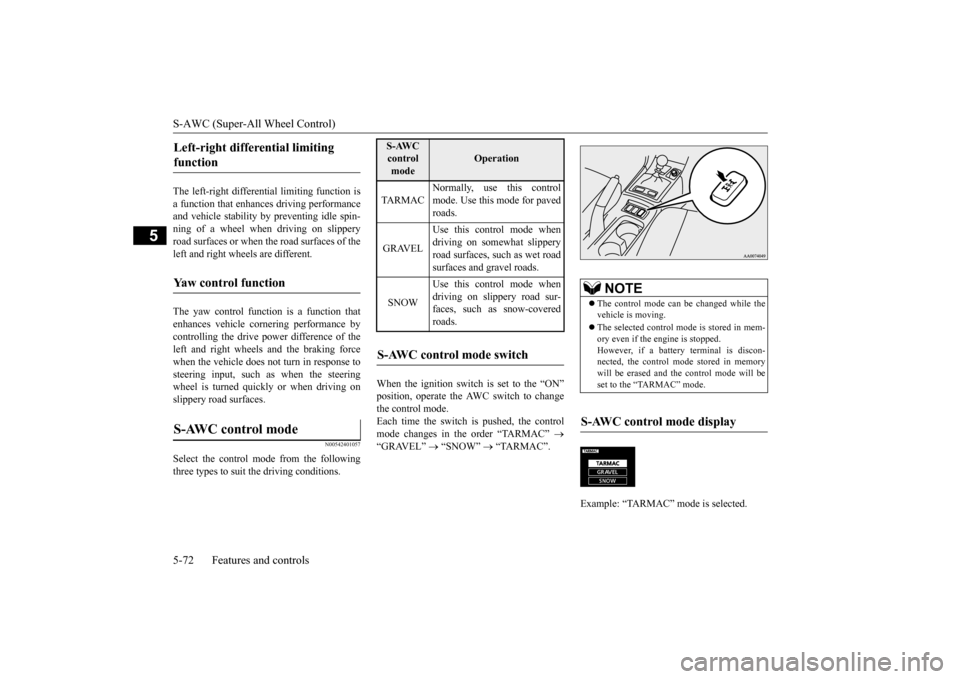
When the ignition switch is set to the “ON” position, operate the AWC switch to change the control mode.Each time the switch is pushed, the control mode changes in the order “TARMAC”
“GRAVEL”
“SNOW”
“TARMAC”.
Left-right differential limiting function Yaw control function S-AWC control mode
S-AWC control mode
Operation
TA R M A C
Normally, use this control mode. Use this mode for paved roads.
GRAVEL
Use this control mode when driving on somewhat slipperyroad surfaces, such as wet road surfaces and gravel roads.
SNOW
Use this control mode when driving on slippery road sur-faces, such as snow-covered roads.
S-AWC control mode switch
NOTE
The control mode can be changed while the vehicle is moving. The selected control mode is stored in mem- ory even if the engine is stopped. However, if a battery terminal is discon-nected, the control mode stored in memory will be erased and the control mode will be set to the “TARMAC” mode.
S-AWC control mode display Example: “TARMAC” mode is selected.ç
BK0210800US.bo
ok 72 ページ 2014年4月8日 火曜日 午前11時28分
Page 141 of 338
Brake assist system 5-80 Features and controls
5
N00567300076
The brake assist system is a device assisting drivers who cannot depress the brake pedalfirmly such as in emergency stop situations and provides greater braking force. If the brake pedal is depressed suddenly, the brakes will be applied with more force thanusual.
N00518000323
The power steering system operates while theengine is running. It helps reduce the effort needed to turn the steering wheel. The power steering system has mechanicalsteering capability in case the power assist is
lost. If the power assist is lost for some rea- son, you will still be able to steer your vehi- cle, but you will notice it takes much more effort to steer. If this happens, have your vehi-cle inspected at an authorized Mitsubishi Motors dealer or a repair facility of your choice.
N00518300472
Cruise control is an automatic speed control system that keeps a set speed. It can be acti- vated at speeds from about 25 mph(40 km/h). Cruise control does not work at speeds below about 25 mph (40 km/h).
WA R N I N G Driving with worn brake pads will make it harder to stop, and can cause an accident.NOTE
When the brakes are applied, a faint noise may be heard, but this
is a characteristic of
high-performance brakes; it does not indicatea problem.
Brake assist system
CAUTION The brake assist system is not a device designed to exercise braking force greater than its capacity. Make sure to always keep asufficient distance between vehicles in front of you without relying too much on the brake assist system.
NOTE
Once the brake assist system is operational, it maintains great braking force even if the brake pedal is lightly released. To stop its operation, completely remove your foot from the brake pedal. The brake assist system may become opera- tional when the brake pedal is fullydepressed even if it has not been depressed suddenly. When the brake assist system is in use while driving, you may feel as if the depressed brake pedal is soft, the pedal moves in smallmotions in conjunction with the operation noise, or the vehicle body and the steering wheel vibrate. This occurs when the brakeassist system is operating normally and does not indicate faulty operation. Continue to depress the brake pedal. You may hear an operation noise when the brake pedal is suddenly or fully depressedwhile stationary. This does not indicate a malfunction and the brake assist system is operating normally.
Power steering system
WA R N I N G Do not stop the engine while the vehicle is moving. Stopping the engine would makethe steering wheel extremely hard to turn, possibly resulting in an accident.CAUTION Do not leave the steering wheel turned all the way in one direction. This can cause damage to the power steering system.
Cruise control
BK0210800US.bo
ok 80 ページ 2014年4月8日 火曜日 午前11時28分
Page 198 of 338
Bluetooth® 2.0 interface
Features and controls 5-137
5
Bluetooth
® is a registered trademark of
BLUETOOTH SIG, INC.
Steering control switch and microphone P.5-137 Voice recognition function
P.5-139
Useful voice commands
P.5-139
Speaker enrollment function
P.5-141
Connecting the Bluetooth
® 2.0 interface and
the Bluetooth
® device
P.5-142
Operating a music player connected via Blue- tooth
® P.5-147
How to make or receive hands-free calls P.5-147 Phonebook function
P.5-149
N00564001141
WA R N I N GAlthough the Bluetooth
® 2.0 interface
allows you to make hands-free calls, if you choose to use the cellular phone whiledriving, you must not allow yourself to be distracted from the safe operation of your vehicle. Anything, including cellularphone usage, that distracts you from the safe operation of your vehicle increases your risk of an accident. Refer to and comply with all state and local laws in your area regarding cellularphone usage while driving.NOTE
If the ignition switch is left in the “ACC” position, the accessory power will automati- cally turn off after a
certain period of time
and you will no longer be able to use the Bluetooth
® 2.0 interface. The accessory
power comes on again if the ignition switch is turned from the “ACC” position. Refer to“ACC power auto-cutout function” on page 5-51. The Bluetooth
® 2.0 interface cannot be used
if the Bluetooth
® device has a dead battery
or the device power is turned off. Hands-free calls will not be possible if your phone does not have service available.
Some Bluetooth
® devices are not compatible
with the Bluetooth
® 2.0 interface.
You can confirm the Link System software version by pressing the HANG-UP button3 times (press and hold 2 times and then press briefly) within 10 seconds. For detail of the Bluetooth
® 2.0 interface,
refer to the following website:[For vehicles sold in U.S.A.] You can access the Mitsubishi Motors North America website.[For vehicles sold in Canada] You can access the Mitsubishi Motors web- site.Please read and agree to the “Warning about Links to the Web Sites of Other Companies”, the websites mentioned above may connectyou to websites other than the Mitsubishi Motors website. http://www.mitsubishi-motors.com/en/prod-ucts/index.html Software updates by cellular phone/digital audio device manufacturers may change/alter device connectivity.NOTE
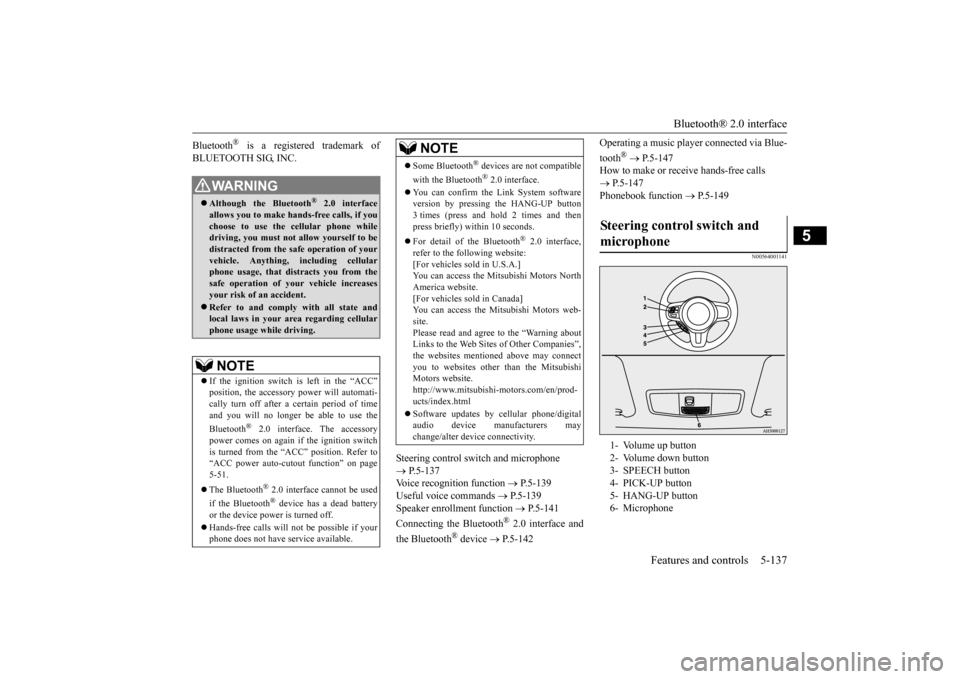
Steering control switch and microphone 1- Volume up button 2- Volume down button 3- SPEECH button 4- PICK-UP button5- HANG-UP button 6- Microphone
BK0210800US.book
137 ページ 2014年4月8日 火曜日 午前11時28分
Page 233 of 338
Safe driving techniques 6-4 Driving safety
6
Replace your tires before they are heavily worn out. As your vehicle is equipped with a tire pres- sure monitoring system, there is a risk ofdamage to the tire inflation pressure sensors when the tire is replaced on the rim. Tire replacement should, therefore, be performedonly by an authorized Mitsubishi Motors dealer. Have someone watch while you turn all the exterior lights on and off. Also check the turn signal indicators and high-beam indicators on the instrument panel. Check the ground under the vehicle after parking overnight, for fuel, water, oil, orother leaks. Make sure all the fluid levels are correct. Also, if you can smell fuel, you need to find out why immediately and have itfixed.
N00629200108
Even this vehicle’s safety equipment, andyour safest driving, cannot guarantee that you
can avoid an accident or injury. However, if you give extra attention to the following areas, you can better protect yourself and your passengers: Drive defensively. Be aware of traffic, road and weather conditions. Leave plenty of stopping distance between your vehicle and the vehicle ahead. Before changing lanes, check your mir- rors and use your turn signal light. While driving, keep a tight grip on the steering wheel. While driving, watch the behavior of other drivers, bicyclists, and pedestrians. Always obey applicable laws and regula- tions. Be a polite and alert driver. Always leave room for unexpected events, such as sudden braking. If you plan to drive in another country, obey their vehicle registration laws and make sure you will be able to get the rightfuel.
N00629400432
Check the battery, including terminals and cables. During extremely cold weather, the battery will not be as strong. Also, the battery power level may drop becausemore power is used for cold starting and driving.
Before driving the vehicle, check to see if the engine runs at the proper speed and if the headlights are as bright as normally. Charge or replace the battery if necessary.During extreme cold weather, it is possi- ble that a very low battery could freeze. Warm the engine sufficiently. After start- ing the engine, allow a short warm-up time to distribute oil
to all cylinders and
turbocharger. Then drive your vehicle slowly. Stay at low speeds at first so that the transaxle, transfer case and rear axle oil have time to spread to all the lubrication points. Manual transaxle can be harder to shift in cold weather conditions. This is normal and shifting will get easier as the transaxlewarms up. Check the engine antifreeze.
Lights Fluid leaks Safe driving techniques
Driving during cold weather
WA R N I N G The battery gives off explosive hydrogen gas. Any spark or flame can cause the bat- tery to explode, which could cause seriousinjury or death. Always wear protective clothes and a face mask when working with your battery, orlet a skilled mechanic do it.
BK0210800US.bo
ok 4 ページ 2014年4月8日 火曜日 午前11時28分
Page 236 of 338
Loading information Driving safety 6-7
6
Curb weight: the weight of a motor vehi- cle with standard equipment including the maximum capacity of fuel, oil, and cool- ant. Accessory weight: the combined weight (in excess of those standard items which may be replaced) of automatic transmis-sion, power steering, power brakes, power windows, power seats, radio, and heater, to the extent that these items are availableas factory- installed equipment (whetherinstalled or not). Vehicle capacity weight: the rated cargo and luggage load plus 150 lbs (68 kg)
*
times the vehicle’s designated seating capacity. Production options weight: the combined weight of those installed regular produc- tion options weighing over 5 lbs (2.3 kg) in excess of those standard items whichthey replace, not previously considered in curb weight or accessory weight, includ- ing heavy duty brakes, ride levelers, roofrack, heavy duty battery, and special trim. Normal occupant weight: 150 lbs (68 kg)
*
times the number of specified occupants.(In your vehicle the number is 3) Occupant distribution: distribution of occupants in a vehicle as specified. (Inyour vehicle the distribution is 2 in front, 1 in second row seat)
N00630100338
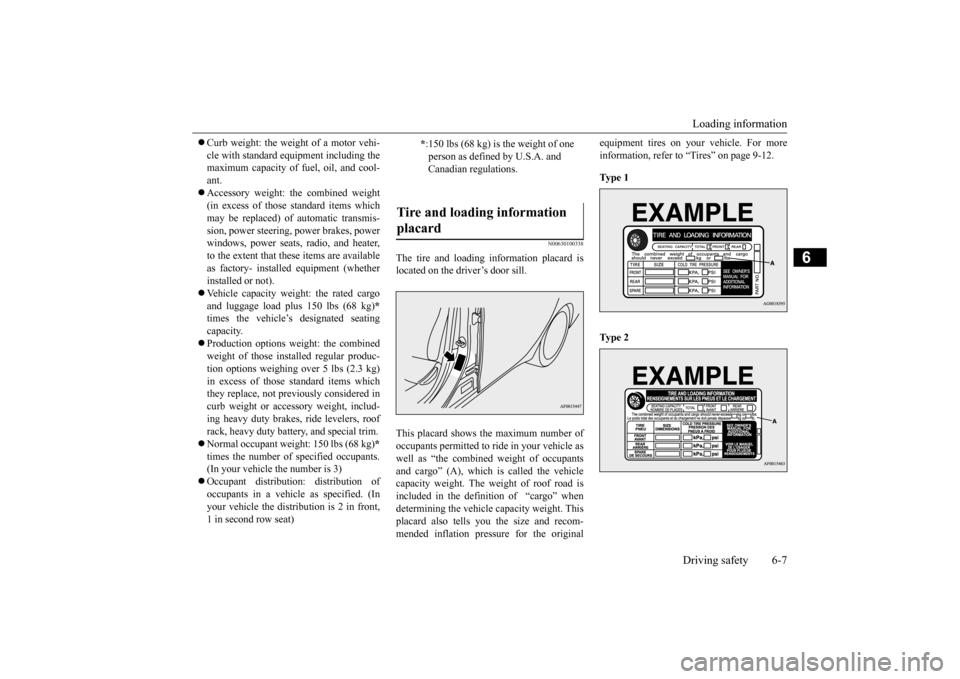
The tire and loading information placard islocated on the driver’s door sill. This placard shows the maximum number of occupants permitted to ride in your vehicle as well as “the combined weight of occupants and cargo” (A), which is called the vehiclecapacity weight. The weight of roof road is included in the definition of “cargo” when determining the vehicle capacity weight. Thisplacard also tells you the size and recom- mended inflation pressure for the original
equipment tires on your vehicle. For more information, refer to “Tires” on page 9-12. Ty p e 1 Ty p e 2
* :150 lbs (68 kg) is the weight of one person as defined by U.S.A. and Canadian regulations.
Tire and loading information placard
BK0210800US.bo
ok 7 ページ 2014年4月8日 火曜日 午前11時28分