ignition MITSUBISHI LANCER SPORTBACK 2014 8.G User Guide
[x] Cancel search | Manufacturer: MITSUBISHI, Model Year: 2014, Model line: LANCER SPORTBACK, Model: MITSUBISHI LANCER SPORTBACK 2014 8.GPages: 422, PDF Size: 55.11 MB
Page 55 of 422
Supplemental Restraint System (SRS) - airbag 4-28 Seat and restraint systems
4
N00418100251
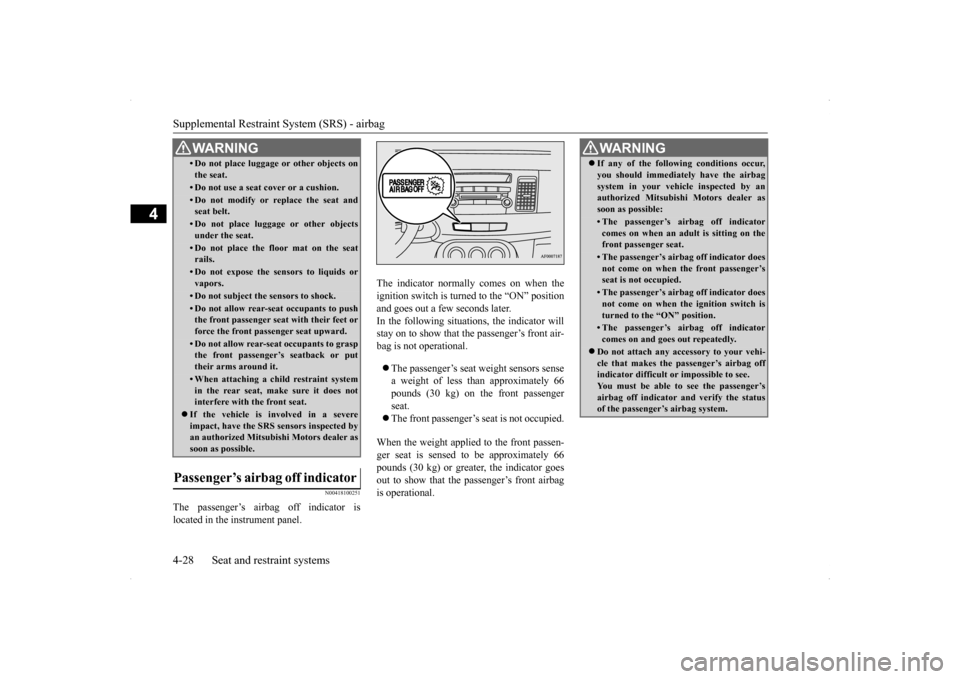
The passenger’s airbag off indicator is located in the instrument panel.
The indicator normally comes on when the ignition switch is turned to the “ON” positionand goes out a few seconds later. In the following situa
tions, the indicator will
stay on to show that the passenger’s front air-bag is not operational. The passenger’s seat weight sensors sense a weight of less than approximately 66 pounds (30 kg) on the front passenger seat. The front passenger’s seat is not occupied.
When the weight applied to the front passen- ger seat is sensed to be approximately 66 pounds (30 kg) or greater, the indicator goesout to show that the passenger’s front airbag is operational.
• Do not place luggage or other objects on the seat.• Do not use a seat cover or a cushion.• Do not modify or replace the seat andseat belt.• Do not place luggage or other objectsunder the seat.• Do not place the floor mat on the seatrails.• Do not expose the sensors to liquids orvapors.• Do not subject the sensors to shock.• Do not allow rear-seat occupants to push the front passenger seat with their feet or force the front passenger seat upward.• Do not allow rear-seat occupants to graspthe front passenger’s seatback or put their arms around it.• When attaching a child restraint systemin the rear seat, make sure it does notinterfere with the front seat.
If the vehicle is involved in a severe impact, have the SRS sensors inspected by an authorized Mitsubishi Motors dealer as soon as possible.
Passenger’s airbag off indicator
WA R N I N G
WA R N I N G If any of the following conditions occur, you should immediately have the airbag system in your vehicle inspected by an authorized Mitsubishi Motors dealer as soon as possible:• The passenger’s airbag off indicatorcomes on when an adult is sitting on thefront passenger seat.• The passenger’s airbag off indicator doesnot come on when the front passenger’s seat is not occupied.• The passenger’s airbag off indicator doesnot come on when the ignition switch is turned to the “ON” position.• The passenger’s airbag off indicatorcomes on and goes out repeatedly.
Do not attach any accessory to your vehi- cle that makes the passenger’s airbag offindicator difficult or impossible to see. You must be able to see the passenger’s airbag off indicator and verify the statusof the passenger’s airbag system.
BK0200700US.bo
ok 28 ページ 2013年2月15日 金曜日 午後12時17分
Page 56 of 422
Supplemental Restraint System (SRS) - airbag
Seat and restraint systems 4-29
4
N00408300524
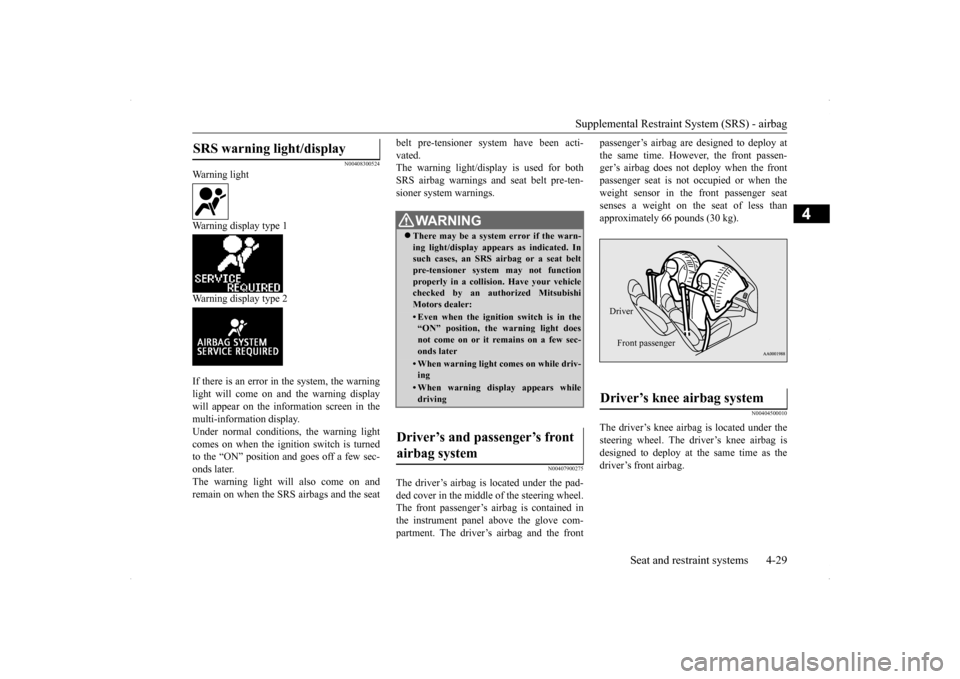
Warning light Warning display type 1 Warning display type 2 If there is an error in the system, the warning light will come on and the warning display will appear on the information screen in the multi-information display.Under normal conditions, the warning lightcomes on when the ignition switch is turned to the “ON” position and goes off a few sec- onds later.The warning light will also come on and remain on when the SRS airbags and the seat
belt pre-tensioner system have been acti- vated. The warning light/display is used for both SRS airbag warnings and seat belt pre-ten-sioner system warnings.
N00407900275
The driver’s airbag is located under the pad- ded cover in the middle of the steering wheel. The front passenger’s airbag is contained inthe instrument panel above the glove com- partment. The driver’s airbag and the front
passenger’s airbag are designed to deploy at the same time. However, the front passen- ger’s airbag does not deploy when the front passenger seat is not occupied or when theweight sensor in the front passenger seat senses a weight on the seat of less than approximately 66 pounds (30 kg).
N00404500010
The driver’s knee airbag is located under the steering wheel. The driver’s knee airbag is designed to deploy at the same time as thedriver’s front airbag.
SRS warning light/display
WA R N I N G There may be a system error if the warn- ing light/display appears as indicated. In such cases, an SRS airbag or a seat beltpre-tensioner system may not function properly in a collision. Have your vehicle checked by an authorized MitsubishiMotors dealer:• Even when the ignition switch is in the“ON” position, the warning light does not come on or it remains on a few sec- onds later• When warning light comes on while driv-ing• When warning display appears whiledriving
Driver’s and passenger’s front airbag system
Driver’s knee airbag system Driver Front passenger
BK0200700US.bo
ok 29 ページ 2013年2月15日 金曜日 午後12時17分
Page 60 of 422
Supplemental Restraint System (SRS) - airbag
Seat and restraint systems 4-33
4
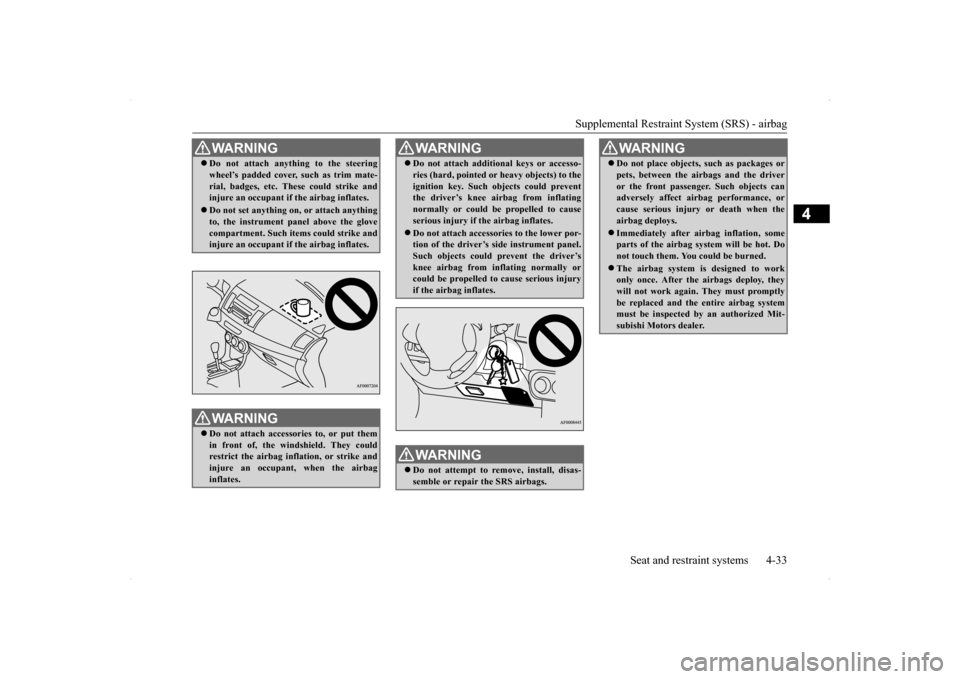
WA R N I N G Do not attach anything to the steering wheel’s padded cover, such as trim mate- rial, badges, etc. These could strike and injure an occupant if the airbag inflates. Do not set anything on, or attach anything to, the instrument panel above the glove compartment. Such items could strike andinjure an occupant if the airbag inflates. WA R N I N G Do not attach accessories to, or put them in front of, the windshield. They could restrict the airbag inflation, or strike andinjure an occupant, when the airbag inflates.
Do not attach additional keys or accesso- ries (hard, pointed or heavy objects) to the ignition key. Such objects could prevent the driver’s knee airbag from inflating normally or could be propelled to causeserious injury if the airbag inflates. Do not attach accessories to the lower por- tion of the driver’s side instrument panel. Such objects could prevent the driver’s knee airbag from inflating normally orcould be propelled to cause serious injury if the airbag inflates.WA R N I N G Do not attempt to remove, install, disas- semble or repair the SRS airbags.WA R N I N G
Do not place objects, such as packages or pets, between the airbags and the driver or the front passenger. Such objects can adversely affect airbag performance, or cause serious injury or death when theairbag deploys. Immediately after airbag inflation, some parts of the airbag system will be hot. Do not touch them. You could be burned. The airbag system is designed to work only once. After the airbags deploy, they will not work again. They must promptlybe replaced and the entire airbag system must be inspected by an authorized Mit- subishi Motors dealer.WA R N I N G
BK0200700US.bo
ok 33 ページ 2013年2月15日 金曜日 午後12時17分
Page 68 of 422
5
Features and controlsBreak-in recommendation
s ...............................................................5-3
Keys .....................................................
.............................................5-3
Electronic immobilizer (Anti-theft starting system) .........................5-4 Keyless entry system (if so equipped) ..............................................5-7Free-hand Advanced Security Transmitter (F.A.S.T.-key) (if so equipped)................................
..................................................... 5-11
Door locks........................
...............................................................5-36
Power door locks .............
...............................................................5-38
“Child safety locks” for
rear door...................................................5-39
Rear hatch ........................
...............................................................5-40
Inside rear hatch rel
ease................................
..................................5-41
Theft-alarm system ..........
...............................................................5-41
Power windows................
...............................................................5-44
Sunroof (if so equipped
) .........................................
........................5-46
Parking brake ...................
...............................................................5-49
Steering wheel tilt lock lever ..........................................................5-50Inside day/night rearview
mirror ....................................................5-50
Outside rearview mirr
ors ................................................................5-52
Ignition switch .................
...............................................................5-53
Steering wheel lock..........
...............................................................5-55
Starting and stopping the e
ngine ....................................................5-55
Turbocharger operation (if so equipped) ........................................5-59Manual transaxle (if so equipped) ..................................................5-59Continuously variable transmissi
on (CVT) (if so equipped)..........5-61
Twin Clutch SST (Sportronic Shif
t Transmission) (if so equipped)
...................................................................
..................................5-70
All-wheel drive system (if
so equipped).........................................5-82
Cautions on handling of all-wheel drive vehicles ..........................5-82
ACD (Active center differential system) (if so equipped) ............. 5-83 Limited-slip differential (i
f so equipped) ....................................... 5-85
Service brake ..................
.................................................
............... 5-85
Hill start assist (for vehicles equipped with Twin Clutch SST) ..... 5-86Brake assist system
................................................
......................... 5-87
Anti-lock braking syst
em ......................................
......................... 5-88
Power steering system
...........................................
......................... 5-90
Active stability control
(ASC) .....................
................................... 5-91
Cruise control .................
.................................................
............... 5-94
Tire pressure monitoring
system .................................................. 5-100
Rear-view camera (if so
equipped)..............
................................. 5-104
Instrument cluster .
.................................................
....................... 5-106
Multi-information disp
lay .....................................
....................... 5-108
Indicator light, warning light, and information screen display list
.................................................................
................................. 5-129
Indicators ..................................
.................................................... 5-141
Warning lights.................
.................................................
............. 5-142
Information screen disp
lay ....................................
....................... 5-143
Combination headlights and dimmer switch ................................ 5-145Headlight leveling switch (if
so equipped)................................... 5-150
Turn signal lever ...
.................................................
....................... 5-150
Hazard warning flasher
switch ..................................................... 5-151
Front fog light switch (if so
equipped) ......................................... 5-151
Wiper and washer swit
ch ......................................
....................... 5-152
Electric rear window def
ogger switch .......................................... 5-157
Horn switch ..............................
.................................................... 5-157
Link System (if so equi
pped) ....................................................... 5-158
Bluetooth
® 2.0 interface (if so
equipped)..................................... 5-158
BK0200700US.bo
ok 1 ページ 2013年2月15日 金曜日 午後12時17分
Page 71 of 422
![MITSUBISHI LANCER SPORTBACK 2014 8.G User Guide Electronic immobilizer (Anti-theft starting system) 5-4 Features and controls
5
N00509101817
[For vehicles equipped with the Free-hand Advanced Security Transmitter (F.A.S.T.- key)] For information on](/img/19/7508/w960_7508-70.png "MITSUBISHI LANCER SPORTBACK 2014 8.G User Guide Electronic immobilizer (Anti-theft starting system) 5-4 Features and controls
5
N00509101817
[For vehicles equipped with the Free-hand Advanced Security Transmitter (F.A.S.T.- key)] For information on")
Electronic immobilizer (Anti-theft starting system) 5-4 Features and controls
5
N00509101817
[For vehicles equipped with the Free-hand Advanced Security Transmitter (F.A.S.T.- key)] For information on operations for vehiclesequipped with the Free-hand Advanced Secu- rity Transmitter (F.A.S.T.-key), refer to “Free-hand Advanced Security Transmitter(F.A.S.T.-key): Electronic immobilizer (Anti- theft starting system)” on page 5-28.
[Except for vehicles equipped with the Free- hand Advanced Security Transmitter (F.A.S.T.-key)] The electronic immobilizer is designed to sig-nificantly reduce the possibility of vehicle theft. The purpose of the system is to immo- bilize the vehicle if an invalid start isattempted. A valid start attempt can only be achieved (subject to certain conditions) using a key “registered” to the immobilizer system.All of the keys provided with your new vehi-cle have been programmed to the vehicle’s electronics.
• Do not excessively bend the key or subject it to strong impacts. • Keep the remote control transmitter dry. • Keep away from magnetic objects such as key rings. • Keep away from devices that produce mag- netism, such as audio systems, computers and televisions. • Keep away from devices that emit strong electromagnetic waves, such as cellularphones, wireless devices and high fre- quency equipment (including medical devices.) • Do not clean with ultrasonic cleaners. • Do not leave the key where it may be exposed to high temperature or high humid- ity.
If you lose your key, to prevent the theft of the vehicle immediately contact an autho-rized Mitsubishi Motors dealer. If you notify an authorized Mitsubishi Motors dealer of the key number, they canmake a new key. The key number is stamped on the key number plate. Keep the key num- ber plate in a safe place separate from thekey itself.NOTE
No keys other than those registered in advance can be used to start the engine. Refer to “Electronic immobilizer (Anti-theft starting system)” on page 5-4. Refer to “Free-hand Advanced SecurityTransmitter (F.A.S.T.-key): Electronic immobilizer (Anti-theft starting system)” on page 5-28. When the theft-alarm is in the system opera- tional status, the alarm operates if a door orrear hatch is opened after using the key, the door lock knob or the power door lock to unlock the vehicle. The system does not enter the preparation status if the keyless entry system or theF.A.S.T.-key was not used to lock the vehi- cle.
Electronic immobilizer (Anti-theft starting system)
NOTE
NOTE
Do not attach additional keys or accessories to the ignition key. Such objects could pre-vent the driver’s knee airbag from inflating normally. Refer to “Deployment of front air- bags” on page 4-30. In the following cases, the vehicle may not be able to recognize the registered ID codefrom the key. This means the engine will not start even when the key is turned to the “START” position. • When the key contacts a key ring or other metallic or magnetic object (Type A) • When the key grip contacts metal of another key (Type B) • When the key contacts or is close to other immobilizer keys (including keys of other vehicles) (Type C)
BK0200700US.bo
ok 4 ページ 2013年2月15日 金曜日 午後12時17分
Page 73 of 422
Electronic immobilizer (Anti-theft starting system) 5-6 Features and controls
5
N00562200067
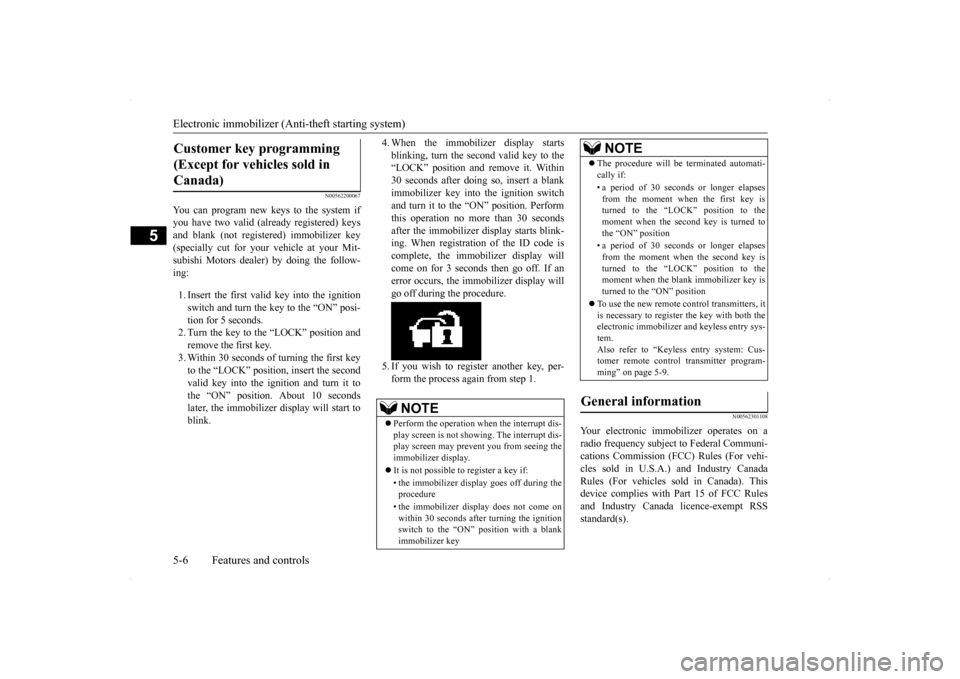
You can program new keys to the system if you have two valid (already registered) keys and blank (not registered) immobilizer key(specially cut for your vehicle at your Mit- subishi Motors dealer) by doing the follow- ing: 1. Insert the first valid key into the ignition switch and turn the key to the “ON” posi-tion for 5 seconds. 2. Turn the key to the “LOCK” position and remove the first key.3. Within 30 seconds of turning the first key to the “LOCK” position, insert the second valid key into the ignition and turn it tothe “ON” position. About 10 seconds later, the immobilizer display will start to blink.
4. When the immobilizer display starts blinking, turn the second valid key to the “LOCK” position and remove it. Within 30 seconds after doing so, insert a blankimmobilizer key into the ignition switch and turn it to the “ON” position. Perform this operation no more than 30 secondsafter the immobilizer display starts blink- ing. When registration of the ID code is complete, the immobilizer display willcome on for 3 seconds then go off. If anerror occurs, the immobilizer display will go off during the procedure. 5. If you wish to register another key, per- form the process again from step 1.
N00562301108
Your electronic immobilizer operates on a radio frequency subject to Federal Communi- cations Commission (FCC) Rules (For vehi- cles sold in U.S.A.) and Industry CanadaRules (For vehicles sold in Canada). This device complies with Part 15 of FCC Rules and Industry Canada licence-exempt RSSstandard(s).
Customer key programming (Except for vehicles sold in Canada)
NOTE
Perform the operation when the interrupt dis- play screen is not showing. The interrupt dis- play screen may prevent you from seeing the immobilizer display. It is not possible to register a key if: • the immobilizer display goes off during the procedure • the immobilizer display does not come on within 30 seconds after turning the ignition switch to the “ON” position with a blankimmobilizer key
The procedure will be terminated automati- cally if: • a period of 30 seconds or longer elapses from the moment when the first key isturned to the “LOCK” position to the moment when the second key is turned to the “ON” position • a period of 30 seconds or longer elapses from the moment when the second key isturned to the “LOCK” position to the moment when the blank immobilizer key is turned to the “ON” position
To use the new remote control transmitters, it is necessary to register the key with both theelectronic immobilizer and keyless entry sys- tem. Also refer to “Keyless entry system: Cus-tomer remote control transmitter program- ming” on page 5-9.
General information
NOTE
BK0200700US.bo
ok 6 ページ 2013年2月15日 金曜日 午後12時17分
Page 74 of 422
Keyless entry system (if so equipped)
Features and controls 5-7
5
Operation is subject to the following two con- ditions. This device may not cause harmful inter- ference. This device must accept any interference received, including interference that may cause undesired operation.
N00509000819
Press the remote control transmitter buttonsto lock or unlock the doors and the rear hatch. It can also help you signal for attention bysetting off the panic alarm.
N00542700037
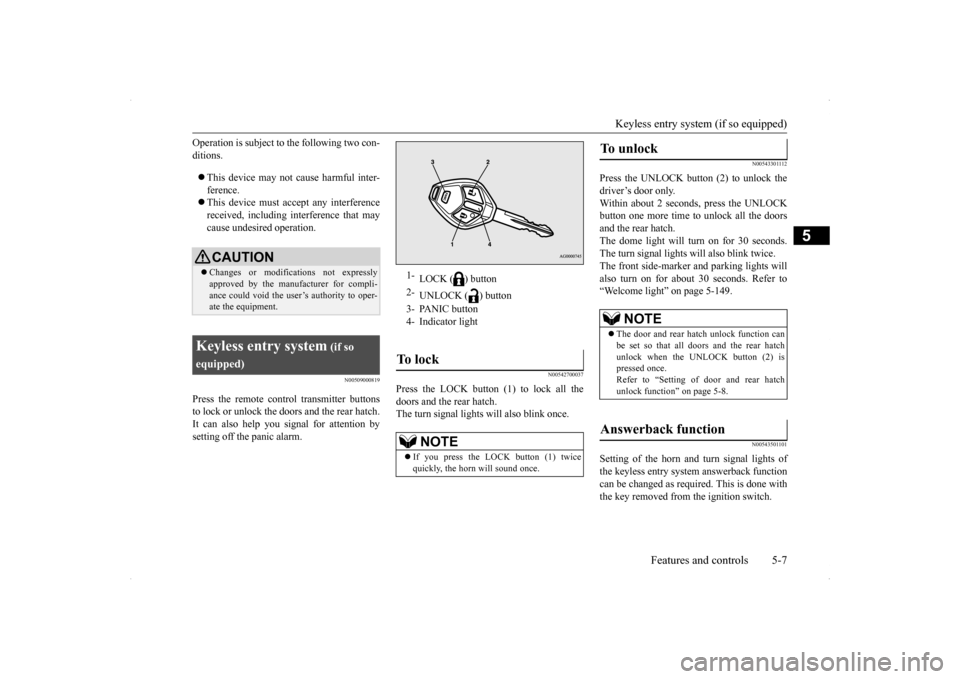
Press the LOCK button (1) to lock all thedoors and the rear hatch.The turn signal lights will also blink once.
N00543301112
Press the UNLOCK button (2) to unlock thedriver’s door only.Within about 2 seconds, press the UNLOCK button one more time to unlock all the doors and the rear hatch.The dome light will turn on for 30 seconds. The turn signal lights will also blink twice. The front side-marker and parking lights willalso turn on for about 30 seconds. Refer to“Welcome light” on page 5-149.
N00543501101
Setting of the horn and turn signal lights of the keyless entry system answerback function can be changed as requi
red. This is done with
the key removed from the ignition switch.
CAUTION Changes or modifications not expressly approved by the manufacturer for compli- ance could void the user’s authority to oper- ate the equipment.
Keyless entry system
(if so
equipped)
1-
LOCK ( ) button
2-
UNLOCK ( ) button
3- PANIC button 4- Indicator lightTo l o c k
NOTE
If you press the LOCK button (1) twice quickly, the horn will sound once.
To u n l o c k
NOTE
The door and rear hatch unlock function can be set so that all doors and the rear hatch unlock when the UNLOCK button (2) is pressed once. Refer to “Setting of door and rear hatch unlock function” on page 5-8.
Answerback function
BK0200700US.bo
ok 7 ページ 2013年2月15日 金曜日 午後12時17分
Page 75 of 422
Keyless entry system (if so equipped) 5-8 Features and controls
5
The horn answerback function can be set to the following three conditions.Each time the horn answerback function is set, a chime will sound to tell you the condi- tion of the answerback function. 1. Remove the key from the ignition switch. 2. Open the driver’s door and turn the com-bination headlights and dimmer switch to the “OFF” position. 3. Press the LOCK button (1) for 4 to 10 sec-onds and press the UNLOCK button (2) during this time.
4. Release in sequence the UNLOCK and LOCK buttons within 10 seconds of pressing the UNLOCK button in step 3.
The turn signal lights answerback function can be set to the following seven conditions. Each time the turn signal lights answerback function is set, a chime will sound to tell youthe condition of the answerback function. 1. Remove the key from the ignition switch. 2. Open the driver’s door and turn the com-bination headlights and dimmer switch to the “OFF” position.
3. Press the UNLOCK button (2) for 4 to 10 seconds and press the LOCK button (1) during this time. 4. Release in sequence the UNLOCK andLOCK buttons within 10 seconds of pressing the LOCK button in step 3.
N00543601144
The door and rear hatch unlock function canbe set to the following two conditions. Each time the door and rear hatch unlockfunction is set, a chime will sound to tell you the condition of the door and rear hatch unlock function. 1. Remove the key from the ignition switch. 2. Open the driver’s door and turn the com- bination headlights and dimmer switch tothe “OFF” position. 3. Press the LOCK button (1) for 4 to 10 sec- onds and press the UNLOCK button (2)during this time.
NOTE
The answerback function does not operate when the key is in the ignition switch or any doors or rear hatch is opened.
Horn deactivation/reactivation
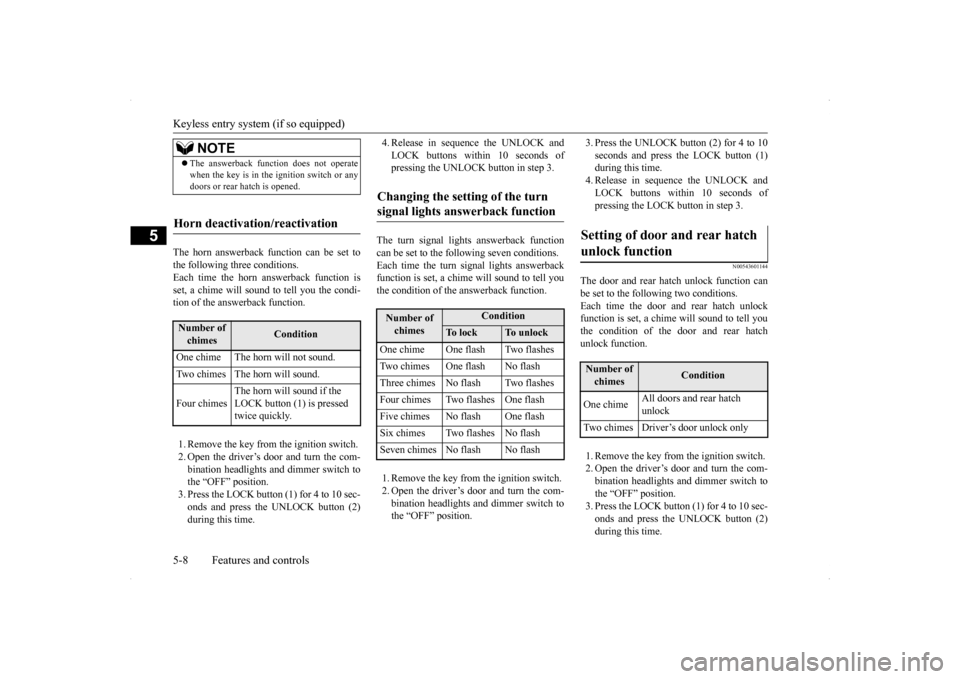
Number of chimes
Condition
One chime The horn will not sound. Two chimes The horn will sound. Four chimes
The horn will sound if the LOCK button (1) is pressed twice quickly.
Changing the setting of the turn signal lights answerback function
Number of chimes
Condition
To l o c k
To unlock
One chime One flash Two flashesTwo chimes One flash No flashThree chimes No flash Two flashesFour chimes Two flashes One flashFive chimes No flash One flashSix chimes Two flashes No flashSeven chimes No flash No flash
Setting of door and rear hatch unlock function
Number of chimes
Condition
One chime
All doors and rear hatch unlock
Two chimes Driver’s door unlock only
BK0200700US.bo
ok 8 ページ 2013年2月15日 金曜日 午後12時17分
Page 77 of 422
Keyless entry system (if so equipped) 5-10 Features and controls
5
ii. Release both the LOCK and UNLOCK buttons for 1 second.
iii. Press the UNLOCK button.
The answerback function informs youthat the ID code registration of the transmitter is completed.
5. To register the ID codes of additionalremote control transmitters, repeat step 4 within 60 seconds after step 4. 6. If no ID code of a remote control trans-mitter is registered within 60 secondsafter step 4, the registration mode is can- celed and the normal mode returns.
N0054610
1111
Your keyless entry system operates on a radio frequency subject to Federal Communica- tions Commission (FCC) Rules (For vehiclessold in U.S.A.) and Industry Canada Rules (For vehicles sold in Canada). This device
complies with Part 15 of FCC Rules and Industry Canada licence-exempt RSS stan- dard(s). Operation is subject to the following two con-ditions. This device may not cause harmful inter- ference. This device must accept any interference received, including interference that may cause undesired operation.
N00544100077
1. Before replacing the battery, remove static electricity from your body by touching ametal grounded object.
NOTE
For verification purposes, try to lock and unlock the doors and the rear hatch after theregistration is completed. The indicator light (4) comes on each time a button is pressed. The keyless entry system does not work if the key is in the ignition switch. The remote control transmitter can be used from about 40 feet (12 m) away. However, this distance may change if your vehicle is near a TV transmitting tower, a power sta- tion, or a radio station. If the UNLOCK button (2) is pressed when all doors and the rear hatch are locked and no doors or the rear hatch are opened withinabout 30 seconds, the doors and the rear hatch will automatically re-lock.
If the following conditions are observed after pressing the buttons on the remote control transmitter, the battery in the remote control transmitter may need to be replaced. • The doors and the rear hatch cannot be locked or unlocked. • The panic alarm cannot be operated. • The indicator light (4) is dim or does not come on.
If you lose your remote control transmitter, please contact an authorized Mitsubishi Motors dealer for a replacement. If you wish to obtain an additional remote control transmitter, please contact an autho- rized Mitsubishi Motors dealer. A maximumof eight remote control transmitters can be programmed for your vehicle. To use the new remote control transmitters, it is necessary to register the key with both the electronic immobilizer and keyless entry sys-tem. Also refer to “Electr
onic immobilizer (Anti-
theft starting system): Customer key pro-gramming” on page 5-6.
General information
NOTE
CAUTION Changes or modifications not expressly approved by the manufacturer for compli- ance could void the user’s authority to oper- ate the equipment.
Procedure for replacing the remote control transmitter bat- tery
BK0200700US.bo
ok 10 ページ 2013年2月15日 金曜日 午後12時17分
Page 81 of 422
Free-hand Advanced Security Transmitter (F.A.S.T.-key) (if so equipped) 5-14 Features and controls
5
N00503300041
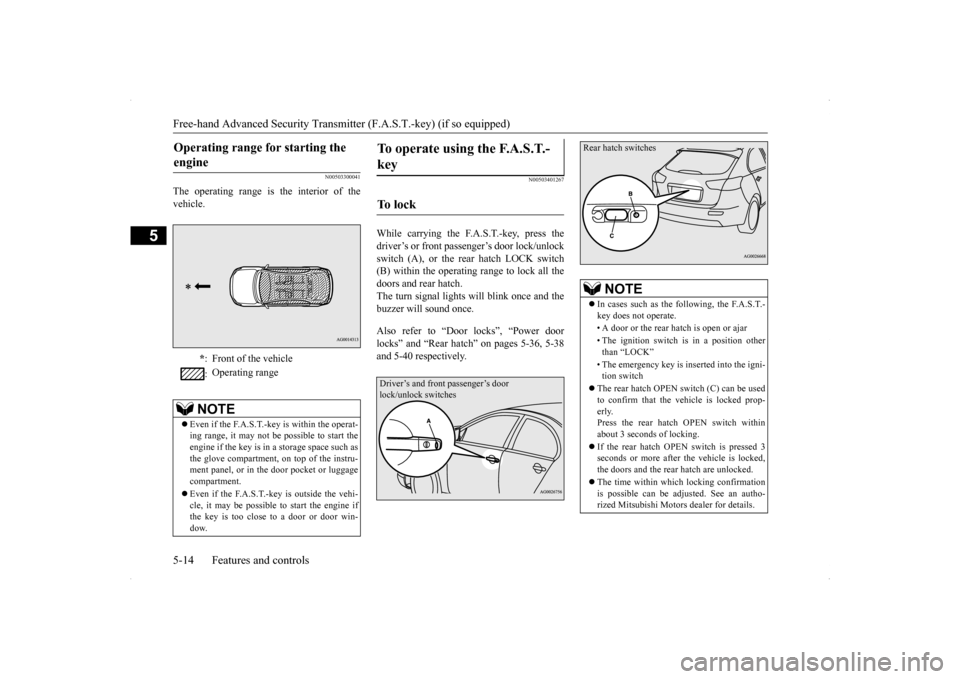
The operating range is the interior of the vehicle.
N00503401267
While carrying the F.A.S.T.-key, press the driver’s or front passenger’s door lock/unlock switch (A), or the rear hatch LOCK switch (B) within the operating range to lock all thedoors and rear hatch.The turn signal lights will blink once and the buzzer will sound once. Also refer to “Door locks”, “Power door locks” and “Rear hatch” on pages 5-36, 5-38and 5-40 respectively.
Operating range for starting the engine
* : Front of the vehicle : Operating range
NOTE
Even if the F.A.S.T.-key is within the operat- ing range, it may not be possible to start theengine if the key is in a storage space such as the glove compartment, on top of the instru- ment panel, or in the door pocket or luggagecompartment. Even if the F.A.S.T.-key is outside the vehi- cle, it may be possible
to start the engine if
the key is too close to a door or door win- dow.
To operate using the F.A.S.T.- key
To l o c k
Driver’s and front passenger’s door lock/unlock switches
NOTE
In cases such as the following, the F.A.S.T.- key does not operate. • A door or the rear hatch is open or ajar • The ignition switch is in a position other than “LOCK” • The emergency key is inserted into the igni- tion switch
The rear hatch OPEN switch (C) can be used to confirm that the vehicle is locked prop- erly. Press the rear hatch OPEN switch withinabout 3 seconds of locking. If the rear hatch OPEN switch is pressed 3 seconds or more after the vehicle is locked, the doors and the rear hatch are unlocked. The time within which locking confirmation is possible can be adjusted. See an autho- rized Mitsubishi Motors dealer for details.
Rear hatch switches
BK0200700US.bo
ok 14 ページ 2013年2月15日 金曜日 午後12時17分