service MITSUBISHI MIRAGE 2015 6.G User Guide
[x] Cancel search | Manufacturer: MITSUBISHI, Model Year: 2015, Model line: MIRAGE, Model: MITSUBISHI MIRAGE 2015 6.GPages: 300, PDF Size: 43.44 MB
Page 105 of 300
Service brake 5-44 Features and controls
5
Prior to moving off after having stopped the vehicle, make sure that
the selector lever is in
“D” (DRIVE) position. To park the vehicle, first bring it to a com- plete stop, fully engage the parking brake,and then move the selector lever to the “P” (PARK) position. If the CVT does not shift while driving, or your vehicle does not pick up enough speed when starting on an uphill slope, it may be that there is something unusual happening inthe transmission, causi
ng a safety device to
activate. Have your ve
hicle checked at an
authorized Mitsubishi Motors dealer or a repair facility of your c
hoice as soon as possi-
ble.
N00517500318
Overuse of the brake can cause weakening, resulting in poor brake response and prema- ture wear of the brake pads.When driving down a long or steep hill, use engine braking by movi
ng the selector lever
to “B” (BRAKE) position.
N00517600436
Your vehicle is equipped with power brakes for more braking force with less brake pedal effort.Your brakes are designed to operate at full capacity, even if the power assist is not being used.If the power assist is not being used, the effort needed to press the brake pedal is greater. If you should lose the power assist for somereason, the brakes will still work. If the power brake unit or either of the two brake hydraulic systems stops working prop-erly, the rest of the brake system will still work, but the vehicle will not slow down as quickly.You will know this has happened if you find you need to press the brake down farther, or harder when slowing down or stopping, or ifthe brake warning light and the warning dis- play in the multi-information display come on. Have the brake system repaired at an
CAUTION To avoid transmission
overheating, never try
to keep your vehicle
stationary on a hill by
using the accelerator
pedal. Always apply
the parking brake and/or service brake. Do not rev the engine unnecessarily while the vehicle is stationary. Unexpected acceler- ation may occur if the selector lever is in aposition other than “P” (PARK) or “N” (NEUTRAL).
Parking
When the CVT makes no speed change
Service brake Brake pedal
WA R N I N G Do not leave any objects near the brake pedal or let a floor mat slide under it; doing so could prevent the full pedalstroke that would be necessary in an emergency. Make sure that the pedal can be operated freely at all times. Make surethe floor mat is securely held in place.
CAUTION It is important not to drive the vehicle with your foot resting on the brake pedal whenbraking is not required.
This practice can
result in very high brake temperatures, pre- mature lining wear, a
nd possible damage to
the brakes.
Power brakes
BK0212400US.book 44 ページ 2014年4月1日 火曜日 午後2時21分
Page 106 of 300
Hill start assist (if so equipped) Features and controls 5-45
5
authorized Mitsubishi Motors dealer or a repair facility of y
our choice immediately.
N00550700124
The disc brakes have an alarm that makes a metallic squeal when
the brake pads have
worn down enough to need service. If you hear this sound, have the brake pads replaced at an authorized Mitsubishi Motorsdealer or a repair fa
cility of your choice.
N00562600087
The hill start assist makes it easy to start off on a steep uphill slope by preventing thevehicle from moving backwards. It keeps the braking force for about 2 second when you move your foot from the brake pedal to theaccelerator pedal.
N00562700091
1. Stop the vehicle completely using thebrake pedal.2. Place the selector lever into the “D” posi- tion. 3. Release the brake peda
l and the hill start
assist will maintain the braking forceapplied while stoppi
ng for approximately
2 seconds. 4. Depress the accelera
tor pedal and the hill
start assist gradually will decrease the braking force as the vehicle starts moving.
WA R N I N G Never coast downhill
with the engine OFF.
Keep the engine running whenever your vehicle is in motion. If you turn off the engine while driving, the power brakebooster will stop wo
rking and your brakes
will not work as well. If the power assist is lost or if either brake hydraulic system stop
s working properly,
take your vehicle
to an authorized
Mitsubishi Motors dealer
or a repair facil-
ity of your choice immediately.
Brake pad wear alarm
WA R N I N G Driving with worn brake pads will make it harder to stop, and can cause an accident.
Hill start assist
(if so equipped)
CAUTION Do not overly rely on th
e hill start assist to
prevent backwards movement of the vehicle.Under certain circumstan
ces, even when hill
start assist is activated, the vehicle may move backwards if the brake pedal is not suf-ficiently depressed, if
the vehicle is heavily
loaded, or if the road is very steep or slip- pery. The hill start assist is not designed to keep the vehicle stopped in
place on uphill slopes
for more than 2 seconds. When facing uphill, do not
rely on using the
hill start assist to ma
intain a stopped position
as an alternative to depressing the brake pedal.Doing so could cause an accident.
Do not perform the following operation while the hill start assist is operating.[Except for vehicles equipped with theF. A . S . T. - k e y ] Turn the ignition switch to the “OFF” or “ACC” position.[Vehicles equipped with the F.A.S.T.-key] Put the operation mode
in OFF or ACC. The
hill start assist coul
d stop operating, which
could result in an accident.
To operate
NOTE
When reversing on an uphill slope, place the selector lever into the “R” position.CAUTION
BK0212400US.book 45 ページ 2014年4月1日 火曜日 午後2時21分
Page 123 of 300
Instrument cluster 5-62 Features and controls
5
N00519000391 N00519100262
The speedometer shows the vehicle speed in miles per hour (mph) or kilometers per hour (km/h).
N00519200292
The tachometer shows e
ngine revolutions per
minute. This allows the driver to determine the most efficient sele
ctor position and engine
speed combinations.This gauge also assists in evaluating engine performance.
N00555001318
The multi-information display displays theodometer, trip odometer, service reminder, fuel remaining, selector
lever position, aver-
age fuel consumption, driving range, etc.
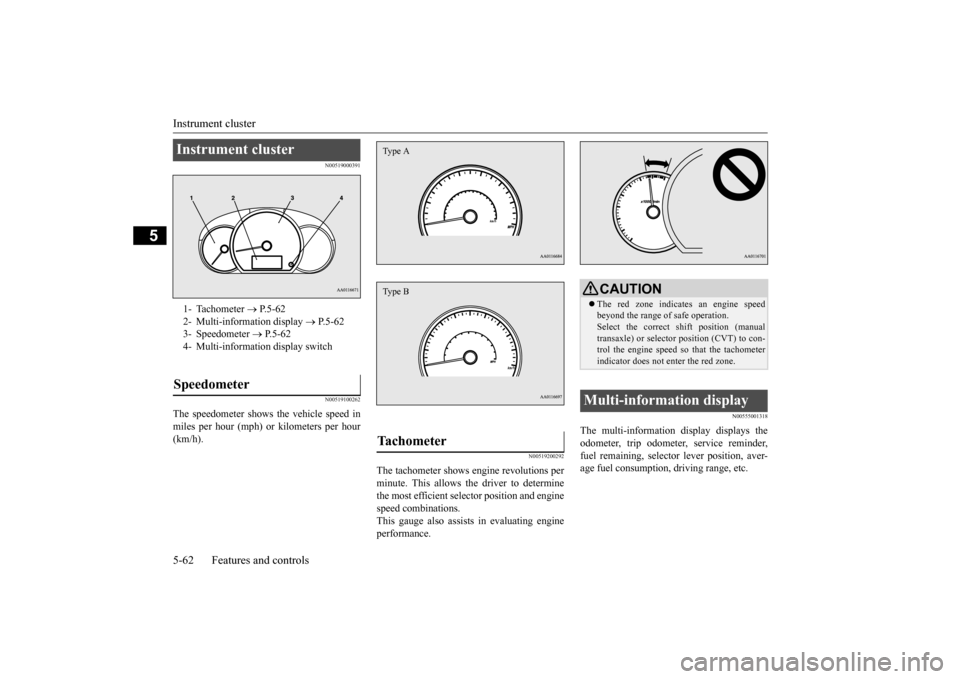
Instrument cluster 1- Tachometer
P.5-62
2- Multi-information display
P.5-62
3- Speedometer
P.5-62
4- Multi-informati
on display switch
Speedometer
Tachometer Type AType B
CAUTIONThe red zone indicate
s an engine speed
beyond the range of safe operation.Select the correct shift position (manual transaxle) or selector position (CVT) to con- trol the engine speed so that the tachometerindicator does not enter the red zone.
Multi-information display
BK0212400US.book 62 ページ 2014年4月1日 火曜日 午後2時21分
Page 125 of 300
Multi-information display 5-64 Features and controls
5
N00574900016
The odometer indicates the total distance the vehicle has traveled.
N00575000014
The trip odometer indicates the distance trav-eled between two points.
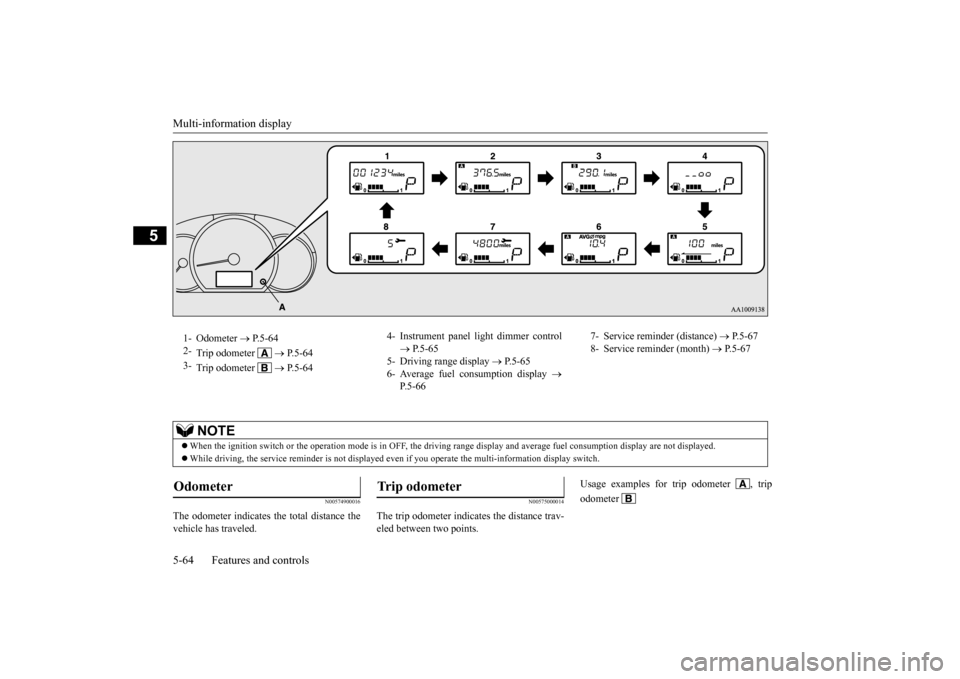
1- Odometer
P.5-64
2-
Trip odometer
P. 5 - 6 4
3-
Trip odometer
P. 5 - 6 4
4- Instrument panel li
ght dimmer control
P.5-65
5- Driving range display
P.5-65
6- Average fuel consumption display
P.5-66
7- Service reminder (distance)
P.5-67
8- Service reminder (month)
P.5-67
NOTE
When the ignition switch or the operation mode
is in OFF, the driving range display a
nd average fuel consumption display are no
t displayed.
While driving, the service reminder is
not displayed even if you operate th
e multi-information display switch.
Odometer
Trip odometer
Usage examples for trip odometer , trip odometer
BK0212400US.book 64 ページ 2014年4月1日 火曜日 午後2時21分
Page 128 of 300
Multi-information display
Features and controls 5-67
5
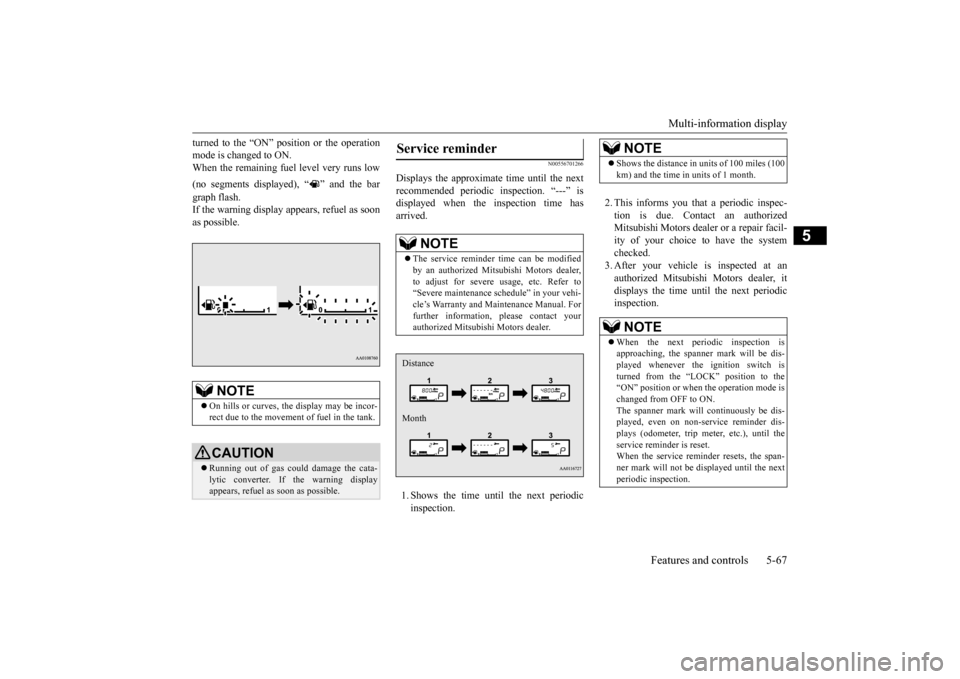
turned to the “ON” position or the operation mode is changed to ON.When the remaining fuel level very runs low (no segments displayed), “ ” and the bar graph flash. If the warning display appears, refuel as soonas possible.
N00556701266
Displays the approximate time until the next recommended periodic
inspection. “---” is
displayed when the inspection time hasarrived. 1. Shows the time until
the next periodic
inspection.
2. This informs you that a periodic inspec- tion is due. Contact an authorized Mitsubishi Motors dealer
or a repair facil-
ity of your choice to have the system checked. 3. After your vehicle
is inspected at an
authorized Mitsubishi Motors dealer, it displays the time unt
il the next periodic
inspection.
NOTE
On hills or curves, the display may be incor- rect due to the movement of fuel in the tank.CAUTION Running out of gas could damage the cata- lytic converter. If the warning display appears, refuel as soon as possible.
Service reminder
NOTE
The service reminder time can be modified by an authorized Mitsubishi Motors dealer,to adjust for severe usage, etc. Refer to “Severe maintenance sc
hedule” in your vehi-
cle’s Warranty and Ma
intenance Manual. For
further information,
please contact your
authorized Mitsubishi Motors dealer.Distance Month
NOTE
Shows the distance in units of 100 miles (100 km) and the time in units of 1 month.NOTE
When the next periodic inspection is approaching, the spanne
r mark will be dis-
played whenever the ignition switch is turned from the “LOCK” position to the “ON” position or when
the operation mode is
changed from OFF to ON. The spanner mark will
continuously be dis-
played, even on non-service reminder dis-plays (odometer, trip meter, etc.), until the service reminder is reset. When the service reminder resets, the span-ner mark will not be
displayed until the next
periodic inspection.
BK0212400US.book 67 ページ 2014年4月1日 火曜日 午後2時21分
Page 129 of 300
Multi-information display 5-68 Features and controls
5
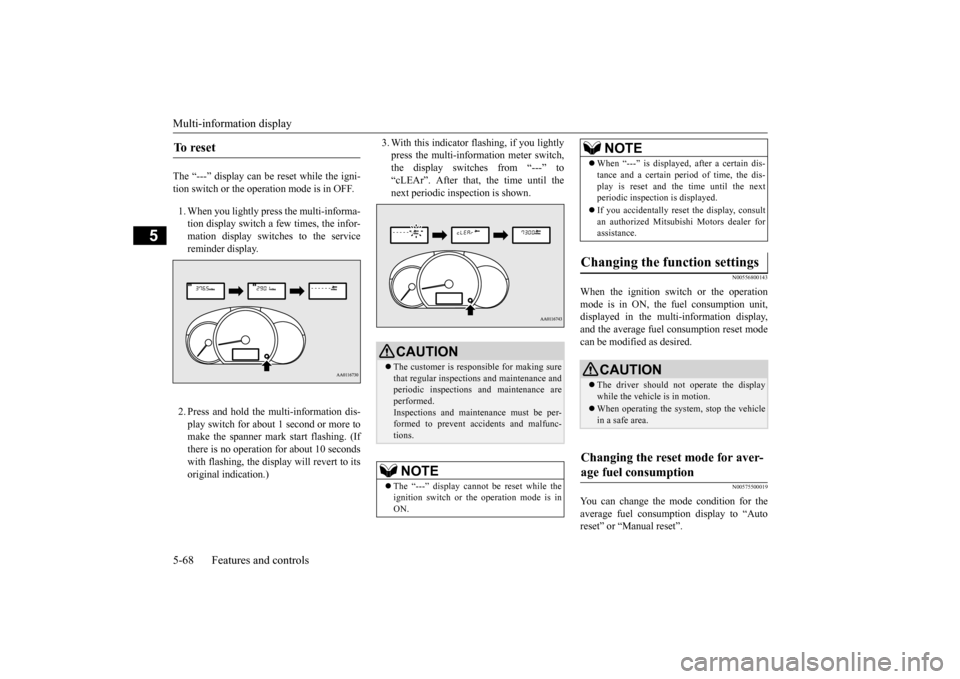
The “---” display can be reset while the igni- tion switch or the opera
tion mode is in OFF.
1. When you lightly press the multi-informa- tion display switch a few times, the infor-mation display switches to the service reminder display. 2. Press and hold the multi-information dis- play switch for about 1 second or more tomake the spanner mark start flashing. (If there is no operation for about 10 seconds with flashing, the displa
y will revert to its
original indication.)
3. With this indicator
flashing, if you lightly
press the multi-information meter switch,the display switches from “---” to “cLEAr”. After that, the time until the next periodic inspection is shown.
N00556800143
When the ignition switch or the operation mode is in ON, the
fuel consumption unit,
displayed in the multi-information display,and the average fuel
consumption reset mode
can be modified as desired.
N00575500019
You can change the mode condition for theaverage fuel consumpt
ion display to “Auto
reset” or “Manual reset”.
To r e s e t
CAUTION The customer is responsible for making sure that regular inspections and maintenance and periodic inspections
and maintenance are
performed.Inspections and mainte
nance must be per-
formed to prevent accidents and malfunc- tions.NOTE
The “---” display cannot
be reset while the
ignition switch or the operation mode is inON.
When “---” is displayed, after a certain dis- tance and a certain pe
riod of time, the dis-
play is reset and th
e time until the next
periodic inspection is displayed. If you accidentally reset
the display, consult
an authorized Mitsubishi Motors dealer for assistance.
Changing the function settings
CAUTION The driver should not operate the display while the vehicle is in motion. When operating the system, stop the vehicle in a safe area.
Changing the reset mode for aver- age fuel consumption
NOTE
BK0212400US.book 68 ページ 2014年4月1日 火曜日 午後2時21分
Page 131 of 300
Indicator and warning light package 5-70 Features and controls
5
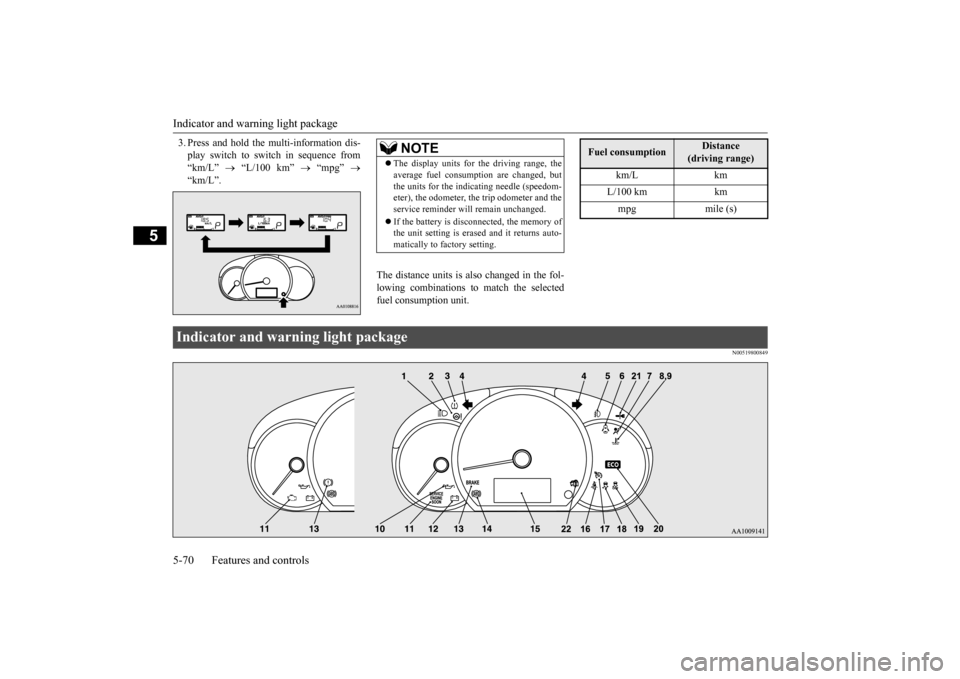
3. Press and hold the multi-information dis- play switch to swit
ch in sequence from
“km/L”
“L/100 km”
“mpg”
“km/L”.
The distance units is also changed in the fol- lowing combinations to match the selectedfuel consumption unit.
N00519800849
NOTE
The display units for the driving range, the average fuel consumption are changed, butthe units for the indica
ting needle (speedom-
eter), the odometer, the trip odometer and the service reminder will
remain unchanged.
If the battery is disconnected, the memory of the unit setting is erased and it returns auto- matically to factory setting.
Fuel consumption
Distance
(driving range)
km/L km L/100 km km mpg mile (s)
Indicator and warning light package BK0212400US.book 70 ページ 2014年4月1日 火曜日 午後2時21分
Page 133 of 300
Warning lights 5-72 Features and controls
5
N00520300147 N00520400526
This light comes on when the ignition switch is turned to the “ON” position (engine off) or the operation mode is put in ON.When the engine is started, the light should go off a few seconds later. The warning light also illuminates after start- ing the engine under the following condi- tions. When the parking brake is still applied. When the brake fluid level is low. When the brake system circuit is not working properly.
When the vehicle is moving at more than 5 mph (8 km/h) and the parking brake applied, a buzzer will sound to in
form the driver that
the parking brake is not properly release. Before driving, be sure that the parking brake is fully released and the brake warning light is off.
N00520500804
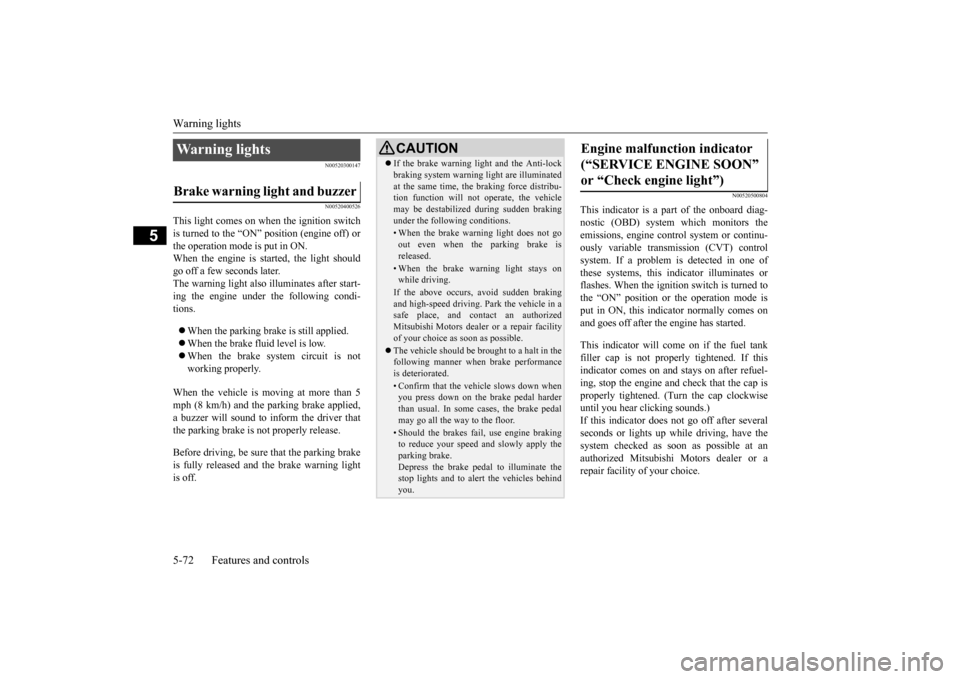
This indicator is a pa
rt of the onboard diag-
nostic (OBD) system which monitors the emissions, engine control system or continu- ously variable transmission (CVT) controlsystem. If a problem is detected in one of these systems, this indicator illuminates or flashes. When the ignition switch is turned to the “ON” position or the operation mode is put in ON, this indicator normally comes onand goes off after the engine has started. This indicator will come on if the fuel tank filler cap is not properly tightened. If this indicator comes on and stays on after refuel-ing, stop the engine and check that the cap is properly tightened. (Turn the cap clockwise until you hear clicking sounds.)If this indicator does not go off after several seconds or lights up while driving, have the system checked as s
oon as possible at an
authorized Mitsubishi Motors dealer or a repair facility of your choice.
Warning lights Brake warning light and buzzer
CAUTION If the brake warning light and the Anti-lock braking system warning
light are illuminated
at the same time, the braking force distribu-tion function will not
operate, the vehicle
may be destabilized
during sudden braking
under the following conditions.• When the brake warn
ing light does not go
out even when the parking brake isreleased.• When the brake warning light stays onwhile driving.If the above occurs, avoid sudden brakingand high-speed driving. Park the vehicle in a safe place, and c
ontact an authorized
Mitsubishi Motors dealer or a repair facilityof your choice as soon as possible. The vehicle should be bro
ught to a halt in the
following manner when
brake performance
is deteriorated.• Confirm that the vehicle slows down whenyou press down on the brake pedal harder than usual. In some cases, the brake pedalmay go all the way to the floor.• Should the brakes fail, use engine brakingto reduce your speed and slowly apply the parking brake. Depress the brake pedal to illuminate thestop lights and to aler
t the vehicles behind
you.
Engine malfunction indicator (“SERVICE ENGINE SOON” or “Check engine light”)
BK0212400US.book 72 ページ 2014年4月1日 火曜日 午後2時21分
Page 134 of 300
Warning lights
Features and controls 5-73
5
N00520600313
This light comes on in the event of a malfunc- tion in the charging system or when the igni-tion switch is turned to the “ON” position (engine off) or the operation mode is put in ON. When the engine is started, the lightshould go out. Check to make sure that the light has gone out before driving.
N00520700170
This light comes on when the engine oil pres-sure is below normal. If the light stays on while driving, stop the engine as soon as pos-sible. Do not run the engine until the cause of the low oil pressure is corrected.
N00575700011
This light comes on in red if the coolant tem- perature becomes excessively high.
CAUTION Driving for a long time
with the engine mal-
function indicator on may cause more dam-age to the emission control system. Thiscould also affect fuel
economy and drivabil-
ity. If this indicator does not come on when the ignition switch is turned to the “ON” posi- tion or the operation mode is put in ON, havethe system checked at an authorized Mitsubishi Motors dealer or a repair facility of your choice. If the engine malfunction indicator comes on while the engine is running, avoid driving athigh speeds. During vehicle
operation with the indicator
on, the vehicle may not
accelerate when you
depress the accelerator pedal. When the vehicle is stat
ionary with the indi-
cator on, you must depr
ess the brake pedal
more firmly than usual since the engine idling speed is higher th
an usual and a vehi-
cle with a CVT has a stronger tendency tocreep forward.
NOTE
Do not disconnect the ba
ttery cable when the
engine malfunction i
ndicator (“SERVICE
ENGINE SOON” or “Check engine light”) ison. The engine electronic
control module stores
critical OBD informati
on (especially exhaust
emission data), which ma
y be lost if the bat-
tery cable is disconne
cted while the engine
malfunction indicator is
on. This will make it
difficult to diagnose th
e cause of future prob-
lems.
Charging system warning light
CAUTION If the warning light stays on while the engine is running, park your ve
hicle in a safe place
as soon as possible and
contact an authorized
Mitsubishi Motors dealer
or a repair facility
of your choice to have the system checked.
Oil pressure warning light
CAUTION If this light comes on when the engine oil level is not low, have
your vehicle checked at
an authorized Mitsubish
i Motors dealer or a
repair facility of your choice. This warning light does not show the amount of oil in the crankcase. This can only be determined by checking the oil level with the dipstick with the engine turned off.
High coolant temperature warning light - red
BK0212400US.book 73 ページ 2014年4月1日 火曜日 午後2時21分
Page 143 of 300
Bluetooth® 2.0 interface (if so equipped) 5-82 Features and controls
5
command operations us
ing a defined voice
tree. The Bluetooth
® 2.0 interface can be used
when the ignition switch or the operation mode is in ON or ACC. Before you can use the Bluetooth
® 2.0 inter-
face, you must pa
ir the Bluetooth
® device
and Bluetooth
® 2.0 interface. Refer to “Con-
necting the Bluetooth
® 2.0 interface and
Bluetooth
® device” on page 5-87.
Bluetooth
® is a registered trademark of
BLUETOOTH SIG, INC.
Steering control sw
itch and microphone
P.5-83Voice recognition function
P.5-84
Useful voice commands
P.5-85
Speaker enrollment function
P. 5 - 8 6
Connecting the Bluetooth
® 2.0 interface and
the Bluetooth
® device
P.5-87
Operating a music player connected via Blue- tooth
® P.5-91
How to make or r
eceive hands-free calls
P.5-91Phonebook function
P.5-94
WA R N I N GAlthough the Bluetooth
® 2.0 interface
allows you to make ha
nds-free calls, if you
choose to use the cellular phone while driving, you must not allow yourself to bedistracted from the sa
fe operation of your
vehicle. Anything, including cellular phone usage, that distracts you from thesafe operation of your vehicle increases your risk of
an accident.
Refer to and comply with all state and local laws in your area regarding cellular phone usage wh
ile driving.
NOTE
For vehicles equipped with the F.A.S.T.-key, if the operation mode is left in ACC, theaccessory power will automatically turn offafter a certain period
of time and you will no
longer be able to use the Bluetooth
® 2.0
interface. The accessory power comes on again if the engine
switch is operated.
Refer to “ACC power
auto-cutout function”
on page 5-14. The Bluetooth
® 2.0 interface
cannot be used
if the Bluetooth
® device has a dead battery
or the device power is turned off. Hands-free calls will
not be possible if your
phone does not have
service available.
If you place the Bluetooth
® device in the
cargo area, you may not be able to use the Bluetooth
® 2.0 interface.
Some Bluetooth
® devices are not compatible
with the Bluetooth
® 2.0 interface.
You can confirm the Link System software version by pressing the HANG-UP button 3 times (press and hold 2 times and then pressbriefly) within 10 seconds.
For detail of the Bluetooth
® 2.0 interface,
refer to the following website: [For vehicles sold in U.S.A.] You can access the Mits
ubishi Motors North
America website. [For vehicles so
ld in Canada]
You can access the Mitsubishi Motors web-site. Please read and agree to the “Warning about Links to the Web Sites of Other Companies”,the websites mentione
d above may connect
you to websites other than the Mitsubishi Motors website.http://www.mitsubishi
-motors.com/en/prod-
ucts/index.html Software updates by cellular phone/digital audio device manufacturers may change/alter devi
ce connectivity.
NOTE
BK0212400US.book 82 ページ 2014年4月1日 火曜日 午後2時21分