radio controls MITSUBISHI MIRAGE 2015 6.G Owner's Manual
[x] Cancel search | Manufacturer: MITSUBISHI, Model Year: 2015, Model line: MIRAGE, Model: MITSUBISHI MIRAGE 2015 6.GPages: 300, PDF Size: 43.44 MB
Page 213 of 300
To play tracks from USB device (if so equipped) 7-32 Comfort controls
7
3. After the voice guide says “What Genre would you like to play?,” say the musictype. 4. If there is only one ma
tch, the system pro-
ceeds to step 6.5. If there are two or more matches, the voice guide will say “More than one match was found, would you like to play
de says “Playing
7. The system exits
the voice recognition
mode and starts playback.
N00763900063
N00764000087
1. Press the PWR switch to turn on the audio system. The system turns on in the last mode used. 2. Connect your USB memory device to the USB input terminal.Refer to “How to connect a USB memory device” on page 5-101. 3. Press the CD button several times toswitch to the USB mode. The input mode changes as follows every time the CD but- ton is pressed: CD mode
USB mode
Bluetooth
® mode (if so equipped)
AUX mode
CD mode.
The USB indicator are illuminated andthen the USB mode will be activated. 4. Once the device is
selected, playback
starts and indicator appears on the dis- play.
NOTE
If you say “No” to three
or all genres uttered
by the system, the voice guide will say “Genre not found, please try again” and the system returns to step 2.NOTE
If the confirmation function is active, the voice guide confirms if the genre is correct.If the genre is correct, say “Yes”. If not, say “No”. After the voice
guide says “Genre not
found, please try again,” the system returnsto step 2. Refer to
“Confirmation function
setting” on page 5-85.
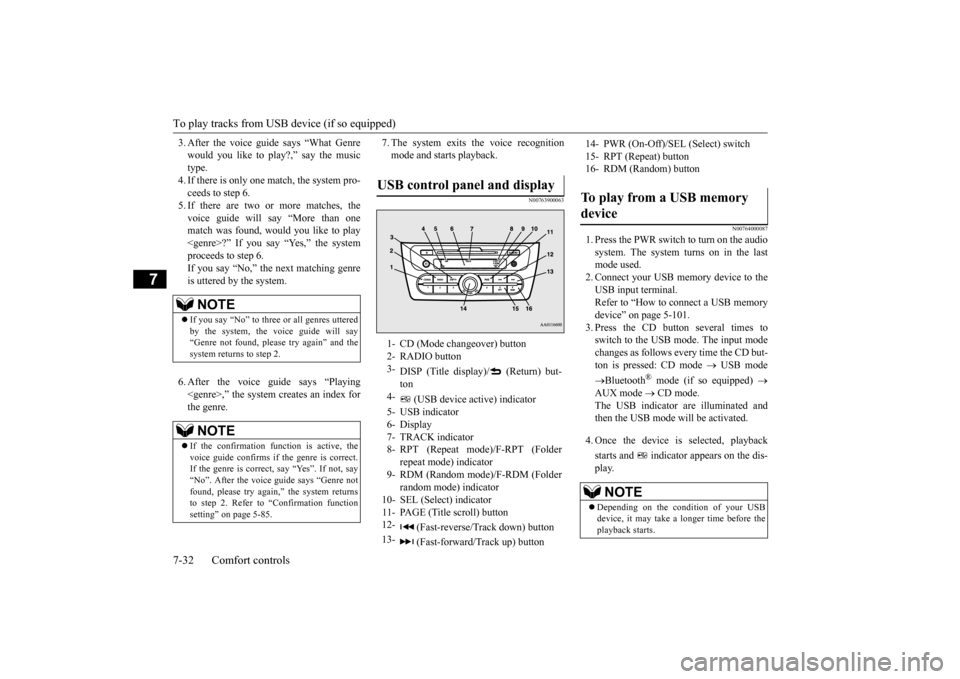
USB control panel and display
1- CD (Mode changeover) button 2- RADIO button 3-
DISP (Title display)/ (Return) but- ton
4-
(USB device ac
tive) indicator
5- USB indicator 6- Display 7- TRACK indicator8- RPT (Repeat mode)/F-RPT (Folder
repeat mode) indicator
9- RDM (Random mode)/F-RDM (Folder
random mode) indicator
10- SEL (Select)
indicator
11- PAGE (Title scroll) button12-
(Fast-reverse/Track down) button
13-
(Fast-forward/Track up) button
14- PWR (On-Off)/SEL
(Select) switch
15- RPT (Repeat) button 16- RDM (Random) buttonTo play from a USB memory device
NOTE
Depending on the condition of your USB device, it may take a
longer time before the
playback starts.
BK0212400US.book 32 ページ 2014年4月1日 火曜日 午後2時21分
Page 214 of 300
To play tracks from USB device (if so equipped)
Comfort controls 7-33
7
5. To stop the playback, press the RADIO button or CD button to switch to a differ-ent mode.
N00764100105
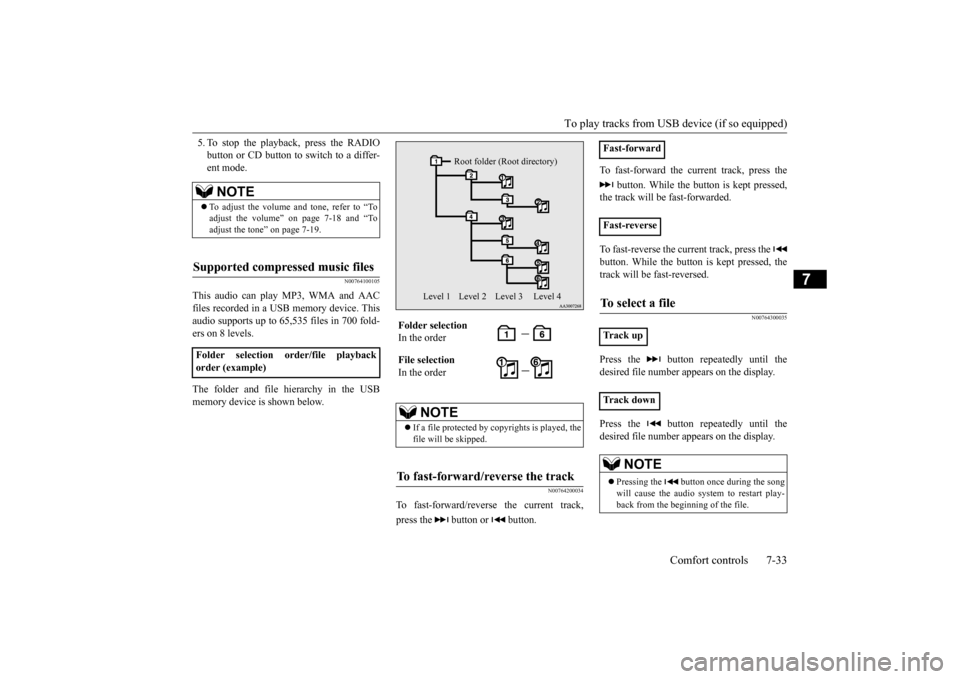
This audio can play MP3, WMA and AACfiles recorded in a USB memory device. Thisaudio supports up to 65,535 files in 700 fold- ers on 8 levels. The folder and file hierarchy in the USB memory device is shown below.
N00764200034
To fast-forward/reverse the current track, press the button or button.
To fast-forward the current track, press the
button. While the button is kept pressed,
the track will be fast-forwarded. To fast-reverse the current track, press the button. While the button is kept pressed, the track will be fast-reversed.
N00764300035
Press the button repeatedly until the desired file number a
ppears on the display.
Press the button repeatedly until the desired file number a
ppears on the display.
NOTE
To adjust the volume and tone, refer to “To adjust the volume” on page 7-18 and “To adjust the tone” on page 7-19.
Supported compressed music files
Folder selection order/file playback order (example)
Folder selection In the order File selection In the order
NOTE
If a file protected by copyrights is played, the file will be skipped.
To fast-forward/reverse the track
Root folder (Root directory)
Level 1 Level 2 Level 3 Level 4
Fast-forward Fast-reverseTo select a file
Tr a c k u p Tr a c k d o w n
NOTE
Pressing the button once during the song will cause the audio system to restart play- back from the beginning of the file.
BK0212400US.book 33 ページ 2014年4月1日 火曜日 午後2時21分
Page 218 of 300
Steering wheel audio remote control switches (if so equipped)
Comfort controls 7-37
7
N00765900038
Press the RPT button several times to switch to show “RPT” in the display. The mode changes as follows every time the RPT button is pressed:No display (not repeat)
RPT (repeat same
track)
F-RPT (repeat all tracks)
No dis-
play To exit this mode, press the button again.
N00703300014
Press the RPT button several times to switch to show “F-RPT” in the display. The mode changes as follows every time the RPT button is pressed:No display (not repeat)
RPT (repeat same
track)
F-RPT (repeat all tracks)
No dis-
play All tracks in the Bluetooth
® device are played
repeatedly. To exit this mode, press the button again.
N00766000023
Press the RDM button to show “RDM” in thedisplay. The system randomly selects and plays tracks from all tracks in the Bluetooth
® device.
To exit this mode, press the button again.
N00766200041
The system can display tag information. 1. Press the DISP button. 2. The display changes
as follows every time
the DISP button is pressed: Album title
Title name
Artist name
Genre
Normal display
N00714800484
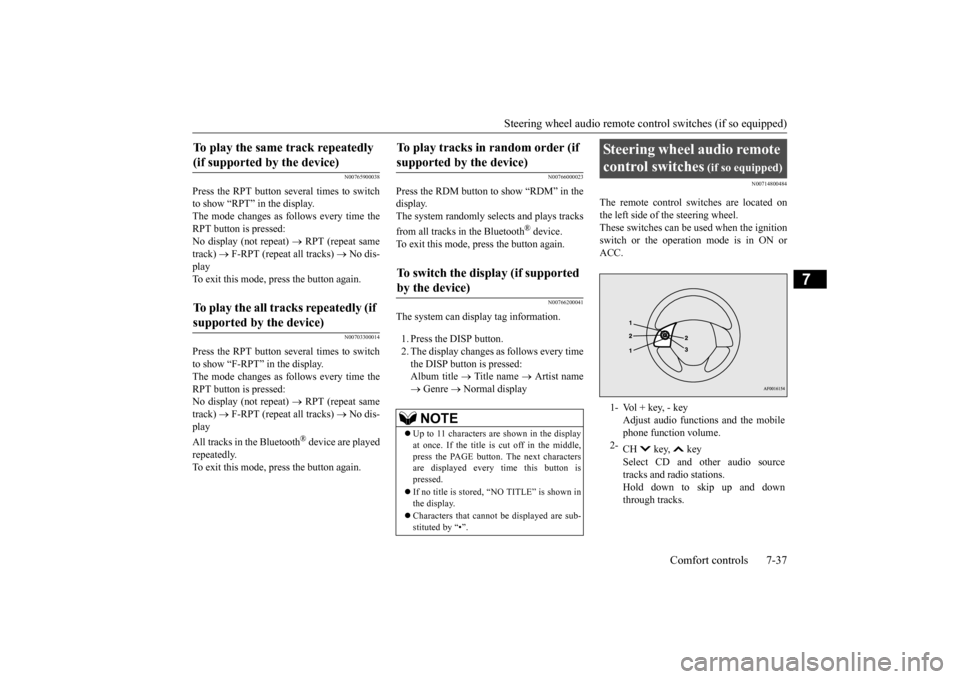
The remote control switches are located on the left side of
the steering wheel.
These switches can be us
ed when the ignition
switch or the operation mode is in ON or ACC.
To play the same track repeatedly (if supported by the device) To play the all tracks repeatedly (if supported by the device)
To play tracks in
random order (if
supported by the device) To switch the display (if supported by the device)
NOTE
Up to 11 characters are shown in the display at once. If the title is cut off in the middle, press the PAGE button. The next characters are displayed every time this button ispressed. If no title is stored, “NO TITLE” is shown in the display. Characters that cannot
be displayed are sub-
stituted by “•”.
Steering wheel audio remote control switches
(if so equipped)
1- Vol + key, - key
Adjust audio functions and the mobile phone function volume.
2-
CH key, key Select CD and ot
her audio source
tracks and radio stations. Hold down to skip up and downthrough tracks.
BK0212400US.book 37 ページ 2014年4月1日 火曜日 午後2時21分
Page 220 of 300
Error codes
Comfort controls 7-39
7
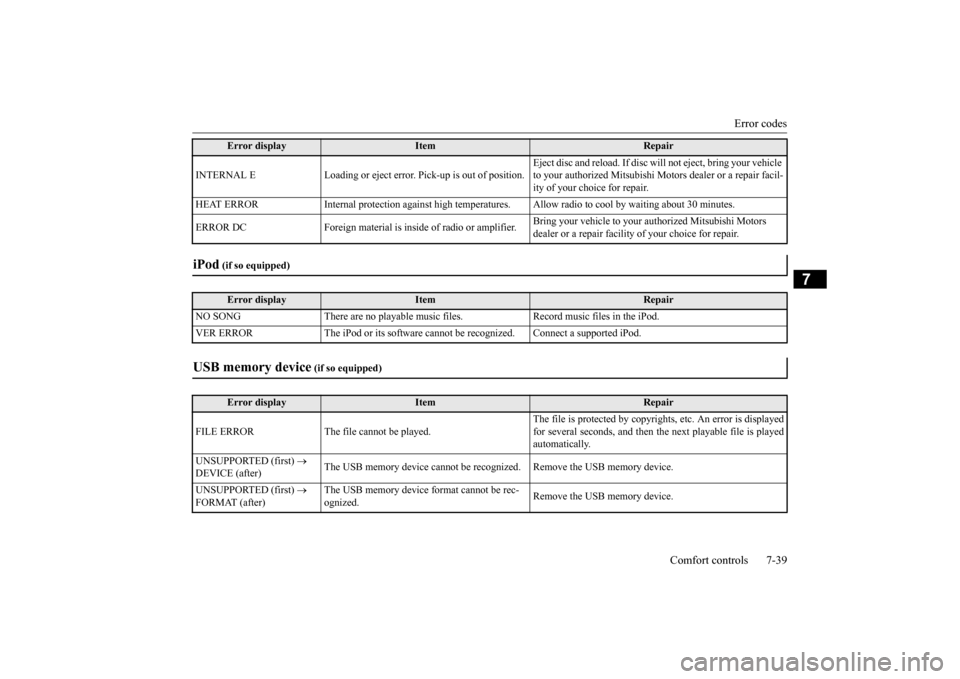
INTERNAL E Loading or eject erro
r. Pick-up is out of position.
Eject disc and reload.
If disc will not ejec
t, bring your vehicle
to your authorized Mitsubishi Moto
rs dealer or a repair facil-
ity of your choice for repair.
HEAT ERROR Internal protection against high temperatur
es. Allow radio to cool by
waiting about 30 minutes.
ERROR DC Foreign material is in
side of radio or amplifier.
Bring your vehicle to your authorized Mitsubishi Motors dealer or a repair facility
of your choice for repair.
iPod
(if so equipped)Error display
Item
Repair
NO SONG There are no playable music files. Record music files in the iPod. VER ERROR The iPod or its
software cannot be recogniz
ed. Connect a supported iPod.
USB memory device
(if so equipped)
Error display
Item
Repair
FILE ERROR The file cannot be played.
The file is protected by copyright
s, etc. An error is displayed
for several seconds, and then the
next playable file is played
automatically.
UNSUPPORTED (first)
DEVICE (after)
The USB memory device cannot be rec
ognized. Remove the
USB memory device.
UNSUPPORTED (first)
FORMAT (after)
The USB memory device format cannot be rec- ognized.
Remove the USB memory device.
Error display
Item
Repair
BK0212400US.book 39 ページ 2014年4月1日 火曜日 午後2時21分
Page 223 of 300
General information about your radio 7-42 Comfort controls
7
N00733900455
Your vehicle’s radio receives both AM and FM stations. The quality of your reception is affected bydistance, obstacles, an
d signal interference.
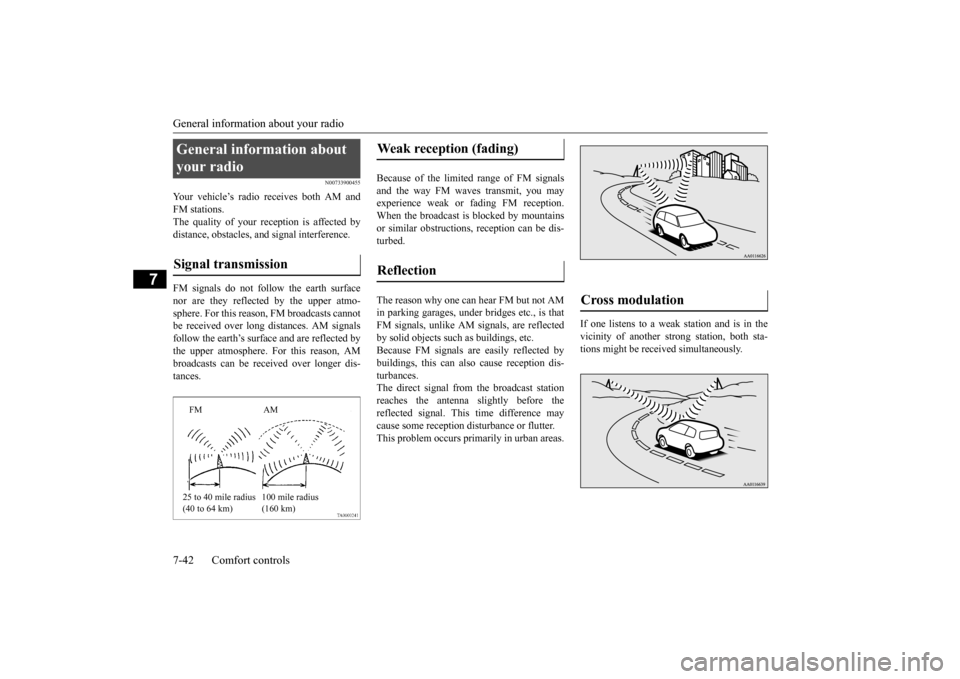
FM signals do not foll
ow the earth surface
nor are they reflected by the upper atmo- sphere. For this reason,
FM broadcasts cannot
be received over long di
stances. AM signals
follow the earth’s surfa
ce and are reflected by
the upper atmosphere. For this reason, AM broadcasts can be rece
ived over longer dis-
tances.
Because of the limited
range of FM signals
and the way FM waves transmit, you may experience weak or fading FM reception.When the broadcast is blocked by mountains or similar obstructions,
reception can be dis-
turbed. The reason why one can hear FM but not AM in parking garages, under
bridges etc., is that
FM signals, unlike AM
signals, are reflected
by solid objects such
as buildings, etc.
Because FM signals ar
e easily reflected by
buildings, this can also cause reception dis- turbances.The direct signal from
the broadcast station
reaches the antenna slightly before the reflected signal. This time difference maycause some reception disturbance or flutter. This problem occurs primarily in urban areas.
If one listens to a weak
station and is in the
vicinity of another st
rong station, both sta-
tions might be receiv
ed simultaneously.
General information about your radio Signal transmission
FM AM 25 to 40 mile radius (40 to 64 km)
100 mile radius (160 km)
Weak reception (fading) Reflection
Cross modulation
BK0212400US.book 42 ページ 2014年4月1日 火曜日 午後2時21分
Page 224 of 300
General information about your radio
Comfort controls 7-43
7
Stereo reception re
quires a high quality
broadcast signal. This means that types of disturbances mentioned previously becomemore marked and the reception range is somewhat diminished during stereo recep- tion. FM reception is affected by the electrical sys- tems of vehicles in
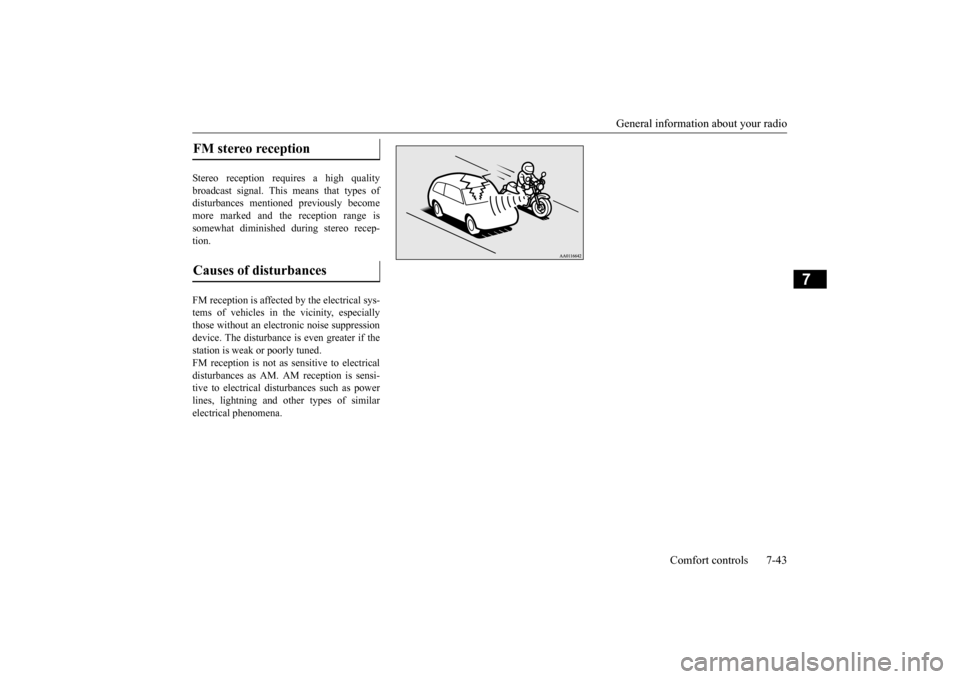
the vicinity, especially
those without an elec
tronic noise suppression
device. The disturbance is even greater if thestation is weak or poorly tuned. FM reception is not as
sensitive to electrical
disturbances as AM. AM
reception is sensi-
tive to electrical dist
urbances such as power
lines, lightning and ot
her types of similar
electrical phenomena.FM stereo reception Causes of disturbances
BK0212400US.book 43 ページ 2014年4月1日 火曜日 午後2時21分
Page 264 of 300
Wiper blades
Vehicle care and maintenance 9-19
9
N00940700138
Check the wiper blades occasionally. Clean them regularly to rem
ove deposits of salt and
road film. Use a sponge or cloth and a milddetergent or non-abrasive
cleaner to clean the
blades and glass areas. Replace the blades if they continue to streakor smear. If the blades are frozen to the windshield or rear window, do not operate the wipers until the ice has melted and the blades are freed, otherwise the wiper mo
tor may be damaged.
N00940800328
Your vehicle is equi
pped with an emission-
control system that meets all the requirementsof the U.S. Environm
ental Protection Agency
and Environment Canada. The emission-con- trol system is made of: a positive crankcase ventilation system an evaporative emission-control system an exhaust emission-control system
To be sure the emission-control system works properly, have your vehicle inspected andmaintained by an authorized Mitsubishi Motors dealer or a repair facility of your choice. This should be
done at the time or
mileage specified in the “WARRANTY AND MAINTENANCE MANUAL”.These, and all the other “general” mainte- nance services listed in this manual, need to be performed to keep your vehicle runningproperly and reliably. You should also have an inspection and ser- vice any time you suspect a malfunction.
N00940900228
Spark plugs must fire properly for good engine performance and emission-control. Do not reuse them by cleaning or regapping.Change them at the mileage listed in the “WARRANTY AND MAINTENANCE MANUAL”.
Wiper blades
NOTE
Do not run the wipers on dry glass for a long time. This wears out the rubber and canscratch the glass.
During cold weather Emission-control system maintenance
NOTE
To meet government
regulations and pro-
mote cleaner air, your
vehicle is equipped
with an onboard diagnostic system (OBD).The engine electroni
c control module that
controls OBD functions stores various data (especially about th
e exhaust emissions).
This data will be erased if the battery cable is disconnected, which c
ould make a rapid
diagnosis difficult. Do not disconnect thebattery cable when th
e engine malfunction
indicator (“SERVIC
E ENGINE SOON” or
“Check engine light”) is ON.
Spark plugs
NOTE
Use the spark plugs listed under “Engine specifications” on page
11-4 or plugs that are
exactly the same. Othe
r plugs could cause
engine damage, perf
ormance problems or
radio noise.
BK0212400US.book 19 ページ 2014年4月1日 火曜日 午後2時21分