display MITSUBISHI MIRAGE G4 2018 (in English) User Guide
[x] Cancel search | Manufacturer: MITSUBISHI, Model Year: 2018, Model line: MIRAGE G4, Model: MITSUBISHI MIRAGE G4 2018Pages: 263, PDF Size: 37.9 MB
Page 111 of 263
Brake assist system 5-48 Features and controls
5
N00562800092
If an abnormal condition occurs in the sys- tem, the following i
ndicator will turn on.
N00567301116
The brake assist system
is a device assisting
drivers who cannot depress the brake pedalfirmly such as in em
ergency stop situations
and provides greater braking force.
If the brake pedal is depressed suddenly, the brakes will be applied
with more force than
usual.
• On vehicles with ma
nual transaxle, the
gearshift lever is in the following position.[When starting an uphi
ll slope forwards.]
The gearshift lever is in any position other than “R” (Reverse). (The hill start assist will operate, even if thegearshift lever is in the “N” (Neutral) posi- tion.) [When starting an uphill
slope backwards.]
The gearshift lever is in the “R” (Reverse) position. (The hill start assist
will not operate when
the gearshift lever is in the “N” (Neutral) position.) • On vehicles with CVT,
the selector lever is
in any position other than “P” (PARK) or “N” (NEUTRAL). • The vehicle is comple
tely stationary, with
the brake pedal depressed. • The parking brake is released. The hill start assist wi
ll not operate if the
accelerator pedal is
depressed before the
brake pedal is released. The hill start assist also operates when reversing on an uphill slope. When the hill start a
ssist is activated, you
may feel the operating sound or vibrationfrom under the body. This is a normal result of the hill start assist operation, and does not indicate a problem.NOTE
Warning indicator
-
ASC indicator
CAUTION If the warning is displayed, the hill start assist will not
operate. Start off carefully.
Park your vehicle in a
safe place and stop the
engine.Restart the engine and check whether the indicator goes out, in wh
ich case the hill start
assist is again working normally. If they remain displayed or reappear fre- quently, it is not necessa
ry to stop the vehicle
immediately, but th
e vehicle should be
inspected by an authorized Mitsubishi Motors dealer or a repair facility of your choice as s
oon as possible.
Brake assist system
CAUTIONThe brake assist system is not a device designed to exercise
braking force greater
than its capacity. Make
sure to always keep a
sufficient distance be
tween your vehicle and
a vehicle in front of you without relying toomuch on the brake assist system.NOTE
Once the brake assist system is operational, it maintains great braking force even if the brake pedal is lightly released.To stop its operation, completely remove your foot from the brake pedal. When the brake assist system is in use while driving, you may feel as if the depressed brake pedal is soft, the pedal moves in smallmotions in conjunction with the operation noise, or the vehicle body and the steering wheel vibrate. This occurs when the brakeassist system is ope
rating normally and does
not indicate faulty
operation. Continue to
depress the brake pedal. When the anti-lock brake system warning light is illuminated, th
e brake assist system is
not functioning.
BK0249600US.book 48 ページ 2017年4月20日 木曜日 午後1時36分
Page 116 of 263
Active stability control (ASC) Features and controls 5-53
5
N00546500118
N00546600119
If an abnormal condition occurs in the sys- tem, the following indicator will turn on.
N00546300031
When moving out of mud, sand or fresh snow, pressing the acce
lerator pedal may not
allow the engine speed to increase. In suchsituations, temporaril
y turning off ASC with
the “ASC OFF” switch will make it easier to move out your vehicle. If you continue to press the “ASC OFF” switch after the ASC is turned off, the “mis-taken operation protec
tion function” will
activate and the ASC will turn back on.
ASC operation indicator or ASC OFF indicator
-
ASC operation indicator The indicator will blink when the ASC is operating.
-
ASC OFF indicator This indicator will turn on when the ASC is turned off with the “ASCOFF” switch.
CAUTION When indicator bli
nks, ASC is operating,
which means that the road is slippery or that your vehicle’s wheels ar
e beginning to slip.
If this happens, drive
slower with less accel-
erator input.NOTE
NOTE
The indicator may turn on when you start the engine. This means that the battery volt- age momentarily dropped when the enginewas started. It does not
indicate a malfunc-
tion, provided that
the display goes out
immediately. When a compact spare tire has been put on your vehicle, the grippi
ng ability of the tire
will be lower, making it
more likely that the
indicator will blink.
ASC warning indicator
-
ASC indicator
-
ASC OFF indicator
CAUTION The system may be malfunctioning. Park your vehicle in a
safe place and stop the
engine.Restart the engine and check whether the indicator goes out. If th
ey go out, there is no
abnormal condition. If
they do not go out or
appear frequently, it is
not necessary to stop
the vehicle imme
diately, but you should have
your vehicle inspected by an authorizedMitsubishi Motors dealer
or a repair facility
of your choice as soon as possible.
To w i n g
CAUTION When towing the vehicle with only the front wheels or only the rear wheels raised off theground, do not place th
e ignition switch in
the “ON” position or
do not put the operation
mode in ON. Placing
the ignition switch in
the “ON” position or
putting the operation
mode in ON could caus
e the ASC to operate,
resulting in an accident.Note that the correct
towing method depends
on the transmission type
and the vehicle’s
drive configuration. For details, refer to “Towing” on page 8-12.
BK0249600US.book 53 ページ 2017年4月20日 木曜日 午後1時36分
Page 124 of 263
Rear-view camera (if so equipped)
Features and controls 5-61
5
N00532900153
If new wheels with new tire inflation pressure sensors are installed,
their ID codes must be
programmed into the tire pressure monitoring system. Have tire and
wheel replacement per-
formed by an authorized Mitsubishi Motors dealer to avoid the ri
sk of damaging the tire
inflation pressure sensors. If the wheelreplacement is not done by an authorized Mitsubishi Motors dealer
, it is not covered by
your warranty.
N00533000236
Your tire pressure monitoring system oper- ates on a radio frequenc
y subject to Federal
Communications Commission (FCC) Rules(For vehicles sold in U.S.A.) and Industry Canada Rules (For vehi
cles sold in Canada).
This device complies with part 15 of FCCRules and Industry Canada licence-exempt RSS standard(s). Operation is subject to
the following two con-
ditions. This device may not
cause harmful inter-
ference This device must ac
cept any interference
received, including interference that may cause undesired operation.
N00546201327
When the gearshift lever or the selector leveris in the “R” position with the ignition switchor the operation mode is in ON, the rear-view image will be displayed on the screen of the DISPLAY AUDIO or
the Smartphone Link
Display Audio. When the gearshift lever or the selector lever is shifted out of the “R” position, the rear- view image will go off.
NOTE
Tire inflation pressures vary with the ambi- ent temperature. If the
vehicle is subjected to
large variations in ambient temperature, thetire inflation pressures may be under-inflated (causing the warning light come on) when the ambient temperature is relatively low. Ifthe warning light comes on, adjust the tire inflation pressure.
Whenever the tires and wheels are replaced with new ones
CAUTION The use of non-genuine wheels will prevent the proper fit of the tire inflation pressure sensors, resulting air
leakage or damage of
the sensors.
General information
WA R N I N G Changes or modifica
tions not expressly
approved by the manufacturer for compli- ance could void the
user’s authority to
operate the equipment.
Rear-view camera
(if so
equipped)
WA R N I N G Never rely solely on the rear-view camera to clear the area behind your vehicle.Always check visual
ly behind and all
around your vehicle fo
r persons, animals,
obstructions or other vehicles. Failure todo so can result in vehicle damage, serious injury or death. The rear-view camera is an aid system for backing up, but it is not a substitute for your visual confirmation. The view on the screen is limited, and objects outside the view, such as under thebumper or around eith
er corner of the
bumper, cannot be seen on the screen.
BK0249600US.book 61 ページ 2017年4月20日 木曜日 午後1時36分
Page 125 of 263
Rear-view camera (if so equipped) 5-62 Features and controls
5
The rear-view camera (A) is built-in to the trunk lid.
Reference lines and uppe
r surface of the rear
bumper (A) are displayed on the screen. The red line (B) i
ndicates approximately
20 inches (50 cm) behind the rear bumper. The Green lines (C) indicate approxi- mately 8 inches (20 cm) outside of the vehicle body. Short transverse lines (1 to 3) indicate dis- tance from the rear bumper.
Location of rear-view camera
CAUTION If the camera lens gets
dirty, a clear image
cannot be obtained. As
necessary, rinse the
lens with clean water a
nd gently wipe with a
clean, soft cloth. To avoid damaging the camera;• Do not rub the cover excessively or polish it by using an abrasive compound. • Do not disassemble the camera.• Do not splash hot wate
r directly on the lens.
• Do not spray the camera and its surround- ings with high-pressure water.• Make sure that the trunk lid is securelyclosed when backing up.
Reference lines on the screen
1: Approximately at the rear edge of the
rear bumper
2: Approximately 39 inches (100 cm) 3: Approximately 79 inches (200 cm)
CAUTION The rear-view camera uses a wide-angle lens. As a result, imag
es and distances shown
on the screen are not exact. Actual distance may be
different from dis-
tance indica
ted by the lines on the screen,
depending on the loading condition of the vehicle and road
surface condition.
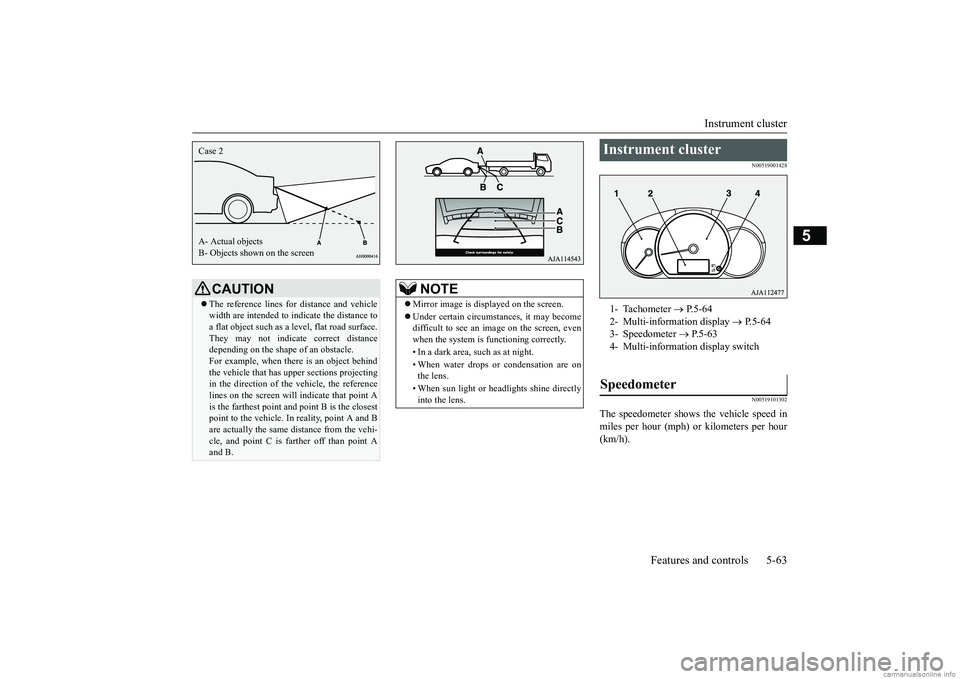
The reference lines for
distance and vehicle
width are based on a leve
l, flat road surface.
In the following cases, objects shown on the screen will appear to be farther off than theyactually are.• When the rear of the vehicle is weigheddown with the weight of passengers and luggage in the ve
hicle. (Case 1)
• When there is an upward slope at the back. (Case 2)
Case 1 A- Actual objects B- Objects shown on the screen
BK0249600US.book 62 ページ 2017年4月20日 木曜日 午後1時36分
Page 126 of 263
Instrument cluster
Features and controls 5-63
5
N00519001428 N00519101302
The speedometer shows the vehicle speed in miles per hour (mph) or kilometers per hour (km/h).
CAUTION The reference lines for
distance and vehicle
width are intended to i
ndicate the distance to
a flat object such as a level, flat road surface. They may not indica
te correct distance
depending on the shape of an obstacle.For example, when ther
e is an object behind
the vehicle that has uppe
r sections projecting
in the direction of the vehicle, the referencelines on the screen will
indicate that point A
is the farthest point a
nd point B is the closest
point to the vehicle. In
reality, point A and B
are actually the same distance from the vehi- cle, and point C is farther off than point A and B.Case 2 A- Actual objects B- Objects shown on the screen
NOTE
Mirror image is displayed on the screen. Under certain circumst
ances, it may become
difficult to see an image on the screen, even when the system is functioning correctly. • In a dark area, such as at night. • When water drops or condensation are on the lens. • When sun light or he
adlights shine directly
into the lens.
Instrument cluster 1- Tachometer
P. 5 - 6 4
2- Multi-information display
P.5-64
3- Speedometer
P.5-63
4- Multi-information display switchSpeedometer
BK0249600US.book 63 ページ 2017年4月20日 木曜日 午後1時36分
Page 127 of 263
Multi-information display 5-64 Features and controls
5
N00519201332
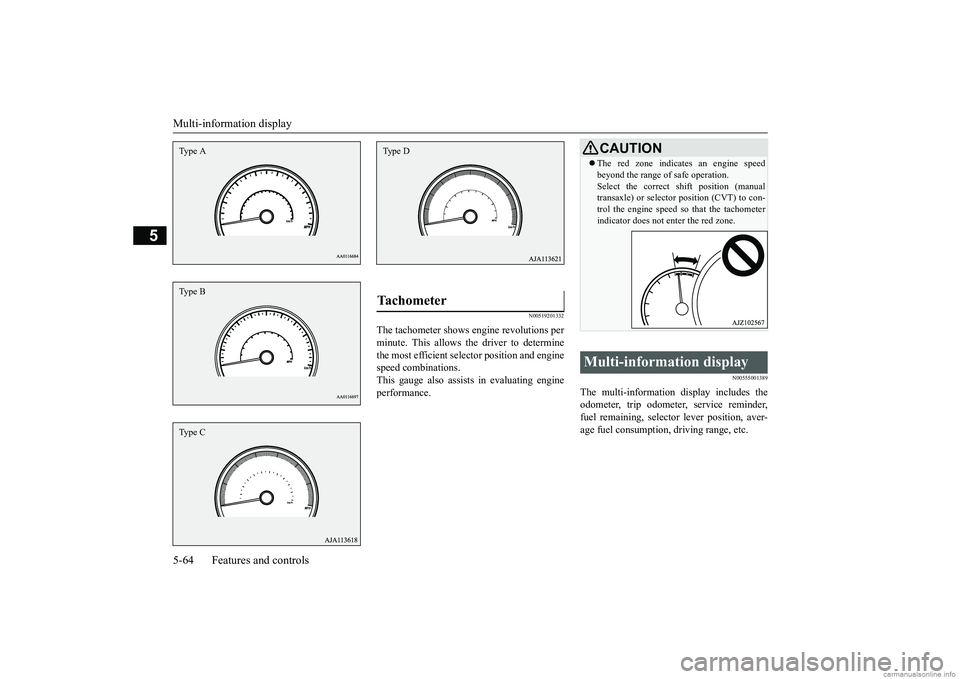
The tachometer shows e
ngine revolutions per
minute. This allows the driver to determine the most efficient sele
ctor position and engine
speed combinations.This gauge also assists in evaluating engine performance.
N00555001389
The multi-information display includes the odometer, trip odometer, service reminder, fuel remaining, selector
lever position, aver-
age fuel consumption, driving range, etc.
Type AType BType C
Tachometer Type D
CAUTION The red zone indicate
s an engine speed
beyond the range of safe operation.Select the correct shift position (manualtransaxle) or selector position (CVT) to con- trol the engine speed so that the tachometer indicator does not enter the red zone.
Multi-information display
BK0249600US.book 64 ページ 2017年4月20日 木曜日 午後1時36分
Page 128 of 263
Multi-information display
Features and controls 5-65
5
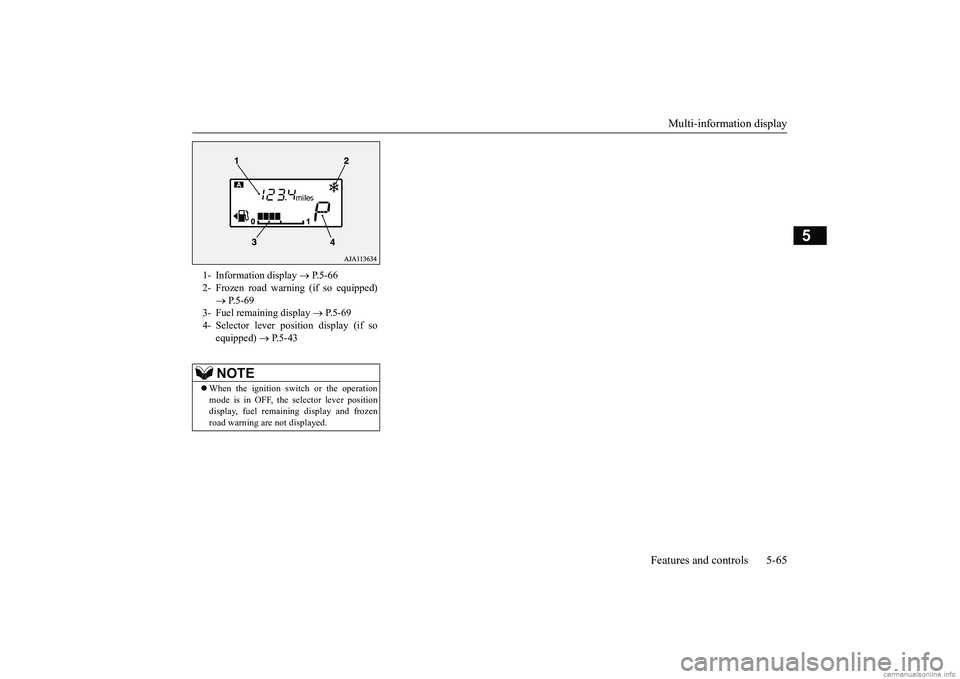
1- Information display
P.5-66
2- Frozen road warning (if so equipped)
P.5-69
3- Fuel remaining display
P. 5 - 6 9
4- Selector lever pos
ition display (if so
equipped)
P.5-43
NOTE
When the ignition switch or the operation mode is in OFF, the selector lever position display, fuel remain
ing display and frozen
road warning are not displayed.
BK0249600US.book 65 ページ 2017年4月20日 木曜日 午後1時36分
Page 129 of 263
Multi-information display 5-66 Features and controls
5
N00574801054
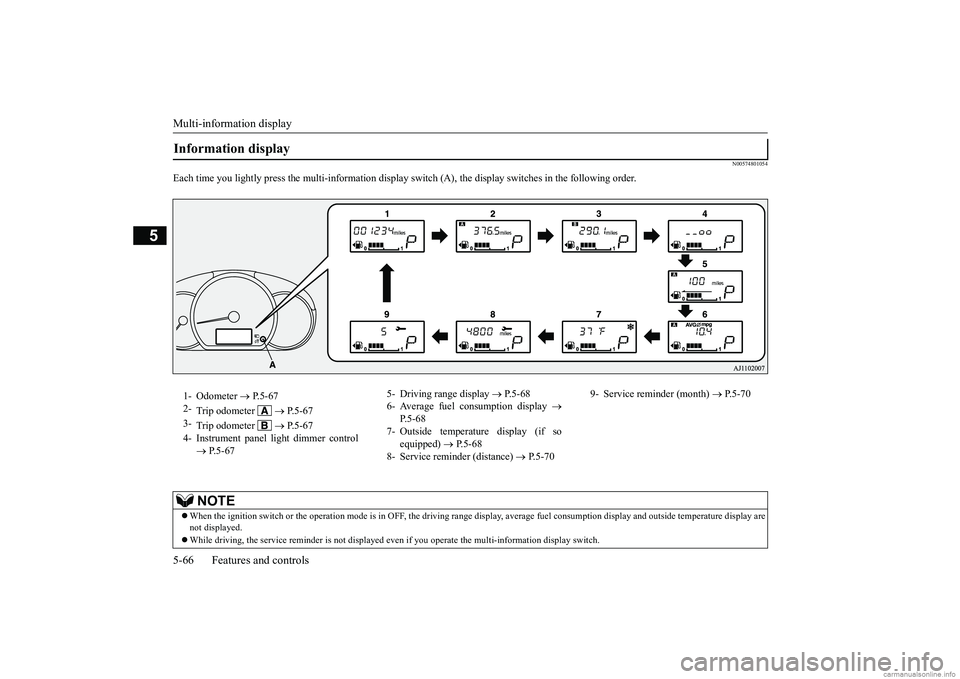
Each time you lightly press th
e multi-information display switch (A), th
e display switches in the following order.
Information display 1- Odometer
P.5-67
2-
Trip odometer
P. 5 - 6 7
3-
Trip odometer
P. 5 - 6 7
4- Instrument panel li
ght dimmer control
P.5-67
5- Driving range display
P.5-68
6- Average fuel consumption display
P.5-68
7- Outside temperature display (if so
equipped)
P.5-68
8- Service reminder (distance)
P.5-70
9- Service reminder (month)
P.5-70
NOTE
When the ignition switch or th
e operation mode is in OFF, the driving range di
splay, average fuel consumption display and outsi
de temperature display are
not displayed. While driving, the service reminder is
not displayed even if you operate th
e multi-information display switch.
BK0249600US.book 66 ページ 2017年4月20日 木曜日 午後1時36分
Page 130 of 263
Multi-information display
Features and controls 5-67
5
N00574900016
The odometer indicates the total distance the vehicle has traveled.
N00575000014
The trip odometer indicates the distance trav-eled between two points. To return the display to 0, hold down the multi-information display switch for about 1 second or more. Only the currently displayed value will be reset. Example
If trip odometer is
displayed, only trip
odometer wi
ll be reset.
N00575101025
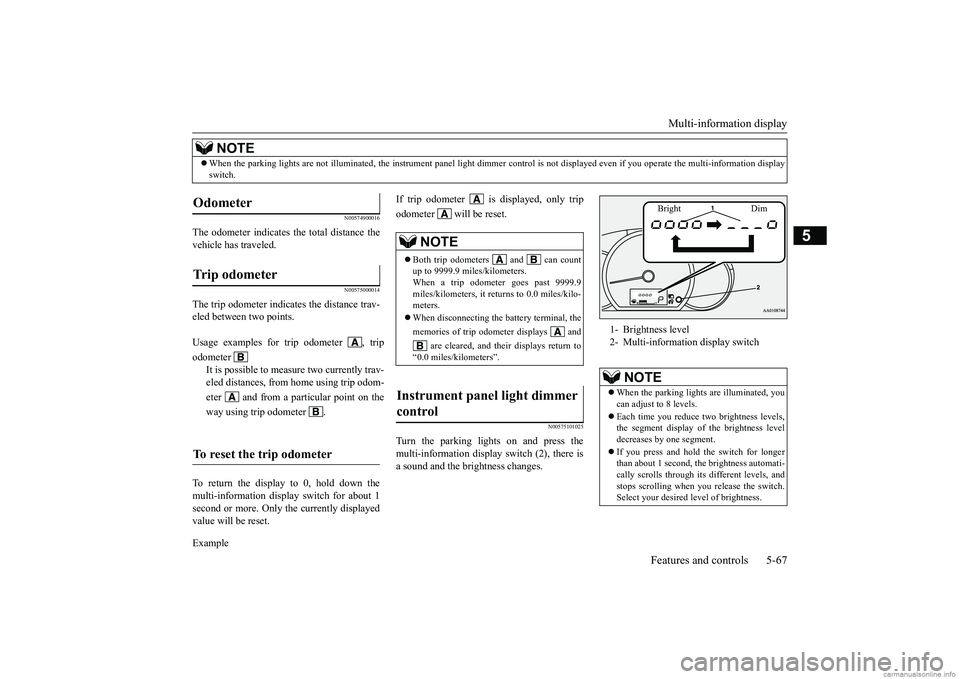
Turn the parking lights on and press the multi-information display switch (2), there is a sound and the brightness changes.
When the parking lights are not il
luminated, the instrument pane
l light dimmer control is not di
splayed even if you operate the
multi-information display
switch.NOTE
Odometer Trip odometer Usage examples for trip odometer , trip odometer
It is possible to measure two currently trav- eled distances, from home using trip odom- eter and from a particular point on theway using trip odometer .
To reset the trip odometer
NOTE
Both trip odometers and can count up to 9999.9 miles/kilometers. When a trip odometer goes past 9999.9miles/kilometers, it returns to 0.0 miles/kilo- meters. When disconnecting the battery terminal, the memories of trip odometer displays and
are cleared, and their displays return to
“0.0 miles/kilometers”.
Instrument panel light dimmer control
1- Brightness level 2- Multi-information display switch
NOTE
When the parking light
s are illuminated, you
can adjust to 8 levels. Each time you reduce tw
o brightness levels,
the segment display of
the brightness level
decreases by one segment. If you press and hold the switch for longer than about 1 second, th
e brightness automati-
cally scrolls through its different levels, and stops scrolling when
you release the switch.
Select your desired
level of brightness.
Bright Dim
BK0249600US.book 67 ページ 2017年4月20日 木曜日 午後1時36分
Page 131 of 263
Multi-information display 5-68 Features and controls
5
N00575201042
This displays the approximate driving range (how many more miles
or kilometers you can
drive). When the driving range falls below approximately 30 miles
(50 km), “---” is dis-
played.
N00575300017
This displays the average fuel consumptionfrom the last reset to the present. The reset mode conditions for the average fuel consumption display can be switchedbetween “Auto reset”
and “Manual reset”.
For information on how to change the aver- age fuel consumption di
splay setting, refer to
“Changing the function settings” on page 5-71.
N00556501134
Shows the temperature outside the vehicle.
The brightness level
of the instruments is
stored when the ignition switch is turned tothe “OFF” position or the operation mode isput in OFF.
Driving range display
NOTE
The driving range is determined based on the fuel consumption data. This may vary depending on the drivi
ng conditions and hab-
its. Treat the distance
displayed as just a
rough guideline. When you refuel, the driving range display is updated. However, if you only add a small amount offuel, the correct value
will not be displayed.
Fill to a full tank whenever possible. When your vehicle is stopped on an extremely steep hill, th
e driving range value
may change. This is due to the movement of fuel in the tank and does not indicate anybreakdown.NOTE
The display setting can be changed to the preferred units (miles or km).Refer to “Changing the
function settings” on
page 5-71.
Average fuel consumption dis- play
NOTE
The average fuel cons
umption display can be
reset separately in both auto reset mode andmanual reset mode. “---” is displayed when the average fuel con- sumption cannot be measured. The initial (default) setting is “Auto reset mode”.NOTE
Average fuel consumption may vary depend on the driving conditi
ons (road conditions,
how you drive, etc.).The actual fuel consum
ption may differ from
the fuel consumption displayed, so treat the fuel consumption displayed as just a roughguideline. Disconnecting the batt
ery cable will erase
from memory the manual reset mode or auto reset mode setting for the average fuel con- sumption display. The display setting ca
n be changed to the
preferred units {mpg, km/L, L/100 km}.Refer to “Changing th
e function settings” on
page 5-71.
Outside temperature display
(if
so equipped)
NOTE
The display setting ca
n be changed to the
preferred units (°F or °C). Refer to “Changing th
e function settings” on
page 5-71. Depending on factors such as the driving conditions, the displa
yed temperature may
vary from the actual outside temperature.NOTE
BK0249600US.book 68 ページ 2017年4月20日 木曜日 午後1時36分