combination switch MITSUBISHI MONTERO 1998 Owner's Guide
[x] Cancel search | Manufacturer: MITSUBISHI, Model Year: 1998, Model line: MONTERO, Model: MITSUBISHI MONTERO 1998Pages: 1501, PDF Size: 25.81 MB
Page 1129 of 1501
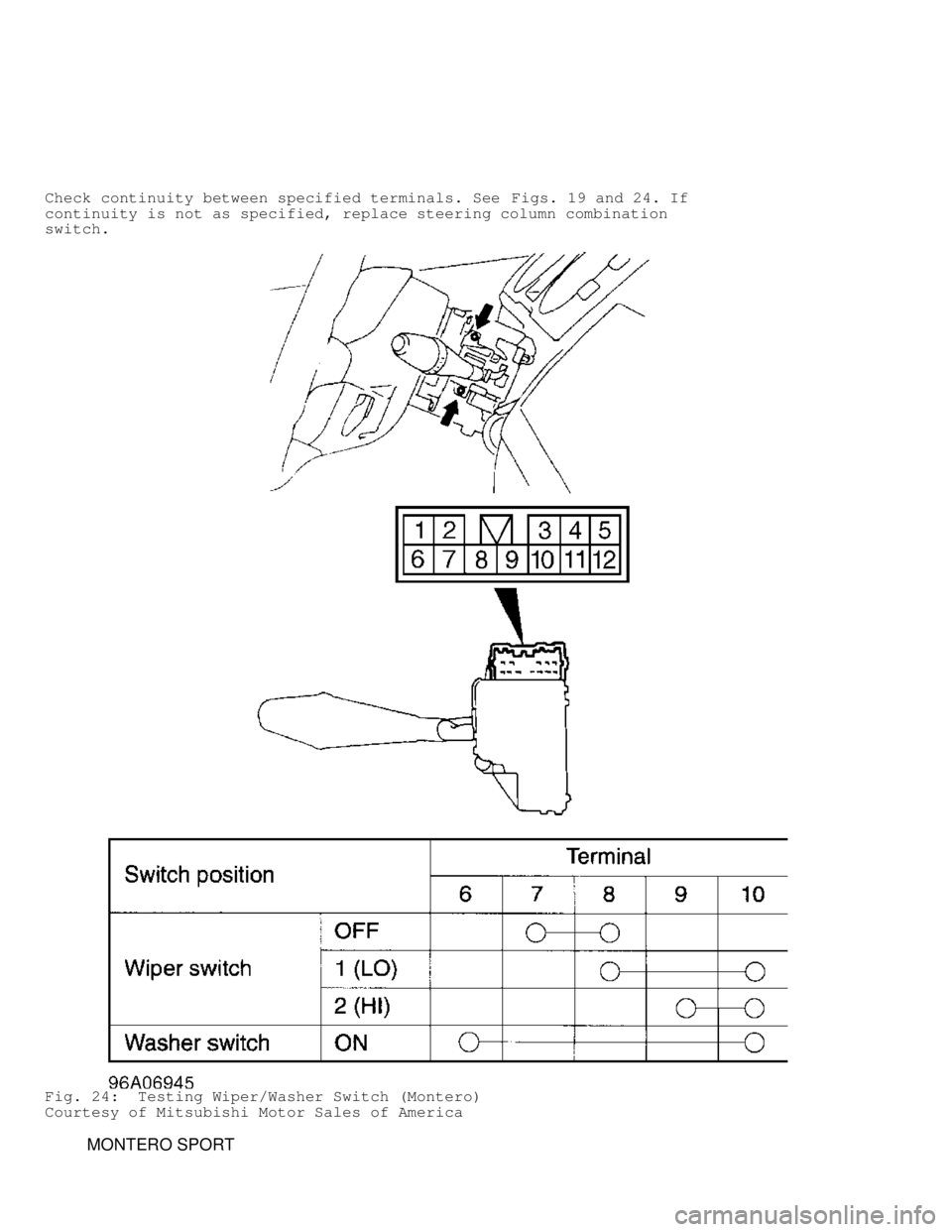
Check continuity between specified terminals. See Figs. 19 and 24. If
continuity is not as specified, replace steering column combination
switch.
Fig. 24: Testing Wiper/Washer Switch (Montero)
Courtesy of Mitsubishi Motor Sales of America
MONTERO SPORT
Page 1131 of 1501
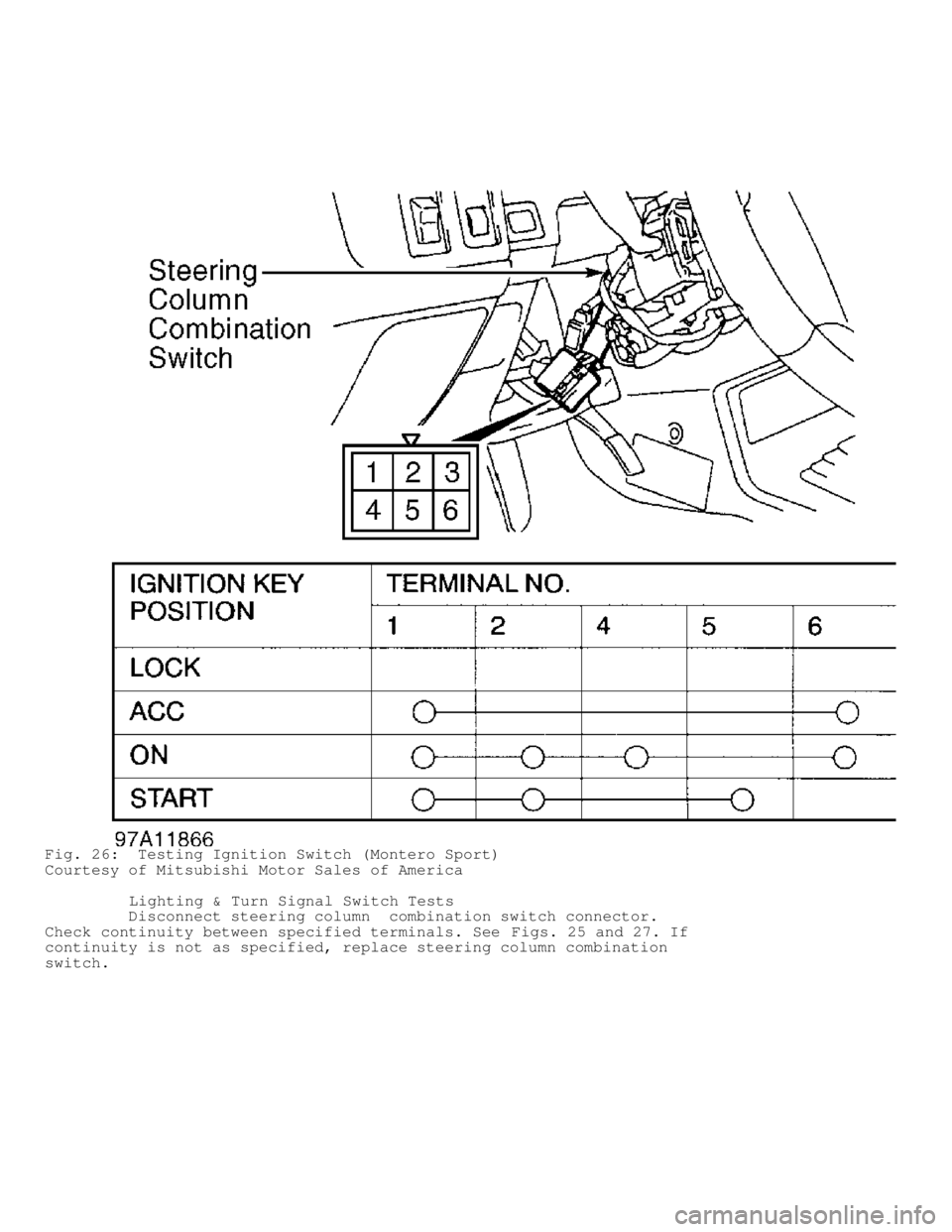
Fig. 26: Testing Ignition Switch (Montero Sport)
Courtesy of Mitsubishi Motor Sales of America
Lighting & Turn Signal Switch Tests
Disconnect steering column combination switch connector.
Check continuity between specified terminals. See Figs. 25 and 27. If
continuity is not as specified, replace steering column combination
switch.
Page 1132 of 1501
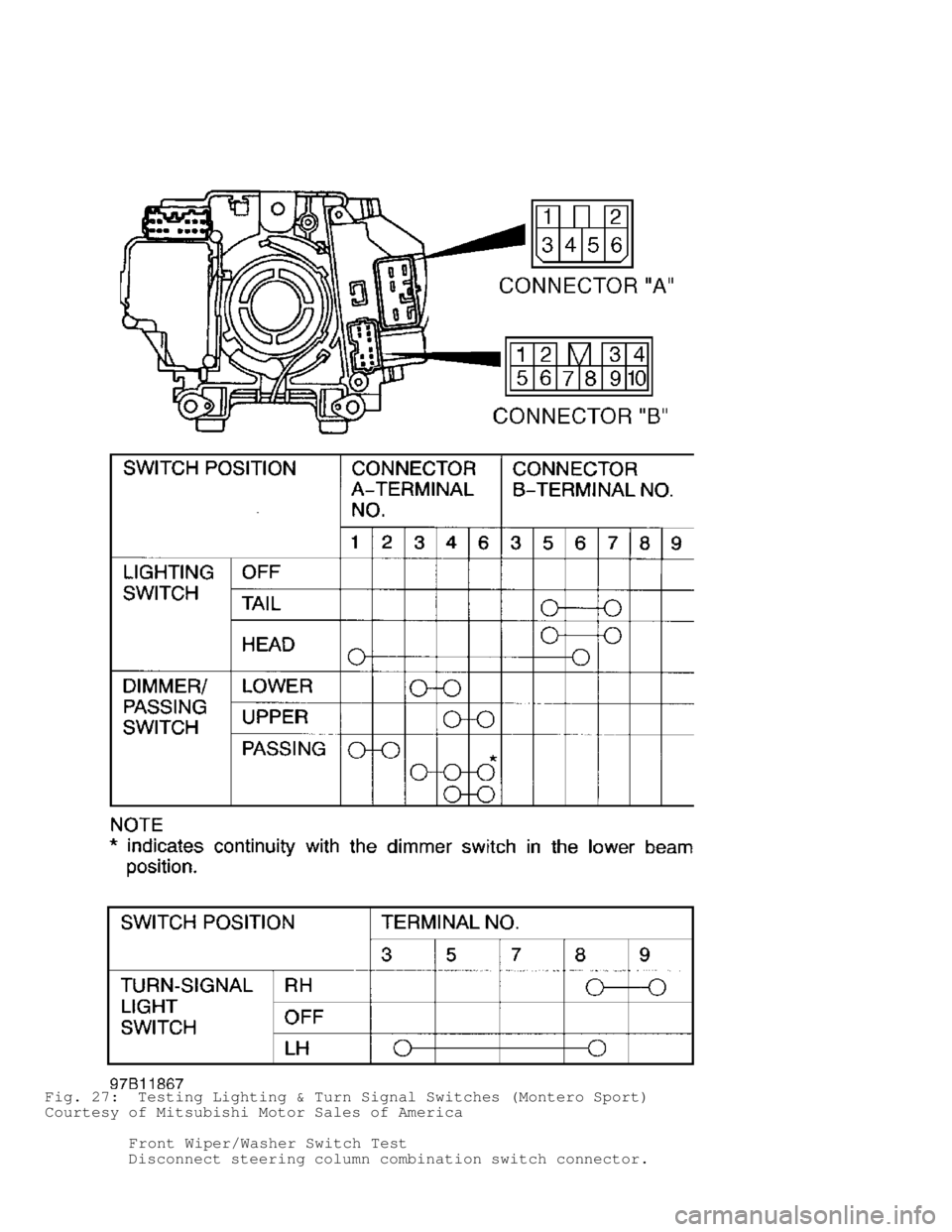
Fig. 27: Testing Lighting & Turn Signal Switches (Montero Sport)
Courtesy of Mitsubishi Motor Sales of America
Front Wiper/Washer Switch Test
Disconnect steering column combination switch connector.
Page 1133 of 1501
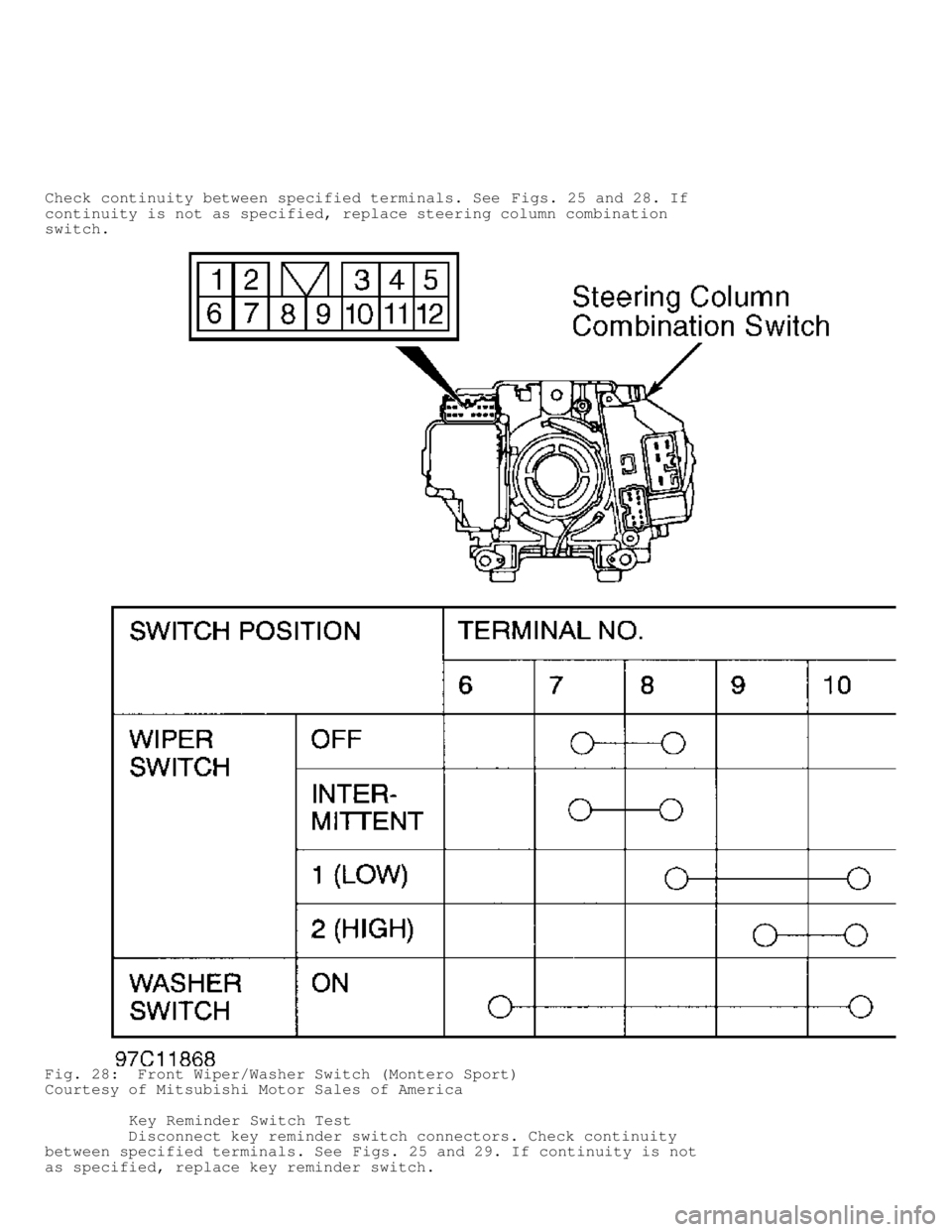
Check continuity between specified terminals. See Figs. 25 and 28. If
continuity is not as specified, replace steering column combination
switch.
Fig. 28: Front Wiper/Washer Switch (Montero Sport)
Courtesy of Mitsubishi Motor Sales of America
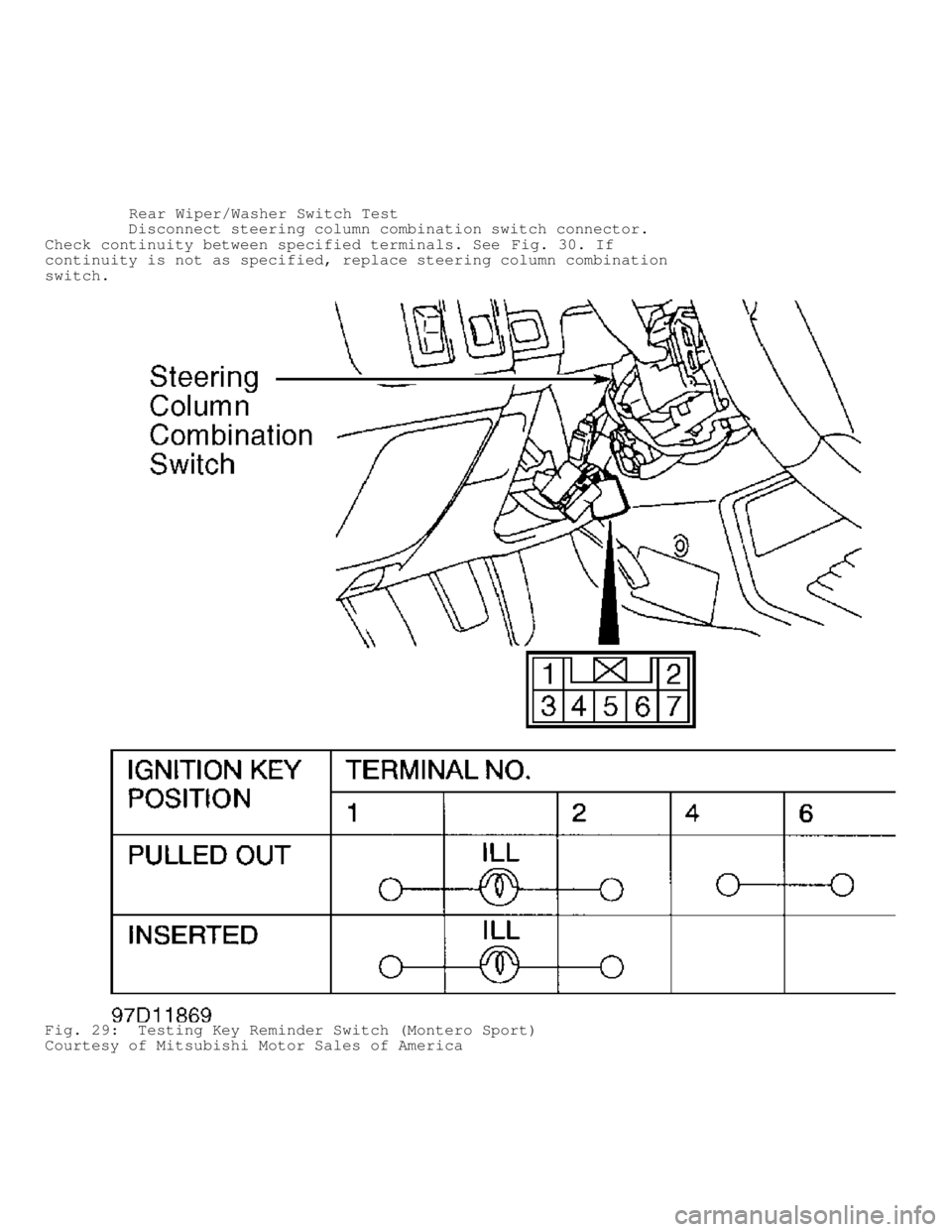
Key Reminder Switch Test
Disconnect key reminder switch connectors. Check continuity
between specified terminals. See Figs. 25 and 29. If continuity is not
as specified, replace key reminder switch.
Page 1134 of 1501
Rear Wiper/Washer Switch Test
Disconnect steering column combination switch connector.
Check continuity between specified terminals. See Fig. 30. If
continuity is not as specified, replace steering column combination
switch.
Fig. 29: Testing Key Reminder Switch (Montero Sport)
Courtesy of Mitsubishi Motor Sales of America
Page 1135 of 1501
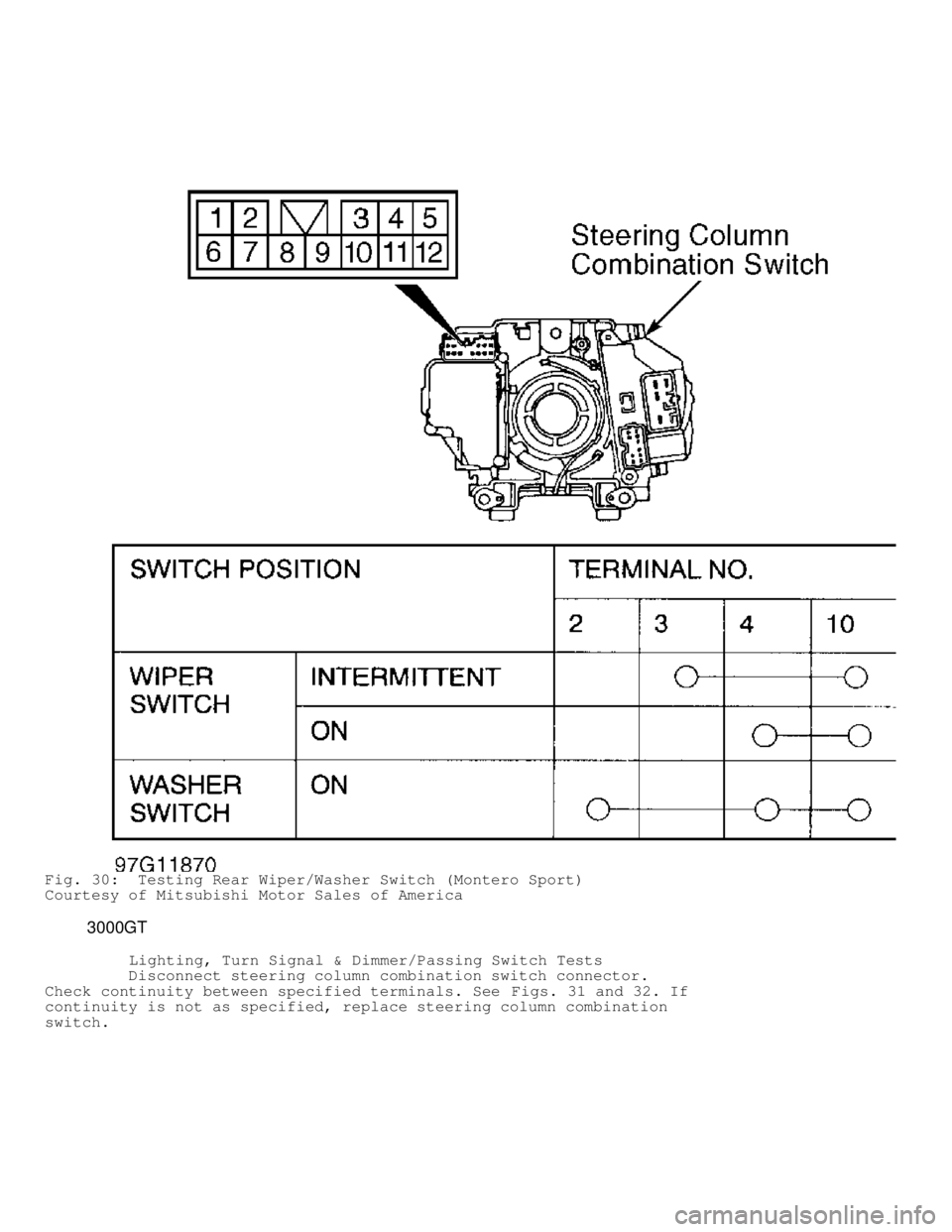
Fig. 30: Testing Rear Wiper/Washer Switch (Montero Sport)
Courtesy of Mitsubishi Motor Sales of America
3000GT
Lighting, Turn Signal & Dimmer/Passing Switch Tests
Disconnect steering column combination switch connector.
Check continuity between specified terminals. See Figs. 31 and 32. If
continuity is not as specified, replace steering column combination
switch.
Page 1139 of 1501
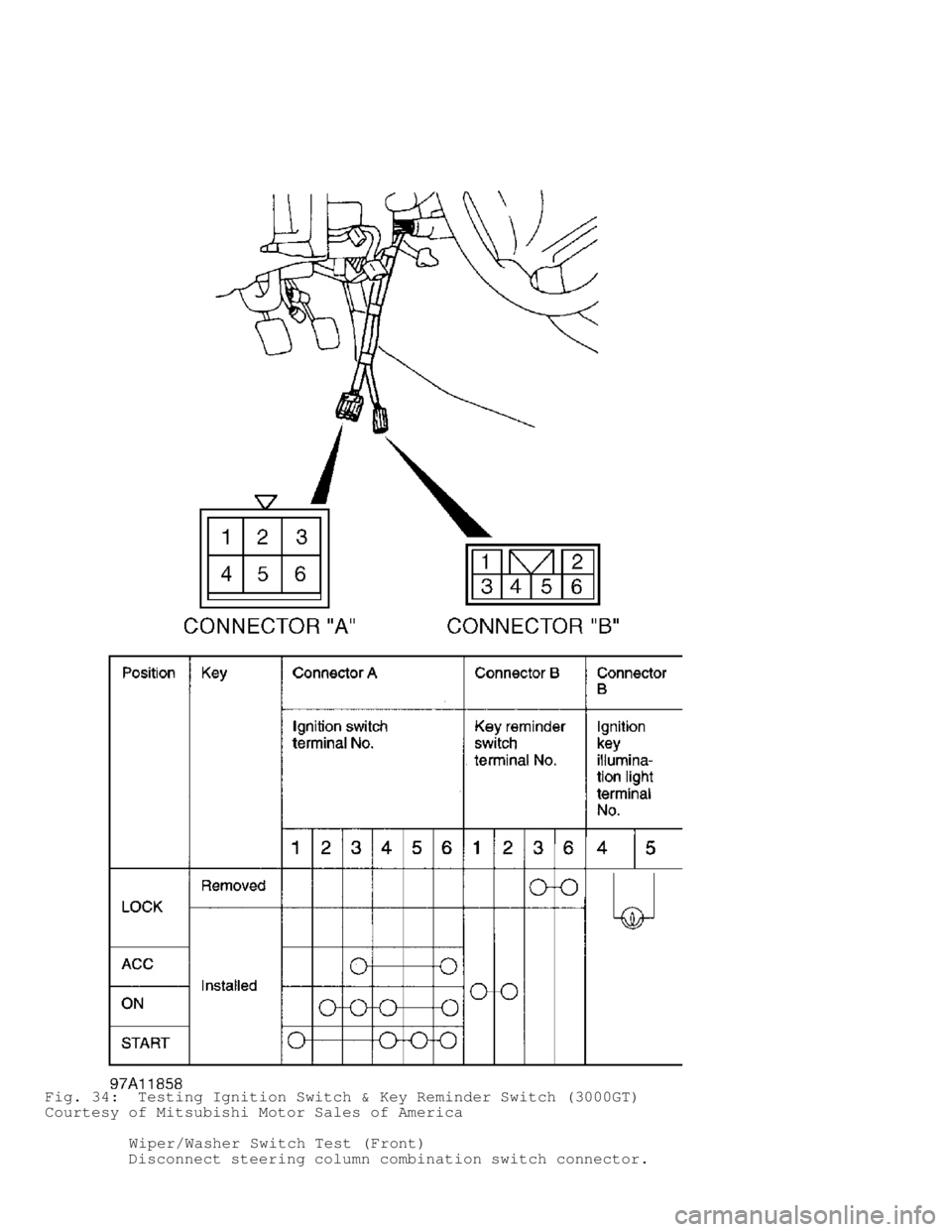
Fig. 34: Testing Ignition Switch & Key Reminder Switch (3000GT)
Courtesy of Mitsubishi Motor Sales of America
Wiper/Washer Switch Test (Front)
Disconnect steering column combination switch connector.
Page 1140 of 1501

Check continuity between specified terminals. See Figs. 31 and 33. If
continuity is not as specified, replace steering column combination
switch.
REMOVAL & INSTALLATION
* PLEASE READ THIS FIRST *
WARNING: Deactivate air bag system before performing any service
operation. See AIR BAG RESTRAINT SYSTEMS article. DO NOT
apply electrical power to any component on steering column
without first deactivating air bag system. Air bag may
deploy.
IGNITION SWITCH
Removal & Installation (Diamante)
Remove instrument panel lower cover. Remove upper and lower
steering column covers. See Fig. 1. Remove ignition switch. To
install, reverse removal procedure.
Removal & Installation (Eclipse)
1) Remove knee protector mount screw plugs. Remove knee
protector. Remove hood lock release handle. Remove upper and lower
steering column covers. See Fig. 6. Remove ignition key illumination
light.
2) Remove steering lock cylinder. Remove A/C-heater system
lap cooler and shower ducts. On A/T models, remove key interlock cable
and slide lever. On all models, remove ignition switch. To install,
reverse removal procedure.
Removal & Installation (Galant)
Remove knee protector. Remove upper and lower column covers.
See Fig. 11 . Remove ignition switch. To install, reverse removal
procedure.
Removal & Installation (Mirage)
Remove knee protector. Remove steering column cover. See
Fig. 15 . Remove clip and cover. On A/T models, remove key interlock
cable, spring and slide lever. On all models, remove ignition switch.
To install, reverse removal procedure.
Removal & Installation (Montero & Montero Sport)
Remove lower instrument panel cover. Remove upper and lower
column covers. See Fig. 19 or 25. Remove ignition switch. To install,
reverse removal procedure.
Removal & Installation (3000GT)
Remove knee protector. Remove upper and lower steering column
covers. See Fig. 31. Remove A/C-heater system lap cooler duct and foot
duct. Remove key reminder switch. Remove ignition switch. To install,
reverse removal procedure.
STEERING COLUMN SWITCH
CAUTION: DO NOT hammer on steering shaft. Collapsible steering column
mechanism may be damaged.
Removal & Installation (Diamante)
Remove air bag module. See AIR BAG RESTRAINT SYSTEMS article.
Remove steering wheel. Remove instrument panel lower cover. Remove
upper and lower steering column covers. See Fig. 1. Remove steering
Page 1151 of 1501

deploys.
* After air bag deploys, air bag surface may contain deposits
of sodium hydroxide, which irritate skin. Always wear safety
glasses, rubber gloves and long-sleeved shirt during clean
up. Wash hands using mild soap and water. Follow correct
clean-up and disposal procedures.
* Because of critical system operating requirements, DO NOT
service any SRS components. Repairs are only made by
replacing defective part(s).
* DO NOT allow any electrical source near inflator on the back
of air bag module.
* When carrying live air bag module, trim cover should be
pointed away from body to minimize injury in case of
accidental air bag deployment.
* If SRS is not fully functional for any reason, DO NOT drive
vehicle until system is repaired and is fully functional. DO
NOT remove bulbs, modules, sensors or other components, or in
any way disable system from operating normally. If SRS is not
functional, park vehicle until repairs are made.
REMOVAL & INSTALLATION
STEERING WHEEL
WARNING: Wait at least 60 seconds after disconnecting negative
battery cable before servicing SRS. System reserve capacitor
maintains SRS voltage for about 60 seconds after battery is
disconnected. Servicing SRS before 60-second period may
cause accidental air bag deployment and possible personal
injury.
Removal
Disable air bag. See DISABLING & ACTIVATING AIR BAG SYSTEM .
Ensure steering wheel is straight ahead. Remove air bag. Place
reference mark on steering wheel and steering column shaft for
installation reference. Remove steering wheel nut and washer. Using
steering wheel puller, remove steering wheel.
CAUTION: DO NOT hammer on steering wheel during removal or
installation, as it may damage steering column.
Installation
To install, reverse removal procedure. Ensure reference marks
are aligned. Tighten fasteners to specification. See
TORQUE SPECIFICATIONS . Activate air bag. See DISABLING & ACTIVATING
AIR BAG SYSTEM.
COMBINATION SWITCH
CAUTION: When installing steering wheel, if rotating part of
clockspring is not properly centered with steering column
and front wheels, clockspring failure will result.
Removal & Installation
Remove lower instrument cover and lower heater duct. Remove
air bag and steering wheel. See STEERING WHEEL under
REMOVAL & INSTALLATION . Remove upper and lower steering column covers.
Disconnect clockspring electrical connector. Remove screws attaching
colckspring and remove clockspring. Disconnect combination switch
electrical connectors. Remove screws and combination switch. To
install, reverse removal procedure.
Page 1152 of 1501

IGNITION SWITCH
Removal & Installation
1) Remove upper and lower steering column covers. Disconnect
harness connector from ignition switch. Using hacksaw, cut slots in
bolt heads of lock assembly. Using screwdriver, remove bolts and lock
assembly.
2) To install, reverse removal procedure. Tighten new bolts
until heads of bolts sheer off.
STEERING COLUMN
WARNING: Failure to follow air bag service precautions may result in
air bag deployment and personal injury. See AIR BAG SERVICE
PRECAUTIONS. Follow all service precautions before
attempting repairs. After component replacement, perform a
system operational check to ensure proper system operation.
CAUTION: Applying excessive pressure or causing impact to steering
shaft during service may cause column to collapse. Before
removing steering column, ensure wheels are in
straight-ahead position. Note steering wheel location for
installation reference.
Removal
1) Remove steering wheel. Remove combination switch and
ignition switch (if necessary). See STEERING WHEEL under
REMOVAL & INSTALLATION .
2) Remove lower instrument panel cover and air duct.
Disconnect all electrical connections. Disconnect brake pedal return
spring (if equipped). Disconnect gearshift control cable.
3) Remove bolts for dust cover at firewall. Remove bolt from
clamp at steering gear. Remove steering column bolts and remove
steering column.
Installation
To install, reverse removal procedure. Apply sealant (3M ATD
8663) to dust cover bolts before installing. Tighten bolts to
specification. See TORQUE SPECIFICATIONS .
OVERHAUL
STEERING COLUMN
WARNING: Failure to follow air bag service precautions may result in
air bag deployment and personal injury. See AIR BAG SERVICE
PRECAUTIONS. Follow all service precautions before
attempting repairs. After component replacement, perform a
system operational check to ensure proper system operation.
NOTE: Vehicle steering column is not repairable. See below for
joint assembly and steering lock removal and installation.
Disassembly
Remove steering column from vehicle. See STEERING COLUMN
under REMOVAL & INSTALLATION . Remove clamp bolt from joint assembly.
See Fig. 1 . Remove assembly. Remove lower boot, upper boot and dust
cover from joint assembly. To remove steering lock, use a hacksaw to
cut bolts at steering lock bracket side. Remove steering lock and
bracket.