eco MITSUBISHI OUTLANDER 2015 3.G Service Manual
[x] Cancel search | Manufacturer: MITSUBISHI, Model Year: 2015, Model line: OUTLANDER, Model: MITSUBISHI OUTLANDER 2015 3.GPages: 446, PDF Size: 59.52 MB
Page 84 of 446
Keyless entry system (if so equipped)
Features and controls 5-7
5
N00562301094
Your electronic immo
bilizer operates on a
radio frequency subject to Federal Communi- cations Commission (FCC)
Rules (For vehi-
cles sold in U.S.A.
) and Industry Canada
Rules (For vehicles so
ld in Canada). This
device complies with part 15 of FCC Rulesand Industry Canada
licence-exempt RSS
standard(s). Operation is subject to the following two con- ditions. This device may not
cause harmful inter-
ference. This device must ac
cept any interference
received, including interference that may cause undesired operation.
N00509001920
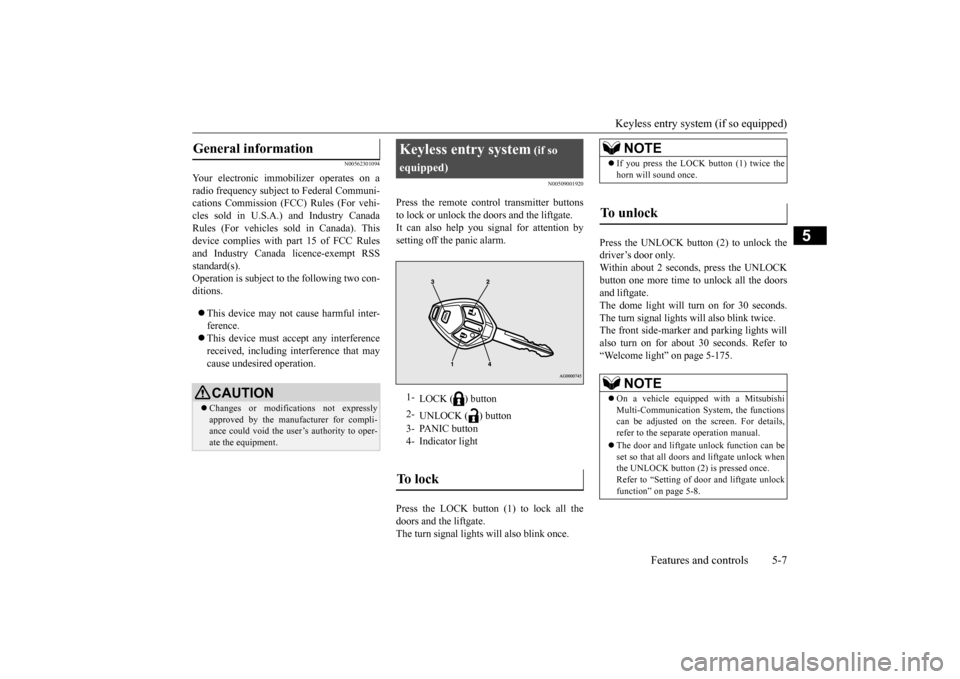
Press the remote control transmitter buttonsto lock or unlock the doors and the liftgate.It can also help you signal for attention by setting off the panic alarm. Press the LOCK button (1) to lock all the doors and the liftgate. The turn signal lights will also blink once.
Press the UNLOCK button (2) to unlock the driver’s door only.Within about 2 seconds, press the UNLOCK button one more time to unlock all the doors and liftgate.The dome light will turn on for 30 seconds. The turn signal lights will also blink twice. The front side-marker
and parking lights will
also turn on for about 30 seconds. Refer to “Welcome light” on page 5-175.
General information
CAUTION Changes or modifica
tions not expressly
approved by the manufacturer for compli- ance could void the user’s authority to oper-ate the equipment.
Keyless entry system
(if so
equipped)1-
LOCK ( ) button
2-
UNLOCK ( ) button
3- PANIC button 4- Indicator lightTo l o c k
NOTE
If you press the LOCK button (1) twice the horn will sound once.
To unlock
NOTE
On a vehicle equipped with a Mitsubishi Multi-Communication System, the functionscan be adjusted on the screen. For details, refer to the separa
te operation manual.
The door and liftgate unlock function can be set so that all doors and liftgate unlock when the UNLOCK button (2) is pressed once. Refer to “Setting of door
and liftgate unlock
function” on page 5-8.
BK0211800US.book 7 ページ 2014年3月12日 水曜日 午後2時42分
Page 85 of 446
Keyless entry system (if so equipped) 5-8 Features and controls
5
The horn and turn signal lights of the keyless entry system answerback function can be changed as required. This is done with thekey removed from the ignition switch. The answerback function can be set in the following three ways. Each time the answerba
ck function is set, a
chime will sound to tell you the condition of the answerback function. 1. Remove the key from
the ignition switch.
2. Open the driver’s door and turn the com-bination headlights and dimmer switch to the “OFF” position.
3. Press the LOCK button (1) for 4 to 10 sec- onds and press the UNLOCK button (2)during this time. 4. Release in sequence the UNLOCK and LOCK buttons within 5 seconds of press-ing the UNLOCK button in step 3.
The answerback function can be turned ON or OFF separately. 1. Remove the key from the ignition switch. 2. Open the driver’s door and turn the com- bination headlights and dimmer switch tothe “OFF” position. 3. Press the UNLOCK button (2) for 4 to 10 seconds and press the LOCK button (1)during this time. 4. Release in sequence the UNLOCK and LOCK buttons within 5 seconds of press-ing the LOCK button in step 3.
N00543601115
The door and liftgate
unlock function can be
set to the following two conditions.Each time the door and
liftgate unlock func-
tion is set, a chime wi
ll sound to tell you the
condition of the door and liftgate unlockfunction.
Answerback function
NOTE
The answerback functi
on will not operate if
any of the doors are open.
Horn deactivation/reactivation
One chime: The horn will not sound. Two chimes: The horn will sound. Four chimes: The hor
n will sound if the
LOCK button is pressed twice within 1 second.
NOTE
On a vehicle equippe
d with a Mitsubishi
Multi-Communication System, the functions can be adjusted on the screen. For details, refer to the separa
te operation manual.
Turn signal lights deactiva- tion/reactivation
Number of chimes
To l o c k
To u n l o c k
One chime One flash Two flashes Two chimes One flash No flash Three chimes No flash Two flashes Four chimes Two flashes One flash Five chimes No flash One flash Six chimes Two flashes No flash Seven chimes
No flash No flash
NOTE
On a vehicle equippe
d with a Mitsubishi
Multi-Communication System, the functions can be adjusted on the screen. For details, refer to the separate operation manual.
Setting of door and liftgate unlock function
BK0211800US.book 8 ページ 2014年3月12日 水曜日 午後2時42分
Page 86 of 446
Keyless entry system (if so equipped)
Features and controls 5-9
5
1. Remove the key from the ignition switch. 2. Open the driver’s door and turn the com-bination headlights and dimmer switch to the “OFF” position. 3. Press the LOCK button (1) for 4 to 10 sec-onds and press the UNLOCK button (2) during this time. 4. Release in sequence the LOCK andUNLOCK buttons within 5 seconds of pressing the LOCK button in step 3.
N00543701060
If you are near your vehicle and feel threat- ened, you may activate the alarm to call atten- tion as follows:
1. Press the PANIC button (3) for more than 1 second.2. The headlights will blink on and off and the horn will sound intermittently for about 3 minutes.3. To turn off the alarm, press any button on the remote control transmitter.
N00543801087
Only remote control transmitters pro- grammed with the vehicle’s electronics can lock or unlock all doors and the liftgate. If you lose the remote control transmitter, you can order a remote c
ontrol transmitter from
your authorized Mitsubi
shi Motors dealer by
referring to the key number. To prevent vehicle theft, the ID code for theremote control transmitter must be changed. Take your vehicle and all remote control transmitters to your authorized MitsubishiMotors dealer to have your ID code changed.
N00543900049
To add a remote control transmitter, you must already have 1 registered remote control transmitter.
Registering the ID code can be done by your- self or by your authorized Mitsubishi Motorsdealer. For you to regist
er the ID code your-
self, follow the “Customer remote control transmitter programming” procedure below.If you choose to have your authorized Mitsubishi Motors dealer register the ID code, take your vehi
cle and any remaining
keys to your authorized Mitsubishi Motors dealer.
N00544001103
You can program new remote control trans- mitters to the system if you have one valid(already registered) remote control transmit- ter by doing the following: 1. Have available all (current and new) remote control transmitters you wish toregister. 2. With a valid (already registered) remote control transmitter, press the UNLOCKbutton (2) for 4 to 10 seconds. Then press and hold the LOCK button (1).
Number of chimes
Condition
One chime
All doors and the liftgate unlock
Two chimes Driver’s door unlock only
NOTE
On a vehicle equippe
d with a Mitsubishi
Multi-Communication System, the functionscan be adjusted on the screen. For details, refer to the separa
te operation manual.
Using the panic alarm
Replacement remote control transmitters
Additional remote control transmitters
NOTE
You are provided with 2 remote control transmitters, but you may register up to 8 remote control transmitters.
Customer remote control trans- mitter programming
BK0211800US.book 9 ページ 2014年3月12日 水曜日 午後2時42分
Page 87 of 446

Keyless entry system (if so equipped) 5-10 Features and controls
5
3. Within 5 seconds of pressing the LOCK button, release the LOCK and UNLOCKbuttons in sequence. At this time, ID codes for all remote con- trol transmitters except for the transmitterused in steps 2 and 3 are erased and the answerback function (door is locked and unlocked) informs you that the registra-tion mode has been activated. 4. Within 60 seconds after step 3, complete the following ID code
registration opera-
tion using the next remote control trans- mitter you wish to register within 4seconds. i) Press both the LOCK and UNLOCK buttons for 2 seconds.ii) Release both the LOCK and UNLOCK buttons for 1 second. iii) Press the UNLOCK button. Theanswerback function informs you that the ID code registration
of the transmitter is
completed.5. To register the ID codes of additional remote control transmitters, repeat step 4 within 60 seconds after step 4.6. If no ID code of a remote control trans- mitter is registered within 60 seconds after step 4, the regi
stration mode is can-
celed and the normal mode returns.
N00546101124
Your keyless entry syst
em operates on a radio
frequency subject to
Federal Communica-
tions Commission (FCC)
Rules (For vehicles
sold in U.S.A.) and Industry Canada Rules (For vehicles sold in
Canada). This device
complies with Part 15 of FCC Rules andIndustry Canada licenc
e-exempt RSS stan-
dard(s). Operation is subject to
the following two con-
ditions. This device may not
cause harmful inter-
ference.
NOTE
For verification purposes, try to lock and unlock the doors after the registration iscompleted. The indicator light (4)
comes on each time a
button is pressed. The keyless entry system does not work if the key is in the ignition switch. The remote control tr
ansmitter can be used
from about 40 feet (12 m) away. However,this distance may cha
nge if your vehicle is
near a TV transmitting tower, a power sta- tion, or a radio station. If the UNLOCK button (2) is pressed when all doors and the liftgate are locked and nodoors or the liftgate are opened within about 30 seconds, the doors and the liftgate will automatically re-lock.On a vehicle equippe
d with a Mitsubishi
Multi-Communication System, the functions can be adjusted on the screen. For details,refer to the separa
te operation manual.
If the following conditi
ons are observed after
pressing the LOCK (1) or UNLOCK (2) but- ton on the remote control transmitter, the battery in the remote control transmitter mayneed to be replaced. • The doors and the liftgate cannot be locked or unlocked. • The panic alarm cannot be operated.• The indicator light
(4) is dim or does not
come on.
If you lose your remote control transmitter, please contact an au
thorized Mitsubishi
Motors dealer for a replacement. If you wish to obtain
an additional remote
control transmitter, please contact an autho-rized Mitsubishi Moto
rs dealer. A maximum
of 8 remote control tr
ansmitters can be pro-
grammed for your vehicle. To use the new remote control transmitters, it is necessary to register
the key with both the
electronic immobilizer
and keyless entry sys-
tem. Also refer to “Electronic immobilizer (Anti-theft starting system): Customer key pro- gramming” on page 5-6.
General information
NOTE
BK0211800US.book 10 ページ 2014年3月12日 水曜日 午後2時42分
Page 88 of 446
Keyless entry system (if so equipped)
Features and controls 5-11
5
This device must ac
cept any interference
received, including interference that maycause undesired operation.
N00544100064
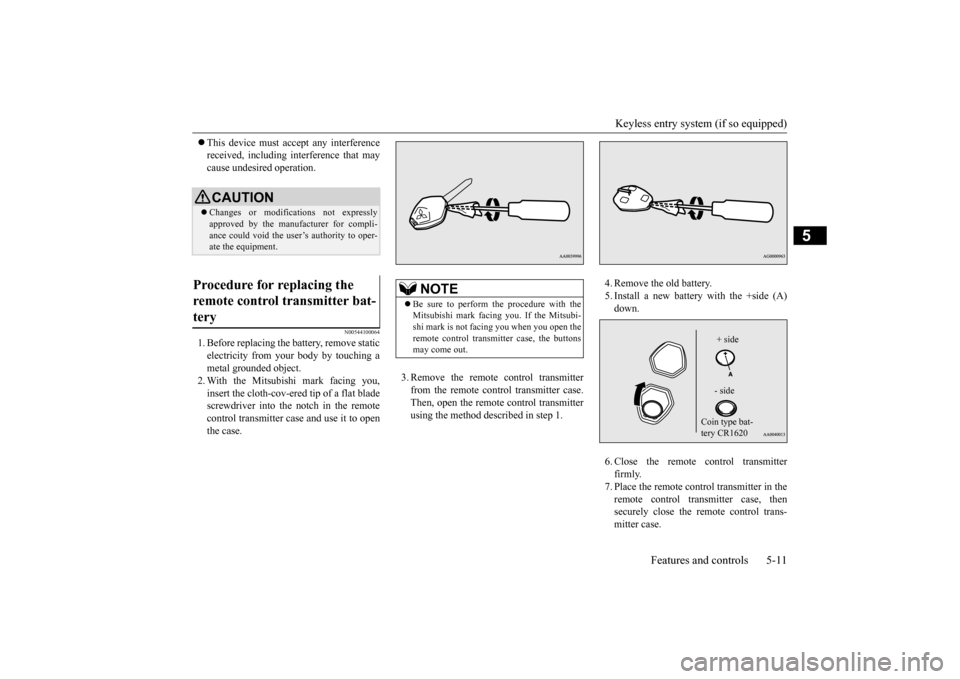
1. Before replacing the battery, remove static electricity from your body by touching a metal grounded object.2. With the Mitsubishi mark facing you, insert the cloth-cov-ered tip of a flat blade screwdriver into the notch in the remotecontrol transmitter case and use it to open the case.
3. Remove the remote control transmitter from the remote control transmitter case. Then, open the remote control transmitterusing the method described in step 1.
4. Remove the old battery. 5. Install a new battery with the +side (A)down. 6. Close the remote control transmitter firmly. 7. Place the remote control transmitter in the remote control transmitter case, then securely close the remote control trans-mitter case.
CAUTION Changes or modifica
tions not expressly
approved by the manufacturer for compli-ance could void the user’s authority to oper- ate the equipment.
Procedure for replacing the remote control transmitter bat- tery
NOTE
Be sure to perform the procedure with the Mitsubishi mark facing you. If the Mitsubi-shi mark is not facing you when you open the remote control transm
itter case, the buttons
may come out.
+ side - side
Coin type bat- tery CR1620
BK0211800US.book 11 ページ 2014年3月12日 水曜日 午後2時42分
Page 90 of 446
Free-hand Advanced Securi
ty Transmitter (F.A.S.T.-key) (if so equipped)
Features and controls 5-13
5
The operations possible with the F.A.S.T.- key can be modified as stated below.(Keyless entry operations are possible.) For details, contact an
authorized Mitsubi-
shi Motors dealer.• Enabling only the locking and unlocking of the doors and the liftgate • Enabling only the starting of the engine• Deactivating the F.A.S.T.-key
N00503201177
When a person enters the operating range ofthe F.A.S.T.-key while carrying the F.A.S.T.- key and presses the driver’s or front passen- ger’s door lock/unlock switch, the liftgateLOCK switch or the li
ftgate OPEN switch,
verification of the ID
code is performed.
The doors and the liftgate can be locked andunlocked and the engine can be started only when the ID codes of the vehicle and F.A.S.T.-key match.
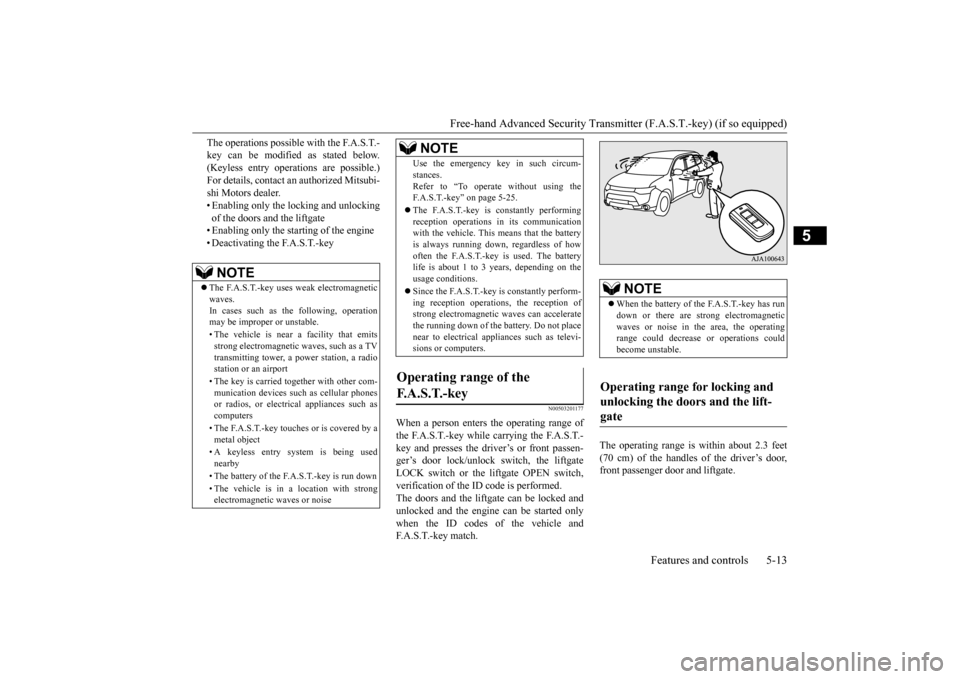
The operating range is
within about 2.3 feet
(70 cm) of the handles of the driver’s door, front passenger door and liftgate.
NOTE
The F.A.S.T.-key uses weak electromagnetic waves.In cases such as the following, operation may be imprope
r or unstable.
• The vehicle is near a facility that emits strong electroma
gnetic waves, such as a TV
transmitting tower, a po
wer station, a radio
station or an airport • The key is carried together with other com- munication devices such
as cellular phones
or radios, or electric
al appliances such as
computers • The F.A.S.T.-key touches or is covered by a metal object • A keyless entry system is being used nearby • The battery of the F.A.S.T.-key is run down • The vehicle is in a location with strong electromagnetic
waves or noise
Use the emergency key in such circum- stances.Refer to “To operate
without using the
F.A.S.T.-key” on page 5-25. The F.A.S.T.-key is constantly performing reception operations
in its communication
with the vehicle. This means that the battery is always running down, regardless of howoften the F.A.S.T.-key is used. The battery life is about 1 to 3 years, depending on the usage conditions. Since the F.A.S.T.-key is constantly perform- ing reception operati
ons, the reception of
strong electrom
agnetic waves
can accelerate
the running down of the
battery. Do not place
near to electrical appliances such as televi-sions or computers.
Operating range of the F. A . S . T. - k e y
NOTE
NOTE
When the battery of the F.A.S.T.-key has run down or there are st
rong electromagnetic
waves or noise in the area, the operating range could decrease
or operations could
become unstable.
Operating range for locking and unlocking the doors and the lift- gate
BK0211800US.book 13 ページ 2014年3月12日 水曜日 午後2時42分
Page 92 of 446
Free-hand Advanced Securi
ty Transmitter (F.A.S.T.-key) (if so equipped)
Features and controls 5-15
5
While carrying the F.A.S.T.-key within the operating range, you ca
n unlock the doors
and the liftgate by using the F.A.S.T.-key operation. The dome light will turn on for 30 seconds.The turn signal lights wi
ll blink twice and the
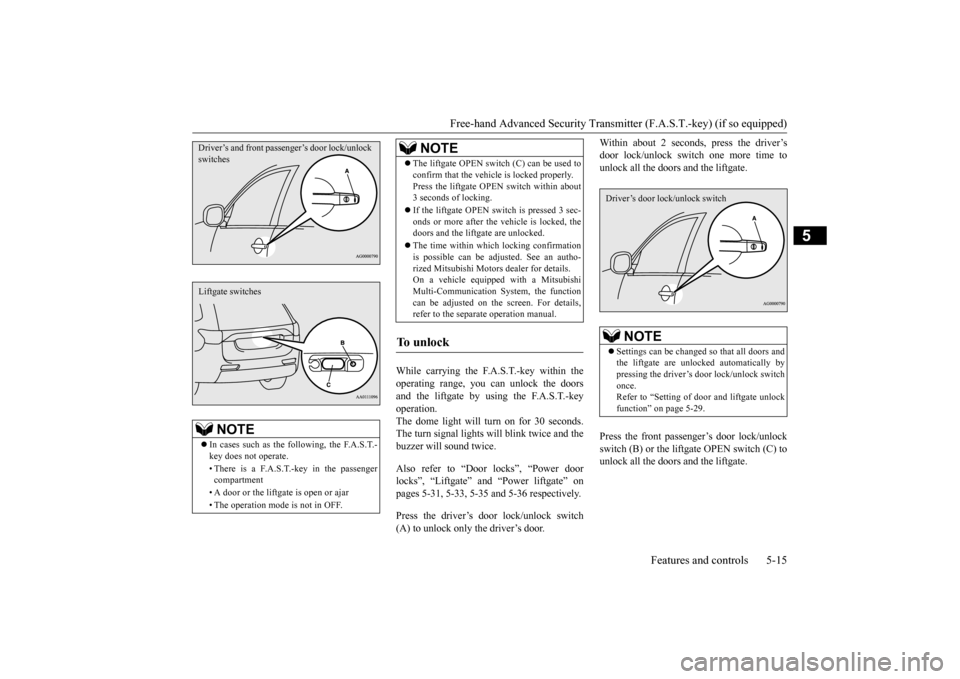
buzzer will sound twice. Also refer to “Door locks”, “Power door locks”, “Liftgate” and “Power liftgate” onpages 5-31, 5-33, 5-35 and 5-36 respectively. Press the driver’s door lock/unlock switch (A) to unlock only the driver’s door.
Within about 2 seconds, press the driver’s door lock/unlock sw
itch one more time to
unlock all the doors and the liftgate. Press the front passenger’s door lock/unlock switch (B) or the lift
gate OPEN switch (C) to
unlock all the doors and the liftgate.
NOTE
In cases such as the following, the F.A.S.T.- key does not operate. • There is a F.A.S.T.-key in the passenger compartment • A door or the liftgate is open or ajar • The operation mode is not in OFF.Driver’s and front passenger’s door lock/unlock switchesLiftgate switches
The liftgate OPEN switch (C) can be used to confirm that the vehicl
e is locked properly.
Press the liftgate OPEN
switch within about
3 seconds of locking. If the liftgate OPEN switch is pressed 3 sec- onds or more after the vehicle is locked, the doors and the liftga
te are unlocked.
The time within which locking confirmation is possible can be adjusted. See an autho- rized Mitsubishi Motors
dealer for details.
On a vehicle equippe
d with a Mitsubishi
Multi-Communication System, the function can be adjusted on the screen. For details,refer to the separate operation manual.
To unlock
NOTE
NOTE
Settings can be changed so that all doors and the liftgate are unlocked automatically by pressing the driver’s door lock/unlock switch once.Refer to “Setting of door
and liftgate unlock
function” on page 5-29.Driver’s door lock/unlock switch
BK0211800US.book 15 ページ 2014年3月12日 水曜日 午後2時42分
Page 93 of 446
Free-hand Advanced
Security Transmitter (F.A.S
.T.-key) (if so equipped)
5-16 Features and controls
5
N00529600114
The electronic immobilize
r is designed to sig-
nificantly reduce the
possibility of vehicle
theft. The purpose of the system is to immo-bilize the vehicle if
an invalid start is
attempted. A valid st
art attempt can only be
achieved (subject to ce
rtain conditions) using
a F.A.S.T.-Key “registered” to the immobi- lizer system. All of the keys provided with your new vehi-cle have been program
med to the vehicle’s
electronics.
N00513501098
To prevent vehicle theft, no F.A.S.T.-keysother than those regist
ered in advance can be
NOTE
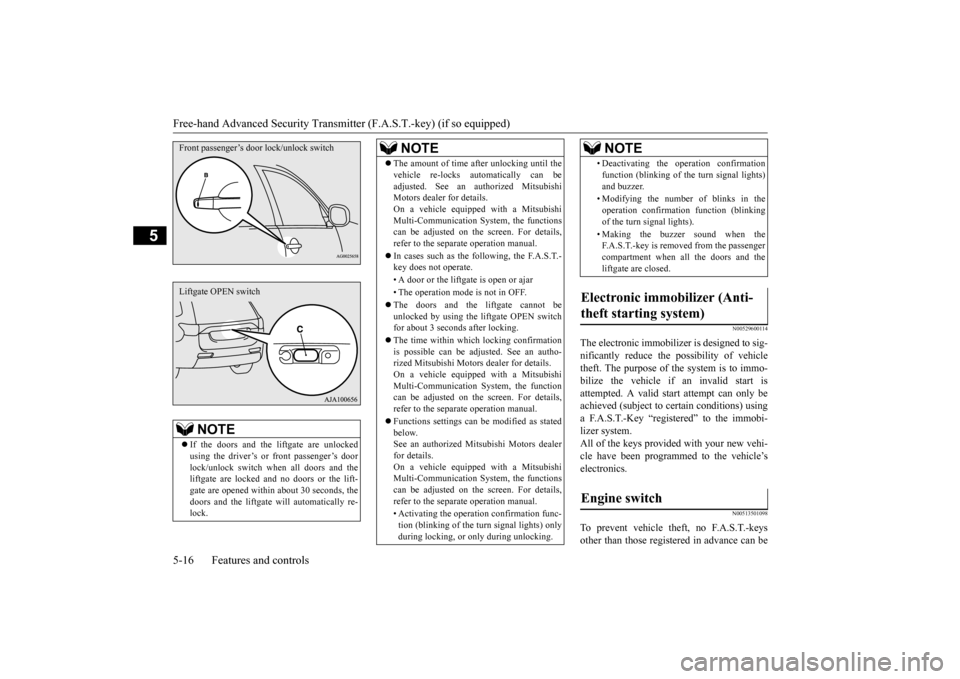
If the doors and the li
ftgate ar
e unlocked
using the driver’s or front passenger’s doorlock/unlock switch when all doors and the liftgate are locked and no doors or the lift- gate are opened within
about 30 seconds, the
doors and the liftgate wi
ll automati
cally re-
lock.Front passenger’s door lock/unlock switchLiftgate OPEN switch
The amount of time af
ter unlocking until the
vehicle re-locks au
tomatically can be
adjusted. See an authorized MitsubishiMotors dealer for details. On a vehicle equippe
d with a Mitsubishi
Multi-Communication System, the functionscan be adjusted on the screen. For details, refer to the separa
te operation manual.
In cases such as the following, the F.A.S.T.- key does not operate. • A door or the liftgate is open or ajar • The operation mode is not in OFF. The doors and the liftgate cannot be unlocked by using the li
ftgate OPEN switch
for about 3 seconds after locking. The time within which locking confirmation is possible can be adjusted. See an autho- rized Mitsubishi Motors
dealer for details.
On a vehicle equippe
d with a Mitsubishi
Multi-Communication System, the function can be adjusted on the screen. For details, refer to the separa
te operation manual.
Functions settings can
be modified as stated
below.See an authorized Mitsubishi Motors dealer for details. On a vehicle equippe
d with a Mitsubishi
Multi-Communication System, the functions can be adjusted on the screen. For details, refer to the separa
te operation manual.
• Activating the operati
on confirmation func-
tion (blinking of the turn signal lights) onlyduring locking, or only during unlocking.NOTE
• Deactivating the ope
ration confirmation
function (blinking of
the turn signal lights)
and buzzer. • Modifying the number of blinks in the operation confirmati
on function (blinking
of the turn signal lights). • Making the buzzer sound when the F.A.S.T.-key is removed from the passenger compartment when all the doors and the liftgate are closed.
Electronic immobilizer (Anti- theft starting system)
Engine switch
NOTE
BK0211800US.book 16 ページ 2014年3月12日 水曜日 午後2時42分
Page 95 of 446
Free-hand Advanced
Security Transmitter (F.A.S
.T.-key) (if so equipped)
5-18 Features and controls
5
N00568101023
After approximately 30
minutes has elapsed
with the operation mode in ACC, the function automatically cuts out the power for the audiosystem and other electr
ic devices that can be
operated with that mode. When the engine switch is pressed while theoperation mode is in ACC, the power is sup- plied again to
those devices.
N00503501213
With the F.A.S.T.-key, warnings are given through buzzers and di
splays on the information screen in the multi information displ
ay in order to pre-
vent mistaken operati
ons or vehicle theft.
When a warning operates, be sure to check the vehicle and the F.
A.S.T.-key. A warning is also di
splayed if there is a problem i
n the F.A.S.T.-key.
CAUTIONWhen the engine is not running, put the oper- ation mode in OFF. Leaving the operationmode in ON or ACC for a long time whenthe engine is not running may cause the bat- tery to be discharged
, making it impossible
to start the engine. When the battery is disconnected, the current operation mode is memorized. After recon-necting the battery, the memorized mode is selected auto
matically. Before disconnect-
ing the battery for repair or replacement,make sure to put the operation mode in OFF. Be careful if you are not sure which opera- tion mode the vehicle is in when the batteryis run down. The operation mode cannot be changed from OFF to ACC or ON if the F.A.S.T.-key is not detected to be in the vehicle. Refer to “Oper- ating range for starting the engine andchanging the operation mode” on page 5-14.
ACC power auto-cutout function
NOTE
It is possible to modify functions as follows: • The time until the power cuts out can be changed to approxi
mately 60 minutes.
• The ACC power auto
-cutout function can
be deactivated.
For details, we recommend you to consult anauthorized Mitsubishi Motors dealer.On vehicles equippe
d with Mitsubishi
Motors Multi-Communication System, screen operations can be
used to make the
adjustment.Refer to the separate Mitsubishi Multi-Com- munications System manual for details.NOTE
Warning activation
BK0211800US.book 18 ページ 2014年3月12日 水曜日 午後2時42分
Page 100 of 446
Free-hand Advanced Securi
ty Transmitter (F.A.S.T.-key) (if so equipped)
Features and controls 5-23
5
N00514601331
The operation mode can be in any mode to start the engine. The starter motor will be turning for up to approximately 15 seconds if the engine switch is released at once. Pressing the engine switch again while the starter motor is still turning will stop the startermotor. The starter motor will be turning for up to approximately 30 seconds while theengine switch
is pressed.
If the engine does not start, wait for a while and then attempt to start the engineagain. Trying repeatedly with the engine or starter motor still turning will damage the starter mechanism. If the engine will not start because the bat- tery is weak or discharged, refer to “Jump-starting the engine” on page 8-2for instructions. A longer warm up period will only con- sume extra fuel. The engine is warmed up enough for driv- ing when the bar graph of engine coolanttemperature display starts to move or the low coolant temperature indicator goes out. Refer to “Engine
coolant temperature
display” on page 5-128 or “Low coolant temperature indica
tor” on page 5-166.
Your vehicle is equipped with an electroni- cally controlled fuel injection system. This system automatically controls fuel injection. There is no need to depress the acceleratorpedal when starting the engine. To prevent battery drai
n, wait a few seconds
between attempts to restart the engine. 1. Make sure all occupants are properly seated with seat belts fastened. 2. Make sure the parking brake is applied. 3. Press and hold the brake pedal downfirmly with your right foot. 4. Make sure the selector
lever is in the “P”
(PARK) position.
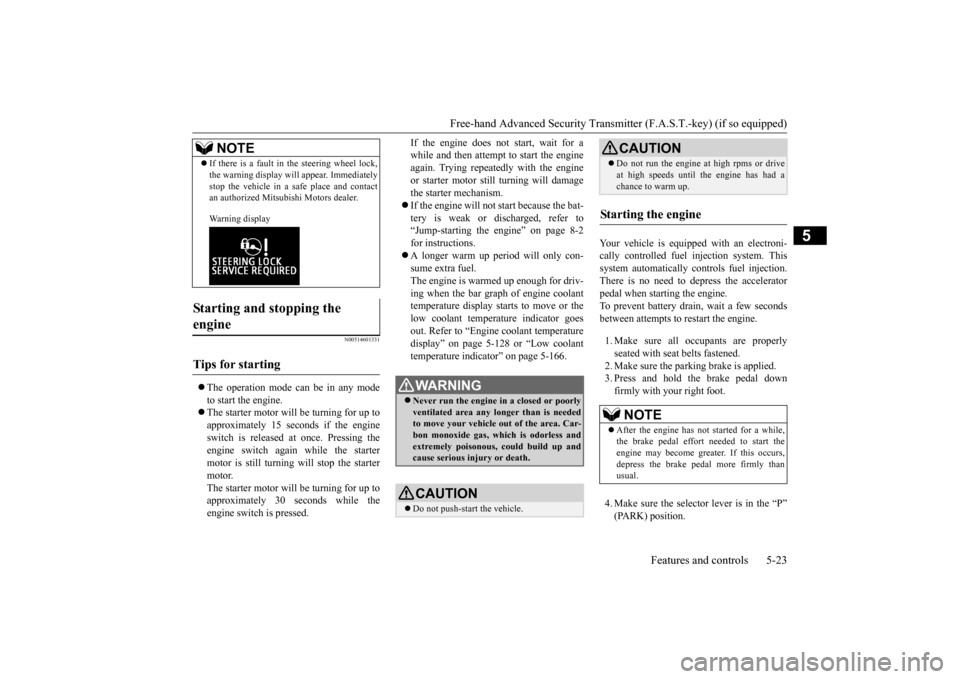
If there is a fault in the steering wheel lock, the warning display will
appear. Immediately
stop the vehicle in a sa
fe place and contact
an authorized Mitsubishi Motors dealer. Warning display
Starting and stopping the engine
Tips for starting
NOTE
WA R N I N G Never run the engine in
a closed or poorly
ventilated area any longer than is neededto move your vehicle
out of the area. Car-
bon monoxide gas, wh
ich is odorless and
extremely poisonous, could build up andcause serious injury or death.CAUTION Do not push-start the vehicle.
Do not run the engine at high rpms or drive at high speeds until the engine has had achance to warm up.
Starting the engine
NOTE
After the engine has not started for a while, the brake pedal effort needed to start the engine may become grea
ter. If this occurs,
depress the brake pedal more firmly thanusual.CAUTION
BK0211800US.book 23 ページ 2014年3月12日 水曜日 午後2時42分