change wheel MITSUBISHI OUTLANDER 2016 3.G User Guide
[x] Cancel search | Manufacturer: MITSUBISHI, Model Year: 2016, Model line: OUTLANDER, Model: MITSUBISHI OUTLANDER 2016 3.GPages: 464, PDF Size: 60.77 MB
Page 159 of 464
S-AWC (Super-All Wheel Co
ntrol) (if so equipped)
Features and controls 5-83
5
4-wheel drive operation requires special driv- ing skills. Carefully read the “4-wheel drive operation” section on page 5-85 and take care to drivesafety.
N00583000042
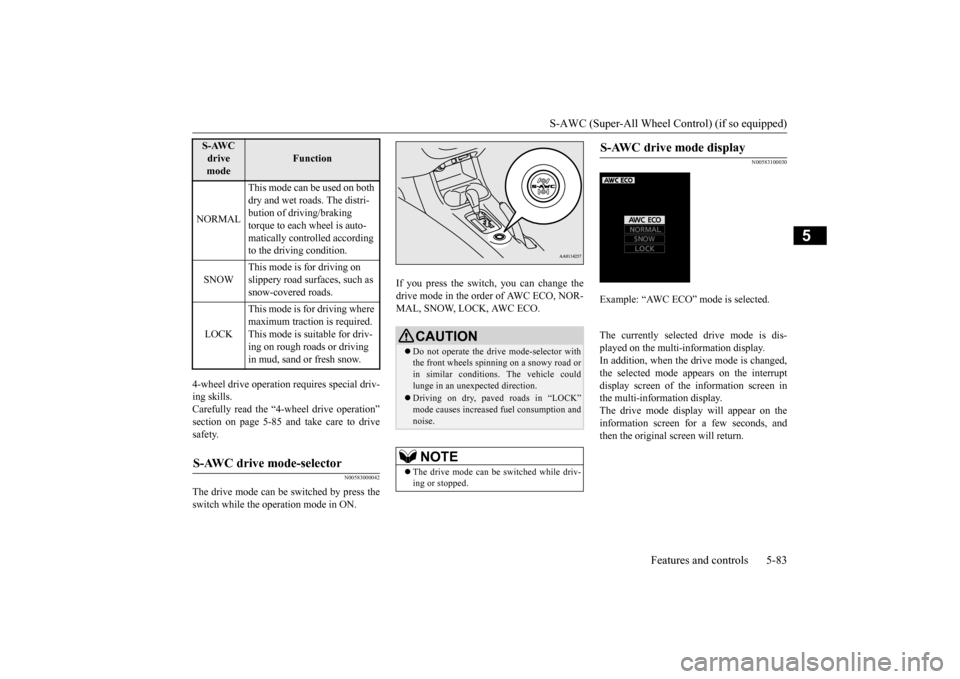
The drive mode can be switched by press theswitch while the operation mode in ON.
If you press the switch, you can change the drive mode in the order of AWC ECO, NOR-MAL, SNOW, LOCK, AWC ECO.
N00583100030
The currently selected
drive mode is dis-
played on the multi-
information display.
In addition, when the drive mode is changed,the selected mode appears on the interrupt display screen of the
information screen in
the multi-information display.The drive mode display will appear on the information screen for a few seconds, and then the original screen will return.
NORMAL
This mode can be used on both dry and wet roads. The distri- bution of driving/braking torque to each wheel is auto- matically controlled according to the driving condition.
SNOW
This mode is for driving on slippery road surfaces, such as snow-covered roads.
LOCK
This mode is for driving where maximum traction is required. This mode is suitable for driv- ing on rough roads or driving in mud, sand or fresh snow.
S-AWC drive mode-selector
S-AWC drive mode
Function
CAUTION Do not operate the drive mode-selector with the front wheels spinning on a snowy road or in similar conditions
. The vehicle could
lunge in an unexpected direction. Driving on dry, paved roads in “LOCK” mode causes increased fuel consumption andnoise.NOTE
The drive mode can be
switched while driv-
ing or stopped.
S-AWC drive mode display
Example: “AWC ECO” mode is selected.
BK0223400US.book 83 ページ 2015年2月13日 金曜日 午後12時15分
Page 160 of 464
S-AWC (Super-All Wheel Control) (if so equipped) 5-84 Features and controls
5
N00542501058
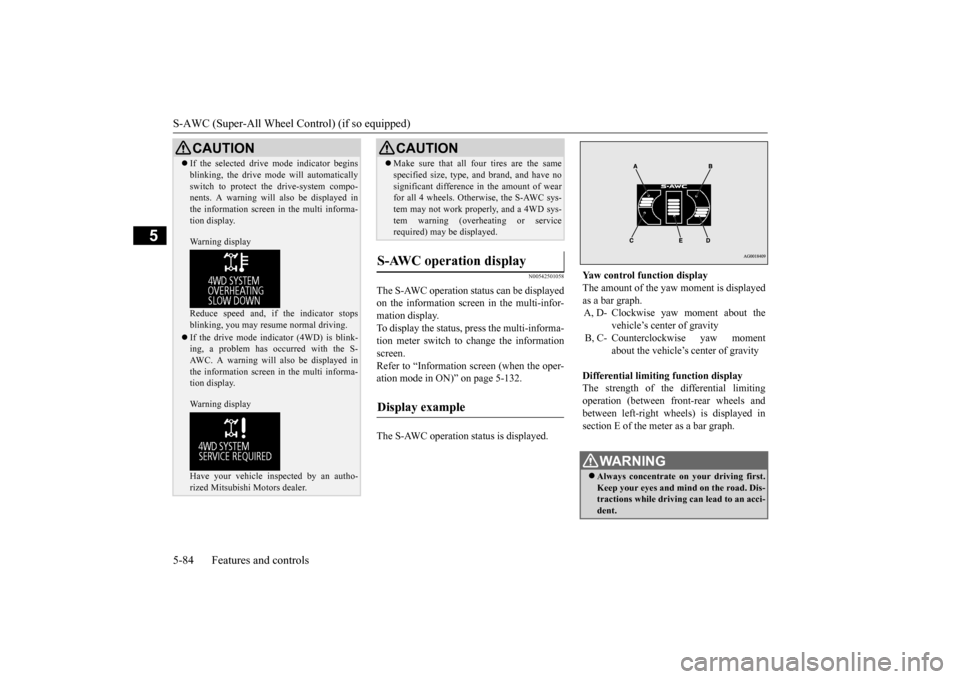
The S-AWC operation status can be displayed on the information screen in the multi-infor-mation display. To display the status, press the multi-informa- tion meter switch to change the informationscreen. Refer to “Information screen (when the oper- ation mode in ON)” on page 5-132. The S-AWC operation status is displayed.
CAUTION If the selected drive mode indicator begins blinking, the drive m
ode will automatically
switch to protect the drive-system compo-nents. A warning will
also be displayed in
the information screen in the multi informa- tion display. Warning display Reduce speed and, if the indicator stops blinking, you may resume normal driving. If the drive mode indi
cator (4WD) is blink-
ing, a problem has occurred with the S-AWC. A warning will
also be displayed in
the information screen in the multi informa- tion display. Warning display Have your vehicle in
spected by an autho-
rized Mitsubishi Motors dealer.
Make sure that all four tires are the same specified size, type, a
nd brand, and have no
significant difference in the amount of wearfor all 4 wheels. Otherwise, the S-AWC sys- tem may not work properly, and a 4WD sys- tem warning (overh
eating or service
required) may
be displayed.
S-AWC operation display
Display example
CAUTION
Yaw control function display The amount of the yaw moment is displayed as a bar graph. A, D- Clockwise yaw moment about the
vehicle’s center of gravity
B, C- Counterclockwise yaw moment
about the vehicle’s
center of gravity
Differential limiting
function display
The strength of the differential limitingoperation (between front-rear wheels and between left-right whee
ls) is displayed in
section E of the me
ter as a bar graph.
WA R N I N GAlways concentrate on
your driving first.
Keep your eyes and mi
nd on the road. Dis-
tractions while driving
can lead to an acci-
dent.
BK0223400US.book 84 ページ 2015年2月13日 金曜日 午後12時15分
Page 161 of 464
4-wheel drive operation
Features and controls 5-85
5
N00576700021
While the drive mode is in the “NORMAL” position, if the ECO mode switch is switchedON, the drive mode
will be changed to
“AWC ECO” mode. If the ECO mode switch is switched OFF, thedrive mode will be returned to “NORMAL” mode. Refer to the “ECO
mode switch” on page
5-184.
N00530601182
Your vehicle has been
designed primarily for
use on pavement. But its unique 4 -wheel
drive system allows
you to occasionally travel on unpaved roads, to campgrounds, picnic
sites, and similar
locations.Not only does this ensure better handling on dry, paved roads but al
so permits better trac-
tion when driving on slippery, wet or snow- covered roads and when moving out of mud.But it is not suitable for heavy off road use or towing in rough conditions. It is particularly im
portant to note that 4-
wheel drive may not gi
ve sufficient hill
climbing ability and e
ngine braking on steep
slopes. You should try to avoid driving onsteep slopes. Also, you must exercise caution when driving on sand and mud and when driving through water because sufficie
nt traction may not be
available in certain circumstances.Please avoid driving the vehicle through areas where the tires may get stuck in deep sand or mud.
When the ECO mode switch is ON
NOTE
If the drive mode is switched in any mode after the drive mode is switched in “AWCECO”, the drive mode will not be changed even if the ECO mode switch is switched OFF.
4-wheel drive operation
WA R N I N G Do not over-rely on th
e 4-wheel drive vehi-
cles. Even 4-wheel drive vehicles have lim- its to the system and ability to maintaincontrol and traction. Reckless driving may lead to accidents. Al
ways drive carefully,
taking account of the road conditions. Improperly operating
this vehicle on or
off-pavement can cause an accident orrollover in which you
and your passengers
could be seriously injured or killed.• Follow all instructions and guidelines inthe owner’s manual.• Keep your speed low and do not drivefaster than conditions.
NOTE
Driving on rough roads can be hard on a vehicle. Before you le
ave the pavement, be
sure all scheduled ma
intenance and service
has been done, and that you have inspected your vehicle. Pay spec
ial attention to the
condition of the ti
res, and check the tire pres-
sures. Mitsubishi Motors is not responsible to the operator for any damage or injury caused or liability incurred by improper and negligent operation of a vehicl
e. All techniques of
vehicle operation depend on the skill and experience of the opera
tor and other partici-
pating parties. Any de
viation from the rec-
ommended operating instru
ctions above is at
their own risk. Note that the stopping distance required of the 4-wheel drive vehicle differs very little from that of the front-wheel drive vehicle.When driving on a snow-covered road or a slippery, muddy surface, make sure that you keep a sufficient dist
ance between your vehi-
cle and the one ahead of you. The driving posture s
hould be more upright;
adjust the seat to a good position for easy steering and pedal operati
on. Be sure to wear
the seat belt. After driving on rough roads, check each part of the vehicle
and wash it thoroughly
with water. Refer to the “Inspection and maintenance followi
ng rough road opera-
tion” section and “Vehicle care and Mainte-nance” sections.
BK0223400US.book 85 ページ 2015年2月13日 金曜日 午後12時15分
Page 162 of 464
4-wheel drive operation 5-86 Features and controls
5
When turning a sharp corner in “4WD LOCK” (Electronically
controlled 4WD) or
“LOCK” (S-AWC) position at low speed, a slight difference in
steering may be experi-
enced similar to feeling as if the brakes wereapplied. This is calle
d tight corner braking
and results from each of the four tires being at a different distance from the corner. The phe-nomenon is typical of 4-
wheel drive vehicles.
If this occurs, either straighten out the steer- ing wheel or change to another mode. Set the drive mode-selector to “4WD AUTO”, “4WD LOCK” (Electronically con-trolled 4WD) or “SNOW” (S-AWC) in accor- dance with the road conditions, and then gradually depress the accelerator pedal for asmooth start.
Set the drive mode-selector to “4WD LOCK” (Electronically contro
lled 4WD) or “LOCK”
(S-AWC) and then gradually depress the accelerator pedal for a
smooth start. Keep the
pressure on the accelera
tor pedal as constant
as possible, and drive at low speed.
CAUTION Setting the drive mode-selector to “4WD LOCK” (Electronically
controlled 4WD) or
“LOCK” (S-AWC) position to drive on drypaved road will increa
se fuel consumption,
with possible noise generation.
Turning sharp corners On snowy or icy roads
NOTE
The use of snow tires is recommended. Maintain a safe distan
ce between vehicles,
avoid sudden braking, and use engine brak- ing (downshifting).CAUTION Avoid sudden braking,
sudden acceleration
and sharp turning. Skidding occurs and con-trol of the vehicl
e could be lost.
Driving on sandy or muddy roads
CAUTION Do not force the vehicle or drive recklessly on sandy surfaces. In comparison with nor- mal road surfaces, th
e engine and other
drive-system components are put underexcessive strain when driving on such a sur- face. This could lead to accidents.
If any of the following conditions occur while the vehicle is
being driven, immedi-
ately park your vehicle
in a safe place and
follow these procedures:• If the engine coolan
t temperature display
flashes on the information screen in the multi-information di
splay or the engine
power drops suddenly. Refer to “Engine overheating” on page 8-4.• If the “ ” warning display and “SLOW DOWN” or the “ ” warning display and “SERVICE REQUIRED” appear on the information screen in the multi-informationdisplay. Refer to “Warning disp
lay” on page 5-66,
5-74.WA R N I N G When attempting to rock your vehicle out of a stuck position, be sure that the areaaround the vehicle is
clear of people and
physical objects. The rocking motion may cause the vehicle to suddenly launch for- ward/backward, caus
ing injury or dam-
age to nearby people or objects.CAUTION
BK0223400US.book 86 ページ 2015年2月13日 金曜日 午後12時15分
Page 163 of 464
Inspection and maintenance following rough road operation
Features and controls 5-87
5
Your vehicle may not provide sufficient hill climbing ability and engine braking on steep slope. Avoid driving on steep slopes even though the vehicle is an 4-wheel drive vehi-cle.
N00537800085
If the electrical circuits become wet, furtheroperation of the vehi
cle will be impossible;
therefore, avoid drivi
ng through water unless
absolutely necessary. If driving through wateris unavoidable, use the following procedure:
Check the depth of the water and the terrain before attempting to drive through it. Driveslowly to avoid creating excessive water splashing.
N00530700085
After operating the vehicle in rough road con- ditions, be sure to perform the followinginspection and maintenance procedures:
Check that the vehicle has not been dam- aged by rocks, gravel, etc. Carefully wash the
vehicle with water.
Drive the vehicle sl
owly while lightly
depressing the brake pedal in order to dryout the brakes. If the brakes still do not function properly, contact an authorized Mitsubishi Motors dealer or a repair facil-ity of your choice as soon as possible to have the brakes checked. Remove the insects, dr
ied grass, etc. clog-
ging the radiator core. After driving through water, check the engine, transaxle and
differential oil. If
the oil or grease is milky or cloudy because of water cont
amination, it must
be replaced with new oil. Check the inside of the vehicle. If water entry is found, dry the carpet etc. Inspect the headlights. If water is in the headlight housing, have it drained at an authorized Mitsubishi Motors dealer or arepair facility of your choice.
NOTE
Avoid sudden braking,
sudden acceleration
and sharp turning; such operations couldresult in the vehicle becoming stuck. If the vehicle become
s stuck in sandy or
muddy roads, it can often be moved with arocking motion. Move the selector lever alternately between the “D” (DRIVE) and “R” (REVERSE) positi
ons while pressing
lightly on the ac
celerator pedal.
Driving on rough road can cause rust on the vehicle; wash the vehi
cle thoroughly as soon
as possible after such use.
Climbing/descending sharp grades Driving through water
CAUTION Never drive through water that is deep enough to cover wheel hubs, axles or exhaust pipe. Do not change th
e selector lever posi-
tion while driving through water. Frequent driving through water can adversely affect the life
span of the vehicle;
consult an authorized Mitsubishi Motors dealer or a repair facili
ty of your choice and
take the necessary measures to prepare,inspect, and repair the vehicle. After driving through water, apply the brakes to be sure they are
functioning properly. If
the brakes are wet a
nd not functioning prop-
erly, dry them out by driving slowly whilelightly depressing the brake pedal. Inspect each part of the vehicle carefully.
Inspection and maintenance following rough road opera-tion
BK0223400US.book 87 ページ 2015年2月13日 金曜日 午後12時15分
Page 199 of 464
Tire pressure monitoring system
Features and controls 5-123
5
A window tint that affects the radio wave signals is installed.
N00532900081
If new wheels with new tire inflation pressure sensors are installed,
their ID codes must be
programmed into the tire pressure monitoringsystem. Have tire and
wheel replacement per-
formed by an authorized Mitsubishi Motors dealer to avoid the ri
sk of damaging the tire
inflation pressure sensors. If the wheel replacement is not done by an authorized Mitsubishi Motors dealer
, it is not covered by
your warranty.
N00584300026
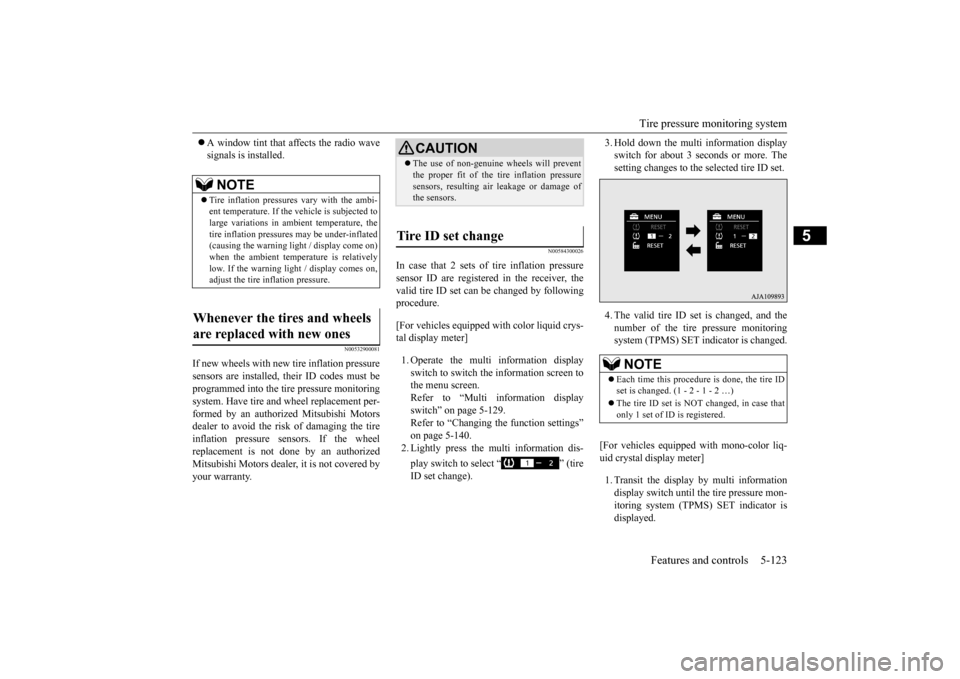
In case that 2 sets of tire inflation pressuresensor ID are registered in the receiver, the valid tire ID set can be changed by following procedure. [For vehicles equipped with color liquid crys- tal display meter] 1. Operate the multi information display switch to switch the information screen to the menu screen.Refer to “Multi information display switch” on page 5-129. Refer to “Changing the function settings”on page 5-140. 2. Lightly press the multi information dis- play switch to select “ ” (tire ID set change).
3. Hold down the multi information display switch for about 3 seconds or more. Thesetting changes to the selected tire ID set. 4. The valid tire ID se
t is changed, and the
number of the tire pressure monitoring system (TPMS) SET indicator is changed.
[For vehicles equipped
with mono-color liq-
uid crystal display meter] 1. Transit the display by multi information display switch until th
e tire pressure mon-
itoring system (TPMS) SET indicator isdisplayed.
NOTE
Tire inflation pressures vary with the ambi- ent temperature. If the
vehicle is subjected to
large variations in ambient temperature, the tire inflation pressures may be under-inflated(causing the warning light / display come on) when the ambient temperature is relatively low. If the warning light / display comes on,adjust the tire inflation pressure.
Whenever the tires and wheels are replaced with new ones
CAUTION The use of non-genuine wheels will prevent the proper fit of the tire inflation pressuresensors, resulting air
leakage or damage of
the sensors.
Tire ID set change
NOTE
Each time this procedure is done, the tire ID set is changed. (1 - 2 - 1 - 2 …) The tire ID set is NOT changed, in case that only 1 set of ID is registered.
BK0223400US.book 123 ページ 2015年2月13日 金曜日 午後12時15分
Page 215 of 464
Multi Information display - Type 1
Features and controls 5-139
5
N00578600024
While driving, the momentary fuel consump- tion is shown with a bar graph. The “ ” mark in the momentary fuel gauge shows the average fuel consumption. When the momentary fuel consumption sur- passes the average fuel consumption, themomentary fuel consum
ption is displayed
with a green bar graph. Be conscious of maintaining the momentaryfuel consumption above the average fuel con- sumption, it can help you drive with the better fuel consumption.
N00568701032
This indicator will be displayed when fuel-efficient driving is achieved.
N00578700038
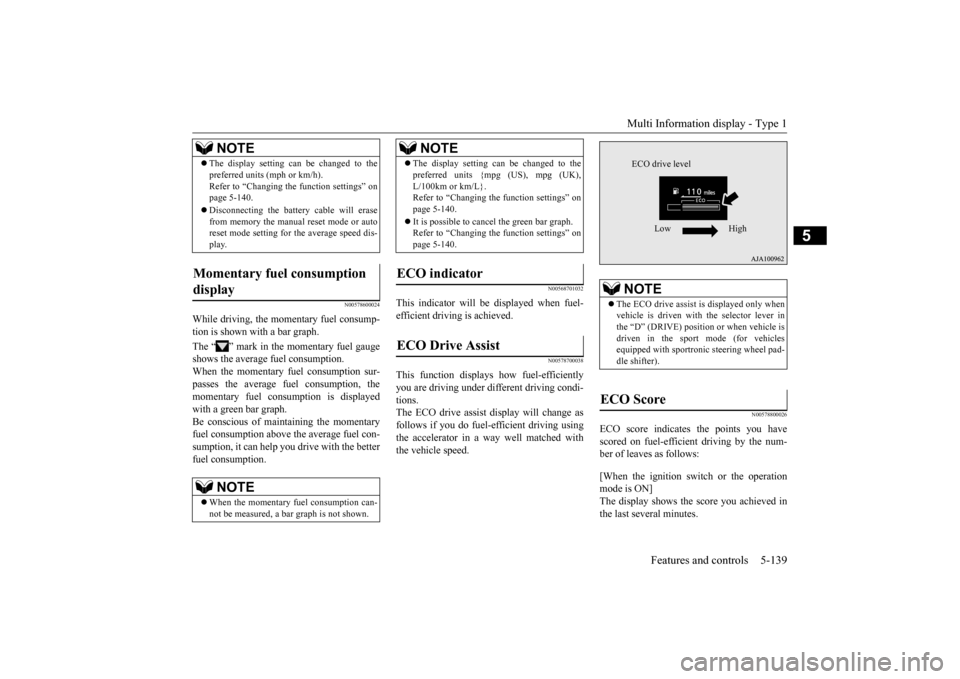
This function displays
how fuel-efficiently
you are driving under different driving condi- tions. The ECO drive assist di
splay will change as
follows if you do fuel-efficient driving using the accelerator in a way well matched with the vehicle speed.
N00578800026
ECO score indicates the points you have scored on fuel-efficient driving by the num- ber of leaves as follows: [When the ignition switch or the operation mode is ON] The display shows the score you achieved in the last several minutes.
The display setting ca
n be changed to the
preferred units (mph or km/h).Refer to “Changing the
function settings” on
page 5-140. Disconnecting the batter
y cable wi
ll erase
from memory the manual reset mode or auto reset mode setting for
the average speed dis-
play.
Momentary fuel consumption display
NOTE
When the momentary fuel consumption can- not be measured, a ba
r graph is not shown.
NOTE
The display setting ca
n be changed to the
preferred units {mpg
(US), mpg (UK),
L/100km or km/L}.Refer to “Changing th
e function settings” on
page 5-140. It is possible to canc
el the green bar graph.
Refer to “Changing th
e function settings” on
page 5-140.
ECO indicator ECO Drive Assist
NOTE
NOTE
The ECO drive assist is displayed only when vehicle is driven with the selector lever inthe “D” (DRIVE) positi
on or when vehicle is
driven in the sport mode (for vehicles equipped with sportroni
c steering wheel pad-
dle shifter).
ECO Score
ECO drive level
Low High
BK0223400US.book 139 ページ 2015年2月13日 金曜日 午後12時15分
Page 248 of 464
Indicators 5-172 Features and controls
5
N00519900127 N00520000216
The arrows will flash in time with the corre- sponding exterior turn signals when the turnsignal lever is used. Both arrows will flash
when the hazard warn-
ing flasher swit
ch is pressed.
N00520100086
A blue light comes on when the headlights are on high beam.
N00520200175
This indicator comes on while the front foglights are on.
N00551300026
This indicator light illuminates while the position lights are on.
N00575601020
This indicator comes on in blue while thecoolant temperature is low.
N00579200030
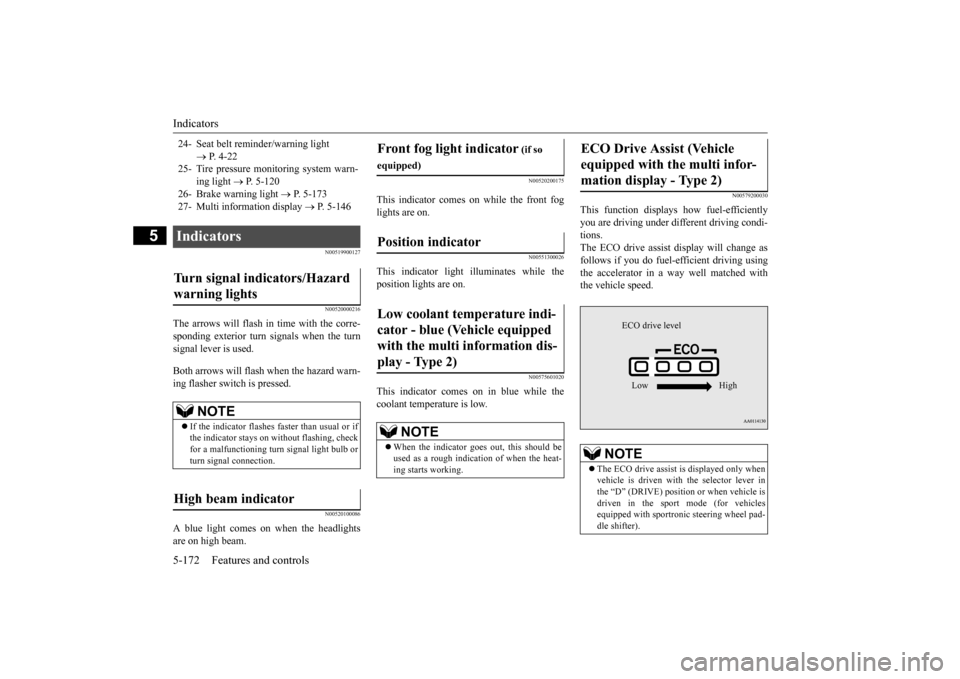
This function displays
how fuel-efficiently
you are driving under different driving condi- tions. The ECO drive assist di
splay will change as
follows if you do fuel-efficient driving using the accelerator in a way well matched with the vehicle speed.
24- Seat belt remi
nder/warning light
P. 4-22
25- Tire pressure moni
toring system warn-
ing light
P. 5-120
26- Brake warning light
P. 5-173
27- Multi information display
P. 5-146
Indicators Turn signal indicators/Hazard warning lights
NOTE
If the indicator flashes faster than usual or if the indicator stays on wi
thout flashing, check
for a malfunctioning turn signal light bulb or turn signal connection.
High beam indicator
Front fog light indicator
(if so
equipped)Position indicator Low coolant temperature indi- cator - blue (Vehicle equipped with the multi information dis- play - Type 2)
NOTE
When the indicator goes out, this should be used as a rough indication of when the heat-ing starts working.
ECO Drive Assist (Vehicle equipped with the multi infor-mation display - Type 2)
NOTE
The ECO drive assist is displayed only when vehicle is driven with
the selector lever in
the “D” (DRIVE) positi
on or when vehicle is
driven in the sport mode (for vehicles equipped with sportroni
c steering wheel pad-
dle shifter).
ECO drive level Low High
BK0223400US.book 172 ページ 2015年2月13日 金曜日 午後12時15分
Page 259 of 464
Turn signal lever
Features and controls 5-183
5
N00522601529
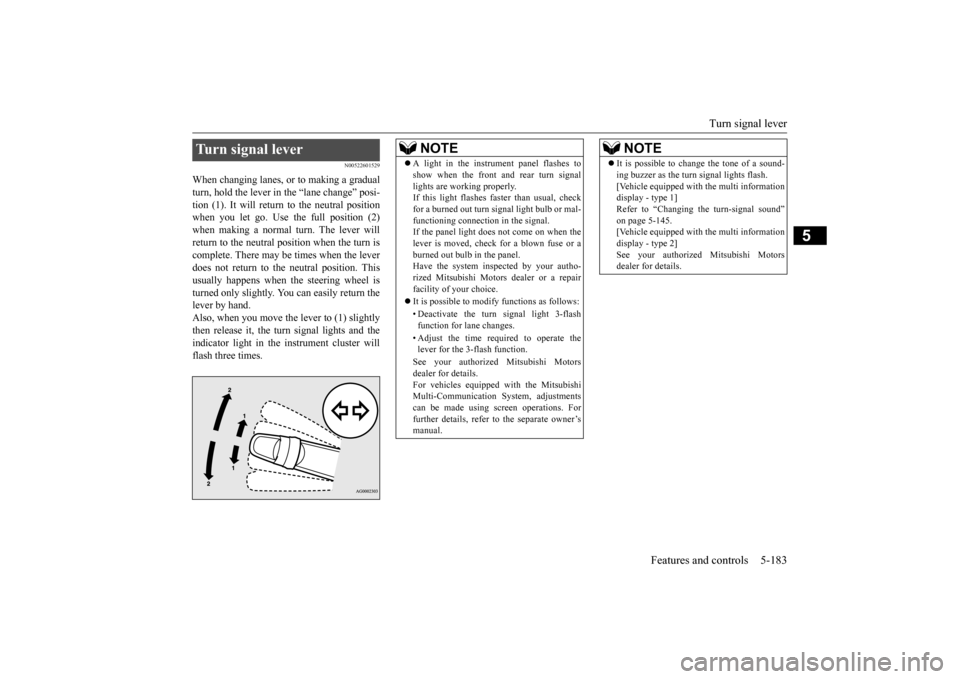
When changing lanes, or to making a gradual turn, hold the lever in the “lane change” posi- tion (1). It will return to the neutral positionwhen you let go. Use the full position (2) when making a normal turn. The lever will return to the neutral position when the turn iscomplete. There may be times when the lever does not return to th
e neutral position. This
usually happens when
the steering wheel is
turned only slightly. You
can easily return the
lever by hand.Also, when you move the lever to (1) slightly then release it, the turn signal lights and the indicator light in the instrument cluster willflash three times.Turn signal lever
NOTE
A light in the instrument panel flashes to show when the front and rear turn signallights are working properly.If this light flashes fast
er than usual, check
for a burned out turn signal light bulb or mal- functioning connecti
on in the signal.
If the panel light does not come on when the lever is moved, check
for a blown fuse or a
burned out bulb in the panel.Have the system inspected by your autho- rized Mitsubishi Motors
dealer or a repair
facility of your choice. It is possible to modify functions as follows: • Deactivate the turn signal light 3-flash function for lane changes. • Adjust the time required to operate the lever for the 3-flash function. See your authorized Mitsubishi Motors dealer for details. For vehicles equipped
with the Mitsubishi
Multi-Communication System, adjustments can be made using sc
reen operations. For
further details, refer to the separate owner’smanual.
It is possible to change the tone of a sound- ing buzzer as the turn signal lights flash.[Vehicle equipped with the multi informationdisplay - type 1] Refer to “Changing the turn-signal sound” on page 5-145.[Vehicle equipped with the multi information display - type 2] See your authorized Mitsubishi Motorsdealer for details.NOTE
BK0223400US.book 183 ページ 2015年2月13日 金曜日 午後12時15分
Page 267 of 464
Horn switch
Features and controls 5-191
5
After about 15 to 20 minutes of operation, the system will shut off automatically.To switch the defogger OFF before 15 to 20 minutes have passed, pr
ess the switch again.
The indicator light will go out and the defog-ger will turn off. If you need the defogger for more than 15 to 20 minutes, press the switch again. This willadd 15 to 20 more minutes.
N00523801195
To honk the horn, press around the “ ” markon the steering wheel.
CAUTION The rear window defogge
r is not designed to
melt snow. Remove
any snow manually
before using the rear window defogger. Use the rear window de
fogger only after the
engine has started and
is running. Be sure to
turn the defogger swit
ch off immediately
after the window is cl
ear to save on battery
power.
Do not place stickers
, tape, or other items
that are attached with
adhesive over the grid
wires on the rear window. When cleaning the insi
de rear window, use a
soft cloth and wipe lightly over the gridwires.NOTE
If your vehicle is equi
pped with door mirror
heater, mist can also be removed from the outside rearview mirrors
when the rear win-
dow defogger switch is pressed. (Refer to“Door mirror heater” on page 5-59.) On vehicles equipped wi
th the wiper deicer,
when the rear window defogger switch is pushed, the windshield becomes warm and the wipers become operable. (Refer to“Wiper deicer switch” on page 5-190.)CAUTION
It is possible to change the setting to make the rear window defogger operate automati-cally when ambient temperature becomeslow while the engine is running, even if you do not push the rear window defogger switch.It operates automati
cally only once after
turning the ignition sw
itch to the “ON” posi-
tion or putting the ope
ration mode in ON.
If you choose this setting, the door mirror heater (if so equipped)
and wiper deicer (if
so equipped) will also
operate automatically
at the same time. For further informati
on, please contact your
authorized Mitsubish
i Motors dealer.
On vehicles equipped
with Mitsubishi Multi-
Communication System
, screen operations
can be used to make the adjustment.Refer to the separate owner’s manual for details.
Horn switch
NOTE
BK0223400US.book 191 ページ 2015年2月13日 金曜日 午後12時15分