display MITSUBISHI OUTLANDER 2017 3.G Owners Manual
[x] Cancel search | Manufacturer: MITSUBISHI, Model Year: 2017, Model line: OUTLANDER, Model: MITSUBISHI OUTLANDER 2017 3.GPages: 521, PDF Size: 14.91 MB
Page 289 of 521
Indicator light, warning light, and information screen display list (multi information display - Type 1)
5
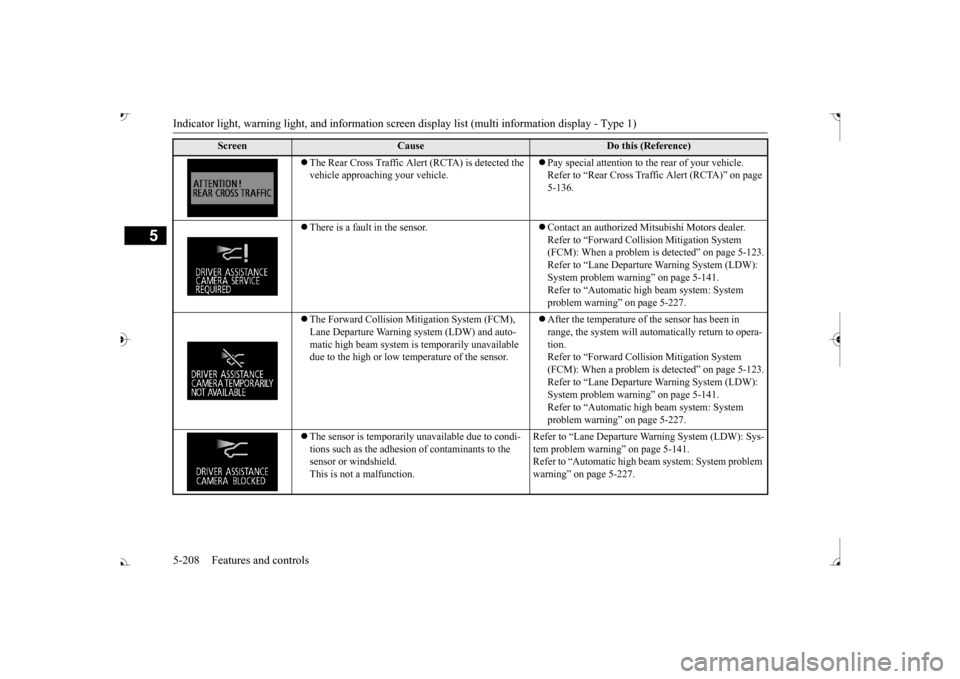
The Rear Cross Traffic Alert (RCTA) is detected the vehicle approaching your vehicle.
Pay special attention to the rear of your vehicle. Refer to “Rear Cross Traffic Alert (RCTA)” on page 5-136.
There is a fault in the sensor.
Contact an authorized Mitsubishi Motors dealer. Refer to “Forward Coll
ision Mitigation System
(FCM): When a problem is detected” on page 5-123.Refer to “Lane Departure Warning System (LDW): System problem warning” on page 5-141. Refer to “Automatic high
beam system: System
problem warning” on page 5-227.
The Forward Collision Mi
tigation System (FCM),
Lane Departure Warning system (LDW) and auto- matic high beam system is
temporarily unavailable
due to the high or low temperature of the sensor.
After the temperature of the sensor has been in range, the system will automatically return to opera- tion. Refer to “Forward Coll
ision Mitigation System
(FCM): When a problem is detected” on page 5-123. Refer to “Lane Departure Warning System (LDW): System problem warning” on page 5-141.Refer to “Automatic high
beam system: System
problem warning” on page 5-227.
The sensor is temporarily
unavailable due to condi-
tions such as the adhesion of contaminants to the sensor or windshield.This is not a malfunction.
Refer to “Lane Departure Wa
rning System (LDW): Sys-
tem problem warning”
on page 5-141.
Refer to “Automatic high be
am system: System problem
warning” on page 5-227.
Screen
Cause
Do this (Reference)
BK0239700US.book 208 ページ 2016年6月16日 木曜日 午前10時58分
Page 290 of 521
Indicator light, warning light, and information screen display list (multi information display - Type 1)
Features and controls 5-209
5
N00579100026
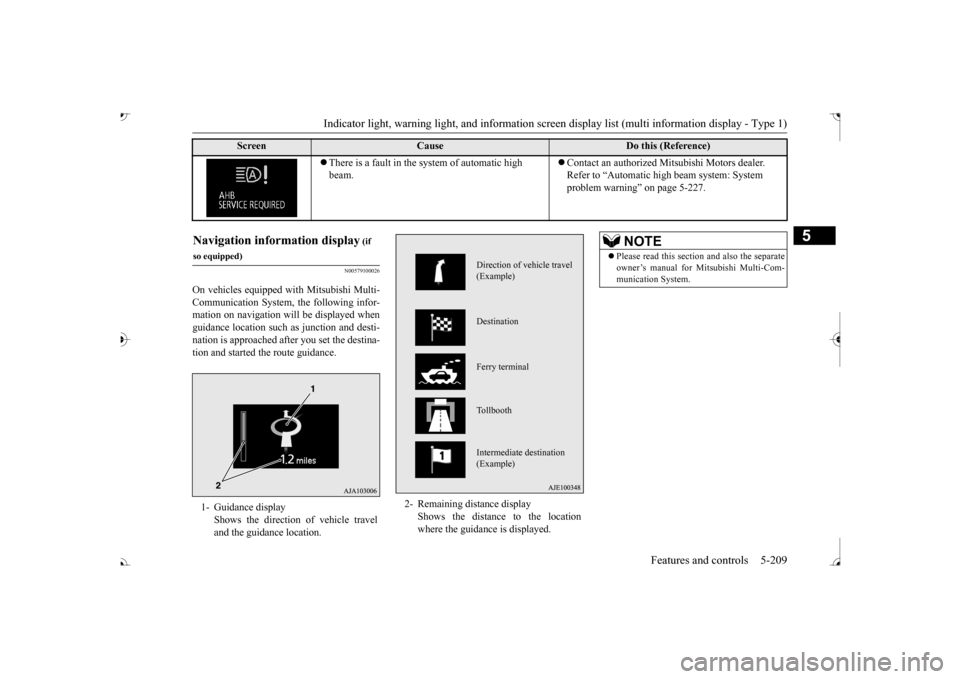
On vehicles equipped with Mitsubishi Multi- Communication System, the following infor- mation on navigation will be displayed whenguidance location such
as junction and desti-
nation is approached after you set the destina- tion and started the route guidance.
There is a fault in the system of automatic high beam.
Contact an authorized Mitsubishi Motors dealer. Refer to “Automatic hi
gh beam system: System
problem warning” on page 5-227.
Screen
Cause
Do this (Reference)
(if
so equipped)1- Guidance display
Shows the direction of vehicle travel and the guidance location.
2- Remaining di
stance display
Shows the distance to the location where the guidance is displayed.
Direction of vehicle travel (Example) Destination Ferry terminal Tollbooth Intermediate destination (Example)
NOTE
Please read this section and also the separate owner’s manual for Mi
tsubishi Multi-Com-
munication System.
BK0239700US.book 209 ページ 2016年6月16日 木曜日 午前10時58分
Page 291 of 521
Indicator light, warning light, and information screen display list (multi information display - Type 1)
5
N00558201324
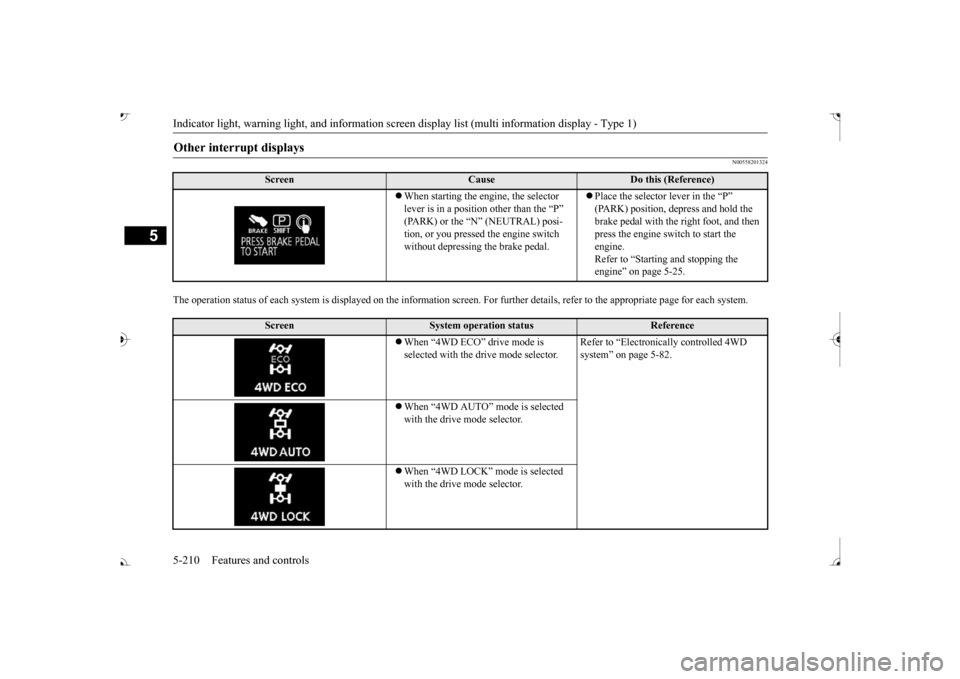
The operation status of each system is displayed on the inform
ation screen. For further details,
refer to the appropriate page
for each system.
Other interrupt displays
Screen
Cause
Do this (Reference)
When starting the engine, the selector lever is in a position other than the “P” tion, or you pressed
the engine switch
without depressing the brake pedal.
Place the selector lever in the “P” brake pedal with the right foot, and then press the engine sw
itch to start the
engine. Refer to “Starting and stopping the engine” on page 5-25.
Screen
System operation status
Reference
When “4WD ECO” drive mode is selected with the drive mode selector.
Refer to “Electronica
lly controlled 4WD
system” on page 5-82.
When “4WD AUTO” mode is selected with the drive mode selector. When “4WD LOCK” mode is selected with the drive mode selector.
BK0239700US.book 210 ページ 2016年6月16日 木曜日 午前10時58分
Page 292 of 521
Indicator light, warning light, and information screen display list (multi information display - Type 1)
Features and controls 5-211
5
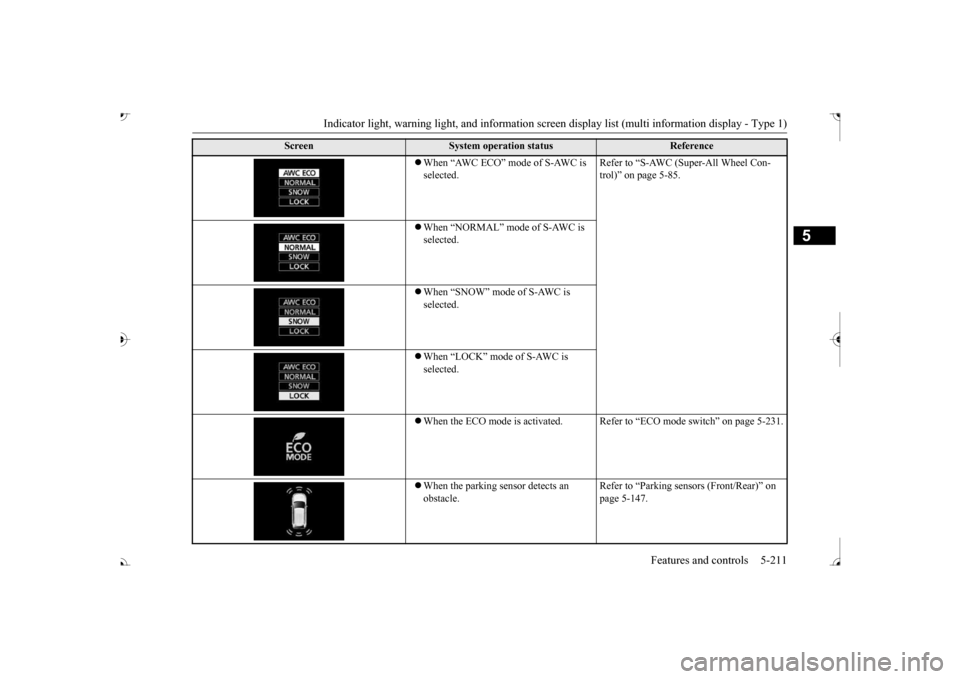
When “AWC ECO” mode of S-AWC is selected.
Refer to “S-AWC (Super-All Wheel Con- trol)” on page 5-85.
When “NORMAL” mode of S-AWC is selected. When “SNOW” mode of S-AWC is selected. When “LOCK” mode of S-AWC is selected. When the ECO mode is activated. Refer
to “ECO mode switch” on page 5-231.
When the parking se
nsor detects an
obstacle.
Refer to “Parking sens
ors (Front/Rear)” on
page 5-147.
Screen
System operation status
Reference
BK0239700US.book 211 ページ 2016年6月16日 木曜日 午前10時58分
Page 293 of 521
Indicator light, warning light, and information screen display list (multi information display - Type 1)
5
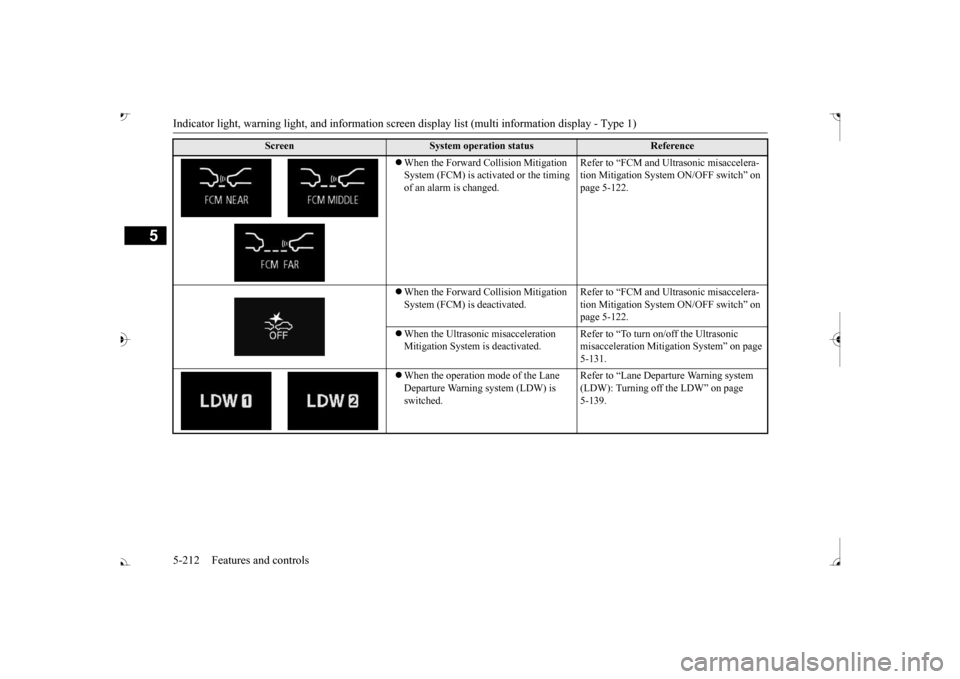
When the Forward Collision Mitigation System (FCM) is activated or the timing of an alarm is changed.
Refer to “FCM and Ultrasonic misaccelera- tion Mitigation System ON/OFF switch” on page 5-122.
When the Forward Collision Mitigation System (FCM) is
deactivated.
Refer to “FCM and Ultrasonic misaccelera- tion Mitigation System ON/OFF switch” on page 5-122.
When the Ultrasonic misacceleration Mitigation System
is deactivated.
Refer to “To turn on/off the Ultrasonic misacceleration Mitiga
tion System” on page
5-131.
When the operation mode of the Lane Departure Warning system (LDW) is switched.
Refer to “Lane Depart
ure Warning system
(LDW): Turning off
the LDW” on page
5-139.
Screen
System operation status
Reference
BK0239700US.book 212 ページ 2016年6月16日 木曜日 午前10時58分
Page 294 of 521
Indicator light, warning light, and information screen display list (multi information display - Type 1)
Features and controls 5-213
5
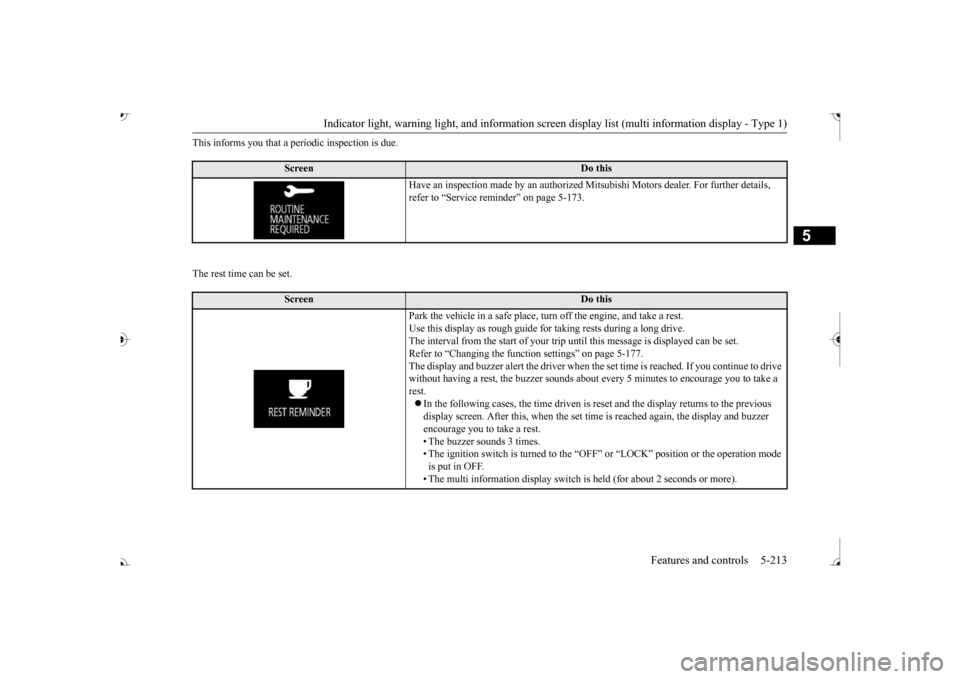
This informs you that a periodic inspection is due. The rest time can be set.
Screen
Do this
Have an inspection made by an authorized Mi
tsubishi Motors dealer
. For further details,
refer to “Service remin
der” on page 5-173.
Screen
Do this
Park the vehicle in a safe place, turn off the engine, and take a rest. Use this display as rough guide fo
r taking rests during a long drive.
The interval from the start of your trip un
til this message is
displayed can be set.
Refer to “Changing the func
tion settings” on page 5-177.
The display and buzzer alert the driver when the
set time is reached. If
you continue to drive
without having a rest
, the buzzer sounds about every 5 mi
nutes to encourage you to take a
rest. In the following cases, the time driven is re
set and the display returns to the previous
display screen. After this, when the set time
is reached again, the display and buzzer
encourage you to take a rest. • The buzzer
sounds 3 times.
• The ignition switch is turn
ed to the “OFF” or “LOCK”
position or the
operation mode
is put in OFF. • The multi information disp
lay switch is held (for
about 2 seconds or more).
BK0239700US.book 213 ページ 2016年6月16日 木曜日 午前10時58分
Page 295 of 521
Indicator and warning light package (multi information display - Type 2) 5-214 Features and controls
5
N00519801918
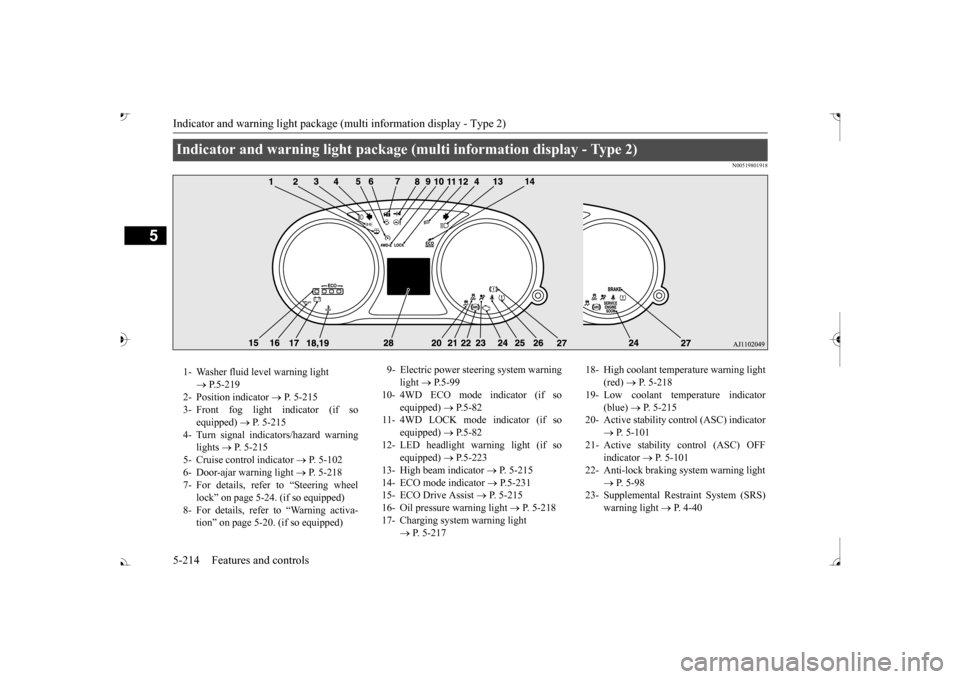
Indicator and warning light package (multi information display - Type 2) 1- Washer fluid level warning light
P.5-219
2- Position indicator
P. 5-215
3- Front fog light indicator (if so
equipped)
P. 5-215
4- Turn signal indicators/hazard warning
lights
P. 5-215
5- Cruise control indicator
P. 5-102
6- Door-ajar warning light
P. 5-218
7- For details, refer to “Steering wheel
lock” on page 5-24. (if so equipped)
8- For details, refer
to “Warning activa-
tion
Page 296 of 521
Indicators
Features and controls 5-215
5
N00519900127 N00520000216
The arrows will flash in time with the corre- sponding exterior turn signals when the turnsignal lever is used. Both arrows will flash when the hazard warn- ing flasher switch is pressed.
N00520100086
A blue light comes on when the headlightsare on high beam.
N00520200175
This indicator comes on while the front foglights are on.
N00551301078
This indicator light illuminates while theparking lights are on.
N00575601020
This indicator comes on in blue while thecoolant temperature is low.
N00579200030
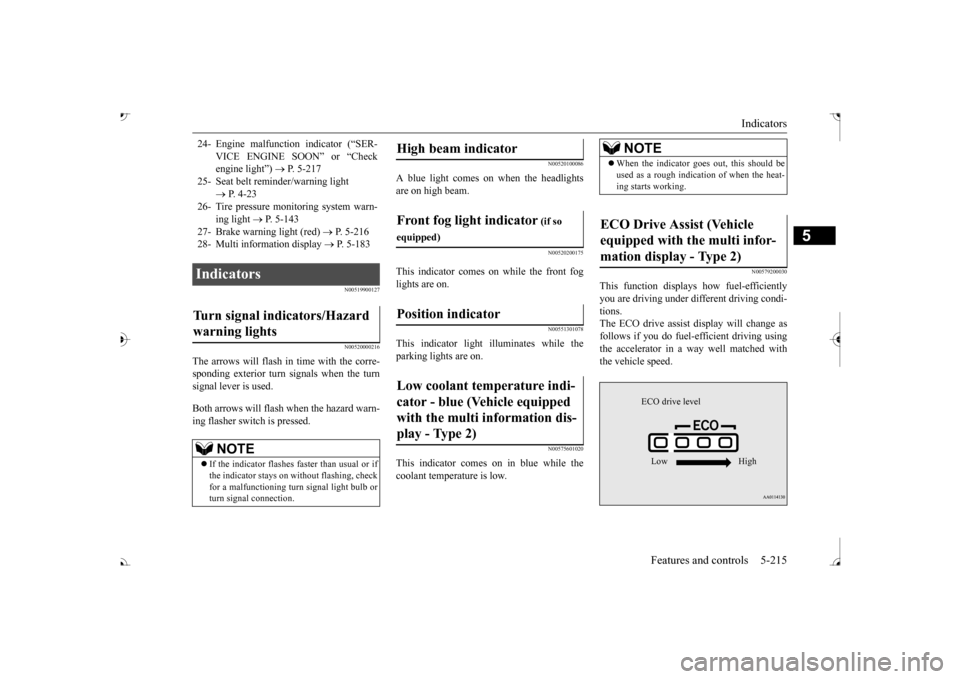
This function displays
how fuel-efficiently
you are driving under different driving condi- tions. The ECO drive assist display will change asfollows if you do fuel-efficient driving using the accelerator in a way well matched with the vehicle speed.
24- Engine malfuncti
on indicator (“SER-
VICE ENGINE SOON” or “Check engine light”)
P. 5-217
25- Seat belt
reminder/warning light
P. 4-23
26- Tire pressure moni
toring system warn-
ing light
P. 5-143
27- Brake warning light (red)
P. 5-216
28- Multi information display
P. 5-183
Indicators Turn signal indicators/Hazard warning lights
NOTE
If the indicator flashes faster than usual or if the indicator stays on wi
thout flashing, check
for a malfunctioning turn signal light bulb or turn signal connection.
High beam indicator Front fog light indicator
(if so
equipped)Position indicator Low coolant temperature indi- cator - blue (Vehicle equipped with the multi information dis- play - Type 2)
NOTE
When the indicator goes out, this should be used as a rough indication of when the heat-ing starts working.
ECO Drive Assist (Vehicle equipped with the multi infor-mation display - Type 2)
ECO drive level Low High
BK0239700US.book 215 ページ 2016年6月16日 木曜日 午前10時58分
Page 297 of 521
Warning lights 5-216 Features and controls
5
N00520300147 N00520401552
This light comes on when the ignition switch is turned to the “ON” position (engine off) orthe operation mode is put in ON. When the engine is started, the light should go off a few seconds later. A warning is alsodisplayed in the multi information display. The warning light also illuminates after start- ing the engine under the following condi-tions. When the parking brake is still applied. When the brake fluid level is low. When the brake system circuit is not working properly.
When the vehicle is moving at more than 5 mph (8 km/h) and parking brake applied, abuzzer will sound to inform the driver that the parking brake is not properly release. Before driving, be sure
that the parking brake
is fully released and
brake warning light is
off.
N00591200030
This warning light will illuminate when there is a fault in the Electric parking brake system. Normally, this warning light illuminateswhen the operation mode is put in ON, and goes off in a few seconds.
NOTE
The ECO drive assist is displayed only when vehicle is driven with
the selector lever in
the “D” (DRIVE) positi
on or when vehicle is
driven in the sport mode (for vehicles equipped with sportroni
c steering wheel pad-
dle shifter).
Warning lights Brake warning light (red) and buzzer
CAUTION If the brake warning light and the Anti-lock braking system warning
light are illuminated
at the same time, the braking force distribu- tion function will not ope
rate, so the vehicle
may be destabilized
during sudden braking
under the following conditions.• When the brake warn
ing light does not go
out even when the parking brake is released.• When the brake warning light stays onwhile driving.• If the above occurs,
avoid sudden braking
and high-speed driving. Park the vehicle in a safe place, and contact an authorized Mit-subishi Motors dealer or a repair facility of your choice as soon as possible.
The vehicle should be bro
ught to a halt in the
following manner when
brake performance
is deteriorated.• Confirm that the vehicle slows down whenyou press down on the brake pedal harderthan usual. In some cases, the brake pedal may go all the way to the floor.
• Should the brakes fail, use engine braking to reduce your speed and observe the fol-lowings.[Vehicles with the parking brake of the lever type] Carefully pull the parking brake lever.[Vehicles with the Electric parking brake] Keep pulling the Electric parking brake switch. (Refer to “Electric parking brake” Depress the brake peda
l to illuminate the
stop lights to alert
the vehicles behind you.
Electric parking brake warning light (yellow)
(if so equipped)
BK0239700US.book 216 ページ 2016年6月16日 木曜日 午前10時58分
Page 299 of 521
Warning lights 5-218 Features and controls
5
tion switch is turned to the “ON” position (engine off) or the operation mode is put inON. On vehicle equipped with the multi information display - Type 1, a warning is also displayed in the multi information dis-play. When the engine is started, the light should go out. Check to make sure that the light has gone out before driving.
N00520701278
This light comes on when the engine oil pres-sure is below normal. If the light stays on while driving, stop the
engine as soon as pos-
sible. Do not run the engine until the cause ofthe low oil pressure is corrected.
N00575701021
This light comes on in red if the coolant tem- perature becomes excessively high.
N00520901339
This light comes on when any door or the lift- gate is open or not completely closed. When the vehicle is moving at more than 5 mph (8 km/h) and any door or the liftgate isopen or ajar, a tone will sound 4 times to inform the driver that any door or the liftgate is not properly shut.
CAUTION If the warning light stays on while the engine is running, park your ve
hicle in a safe place
as soon as possible and
contact an authorized
Mitsubishi Motors dealer
or a repair facility
of your choice to have the system checked.
Oil pressure warning light (Vehicle equipped with the multi information display - Type 2)
CAUTION If this light comes on when the engine oil level is not low, have
your vehicle checked at
an authorized Mitsubish
i Motors dealer or a
repair facility of your choice. This warning light does not show the amount of oil in the crankcase. This can only be determined by checking the oil level with the dipstick with the engine turned off.
High coolant temperature warning light - red (Vehicle equipped with the multi infor- mation display - Type 2)
CAUTION If the light comes on during vehicle opera- tion, it indicates that
the engine is possibly
overheating. Continue
d driving could make
the engine fail. Immedi
ately stop the vehicle
in a safe place and ta
ke appropriate action.
(Refer to