fuel type MITSUBISHI OUTLANDER 2017 3.G User Guide
[x] Cancel search | Manufacturer: MITSUBISHI, Model Year: 2017, Model line: OUTLANDER, Model: MITSUBISHI OUTLANDER 2017 3.GPages: 521, PDF Size: 14.91 MB
Page 253 of 521
Multi Information display - Type 1 5-172 Features and controls
5
N00556601180
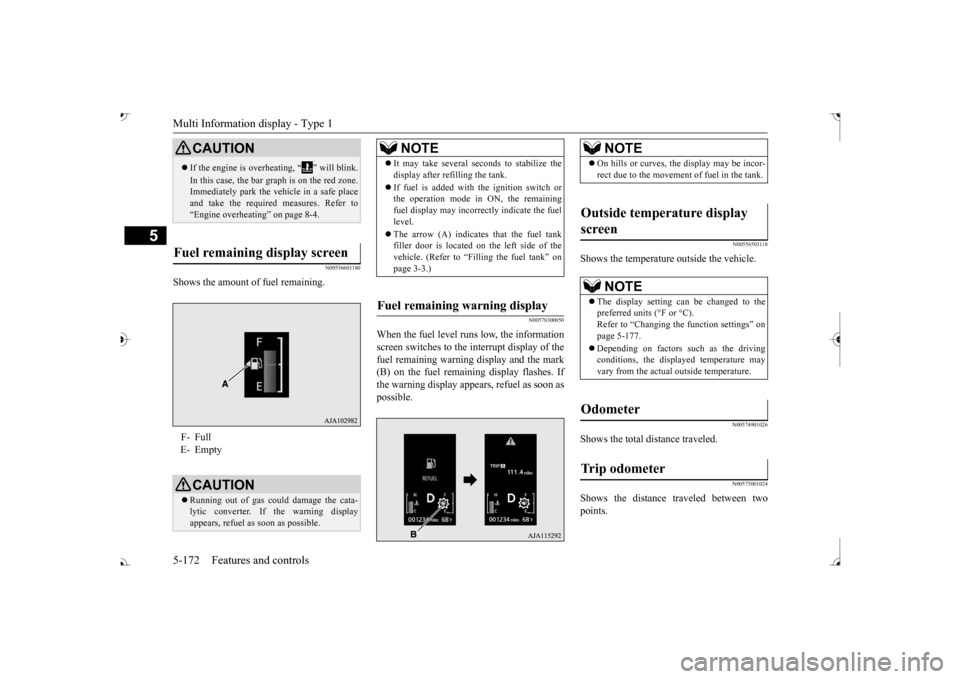
Shows the amount of fuel remaining.
N00578300050
When the fuel level runs low, the information screen switches to the interrupt display of the fuel remaining warning display and the mark(B) on the fuel remaini
ng display flashes. If
the warning display appear
s, refuel as soon as
possible.
N00556501118
Shows the temperature outside the vehicle.
N00574901026
Shows the total distance traveled.
N00575001024
Shows the distance traveled between twopoints.
CAUTION If the engine is overheating, “ ” will blink. In this case, the bar graph is on the red zone. Immediately park the vehicle in a safe place and take the require
d measures. Refer to
“Engine overheating” on page 8-4.
Fuel remaining display screen F- Full E- Empty
CAUTION Running out of gas coul
d damage the cata-
lytic converter. If the warning display appears, refuel as soon as possible.
NOTE
It may take several se
conds to stabilize the
display after re
filling the tank.
If fuel is added with
the ignition switch or
the operation mode in ON, the remaining fuel display may incorre
ctly indicate the fuel
level. The arrow (A) indicates that the fuel tank filler door is located on
the left side of the
vehicle. (Refer to “F
illing the fuel tank” on
page 3-3.)
Fuel remaining warning display
NOTE
On hills or curves, the display may be incor- rect due to the movement
of fuel in the tank.
Outside temperature display screen
NOTE
The display setting ca
n be changed to the
preferred units (°F or °C).
e function settings” on
page 5-177. Depending on factors such as the driving conditions, the displa
yed temperature may
vary from the actual outside temperature.
Odometer Trip odometer
BK0239700US.book 172 ページ 2016年6月16日 木曜日 午前10時58分
Page 256 of 521

Multi Information display - Type 1
Features and controls 5-175
5
N00575201026
Shows the approximate driving range (how many more miles or
kilometers you can
drive). When this driving range falls below30 miles (50 km),
“---” is displayed.
Refuel as soon as possible.
N00575301027
This displays the average fuel consumption from the last reset to the present.There are 2 types of mode settings of manual reset and automatic reset. Refer to “Changing the reset mode for aver-age fuel consumption and average speed” on page 5-178. For information on how to change the aver- age fuel consumption di
splay setting, refer to
“Changing the function settings” on page5-177.
N00578500023
This displays the average speed from the lastreset to the present.There are 2 types of mode setting of manual reset and automatic reset. Refer to “Changing the
reset mode for aver-
age fuel consumption
and average speed” on
page 5-178. For the method for changing the averagespeed display setting, refer to “Changing the function settings
” on page 5-177.
Driving range display
NOTE
The driving range is determined based on the fuel consumption da
ta. This may vary
depending on the drivi
ng conditions and hab-
its. Treat the distance displayed as just a rough guideline. When you refuel, the driving range display is updated. However, if you only add a small amount offuel, the correct value
will not be displayed.
Fill to a full tank whenever possible. When your vehicle is stopped on an extremely steep hill, the driving range value may, change. This is due to the movement offuel in the tank and does not indicate any breakdown. The display setting ca
n be changed to the
preferred units (miles or km). Refer to “Changing the
function settings” on
page 5-177.
Average fuel consumption dis- play
NOTE
The average fuel cons
umption display can be
reset separately in both auto reset mode and manual reset mode. “---” is displayed when the average fuel con- sumption cannot be measured. The initial (default) setting is “Auto reset mode”. Average fuel consumption may vary depend- ing on the driving conditions (road condi- tions, how you drive, etc.) The actual fuelconsumption may differ from the fuel con- sumption displayed, so
treat the fuel con-
sumption displayed as
just a rough guideline.
Disconnecting the batter
y cable wi
ll erase
from memory the manual reset mode or autoreset mode setting for the average fuel con-sumption display. The display setting ca
n be changed to the
preferred units {mpg (US), mpg (UK), L/100km or km/L}. Refer to “Changing the function settings” onpage 5-177.
Average speed display
NOTE
The average speed display can be reset sepa- rately in both auto reset mode and manual reset mode. “---” is displayed when the average speed cannot be measured. The initial (default) setting is “Auto reset mode”.NOTE
BK0239700US.book 175 ページ 2016年6月16日 木曜日 午前10時58分
Page 257 of 521
Multi Information display - Type 1 5-176 Features and controls
5
N00578600024
While driving, the momentary fuel consump- tion is shown with a bar graph. The “ ” mark in the momentary fuel gauge shows the average fuel consumption. When the momentary fuel consumption sur- passes the average fuel consumption, themomentary fuel consumption is displayed with a green bar graph. Be conscious of maintaining the momentaryfuel consumption above the average fuel con- sumption, it can help you drive with the better fuel consumption.
N00568701032
This indicator will be displayed when fuel-efficient driving is achieved.
N00578700038
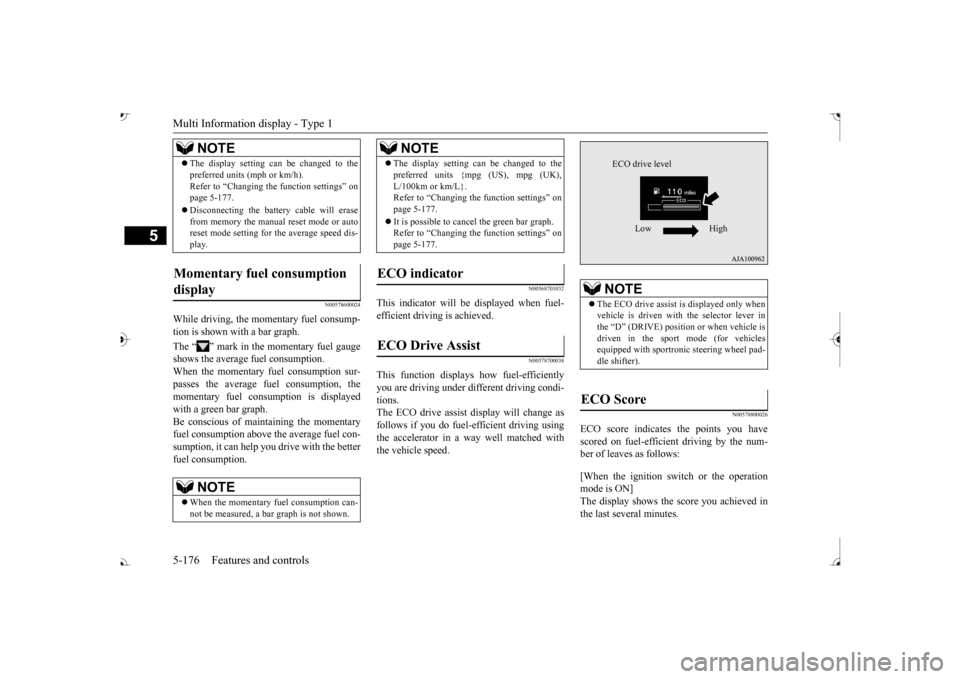
This function displays
how fuel-efficiently
you are driving under different driving condi- tions. The ECO drive assist display will change asfollows if you do fuel-efficient driving using the accelerator in a way well matched with the vehicle speed.
N00578800026
ECO score indicates the points you have scored on fuel-efficient driving by the num- ber of leaves as follows: [When the ignition switch or the operation mode is ON] The display shows the score you achieved in the last several minutes.
The display setting can be changed to the preferred units (mph or km/h).Refer to “Changing th
e function settings” on
page 5-177. Disconnecting the batt
ery cable will erase
from memory the manual reset mode or auto reset mode setting for the average speed dis- play.
Momentary fuel consumption display
NOTE
When the momentary fuel consumption can- not be measured, a ba
r graph is not shown.
NOTE
The display setting can be changed to the preferred units {mpg (US), mpg (UK),L/100km or km/L}.Refer to “Changing the
function settings” on
page 5-177. It is possible to cancel the green bar graph. Refer to “Changing the
function settings” on
page 5-177.
ECO indicator ECO Drive Assist
NOTE
NOTE
The ECO drive assist is displayed only when vehicle is driven with
the selector lever in
the “D” (DRIVE) positi
on or when vehicle is
driven in the sport mode (for vehicles equipped with sportroni
c steering wheel pad-
dle shifter).
ECO Score
ECO drive level
Low High
BK0239700US.book 176 ページ 2016年6月16日 木曜日 午前10時58分
Page 258 of 521
![MITSUBISHI OUTLANDER 2017 3.G User Guide Multi Information display - Type 1
Features and controls 5-177
5
[When the ignition switch is turned to the “OFF” or “LOCK” position or the operationmode is put in OFF] The display shows the](/img/19/7536/w960_7536-257.png "MITSUBISHI OUTLANDER 2017 3.G User Guide Multi Information display - Type 1
Features and controls 5-177
5
[When the ignition switch is turned to the “OFF” or “LOCK” position or the operationmode is put in OFF] The display shows the")
Multi Information display - Type 1
Features and controls 5-177
5
[When the ignition switch is turned to the “OFF” or “LOCK” position or the operationmode is put in OFF] The display shows the overall ECO score the function has counted from the time when theignition switch is turn
ed to the “ON” position
to the time when it is turned to the “OFF” or “LOCK” or “ACC” position, or from the timewhen the operation mode is set to “ON” to the time when it is set to “OFF”.
N00556801270
1. Park your vehicle in a safe place.Firmly apply the parking brake and move the selector lever into the “P” (PARK)position.
2. When you lightly press the multi informa- tion meter switch, the information screenswitches to the function setting screen. Refer to “Information screen” on page 5-169. 3. Press and hold the multi information dis- play switch (for about 2 seconds or more) to switch from the setting mode screen to the menu screen.
4. Select the item to change on the menu screen and change to
the desired setting.
For further details on the operation meth- ods, refer to the following sections. Refer to “Changing the reset mode for average fuel consumption and average speed” on page 5-178.Refer to “Changing the fuel consumption display unit” on page 5-179. Refer to “Changing the temperature unit”on page 5-180. Refer to “Changing the display language” on page 5-180.Refer to “Changing the language on other system to match the multi information display” on page 5-181.Refer to “Operation
sound setting” on
page 5-181.
Changing the function settings
ECO drive level
Low High
CAUTION For safety, stop the vehicle before operating. While driving, even if you operate the multi information display switch, the function set- ting screen is not displayed.
NOTE
To return the menu screen to the function set- ting screen, press and hold the multi infor-mation display switch
(for about 2 seconds
or more). If no operations are made within about 30 seconds of the menu screen being displayed, the display returns to the function setting screen.
BK0239700US.book 177 ページ 2016年6月16日 木曜日 午前10時58分
Page 259 of 521
Multi Information display - Type 1 5-178 Features and controls
5
Refer to “Changing the time until “REST REMINDER” is displayed” on page 5-182.Refer to “Changing the turn signal sound” on page 5-182. Refer to “Changing the momentary fuelconsumption display” on page 5-182. Refer to “Tire ID set change” on page 5-146.Refer to “Returning to the factory set- tings” on page 5-183.
N00557001240
You can change the mode condition for theaverage fuel consumption and average speed display to “Auto reset”
or “Manual reset.”
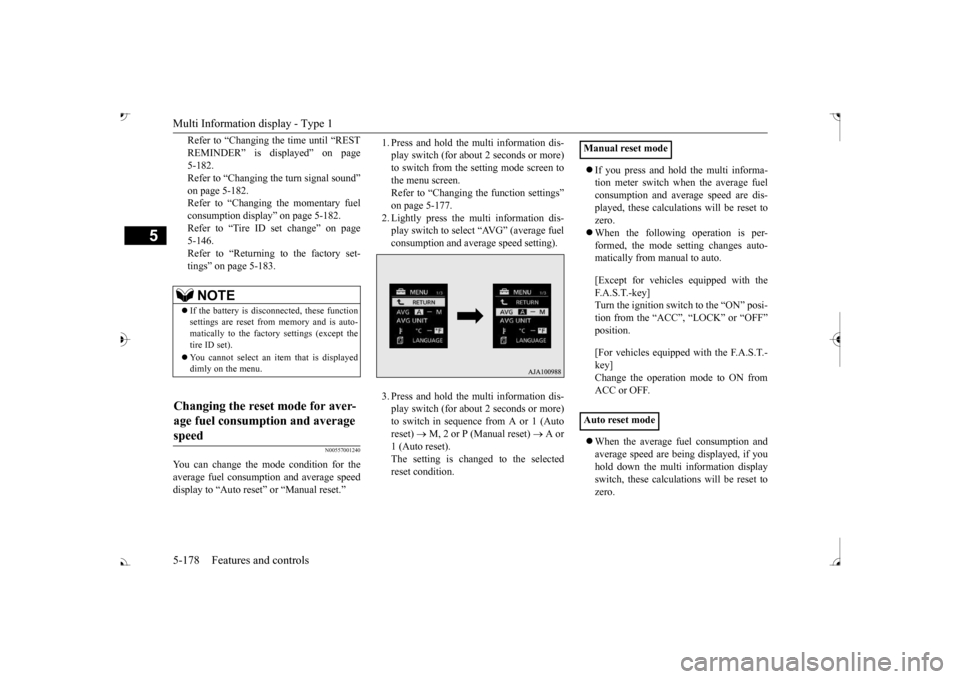
1. Press and hold the mu
lti information dis-
play switch (for about 2 seconds or more)to switch from the setting mode screen to the menu screen. Refer to “Changing th
e function settings”
on page 5-177. 2. Lightly press the multi information dis- play switch to select “AVG” (average fuelconsumption and average speed setting). 3. Press and hold the mu
lti information dis-
play switch (for about 2 seconds or more)to switch in sequence from A or 1 (Auto reset)
M, 2 or P (Manual reset)
A or
1 (Auto reset).The setting is changed to the selected reset condition.
If you press and hold the multi informa- tion meter switch when the average fuelconsumption and average speed are dis- played, these calculati
ons will be reset to
zero. When the following operation is per- formed, the mode setting changes auto- matically from manual to auto. [Except for vehicles
equipped with the
F. A . S . T. - k e y ] Turn the ignition switch to the “ON” posi-tion from the “ACC”, “LOCK” or “OFF” position. [For vehicles equipped
with the F.A.S.T.-
key]Change the operation mode to ON from ACC or OFF. When the average fuel consumption and average speed are being displayed, if youhold down the multi in
formation display
switch, these calculations will be reset to zero.
NOTE
If the battery is disc
onnected, these function
settings are reset from
memory and is auto-
matically to the factory settings (except thetire ID set). You cannot select an it
em that is displayed
dimly on the menu.
Changing the reset mode for aver- age fuel consumption and average speed
Manual reset mode Auto reset mode
BK0239700US.book 178 ページ 2016年6月16日 木曜日 午前10時58分
Page 260 of 521
Multi Information display - Type 1
Features and controls 5-179
5
When the engine switch or the operation mode is in the following conditions, theaverage fuel consumption display and the average speed display will automatically reset. [Except for vehicles equipped with the F. A . S . T. - k e y ] The ignition switch has been set to the “ACC”, “LOCK” or
“OFF” position for
about 4 hours or more. [For vehicles equipped with the F.A.S.T.- key]The operation mode has been in ACC or OFF for about 4 hours or more.
N00557101166
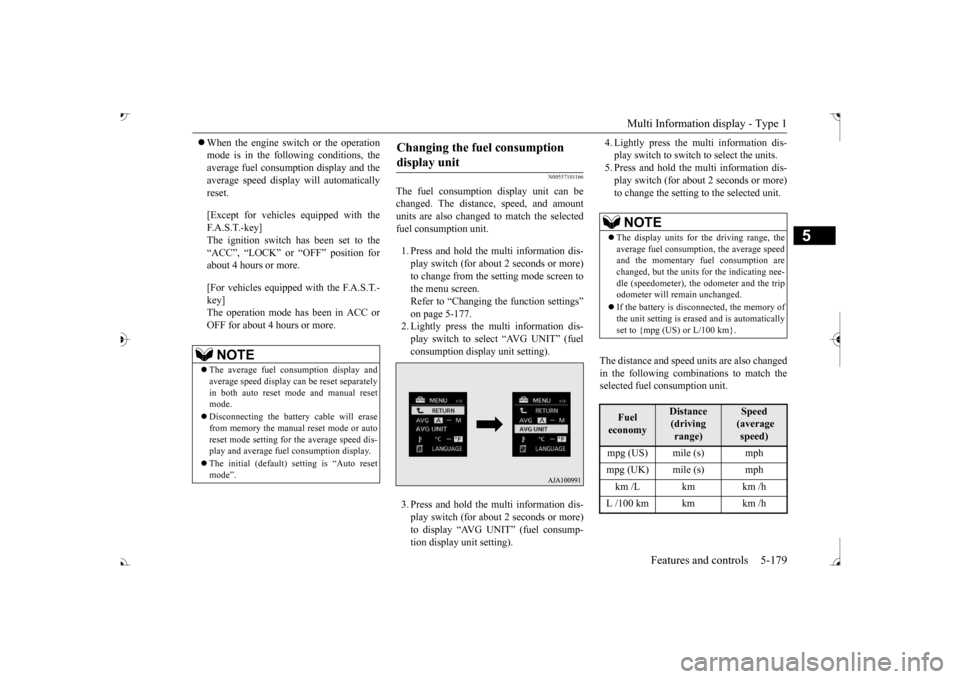
The fuel consumption display unit can be changed. The distan
ce, speed, and amount
units are also changed to match the selected fuel consumption unit. 1. Press and hold the multi information dis- play switch (for about 2 seconds or more) to change from the setting mode screen to the menu screen. Refer to “Changing the function settings” on page 5-177.2. Lightly press the multi information dis- play switch to select “AVG UNIT” (fuel consumption display unit setting). 3. Press and hold the multi information dis- play switch (for about 2 seconds or more) to display “AVG UNIT” (fuel consump- tion display unit setting).
4. Lightly press the multi information dis- play switch to switch to select the units.5. Press and hold the multi information dis- play switch (for about 2 seconds or more) to change the setting to the selected unit.
The distance and speed units are also changed in the following combinations to match theselected fuel consumption unit.
NOTE
The average fuel consumption display and average speed display ca
n be reset separately
in both auto reset mode and manual reset mode. Disconnecting the batter
y cable wi
ll erase
from memory the manual reset mode or auto reset mode setting for
the average speed dis-
play and average fuel consumption display. The initial (default) setting is “Auto reset mode”.
Changing the fuel consumption display unit
NOTE
The display units for the driving range, the average fuel consumption, the average speed and the momentary fuel consumption are changed, but the units
for the indicating nee-
dle (speedometer), the odometer and the trip odometer will remain unchanged. If the battery is disconnected, the memory of the unit setting is erased and is automatically set to {mpg (US) or L/100 km}.Fuel economy
Distance (driving range)
Speed (average speed)
mpg (UK) mile (s) mph km /L km km /h L /100 km km km /h
BK0239700US.book 179 ページ 2016年6月16日 木曜日 午前10時58分
Page 263 of 521
Multi Information display - Type 1 5-182 Features and controls
5
N00557501160
The time until the di
splay appears can be
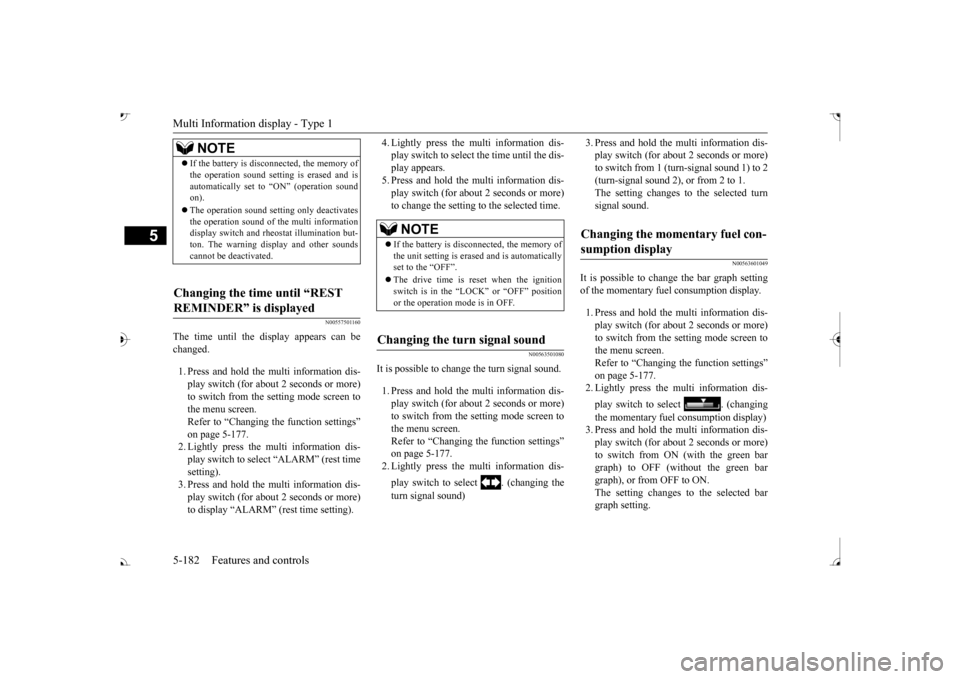
changed. 1. Press and hold the multi information dis- play switch (for about 2 seconds or more) to switch from the setting mode screen to the menu screen.Refer to “Changing the function settings” on page 5-177. 2. Lightly press the multi information dis-play switch to select “ALARM” (rest time setting). 3. Press and hold the multi information dis-play switch (for about 2 seconds or more) to display “ALARM” (rest time setting).
4. Lightly press the multi information dis- play switch to select the time until the dis-play appears. 5. Press and hold the mu
lti information dis-
play switch (for about 2 seconds or more)to change the setting to the selected time.
N00563501080
It is possible to cha
nge the turn signal sound.
1. Press and hold the mu
lti information dis-
play switch (for about 2 seconds or more) to switch from the setting mode screen tothe menu screen. Refer to “Changing th
e function settings”
on page 5-177.2. Lightly press the multi information dis- play switch to select . (changing the turn signal sound)
3. Press and hold the multi information dis- play switch (for about 2 seconds or more)to switch from 1 (turn-signal sound 1) to 2 (turn-signal sound 2), or from 2 to 1. The setting changes to the selected turnsignal sound.
N00563601049
It is possible to change the bar graph settingof the momentary fuel consumption display. 1. Press and hold the multi information dis- play switch (for about 2 seconds or more) to switch from the setting mode screen tothe menu screen. Refer to “Changing the function settings” on page 5-177.2. Lightly press the multi information dis- play switch to
select . (changing
the momentary fuel consumption display) 3. Press and hold the multi information dis- play switch (for about 2 seconds or more) to switch from ON (with the green bargraph) to OFF (without the green bar graph), or from OFF to ON. The setting changes to the selected bargraph setting.
NOTE
If the battery is disconnected, the memory of the operation sound setting is erased and isautomatically set to
“ON” (operation sound
on). The operation sound sett
ing only deactivates
the operation sound of the multi information display switch and rheostat illumination but- ton. The warning di
splay and other sounds
cannot be deactivated.
Changing the time until “REST REMINDER” is displayed
NOTE
If the battery is disconnected, the memory of the unit setting is erased and is automatically set to the “OFF”. The drive time is reset when the ignition switch is in the “LOCK” or “OFF” position or the operation mode is in OFF.
Changing the turn signal sound
Changing the momentary fuel con- sumption display
BK0239700US.book 182 ページ 2016年6月16日 木曜日 午前10時58分
Page 264 of 521
Multi Information display - Type 2
Features and controls 5-183
5
N00557601217
Many of the function set
tings can be returned
to their factory settings. 1. Press and hold the mu
lti information dis-
play switch (for about 2 seconds or more)to switch from the setting mode screen to the menu screen. Refer to “Changing th
e function settings”
on page 5-177. 2. Lightly press the multi information dis- play switch to select “RESET” (return to the factory settings). 3. Press and hold the mu
lti information dis-
play switch (for about 5 seconds or more), the buzzer sounds and all of the function settings are returned to the factory set-tings.
N00555001291
The multi information display displays theodometer, trip odometer, service reminder, fuel remaining, outside
temperature, selector
lever position, averag
e fuel consumption,
driving range, etc. It is also possible to change elements such as the units used on the multi information dis- play.
Returning to the
factory settings
NOTE
The factory settings are as follows. • Average fuel consumption and average speed reset mode: A (Auto reset) • Fuel consumption di
splay unit: mpg (US)
or (L/100 km) • Temperature unit: °F (Fahrenheit) or {°C (Celsius)} • Display language: ENGLISH • Cooperative language
setting: A (language
cooperation: enabled)
• Operation sounds: ON (Operation sound on) • “REST REMINDER” display: OFF • Turn signal sound: Turn signal sound 1• Momentary fuel consumption with the green bar graph: ON
The tire ID set cannot be returned to the fac- tory settings.
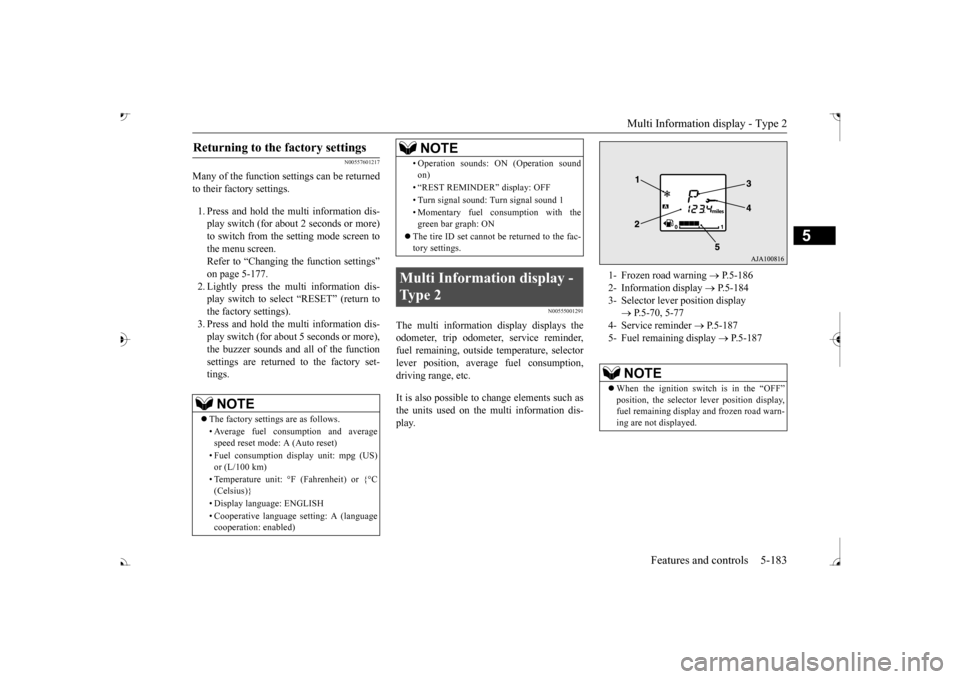
Multi Information display - Type 2
NOTE
1- Frozen road warning
P.5-186
2- Information display
P.5-184
3- Selector lever position display
P.5-70, 5-77
4- Service reminder
P.5-187
5- Fuel remaining display
P.5-187
NOTE
When the ignition switch is in the “OFF”
lever position display,
fuel remaining display and frozen road warn-ing are not displayed.
BK0239700US.book 183 ページ 2016年6月16日 木曜日 午前10時58分
Page 265 of 521
Multi Information display - Type 2 5-184 Features and controls
5
N00574801067
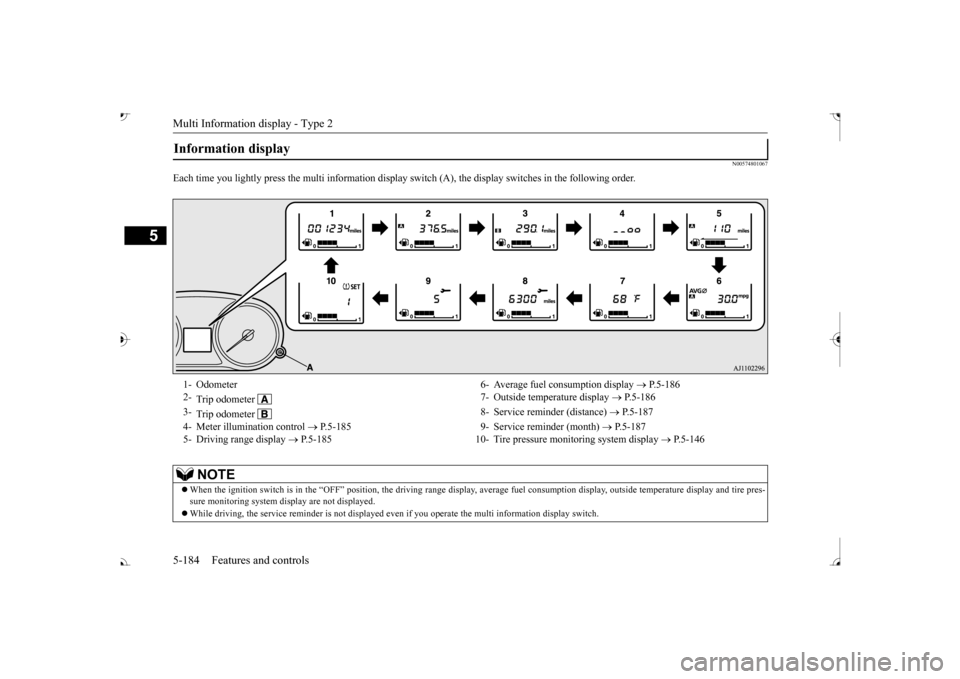
Each time you lightly press th
e multi information display switch (A), th
e display switches in
the following order.
Information display 1- Odometer 6- Average fuel
consumption display
P.5-186
2-
Trip odometer
7- Outside temperature display
P.5-186
3-
Trip odometer
8- Service reminder (distance)
P.5-187
4- Meter illumination control
P.5-185 9- Service reminder (month)
P.5-187
5- Driving range display
P.5-185 10- Tire pressure monitoring system display
P.5-146
NOTE
When the ignition switch is in the “OFF” position, the driving ra
nge display, average fuel consum
ption display, outside tempera
ture display and tire pres-
sure monitoring system di
splay are not displayed.
While driving, the service reminder is
not displayed even if you operate th
e multi information display switch.
BK0239700US.book 184 ページ 2016年6月16日 木曜日 午前10時58分
Page 266 of 521
Multi Information display - Type 2
Features and controls 5-185
5
N00574901039
The odometer indicates the total distance the vehicle has traveled.
N00575001037
The trip odometer indicates the distance trav-eled between two points. To return the display to 0, hold down the multi information display switch for about 2 seconds or more. Only the currently dis- played value wi
ll be reset.
Example If trip odometer is displayed, only tripodometer will be reset.
Both trip odometers and can count up to 9999.9 m
iles/kilometers.
When a trip odometer goes past 9999.9miles/kilometers, it returns to 0.0 miles/ kilometers. When disconnecting th
e battery terminal,
the memories of trip odometer displays
and are cleared, and their displays
return to “0.0 miles/kilometers”.
N00578900030
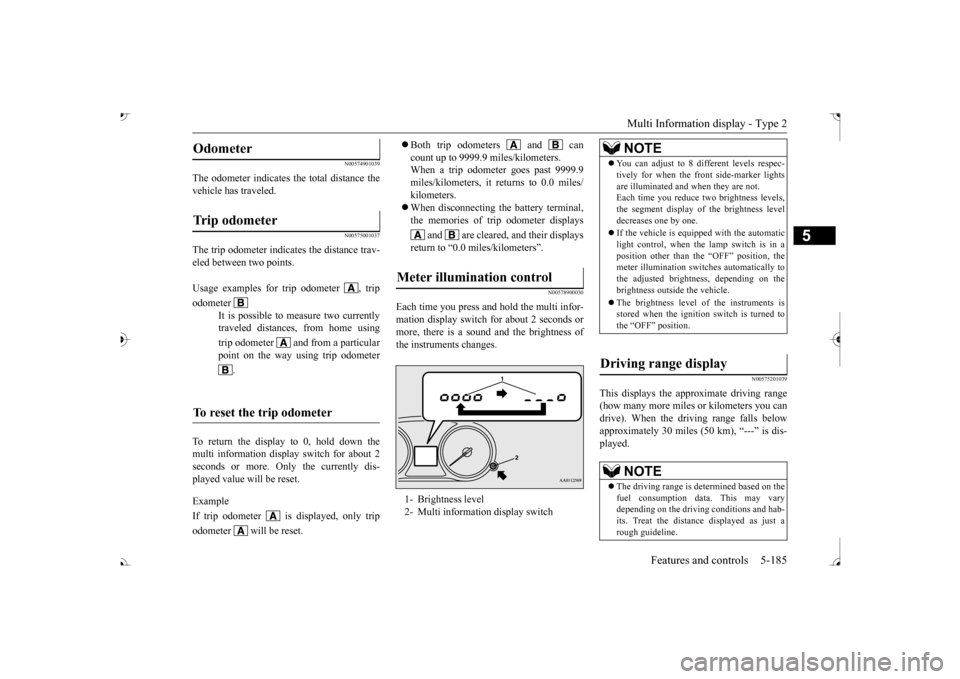
Each time you press a
nd hold the multi infor-
mation display switch for about 2 seconds ormore, there is a sound and the brightness of the instruments changes.
N00575201039
This displays the approximate driving range (how many more miles or
kilometers you can
drive). When the driving range falls below approximately 30 miles (
50 km), “---” is dis-
played.
Odometer Trip odometer Usage examples for trip odometer , trip odometer
It is possible to
measure two currently
traveled distances, from home using trip odometer and from a particular point on the way using trip odometer
.
To reset the trip odometer
Meter illumination control 1- Brightness level 2- Multi information display switch
NOTE
You can adjust to 8 di
fferent levels respec-
tively for when the front side-marker lightsare illuminated and when they are not.Each time you reduce tw
o brightness levels,
the segment display of
the brightness level
decreases one by one. If the vehicle is equi
pped with the automatic
light control, when the lamp switch is in aposition other than the
“OFF” position, the
meter illumination switches automatically to the adjusted bright
ness, depending on the
brightness outsi
de the vehicle.
The brightness level of the instruments is stored when the ignition switch is turned to the “OFF” position.
Driving range display
NOTE
The driving range is determined based on the fuel consumption data. This may vary depending on the drivi
ng conditions and hab-
its. Treat the distance displayed as just arough guideline.
BK0239700US.book 185 ページ 2016年6月16日 木曜日 午前10時58分