alarm MITSUBISHI OUTLANDER 2017 3.G Owner's Manual
[x] Cancel search | Manufacturer: MITSUBISHI, Model Year: 2017, Model line: OUTLANDER, Model: MITSUBISHI OUTLANDER 2017 3.GPages: 521, PDF Size: 14.91 MB
Page 215 of 521
Blind Spot Warning (BSW) (with Lane Change Assist) (if so equipped)
5
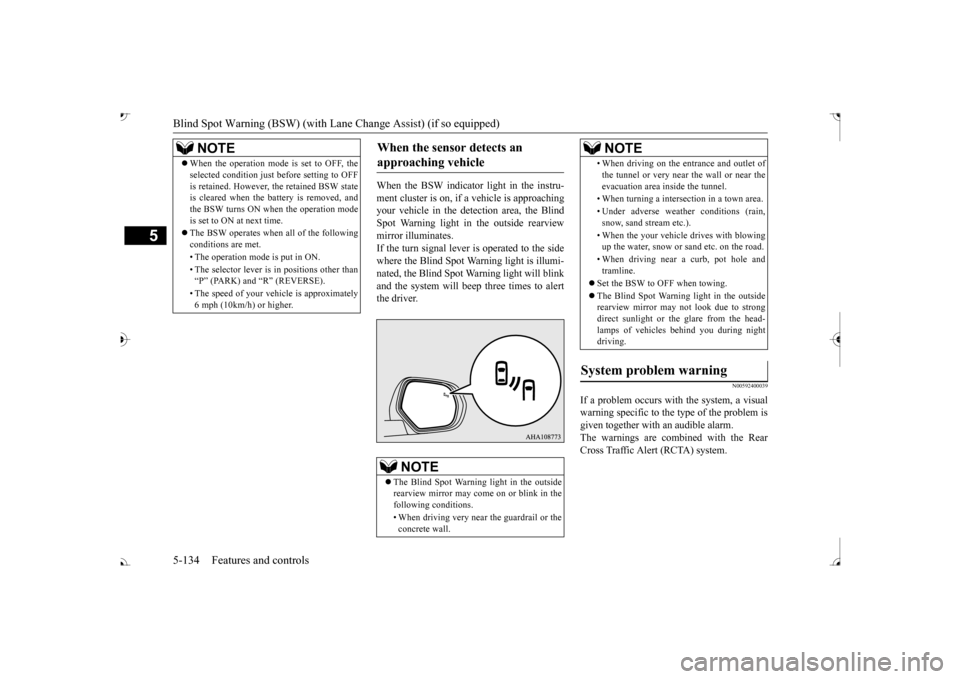
When the BSW indicator light in the instru- ment cluster is on, if
a vehicle is approaching
your vehicle in the detection area, the Blind Spot Warning light in
the outside rearview
mirror illuminates.If the turn signal lever is operated to the side where the Blind Spot Wa
rning light is illumi-
nated, the Blind Spot Wa
rning light will blink
and the system will beep three times to alert the driver.
N00592400039
If a problem occurs with the system, a visualwarning specific to the type of the problem isgiven together with an audible alarm. The warnings are combined with the Rear Cross Traffic Alert (RCTA) system.
NOTE
When the operation mode is set to OFF, the selected condition just before setting to OFFis retained. However, the retained BSW stateis cleared when the battery is removed, and the BSW turns ON when the operation mode is set to ON at next time. The BSW operates when all of the following conditions are met. • The operation mode
is put in ON.
• The selector lever is
in positions other than
Page 222 of 521
Lane Departure Warning System (LDW) (if so equipped)
Features and controls 5-141
5
N00578100045
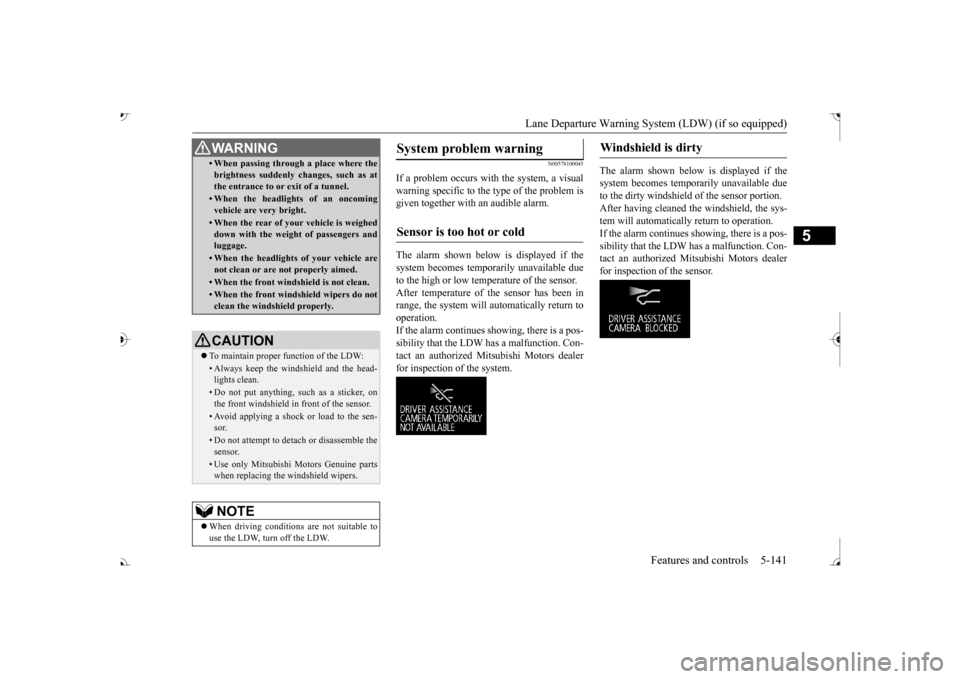
If a problem occurs with the system, a visual warning specific to the type of the problem is given together with an audible alarm. The alarm shown below is displayed if the system becomes tempor
arily unavailable due
to the high or low temperature of the sensor. After temperature of the sensor has been in range, the system will automatically return tooperation. If the alarm continues s
howing, there is a pos-
sibility that the LDW has a malfunction. Con-tact an authorized Mitsubishi Motors dealer for inspection of the system.
The alarm shown below is displayed if the system becomes temporarily unavailable due to the dirty windshield of the sensor portion. After having cleaned the windshield, the sys-tem will automatically return to operation. If the alarm continues showing, there is a pos- sibility that the LDW has a malfunction. Con-tact an authorized Mitsubishi Motors dealer for inspection of the sensor.
• When passing through a place where the brightness suddenly changes, such as atthe entrance to or exit of a tunnel.• When the headlights of an oncomingvehicle are very bright. • When the rear of your vehicle is weigheddown with the weight of passengers andluggage.• When the headlights
of your vehicle are
not clean or are not properly aimed.• When the front windshield is not clean.• When the front windshield wipers do notclean the windshield properly.CAUTION To maintain proper function of the LDW:• Always keep the windshield and the head- lights clean.• Do not put anything, such as a sticker, onthe front windshield in front of the sensor.• Avoid applying a shock or load to the sen-sor.• Do not attempt to deta
ch or disassemble the
sensor.• Use only Mitsubishi Motors Genuine parts when replacing the
windshield wipers.
NOTE
When driving conditions are not suitable to use the LDW, turn off the LDW.WA R N I N G
System problem warning
Sensor is too hot or cold
Windshield is dirty
BK0239700US.book 141 ページ 2016年6月16日 木曜日 午前10時58分
Page 223 of 521
Tire pressure monitoring system 5-142 Features and controls
5
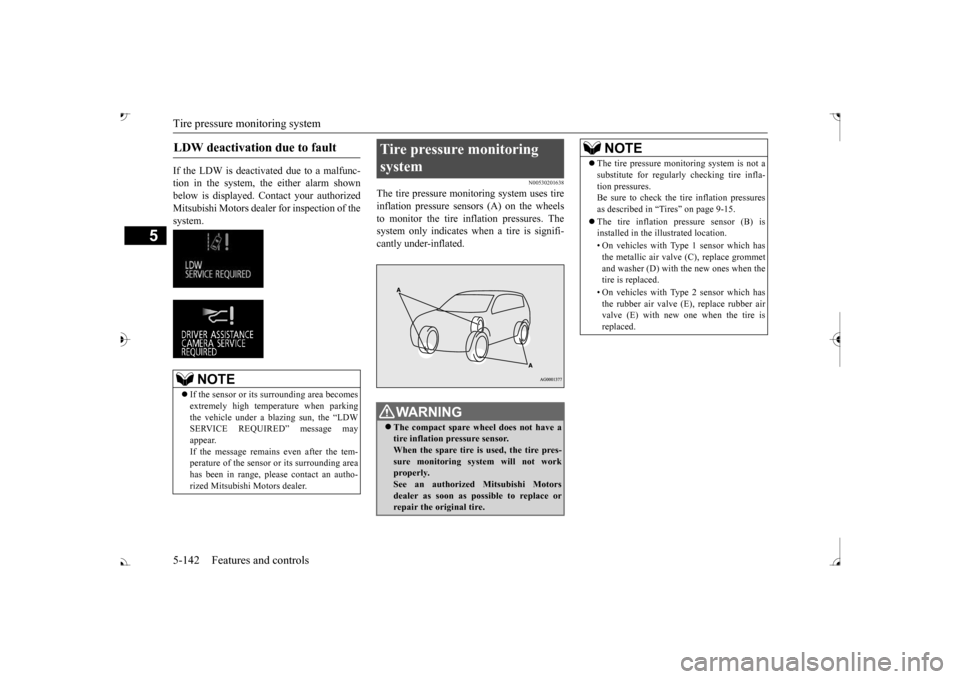
If the LDW is deactivated due to a malfunc- tion in the system, the either alarm shown below is displayed. Contact your authorized Mitsubishi Motors dealer for inspection of thesystem.
N00530201638
The tire pressure monitoring system uses tire inflation pressure sensors (A) on the wheels to monitor the tire inflation pressures. Thesystem only indicates when a tire is signifi- cantly under-inflated.
LDW deactivation due to fault
NOTE
If the sensor or its surrounding area becomes extremely high temperature when parking the vehicle under a bl
azing sun, the “LDW
SERVICE REQUIRED” message may appear. If the message remains even after the tem-perature of the sensor or its surrounding area has been in range, plea
se contact an autho-
rized Mitsubishi Motors dealer.
Tire pressure monitoring system
WA R N I N G The compact spare whee
l does not have a
tire inflation pressure sensor.When the spare tire is used, the tire pres- sure monitoring system will not work properly.See an authorized Mitsubishi Motors dealer as soon as possible to replace or repair the original tire.
NOTE
The tire pressure monitoring system is not a substitute for regularly
checking tire infla-
tion pressures.Be sure to check the tire inflation pressures as described in “Tires” on page 9-15. The tire inflation pressure sensor (B) is installed in the illustrated location. • On vehicles with Type 1 sensor which has the metallic air valve (C), replace grommet and washer (D) with the new ones when thetire is replaced. • On vehicles with Type 2 sensor which has the rubber air valve (E
), replace rubber air
valve (E) with new one when the tire is replaced.
BK0239700US.book 142 ページ 2016年6月16日 木曜日 午前10時58分
Page 230 of 521
Parking sensors (Front/Rear) (if so equipped)
Features and controls 5-149
5
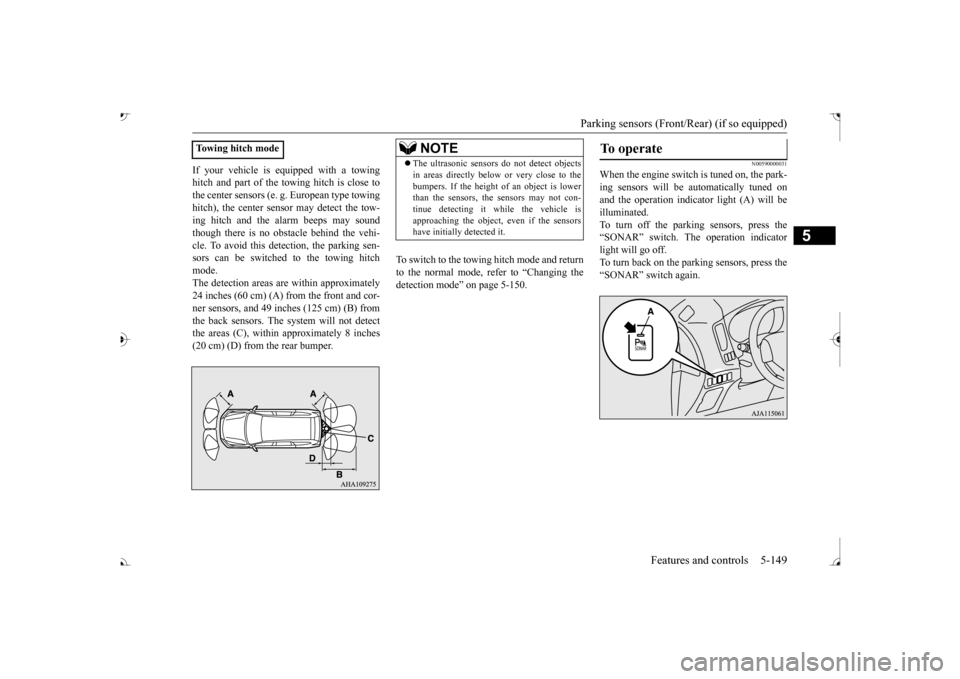
If your vehicle is equipped with a towing hitch and part of the towing hitch is close tothe center sensors (e. g.
European type towing
hitch), the center sens
or may detect the tow-
ing hitch and the alarm beeps may soundthough there is no obstacle behind the vehi- cle. To avoid this dete
ction, the parking sen-
sors can be switched to the towing hitchmode. The detection areas ar
e within approximately
24 inches (60 cm) (A) from the front and cor- ner sensors, and 49 inches (125 cm) (B) from the back sensors. The
system will not detect
the areas (C), within approximately 8 inches (20 cm) (D) from the rear bumper.
To switch to the towing hitch mode and return to the normal mode, refer to “Changing thedetection mode” on page 5-150.
N00590000031
When the engine switch is tuned on, the park- ing sensors will be
automatically tuned on
and the operation indica
tor light (A) will be
illuminated. To turn off the parking sensors, press the “SONAR” switch. The operation indicatorlight will go off. To turn back on the parking sensors, press the “SONAR” switch again.
Towing hitch mode
NOTE
The ultrasonic sensors
do not dete
ct objects
in areas directly below or very close to thebumpers. If the height of an object is lowerthan the sensors, the sensors may not con- tinue detecting it
while the vehicle is
approaching the object, even if the sensorshave initially detected it.
To operate
BK0239700US.book 149 ページ 2016年6月16日 木曜日 午前10時58分
Page 231 of 521
Parking sensors (Front/Rear) (if so equipped) 5-150 Features and controls
5
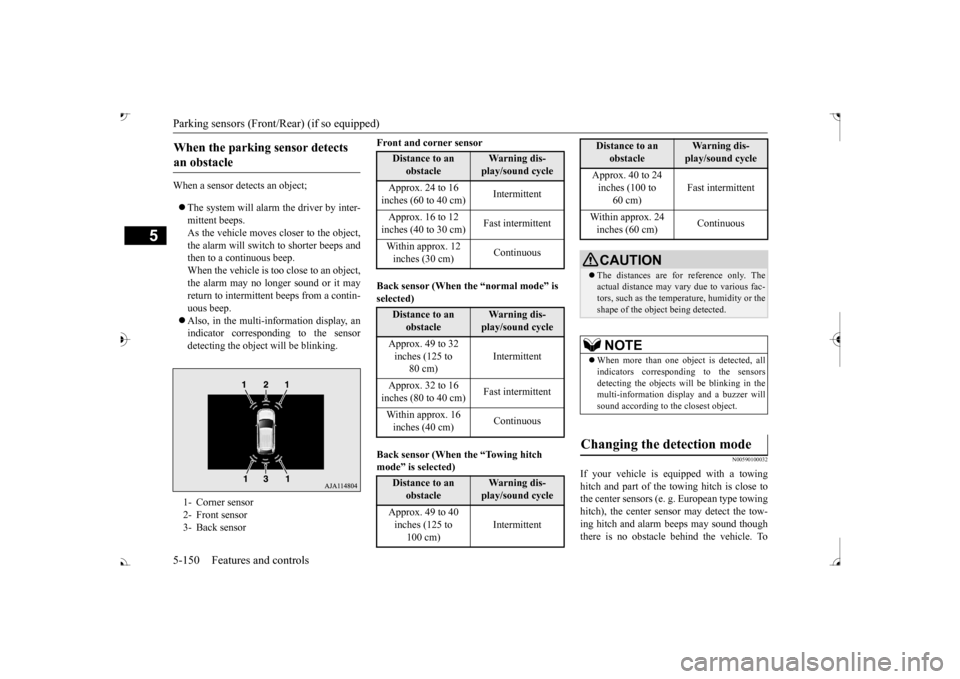
When a sensor detects an object; The system will alarm the driver by inter- mittent beeps.As the vehicle moves
closer to the object,
the alarm will switch to shorter beeps and then to a continuous beep.When the vehicle is too close to an object, the alarm may no longer sound or it may return to intermittent beeps from a contin- uous beep. Also, in the multi-information display, an indicator corresponding to the sensor detecting the objec
t will be blinking.
Front and corner sensor Back sensor (When the “normal mode” is selected) mode
Page 263 of 521
Multi Information display - Type 1 5-182 Features and controls
5
N00557501160
The time until the di
splay appears can be
changed. 1. Press and hold the multi information dis- play switch (for about 2 seconds or more) to switch from the setting mode screen to the menu screen.Refer to “Changing the function settings” on page 5-177. 2. Lightly press the multi information dis-play switch to select “ALARM” (rest time setting). 3. Press and hold the multi information dis-play switch (for about 2 seconds or more) to display “ALARM” (rest time setting).
4. Lightly press the multi information dis- play switch to select the time until the dis-play appears. 5. Press and hold the mu
lti information dis-
play switch (for about 2 seconds or more)to change the setting to the selected time.
N00563501080
It is possible to cha
nge the turn signal sound.
1. Press and hold the mu
lti information dis-
play switch (for about 2 seconds or more) to switch from the setting mode screen tothe menu screen. Refer to “Changing th
e function settings”
on page 5-177.2. Lightly press the multi information dis- play switch to select . (changing the turn signal sound)
3. Press and hold the multi information dis- play switch (for about 2 seconds or more)to switch from 1 (turn-signal sound 1) to 2 (turn-signal sound 2), or from 2 to 1. The setting changes to the selected turnsignal sound.
N00563601049
It is possible to change the bar graph settingof the momentary fuel consumption display. 1. Press and hold the multi information dis- play switch (for about 2 seconds or more) to switch from the setting mode screen tothe menu screen. Refer to “Changing the function settings” on page 5-177.2. Lightly press the multi information dis- play switch to
select . (changing
the momentary fuel consumption display) 3. Press and hold the multi information dis- play switch (for about 2 seconds or more) to switch from ON (with the green bargraph) to OFF (without the green bar graph), or from OFF to ON. The setting changes to the selected bargraph setting.
NOTE
If the battery is disconnected, the memory of the operation sound setting is erased and isautomatically set to
“ON” (operation sound
on). The operation sound sett
ing only deactivates
the operation sound of the multi information display switch and rheostat illumination but- ton. The warning di
splay and other sounds
cannot be deactivated.
Changing the time until “REST REMINDER” is displayed
NOTE
If the battery is disconnected, the memory of the unit setting is erased and is automatically set to the “OFF”. The drive time is reset when the ignition switch is in the “LOCK” or “OFF” position or the operation mode is in OFF.
Changing the turn signal sound
Changing the momentary fuel con- sumption display
BK0239700US.book 182 ページ 2016年6月16日 木曜日 午前10時58分
Page 267 of 521
Multi Information display - Type 2 5-186 Features and controls
5
N00575301030
This displays the average fuel consumption from the last reset to the present. The reset mode conditions for the average fuel consumption disp
lay can be switched
between “Auto reset”
and “Manual reset”.
For information on how to change the aver- age fuel consumption display setting, refer to“Changing the function settings” on page 5-189.
N00556501121
Shows the temperature
outside the vehicle.
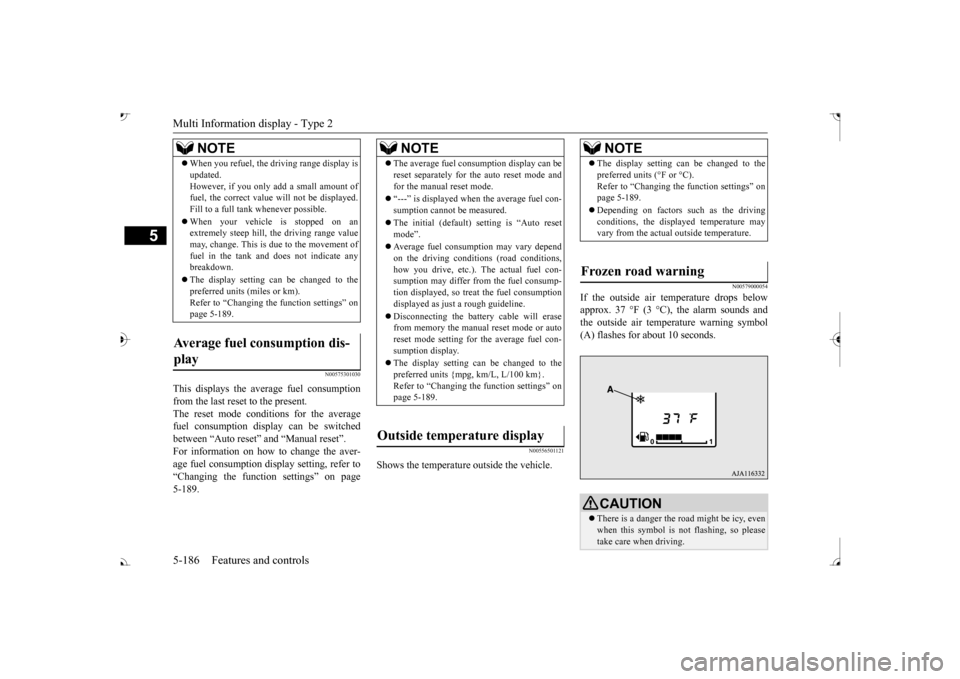
N00579000054
If the outside air temperature drops below approx. 37 °F (3 °C), the alarm sounds andthe outside air temperature warning symbol (A) flashes for about 10 seconds.
When you refuel, the driving range display is updated.However, if you only add a small amount offuel, the correct value
will not be displayed.
Fill to a full tank whenever possible. When your vehicle is stopped on an extremely steep hill, th
e driving range value
may, change. This is due to the movement offuel in the tank and does not indicate any breakdown. The display setting can be changed to the preferred units (miles or km). Refer to “Changing th
e function settings” on
page 5-189.
Average fuel consumption dis- play
NOTE
NOTE
The average fuel cons
umption display can be
reset separately for the auto reset mode andfor the manual reset mode. “---” is displayed when the average fuel con- sumption cannot be measured. The initial (default) setting is “Auto reset mode”. Average fuel consumption may vary depend on the driving conditi
ons (road conditions,
how you drive, etc.). The actual fuel con- sumption may differ from the fuel consump- tion displayed, so treat the fuel consumptiondisplayed as just
a rough guideline.
Disconnecting th
e battery cable will erase
from memory the manual reset mode or auto reset mode setting for the average fuel con- sumption display. The display setting can be changed to the preferred units {mpg, km/L, L/100 km}.Refer to “Changing the
function settings” on
page 5-189.
Outside temperature display
NOTE
The display setting ca
n be changed to the
preferred units (°F or °C).
e function settings” on
page 5-189. Depending on factors such as the driving conditions, the displa
yed temperature may
vary from the actual outside temperature.
Frozen road warning
CAUTION There is a danger the ro
ad might be icy, even
when this symbol is not flashing, so pleasetake care when driving.
BK0239700US.book 186 ページ 2016年6月16日 木曜日 午前10時58分
Page 283 of 521
Indicator light, warning light, and information screen display list (multi information display - Type 1)
5
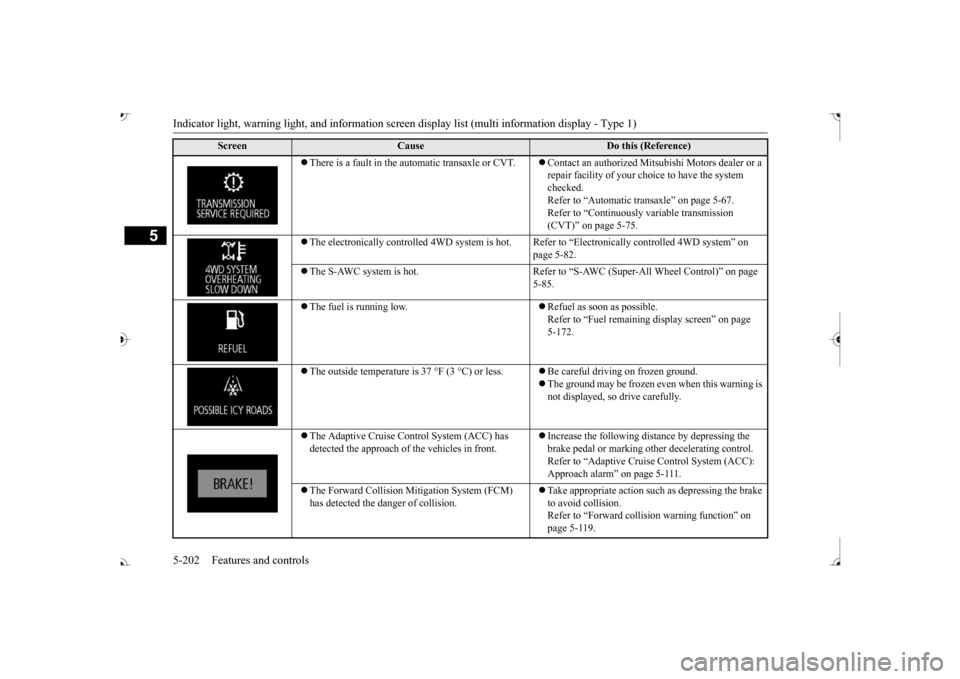
There is a fault in the automatic transaxle or CVT.
Contact an authorized Mits
ubishi Motors dealer or a
repair facility of your c
hoice to have the system
checked. Refer to “Automatic tr
ansaxle” on page 5-67.
Refer to “Continuously
variable transmission
(CVT)” on page 5-75.
The electronically controlled 4WD
system is hot. Refer to “Electr
onically controlled
4WD system” on
page 5-82.
The S-AWC system is hot. Refer to “S-A
WC (Super-All Wheel Control)” on page
5-85.
The fuel is running low.
Refuel as soon as possible. Refer to “Fuel remaining
display screen” on page
5-172.
The outside temperature is
37 °F (3 °C) or less.
Be careful driving on frozen ground. The ground may be frozen even when this warning is not displayed, so drive carefully.
The Adaptive Cruise Control System (ACC) has detected the approach of
the vehicles in front.
Increase the following di
stance by depressing the
brake pedal or marking ot
her decelerating control.
Refer to “Adaptive Cruise
Control System (ACC):
Approach alarm” on page 5-111.
The Forward Collision Mitigation System (FCM) has detected the da
nger of collision.
Take appropriate action such
as depressing the brake
to avoid collision.Refer to “Forward colli
sion warning function” on
page 5-119.
Screen
Cause
Do this (Reference)
BK0239700US.book 202 ページ 2016年6月16日 木曜日 午前10時58分
Page 293 of 521
Indicator light, warning light, and information screen display list (multi information display - Type 1)
5
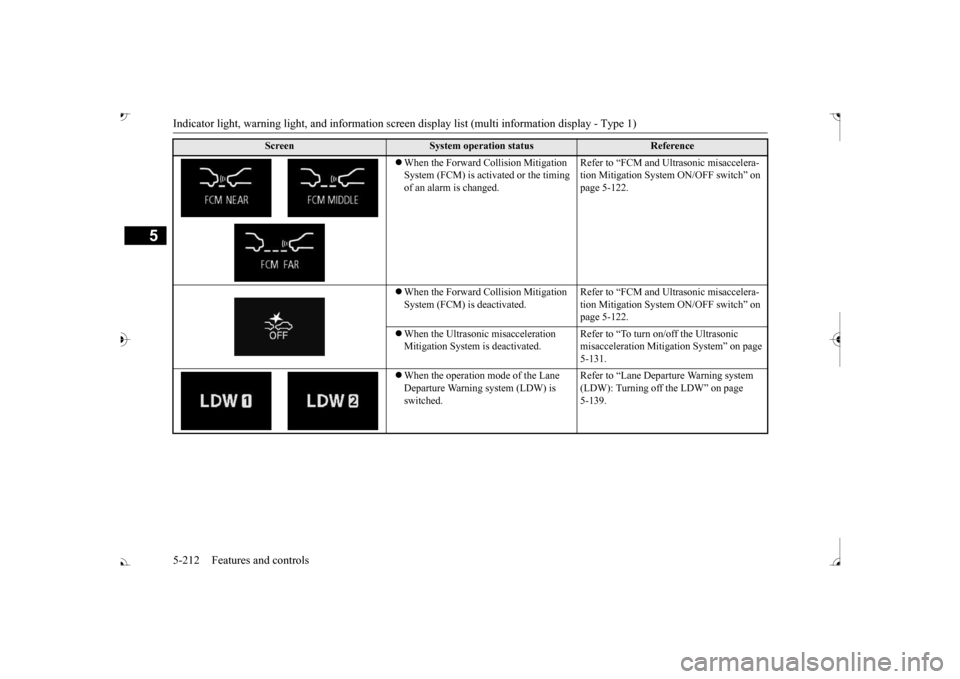
When the Forward Collision Mitigation System (FCM) is activated or the timing of an alarm is changed.
Refer to “FCM and Ultrasonic misaccelera- tion Mitigation System ON/OFF switch” on page 5-122.
When the Forward Collision Mitigation System (FCM) is
deactivated.
Refer to “FCM and Ultrasonic misaccelera- tion Mitigation System ON/OFF switch” on page 5-122.
When the Ultrasonic misacceleration Mitigation System
is deactivated.
Refer to “To turn on/off the Ultrasonic misacceleration Mitiga
tion System” on page
5-131.
When the operation mode of the Lane Departure Warning system (LDW) is switched.
Refer to “Lane Depart
ure Warning system
(LDW): Turning off
the LDW” on page
5-139.
Screen
System operation status
Reference
BK0239700US.book 212 ページ 2016年6月16日 木曜日 午前10時58分
Page 514 of 521
Alphabetical index
12-1
12
Numerics
12 V power outlets
............................
5-267
4-wheel drive operation
.......................
5-88
A
Accessory (installation)
.........................
3-6
Active stability control (ASC)
............
5-100
Adaptive Cruise C
ontrol System (ACC)
.......
5-106 Air cleaner filter
...................................
9-9
Air conditioner
Dual-zone automatic climate control air conditioner
.....................................
7-5
Important air condi
tioning operating tips
..
7-13
Air purifier
.........................................
7-14
Airbag
...............................................
4-34
All-wheel drive operation
....................
5-88
Aluminum wheels
...............................
9-43
AM/FM radio
.....................................
7-14
Anti-lock braking system
.....................
5-97
Arm rest
.............................................
4-10
Assist grip
........................................
5-283
Audio
AM/FM radio
.................................
7-14
CD player
......................................
7-14
Troubleshooting
.............................
7-47
Automatic high beam system
..............
5-224
Automatic transaxle
............................
5-67
Fluid
.....................................
9-11
, 11-7
Selector le
ver operation
..................
5-68
Selector lever positions
...................
5-71
Sports mode
...................................
5-72
B
Back-up light
Bulb capacity
.................................
9-32
Replacement
..................................
9-38
Ball joint, steering linka
ge seals, drive shaft
boots
...............................................
9-24
Battery
..............................................
9-13
Charging system warning light
.......
5-217
Checking battery
electrolyte level
....
9-13
Disconnection and connection
.........
9-14
During cold weather
.......................
9-13
Specification
..................................
11-6
Blind Spot Warning (BSW)
................
5-131
Bluetooth® 2.0 interface
....................
5-240
Bottle holders
....................................
5-280
Brake
Fluid
.....................................
9-12
, 11-7
Brake assist
........................................
5-96
Braking
Anti-lock braking system
................
5-97
Braking
...........................................
6-5
Hose
..............................................
9-24
Pad wear alarm
...............................
5-93
Parking brake
.................................
5-53
Pedal
.............................................
5-92
Pedal free play
................................
9-21
Power brakes
..................................
5-92
Service brake
..................................
5-92
Warning lights and buzzer
.............
5-216
Break-in recommendations
....................
5-3
Bulb capacity
......................................
9-32
C
California Perchl
orate Materials
Requirements
.....................................
3-7
Capacities
..........................................
11-7
Card holder
............................
5-266
, 5-277
Cargo area cover
...............................
5-281
Cargo loads
........................................
6-10
Cargo room light
...............................
5-275
Bulb capacity
.................................
9-33
Catalytic converter
................................
9-2
Cautions on the handling of all-wheel drive vehicles
............................................
5-91
CD player
...........................................
7-14
Certification label
...............................
11-3
Charging system warning light
...........
5-217
Child restraint systems
........................
4-27
Child safety locks for rear door
............
5-37
BK0239700US.book 1 ページ 2016年6月16日 木曜日 午前10時58分