warning light MITSUBISHI OUTLANDER 2017 3.G Workshop Manual
[x] Cancel search | Manufacturer: MITSUBISHI, Model Year: 2017, Model line: OUTLANDER, Model: MITSUBISHI OUTLANDER 2017 3.GPages: 521, PDF Size: 14.91 MB
Page 261 of 521
Multi Information display - Type 1 5-180 Features and controls
5
N00557201154
The temperature display unit can be switched. 1. Press and hold the multi information dis- play switch (for about 2 seconds or more) to switch from the setting mode screen tothe menu screen. Refer to “Changing the function settings” on page 5-177.2. Lightly press the multi information dis- play switch to select “ ” (temperature unit setting). 3. Press and hold the multi information dis- play switch (for about 2 seconds or more)to switch in from °C to °F, or from °F to °C. The setting is changed to the selected tem-perature unit.
N00557301184
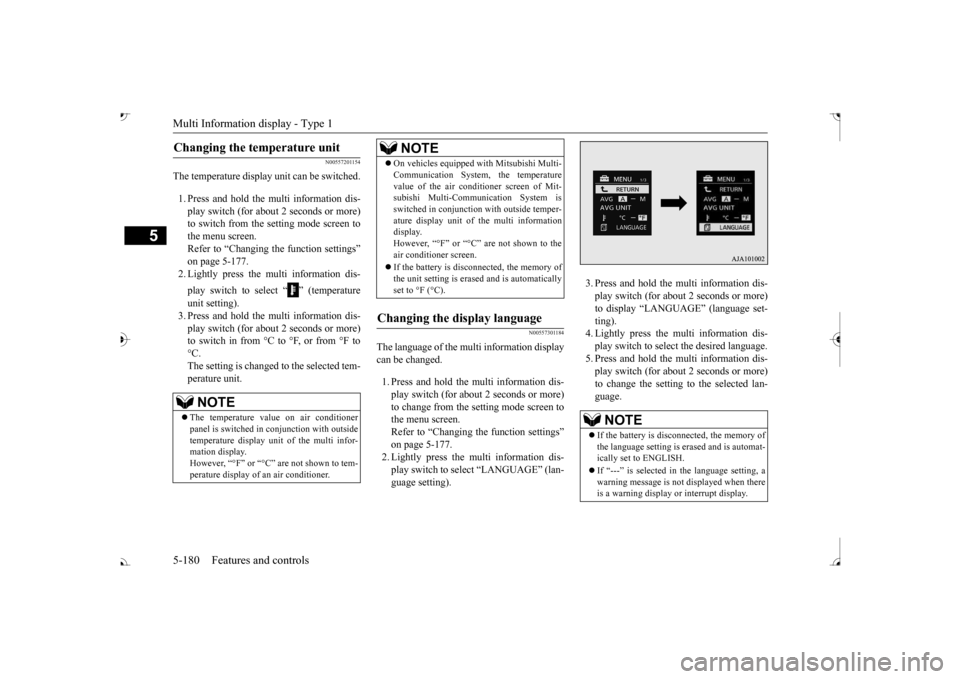
The language of the multi information displaycan be changed. 1. Press and hold the mu
lti information dis-
play switch (for about 2 seconds or more) to change from the setting mode screen to the menu screen.Refer to “Changing th
e function settings”
on page 5-177. 2. Lightly press the multi information dis-play switch to se
lect “LANGUAGE” (lan-
guage setting).
3. Press and hold the multi information dis- play switch (for about 2 seconds or more)to display “LANGUAGE” (language set- ting). 4. Lightly press the multi information dis-play switch to select
the desired language.
5. Press and hold the multi information dis- play switch (for about 2 seconds or more)to change the setting to the selected lan- guage.
Changing the temperature unit
NOTE
The temperature value on air conditioner panel is switched in
conjunction with outside
temperature display unit of the multi infor-mation display. However, “°F” or “°C” are not shown to tem- perature display of
an air conditioner.
On vehicles equipped
with Mitsubishi Multi-
Communication System, the temperaturevalue of the air conditioner screen of Mit-subishi Multi-Communication System is switched in conjunction
with outside temper-
ature display unit of the multi informationdisplay. However, “°F” or “°C” air conditioner screen. If the battery is disconnected, the memory of the unit setting is erased and is automaticallyset to °F (°C).
Changing the display language
NOTE
NOTE
If the battery is disconnected, the memory of the language setting is erased and is automat- ically set to ENGLISH. If “---” is selected in the language setting, a warning message is not displayed when there is a warning display or interrupt display.
BK0239700US.book 180 ページ 2016年6月16日 木曜日 午前10時58分
Page 263 of 521
Multi Information display - Type 1 5-182 Features and controls
5
N00557501160
The time until the di
splay appears can be
changed. 1. Press and hold the multi information dis- play switch (for about 2 seconds or more) to switch from the setting mode screen to the menu screen.Refer to “Changing the function settings” on page 5-177. 2. Lightly press the multi information dis-play switch to select “ALARM” (rest time setting). 3. Press and hold the multi information dis-play switch (for about 2 seconds or more) to display “ALARM” (rest time setting).
4. Lightly press the multi information dis- play switch to select the time until the dis-play appears. 5. Press and hold the mu
lti information dis-
play switch (for about 2 seconds or more)to change the setting to the selected time.
N00563501080
It is possible to cha
nge the turn signal sound.
1. Press and hold the mu
lti information dis-
play switch (for about 2 seconds or more) to switch from the setting mode screen tothe menu screen. Refer to “Changing th
e function settings”
on page 5-177.2. Lightly press the multi information dis- play switch to select . (changing the turn signal sound)
3. Press and hold the multi information dis- play switch (for about 2 seconds or more)to switch from 1 (turn-signal sound 1) to 2 (turn-signal sound 2), or from 2 to 1. The setting changes to the selected turnsignal sound.
N00563601049
It is possible to change the bar graph settingof the momentary fuel consumption display. 1. Press and hold the multi information dis- play switch (for about 2 seconds or more) to switch from the setting mode screen tothe menu screen. Refer to “Changing the function settings” on page 5-177.2. Lightly press the multi information dis- play switch to
select . (changing
the momentary fuel consumption display) 3. Press and hold the multi information dis- play switch (for about 2 seconds or more) to switch from ON (with the green bargraph) to OFF (without the green bar graph), or from OFF to ON. The setting changes to the selected bargraph setting.
NOTE
If the battery is disconnected, the memory of the operation sound setting is erased and isautomatically set to
“ON” (operation sound
on). The operation sound sett
ing only deactivates
the operation sound of the multi information display switch and rheostat illumination but- ton. The warning di
splay and other sounds
cannot be deactivated.
Changing the time until “REST REMINDER” is displayed
NOTE
If the battery is disconnected, the memory of the unit setting is erased and is automatically set to the “OFF”. The drive time is reset when the ignition switch is in the “LOCK” or “OFF” position or the operation mode is in OFF.
Changing the turn signal sound
Changing the momentary fuel con- sumption display
BK0239700US.book 182 ページ 2016年6月16日 木曜日 午前10時58分
Page 264 of 521
Multi Information display - Type 2
Features and controls 5-183
5
N00557601217
Many of the function set
tings can be returned
to their factory settings. 1. Press and hold the mu
lti information dis-
play switch (for about 2 seconds or more)to switch from the setting mode screen to the menu screen. Refer to “Changing th
e function settings”
on page 5-177. 2. Lightly press the multi information dis- play switch to select “RESET” (return to the factory settings). 3. Press and hold the mu
lti information dis-
play switch (for about 5 seconds or more), the buzzer sounds and all of the function settings are returned to the factory set-tings.
N00555001291
The multi information display displays theodometer, trip odometer, service reminder, fuel remaining, outside
temperature, selector
lever position, averag
e fuel consumption,
driving range, etc. It is also possible to change elements such as the units used on the multi information dis- play.
Returning to the
factory settings
NOTE
The factory settings are as follows. • Average fuel consumption and average speed reset mode: A (Auto reset) • Fuel consumption di
splay unit: mpg (US)
or (L/100 km) • Temperature unit: °F (Fahrenheit) or {°C (Celsius)} • Display language: ENGLISH • Cooperative language
setting: A (language
cooperation: enabled)
• Operation sounds: ON (Operation sound on) • “REST REMINDER” display: OFF • Turn signal sound: Turn signal sound 1• Momentary fuel consumption with the green bar graph: ON
The tire ID set cannot be returned to the fac- tory settings.
Multi Information display - Type 2
NOTE
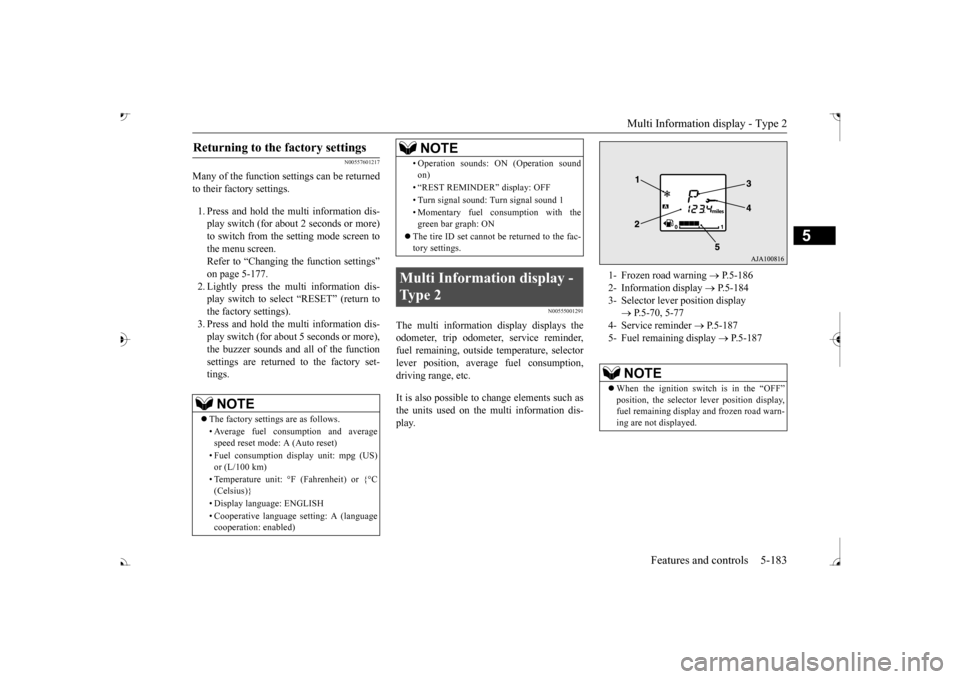
1- Frozen road warning
P.5-186
2- Information display
P.5-184
3- Selector lever position display
P.5-70, 5-77
4- Service reminder
P.5-187
5- Fuel remaining display
P.5-187
NOTE
When the ignition switch is in the “OFF”
lever position display,
fuel remaining display and frozen road warn-ing are not displayed.
BK0239700US.book 183 ページ 2016年6月16日 木曜日 午前10時58分
Page 272 of 521
Indicator light, warning light, and information screen display list (multi information display - Type 1)
Features and controls 5-191
5
N00557701074 N00557801349
Indicator light, warning light, and information
screen display list (multi information display -
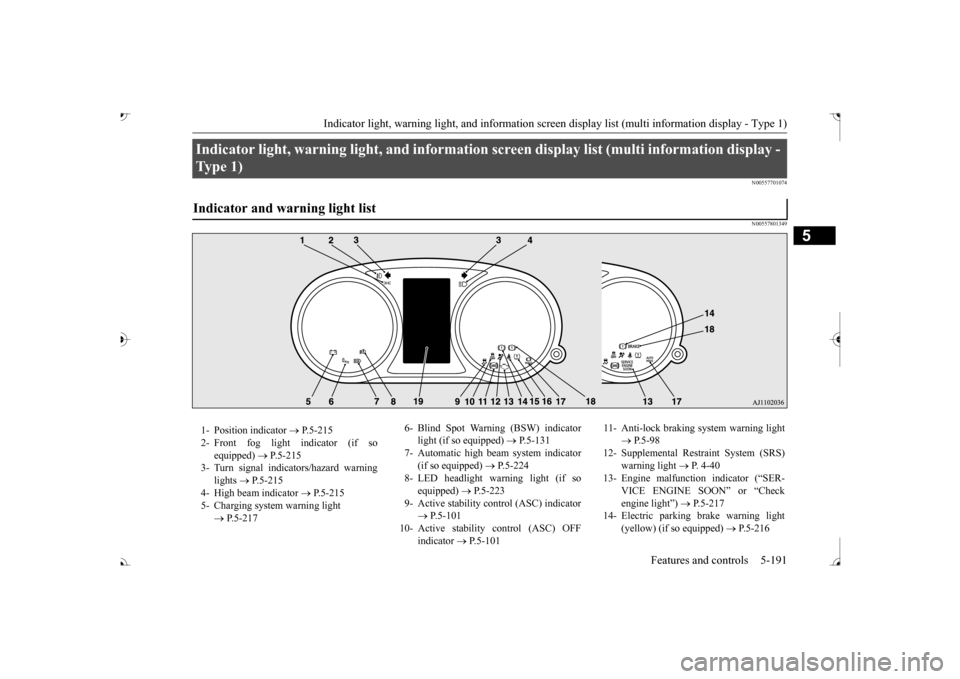
Type 1) Indicator and warning light list 1- Position indicator
P.5-215
2- Front fog light indicator (if so
equipped)
P.5-215
3- Turn signal indicators/hazard warning
lights
P.5-215
4- High beam indicator
P.5-215
5- Charging system warning light
P.5-217
6- Blind Spot Warning (BSW) indicator
light (if so equipped)
P.5-131
7- Automatic high beam system indicator
(if so equipped)
P.5-224
8- LED headlight warning light (if so
equipped)
P.5-223
9- Active stability control (ASC) indicator
P.5-101
10- Active stability
control (ASC) OFF
indicator
P.5-101
11- Anti-lock braking
system warning light
P.5-98
12- Supplemental Restra
int System (SRS)
warning light
P. 4 - 4 0
13- Engine malfuncti
on indicator (“SER-
VICE ENGINE SOON” or “Check engine light”)
P.5-217
14- Electric parking
brake warning light
(yellow) (if so equipped)
P.5-216
BK0239700US.book 191 ページ 2016年7月1日 金曜日 午後3時15分
Page 273 of 521

Indicator light, warning light, and information screen display list (multi information display - Type 1)
5
N00557901092
When there is information to be announced,
such as light reminder, the
tone sounds and the screen sw
itches to the displays show
n below. Refer to
the appropriate page and ta
ke the necessary measures.
When the cause of the warning display is elimin
ated, the warning displa
y goes out automatically.
Refer to Warning disp
lay list on page 5-193.
Refer to Navigation informat
ion display on page 5-209.
Refer to Other interrupt displays on page 5-210. 15- Seat belt remi
nder/warning light
P.4-23
16- Tire pressure monitoring system warn-
ing light
P.5-143
17- Brake auto hold indicator (if so
equipped)
P.5-93
18- Brake warning light (red)
P.5-216
19- Information screen display list
P.5-192
Information screen display list
NOTE
In the following cases, a warning may be
displayed on the information screen and th
e buzzer may sound for a
few seconds, at tim
es.
This is caused by the system picking up in
terference such as strong el
ectromagnetic waves
or noise, and is not a functional pro
blem.
• An extremely strong electrom
agnetic wave is received from a s
ource such as an illegal radio se
t, a spark from a wire, or a rad
ar station.
• Abnormal voltage or a static
electricity disc
harge is generated by the operation of
your vehicle’s electr
onics (including afte
r-market parts).
If the warning display has oc
curred a number of times, take your
vehicle to an author
ized Mitsubishi Motors
dealer or a repair
facility of your choice and
have the system checked.
BK0239700US.book 192 ページ 2016年6月16日 木曜日 午前10時58分
Page 274 of 521
Indicator light, warning light, and information screen display list (multi information display - Type 1)
Features and controls 5-193
5
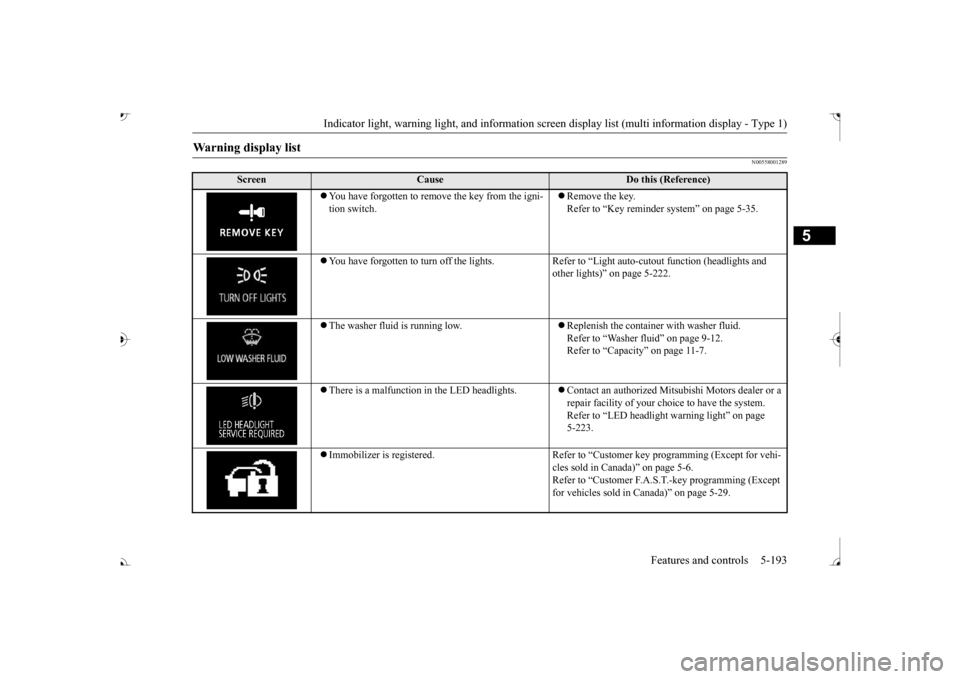
N00558001289
Warning display list
Screen
Cause
Do this (Reference)
ove the key from the igni-
tion switch.
Remove the key. Refer to “Key reminder system” on page 5-35.
You have forgotten to turn off
the lights. Refer to “Light auto
-cutout function (headlights and
other lights)” on page 5-222.
The washer fluid is running low.
Replenish the container with washer fluid. Refer to “Washer fluid” on page 9-12.Refer to “Capacity” on page 11-7.
There is a malfunction
in the LED headlights.
Contact an authorized Mitsubishi Motors dealer or a repair facility of your choi
ce to have the system.
Refer to “LED headlight
warning light” on page
5-223.
Immobilizer is registered. Refer to “Cus
tomer key programming (Except for vehi-
cles sold in Canada)” on page 5-6.Refer to “Customer F.A.S.
T.-key programming (Except
for vehicles sold in Canada)” on page 5-29.
BK0239700US.book 193 ページ 2016年6月16日 木曜日 午前10時58分
Page 275 of 521
Indicator light, warning light, and information screen display list (multi information display - Type 1)
5
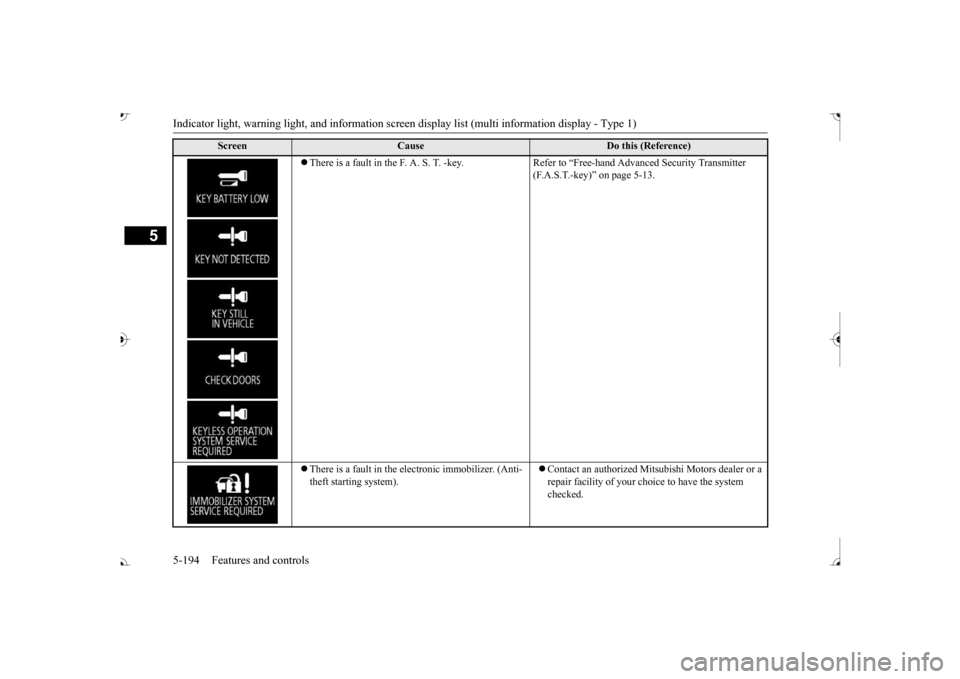
There is a fault in the F. A. S. T. -key. Refer to “Free-hand Advanced Security Transmitter
(F.A.S.T.-key)” on page 5-13.
There is a fault in the electronic immobilizer. (Anti- theft starting system).
Contact an authorized Mits
ubishi Motors dealer or a
repair facility of your c
hoice to have the system
checked.
Screen
Cause
Do this (Reference)
BK0239700US.book 194 ページ 2016年6月16日 木曜日 午前10時58分
Page 276 of 521
Indicator light, warning light, and information screen display list (multi information display - Type 1)
Features and controls 5-195
5
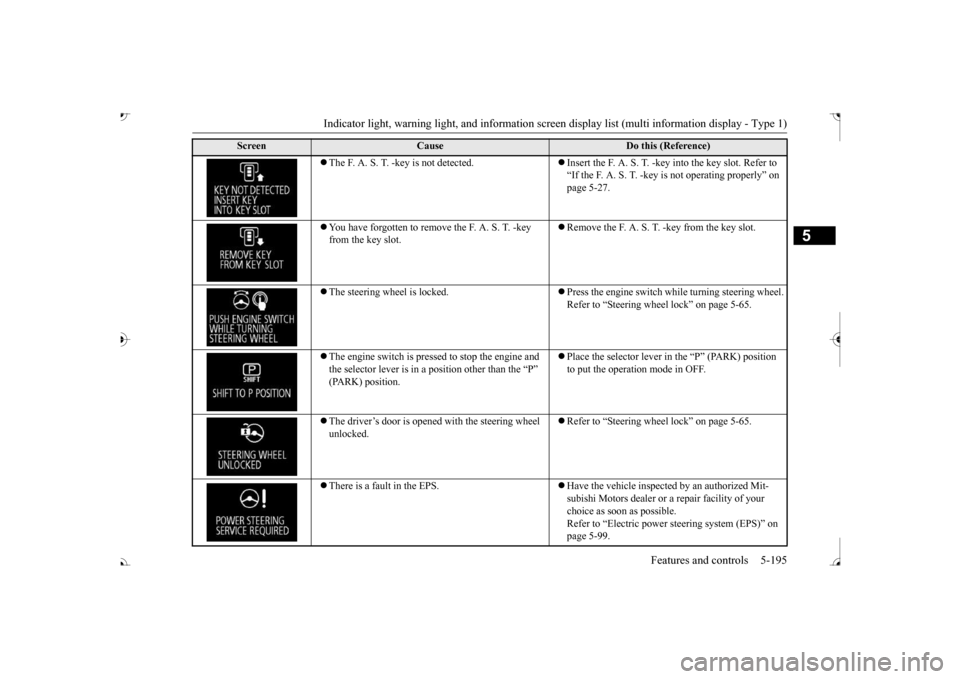
The F. A. S. T. -key is not detected.
Insert the F. A. S. T. -key into the key slot. Refer to “If the F. A. S. T. -key
is not operating properly” on
page 5-27.
You have forgotten to remove
the F. A. S. T. -key
from the key slot.
Remove the F. A. S. T.
-key from the key slot.
The steering wheel is locked.
Press the engine switch wh
ile turning steering wheel.
Refer to “Steering wheel lock” on page 5-65.
The engine switch is pre
ssed to stop the engine and
the selector lever is in a position other than the “P”
Place the selector lever in
the “P” (PARK) position
to put the operati
on mode in OFF.
The driver’s door is opened with the steering wheel unlocked.
Refer to “Steering wheel lock” on page 5-65.
There is a fault in the EPS.
Have the vehicle inspected by an authorized Mit- subishi Motors dealer or a
repair facility of your
choice as soon as possible. Refer to “Electric power
steering system (EPS)” on
page 5-99.
Screen
Cause
Do this (Reference)
BK0239700US.book 195 ページ 2016年6月16日 木曜日 午前10時58分
Page 277 of 521
Indicator light, warning light, and information screen display list (multi information display - Type 1)
5
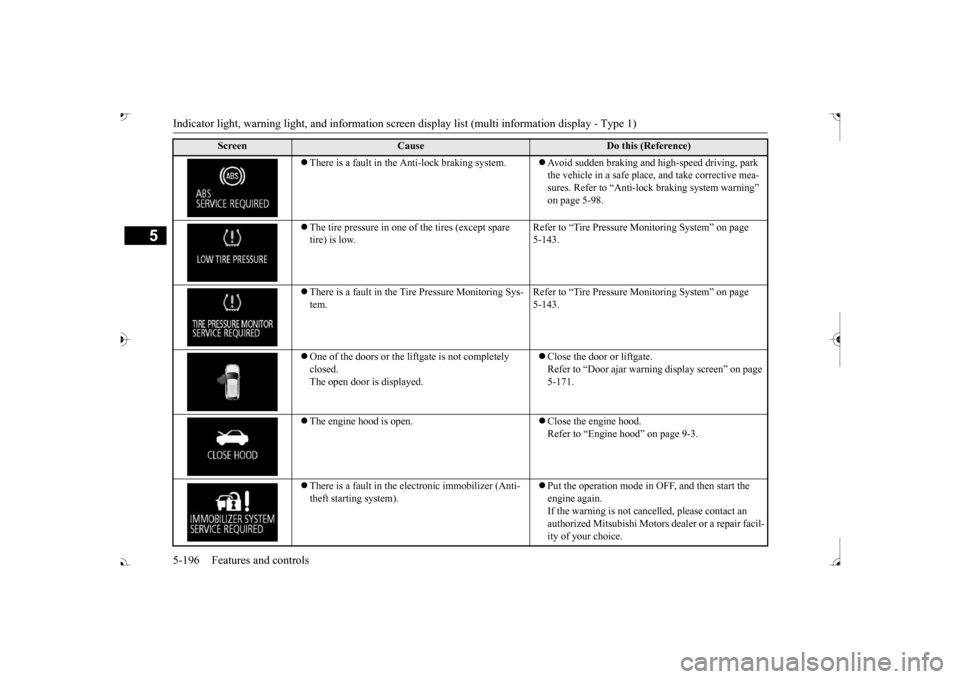
There is a fault in the Anti-lock braking system.
Avoid sudden braking and high-speed driving, park the vehicle in a safe place, and take corrective mea-sures. Refer to “Anti-lock
braking system warning”
on page 5-98.
The tire pressure in one of the tires (except spare tire) is low.
Refer to “Tire Pressure Monitoring System” on page 5-143.
There is a fault in the Tire Pressure Monitoring Sys- tem.
Refer to “Tire Pressure Monitoring System” on page 5-143.
One of the doors or the liftgate is not completely closed. The open door is displayed.
Close the door or liftgate. Refer to “Door ajar warnin
g display screen” on page
5-171.
The engine hood is open.
Close the engine hood. Refer to “Engine hood” on page 9-3.
There is a fault in the electronic immobilizer (Anti- theft starting system).
Put the operation mode in OFF, and then start the engine again.If the warning is not cancel
led, please contact an
authorized Mitsubishi Motors dealer or a repair facil- ity of your choice.
Screen
Cause
Do this (Reference)
BK0239700US.book 196 ページ 2016年6月16日 木曜日 午前10時58分
Page 278 of 521
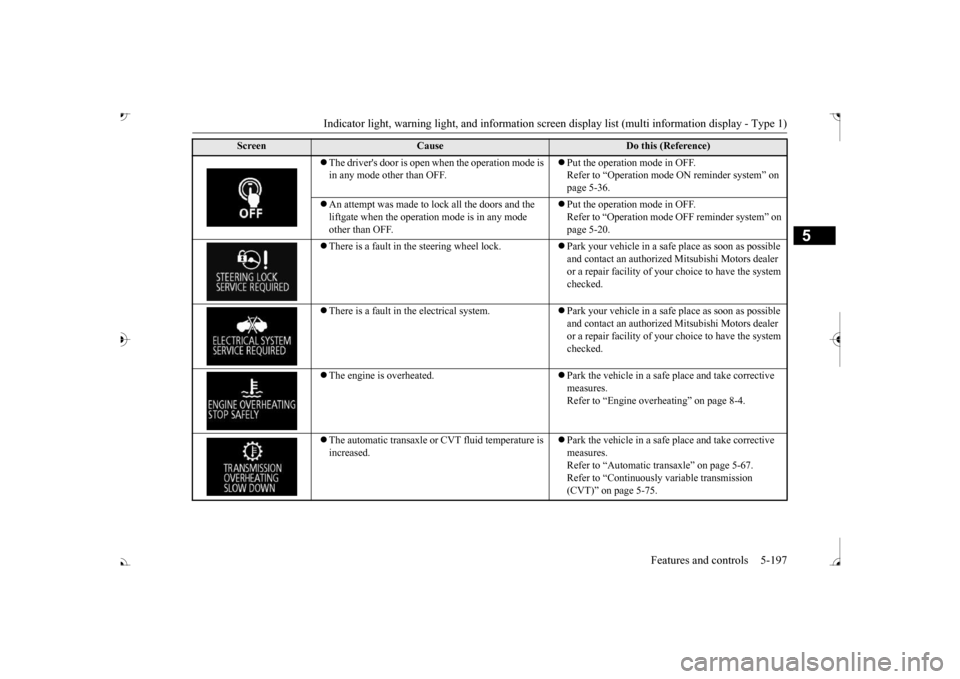
Indicator light, warning light, and information screen display list (multi information display - Type 1)
Features and controls 5-197
5
The driver's door is open when the operation mode is in any mode other than OFF.
Put the operation mode in OFF. Refer to “Operation mode
ON reminder system” on
page 5-36.
An attempt was made to lock all the doors and the liftgate when the operati
on mode is in any mode
other than OFF.
Put the operation mode in OFF. Refer to “Operation mode
OFF reminder system” on
page 5-20.
There is a fault in the steering wheel lock.
Park your vehicle in a safe
place as soon as possible
and contact an authorized
Mitsubishi Motors dealer
or a repair facility of your
choice to have the system
checked.
There is a fault in the electrical system.
Park your vehicle in a safe
place as soon as possible
and contact an authorized
Mitsubishi Motors dealer
or a repair facility of your
choice to have the system
checked.
The engine is overheated.
Park the vehicle in a safe place and take corrective measures. Refer to “Engine overh
eating” on page 8-4.
The automatic transaxle or CVT fluid temperature is increased.
Park the vehicle in a safe place and take corrective measures. Refer to “Automatic tr
ansaxle” on page 5-67.
Refer to “Continuously variable transmission (CVT)” on page 5-75.
Screen
Cause
Do this (Reference)
BK0239700US.book 197 ページ 2016年6月16日 木曜日 午前10時58分