radio MITSUBISHI OUTLANDER III 2015 Owner's Manual
[x] Cancel search | Manufacturer: MITSUBISHI, Model Year: 2015, Model line: OUTLANDER III, Model: MITSUBISHI OUTLANDER III 2015Pages: 446, PDF Size: 59.52 MB
Page 345 of 446

Listen to Satellite Radio (if so equipped) 7-30 Comfort controls
7
Channels are received in order and take 10 seconds each. Press the SCAN key. All of the channels are scanned. 1. Press the PTY key. Switches to the category search mode, and the category name is indicated on thedisplay. 2. Turn the /SEL key to select the cate- gory.3. Press the SCAN key. The channels in the selected category are scanned.
Register the channel in
advance, and select
this at a later time. 1. Tune in to the channel to register. 2. Hold down any of the keys from the 1RPT key to the 6 key. A “Beep” sounds, and the preset key isregistered.
Other channels can be
selected while listen-
ing to a channel. 1. Press the PTY key. Switches to the category search mode,and the category name is indicated on the display. 2. Turn the /SEL key to select the cate- gory. 3. Press the /SEL key. Switches to channe
l search mode.
4. Turn the /SEL key to select the chan- nel. 5. Press the /SEL key. A “Beep” sounds, and the selected chan- nel is received. (Channel preliminary set-ting mode) The channel name shown on the display flashes. Press the /SEL key again to cancel the search mode and retu
rn to normal recep-
tion. 6. To continue the search, turn the /SEL key to select the channel. The selected channel is received. 7. Press the /SEL key. Cancels the search mode and returns tonormal reception.
Scan Station Selection
Scan All Channels
NOTE
Press this key again while receiving the channel to return to normal reception. Selecting a channel will cancel this.
Scan Category Channels
NOTE
Press the SCAN key or PTY key again while receiving the channel to return to normalreception. Turning the /SET key will cancel.
Preset Memory
NOTE
The preset memory can register a maximum of 6 stations per band. If a preset key that already has a channel reg- istered is selected, then this is overwritten with the new preset. Pressing the preset key will select the previ- ously registered channel. The preset channels on the display are shownas “P1” though “P6”.
Channel Search
BK0211800US.book 30 ページ 2014年3月12日 水曜日 午後2時42分
Page 355 of 446
Display Indicator 7-40 Comfort controls
7
N00717700022
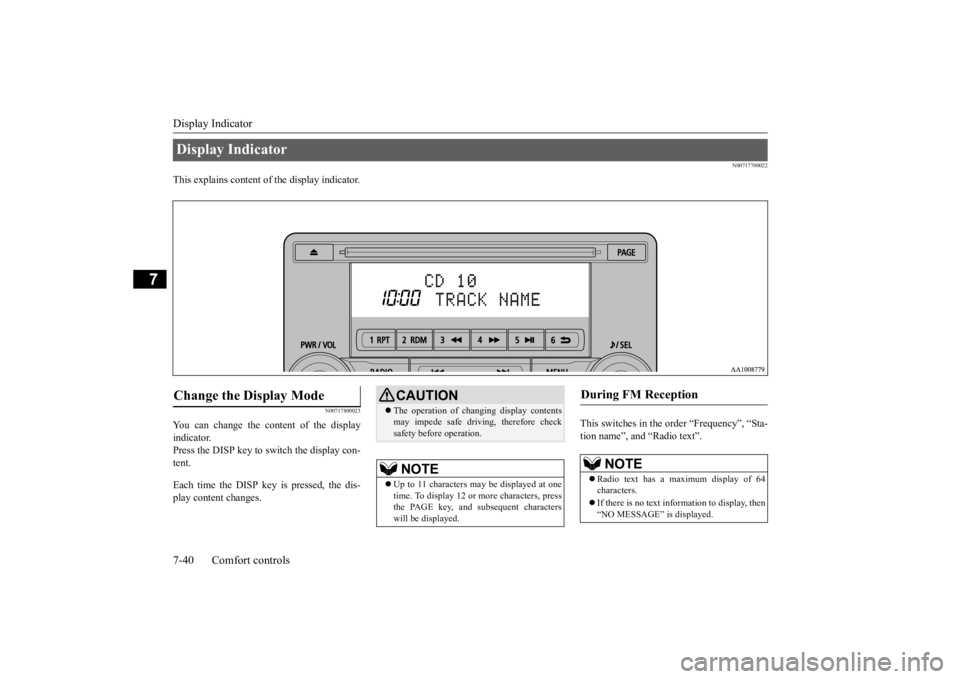
This explains content of the display indicator.
N00717800023
You can change the content of the display indicator. Press the DISP key to switch the display con-tent. Each time the DISP ke
y is pressed, the dis-
play content changes.
This switches in the order “Frequency”, “Sta- tion name”, and “Radio text”.
Display Indicator Change the Display Mode
CAUTION The operation of changing display contents may impede safe driving, therefore checksafety before operation.NOTE
Up to 11 characters
may be displayed at one
time. To display 12 or more characters, press the PAGE key, and s
ubsequent characters
will be displayed.
During FM Reception
NOTE
Radio text has a ma
ximum display of 64
characters. If there is no text information to display, then “NO MESSAGE” is displayed.
BK0211800US.book 40 ページ 2014年3月12日 水曜日 午後2時42分
Page 356 of 446
Audio Quality and Volume Balance Adjustment
Comfort controls 7-41
7
This switches in the order “Channel name”, “Category name”, “Artist name”, “Track name”, and “C
omposer name”.
This switches in the order “Disc title”, “Track title”, and “Operating status”. This switches in the order “Folder title”, “File title”, and “Operating status”.
Hold down the DISP key. This switches the ID3tag display. [DISP] Each time the key is pressed, thisswitches in the order “Album name”, “Track name”, “Artist name”, “Genre name”*, and “Operating status”.
N00718200024
This switches in the order “Albums”, “Track name”, “Artist name”, “Genre name”, and “Operating status”.
N00718300025
Operating details are the same as in “DuringiPod Playback” (P.7-41).
N00718400026
Change audio
quality settings.
1. Press the /SEL key to select settings items. Each time the /SEL
key is pressed, this
switches in the order BASS, TREBLE, FADER, BALANCE,
SCV, and Cancel.
2. Turn the /SEL key to adjust.
During Satellite Radio Reception
(if so equipped)
NOTE
The channel and cate
gory have a maximum
display of 8 characters
. The other items have
a maximum display
of 36 characters.
During CD-DA playback
NOTE
If there is no text information to display, then “NO TITLE” is displayed.
During MP3/WMA/AAC Play- back
NOTE
If there is no text information to display, then “NO TITLE” is displayed.
Display the ID3tag
*:Displayed when playing back audio files on a USB device
(vehicles with a
Bluetooth
® 2.0 interface).
NOTE
During display of the ID3tag, hold down the DISP key to switch to the folder title display. The genre name displa
y may not be possible.
During iPod Playback
NOTE
If there is no text information to display, then “NO TITLE” is displayed. Displayed genre name
in equipment by type
(vehicles with a Bluetooth
® 2.0 interface).
The genre name displa
y may not be possible.
During Bluetooth
® 2.0 Audio Play-
back
(if so equipped)
Audio Quality and Volume Balance Adjustment Adjust Audio Quality and Vol- ume Balance
BK0211800US.book 41 ページ 2014年3月12日 水曜日 午後2時42分
Page 357 of 446
System Settings 7-42 Comfort controls
7
N00718500043
Change system settings
such as product time.
1. Press the MENU key. 2. Press the /SEL key to select settings items.
Each time the /SEL key is pressed, this switches in the order Satellite radio set- tings*
1, Gracenote DB*
2, PHONE set-
tings, Adjust time, and Cancel. 3. Turn the /SEL key to set.4. Press the /SEL key to determine. This completes settings, and displays the next setti
ngs item.
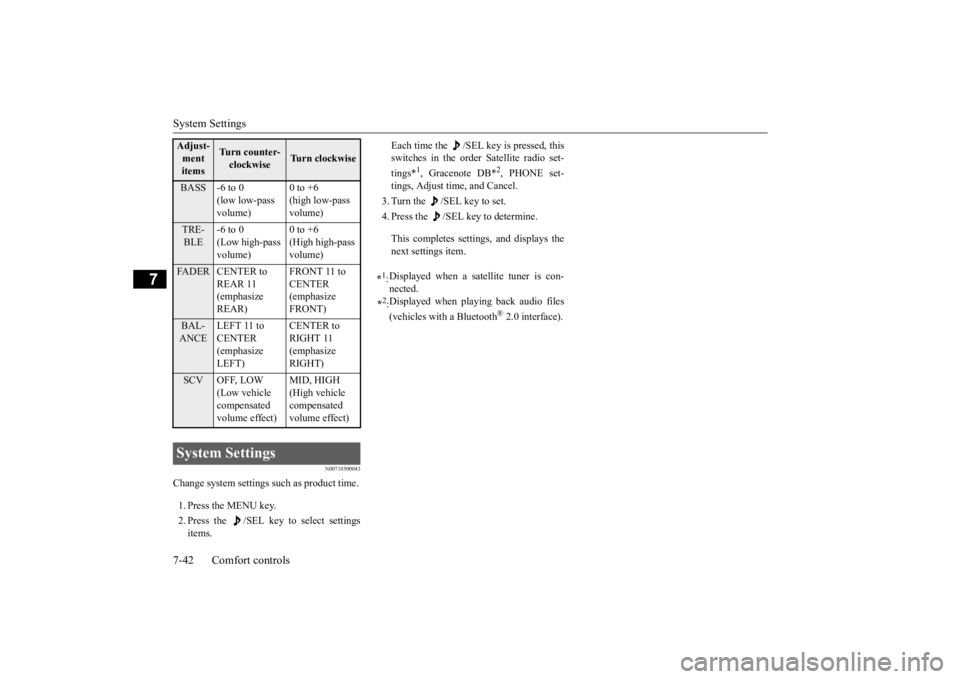
Adjust- ment items
Turn counter- clockwise
Turn clockwise
BASS -6 to 0
(low low-pass volume)
0 to +6 (high low-pass volume)
TRE- BLE
-6 to 0 (Low high-pass volume)
0 to +6 (High high-pass volume)
FADER CENTER to
REAR 11 (emphasize REAR)
FRONT 11 to CENTER (emphasize FRONT)
BAL- ANCE
LEFT 11 to CENTER (emphasize LEFT)
CENTER to RIGHT 11 (emphasize RIGHT)
SCV OFF, LOW
(Low vehicle compensated volume effect)
MID, HIGH (High vehicle compensated volume effect)
System Settings
*1: Displayed when a sate
llite tuner is con-
nected.
*2: Displayed when playi
ng back audio files
(vehicles with a Bluetooth
® 2.0 interface).
BK0211800US.book 42 ページ 2014年3月12日 水曜日 午後2時42分
Page 358 of 446
System Settings
Comfort controls 7-43
7
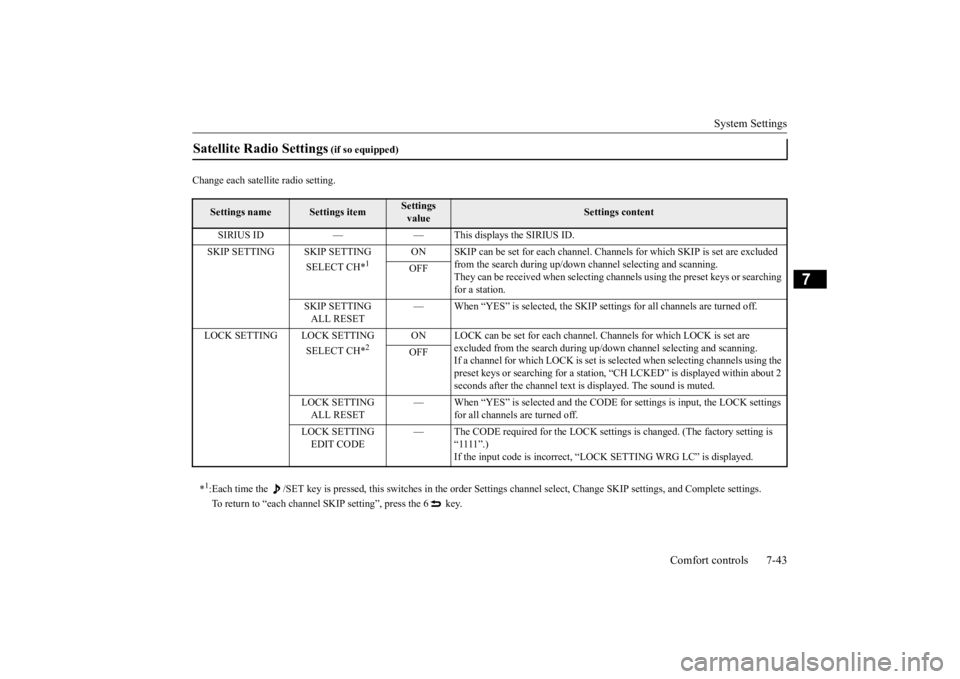
Change each satel
lite radio setting.
Satellite Radio Settings
(if so equipped)
Settings name
Settings item
Settings value
Settings content
SIRIUS ID — — This displays the SIRIUS ID. SKIP SETTING SKIP SETTING
SELECT CH*
1
ON SKIP can be set for each channel. Channels for which SKIP is set are excluded
from the search during up/down
channel selecting and scanning.
They can be received when selecting chan
nels using the preset keys or searching
for a station.
OFF
SKIP SETTING ALL RESET
— When “YES” is selected, the SKIP sett
ings for all channels are turned off.
LOCK SETTING LOCK SETTING
SELECT CH*
2
ON LOCK can be set for each channel.
Channels for which LOCK is set are
excluded from the search during up/dow
n channel selecting and scanning.
If a channel for which LOCK is set is sele
cted when selecting
channels using the
preset keys or searching for a station,
“CH LCKED” is displayed within about 2
seconds after the channel text is
displayed. The sound is muted.
OFF
LOCK SETTING ALL RESET
— When “YES” is selected and the CODE fo
r settings is input
, the LOCK settings
for all channels are turned off.
LOCK SETTING EDIT CODE
— The CODE required for the LOCK settings
is changed. (The
factory setting is
“1111”.) If the input code is incorrect, “L
OCK SETTING WRG LC
” is displayed.
*1: Each time the /SET key is pressed, this switches in the orde
r Settings channel select, Change SKIP settings, and Complete setti
ngs.
To return to “each channel SK
IP setting”, press the 6 key.
BK0211800US.book 43 ページ 2014年3月12日 水曜日 午後2時42分
Page 363 of 446
General information about your radio 7-48 Comfort controls
7
N00733901465
Your vehicle’s radio receives both AM and FM stations. The quality of your reception is affected by distance, obstacles, an
d signal interference.
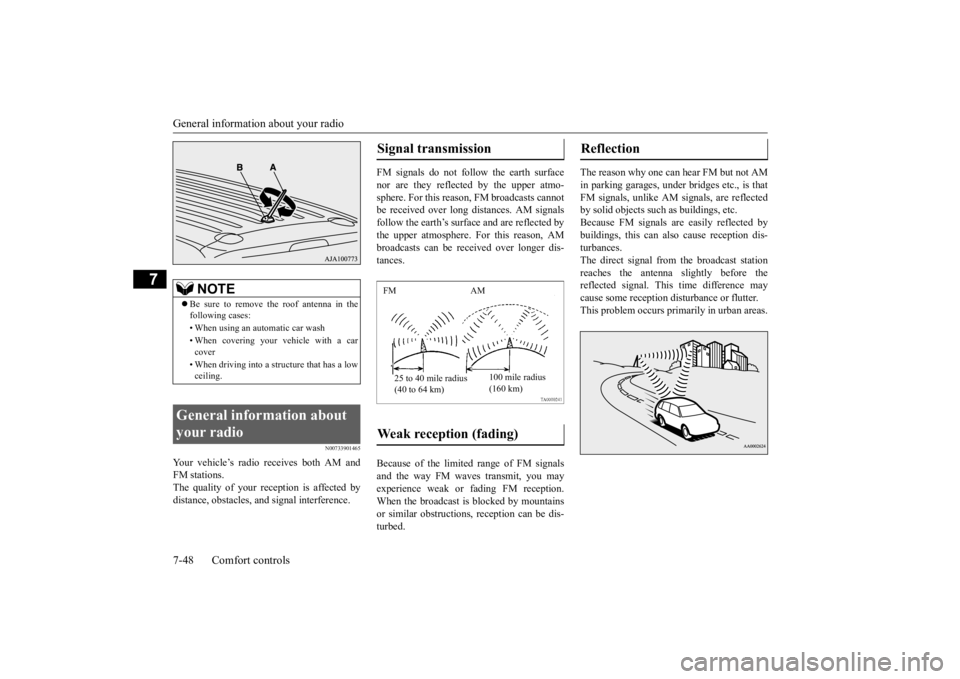
FM signals do not follow the earth surface nor are they reflected by the upper atmo- sphere. For this reason,
FM broadcasts cannot
be received over long distances. AM signalsfollow the earth’s surface and are reflected by the upper atmosphere. For this reason, AM broadcasts can be received over longer dis-tances. Because of the limited
range of FM signals
and the way FM waves transmit, you may experience weak or fading FM reception. When the broadcast is blocked by mountainsor similar obstructions,
reception can be dis-
turbed.
The reason why one can hear FM but not AM in parking garages, unde
r bridges etc., is that
FM signals, unlike AM
signals, are reflected
by solid objects such
as buildings, etc.
Because FM signals are easily reflected by buildings, this can also
cause reception dis-
turbances.The direct signal from
the broadcast station
reaches the antenna slightly before the reflected signal. This
time difference may
cause some reception di
sturbance or flutter.
This problem occurs primarily in urban areas.
NOTE
Be sure to remove the roof antenna in the following cases: • When using an automatic car wash • When covering your vehicle with a car cover • When driving into a structure that has a low ceiling.
General information about your radio
Signal transmission Weak reception (fading) FM AM 25 to 40 mile radius (40 to 64 km)
100 mile radius (160 km)
Reflection
BK0211800US.book 48 ページ 2014年3月12日 水曜日 午後2時42分
Page 364 of 446
General information about your radio
Comfort controls 7-49
7
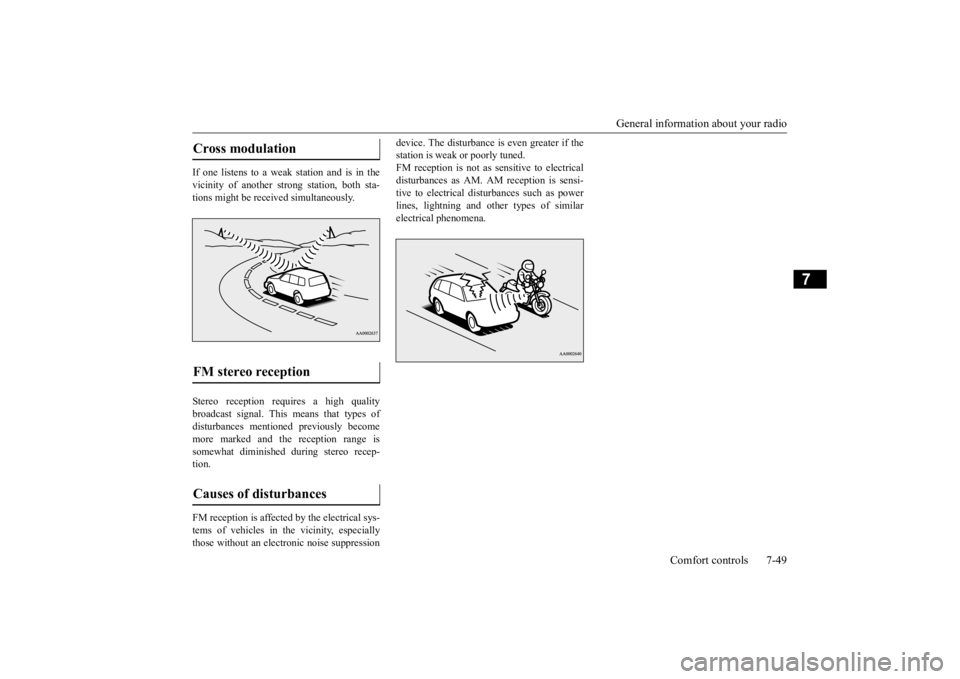
If one listens to a weak station and is in the vicinity of another st
rong station, both sta-
tions might be received simultaneously. Stereo reception re
quires a high quality
broadcast signal. This means that types ofdisturbances mentioned previously become more marked and the reception range is somewhat diminished during stereo recep-tion. FM reception is affected by the electrical sys- tems of vehicles in
the vicinity, especially
those without an elec
tronic noise suppression
device. The disturbance is even greater if the station is weak or poorly tuned.FM reception is not as sensitive to electrical disturbances as AM. AM
reception is sensi-
tive to electrical dist
urbances such as power
lines, lightning and ot
her types of similar
electrical phenomena.
Cross modulation FM stereo reception Causes of disturbances
BK0211800US.book 49 ページ 2014年3月12日 水曜日 午後2時42分
Page 403 of 446
Emission-control system maintenance 9-22 Vehicle care and maintenance
9
detergent or non-abrasive
cleaner to clean the
blades and glass areas.Replace the blades if th
ey continue to streak
or smear. If the blades are frozen to the windshield or rear window, do not operate the wipers until the ice has melted and the blades are freed,otherwise the wiper mo
tor may be damaged.
N00940800328
Your vehicle is equi
pped with an emission-
control system that me
ets all the requirements
of the U.S. Environmental Protection Agency and Environment Cana
da. The emission-con-
trol system is made of: a positive crankcase ventilation system an evaporative emission-control system an exhaust emission-control system
To be sure the emissi
on-control system works
properly, have your ve
hicle inspected and
maintained by an authorized Mitsubishi Motors dealer or a repair facility of your choice. This should be done at the time ormileage specified in the “WARRANTY AND MAINTENANCE MANUAL”. These, and all the other “general” mainte-nance services listed in this manual, need to be performed to keep
your vehicle running
properly and reliably. You should also have
an inspection and ser-
vice any time you suspect a malfunction.
N00940900231
Spark plugs must fire properly to ensure proper engine perfo
rmance and emission-
control.Do not reuse spark plugs by cleaning or regapping. Spark plugs sh
ould be replaced at
the mileage specified in the “WARRANTYAND MAINTENANCE MANUAL”.
N00941000040
Check the hose surfaces for any heat and mechanical damage, ha
rd and brittle rubber,
cracking, tears, cuts and abrasions. Pay spe-cial attention to the hos
es closest to high heat
sources such as the exhaust manifold. Check all the hose connections, such as clamps andcouplings, to make sure they are secure and that there are no leaks. If you see any wear or damage, replace the hoses immediately.
NOTE
Do not run the wipers on dry glass for a long time. This wears out
the rubber and can
scratch the glass.
During cold weather Emission-control system maintenance
NOTE
To meet government
regulations and pro-
mote cleaner air, your
vehicle is equipped
with an onboard diagnostic system (OBD).The engine electroni
c control module that
controls OBD functions
stores various data
(especially about th
e exhaust emissions).
This data will be erased if the battery cable is disconnected, which c
ould make a rapid
diagnosis difficult.
Do not disconnect the
battery cable when the engine malfunction indicator (“SERVIC
E ENGINE SOON” or
“Check engine light”) is ON.
Spark plugs
NOTE
Use the recommended or
equivalent spark
plugs listed under “Engine specifications” onpage 11-6. Use of other plugs could cause engine damage, loss of
performance or radio
noise.
Fuel hoses
BK0211800US.book 22 ページ 2014年3月12日 水曜日 午後2時42分
Page 407 of 446
Fuses 9-26 Vehicle care and maintenance
9
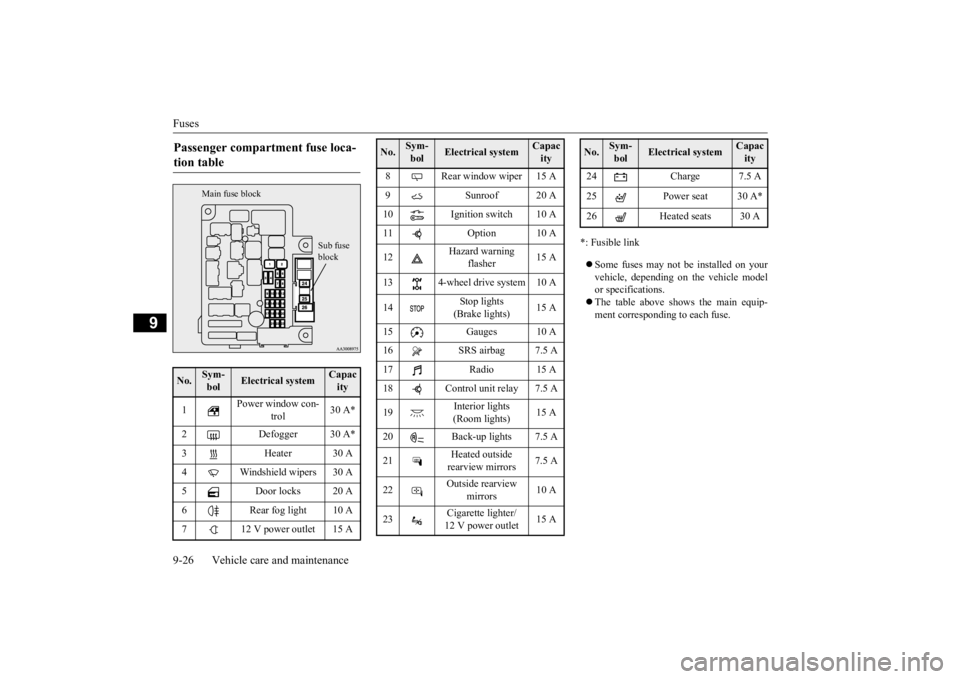
*: Fusible link Some fuses may not be installed on your vehicle, depending on the vehicle modelor specifications. The table above shows the main equip- ment corresponding to each fuse.
Passenger compartment fuse loca- tion table No.
Sym- bol
Electrical system
Capacity
1
Power window con-
trol
30 A*
2 Defogger 30 A* 3 Heater 30 A 4 Windshield wipers 30 A5 Door locks 20 A6 Rear fog light 10 A7 12 V power outlet 15 A
Sub fuse block
Main fuse block
8 Rear window wiper 15 A9 Sunroof 20 A 10 Ignition switch 10 A 11 Option 10 A 12
Hazard warning
flasher
15 A
13 4-wheel drive system 10 A 14
Stop lights (Brake lights)
15 A
15 Gauges 10 A 16 SRS airbag 7.5 A 17 Radio 15 A18 Control unit relay 7.5 A 19
Interior lights (Room lights)
15 A
20 Back-up lights 7.5 A 21
Heated outside rearview mirrors
7.5 A
22
Outside rearview
mirrors
10 A
23
Cigarette lighter/ 12 V power outlet
15 A
No.
Sym- bol
Electrical system
Capacity
24 Charge 7.5 A 25 Power seat 30 A*26 Heated seats 30 ANo.
Sym- bol
Electrical system
Capacity
BK0211800US.book 26 ページ 2014年3月12日 水曜日 午後2時42分
Page 440 of 446
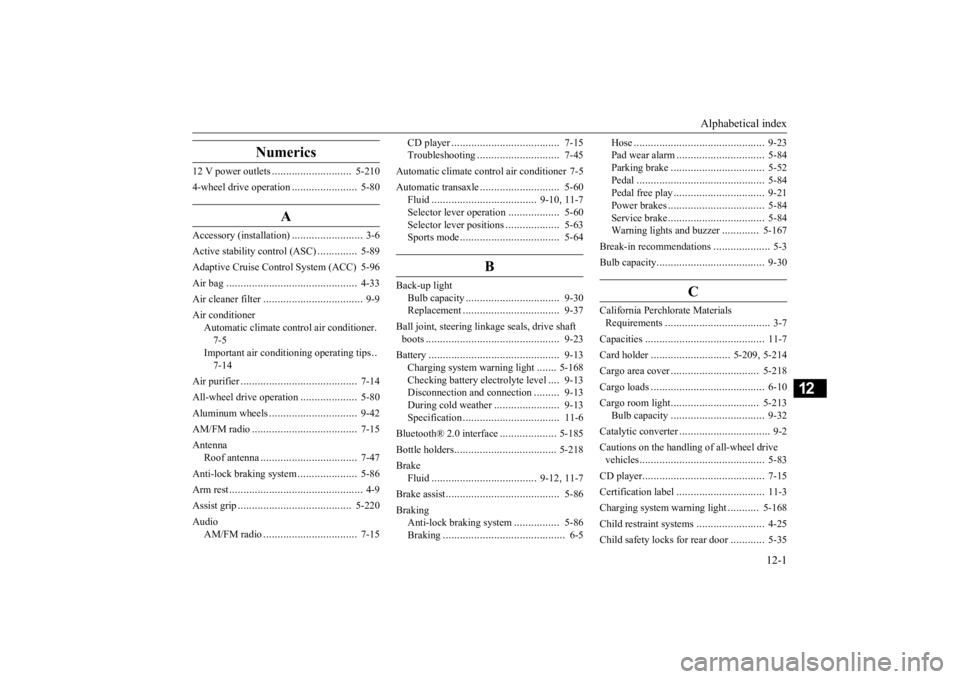
Alphabetical index
12-1
12
Numerics
12 V power outlets
............................
5-210
4-wheel drive operation
.......................
5-80
A
Accessory (installation)
.........................
3-6
Active stability control (ASC)
..............
5-89
Adaptive Cruise Cont
rol System (ACC) 5-96
Air bag
..............................................
4-33
Air cleaner filter
...................................
9-9
Air conditioner
Automatic climate control air conditioner
.
7-5Important air condi
tioning operating tips
..
7-14
Air purifier
.........................................
7-14
All-wheel drive operation
....................
5-80
Aluminum wheels
...............................
9-42
AM/FM radio
.....................................
7-15
Antenna
Roof antenna
..................................
7-47
Anti-lock braking system
.....................
5-86
Arm rest
...............................................
4-9
Assist grip
........................................
5-220
Audio
AM/FM radio
.................................
7-15
CD player
......................................
7-15
Troubleshooting
.............................
7-45
Automatic climate cont
rol air conditioner 7-5
Automatic transaxle
............................
5-60
Fluid
.....................................
9-10
, 11-7
Selector le
ver operation
..................
5-60
Selector lever positions
...................
5-63
Sports mode
...................................
5-64
B
Back-up light
Bulb capacity
.................................
9-30
Replacement
..................................
9-37
Ball joint, steering linka
ge seals, drive shaft
boots
...............................................
9-23
Battery
..............................................
9-13
Charging system warning light
.......
5-168
Checking battery
electrolyte level
....
9-13
Disconnection and connection
.........
9-13
During cold weather
.......................
9-13
Specification
..................................
11-6
Bluetooth® 2.0 interface
....................
5-185
Bottle holders
....................................
5-218
Brake
Fluid
.....................................
9-12
, 11-7
Brake assist
........................................
5-86
Braking
Anti-lock braking system
................
5-86
Braking
...........................................
6-5
Hose
..............................................
9-23
Pad wear alarm
...............................
5-84
Parking brake
.................................
5-52
Pedal
.............................................
5-84
Pedal free play
................................
9-21
Power brakes
..................................
5-84
Service brake
..................................
5-84
Warning lights and buzzer
.............
5-167
Break-in recommendations
....................
5-3
Bulb capacity
......................................
9-30
C
California Perchl
orate Materials
Requirements
.....................................
3-7
Capacities
..........................................
11-7
Card holder
............................
5-209
, 5-214
Cargo area cover
...............................
5-218
Cargo loads
........................................
6-10
Cargo room light
...............................
5-213
Bulb capacity
.................................
9-32
Catalytic converter
................................
9-2
Cautions on the handling of all-wheel drive vehicles
............................................
5-83
CD player
...........................................
7-15
Certification label
...............................
11-3
Charging system warning light
...........
5-168
Child restraint systems
........................
4-25
Child safety locks for rear door
............
5-35
BK0211800US.book 1 ページ 2014年3月12日 水曜日 午後2時42分