ECO mode MITSUBISHI OUTLANDER III 2015 Workshop Manual
[x] Cancel search | Manufacturer: MITSUBISHI, Model Year: 2015, Model line: OUTLANDER III, Model: MITSUBISHI OUTLANDER III 2015Pages: 446, PDF Size: 59.52 MB
Page 189 of 446
Lane Departure Warning System (LDW) (if so equipped) 5-112 Features and controls
5
warnings when your vehi
cle is leaving or has
left the lane.
N00578000028
Every time the operation mode is turned to“ON”, the LDW will automatically be turnedon and the “LDW” indicator will appear on the information screen of the multi-informa- tion display,
N00581000035
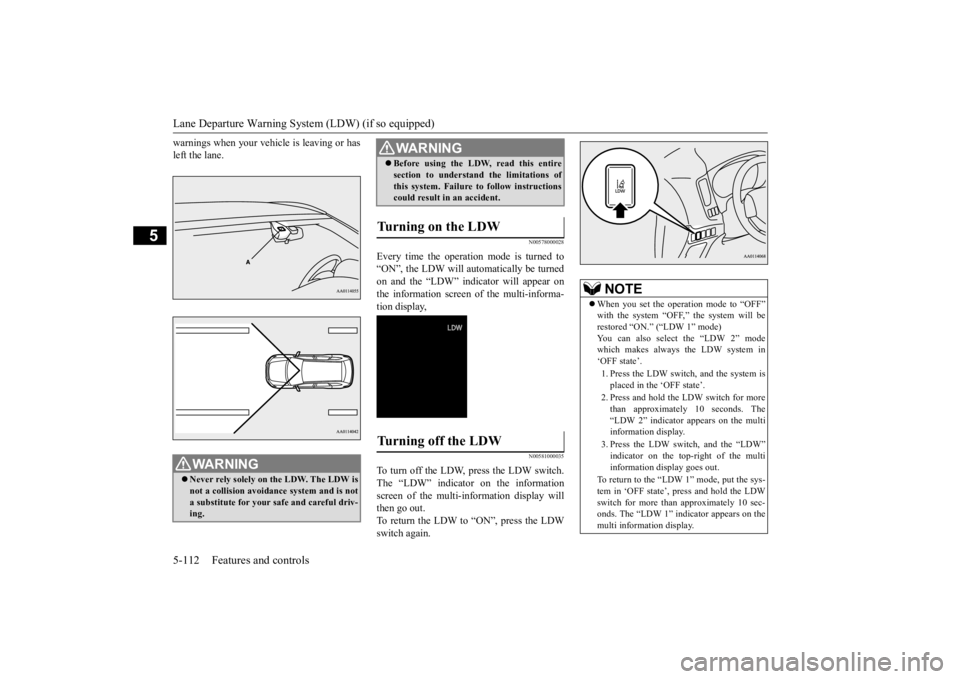
To turn off the LDW, press the LDW switch.The “LDW” indicator on the information screen of the multi-in
formation display will
then go out.To return the LDW to “ON”, press the LDW switch again.
WA R N I N G Never rely solely on the LDW. The LDW is not a collision avoidance system and is not a substitute for your safe and careful driv-ing.
Before using the LDW, read this entire section to understand the limitations ofthis system. Failure to follow instructionscould result in an accident.
Turning on the LDW
Turning off the LDW
WA R N I N G
NOTE
When you set the operation mode to “OFF” with the system “OFF,” the system will berestored “ON.” (“LDW 1” mode) You can also select the “LDW 2” mode which makes always the LDW system in‘OFF state’. 1. Press the LDW switch, and the system is placed in the ‘OFF state’. 2. Press and hold the LDW switch for more than approximately 10 seconds. The “LDW 2” indicator appears on the multi information display. 3. Press the LDW switch, and the “LDW” indicator on the top-right of the multiinformation display goes out.
To return to the “LDW 1” mode, put the sys- tem in ‘OFF state’, press and hold the LDW switch for more than
approximately 10 sec-
onds. The “LDW 1” indicator appears on themulti information display.
BK0211800US.book 112 ページ 2014年3月12日 水曜日 午後2時42分
Page 192 of 446
Tire pressure monitoring system
Features and controls 5-115
5
N00532701334
When the ignition switch is turned to the “ON” position or the ope
ration mode is put in
ON, the tire pressure monitoring system
warning light normally
illuminates and goes
off a few seconds later. If one or more of the vehicle tires (except for the spare tire) is significantly under-inflated, the warning light will remain illuminated while the ignition switch is in the “ON” posi-tion or the operation mode is put in ON. Refer to “If the warning light / display illumi- nates while driving” on page 5-117 and takethe necessary measures.
NOTE
The tire pressure monitoring system is not a substitute for regularly
checking tire infla-
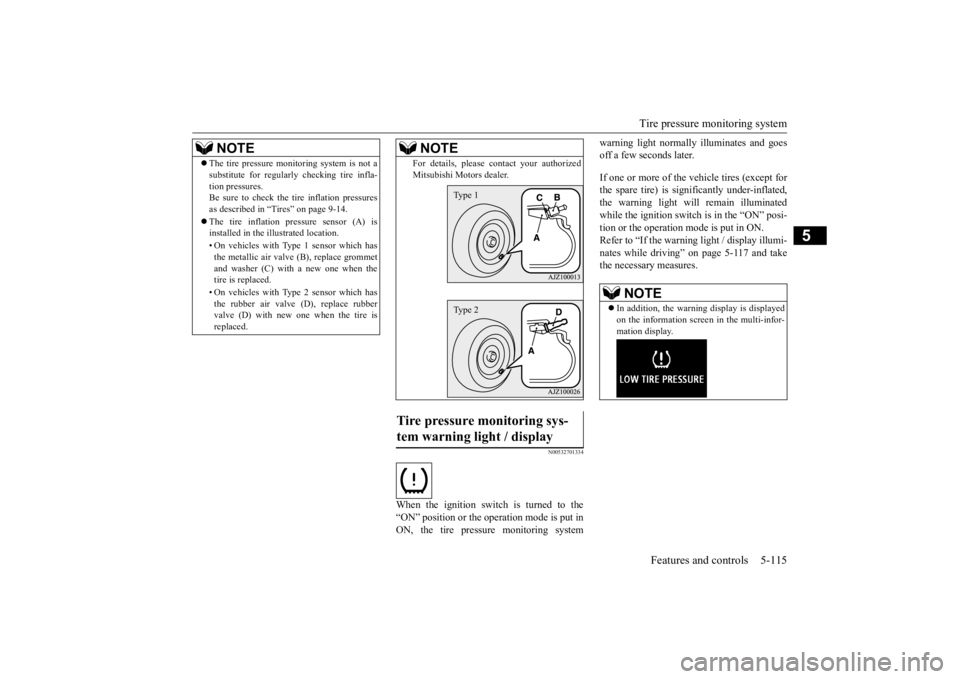
tion pressures.Be sure to check the tire inflation pressures as described in “Tires” on page 9-14. The tire inflation pressure sensor (A) is installed in the illustrated location. • On vehicles with Type
1 sensor which has
the metallic air valve (B), replace grommet and washer (C) with a new one when thetire is replaced. • On vehicles with Type
2 sensor which has
the rubber air valve (D), replace rubber valve (D) with new one when the tire is replaced.
For details, please
contact your authorized
Mitsubishi Moto
rs dealer.
Tire pressure monitoring sys- tem warning light / display
NOTE
Type 1Type 2
NOTE
In addition, the warni
ng display is displayed
on the information screen in the multi-infor-mation display.
BK0211800US.book 115 ページ 2014年3月12日 水曜日 午後2時42分
Page 193 of 446
Tire pressure monitoring system 5-116 Features and controls
5
Each tire, including the spare (if provided), should be checked monthly when cold and inflated to the inflation pressure recom-mended by the vehicle manufacturer on the vehicle placard or tire in
flation pressure label.
(If your vehicle has tires of a different sizethan the size indicated on the vehicle placard or tire inflation pres
sure label, you should
determine the proper ti
re inflation pressure
for those tires.) As an added safety fe
ature, your vehicle has
been equipped with a ti
re pressure monitoring
system (TPMS) that illuminates a low tire pressure telltale when one or more of your tires is significan
tly under-inflated.
Accordingly, when the low tire pressure tell- tale illuminates, you should stop and check your tires as soon as
possible, and inflate
them to the proper pressure. Driving on a sig- nificantly under-inflated
tire causes the tire to
overheat and can lead to tire failure.
Under-inflation also reduces fuel efficiency and tire tread life, a
nd may affect the vehi-
cle’s handling and stopping ability. Please note that the TPMS is not a substitute for proper tire maintenance, and it is the driver’sresponsibility to mainta
in correct tire pres-
sure, even if under-inf
lation has not reached
the level to trigger illumination of the TPMSlow tire pressure telltale. Your vehicle has also been equipped with a TPMS malfunction indica
tor to indicate when
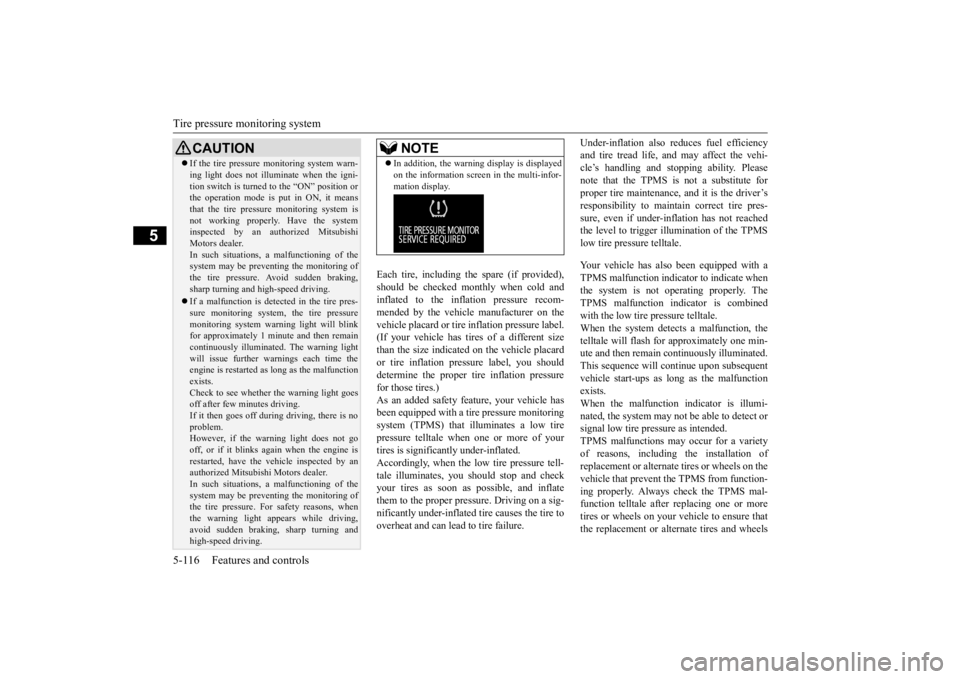
the system is not operating properly. The TPMS malfunction indicator is combined with the low tire pressure telltale.When the system detects a malfunction, the telltale will flash for approximately one min- ute and then remain continuously illuminated.This sequence will continue upon subsequent vehicle start-ups as
long as the malfunction
exists.When the malfunction indicator is illumi- nated, the system may not
be able to detect or
signal low tire pressure as intended.TPMS malfunctions may
occur for a variety
of reasons, including the installation of replacement or alternate tires or wheels on thevehicle that prevent the TPMS from function- ing properly. Always check the TPMS mal- function telltale after
replacing one or more
tires or wheels on your vehicle to ensure that the replacement or alternate tires and wheels
CAUTION If the tire pressure monitoring system warn- ing light does not illumi
nate when the igni-
tion switch is turned to the “ON” position orthe operation mode is put in ON, it means that the tire pressure monitoring system is not working properly. Have the systeminspected by an authorized Mitsubishi Motors dealer. In such situations,
a malfunctioning of the
system may be preventing the monitoring of the tire pressure. Avoid sudden braking, sharp turning and high-speed driving. If a malfunction is detected in the tire pres- sure monitoring system, the tire pressuremonitoring system warn
ing light will blink
for approximately 1 minute and then remain continuously illuminated. The warning lightwill issue further warnings each time the engine is restarted as
long as the malfunction
exists.Check to see whether
the warning light goes
off after few minutes driving. If it then goes off during driving, there is noproblem. However, if the warning light does not go off, or if it blinks again when the engine isrestarted, have the vehicle inspected by an authorized Mitsubishi Motors dealer. In such situations,
a malfunctioning of the
system may be preventing the monitoring of the tire pressure. For safety reasons, when the warning light appears while driving,avoid sudden braking, sharp turning and high-speed driving.
NOTE
In addition, the warni
ng display is displayed
on the information screen in the multi-infor-mation display.
BK0211800US.book 116 ページ 2014年3月12日 水曜日 午後2時42分
Page 199 of 446
Multi Information display - Type 1 5-122 Features and controls
5
N00555001334
The multi information display displays warn- ings, the odometer, trip odometer, servicereminder, engine cool
ant temperature, fuel
remaining, outside temper
ature, selector lever
position, average and momentary fuel con-sumption, driving range, average speed, etc.
It is also possible to change elements such as the language and units used on the multiinformation display. [With ignition switch
or operation mode in
OFF]
NOTE
You can adjust to 8 different levels for when the front side-marker
and parking lights are
illuminated and when they are not. If the vehicle is equipped with the automatic light control, the light
switch is in a position
other than the “OFF” pos
ition and it is suffi-
ciently dark outside the vehicle, the meter illumination switches automatically to theadjusted brightness. The brightness level
of the instruments is
stored when the ignition switch is turned to the “OFF” or “LOCK”
position or the opera-
tion mode is put in OFF. If you press and hold the button for longer than about 2 second when the front side-marker and parking li
ghts are illuminated,
the brightness level changes to the maximum level. Pressing and holding the button forlonger than about 2 second again returns the brightness level to
the previous level.
Multi Information display - Type 1
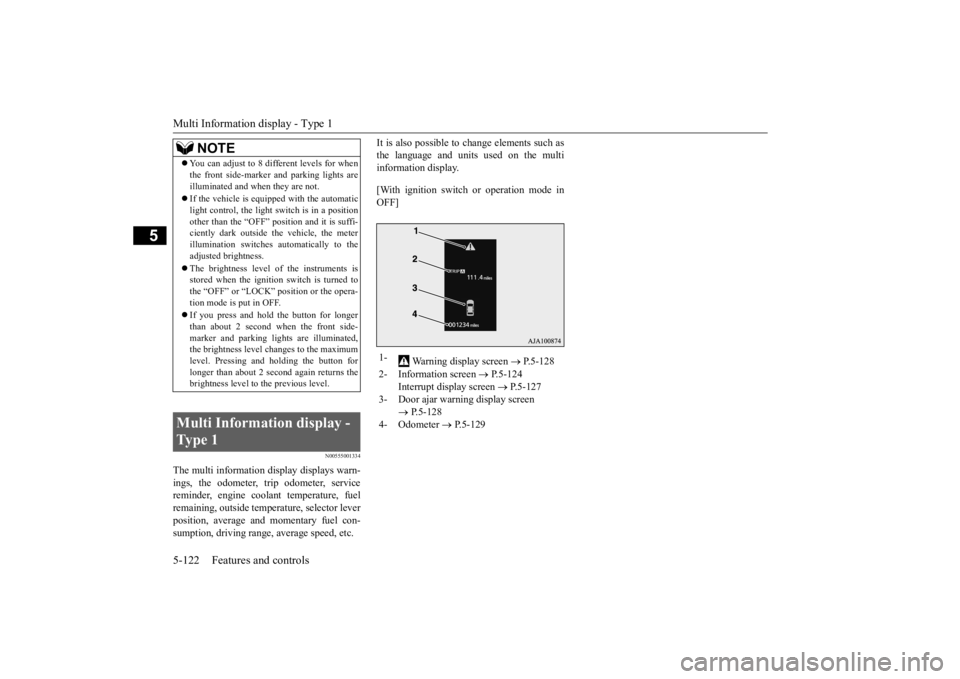
1-
Warning display screen
P.5-128
2- Information screen
P.5-124
Interrupt display screen
P.5-127
3- Door ajar warning display screen
P.5-128
4- Odometer
P.5-129
BK0211800US.book 122 ページ 2014年3月12日 水曜日 午後2時42分
Page 200 of 446
![MITSUBISHI OUTLANDER III 2015 Workshop Manual Multi Information display - Type 1
Features and controls 5-123
5
[With ignition switch or operation mode in ON]
N00555101188
Each time the multi information display switch is operated, th
e buzzer s](/img/19/58145/w960_58145-199.png "MITSUBISHI OUTLANDER III 2015 Workshop Manual Multi Information display - Type 1
Features and controls 5-123
5
[With ignition switch or operation mode in ON]
N00555101188
Each time the multi information display switch is operated, th
e buzzer s")
Multi Information display - Type 1
Features and controls 5-123
5
[With ignition switch or operation mode in ON]
N00555101188
Each time the multi information display switch is operated, th
e buzzer sounds and the
multi information disp
lay changes between
information such as warnings, trip odometer,
1- Drive mode indicator display screen (if
so equipped)
P. 5 - 7 6
2- S-AWC control mode display screen (if
so equipped)
P. 5 - 7 9
3-
Warning display screen
P.5-128
4- Forward Collision Mitigation System
(FCM) OFF displa
y screen (if so
equipped)
P.5-106
5- Lane Departure Warning (LDW) dis-
play screen (if so equipped)
P. 5 - 1 1 1
6- ECO mode indicator display screen
P.5-177
7- Information screen
P.5-124
8- Selector lever
position display
P.5-62, 5-69
9- Engine coolant te
mperature display
P.5-128
10- Odometer
P.5-129
11- Cruise control display screen (if so
equipped)
P.5-92
12- Adaptive Cruise Control System (ACC)
display screen (if so equipped) P.5-96
13- ECO indicator (if so equipped)
P.5-133
14- Fuel remaining display screen
P.5-129
15- Outside temperature display screen
P.5-129
NOTE
The fuel units, outside
temperature units,
display language, and
other settings can be
changed. Refer to “Changing the function settings” onpage 5-134.
Multi information display switch
BK0211800US.book 123 ページ 2014年3月12日 水曜日 午後2時42分
Page 202 of 446
Multi Information display - Type 1
Features and controls 5-125
5
N00555801202
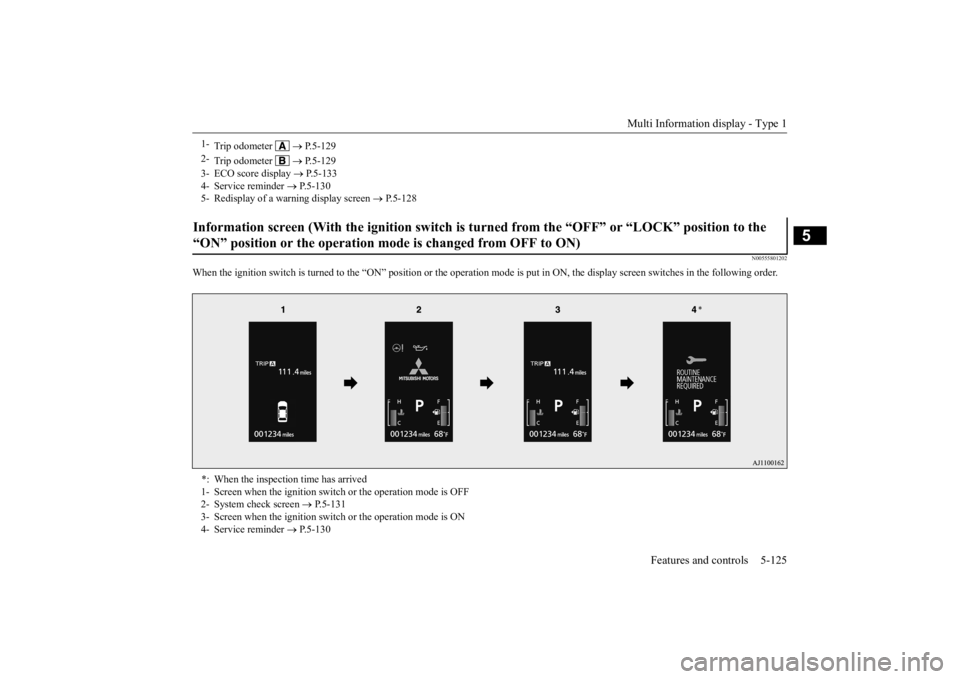
When the ignition switch is turned to the
“ON” position or the operation m
ode is put in ON, the disp
lay screen switches in the
following order.
1-
Trip odometer
P.5-129
2-
Trip odometer
P.5-129
3- ECO score display
P.5-133
4- Service reminder
P.5-130
5- Redisplay of a warning display screen
P.5-128
Information screen (With the igniti
on switch is turned from the “O
FF” or “LOCK” position to the
“ON” position or the operation mo
de is changed from OFF to ON)
*: When the inspection time has arrived 1- Screen when the ignition switch
or the operation mode is OFF
2- System check screen
P.5-131
3- Screen when the ignition switch
or the operation mode is ON
4- Service reminder
P.5-130
BK0211800US.book 125 ページ 2014年3月12日 水曜日 午後2時42分
Page 203 of 446
Multi Information display - Type 1 5-126 Features and controls
5
N00556201232
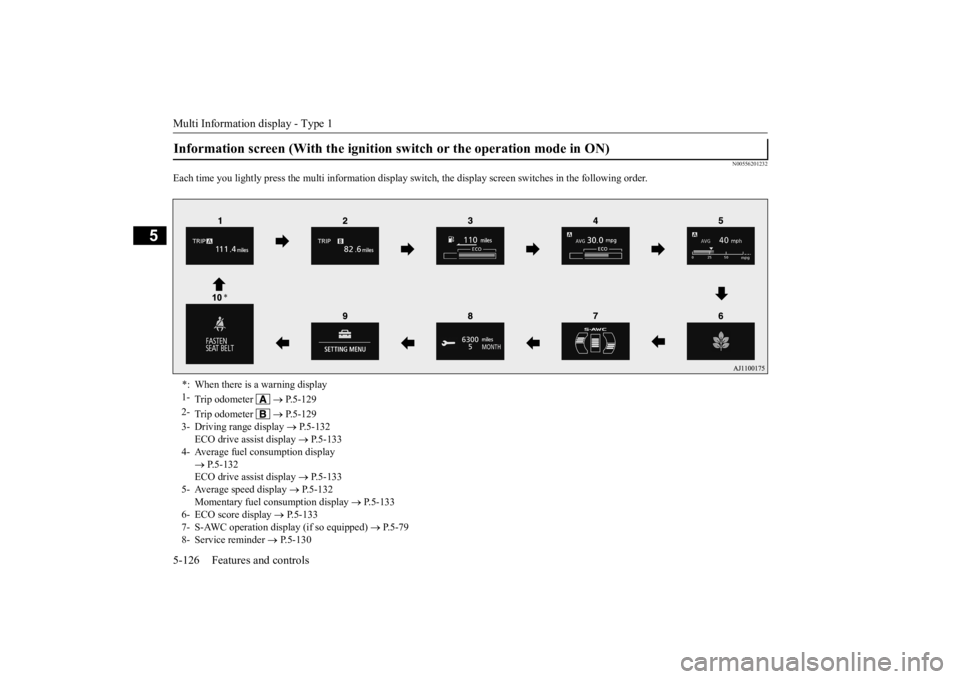
Each time you lightly press th
e multi information display switch, the displa
y screen switches in the following order.
Information screen (With the ignition
switch or the operation mode in ON)
*: When there is a warning display 1-
Trip odometer
P.5-129
2-
Trip odometer
P.5-129
3- Driving range display
P.5-132
ECO drive assist display
P.5-133
4- Average fuel consumption display
P.5-132 ECO drive assist display
P.5-133
5- Average speed display
P.5-132
Momentary fuel consumption display
P.5-133
6- ECO score display
P.5-133
7- S-AWC operation display (if so equipped)
P.5-79
8- Service reminder
P.5-130
BK0211800US.book 126 ページ 2014年3月12日 水曜日 午後2時42分
Page 205 of 446
Multi Information display - Type 1 5-128 Features and controls
5
N00579600021
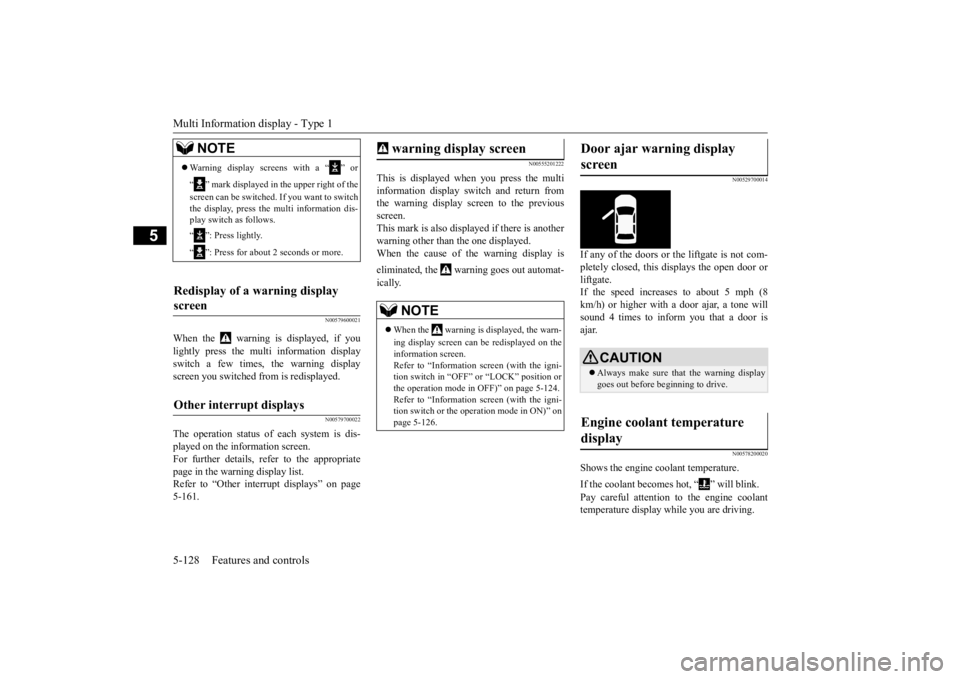
When the warning is displayed, if you lightly press the multi information display switch a few times, the warning display screen you switched from is redisplayed.
N00579700022
The operation status of
each system is dis-
played on the information screen.For further details, refer to the appropriate page in the warning display list. Refer to “Other interrupt displays” on page5-161.
N00555201222
This is displayed when you press the multi information display switch and return from the warning display screen to the previousscreen. This mark is also displa
yed if there is another
warning other than the one displayed.When the cause of the warning display is eliminated, the warning goes out automat- ically.
N00529700014
If any of the doors or the liftgate is not com- pletely closed, this displays the open door or liftgate. If the speed increases to about 5 mph (8 km/h) or higher with a door ajar, a tone will sound 4 times to inform you that a door isajar.
N00578200020
Shows the engine coolant temperature. If the coolant becomes hot, “ ” will blink. Pay careful attention to
the engine coolant
temperature display while you are driving.
NOTE
Warning display screens with a “ ” or “ ” mark displayed in the upper right of the screen can be switched
. If you want to switch
the display, press the multi information dis-play switch as follows. “ ”: Press lightly. “ ”: Press for about 2 seconds or more.
Redisplay of a warning display screen Other interrupt displays
warning display screen
NOTE
When the warning is displayed, the warn- ing display screen can
be redisplayed on the
information screen.Refer to “Information sc
reen (with the igni-
tion switch in “OFF” or “LOCK” position or the operation mode in OFF)” on page 5-124.Refer to “Information sc
reen (with the igni-
tion switch or the oper
ation mode in ON)” on
page 5-126.
Door ajar warning display screen
CAUTION Always make sure that
the warning display
goes out before beginning to drive.
Engine coolant temperature display
BK0211800US.book 128 ページ 2014年3月12日 水曜日 午後2時42分
Page 207 of 446
Multi Information display - Type 1 5-130 Features and controls
5
To return the display to 0, hold down the multi information display switch for about 2 seconds or more. Only the currently dis- played value will be reset. Example If trip odometer is
displayed, only trip
odometer wi
ll be reset.
Both trip odometers and can count up to 9999.9 m
iles/kilometers.
When a trip odometer goes past 9999.9 miles/kilometers, it returns to 0.0 miles/ kilometers. When disconnecting th
e battery terminal,
the memories of trip odometer displays
and are cleared, and their displays
return to “0.0 miles/kilometers”.
N00556701237
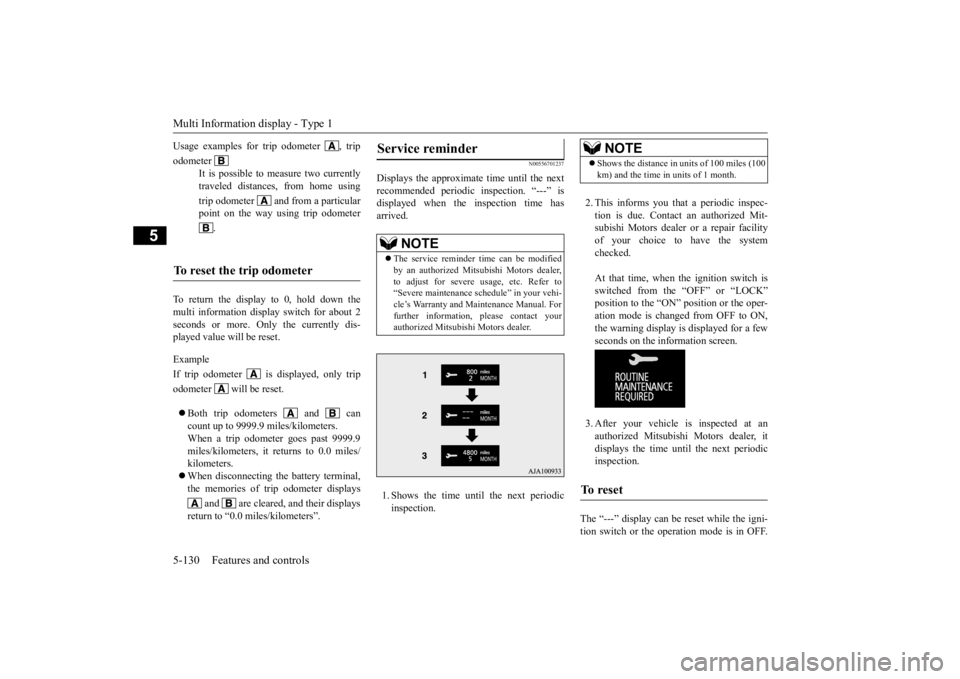
Displays the approximate time until the next recommended periodic inspection. “---” is displayed when the inspection time hasarrived. 1. Shows the time until the next periodic inspection.
2. This informs you that a periodic inspec- tion is due. Contact
an authorized Mit-
subishi Motors dealer or a repair facilityof your choice to have the system checked. At that time, when the ignition switch is switched from the “OFF” or “LOCK” position to the “ON” position or the oper-ation mode is changed from OFF to ON, the warning display is displayed for a few seconds on the information screen. 3. After your vehicle is inspected at an authorized Mitsubishi Motors dealer, it displays the time until the next periodicinspection.
The “---” display can be
reset while the igni-
tion switch or the opera
tion mode is in OFF.
Usage examples for trip odometer , trip odometer
It is possible to measure two currently traveled distances, from home using trip odometer and from a particular point on the way using trip odometer
.
To reset the trip odometer
Service reminder
NOTE
The service reminder ti
me can be modified
by an authorized Mitsubishi Motors dealer,to adjust for severe usage, etc. Refer to “Severe maintenance schedule” in your vehi- cle’s Warranty and Main
tenance Manual. For
further information,
please contact your
authorized Mitsubishi Motors dealer.
NOTE
Shows the distance in units of 100 miles (100 km) and the time in units of 1 month.
To r e s e t
BK0211800US.book 130 ページ 2014年3月12日 水曜日 午後2時42分
Page 208 of 446
Multi Information display - Type 1
Features and controls 5-131
5
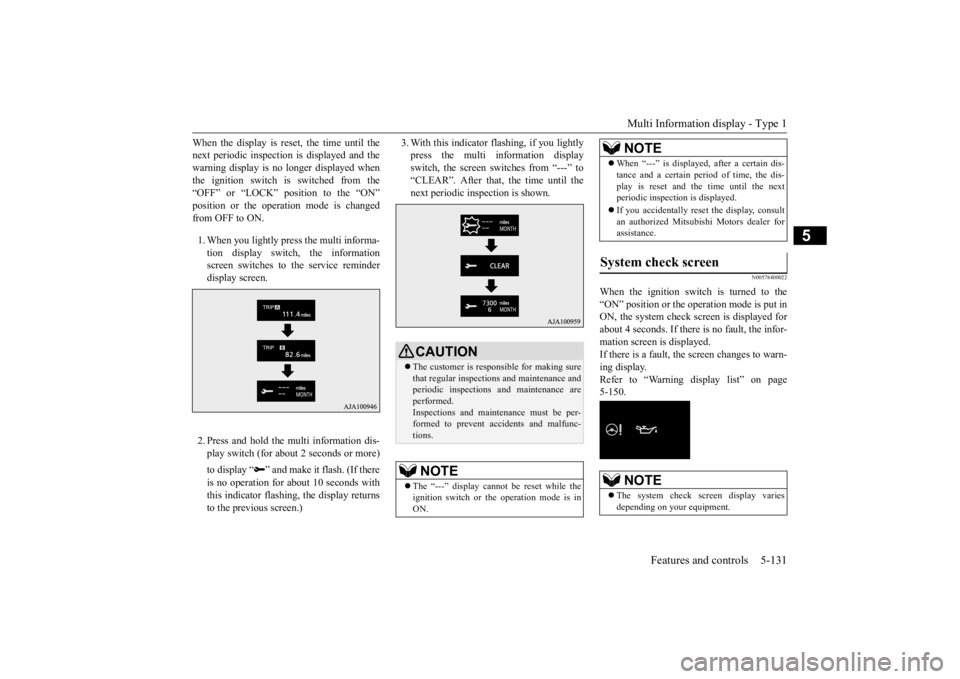
When the display is reset, the time until the next periodic inspection
is displayed and the
warning display is no longer displayed when the ignition switch is switched from the “OFF” or “LOCK” position to the “ON”position or the operation mode is changed from OFF to ON. 1. When you lightly press the multi informa- tion display switch, the informationscreen switches to the service reminder display screen. 2. Press and hold the mu
lti information dis-
play switch (for about 2 seconds or more) to display “ ” and make
it flash. (If there
is no operation for ab
out 10 seconds with
this indicator flashing,
the display returns
to the previous screen.)
3. With this indicator flashing, if you lightly press the multi information displayswitch, the screen sw
itches from “---” to
“CLEAR”. After that, the time until the next periodic inspection is shown.
N00578400022
When the ignition switch is turned to the “ON” position or the operation mode is put in ON, the system check screen is displayed forabout 4 seconds. If there is no fault, the infor- mation screen is displayed. If there is a fault, the screen changes to warn-ing display. Refer to “Warning display list” on page 5-150.
CAUTION The customer is responsible for making sure that regular inspections
and maintenance and
periodic inspections
and maintenance are
performed.Inspections and mainte
nance must be per-
formed to prevent accidents and malfunc- tions.NOTE
The “---” display cannot
be reset while the
ignition switch or th
e operation mode is in
ON.
When “---” is displaye
d, after a certain dis-
tance and a certain pe
riod of time, the dis-
play is reset and the time until the nextperiodic inspecti
on is displayed.
If you accidentally rese
t the display, consult
an authorized Mitsubishi Motors dealer for assistance.
System check screen
NOTE
The system check screen display varies depending on your equipment.NOTE
BK0211800US.book 131 ページ 2014年3月12日 水曜日 午後2時42分