Sec pressure MITSUBISHI OUTLANDER III 2015 Owners Manual
[x] Cancel search | Manufacturer: MITSUBISHI, Model Year: 2015, Model line: OUTLANDER III, Model: MITSUBISHI OUTLANDER III 2015Pages: 446, PDF Size: 59.52 MB
Page 10 of 446
2-1
2
If this warning light comes on or
flashes while you’re driving...
Quick index
N00200702159
If this warning light comes on
or flashes while you’re driving...
NOTE
For information regarding warning
displays in the multi-information display (Color
liquid crystal display
type), refer to “Mult
i-information display” on
page 5-122. These warning lights will co
me on for a few seconds for a bulb check when the i
gnition switch is
first turned to “ON” or the op
eration mode is put in ON.
Wa rn in g l ig h t s
Do this
Ref. Page
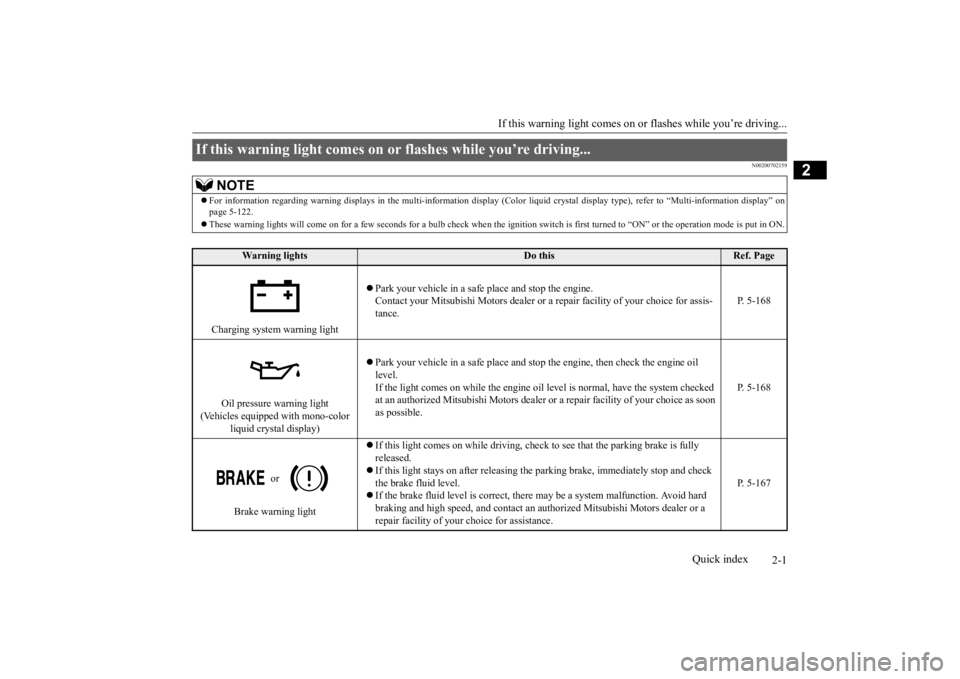
Charging system warning light
Park your vehicle in a safe
place and stop the engine.
Contact your Mitsubishi Motors dealer or a re
pair facility of your choice for assis-
tance.
P. 5-168
Oil pressure warning light
(Vehicles equipped with mono-color
liquid crystal display)
Park your vehicle in a safe
place and stop the engine, then check the engine oil
level. If the light comes on while the engine oil le
vel is normal, have the system checked
at an authorized Mitsubishi
Motors dealer or a repair fa
cility of your choice as soon
as possible.
P. 5-168
or
Brake warning light
If this light comes on while driving, check to see that the parking brake is fully released. If this light stays on after
releasing the parking brake,
immediately stop and check
the brake fluid level. If the brake fluid level is correct, there
may be a system malfunction. Avoid hard
braking and high speed, and contact an au
thorized Mitsubishi Mo
tors dealer or a
repair facility of your
choice for assistance.
P. 5-167
BK0211800US.book 1 ページ 2014年3月12日 水曜日 午後2時42分
Page 78 of 446
5
Features and controlsBreak-in recommendations ..............................................................5-3 Keys .................................................................................................5-3 Electronic immobilizer (Anti-theft starting system) ........................5-4Keyless entry system (if so equipped) ..............................................5-7 Free-hand Advanced Security Tr
ansmitter (F.A.S.T.-key) (if so
equipped).....................................................................................5-12Door locks ......................................................................................5-31 Power door locks ......
...........
...........
...........
...........
...........
.........
.....5-33
Child safety locks for rear door ..........
...........
.........
.........
.........
.....5-35
Liftgate (except for vehi
cles equipped with the
power liftgate) ....5-35
Power liftgate (if so equipped) .......................................................5-36 Inside liftgate release .....................................................................5-43Theft-alarm system ........................................................................5-44 Power window control ...................................................................5-47 Sunroof (if so equipped) .................................................................5-50Parking brake .................................................................................5-52 Steering wheel height and reach adjustment ..................................5-53 Inside rearview mirror ...................................................................5-53Outside rearview mirrors ...............................................................5-54 Ignition switch ...............................................................................5-55 Steering wheel lock (if so equipped) ..............................................5-57Starting the engine .........................................................................5-58 Automatic transaxle (if so equipped)..............................................5-60 Continuously variable transmission
(CVT) (if so equipped)..........5-67
Electronically controlled
4WD system (if so equipped).................5-74
S-AWC (Super-All Wheel Control) (if
so equipped) .....................5-77
4-wheel drive operation .................................................................5-80Inspection and maintenance followi
ng rough road operation ........5-82
Cautions on the handling of 4-wheel dr
ive vehicles ..................... 5-83
Service brake ................................................................................. 5-84 Hill start assist (if so equipped) ...................................................... 5-85Brake assist system ........................................................................ 5-86 Anti-lock braking system .............................................................. 5-86 Electric power steering system (EPS) ........................................... 5-88Active stability control (ASC) ....................................................... 5-89 Cruise control ................................................................................ 5-92 Adaptive Cruise Control System (ACC) (if so equipped) .............. 5-96Forward Collision Mitigation System
(FCM) (if so equipped) .... 5-106
Lane Departure Warning System (LDW
) (if so equipped)........... 5-111
Tire pressure monitoring system ................................................. 5-114Rear-view camera (if so equipped)............................................... 5-118 Instrument cluster ........................................................................ 5-120 Multi Information display - Type 1 ............................................. 5-122Multi Information display - Type 2 ............................................. 5-140 Indicator light, warning light, and
information screen display list
(multi information display - Type 1) ....................................... 5-148Indicator and warning light package
(multi information display - Type
2) .............................................................................................. 5-165 Indicators ..................................................................................... 5-166Warning lights .............................................................................. 5-167 Information screen display (Vehicle equipped with the multi informa- tion display - Type 1) ............................................................... 5-169Combination headlights and dimmer switch ............................... 5-171 Headlight leveling switch (if so equipped)................................... 5-176 Turn signal lever .......................................................................... 5-176Hazard warning flasher switch .................................................... 5-177
BK0211800US.book 1 ページ 2014年3月12日 水曜日 午後2時42分
Page 127 of 446
Sunroof (if so equipped) 5-50 Features and controls
5
N00551400014
Wind buffeting can be de
scribed as the per-
ception of pressure on the ears or a boomingor rumbling sound. Your
vehicle may exhibit
wind buffeting when driving with one or both rear door windows down or partially opened.This is a normal occurre
nce that can be mini-
mized. If the buffeting
occurs with the rear
door windows open, open the front door win- dows as well as the rear door windows to minimize the condition.
N00511001682
The sunroof can be opened and closed withthe ignition switch or the operation mode in ON.
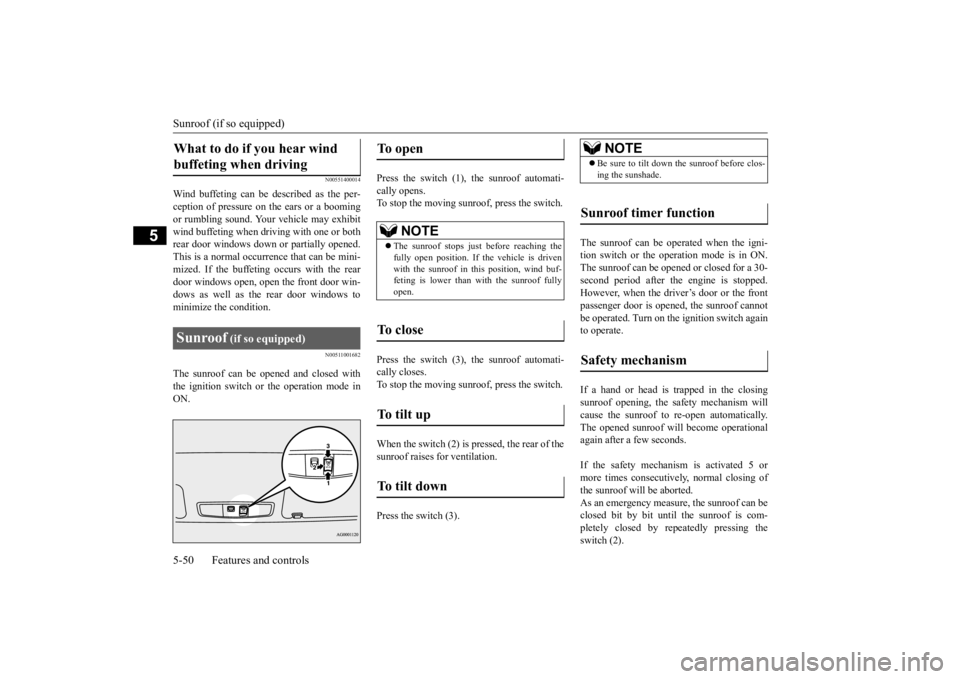
Press the switch (1), the sunroof automati- cally opens. To stop the moving sunroof, press the switch. Press the switch (3), the sunroof automati- cally closes. To stop the moving sunroof, press the switch. When the switch (2) is pressed, the rear of the sunroof raises
for ventilation.
Press the switch (3).
The sunroof can be operated when the igni- tion switch or the operation mode is in ON.The sunroof can be opened or closed for a 30- second period after th
e engine is stopped.
However, when the driver’s door or the frontpassenger door is opened, the sunroof cannot be operated. Turn on the ignition switch again to operate. If a hand or head is trapped in the closing sunroof opening, the safety mechanism willcause the sunroof to
re-open automatically.
The opened sunroof will become operational again after a few seconds. If the safety mechanism is activated 5 or more times consecutiv
ely, normal closing of
the sunroof will be aborted. As an emergency measure, the sunroof can be closed bit by bit until the sunroof is com-pletely closed by repeatedly pressing the switch (2).
What to do if you hear wind buffeting when driving Sunroof
(if so equipped)
To open
NOTE
The sunroof stops just before reaching the fully open position. If the vehicle is driven with the sunroof in this position, wind buf- feting is lower than with the sunroof fullyopen.
To close
To tilt up
To tilt down
NOTE
Be sure to tilt down the sunroof before clos- ing the sunshade.
Sunroof timer function
Safety mechanism
BK0211800US.book 50 ページ 2014年3月12日 水曜日 午後2時42分
Page 158 of 446
4-wheel drive operation
Features and controls 5-81
5
When turning a sharp corner in “4WD LOCK” or “LOCK” position at low speed, a slight difference in
steering may be experi-
enced similar to feeling as if the brakes wereapplied. This is called tight corner braking and results from each of the four tires being at a different distance from the corner. The phe-nomenon is typical of 4-
wheel drive vehicles.
If this occurs, either straighten out the steer- ing wheel or change to another mode. Set the drive mode-selector to “4WD AUTO”, “4WD LOCK” or “SNOW” inaccordance with the road conditions, and then gradually depress the accelerator pedal for a smooth start.
Set the drive mode-selector to “4WD LOCK” or “LOCK” and then gradually depress theaccelerator pedal for a
smooth start. Keep the
pressure on the accelera
tor pedal as constant
as possible, and drive at low speed.
NOTE
Driving on rough roads can be hard on a vehicle. Before you le
ave the pavement, be
sure all scheduled ma
intenance and service
has been done, and that
you have inspected
your vehicle. Pay spec
ial attention to the
condition of the ti
res, and check the tire pres-
sures. Mitsubishi Motors is not responsible to the operator for any damage or injury caused or liability incurred by improper and negligent operation of a vehicl
e. All techniques of
vehicle operation depend on the skill and experience of the opera
tor and other partici-
pating parties. Any de
viation from the rec-
ommended operating instru
ctions above is at
their own risk. Note that the stopping distance required of the 4-wheel drive vehicle differs very little from that of the front-wheel drive vehicle.When driving on a snow-covered road or a slippery, muddy surface, make sure that you keep a sufficient dist
ance between your vehi-
cle and the one ahead of you. The driving posture s
hould be more upright;
adjust the seat to a good position for easy steering and pedal operati
on. Be sure to wear
the seat belt. After driving on rough roads, check each part of the vehicle
and wash it thoroughly
with water. Refer to the “Inspection and maintenance followi
ng rough road opera-
tion” section and “Vehicle care and Mainte-nance” sections.
CAUTION Setting the drive mode-selector to “4WD LOCK” or “LOCK” position to drive on drypaved road will increa
se fuel consumption,
with possible noise generation.
Turning sharp corners On snowy or icy roads
NOTE
The use of snow tires is recommended.
Maintain a safe distan
ce between
vehicles,
avoid sudden braking, and use engine brak-ing (downshifting).CAUTION Avoid sudden braking,
sudden acceleration
and sharp turning. Sk
idding occurs and con-
trol of the vehicle could be lost.
Driving on sandy or muddy roads
CAUTION Do not force the vehicle or drive recklessly on sandy surfaces. In comparison with nor- mal road surfaces, the engine and otherdrive-system components are put under excessive strain when driving on such a sur- face. This could lead to accidents. If any of the follow
ing conditions occur
while the vehicle is
being driven, immedi-
ately park your vehicle in a safe place and follow these procedures:NOTE
BK0211800US.book 81 ページ 2014年3月12日 水曜日 午後2時42分
Page 160 of 446
Cautions on the handling of 4-wheel drive vehicles
Features and controls 5-83
5
Carefully wash the
vehicle with water.
Drive the vehicle sl
owly while lightly
depressing the brake pedal in order to dry out the brakes. If the brakes still do not function properly, contact an authorizedMitsubishi Motors dealer or a repair facil- ity of your choice as soon as possible to have the brakes checked. Remove the insects, dr
ied grass, etc. clog-
ging the radiator core. After driving through water, check the engine, transaxle and
differential oil. If
the oil or grease is milky or cloudybecause of water cont
amination, it must
be replaced with new oil. Check the inside of the vehicle. If water entry is found, dry the carpet etc. Inspect the headlights. If water is in the headlight housing, have it drained at anauthorized Mitsubishi Motors dealer or a repair facility of your choice.
N00530801201
Since the driving torque can be applied to thefour wheels, the driving performance of the
vehicle when operating in 4-wheel drive is greatly affected by the condition of the tires. Pay close attenti
on to the tires.
Install only the specified tires on all wheels. Refer to “Tires and wheels” on page 11-7. Be sure all four tires and wheels are the same size and type. When it is necessary to replace any of the tires or wheels, replace all four. All tires should be ro
tated before the wear
difference between the front and rear tiresis recognizable.
Good vehicle performance cannot be expected if there is a difference in wear between tires. Refer to “Tire rotation” onpage 9-20. Check the tire inflation pressure regularly.
Cautions on the handling of 4-wheel drive vehicles Tires and wheels
CAUTION Always use tires of th
e same size, type, and
brand that have no wear differences. Using tires of different size,
type, brands or degree
of wear, will increase the differential oil tem-perature and result in possible damage to the driving system. Further, the drive train will be subject to excessi
ve loading, possibly
leading to oil leakage,
component seizure, or
other serious failures.
To w i n g
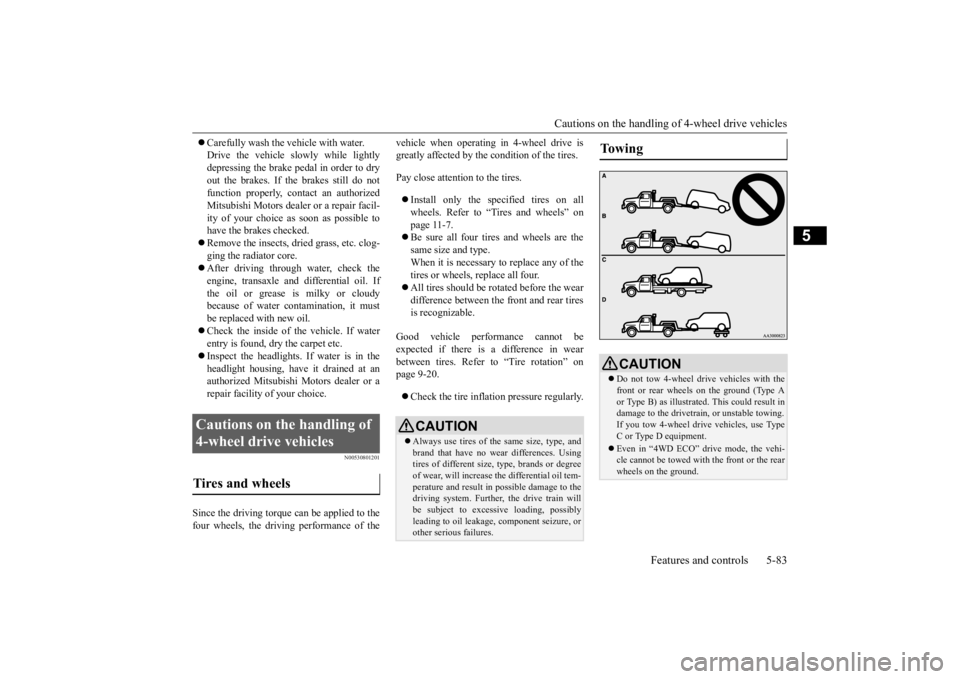
CAUTION Do not tow 4-wheel drive vehicles with the front or rear wheels on the ground (Type A or Type B) as illustrated. This could result in damage to the drivetra
in, or unstable towing.
If you tow 4-wheel drive vehicles, use TypeC or Type D equipment. Even in “4WD ECO” drive mode, the vehi- cle cannot be towed with the front or the rear wheels on the ground.
BK0211800US.book 83 ページ 2014年3月12日 水曜日 午後2時42分
Page 178 of 446
Adaptive Cruise Control System (ACC) (if so equipped)
Features and controls 5-101
5
WA R N I N G When the ACC is not being used, turn off the system to avoid unexpected ACC acti-vation. Never operate the AC
C from outside the
vehicle. The ACC will not decelerate your vehicle and/or give the approach alarm in the fol-lowing cases.• When an object other than a vehicle,such as a pedestri
an, is in front.
• When a malfunction is detected in the system.
The ACC will not decelerate your vehicle in the following cases, but will give the approach alarm.• When the front vehicle is stationary ormoving at an extremely slow speed.• When your brake system has a problem,such as overheating.
The ACC may not be able to maintain the set speed or the dist
ance to a vehicle in
front and may not alert the driver, if thesystem cannot detect the front vehicle properly. Typical situations include: • When a vehicle cuts
into your path at a
close distance.• When a vehicle in front is not completelyin your path.• When a vehicle in front is towing atrailer.• When a motorcycle or a bicycle is infront.
• When a vehicle in front is a truck loaded with freight that protrudes rearwardfrom the cargo bed.• When the height of a vehicle in front isextremely low or the road clearance ofthe vehicle is extremely high.• When driving on a r
oad with alternating
up and down surfaces.• When driving on a curve.• When driving on a bumpy or rough road.• When driving in a tunnel.• When driving in construction zones.• When the rear of you
r vehicle is weighed
down with the weight of passengers andluggage• For up to two minute
s after starting driv-
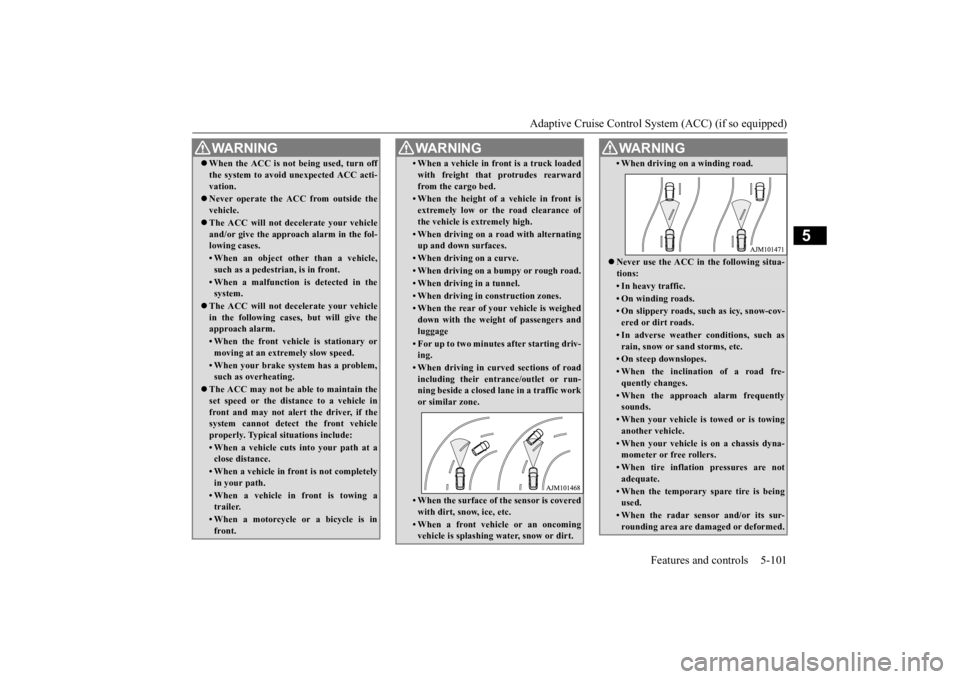
ing.• When driving in curved sections of roadincluding their entrance/outlet or run- ning beside a closed lane in a traffic work or similar zone.• When the surface of th
e sensor is covered
with dirt, snow, ice, etc.• When a front vehicl
e or an oncoming
vehicle is splashing wa
ter, snow or dirt.
WA R N I N G
• When driving on
a winding road.
Never use the ACC in the following situa- tions:• In heavy traffic.• On winding roads.• On slippery roads, such as icy, snow-cov-ered or dirt roads.• In adverse weather conditions, such asrain, snow or sand storms, etc.• On steep downslopes.• When the inclination of a road fre-quently changes.• When the approach alarm frequentlysounds.• When your vehicle is
towed or is towing
another vehicle.• When your vehicle is on a chassis dyna-mometer or free rollers.• When tire inflation pressures are notadequate.• When the temporary sp
are tire is being
used.• When the radar sensor and/or its sur-rounding area are da
maged or deformed.
WA R N I N G
BK0211800US.book 101 ページ 2014年3月12日 水曜日 午後2時42分
Page 192 of 446
Tire pressure monitoring system
Features and controls 5-115
5
N00532701334
When the ignition switch is turned to the “ON” position or the ope
ration mode is put in
ON, the tire pressure monitoring system
warning light normally
illuminates and goes
off a few seconds later. If one or more of the vehicle tires (except for the spare tire) is significantly under-inflated, the warning light will remain illuminated while the ignition switch is in the “ON” posi-tion or the operation mode is put in ON. Refer to “If the warning light / display illumi- nates while driving” on page 5-117 and takethe necessary measures.
NOTE
The tire pressure monitoring system is not a substitute for regularly
checking tire infla-
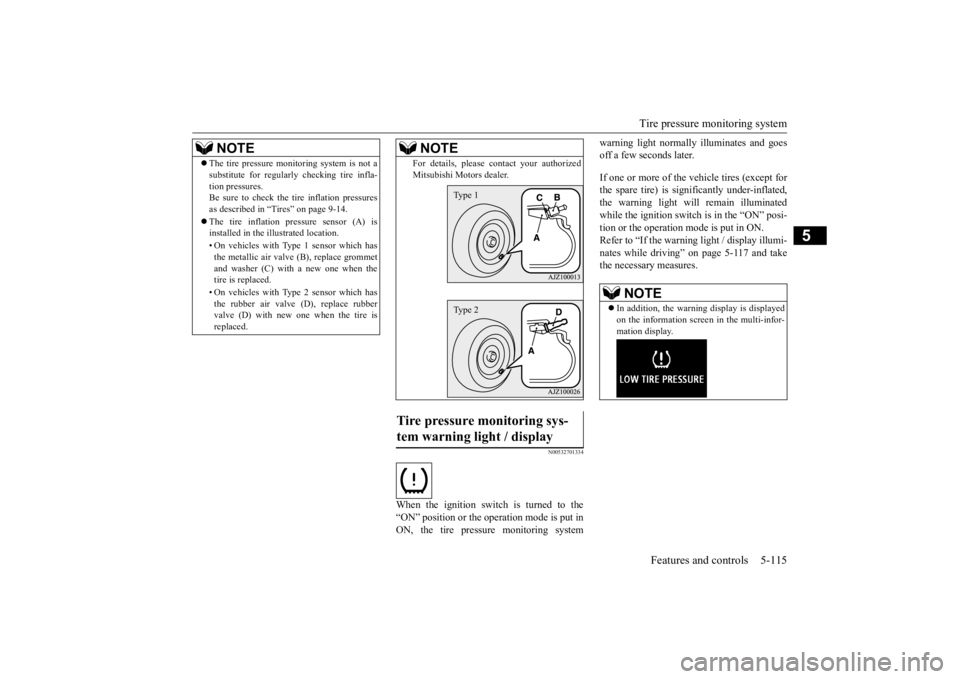
tion pressures.Be sure to check the tire inflation pressures as described in “Tires” on page 9-14. The tire inflation pressure sensor (A) is installed in the illustrated location. • On vehicles with Type
1 sensor which has
the metallic air valve (B), replace grommet and washer (C) with a new one when thetire is replaced. • On vehicles with Type
2 sensor which has
the rubber air valve (D), replace rubber valve (D) with new one when the tire is replaced.
For details, please
contact your authorized
Mitsubishi Moto
rs dealer.
Tire pressure monitoring sys- tem warning light / display
NOTE
Type 1Type 2
NOTE
In addition, the warni
ng display is displayed
on the information screen in the multi-infor-mation display.
BK0211800US.book 115 ページ 2014年3月12日 水曜日 午後2時42分
Page 196 of 446
Rear-view camera (if so equipped)
Features and controls 5-119
5
The rear-view camera (A) is in the liftgate, at the left side of
the liftgate handle.
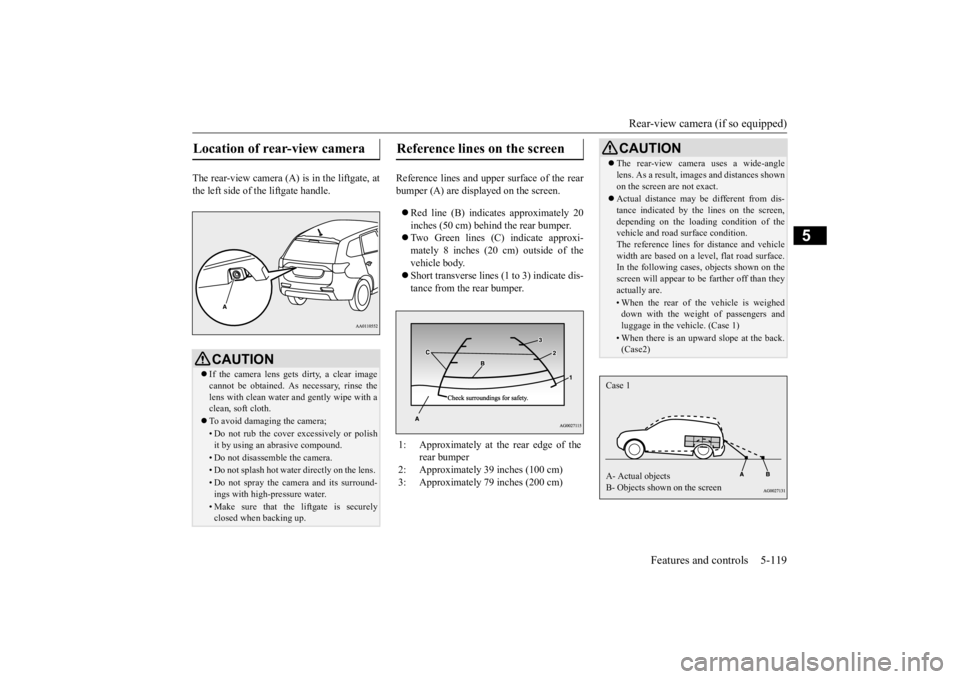
Reference lines and uppe
r surface of the rear
bumper (A) are displayed on the screen. Red line (B) indicates approximately 20 inches (50 cm) behind the rear bumper. Two Green lines (C) indicate approxi- mately 8 inches (20 cm) outside of the vehicle body. Short transverse lines (1
to 3) indicate dis-
tance from the rear bumper.
Location of rear-view camera
CAUTION If the camera lens gets
dirty, a clear image
cannot be obtained. As
necessary, rinse the
lens with clean water a
nd gently wipe with a
clean, soft cloth. To avoid damaging the camera;• Do not rub the cover excessively or polish it by using an abrasive compound. • Do not disassemble the camera.• Do not splash hot wate
r directly on the lens.
• Do not spray the camera and its surround- ings with high-
pressure water.
• Make sure that the liftgate is securely closed when backing up.
Reference lines on the screen
1: Approximately at the rear edge of the
rear bumper
2: Approximately 39 inches (100 cm) 3: Approximately 79 inches (200 cm)
CAUTION The rear-view camera uses a wide-angle lens. As a result, images and distances shownon the screen are not exact. Actual distance may be different from dis- tance indicated by the
lines on the screen,
depending on the loadi
ng condition of the
vehicle and road surface condition. The reference lines for distance and vehiclewidth are based on a level, flat road surface. In the following cases, objects shown on the screen will appear to
be farther off than they
actually are.• When the rear of th
e vehicle is weighed
down with the weight of passengers and luggage in the vehicle. (Case 1)• When there is an upward slope at the back.(Case2)
Case 1 A- Actual objects B- Objects shown on the screen
BK0211800US.book 119 ページ 2014年3月12日 水曜日 午後2時42分
Page 306 of 446
Loading information Driving safety 6-7
6
Vehicle maximum load on the tire: load on an individual tire that is determined bydistributing to each axle its share of the maximum loaded vehicle weight and dividing by two. Vehicle normal load on the tire: load on an individual tire that is determined by dis- tributing to each axle its share of the curbweight, accessory weight, and normal occupant weight and dividing by two. Maximum loaded vehicle weight: the sum of - (a) Curb weight;(b) Accessory weight; (c) Vehicle capacity weight; and (d) Production options weight. Curb weight: the weight of a motor vehi- cle with standard e
quipment including the
maximum capacity of fuel, oil, and cool-ant. Accessory weight: the combined weight (in excess of those
standard items which
may be replaced) of automatic transmis- sion, power steering, power brakes, power windows, power seats, radio, and heater,to the extent that these items are available as factory- installed equipment (whether installed or not). Vehicle capacity weight: the rated cargo and luggage load plus 150 lbs (68 kg) * times the vehicle’s
designated seating
capacity.
Production options weight: the combined weight of those installed regular produc-tion options weighing over 5 lbs (2.3 kg) in excess of those standard items which they replace, not prev
iously considered in
curb weight or accessory weight, includ- ing heavy duty brakes,
ride levelers, roof
rack, heavy duty battery, and special trim. Normal occupant weight: 150 lbs (68 kg) * times the number of
specified occupants
(3 in the case of your vehicle) Occupant distribution:
Occupant distribu-
tion within the passenger compartment (Inyour vehicle the distribution is 2 in front, 1 in second row seat)
N00630101407
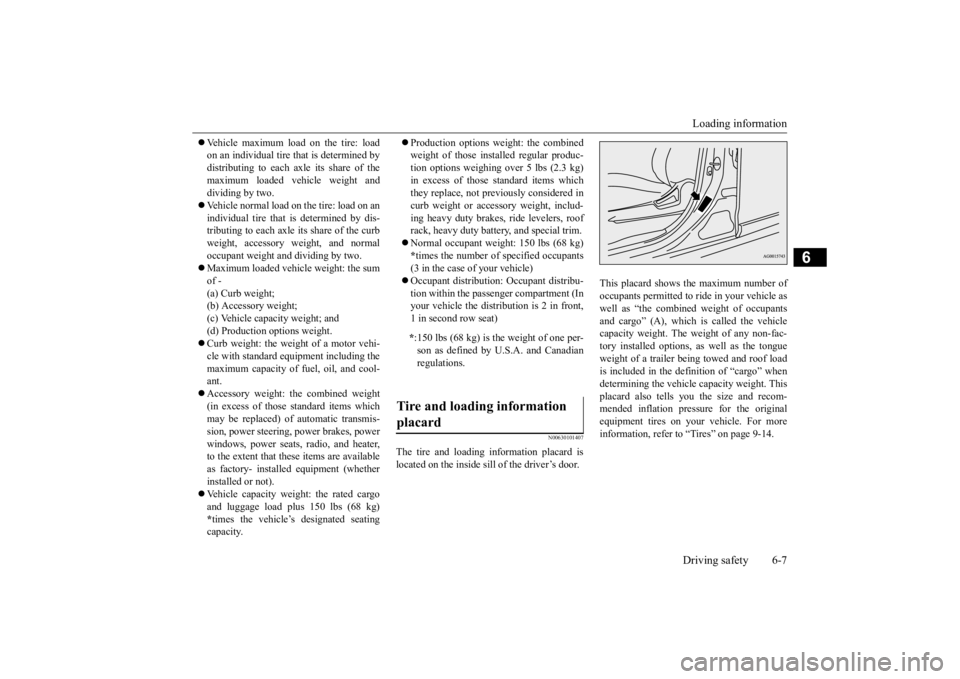
The tire and loading information placard is located on the inside sill of the driver’s door.
This placard shows the maximum number of occupants permitted to
ride in your vehicle as
well as “the combined
weight of occupants
and cargo” (A), which
is called the vehicle
capacity weight. The weight of any non-fac-tory installed options, as well as the tongue weight of a trailer being towed and roof load is included in the defi
nition of “cargo” when
determining the vehicle
capacity weight. This
placard also tells you the size and recom- mended inflation pressure for the originalequipment tires on your vehicle. For more information, refer to
“Tires” on page 9-14.
* :150 lbs (68 kg) is th
e weight of one per-
son as defined by U.S.A. and Canadian regulations.
Tire and loading information placard
BK0211800US.book 7 ページ 2014年3月12日 水曜日 午後2時42分
Page 326 of 446
Automatic climate cont
rol air conditioner
Comfort controls 7-11
7
N00712200022
You can change the following functions to match your preference. Enable automatic ai
r conditioning control:
When the AUTO switch is pressed, or when the temperature control switch hasbeen set to the minimum temperature, the air conditioning switch is automatically controlled. Disable automatic air conditioning con- trol: The air conditioning switch is not auto- matically controlled,
unless the air condi-
tioning switch is used. Changing the settings Press the air conditioning switch for about10 seconds or longer. When the setting has changed, the system will beep and the indi
cator light will flash.
• When the setting has changed from enabled to disabled, the system will beep three times and the indicator light willflash three times. • When the setting has changed from dis- abled to enabled, the system will beeptwo times and the i
ndicator light will
flash three times. On vehicles equippe
d with Mitsubishi
Multi-Communication System, screen operations can also be used to change the setting. Refer to th
e separate owner’s
manual for details.
N00703501039
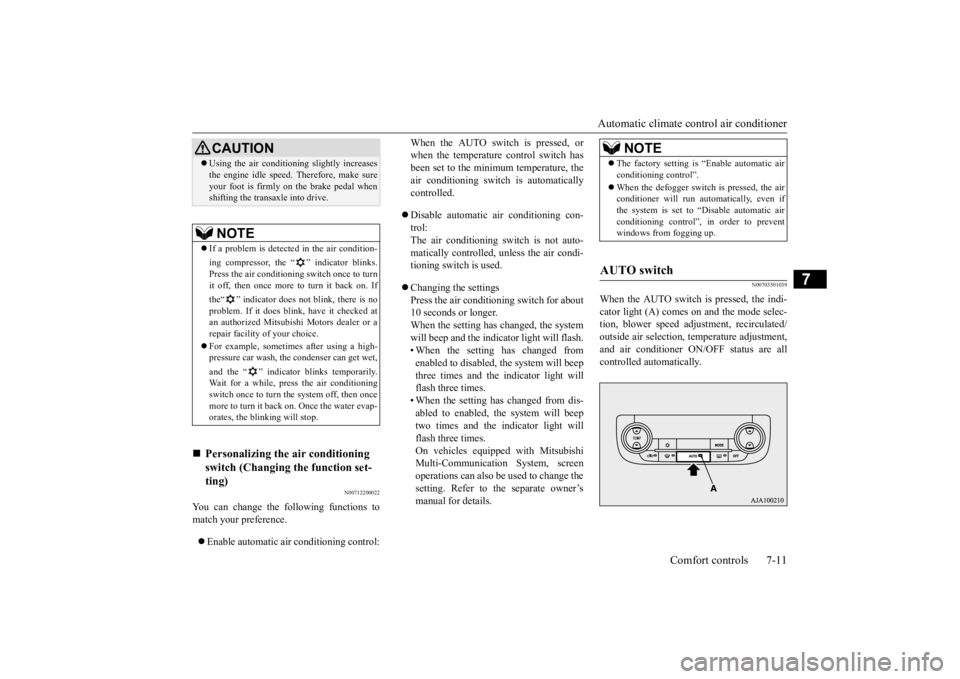
When the AUTO switch is pressed, the indi-cator light (A) comes on and the mode selec-tion, blower speed adju
stment, reci
rculated/
outside air selection, temperature adjustment, and air conditioner ON/
OFF status are all
controlled automatically.
CAUTION Using the air conditioni
ng slightly increases
the engine idle speed. Therefore, make sureyour foot is firmly on the brake pedal whenshifting the transaxle into drive.NOTE
If a problem is detect
ed in the air condition-
ing compressor, the “ ” indicator blinks. Press the air conditioning
switch once to turn
it off, then once more to turn it back on. If the“ ” indicator does not blink, there is no problem. If it does blink,
have it checked at
an authorized Mitsubish
i Motors dealer or a
repair facility of your choice. For example, sometimes after using a high- pressure car wash, the
condenser can get wet,
and the “ ” indicator blinks temporarily. Wait for a while, pres
s the air conditioning
switch once to turn the system off, then oncemore to turn it back on. Once the water evap-orates, the blinking will stop.
Personalizing the
air conditioning
switch (Changing the function set-ting)
NOTE
The factory setting is
“Enable automatic air
conditioning control”. When the defogger switch
is pressed, the air
conditioner will run au
tomatically, even if
the system is set to “Disable automatic airconditioning control”, in order to prevent windows from fogging up.
AUTO switch
BK0211800US.book 11 ページ 2014年3月12日 水曜日 午後2時42分