CD player MITSUBISHI OUTLANDER III 2016 User Guide
[x] Cancel search | Manufacturer: MITSUBISHI, Model Year: 2016, Model line: OUTLANDER III, Model: MITSUBISHI OUTLANDER III 2016Pages: 464, PDF Size: 60.77 MB
Page 343 of 464
Air purifier
Comfort controls 7-15
7
The air conditioner should be operated for at least five minutes each week, even in cold weather. This includes the quick defrostingmode. Operating the
air condition system
weekly maintains lubrication of the compres- sor internal parts to keep the air conditionerin the best operating condition.
N00733801190
The air conditioning syst
em is equipped with
an air filter to remove pollen and dust. The air filter’s ability to collect pollen anddirt is reduced as it be
comes dirty, so replace
it periodically. For the
maintenance interval,
refer to the “WARRANTY AND MAINTE-NANCE MANUAL”.
N00734302102
The audio system can only be used when theignition switch or the
operation mode is in
ON or ACC.
N00715000021
This product supports audio playback from iPod/iPhone devi
ces, however dif-
fering versions mean
that playback cannot
be guaranteed. Please be aware that depending on the iPod/iPhone model or
version, operation
may differ.
During a long period of disuse Air purifier
NOTE
Operation in certain conditions such as driv- ing on a dusty road and frequent use of the air conditioner can lead
to reduction of ser-
vice life of the filter. When you feel that theair flow is lower than normal or when the windshield or windows start to fog up easily, replace the air filter.Contact your Mitsubishi
Motors dealer or a
repair facility of your
choice for assistance.
AM/FM radio/CD player
(if
so equipped)
NOTE
To listen to the audio system while the engine is not running, turn the ignitionswitch to the “ACC”
position or put the oper-
ation mode in ACC. If the ignition switch
or the operation mode
is left in ACC, the accessory power will automatically turn off after a certain period of time and you will no
longer be able to use
the audio system. The accessory power comes on again if the ignition switch or the engine switch is operated with it in the“ACC” position. Refer to “ACC power auto- cutout function” on page 5-19 and 5-60. If a cellular phone is used inside the vehicle, it may create noise in
the audio equipment.
This does not mean that anything is wrongwith your audio equipmen
t. In such a case,
use the cellular phone at a place as far away as possible from the audio equipment.
If foreign objects or wa
ter get into the audio
equipment, or if smoke or a strange odorcomes from it, immediately turn off theaudio system and have
it checked at an
authorized Mitsubishi Motors dealer or a repair facility of your choice. Never try torepair it yourself. Avoid using the audio sys- tem until it is inspected by a qualified per- son. If the audio system is damaged by foreign objects, water, or fire, have the systemchecked by a qualified Mitsubishi Motors technician.
Important Points on Usage
iPod/iPhone Playback Function
(if
so equipped)
NOTE
BK0223400US.book 15 ページ 2015年2月13日 金曜日 午後12時15分
Page 344 of 464
AM/FM radio/CD player (if so equipped) 7-16 Comfort controls
7
N00715200023
If the product becomes dirty, wipe with a soft cloth. If very dirty, use a soft cloth dipped in neutral detergent diluted in water, and then wrung out. Do not use benzene, thin- ners, or other chemic
al wipes. This may
harm the surface.
N00715300053
Product names and other proper names are the trademarks or registered trade- marks of their respective owners. Furthermore, even if there is no specific denotation of trademarks or registered trademarks, these are to be observed intheir entirety. “Made for iPod”, “Made for iPhone” mean that an electronic accessory has been designed to connect specifically to iPod or iPhone, respec
tively, and has been
certified by the devel
oper to meet Apple
performance standards. iPhone, iPod, iPod clas
sic, iPod nano, and
iPod touch are trademarks of Apple Inc., registered in the U.S. and other countries.
Apple is not responsible for the operation of this device or its compliance withsafety and regulatory standards.
How to Clean
Trademarks
NOTE
iPod and iTunes licensi
ng allows individual
users to privately re
produce and play back
non- copyrighted material
as well as material
that may be legally copied and reproduced. Infringement of copyr
ight is prohibited.
For vehicles w
ith a Bluetooth
® 2.0 interface,
the types of devices
that can be connected
may vary.[For vehicles sold in U.S.A.] For details, access the Mitsubishi Motors North America website.[For vehicles sold in Canada and Mexico] For details, access the Mitsubishi Motors website. Please read and agree to the “Warn-ing about Links to the Web Sites of OtherCompanies”. The webs
ites mentioned above
may connect you to websites other than the Mitsubishi Motors website.http://www.mitsubishi-motors.com/en/prod- ucts/index.html
BK0223400US.book 16 ページ 2015年2月13日 金曜日 午後12時15分
Page 345 of 464
AM/FM radio/CD player (if so equipped)
Comfort controls 7-17
7
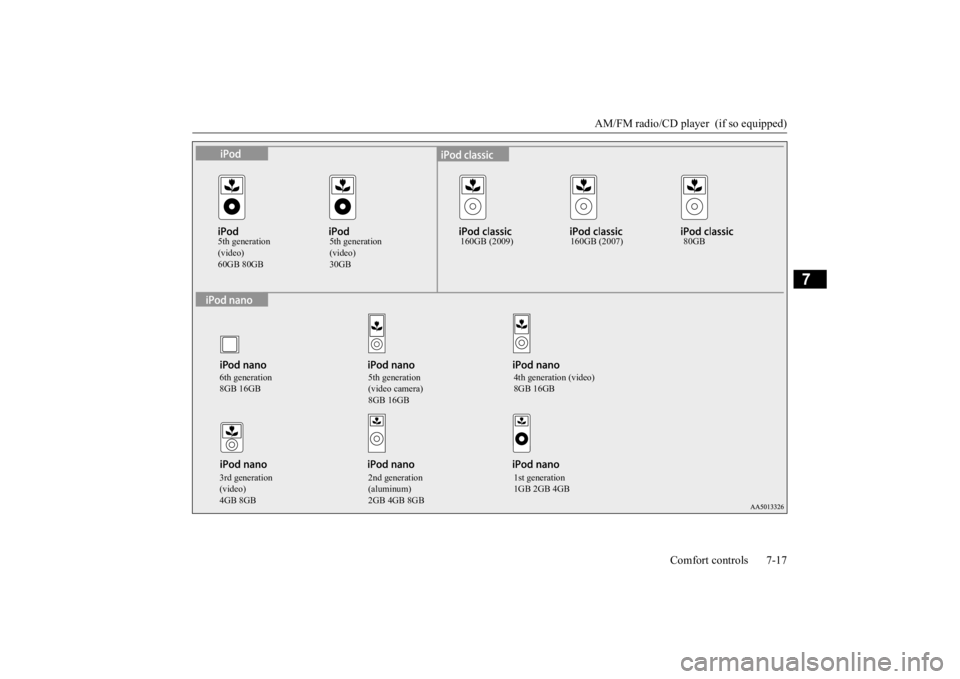
5th generation (video)60GB 80GB
5th generation (video)30GB
160GB (2009) 160GB (2007) 80GB
6th generation 8GB 16GB
5th generation (video camera) 8GB 16GB
4th generation (video) 8GB 16GB
3rd generation (video)4GB 8GB
2nd generation (aluminum)2GB 4GB 8GB
1st generation 1GB 2GB 4GB
BK0223400US.book 17 ページ 2015年2月13日 金曜日 午後12時15分
Page 364 of 464

Listen to Audio Files on a USB Device 7-36 Comfort controls
7
Press the MEDIA key to set USB as the source. The selected source is
indicated on the dis-
play.
Press the key or key to select the track. This enables selection of
the next or previous
track. Hold down the 3 key or the 4 key. Fast forward/rewind is possible. Repeat playback, random
playback, and scan
playback are possible. Press the 1RPT key. Repeat playback of th
e track currently being
played.
NOTE
Digital audio players that support the mass storage class specifications can be con-nected. For details regarding the types of USB devices that can be c
onnected and the types
of files that can be pl
ayed back in vehicles
with a Bluetooth
® 2.0 interface, refer to
“Types of connectable
devices and supported
file specifications” on page 5-217. Regarding how to c
onnect USB devices,
refer to “How to
connect a USB memory
device” on page 5-215. When connecting a US
B device, use a con-
nection cable. Failure to use a connection cable when connecti
ng may place undue load
on, or damage th
e USB connector.
Set up the device in order that no unsafe actions, such as pluggi
ng in the connection
cable are taken while driving. When inserting and removing the USB device, for safety’s sa
ke first stop the vehi-
cle. Do not insert other than audio devices into the USB port. Damage
to the device or
equipment may result. Depending on the status
of the USB device,
it may take some time
until the device is rec-
ognized, or playback starts. Depending on USB device
s, buttons on the
product will not operate while the USBdevice is connected.
USB device specificati
ons and settings may
mean that connection is not possible, orresult in differences
in operation or display.
Depending on audio data
in the USB device,
track information may
not be displayed cor-
rectly. Depending on the status of the vehicle and device, the iPod/iPhone
may not play back
after starting the engine. Data containing copyri
ght information may
not play back. This product can play
back MP3, WMA, and
AAC format audio files. Depending on the type of USB device, usage may not be possible, or
functions that can be
used may be restricted. The recommended file system for USB memory is FAT32. The maximum supported capacity for USB memory is 32GB. Operate the USB device containing recorded audio files while conne
cted to this product.
Play Back of Audio Files on a USB Device
NOTE
Select the Track (File) Fast Forward or Rewind Switch Playback Mode Repeat Playback (RPT)
NOTE
Pressing again will cancel.
BK0223400US.book 36 ページ 2015年2月13日 金曜日 午後12時15分
Page 457 of 464

Alphabetical index
12-1
12
Numerics
12 V power outlets
............................
5-219
4-wheel drive operation
.......................
5-85
A
Accessory (installation)
.........................
3-6
Active stability control (ASC)
..............
5-94
Adaptive Cruise C
ontrol System (ACC)
.......
5-100 Air bag
..............................................
4-33
Air cleaner filter
...................................
9-9
Air conditioner
Automatic climate control air conditioner
.
7-5 Important air condi
tioning operating tips
..
7-14
Air purifier
.........................................
7-15
All-wheel drive operation
....................
5-85
Aluminum wheels
...............................
9-42
AM/FM radio
.....................................
7-15
Antenna
Roof antenna
..................................
7-51
Anti-lock braking system
.....................
5-91
Arm rest
...............................................
4-9
Assist grip
........................................
5-235
Audio
AM/FM radio
.................................
7-15
CD player
......................................
7-15
Troubleshooting
.............................
7-49
Automatic climate cont
rol air conditioner 7-5
Automatic transaxle
............................
5-64
Fluid
.....................................
9-11
, 11-7
Selector le
ver operation
..................
5-64
Selector lever positions
...................
5-68
Sports mode
...................................
5-68
B
Back-up light
Bulb capacity
.................................
9-30
Replacement
..................................
9-36
Ball joint, steering linka
ge seals, drive shaft
boots
...............................................
9-24
Battery
..............................................
9-13
Charging system warning light
.......
5-174
Checking battery
electrolyte level
....
9-13
Disconnection and connection
.........
9-14
During cold weather
.......................
9-13
Specification
..................................
11-6
Bluetooth® 2.0 interface
....................
5-192
Bottle holders
....................................
5-233
Brake
Fluid
.....................................
9-12
, 11-7
Brake assist
........................................
5-90
Braking
Anti-lock braking system
................
5-91
Braking
............................................
6-5
Hose
..............................................
9-24
Pad wear alarm
...............................
5-89
Parking brake
.................................
5-53
Pedal
.............................................
5-89
Pedal free play
................................
9-21
Power brakes
..................................
5-89
Service brake
..................................
5-89
Warning lights and buzzer
.............
5-173
Break-in recommendations
....................
5-3
Bulb capacity
......................................
9-30
C
California Perchl
orate Materials
Requirements
.....................................
3-7
Capacities
..........................................
11-7
Card holder
............................
5-219
, 5-229
Cargo area cover
...............................
5-233
Cargo loads
........................................
6-10
Cargo room light
...............................
5-227
Bulb capacity
.................................
9-32
Catalytic converter
................................
9-2
Cautions on the handling of all-wheel drive vehicles
............................................
5-88
CD player
...........................................
7-15
Certification label
...............................
11-3
Charging system warning light
...........
5-174
Child restraint systems
........................
4-26
BK0223400US.book 1 ページ 2015年2月13日 金曜日 午後12時15分