fuel consumption MITSUBISHI OUTLANDER III 2016 User Guide
[x] Cancel search | Manufacturer: MITSUBISHI, Model Year: 2016, Model line: OUTLANDER III, Model: MITSUBISHI OUTLANDER III 2016Pages: 464, PDF Size: 60.77 MB
Page 221 of 464
Multi Information display - Type 1
Features and controls 5-145
5
Refer to “Changing th
e function settings”
on page 5-140.2. Lightly press the multi information dis- play switch to select “ ” (operation sound setting). 3. Press and hold the mu
lti information dis-
play switch (for about 2 seconds or more) to switch from ON (operation sound on)to OFF (operation sound off), or from OFF to ON. The setting is changed to the selected con- dition.
N00557501160
The time until the display appears can be changed.
1. Press and hold the multi information dis- play switch (for about 2 seconds or more)to switch from the setting mode screen to the menu screen. Refer to “Changing the function settings”on page 5-140. 2. Lightly press the multi information dis- play switch to select “ALARM” (rest timesetting). 3. Press and hold the multi information dis- play switch (for about 2 seconds or more) to display “ALARM” (rest time setting). 4. Lightly press the multi information dis-play switch to select the time until the dis- play appears. 5. Press and hold the multi information dis-play switch (for about 2 seconds or more) to change the setting to the selected time.
N00563501080
It is possible to change the turn signal sound.
1. Press and hold the multi information dis- play switch (for about 2 seconds or more)to switch from the setting mode screen to the menu screen. Refer to “Changing th
e function settings”
on page 5-140. 2. Lightly press the multi information dis- play switch to select . (changing the turn signal sound) 3. Press and hold the multi information dis- play switch (for about 2 seconds or more) to switch from 1 (turn-signal sound 1) to 2(turn-signal sound 2), or from 2 to 1. The setting changes to the selected turn signal sound.
N00563601049
It is possible to change the bar graph settingof the momentary fuel consumption display. 1. Press and hold the multi information dis- play switch (for about 2 seconds or more) to switch from the setting mode screen to the menu screen.Refer to “Changing th
e function settings”
on page 5-140. 2. Lightly press the multi information dis- play switch to select . (changing the momentary fuel consumption display)
NOTE
If the battery is disconnected, the memory of the operation sound setting is erased and is automatically
set to “ON” (operation sound
on). The operation sound set
ting only deactivates
the operation sound of the multi informationdisplay switch and rheo
stat illumination but-
ton. The warning disp
lay and other sounds
cannot be de
activated.
Changing the time until “REST REMINDER” is displayed
NOTE
If the battery is disconnected, the memory of the unit setting is erased and is automatically set to the “OFF”. The drive time is reset when the ignition switch is in the “LOCK” or “OFF” position or the operation mode is in OFF.
Changing the turn signal sound
Changing the momentary fuel con- sumption display
BK0223400US.book 145 ページ 2015年2月13日 金曜日 午後12時15分
Page 222 of 464
Multi Information display - Type 2 5-146 Features and controls
5
3. Press and hold the multi information dis- play switch (for about 2 seconds or more)to switch from ON (with the green bar graph) to OFF (without the green bar graph), or from OFF to ON.The setting changes to the selected bar graph setting.
N00557601217
Many of the function settings can be returned to their factory settings. 1. Press and hold the multi information dis- play switch (for about 2 seconds or more) to switch from the setting mode screen to the menu screen.Refer to “Changing the function settings” on page 5-140. 2. Lightly press the multi information dis-play switch to select “RESET” (return to the factory settings). 3. Press and hold the multi information dis-play switch (for about
5 seconds or more),
the buzzer sounds and
all of the function
settings are returned to the factory set-tings.
N00555001291
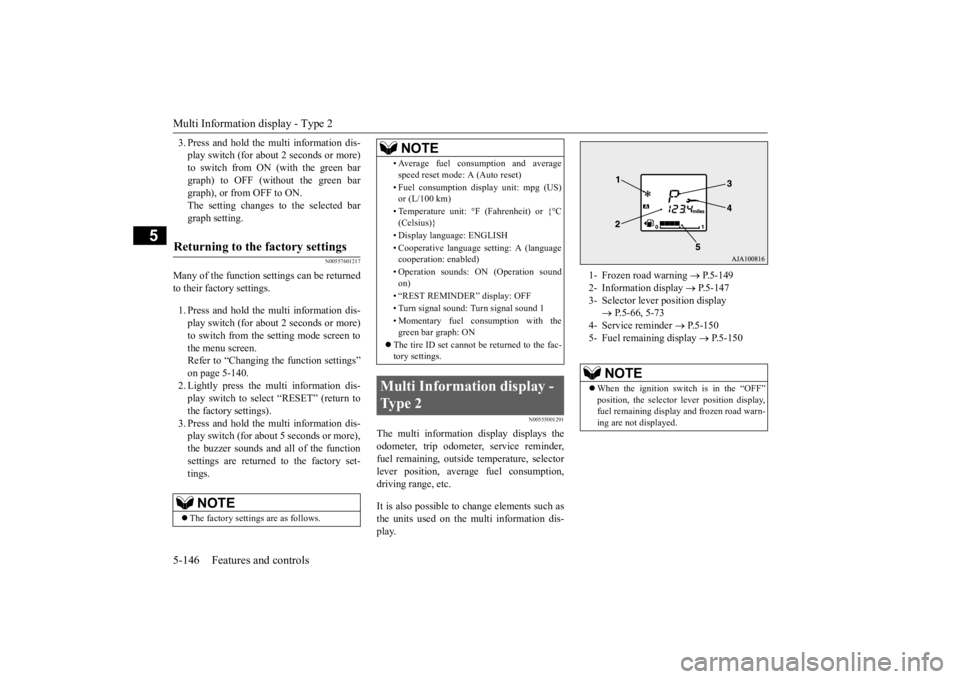
The multi information display displays the odometer, trip odometer, service reminder, fuel remaining, outside
temperature, selector
lever position, average fuel consumption, driving range, etc. It is also possible to change elements such as the units used on the multi information dis-play.
Returning to the factory settings
NOTE
The factory settings are as follows.
• Average fuel consumption and average speed reset mode: A (Auto reset) • Fuel consumption di
splay unit: mpg (US)
or (L/100 km) • Temperature unit: °F (Fahrenheit) or {°C (Celsius)} • Display language: ENGLISH • Cooperative language
setting: A (language
cooperation: enabled) • Operation sounds: ON (Operation sound on) • “REST REMINDER” display: OFF• Turn signal sound: Turn signal sound 1 • Momentary fuel consumption with the green bar graph: ON
The tire ID set cannot be returned to the fac- tory settings.
Multi Information display - Type 2
NOTE
1- Frozen road warning
P.5-149
2- Information display
P.5-147
3- Selector lever position display
P.5-66, 5-73
4- Service reminder
P.5-150
5- Fuel remaining display
P.5-150
NOTE
When the ignition switch is in the “OFF” position, the selector
lever position display,
fuel remaining display and frozen road warn-ing are not displayed.
BK0223400US.book 146 ページ 2015年2月13日 金曜日 午後12時15分
Page 223 of 464
Multi Information display - Type 2
Features and controls 5-147
5
N00574801038
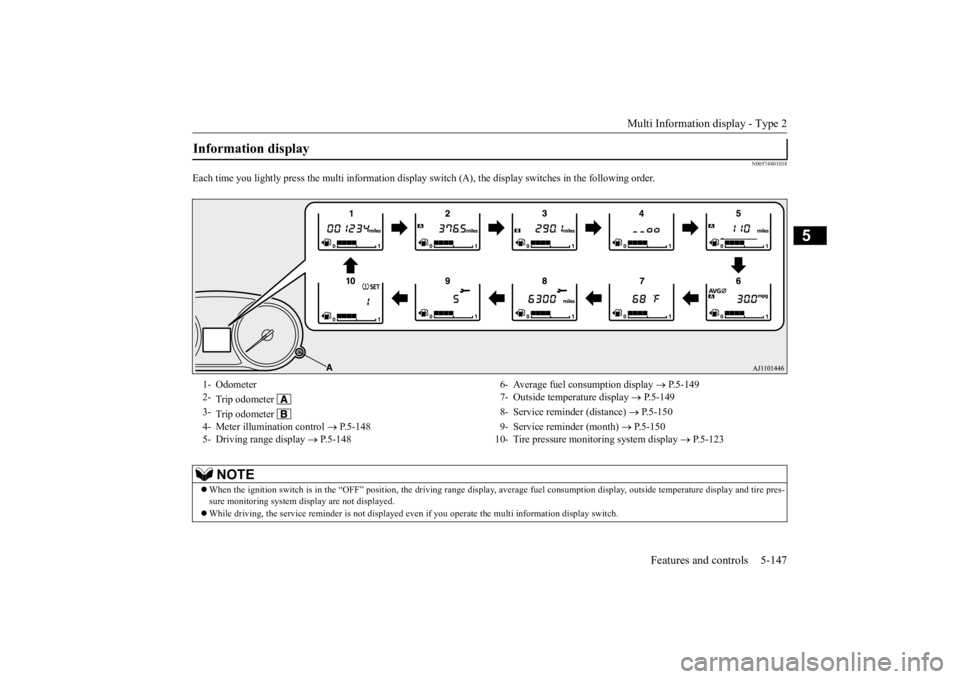
Each time you lightly press the multi
information display switch (A), the di
splay switches in the following order.
Information display 1- Odometer 6- Average fuel consumption display
P.5-149
2-
Trip odometer
7- Outside temperature display
P.5-149
3-
Trip odometer
8- Service reminder (distance)
P.5-150
4- Meter illumination control
P.5-148 9- Service reminder (month)
P.5-150
5- Driving range display
P.5-148 10- Tire pressure monitoring system display
P.5-123
NOTE
When the ignition switch is in the “OFF” pos
ition, the driving range display, average
fuel consumption display, outside tempera
ture display and tire pres-
sure monitoring system display are not displayed. While driving, the service reminder is
not displayed even if you operate th
e multi informati
on display switch.
BK0223400US.book 147 ページ 2015年2月13日 金曜日 午後12時15分
Page 224 of 464
Multi Information display - Type 2 5-148 Features and controls
5
N00574901039
The odometer indicates the total distance the vehicle has traveled.
N00575001037
The trip odometer indicates the distance trav-eled between two points. To return the display to 0, hold down the multi information display switch for about 2 seconds or more. Only the currently dis- played value will be reset. Example If trip odometer is
displayed, only trip
odometer wi
ll be reset.
Both trip odometers and can count up to 9999.9 miles/kilometers. When a trip odometer goes past 9999.9miles/kilometers, it returns to 0.0 miles/ kilometers. When disconnecting the battery terminal, the memories of trip odometer displays
and are cleared, and their displays
return to “0.0 miles/kilometers”.
N00578900030
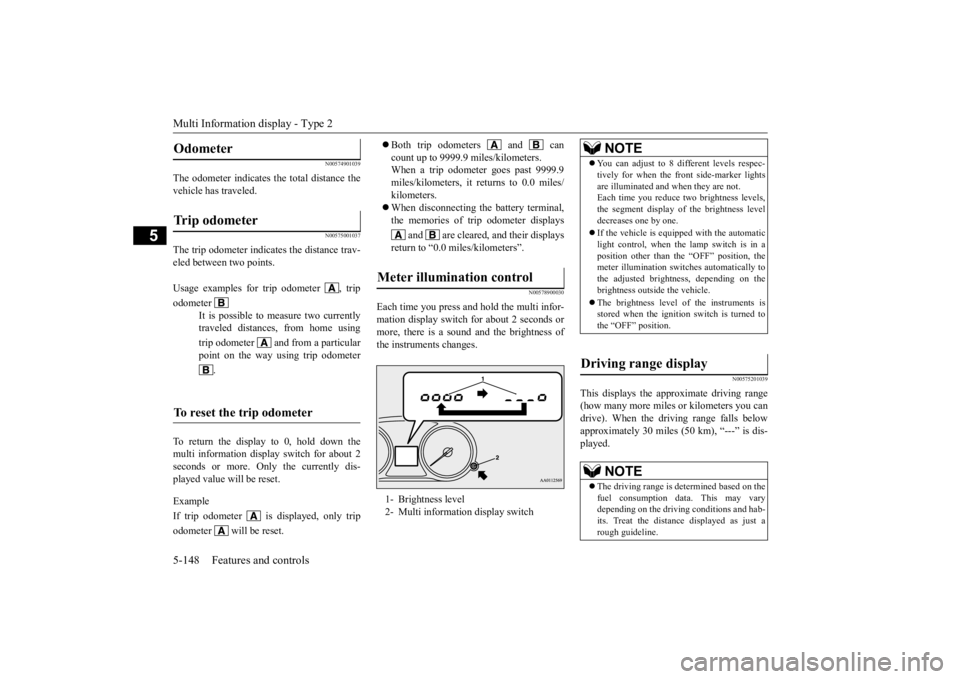
Each time you press and hold the multi infor- mation display switch
for about 2 seconds or
more, there is a sound and the brightness of the instruments changes.
N00575201039
This displays the approximate driving range (how many more miles
or kilometers you can
drive). When the driving range falls below approximately 30 miles
(50 km), “---” is dis-
played.
Odometer Trip odometer Usage examples for trip odometer , trip odometer
It is possible to measure two currently traveled distances, from home using trip odometer and from a particular point on the way using trip odometer
.
To reset the trip odometer
Meter illumination control 1- Brightness level 2- Multi informati
on display switch
NOTE
You can adjust to 8 di
fferent levels respec-
tively for when the fr
ont side-marker lights
are illuminated and when they are not.Each time you reduce tw
o brightness levels,
the segment display of the brightness level decreases one by one. If the vehicle is equipped with the automatic light control, when the lamp switch is in aposition other than th
e “OFF” position, the
meter illumination switches automatically to the adjusted bright
ness, depending on the
brightness outside the vehicle. The brightness level
of the instruments is
stored when the ignition switch is turned to the “OFF” position.
Driving range display
NOTE
The driving range is determined based on the fuel consumption data. This may vary depending on the drivi
ng conditions and hab-
its. Treat the distance
displayed as just a
rough guideline.
BK0223400US.book 148 ページ 2015年2月13日 金曜日 午後12時15分
Page 225 of 464
Multi Information display - Type 2
Features and controls 5-149
5
N00575301030
This displays the average fuel consumption from the last reset to the present. The reset mode conditions for the average fuel consumption display can be switchedbetween “Auto reset”
and “Manual reset”.
For information on how to change the aver- age fuel consumption di
splay setting, refer to
“Changing the function settings” on page 5-152.
N00556501121
Shows the temperature outside the vehicle.
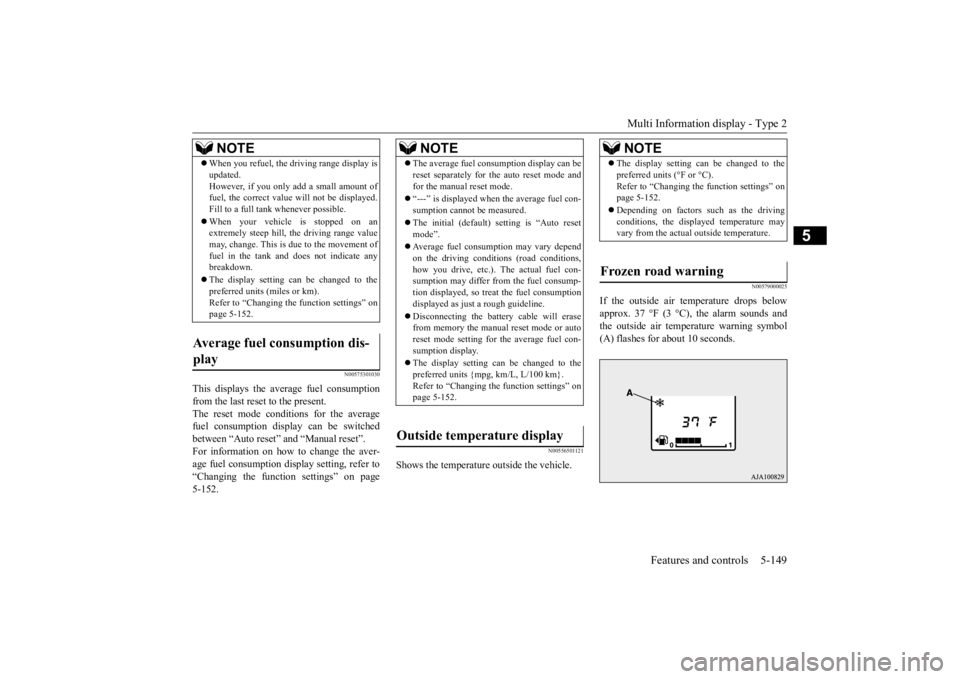
N00579000025
If the outside air temperature drops below approx. 37 °F (3 °C), the alarm sounds andthe outside air temperature warning symbol (A) flashes for about 10 seconds.
When you refuel, the driving range display is updated.However, if you only add a small amount offuel, the correct value
will not be displayed.
Fill to a full tank whenever possible. When your vehicle is stopped on an extremely steep hill, the driving range value may, change. This is due to the movement offuel in the tank and does not indicate any breakdown. The display setting ca
n be changed to the
preferred units (miles or km). Refer to “Changing the
function settings” on
page 5-152.
Average fuel consumption dis- play
NOTE
NOTE
The average fuel cons
umption display can be
reset separately for the auto reset mode andfor the manual reset mode. “---” is displayed when the average fuel con- sumption cannot be measured. The initial (default) setting is “Auto reset mode”. Average fuel consumption may vary depend on the driving conditi
ons (road conditions,
how you drive, etc.). The actual fuel con- sumption may differ from the fuel consump- tion displayed, so trea
t the fuel consumption
displayed as just a rough guideline. Disconnecting the batt
ery cable will erase
from memory the manual reset mode or auto reset mode setting for the average fuel con- sumption display. The display setting ca
n be changed to the
preferred units {mpg, km/L, L/100 km}.Refer to “Changing th
e function settings” on
page 5-152.
Outside temperature display
NOTE
The display setting ca
n be changed to the
preferred units (°F or °C).Refer to “Changing the function settings” onpage 5-152. Depending on factors such as the driving conditions, the displa
yed temperature may
vary from the actual outside temperature.
Frozen road warning
BK0223400US.book 149 ページ 2015年2月13日 金曜日 午後12時15分
Page 228 of 464
Multi Information display - Type 2 5-152 Features and controls
5
N00556801209
The “Average fuel c
onsumption reset mode”,
“Fuel consumption uni
t” and “Temperature
unit” setting can be m
odified as desired,
when the ignition switch is in the “ON” posi- tion.
N00575501029
You can change the mode condition for theaverage fuel consumpt
ion display to “Auto
reset” or “Manual reset”. 1. When you lightly press the multi informa- tion display switch a few times, the infor- mation display switches to the driving range display.Refer to “Information display” on page 5-147.
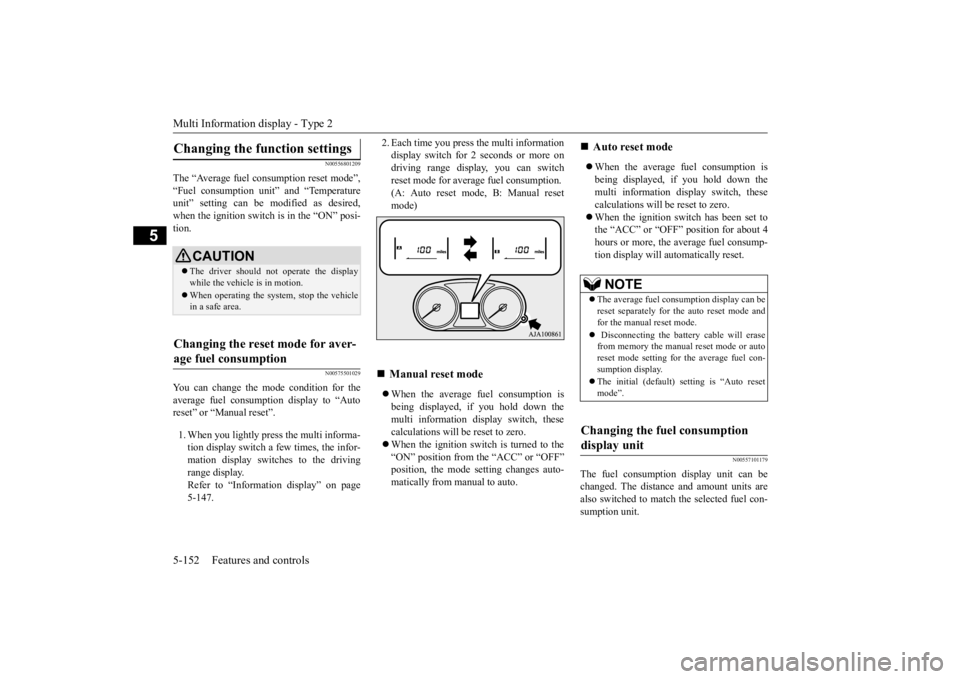
2. Each time you press the multi information display switch for 2 seconds or more ondriving range display, you can switch reset mode for average fuel consumption. (A: Auto reset mode, B: Manual resetmode) When the average fuel consumption is being displayed, if you hold down the multi information display switch, thesecalculations will be reset to zero. When the ignition switch is turned to the “ON” position from the “ACC” or “OFF”position, the mode se
tting changes auto-
matically from manual to auto.
When the average fuel consumption is being displayed, if you hold down themulti information display switch, these calculations will
be reset to zero.
When the ignition sw
itch has been set to
the “ACC” or “OFF” position for about 4 hours or more, the average fuel consump- tion display will automatically reset.
N00557101179
The fuel consumption display unit can bechanged. The distance and amount units arealso switched to match the selected fuel con- sumption unit.
Changing the function settings
CAUTION The driver should not operate the display while the vehicle is in motion. When operating the system, stop the vehicle in a safe area.
Changing the reset mode for aver- age fuel consumption
Manual reset mode
Auto reset mode NOTE
The average fuel cons
umption display can be
reset separately for the auto reset mode and for the manual reset mode. Disconnecting the batt
ery cable will erase
from memory the manual reset mode or auto reset mode setting for the average fuel con-sumption display. The initial (default) setting is “Auto reset mode”.
Changing the fuel consumption display unit
BK0223400US.book 152 ページ 2015年2月13日 金曜日 午後12時15分
Page 229 of 464
Multi Information display - Type 2
Features and controls 5-153
5
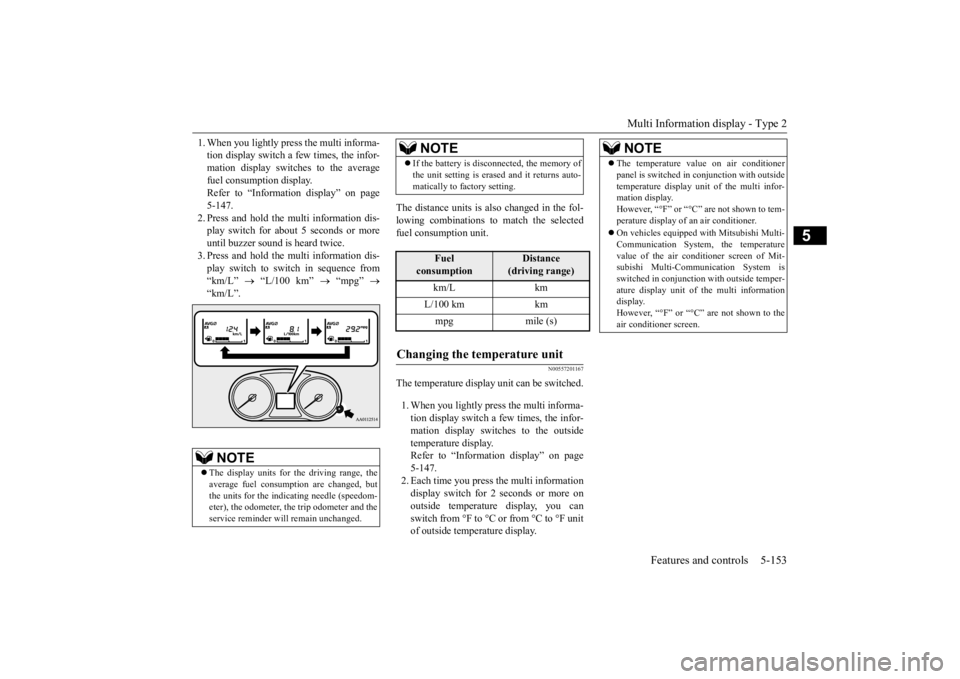
1. When you lightly press the multi informa- tion display switch a few times, the infor-mation display switches to the average fuel consumption display. Refer to “Information display” on page5-147. 2. Press and hold the mu
lti information dis-
play switch for about 5 seconds or moreuntil buzzer sound is heard twice. 3. Press and hold the mu
lti information dis-
play switch to switch in sequence from “km/L”
“L/100 km”
“mpg”
“km/L”.
The distance units is al
so changed in the fol-
lowing combinations to match the selected fuel consumption unit.
N00557201167
The temperature display unit can be switched. 1. When you lightly press the multi informa- tion display switch a few times, the infor-mation display switches to the outside temperature display. Refer to “Information display” on page5-147. 2. Each time you press the multi information display switch for 2 seconds or more onoutside temperature display, you can switch from °F to °C or from °C to °F unit of outside temperature display.
NOTE
The display units for the driving range, the average fuel consumption are changed, but the units for the indica
ting needle (speedom-
eter), the odometer, the trip odometer and theservice reminder will
remain unchanged.
If the battery is disconnected, the memory of the unit setting is erased and it returns auto-matically to factory setting.
Fuel
consumption
Distance
(driving range)
km/L km L/100 km km mpg mile (s)
Changing the temperature unit
NOTE
NOTE
The temperature value on air conditioner panel is switched in
conjunction with outside
temperature display unit of the multi infor-mation display. However, “°F” or “°C” are not shown to tem- perature display of an air conditioner. On vehicles equipped
with Mitsubishi Multi-
Communication System, the temperaturevalue of the air conditioner screen of Mit- subishi Multi-Communication System is switched in conjunction
with outside temper-
ature display unit of the multi information display. However, “°F” or “°C”
are not shown to the
air conditioner screen.
BK0223400US.book 153 ページ 2015年2月13日 金曜日 午後12時15分
Page 314 of 464
Driving precaution 6-2 Driving safety
6
N00629300053
Utility vehicles have
higher ground clearance
and a narrower track, which enables them to perform in a wide variety of off-road situa-tions. Because of the higher ground clear- ance, these vehicles have a higher center of gravity, which makes them handle differentlythan ordinary vehicles when driving on pave- ment. They are not designed to maneuver or corner at the same speed on pavement as con-ventional 2-wheel driv
e passenger cars any
more than low-slung sports cars are designed to perform sati
sfactorily in off-road condi-
tions. Always drive safely and steer the vehicle carefully. Avoid operati
ng the vehicle in a
manner that might require sharp turns or abrupt maneuvers. As w
ith other vehicles of
this type, failure to ope
rate this vehicle cor-
rectly can result in loss of control or vehicle rollover. In a rollover crash, an unbelted person is sig-nificantly more likely to die than a person wearing a seat belt. Be
fore starting the vehi-
cle, always make cert
ain that you and all your
passengers are properly wearing their seatbelts (with children in the rear seat, in appro- priate restraints).
N00628801191
Fuel economy is depe
ndent on many factors.
Your personal driving habits can have a sig- nificant effect on your fuel consumption. Several recommendations
for achieving the
greatest fuel economy are listed below. Whenever accelerating from a stop, always accelerate
slowly and smoothly.
When parked for even a short period, do not idle the engine. Shut it off. Plan your trips to avoid unnecessary stops. Keep your tires inflated to the recom- mended pressures. When driving a 4-wheel drive vehicle on highways or dry improved roads, set thedrive mode to “4WD ECO” or “4WD AUTO” (Electronically controlled 4WD), or “AWC ECO” or “NORMAL” (S-AW C ) . For freeway driving, maintain a speed of approximately 50 mph (80 km/h) whentraffic, roadway and weather conditions safely permit.
Keep your air filter clean and your vehicle lubricated according
to the recommenda-
tions in this manual. Always keep your ve
hicle well main-
tained. A poorly maintained enginewastes fuel and costs money. Never overload your vehicle.
N00628900049
Drunk driving is one of the most frequent causes of accidents.Your driving ability ca
n be seriously impaired
even with blood alcohol levels far below the legal minimum. If you
have been drinking,
don’t drive. Ride with a designated non- drinking driver, call a cab or a friend, or use public transportation. Drinking coffee or tak-ing a cold shower will not make you sober. Similarly, prescription and nonprescription drugs affect your aler
tness, perception and
reaction time. Consul
t with your doctor or
pharmacist before dr
iving while under the
influence of any of these medications.
Driving precaution
WA R N I N G Utility vehicles have
a significantly higher
rollover rate than othe
r types of vehicles.
Avoid abrupt maneuvers and excessive speed. Always buckle up.
Fuel economy
Driving, alcohol and drugs
WA R N I N G NEVER DRINK AND DRIVE. Your perceptions ar
e less accurate, your
reflexes are slower and your judgment isimpaired.
BK0223400US.book 2 ページ 2015年2月13日 金曜日 午後12時15分