warning MITSUBISHI OUTLANDER III 2016 Repair Manual
[x] Cancel search | Manufacturer: MITSUBISHI, Model Year: 2016, Model line: OUTLANDER III, Model: MITSUBISHI OUTLANDER III 2016Pages: 464, PDF Size: 60.77 MB
Page 199 of 464
Tire pressure monitoring system
Features and controls 5-123
5
A window tint that affects the radio wave signals is installed.
N00532900081
If new wheels with new tire inflation pressure sensors are installed,
their ID codes must be
programmed into the tire pressure monitoringsystem. Have tire and
wheel replacement per-
formed by an authorized Mitsubishi Motors dealer to avoid the ri
sk of damaging the tire
inflation pressure sensors. If the wheel replacement is not done by an authorized Mitsubishi Motors dealer
, it is not covered by
your warranty.
N00584300026
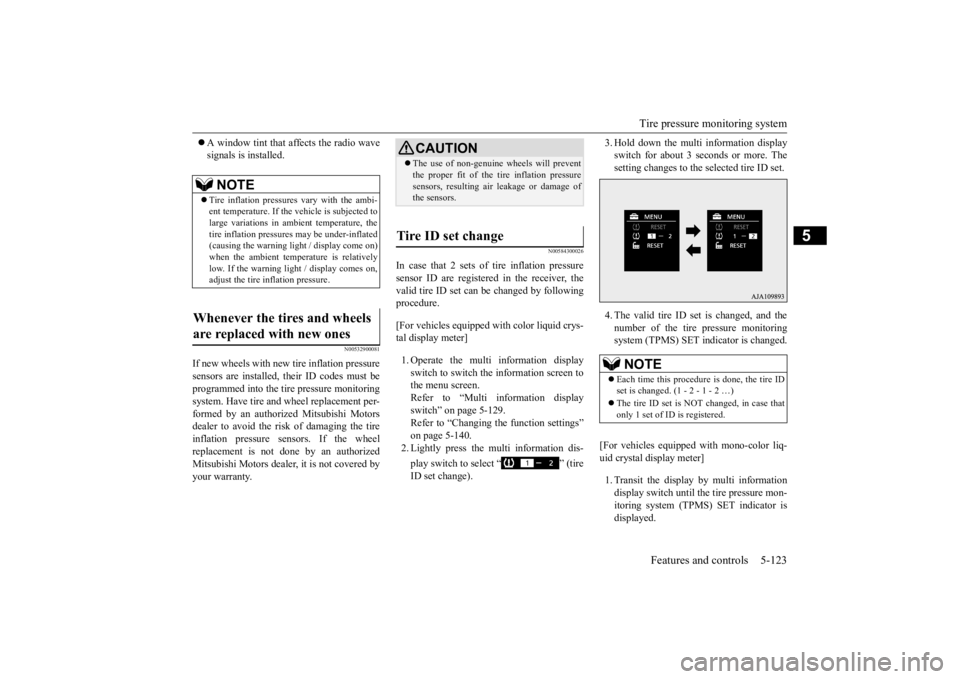
In case that 2 sets of tire inflation pressuresensor ID are registered in the receiver, the valid tire ID set can be changed by following procedure. [For vehicles equipped with color liquid crys- tal display meter] 1. Operate the multi information display switch to switch the information screen to the menu screen.Refer to “Multi information display switch” on page 5-129. Refer to “Changing the function settings”on page 5-140. 2. Lightly press the multi information dis- play switch to select “ ” (tire ID set change).
3. Hold down the multi information display switch for about 3 seconds or more. Thesetting changes to the selected tire ID set. 4. The valid tire ID se
t is changed, and the
number of the tire pressure monitoring system (TPMS) SET indicator is changed.
[For vehicles equipped
with mono-color liq-
uid crystal display meter] 1. Transit the display by multi information display switch until th
e tire pressure mon-
itoring system (TPMS) SET indicator isdisplayed.
NOTE
Tire inflation pressures vary with the ambi- ent temperature. If the
vehicle is subjected to
large variations in ambient temperature, the tire inflation pressures may be under-inflated(causing the warning light / display come on) when the ambient temperature is relatively low. If the warning light / display comes on,adjust the tire inflation pressure.
Whenever the tires and wheels are replaced with new ones
CAUTION The use of non-genuine wheels will prevent the proper fit of the tire inflation pressuresensors, resulting air
leakage or damage of
the sensors.
Tire ID set change
NOTE
Each time this procedure is done, the tire ID set is changed. (1 - 2 - 1 - 2 …) The tire ID set is NOT changed, in case that only 1 set of ID is registered.
BK0223400US.book 123 ページ 2015年2月13日 金曜日 午後12時15分
Page 204 of 464
Multi Information display - Type 1 5-128 Features and controls
5
N00555001347
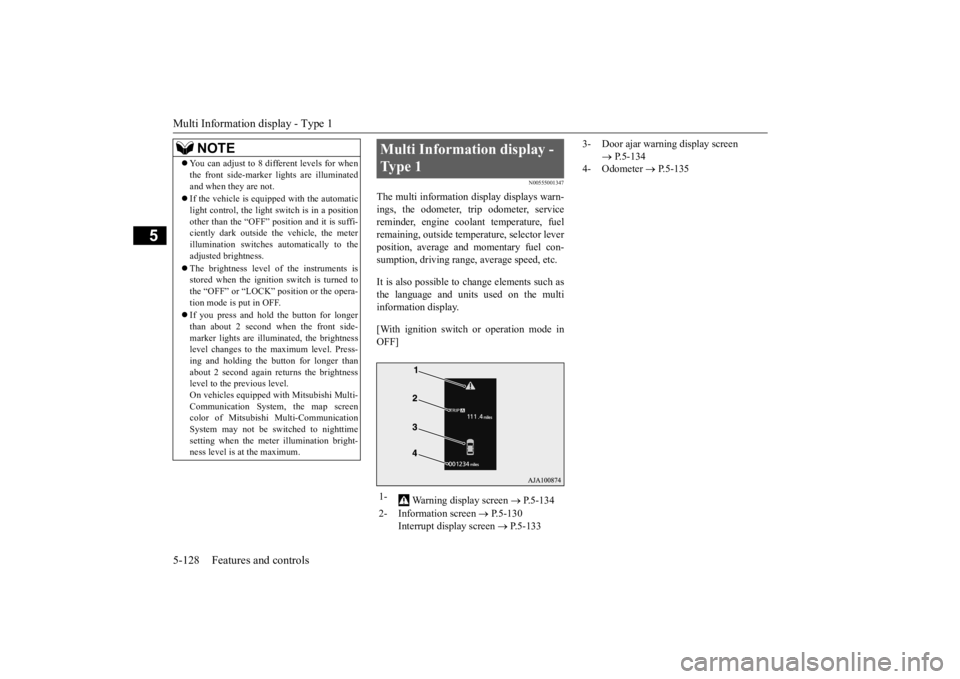
The multi information display displays warn- ings, the odometer, tr
ip odometer, service
reminder, engine cool
ant temperature, fuel
remaining, outside temper
ature, selector lever
position, average and momentary fuel con- sumption, driving range, average speed, etc. It is also possible to change elements such as the language and units used on the multi information display. [With ignition switch
or operation mode in
OFF]
NOTE
You can adjust to 8 different levels for when the front side-marker
lights are illuminated
and when they are not. If the vehicle is equipped with the automatic light control, the light
switch is in a position
other than the “OFF” pos
ition and it is suffi-
ciently dark outside the vehicle, the meter illumination switches automatically to theadjusted brightness. The brightness level
of the instruments is
stored when the ignition switch is turned to the “OFF” or “LOCK”
position or the opera-
tion mode is put in OFF. If you press and hold the button for longer than about 2 second when the front side-marker lights are illum
inated, the brightness
level changes to the
maximum level. Press-
ing and holding the button for longer thanabout 2 second again returns the brightness level to the previous level. On vehicles e
quipped with Mitsubishi Multi-
Communication System
, the map screen
color of Mitsubishi Multi-Communication System may not be sw
itched to nighttime
setting when the mete
r illumination bright-
ness level is at the maximum.
Multi Information display - Type 1 1-
Warning display screen
P.5-134
2- Information screen
P.5-130
Interrupt display screen
P.5-133
3- Door ajar warning display screen
P.5-134
4- Odometer
P.5-135
BK0223400US.book 128 ページ 2015年2月13日 金曜日 午後12時15分
Page 205 of 464
![MITSUBISHI OUTLANDER III 2016 Repair Manual Multi Information display - Type 1
Features and controls 5-129
5
[With ignition switch or operation mode in ON]
N00555101205
Each time the multi information display switch is operated, th
e buzzer s](/img/19/58143/w960_58143-204.png "MITSUBISHI OUTLANDER III 2016 Repair Manual Multi Information display - Type 1
Features and controls 5-129
5
[With ignition switch or operation mode in ON]
N00555101205
Each time the multi information display switch is operated, th
e buzzer s")
Multi Information display - Type 1
Features and controls 5-129
5
[With ignition switch or operation mode in ON]
N00555101205
Each time the multi information display switch is operated, th
e buzzer sounds and the
multi information disp
lay changes between
information such as warnings, trip odometer,
1- Drive mode indicator display screen (if
so equipped)
P. 5 - 8 0
2- S-AWC drive mode display screen (if
so equipped)
P. 5 - 8 3
3-
Warning display screen
P.5-134
4- Forward Collision Mitigation System
(FCM) OFF displa
y screen (if so
equipped)
P.5-111
5- Lane Departure Warning (LDW) dis-
play screen (if so equipped)
P. 5 - 1 1 6
6- ECO mode indicator display screen
P.5-184
7- Information screen
P.5-130
8- Selector lever
position display
P.5-66, 5-73
9- Engine coolant te
mperature display
P.5-134
10- Odometer
P.5-135
11- Cruise control display screen (if so
equipped)
P.5-96
12- Adaptive Cruise Control System (ACC)
display screen (if so equipped) P.5-100
13- ECO indicator
P.5-139
14- Fuel remaining display screen
P.5-135
15- Outside temperature display screen
P.5-135
NOTE
The fuel units, outside
temperature units,
display language, and
other settings can be
changed. Refer to “Changing the function settings” onpage 5-140.
Multi information display switch
BK0223400US.book 129 ページ 2015年2月13日 金曜日 午後12時15分
Page 206 of 464
Multi Information display - Type 1 5-130 Features and controls
5
average and momentary fuel consumption, distance range, etc.It is also possible to change elements such as the language and units used on the multi information display by operating the multiinformation display switch.
N00555301177
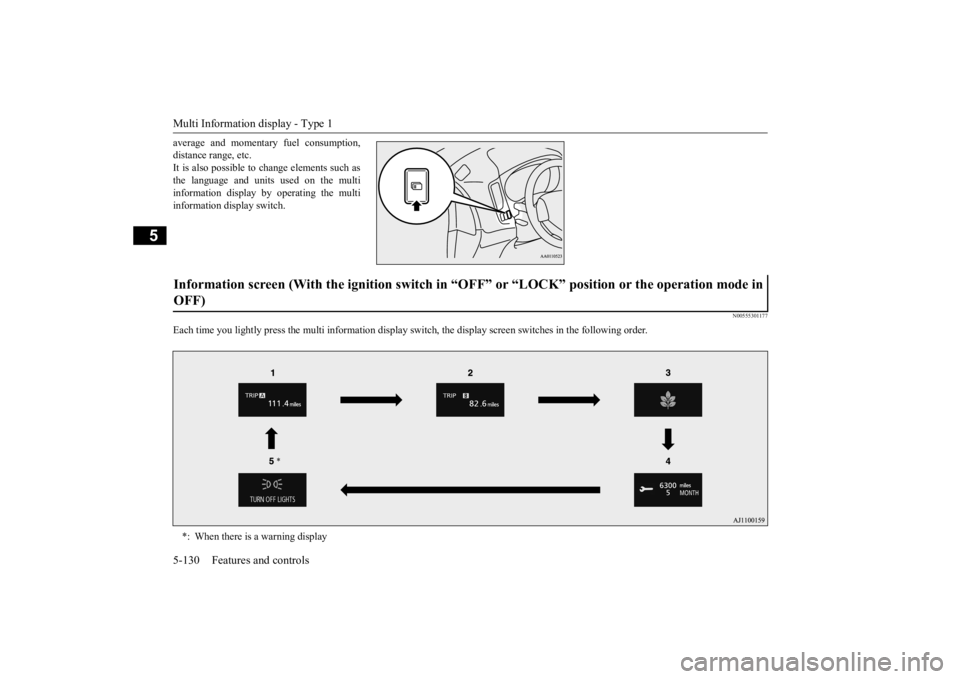
Each time you lightly press th
e multi information display switch, the displa
y screen switches in the following order.
Information screen (With the igniti
on switch in “OFF” or “LOCK” po
sition or the operation mode in
OFF) *: When there is a warning display
BK0223400US.book 130 ページ 2015年2月13日 金曜日 午後12時15分
Page 207 of 464
Multi Information display - Type 1
Features and controls 5-131
5
N00555801202
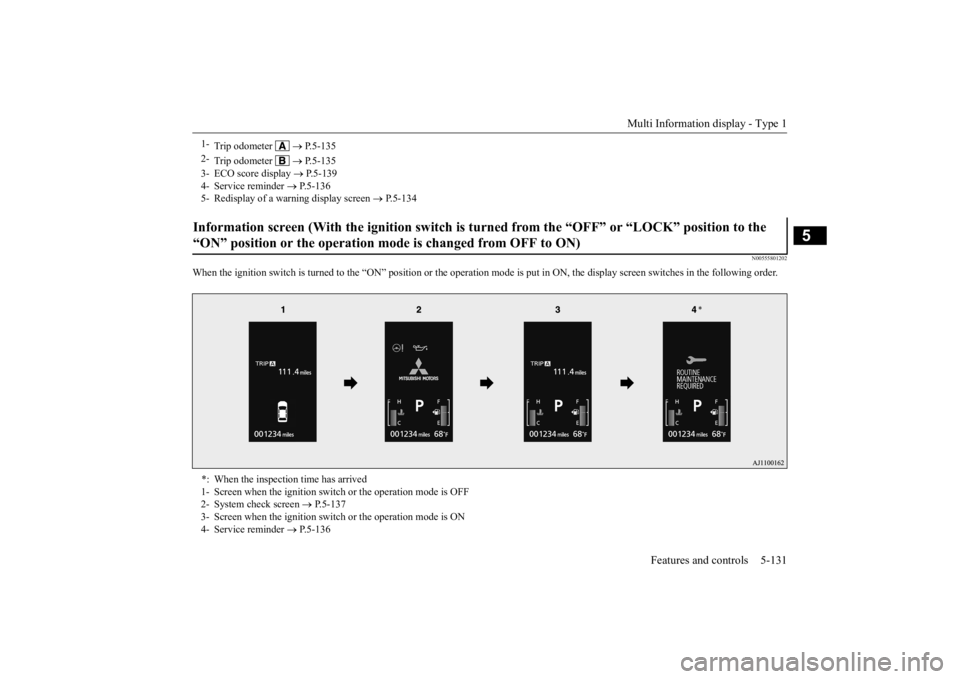
When the ignition switch is turned to the
“ON” position or the operation m
ode is put in ON, the disp
lay screen switches in the
following order.
1-
Trip odometer
P.5-135
2-
Trip odometer
P.5-135
3- ECO score display
P.5-139
4- Service reminder
P.5-136
5- Redisplay of a warning display screen
P.5-134
Information screen (With the igniti
on switch is turned from the “O
FF” or “LOCK” position to the
“ON” position or the operation mo
de is changed from OFF to ON)
*: When the inspection time has arrived 1- Screen when the ignition switch
or the operation mode is OFF
2- System check screen
P.5-137
3- Screen when the ignition switch
or the operation mode is ON
4- Service reminder
P.5-136
BK0223400US.book 131 ページ 2015年2月13日 金曜日 午後12時15分
Page 208 of 464
Multi Information display - Type 1 5-132 Features and controls
5
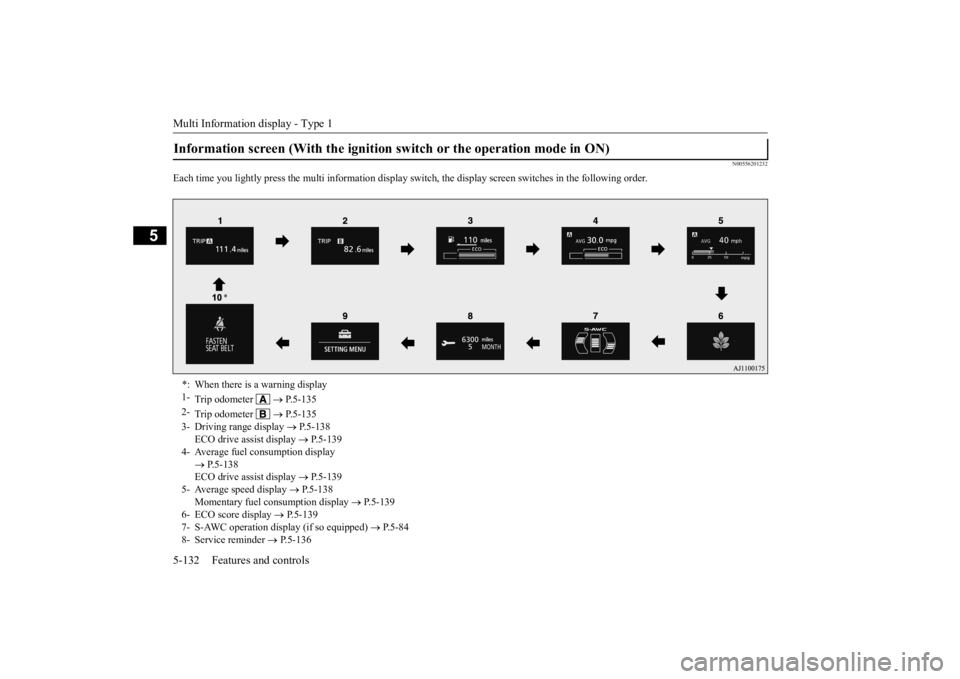
N00556201232
Each time you lightly press th
e multi information display switch, the displa
y screen switches in the following order.
Information screen (With the ignition
switch or the operation mode in ON)
*: When there is a warning display 1-
Trip odometer
P.5-135
2-
Trip odometer
P.5-135
3- Driving range display
P.5-138
ECO drive assist display
P.5-139
4- Average fuel consumption display
P.5-138 ECO drive assist display
P.5-139
5- Average speed display
P.5-138
Momentary fuel consumption display
P.5-139
6- ECO score display
P.5-139
7- S-AWC operation display (if so equipped)
P.5-84
8- Service reminder
P.5-136
BK0223400US.book 132 ページ 2015年2月13日 金曜日 午後12時15分
Page 209 of 464
Multi Information display - Type 1
Features and controls 5-133
5
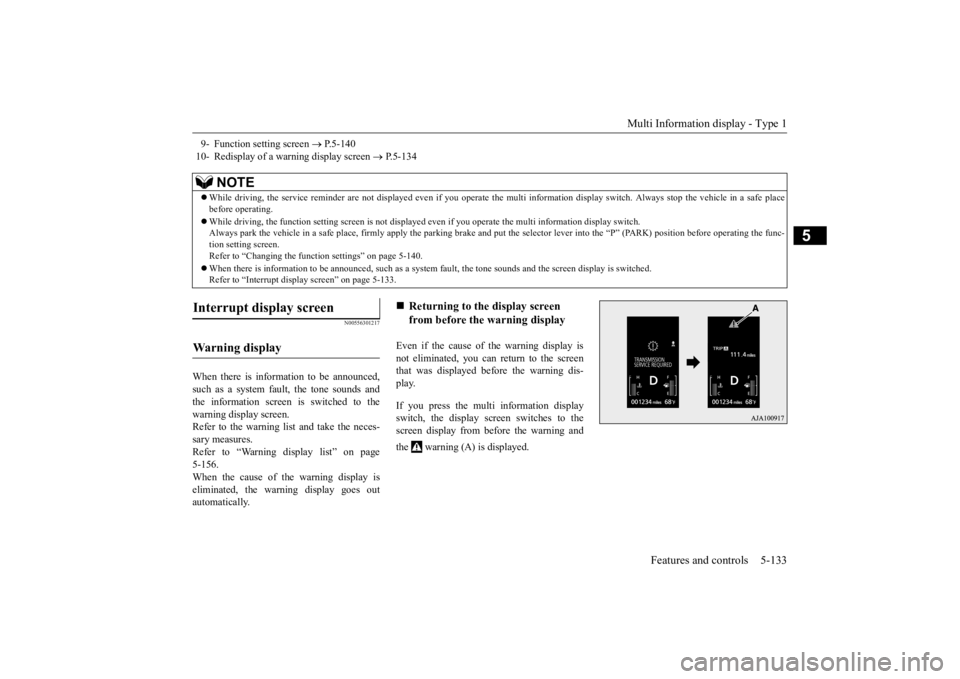
N00556301217
When there is information to be announced, such as a system fault, the tone sounds and the information screen is switched to the warning display screen.Refer to the warning list and take the neces- sary measures. Refer to “Warning display list” on page5-156. When the cause of the warning display is eliminated, the warning display goes outautomatically.
Even if the cause of the warning display is not eliminated, you can return to the screenthat was displayed be
fore the warning dis-
play. If you press the multi information display switch, the display screen switches to thescreen display from before the warning and the warning (A) is displayed.
9- Function setting screen
P.5-140
10- Redisplay of a warning display screen
P.5-134
NOTE
While driving, the service reminder are not
displayed even if you operate the multi in
formation display swit
ch. Always stop the
vehicle in a safe place
before operating. While driving, the function sett
ing screen is not displayed even if you ope
rate the multi information display switch.
Always park the vehicle in a sa
fe place, firmly apply the park
ing brake and put the selector le
ver into the “P” (PARK) position
before operating the func-
tion setting screen.Refer to “Changing the func
tion settings” on page 5-140.
When there is information to be announced, such as a system
fault, the tone sounds and the
screen display is switched.
Refer to “Interrupt disp
lay screen” on page 5-133.
Interrupt display screen Wa r n i n g d is p la y
Returning to the display screen from before the warning display
BK0223400US.book 133 ページ 2015年2月13日 金曜日 午後12時15分
Page 210 of 464
Multi Information display - Type 1 5-134 Features and controls
5
N00579600021
When the warning is displayed, if you lightly press the multi information display switch a few times, the warning display screen you switched from is redisplayed.
N00579700022
The operation status of
each system is dis-
played on the information screen.For further details, refer to the appropriate page in the warning display list. Refer to “Other interrupt displays” on page5-167.
N00555201222
This is displayed when you press the multi information display switch and return from the warning display screen to the previousscreen. This mark is also displa
yed if there is another
warning other than the one displayed.When the cause of the warning display is eliminated, the warning goes out automat- ically.
N00529700014
If any of the doors or the liftgate is not com- pletely closed, this displays the open door or liftgate. If the speed increases to about 5 mph (8 km/h) or higher with a door ajar, a tone will sound 4 times to inform you that a door isajar.
N00578200020
Shows the engine coolant temperature. If the coolant becomes hot, “ ” will blink. Pay careful attention to
the engine coolant
temperature display while you are driving.
NOTE
Warning display screens with a “ ” or “ ” mark displayed in the upper right of the screen can be switched
. If you want to switch
the display, press the multi information dis-play switch as follows. “ ”: Press lightly. “ ”: Press for about 2 seconds or more.
Redisplay of a warning display screen Other interrupt displays
warning display screen
NOTE
When the warning is displayed, the warn- ing display screen can
be redisplayed on the
information screen.Refer to “Information sc
reen (with the igni-
tion switch in “OFF” or “LOCK” position or the operation mode in OFF)” on page 5-130.Refer to “Information sc
reen (with the igni-
tion switch or the oper
ation mode in ON)” on
page 5-132.
Door ajar warning display screen
CAUTION Always make sure that
the warning display
goes out before beginning to drive.
Engine coolant temperature display
BK0223400US.book 134 ページ 2015年2月13日 金曜日 午後12時15分
Page 211 of 464
Multi Information display - Type 1
Features and controls 5-135
5
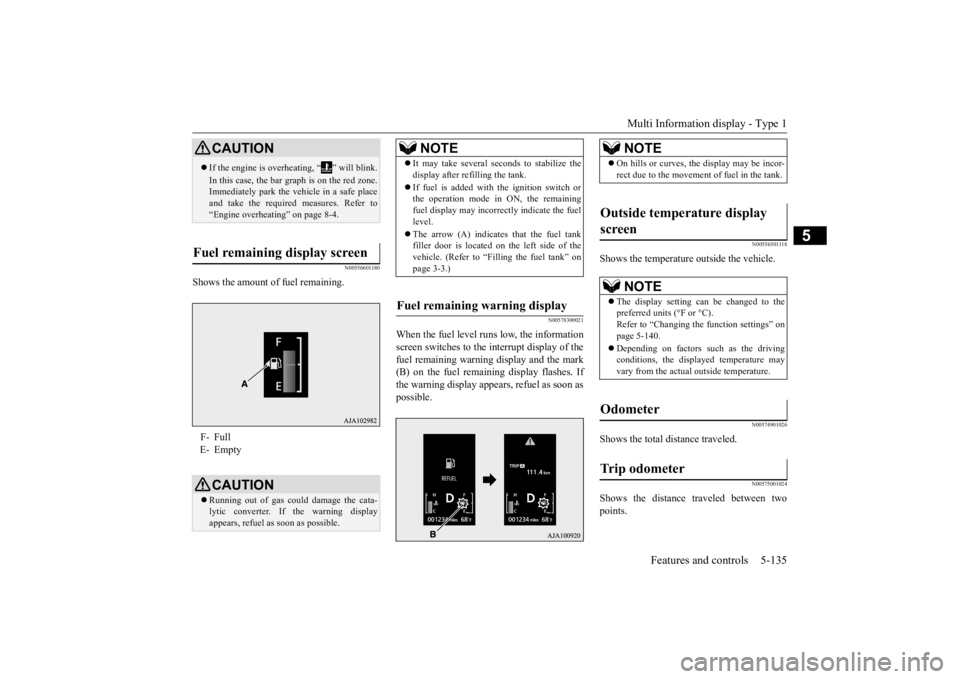
N00556601180
Shows the amount of fuel remaining.
N00578300021
When the fuel level runs low, the information screen switches to the interrupt display of the fuel remaining warning display and the mark(B) on the fuel remaini
ng display flashes. If
the warning display appe
ars, refuel as soon as
possible.
N00556501118
Shows the temperature
outside the vehicle.
N00574901026
Shows the total distance traveled.
N00575001024
Shows the distance traveled between two points.
CAUTION If the engine is overh
eating, “ ” will blink.
In this case, the bar graph is on the red zone. Immediately park the ve
hicle in a safe place
and take the required measures. Refer to “Engine overheating” on page 8-4.
Fuel remaining display screen F- Full E- Empty
CAUTION Running out of gas could damage the cata- lytic converter. If the warning display appears, refuel as soon as possible.
NOTE
It may take several se
conds to stabilize the
display after refilling the tank. If fuel is added with
the ignition switch or
the operation mode in ON, the remaining fuel display may incorr
ectly indicate the fuel
level. The arrow (A) indicates that the fuel tank filler door is located on
the left side of the
vehicle. (Refer to “F
illing the fuel tank” on
page 3-3.)
Fuel remaining warning display
NOTE
On hills or curves, the display may be incor- rect due to the movement of fuel in the tank.
Outside temperature display screen
NOTE
The display setting ca
n be changed to the
preferred units (°F or °C). Refer to “Changing the function settings” onpage 5-140. Depending on factors such as the driving conditions, the displa
yed temperature may
vary from the actual outside temperature.
Odometer Trip odometer
BK0223400US.book 135 ページ 2015年2月13日 金曜日 午後12時15分
Page 212 of 464
Multi Information display - Type 1 5-136 Features and controls
5
To return the display to 0, hold down the multi information display switch for about 2 seconds or more. Only the currently dis- played value will be reset. Example If trip odometer is
displayed, only trip
odometer wi
ll be reset.
Both trip odometers and can count up to 9999.9 m
iles/kilometers.
When a trip odometer goes past 9999.9 miles/kilometers, it returns to 0.0 miles/ kilometers. When disconnecting th
e battery terminal,
the memories of trip odometer displays
and are cleared, and their displays
return to “0.0 miles/kilometers”.
N00556701237
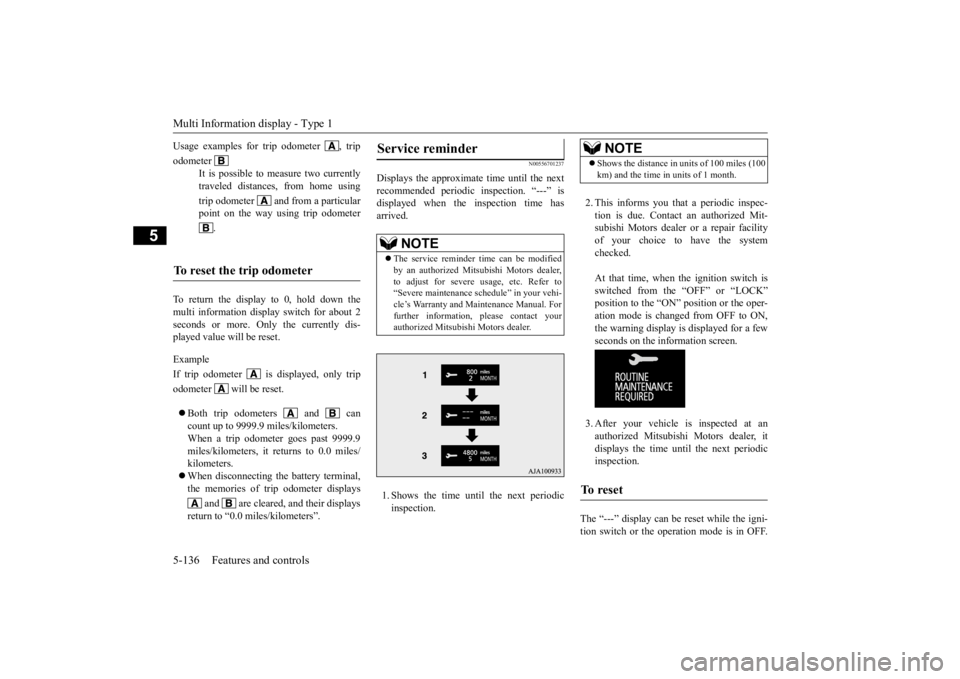
Displays the approximate time until the next recommended periodic inspection. “---” is displayed when the inspection time hasarrived. 1. Shows the time until the next periodic inspection.
2. This informs you that a periodic inspec- tion is due. Contact
an authorized Mit-
subishi Motors dealer or a repair facilityof your choice to have the system checked. At that time, when the ignition switch is switched from the “OFF” or “LOCK” position to the “ON” position or the oper-ation mode is changed from OFF to ON, the warning display is displayed for a few seconds on the information screen. 3. After your vehicle is inspected at an authorized Mitsubishi Motors dealer, it displays the time until the next periodicinspection.
The “---” display can be
reset while the igni-
tion switch or the opera
tion mode is in OFF.
Usage examples for trip odometer , trip odometer
It is possible to measure two currently traveled distances, from home using trip odometer and from a particular point on the way using trip odometer
.
To reset the trip odometer
Service reminder
NOTE
The service reminder ti
me can be modified
by an authorized Mitsubishi Motors dealer,to adjust for severe usage, etc. Refer to “Severe maintenance schedule” in your vehi- cle’s Warranty and Main
tenance Manual. For
further information,
please contact your
authorized Mitsubishi Motors dealer.
NOTE
Shows the distance in units of 100 miles (100 km) and the time in units of 1 month.
To r e s e t
BK0223400US.book 136 ページ 2015年2月13日 金曜日 午後12時15分