engine MITSUBISHI OUTLANDER III 2016 Manual Online
[x] Cancel search | Manufacturer: MITSUBISHI, Model Year: 2016, Model line: OUTLANDER III, Model: MITSUBISHI OUTLANDER III 2016Pages: 464, PDF Size: 60.77 MB
Page 218 of 464
Multi Information display - Type 1 5-142 Features and controls
5
When the engine switch or the operation mode is in the following conditions, theaverage fuel consumption display and the average speed display will automatically reset. [Except for vehicles
equipped with the
F. A . S . T. - k e y ] The ignition switch has been set to the “ACC”, “LOCK” or
“OFF” position for
about 4 hours or more. [For vehicles equipped
with the F.A.S.T.-
key]The operation mode has been in ACC or OFF for about 4 hours or more.
N00557101166
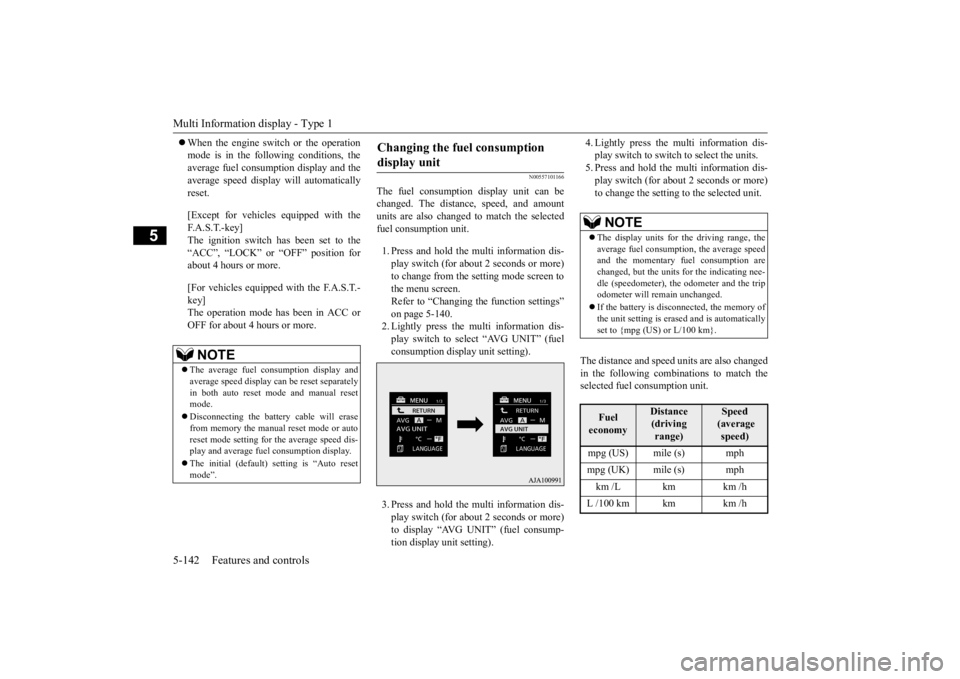
The fuel consumption display unit can be changed. The distance, speed, and amount units are also changed to match the selected fuel consumption unit. 1. Press and hold the mu
lti information dis-
play switch (for about 2 seconds or more) to change from the setting mode screen to the menu screen. Refer to “Changing th
e function settings”
on page 5-140.2. Lightly press the multi information dis- play switch to select “AVG UNIT” (fuel consumption disp
lay unit setting).
3. Press and hold the mu
lti information dis-
play switch (for about 2 seconds or more) to display “AVG UNIT” (fuel consump- tion display unit setting).
4. Lightly press the multi information dis- play switch to switch to select the units.5. Press and hold the multi information dis- play switch (for about 2 seconds or more) to change the setting to the selected unit.
The distance and speed
units are also changed
in the following combinations to match theselected fuel consumption unit.
NOTE
The average fuel consumption display and average speed display ca
n be reset separately
in both auto reset m
ode and manual reset
mode. Disconnecting the batt
ery cable will erase
from memory the manual reset mode or auto reset mode setting for the average speed dis-play and average fuel consumption display. The initial (default) setting is “Auto reset mode”.
Changing the fuel consumption display unit
NOTE
The display units for the driving range, the average fuel consumption, the average speed and the momentary fuel consumption are changed, but the units
for the indicating nee-
dle (speedometer), the odometer and the trip odometer will remain unchanged. If the battery is disconnected, the memory of the unit setting is erased and is automatically set to {mpg (US) or L/100 km}.Fuel economy
Distance (driving range)
Speed (average speed)
mpg (US) mile (s) mph mpg (UK) mile (s) mph km /L km km /h L /100 km km km /h
BK0223400US.book 142 ページ 2015年2月13日 金曜日 午後12時15分
Page 230 of 464
Indicator light, warning light, and information screen display list (multi information display - Type 1) 5-154 Features and controls
5
N00557701058 N00557801310
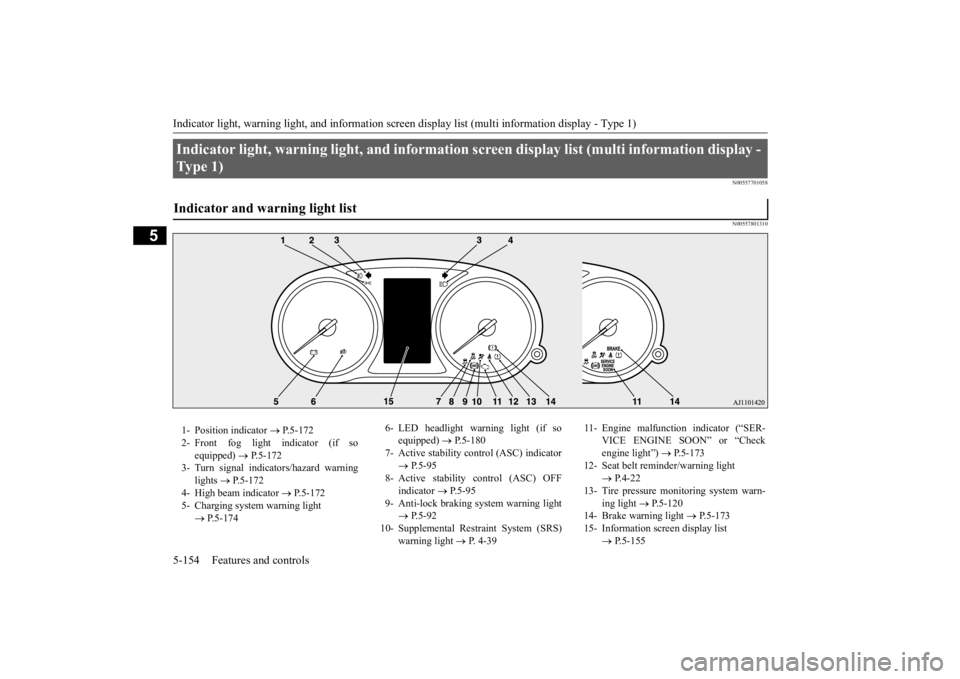
Indicator light, warning light, an
d information screen display list (multi information display -
Ty p e 1 ) Indicator and warning light list 1- Position indicator
P.5-172
2- Front fog light indicator (if so
equipped)
P.5-172
3- Turn signal indicators/hazard warning
lights
P.5-172
4- High beam indicator
P.5-172
5- Charging system warning light
P.5-174
6- LED headlight warning light (if so
equipped)
P.5-180
7- Active stability c
ontrol (ASC) indicator
P.5-95
8- Active stability control (ASC) OFF
indicator
P.5-95
9- Anti-lock braking
system warning light
P.5-92
10- Supplemental Restraint System (SRS)
warning light
P. 4-39
11- Engine malfunction indicator (“SER-
VICE ENGINE SOON” or “Check engine light”)
P.5-173
12- Seat belt remi
nder/warning light
P.4-22
13- Tire pressure monitoring system warn-
ing light
P.5-120
14- Brake warning light
P.5-173
15- Information screen display list
P.5-155
BK0223400US.book 154 ページ 2015年2月13日 金曜日 午後12時15分
Page 234 of 464
Indicator light, warning light, and information screen display list (multi information display - Type 1) 5-158 Features and controls
5
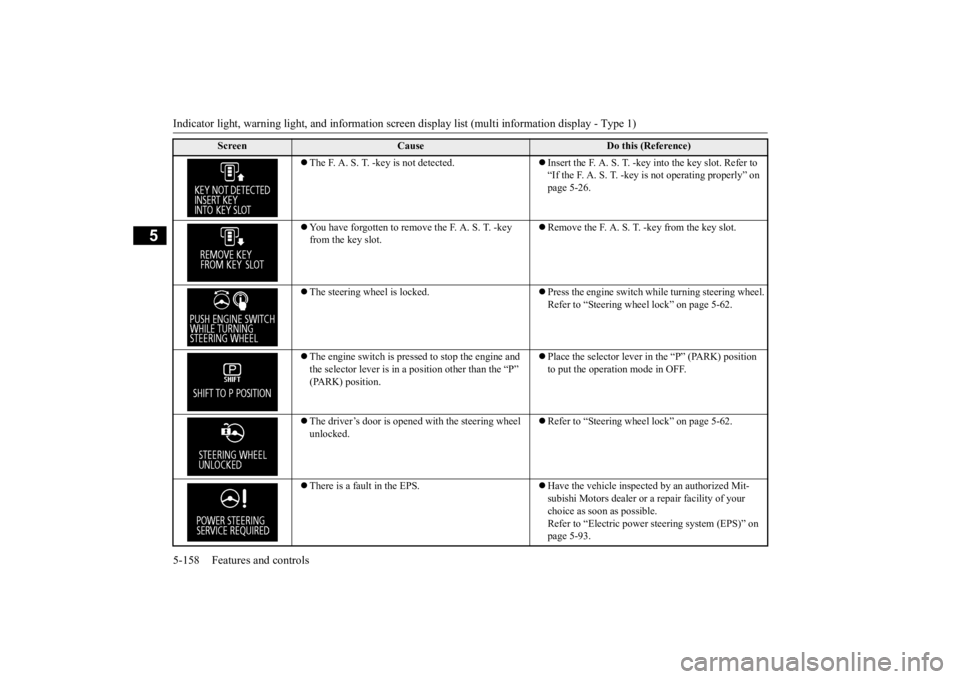
The F. A. S. T. -key is not detected.
Insert the F. A. S. T. -key
into the key slot. Refer to
“If the F. A. S. T. -key is not operating properly” on page 5-26.
You have forgotten to remove the F. A. S. T. -key from the key slot.
Remove the F. A. S. T. -key from the key slot.
The steering wheel is locked.
Press the engine switch while turning steering wheel. Refer to “Steering wheel lock” on page 5-62.
The engine switch is presse
d to stop the engine and
the selector lever is in a
position other than the “P”
(PARK) position.
Place the selector lever in the “P” (PARK) position to put the operation mode in OFF.
The driver’s door is opened with the steering wheel unlocked.
Refer to “Steering wheel lock” on page 5-62.
There is a fault in the EPS.
Have the vehicle inspected by an authorized Mit- subishi Motors dealer or
a repair facility of your
choice as soon as possible. Refer to “Electric power steering system (EPS)” on page 5-93.
Screen
Cause
Do this (Reference)
BK0223400US.book 158 ページ 2015年2月13日 金曜日 午後12時15分
Page 235 of 464
Indicator light, warning light, and information screen display list (multi information display - Type 1)
Features and controls 5-159
5
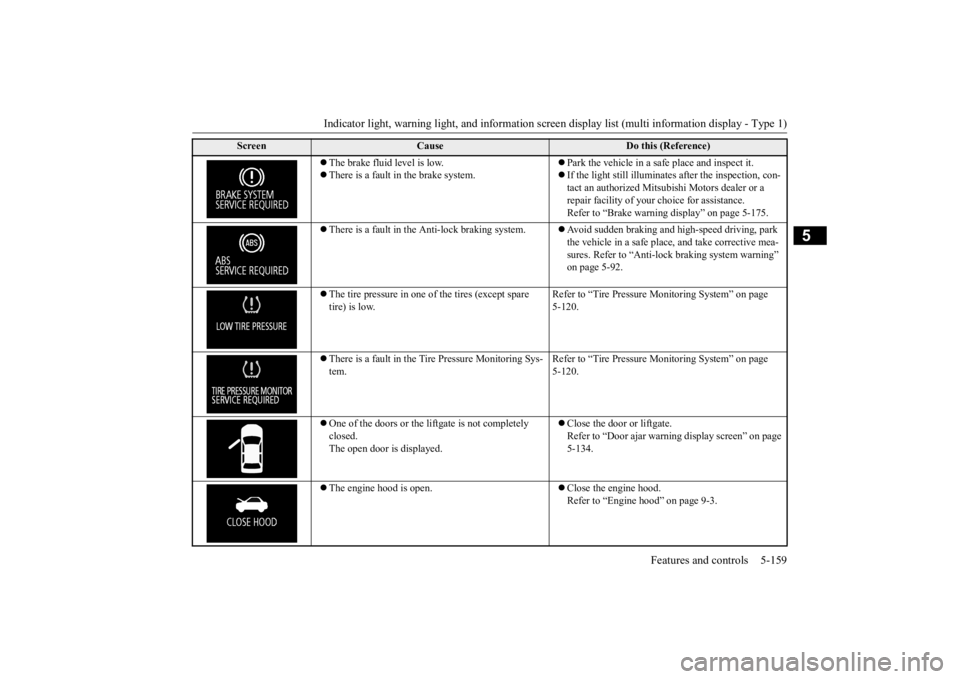
The brake fluid level is low. There is a fault in the brake system.
Park the vehicle in a sa
fe place and inspect it.
If the light still illuminates after the inspection, con- tact an authorized Mitsubishi Motors dealer or a repair facility of your
choice for assistance.
Refer to “Brake warning display” on page 5-175.
There is a fault in the Anti-lock braking system.
Avoid sudden braking and hi
gh-speed driving, park
the vehicle in a safe place, and take corrective mea- sures. Refer to “Anti-lock braking system warning” on page 5-92.
The tire pressure in one of the tires (except spare tire) is low.
Refer to “Tire Pressure
Monitoring System” on page
5-120.
There is a fault in the Tire Pressure Monitoring Sys- tem.
Refer to “Tire Pressure
Monitoring System” on page
5-120.
One of the doors or the liftgate is not completely closed. The open door is displayed.
Close the door or liftgate. Refer to “Door ajar warni
ng display screen” on page
5-134.
The engine hood is open.
Close the engine hood. Refer to “Engine hood” on page 9-3.
Screen
Cause
Do this (Reference)
BK0223400US.book 159 ページ 2015年2月13日 金曜日 午後12時15分
Page 236 of 464
Indicator light, warning light, and information screen display list (multi information display - Type 1) 5-160 Features and controls
5
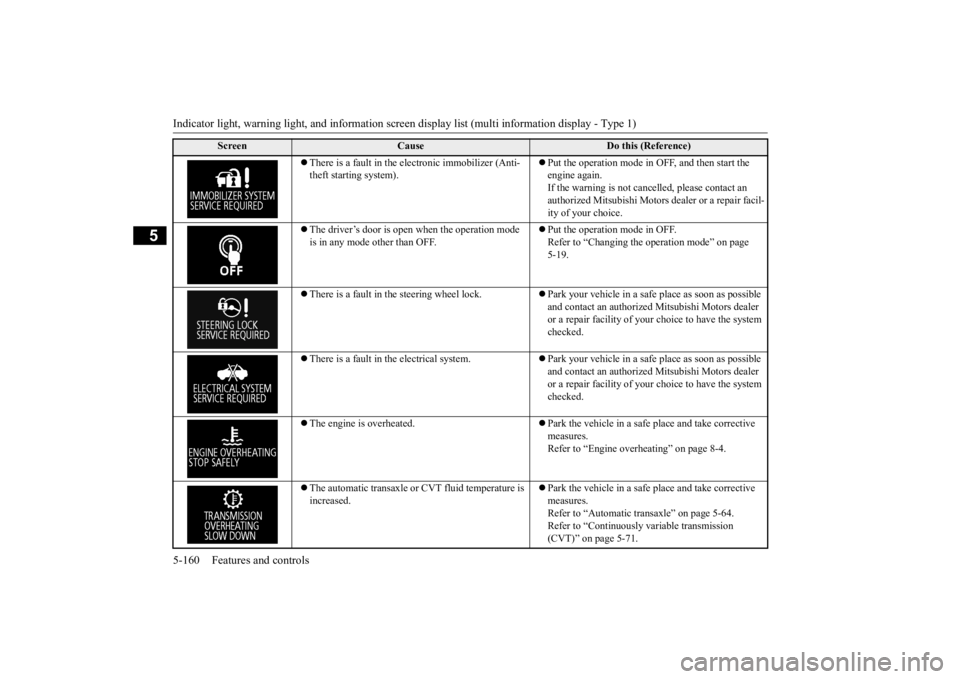
There is a fault in the electronic immobilizer (Anti- theft starting system).
Put the operation mode in OFF, and then start the engine again.If the warning is not cancel
led, please contact an
authorized Mitsubishi Motors dealer or a repair facil- ity of your choice.
The driver’s door is open when the operation mode is in any mode other than OFF.
Put the operation mode in OFF. Refer to “Changing the operation mode” on page 5-19.
There is a fault in the steering wheel lock.
Park your vehicle in a safe place as soon as possible and contact an authorized
Mitsubishi Motors dealer
or a repair facility of your
choice to have the system
checked.
There is a fault in the electrical system.
Park your vehicle in a safe place as soon as possible and contact an authorized
Mitsubishi Motors dealer
or a repair facility of your
choice to have the system
checked.
The engine is overheated.
Park the vehicle in a safe place and take corrective measures. Refer to “Engine overheating” on page 8-4.
The automatic transaxle or CVT fluid temperature is increased.
Park the vehicle in a safe place and take corrective measures. Refer to “Automatic tr
ansaxle” on page 5-64.
Refer to “Continuously
variable transmission
(CVT)” on page 5-71.
Screen
Cause
Do this (Reference)
BK0223400US.book 160 ページ 2015年2月13日 金曜日 午後12時15分
Page 243 of 464
Indicator light, warning light, and information screen display list (multi information display - Type 1)
Features and controls 5-167
5
N00558201308
The operation status of each syst
em is displayed on the informat
ion screen. For furthe
r details, refer to
the appropriate page
for each system.
Other interrupt displays
Screen
System operation status
Reference
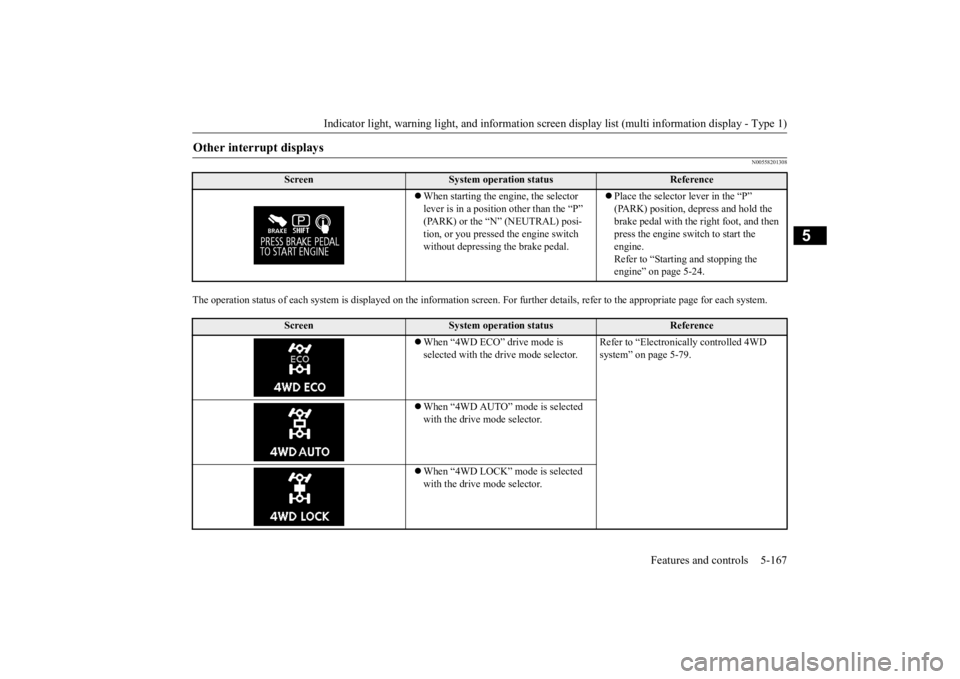
When starting the engine, the selector lever is in a positi
on other than the “P”
(PARK) or the “N” (NEUTRAL) posi-tion, or you pressed the engine switch without depressing the brake pedal.
Place the selector lever in the “P” (PARK) position, depress and hold the brake pedal with the right foot, and then press the engine switch to start the engine. Refer to “Starting and stopping the engine” on page 5-24.
Screen
System operation status
Reference
When “4WD ECO” drive mode is selected with the drive mode selector.
Refer to “Electronica
lly controlled 4WD
system” on page 5-79.
When “4WD AUTO” mode is selected with the drive mode selector. When “4WD LOCK” mode is selected with the drive mode selector.
BK0223400US.book 167 ページ 2015年2月13日 金曜日 午後12時15分
Page 246 of 464
Indicator light, warning light, and information screen display list (multi information display - Type 1) 5-170 Features and controls
5
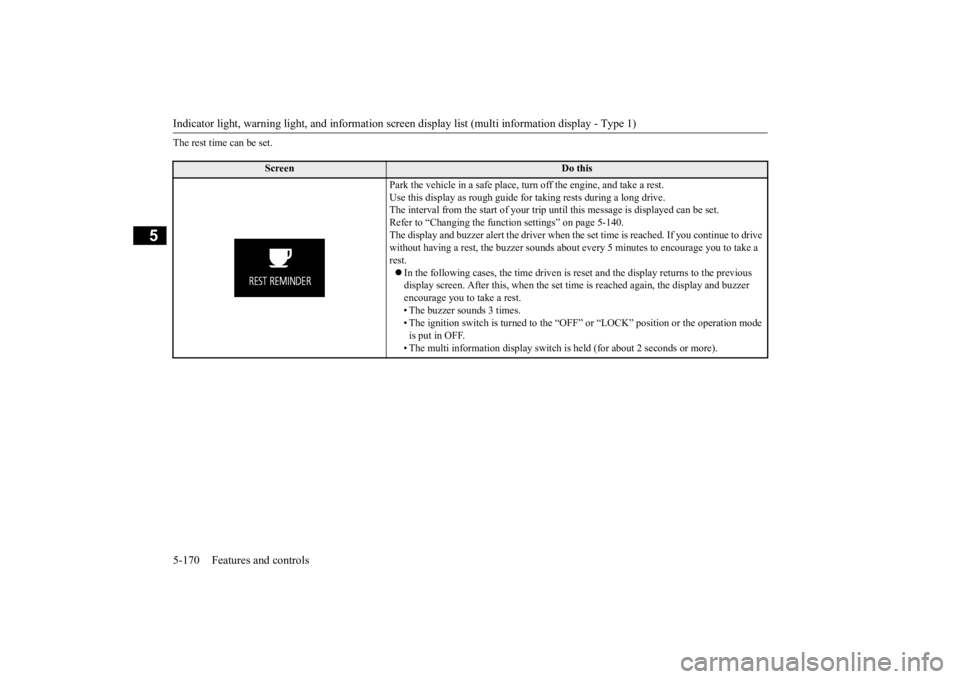
The rest time can be set.
Screen
Do this
Park the vehicle in a safe place, tu
rn off the engine,
and take a rest.
Use this display as rough guide
for taking rests during a long drive.
The interval from the start of your trip
until this message is
displayed can be set.
Refer to “Changing the function settings” on page 5-140. The display and buzzer alert the driver when th
e set time is reached.
If you continue to drive
without having a rest, the buzzer sounds about
every 5 minutes to encourage you to take a
rest. In the following cases, the time driven is reset and the display returns to the previous display screen. After this, when the set time
is reached again,
the display and buzzer
encourage you to take a rest. • The buzzer sounds 3 times.• The ignition switch is turned to the “OFF”
or “LOCK” position or the operation mode
is put in OFF. • The multi information display switch is
held (for about 2 seconds or more).
BK0223400US.book 170 ページ 2015年2月13日 金曜日 午後12時15分
Page 247 of 464
Indicator and warning light package (multi information display - Type 2)
Features and controls 5-171
5
N00519801891
Indicator and warning light package (mu
lti information display - Type 2)
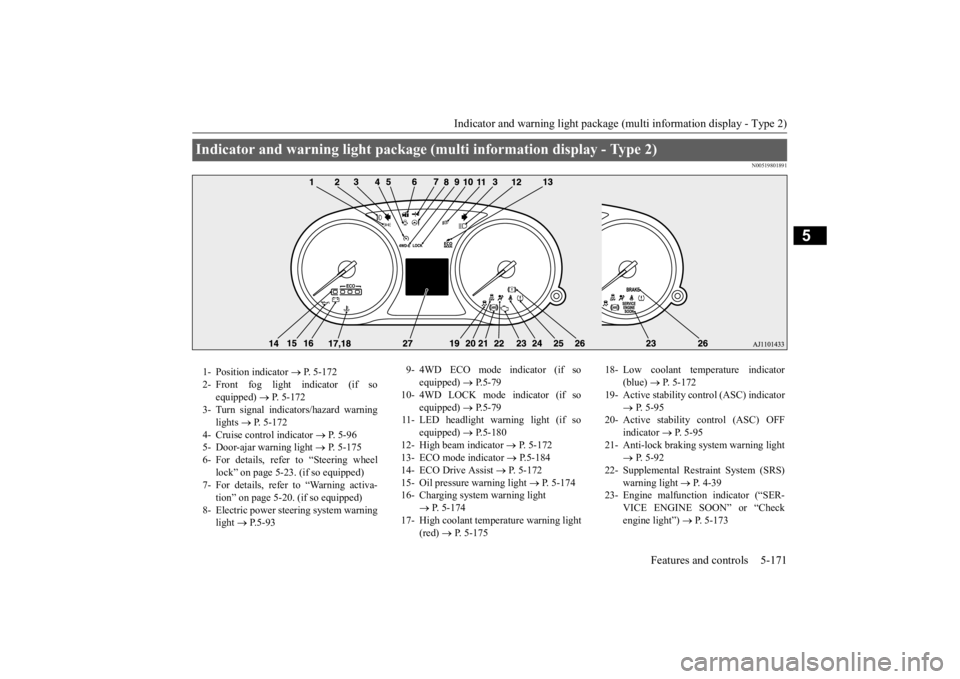
1- Position indicator
P. 5-172
2- Front fog light indicator (if so
equipped)
P. 5-172
3- Turn signal indicators/hazard warning
lights
P. 5-172
4- Cruise control indicator
P. 5-96
5- Door-ajar warning light
P. 5-175
6- For details, refer to “Steering wheel
lock” on page 5-23. (if so equipped)
7- For details, refer to “Warning activa-
tion” on page 5-20. (if so equipped)
8- Electric power stee
ring system warning
light
P. 5 - 9 3
9- 4WD ECO mode indicator (if so
equipped)
P.5-79
10- 4WD LOCK mode indicator (if so
equipped)
P.5-79
11- LED headlight warning light (if so
equipped)
P.5-180
12- High beam indicator
P. 5-172
13- ECO mode indicator
P.5-184
14- ECO Drive Assist
P. 5-172
15- Oil pressure warning light
P. 5-174
16- Charging system warning light
P. 5-174
17- High coolant temperature warning light
(red)
P. 5-175
18- Low coolant temp
erature indicator
(blue)
P. 5-172
19- Active stability control (ASC) indicator
P. 5-95
20- Active stability control (ASC) OFF
indicator
P. 5-95
21- Anti-lock braking system warning light
P. 5-92
22- Supplemental Restra
int System (SRS)
warning light
P. 4 - 3 9
23- Engine malfuncti
on indicator (“SER-
VICE ENGINE SOON” or “Check engine light”)
P. 5-173
BK0223400US.book 171 ページ 2015年2月13日 金曜日 午後12時15分
Page 249 of 464
Warning lights
Features and controls 5-173
5
N00520300147 N00520401536
This light comes on when the ignition switch is turned to the “ON” position (engine off) or the operation mode is put in ON.When the engine is started, the light should go off a few seconds later. A warning is also displayed in the multi information display. The warning light also illuminates after start- ing the engine under the following condi-tions. When the parking brake is still applied. When the brake fluid level is low. When the brake system circuit is not working properly.
When the vehicle is moving at more than 5 mph (8 km/h) and parking brake applied, a buzzer will sound to inform the driver that theparking brake is not properly release. Before driving, be sure
that the parking brake
is fully released and
brake warning light is
off.
N00520501814
This indicator is a part
of the onboard diag-
nostic (OBD) system which monitors the emissions, engine control system or auto- matic transaxle cont
rol system/continuously
variable transmission
(CVT) control system.
If a problem is detected in one of these sys- tems, this indicator illuminates or flashes. When the ignition switch is turned to the “ON” position or the operation mode is put inON, this indicator
normally comes on and
goes off after the engine has started. This indicator will come on if the fuel tank filler cap is not properly tightened. If thisindicator comes on and stays on after refuel- ing, stop the engine and check that the cap is properly tightened. (Turn the cap clockwiseuntil you hear clicking sounds.) If this indicator does not go off after several seconds or lights up while driving, have thesystem checked as soon as possible at an authorized Mitsubishi Motors dealer or a repair facility
of your choice.
Warning lights Brake warning light and buzzer
CAUTIONIf the brake warning light and the Anti-lock braking system warning
light are illuminated
at the same time, the braking force distribu-tion function will not ope
rate, so the vehicle
may be destabilized during sudden braking under the following conditions.• When the brake warning light does not goout even when the parking brake isreleased.• When the brake warning light stays onwhile driving.• If the above occurs, avoid sudden brakingand high-speed driving. Park the vehicle in a safe place, and contact an authorized Mit- subishi Motors dealer or a repair facility ofyour choice as soon as possible.
The vehicle should be brought to a halt in the following manner when brake performance is deteriorated.• Confirm that the vehicle slows down whenyou press down on the brake pedal harder than usual. In some cases, the brake pedalmay go all the way to the floor.• Should the brakes fail, use engine brakingto reduce your speed and slowly apply the parking brake. Depress the brake peda
l to illuminate the
stop lights to alert
the vehicles
behind you.
Engine malfunction indicator (“SERVICE ENGINE SOON” or “Check engine light”)
BK0223400US.book 173 ページ 2015年2月13日 金曜日 午後12時15分
Page 250 of 464
Warning lights 5-174 Features and controls
5
N00520601323
This light comes on in the event of a malfunc- tion in the charging system or when the igni-tion switch is turned to the “ON” position (engine off) or the operation mode is put in ON. On vehicle equipped with the multiinformation display - Type 1, a warning is also displayed in the multi information dis- play. When the engine is started, the lightshould go out. Check to make sure that the light has gone out before driving.
N00520701278
This light comes on when the engine oil pres- sure is below normal. If the light stays onwhile driving, stop the
engine as soon as pos-
sible. Do not run the engine until the cause of the low oil pressure is corrected.
CAUTION Driving for a long time with the engine mal- function indicator on
may cause more dam-
age to the emission control system. Thiscould also affect fuel economy and drivabil- ity. If this indicator does not come on when the ignition switch is turned to the “ON” posi- tion or the operation mode
is put in ON, have
the system checked at an authorized Mitsubi- shi Motors dealer or a repair facility of your choice. If the engine malfuncti
on indicator comes on
while the engine is running, avoid driving athigh speeds. During vehicle operation
with the indicator
on, the vehicle may not
accelerate when you
depress the accelerator pedal. When the vehicle is stat
ionary with the indi-
cator on, you must depress the brake pedalmore firmly than usual since the engine idling speed is higher than usual and a vehi- cle with an automatic transaxle or CVT has astronger tendency to creep forward.
NOTE
Do not disconnect the ba
ttery cable when the
engine malfunction i
ndicator (“SERVICE
ENGINE SOON” or “Che
ck engine light”) is
on. The engine electronic control module stores critical OBD information (especially exhaustemission data), which ma
y be lost if the bat-
tery cable is disconne
cted while the engine
malfunction indicator is
on. This will make it
difficult to diagnose the cause of future prob- lems.
Charging system warning light
CAUTION If the warning light stays on while the engine is running, park your ve
hicle in a safe place
as soon as possible and
contact an authorized
Mitsubishi Motors dealer
or a repair facility
of your choice to have the system checked.
Oil pressure warning light (Vehicle equipped with the multi information display - Type 2)
CAUTION If this light comes on when the engine oil level is not low, have
your vehicle checked at
an authorized Mitsubish
i Motors dealer or a
repair facility
of your choice.
This warning light does not show the amount of oil in the crankcase. This can only bedetermined by checking th
e oil level with the
dipstick with the engine turned off.
BK0223400US.book 174 ページ 2015年2月13日 金曜日 午後12時15分