display MITSUBISHI OUTLANDER III 2017 Owners Manual
[x] Cancel search | Manufacturer: MITSUBISHI, Model Year: 2017, Model line: OUTLANDER III, Model: MITSUBISHI OUTLANDER III 2017Pages: 521, PDF Size: 14.95 MB
Page 238 of 521
Multi Around Monitor (if so equipped)
Features and controls 5-157
5
N00587500032
The Multi Around Monitor can only be used when the operation mode is put in ON. When you move the selector lever to the “R” view/rear-view is disp
layed on the screen of
the inside rearview mirror, the DISPLAY AUDIO, the Smartphone Link Display Audio or the Mitsubishi Multi-communication Sys-
tem. When you move the selector lever to any other position, the
display disappears.
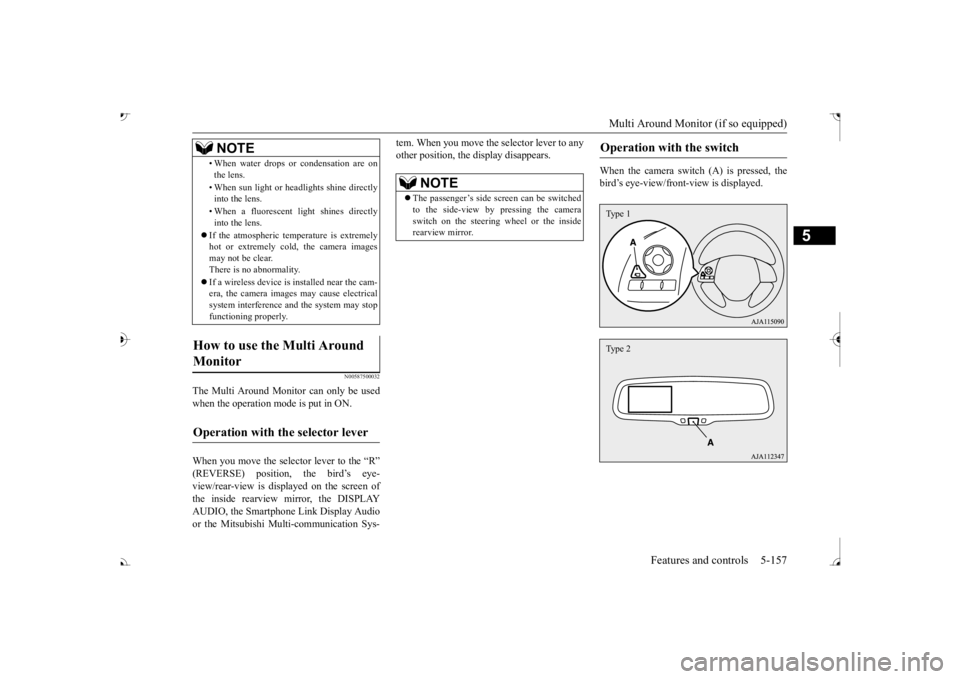
When the camera switch (A) is pressed, the bird’s eye-view/front
-view is displayed.
• When water drops or
condensation are on
the lens. • When sun light or he
adlights shine directly
into the lens. • When a fluorescent li
ght shines directly
into the lens.
If the atmospheric temperature is extremely hot or extremely cold, the camera images may not be clear.There is no abnormality. If a wireless device is installed near the cam- era, the camera images may cause electrical system interference and the system may stop functioning properly.
How to use the Multi Around Monitor
Operation with the selector lever
NOTE
NOTE
The passenger’s side sc
reen can be switched
to the side-view by pressing the camera switch on the steering wheel or the inside rearview mirror.
Operation with the switch
Type 1Type 2
BK0239700US.book 157 ページ 2016年6月16日 木曜日 午前10時58分
Page 239 of 521
Multi Around Monitor (if so equipped)
5
If the camera switch is pressed, the mode of Multi Around Monitor is
switched as follows.
Bird’s eye-view/Rear-view mode
Side-
view/Rear-view mode Bird’s eye-view/Rear-view mode
Side-
view/Rear-view mode
OFF
If the camera switch is
pressed, the mode of
Multi Around Monitor is switched, Bird’seye-view/Front-view mode
Side-
view/Front-view mode
OFF
N00587600033
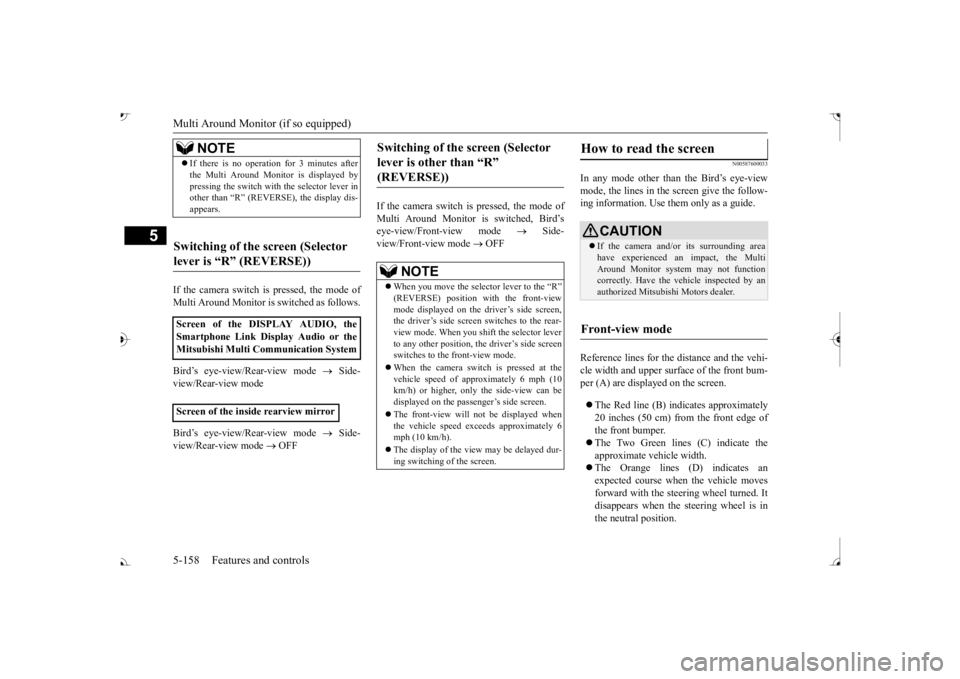
In any mode other than the Bird’s eye-view mode, the lines in the screen give the follow- ing information. Use them only as a guide. Reference lines for the distance and the vehi- cle width and upper surface of the front bum- per (A) are displayed on the screen. The Red line (B) indicates approximately 20 inches (50 cm) from the front edge ofthe front bumper. The Two Green lines (C) indicate the approximate ve
hicle width.
The Orange lines (D) indicates an expected course when the vehicle moves forward with the steering wheel turned. Itdisappears when the
steering wheel is in
the neutral position.
NOTE
If there is no operation for 3 minutes after the Multi Around Monitor is displayed bypressing the switch with the selector lever inother than “R” (REVERSE), the display dis- appears.
Switching of the screen (Selector lever is
Page 240 of 521
Multi Around Monitor (if so equipped)
Features and controls 5-159
5
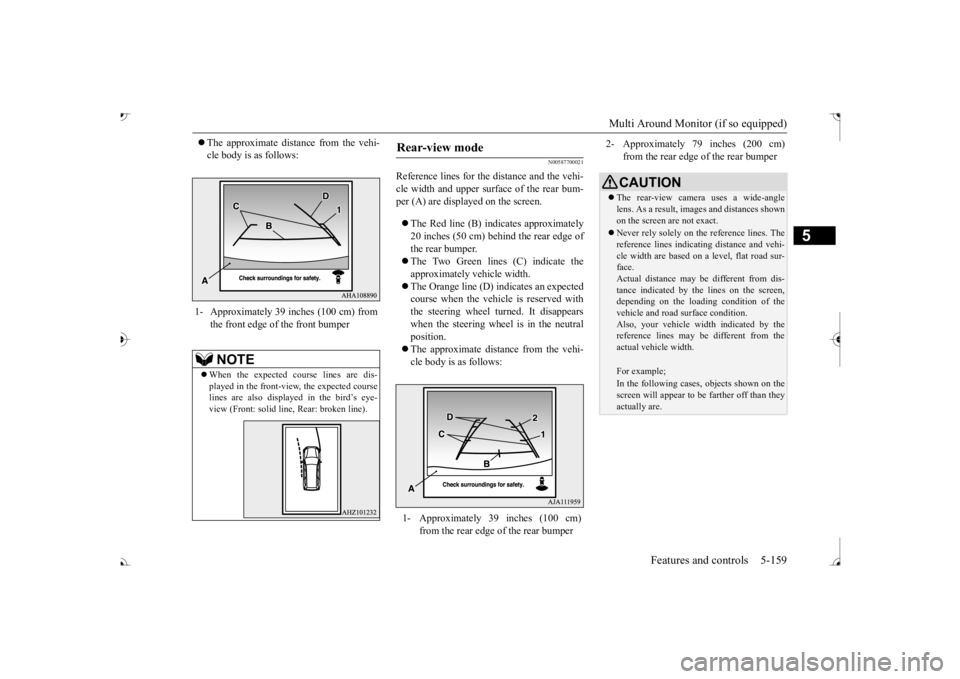
The approximate distance from the vehi- cle body is as follows:
N00587700021
Reference lines for the distance and the vehi- cle width and upper surface of the rear bum- per (A) are displayed on the screen. The Red line (B) indicates approximately 20 inches (50 cm) behind the rear edge of the rear bumper. The Two Green lines (C) indicate the approximately vehicle width. The Orange line (D) indicates an expected course when the vehicle is reserved with the steering wheel turned. It disappears when the steering wheel is in the neutralposition. The approximate distance from the vehi- cle body is as follows:
1- Approximately 39 inches (100 cm) from
the front edge of the front bumperNOTE
When the expected course lines are dis- played in the front-vie
w, the expected course
lines are also displayed in the bird’s eye-view (Front: solid line
, Rear: broken line).
Rear-view mode
1- Approximately 39 inches (100 cm)
from the rear edge of the rear bumper
2- Approximately 79 inches (200 cm)
from the rear edge of the rear bumperCAUTION The rear-view camera uses a wide-angle lens. As a result, images and distances shown on the screen are not exact. Never rely solely on th
e reference lines. The
reference lines indicati
ng distance and vehi-
cle width are based on a level, flat road sur- face. Actual distance may be different from dis-tance indicated by the
lines on the screen,
depending on the loadi
ng condition of the
vehicle and road surface condition.Also, your vehicle wi
dth indicated by the
reference lines may be different from the actual vehicle width.For example;In the following cases, objects shown on thescreen will appear to
be farther off than they
actually are.
BK0239700US.book 159 ページ 2016年6月16日 木曜日 午前10時58分
Page 242 of 521
Multi Around Monitor (if so equipped)
Features and controls 5-161
5
N00587900023
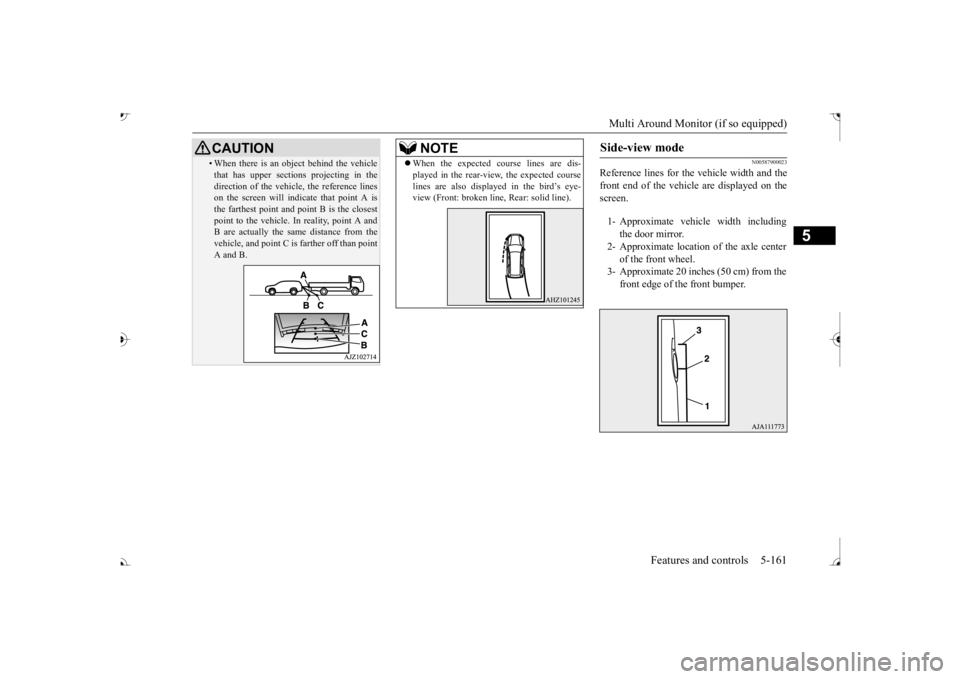
Reference lines for the
vehicle width and the
front end of the vehicle are displayed on the screen.
• When there is an object behind the vehicle that has upper sections projecting in thedirection of the vehicl
e, the reference lines
on the screen will indicate that point A is the farthest point and
point B is the closest
point to the vehicle.
In reality, point A and
B are actually the same distance from the vehicle, and point C is
farther off than point
A and B.CAUTION
NOTE
When the expected course lines are dis- played in the rear-view, the expected courselines are also displayed in the bird’s eye-view (Front: broken li
ne, Rear: solid line).
Side-view mode
1- Approximate vehi
cle width including
the door mirror.
2- Approximate location
of the axle center
of the front wheel.
3- Approximate 20 inches (50 cm) from the
front edge of the front bumper.
BK0239700US.book 161 ページ 2016年6月16日 木曜日 午前10時58分
Page 243 of 521
Multi Around Monitor (if so equipped)
5
N00588000021
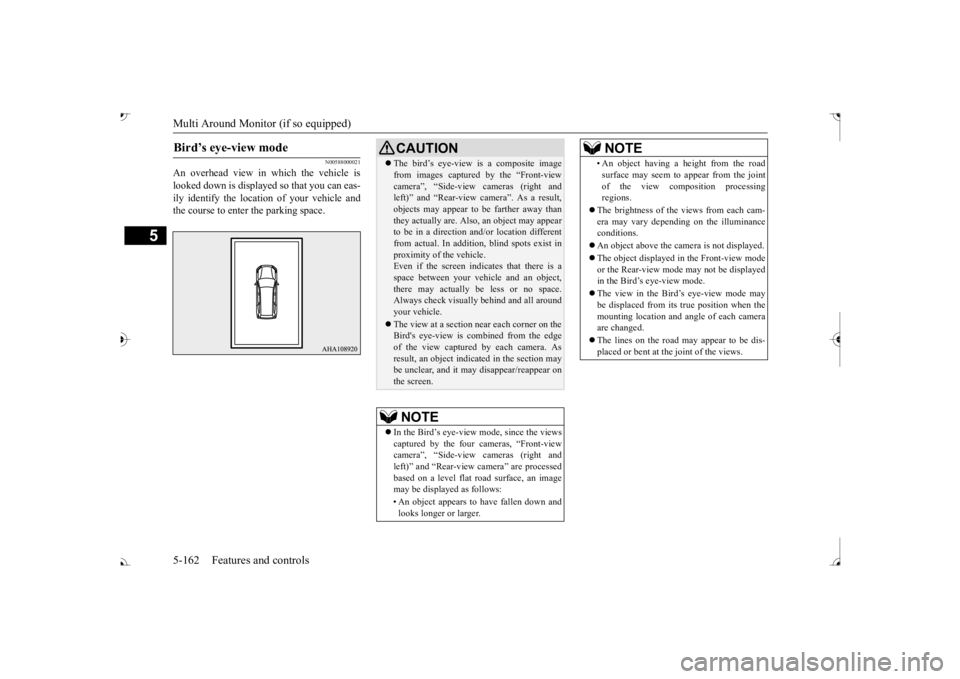
An overhead view in which the vehicle is looked down is displaye
d so that you can eas-
ily identify the location of your vehicle andthe course to enter the parking space.Bird’s eye-view mode
CAUTION The bird’s eye-view is a composite image from images captured by the “Front-viewcamera
Page 244 of 521
Instrument cluster
Features and controls 5-163
5
N00519001402
N00519101272
The speedometer shows
the vehicle speed in
miles per hour (mph) or kilometers per hour(km/h).
N00519201303
The tachometer shows en
gine revolutions per
minute. This allows the driver to determine the most efficient selector position and engine speed combinations.This gauge also assists in evaluating engine performance.
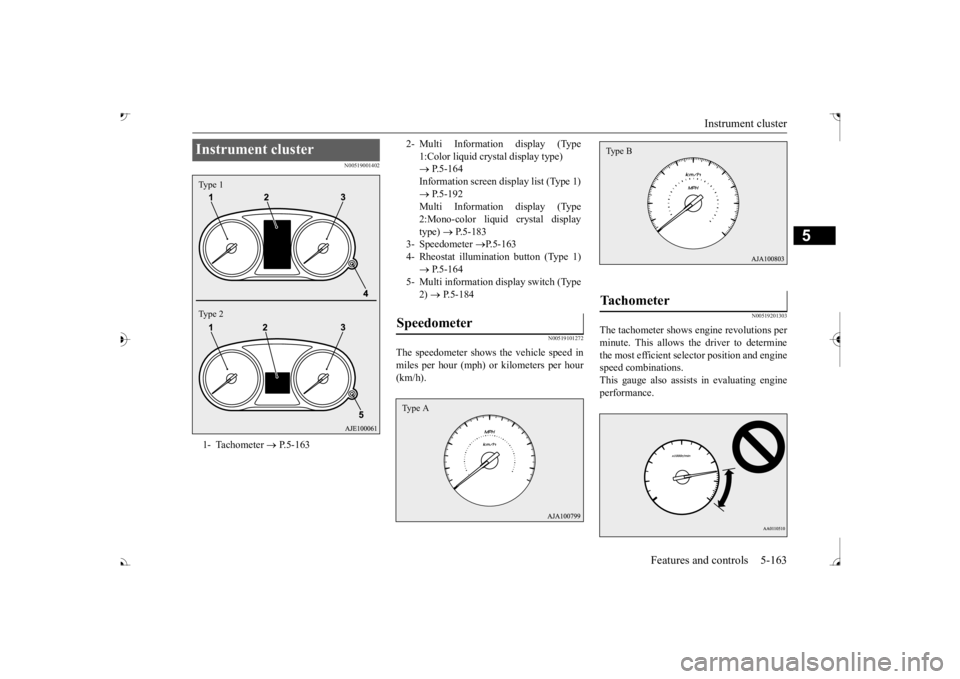
Instrument cluster 1- Tachometer
P.5-163
Type 1 Type 2
2- Multi Information display (Type
1:Color liquid crystal display type) P.5-164 Information screen display list (Type 1) Multi Information display (Type2:Mono-color liquid crystal display type)
P.5-183
3- Speedometer
P.5-163
4- Rheostat illumination button (Type 1) 5- Multi information display switch (Type
2) P.5-184
Speedometer Type A
Tachometer Type B
BK0239700US.book 163 ページ 2016年6月16日 木曜日 午前10時58分
Page 245 of 521
Multi Information display - Type 1 5-164 Features and controls
5
N00554901248
Each time you press this button, there is a sound and the brightness of the instruments changes.
N00555001392
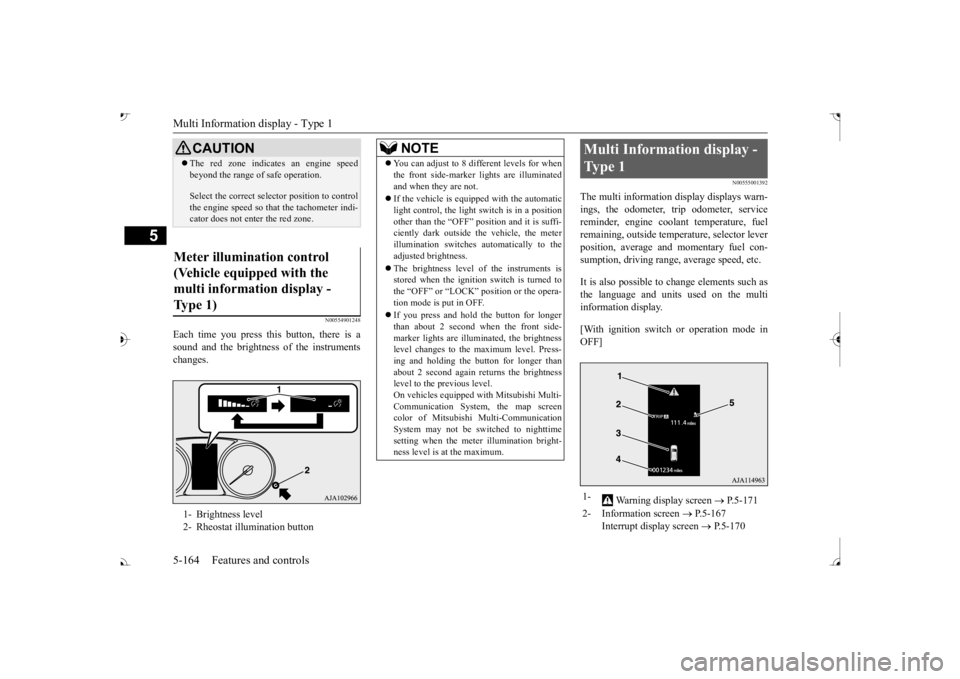
The multi information display displays warn- ings, the odometer, trip odometer, service reminder, engine cool
ant temperature, fuel
remaining, outside temper
ature, selector lever
position, average and momentary fuel con- sumption, driving range, average speed, etc. It is also possible to change elements such as the language and units used on the multi information display. [With ignition switch or operation mode in OFF]
CAUTION The red zone indicate
s an engine speed
beyond the range of
safe operation.
Select the correct selector position to control the engine speed so that
the tachometer indi-
cator does not ente
r the red zone.
Meter illumination control (Vehicle equipped with the multi information display - Type 1) 1- Brightness level 2- Rheostat illumination button
NOTE
You can adjust to 8 different levels for when the front side-marker
lights are illuminated
and when they are not. If the vehicle is equi
pped with the automatic
light control, the light switch is in a positionother than the “OFF” position and it is suffi- ciently dark outside th
e vehicle, the meter
illumination switches automatically to theadjusted brightness. The brightness level of the instruments is stored when the ignition switch is turned to the “OFF” or “LOCK”
position or the opera-
tion mode is put in OFF. If you press and hold the button for longer than about 2 second when the front side-marker lights are illumi
nated, the brightness
level changes to the maximum level. Press- ing and holding the button for longer thanabout 2 second again returns the brightness level to the previous level. On vehicles equipped
with Mitsubishi Multi-
Communication System
, the map screen
color of Mitsubishi Multi-Communication System may not be sw
itched to nighttime
setting when the meter illumination bright- ness level is at the maximum.
Multi Information display - Type 1 1-
Warning display screen
P.5-171
2- Information screen
P.5-167
Interrupt display screen
P.5-170
BK0239700US.book 164 ページ 2016年6月16日 木曜日 午前10時58分
Page 246 of 521

Multi Information display - Type 1
Features and controls 5-165
5
3- Door ajar warning display screen
P.5-171
4- Odometer
P.5-172
5-
“ ” or “ ” mark indicator
P.5-170
BK0239700US.book 165 ページ 2016年6月16日 木曜日 午前10時58分
Page 247 of 521
![MITSUBISHI OUTLANDER III 2017 Owners Manual Multi Information display - Type 1 5-166 Features and controls
5
[With ignition switch or operation mode in ON] 1- Drive mode indicator display screen (if
so equipped)
P.5-84
2- S-AWC drive mo](/img/19/58146/w960_58146-246.png "MITSUBISHI OUTLANDER III 2017 Owners Manual Multi Information display - Type 1 5-166 Features and controls
5
[With ignition switch or operation mode in ON] 1- Drive mode indicator display screen (if
so equipped)
P.5-84
2- S-AWC drive mo")
Multi Information display - Type 1 5-166 Features and controls
5
[With ignition switch or operation mode in ON] 1- Drive mode indicator display screen (if
so equipped)
P.5-84
2- S-AWC drive mode display screen (if
so equipped)
P.5-87
3-
Warning display screen
P.5-171
4- Forward Collision Mitigation System
(FCM) OFF display screen (if so equipped)
P.5-117
Ultrasonic misacceleration MitigationSystem OFF display screen (if so equipped)
P.5-127
5- Lane Departure Warning (LDW) sys-
tem display screen (if so equipped) P.5-139
6- ECO mode indicator display screen
P.5-231
7- Information screen
P.5-167
8- Selector lever
position display
P.5-70, 5-77
9- Engine coolant temperature display
P.5-171
10- Odometer
P.5-172
11- Cruise control display screen (if so
equipped)
P.5-102
12- Adaptive Cruise Control System (ACC)
display screen (if so equipped) P.5-106
13- ECO indicator
P.5-176
14-
“ ” or “ ” mark indicator
P.5-170
15- Fuel remaining display screen
P.5-172
16- Outside temperature display screen
P.5-172NOTE
The fuel units, outside temperature units, display language, and ot
her settings can be
changed. Refer to “Changing th
e function settings” on
page 5-177.
BK0239700US.book 166 ページ 2016年6月16日 木曜日 午前10時58分
Page 248 of 521
Multi Information display - Type 1
Features and controls 5-167
5
N00555101205
Each time the multi information display switch is operated, th
e buzzer sounds and the
multi information disp
lay changes between
information such as wa
rnings, trip odometer,
average and momentary fuel consumption,distance range, etc.
It is also possible to change elements such as the language and units used on the multiinformation display by operating the multi information display switch.
N00555301177
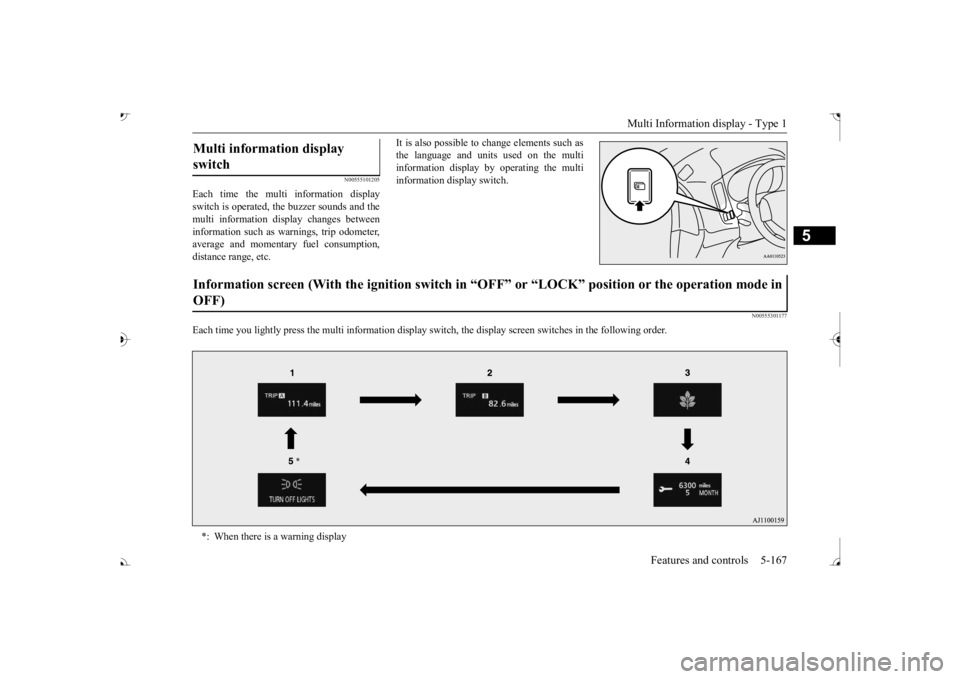
Each time you lightly press the multi in
formation display switch, th
e display screen switches
in the following order.
Multi information display switch Information screen (With the igniti
on switch in “OFF” or “LOCK” po
sition or the operation mode in
OFF) *: When there is a warning display
BK0239700US.book 167 ページ 2016年6月16日 木曜日 午前10時58分