air condition MITSUBISHI OUTLANDER III 2017 User Guide
[x] Cancel search | Manufacturer: MITSUBISHI, Model Year: 2017, Model line: OUTLANDER III, Model: MITSUBISHI OUTLANDER III 2017Pages: 521, PDF Size: 14.95 MB
Page 156 of 521
Continuously variable transmission (CVT) (if so equipped)
Features and controls 5-75
5
and then move the sele
ctor lever to the “P”
(PARK) position. If the transaxle does not change gears while driving, or your vehicle does not pick up enough speed when starting on an uphillslope, it may be that there is something unusual happening in the
transaxle, causing a
safety device to activa
te. Have your vehicle
checked at an authorized Mitsubishi Motors dealer or a repair facility of your choiceimmediately.
N00560201060
The CVT will automati
cally and continuously
change its gear ratio depending on road anddriving conditions. This helps achieve smooth driving and excellent fuel efficiency. If your vehicle is equipped with the spor- tronic steering wheel paddle shifter, you can manually shift up and shift down the trans-mission. Refer to “Sports mode” on page 5-80. The transmission prevents unnecessary upshifts even when the accelerator pedal is released and ensures smooth driving. According to the condi
tions, the transmission
will automatically shift to a lower gear ratioto achieve stronger engine braking. This may help reduce your need
to use the service
brake.
N00560301090
As an additional safe
ty precaution, models
equipped with a continuously variable trans- mission have a shift-lock device that holdsthe selector lever in the “P” (PARK) position. To move the selector lever from the “P”the steps below. 1. Press and hold the brake pedal down. 2. Move the selector lever to the desiredposition.
The CVT selects an optimum ratio automati- cally when the selector lever is in the “D”
nding on the speed of
the vehicle and the positi
on of the accelerator
pedal.
When the automatic transaxle makes no gear change
NOTE
When the warning display and “SLOW DOWN” or the warning display and “SERVICE REQUIRED” appear on the information screen in
the multi-information
display, there could be
a malfunction in the
automatic transaxle. Refer to “Automatic transaxle: Warning di
splay” on page 5-70.
Continuously variable transmission (CVT)
(if so
equipped)
DRIVING DOWNHILL
Selector lever operation
NOTE
The selector lever cannot
be moved from “P”
switch is set to the “OFF” or “LOCK” or“ACC” position, or if the key has been removed, or the opera
tion mode is put in
OFF or ACC, or if the brake pedal is notpressed and held down.
BK0239700US.book 75 ページ 2016年6月16日 木曜日 午前10時58分
Page 160 of 521
Continuously variable transmission (CVT) (if so equipped)
Features and controls 5-79
5
N00560601107
This position locks the transmission to pre- vent the vehicle from m
oving. The engine can
be started in the “P” (PARK) position. Move the lever to this position only after the vehicle has come to a complete stop.
At this position, the transmission is disen- gaged. It is the same
as the neutral position on
a manual transaxle and should be used whenthe vehicle is not m
oving for an extended
length of time during driving, such as in a traffic jam.
This position is used fo
r most city and high-
way driving. The transmission will automati- cally and continuously ch
ange its gear ratio
depending on road and driving conditions. Use when engine braking is needed, or for high-power sport drive.
After a while, confirm that the warning display is no longer show
ing. It is safe to
continue driving if the display is no longer showing. If the warn
ing display remains or
flashes frequently,
have your vehicle
inspected by an authorized Mitsubishi Motors dealer or a repair facility of your choice. [When warning di
splay is showing]
It may be that ther
e is something unusual
happening in the CVT, causing a safety device to activate
. Have your vehicle
inspected by an authorized MitsubishiMotors dealer or a repair facility of your choice immediately.
Selector lever positions
“P” PARK
“R” REVERSE
CAUTION
CAUTION Never shift into the “P” (PARK) or “R”motion. If the lever is shifted into the “P” the vehicle is in motion, the transmission may be damaged.
“N” NEUTRAL
WA R N I N G Never move the selector lever to the “N” you could accidentally slip it into the “P” damaging the transmission. To prevent the vehicle from rolling when stopped on a slope,
the engine should be
started in the “P” (PARK) position, not in “N” (NEUTRAL) position.
To prevent rolling, always keep your foot on the brake pedal when the vehicle is in“N” (NEUTRAL) positi
on, or when shift-
ing into or out of
Page 172 of 521
Inspection and maintenance following rough road operation
Features and controls 5-91
5
N00530700085
After operating the vehicle in rough road con- ditions, be sure to perform the followinginspection and maintenance procedures: Check that the vehicle has not been dam- aged by rocks, gravel, etc. Carefully wash the
vehicle with water.
Drive the vehicle slowly while lightly depressing the brake pedal in order to dryout the brakes. If the brakes still do not function properly, contact an authorized Mitsubishi Motors dealer or a repair facil-ity of your choice as
soon as possible to
have the brakes checked. Remove the inse
cts, dried grass, etc. clog-
ging the radiator core. After driving through water, check the engine, transaxle and
differential oil. If
the oil or grease is milky or cloudy because of water c
ontamination, it must
be replaced with new oil. Check the inside of the vehicle. If water entry is found, dry the carpet etc. Inspect the headlights. If water is in the headlight housing, have
it drained at an
authorized Mitsubishi
Motors dealer or a
repair facility of your choice.
N00530801214
Since the driving torque can be applied to thefour wheels, the driving performance of the vehicle when operating in 4-wheel drive is greatly affected by the condition of the tires.
Pay close attention to the tires. Install only the specified tires on all wheels. Refer to “Tires and wheels” onpage 11-7. Be sure all four tire
s and wheels are the
same size
and type.
When it is necessary to replace any of the tires or wheels, replace all four. All tires should be rotated before the wear difference between the
front and rear tires
is recognizable.
Good vehicle performance cannot be expected if there is a difference in wear between tires. Refer to “Tire rotation” on page 9-20. Check the tire inflati
on pressure regularly.
CAUTIONNever drive through water that is deep enough to cover wheel hubs, axles or exhaustpipe. Do not change th
e selector lever posi-
tion while driving through water. Frequent driving through water can adversely affect the life
span of the vehicle;
consult an authorized Mitsubishi Motors dealer or a repair faci
lity of your choice and
take the necessary measures to prepare,inspect, and repair the vehicle. After driving through wa
ter, apply the brakes
to be sure they are functioning properly. If the brakes are wet and not functioning prop- erly, dry them out by
driving slowly while
lightly depressing the
brake pedal. Inspect
each part of the vehicle carefully.
Inspection and maintenance following rough road opera-tion
Cautions on the handling of 4-wheel drive vehicles Tires and wheels
CAUTION Always use tires of th
e same size, type, and
brand that have no wear differences. Using tires of different size,
type, brands or degree
of wear, will increase the differential oil tem- perature and result in
possible damage to the
driving system. Further, the drive train willbe subject to excessi
ve loading, possibly
leading to oil leakage, component seizure, or other serious failures.
BK0239700US.book 91 ページ 2016年6月16日 木曜日 午前10時58分
Page 179 of 521
Anti-lock braking system 5-98 Features and controls
5
N00531601684
Warning light Warning display If there is a malfunction in the system, the anti-lock braking system warning light will come on and the warning display will appearon the information screen in the multi-infor- mation display. Under normal conditions, the anti-lock brak-ing system warning light only comes on when the ignition switch is turned to the “ON”and goes off a few seconds later.
N00531701614
Avoid hard braking and high-speed driv- ing. Stop the vehicl
e in a safe place.
Test the system by restarting the engineand driving at a speed of about 12 mph (20 km/h) or higher. If the warning light / display then remainsoff during driving, there is no abnormal condition.
However, if the warning light / display do not disappear, or if they come on againwhen the vehicle is driven, have the vehi- cle checked by an authorized Mitsubishi Motors dealer or repair facility of yourchoice as soon
as possible.
Warning light
Warning display The anti-lock braking system and brake force distribution function ma
y not work, so hard
braking could make the vehicle unstable.
The anti-lock braking system can be used after the vehicle has
reached a speed over
approximately 6 mph (10 km/h). It stopsworking when the vehicle slows below 3 mph (5 km/h).
Anti-lock braking system warn- ing light / display
NOTE
CAUTION Any of the following i
ndicates that the anti-
lock braking system is not functioning andonly the standard brake system is working.(The standard brake system is functioning normally.) If this happens, take your vehicle to an authorized Mitsubishi Motors dealer ora repair facility
of your choice.
• When the ignition switch is in the “ON” position or the operation mode is put in ON, the warning light doe
s not come on or it
remains on and does not go off• The warning light comes on while driving• The warning display appears while driving
If the warning light / display illuminate while driving If only the anti-lock braking sys- tem warning light/display illumi-nate
If the anti-lock braking system warning light / display and brake warning light / display illuminate at the same time
BK0239700US.book 98 ページ 2016年6月16日 木曜日 午前10時58分
Page 181 of 521
Active stability control (ASC)
5
If there is a malfunction in the system, the warning light will come on and the warningdisplay will appear on the information screen in the multi information display. Under normal conditions, the warning lightcome on when the ignition switch is turned to the “ON” position or the operation mode is put in ON, and goes off after the engine hasstarted.
N00559100147
The Active stability
control (ASC) takes
overall control of the
anti-lock braking sys-
tem, traction control function and skid control function to help maintain the vehicle’s controland traction. Please read
this section in con-
junction with the page on the anti-lock brak- ing system, traction control function and skidcontrol function. Anti-lock braking system
P.5-97
Traction control function
P.5-100
Skid control function
P.5-100
N00559200021
On slippery surfaces, the traction control function prevents the drive wheels from spin- ning excessive, thus helping the vehicle tostart moving from a stopp
ed condition.
It also
provides sufficient driv
ing force and steering
performance as the vehicle turns while press-ing the acceleration pedal.
N00559300019
The skid control function is designed to helpthe driver maintain control of the vehicle on slippery roads or during rapid steering
CAUTION If the warning display appears while the engine is running, have
the vehicle inspected
by an authorized Mitsubishi Motors dealer or a repair facility of
your choice as soon as
possible. It may become harder to turn thesteering wheel.
Active stability control (ASC)
CAUTION Do not over-rely on the ASC. Even the ASC cannot prevent the natural laws of physics from acting on the vehicle. This system, like any other system, has
limits and cannot help
you to maintain traction and control of the vehicle in all circumstances. Reckless driv- ing can lead to accident
s. It is the driver’s
responsibillty to drive carefully, This means taking into account the traffic, road and envi- ronmental conditions. Be sure to use the same specified type and size of tire on all four
wheels. Otherwise, the
ASC may not work properly. Do not install any aftermarket limited slip differential (LSD) on your vehicle. The ASC may stop functioning properly.NOTE
An operation noise may be emitted from the engine compartment in the following situa-tions. The sound is associated with checkingthe operations of the ASC. At this time, you may feel a shock from the brake pedal if you depress it. These do not
indicate a malfunc-
tion. • When the ignition switch is set to the “ON” position. • When the vehicle is driven for a while after the engine is turned on.
When the ASC is acti
vated, you may feel a
vibration in the vehicl
e body or hear a whin-
ing sound from the engine compartment.This indicates that th
e system is operating
normally. It does not i
ndicate a malfunction.
When the anti-lock braking system warning light is illuminated, the ASC is not active.
Traction control function
CAUTION When driving a vehicle on a snowy or icy road, be sure to install snow tires and drive the vehicle at moderate speeds.
Skid control function
NOTE
BK0239700US.book 100 ページ 2016年6月16日 木曜日 午前10時58分
Page 183 of 521
Cruise control (if so equipped)
5
N00546601129
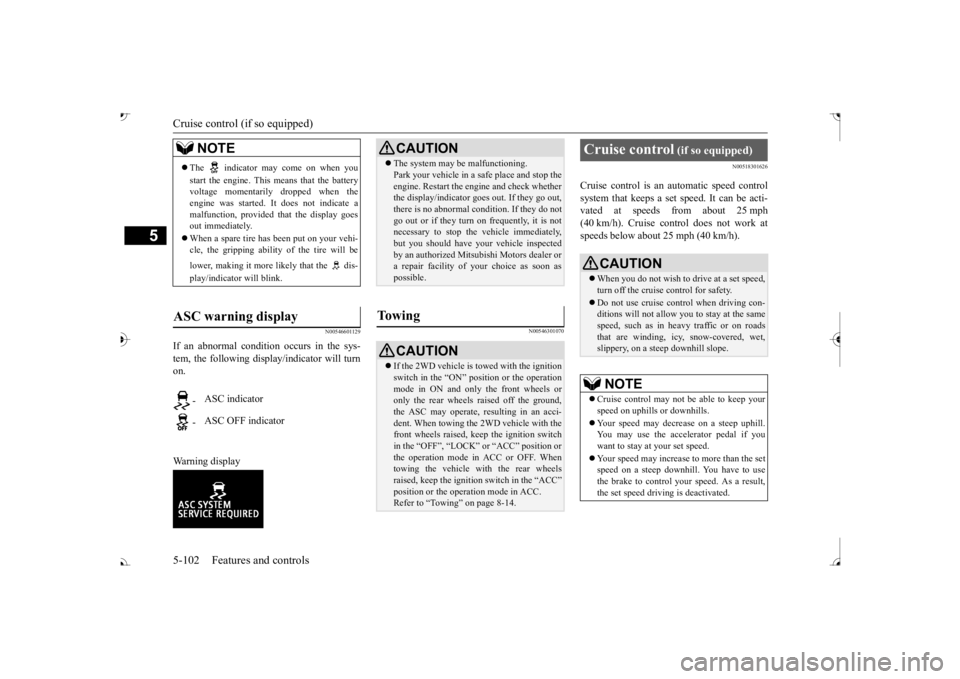
If an abnormal condition occurs in the sys- tem, the following display/indicator will turn on. Warning display
N00546301070
N00518301626
Cruise control is an automatic speed control system that keeps a set speed. It can be acti-vated at speeds from about 25 mph (40 km/h). Cruise cont
rol does not work at
speeds below about 25 mph (40 km/h).
NOTE
The indicator may come on when you start the engine. This means that the battery voltage momentarily dropped when theengine was started. It
does not indicate a
malfunction, provided th
at the display goes
out immediately. When a spare tire has been put on your vehi- cle, the gripping ability of the tire will be lower, making it more
likely that the dis-
play/indicator will blink.
ASC warning display
-
ASC indicator
-
ASC OFF indicator
CAUTION The system may be malfunctioning. Park your vehicle in a
safe place and stop the
engine. Restart the engi
ne and check whether
the display/indicator goes out. If they go out, there is no abnormal condition. If they do not go out or if they turn on frequently, it is notnecessary to stop the
vehicle immediately,
but you should have your
vehicle inspected
by an authorized Mitsubishi Motors dealer ora repair facility of
your choice as soon as
possible.
To w i n g
CAUTION If the 2WD vehicle is
towed with the ignition
switch in the “ON” pos
ition or the operation
mode in ON and only the front wheels or only the rear wheels raised off the ground, the ASC may operate, resulting in an acci-dent. When towing the 2WD vehicle with the front wheels raised, ke
ep the ignition switch
in the “OFF”, “LOCK” the operation mode in ACC or OFF. Whentowing the vehicle with the rear wheels raised, keep the ignition switch in the “ACC”Refer to “Towing” on page 8-14.
Cruise control
(if so equipped)
When you do not wish to drive at a set speed, turn off the cruise control for safety. Do not use cruise control when driving con- ditions will not allow
you to stay at the same
speed, such as in heavy traffic or on roads that are winding, icy, snow-covered, wet,slippery, on a steep downhill slope.NOTE
Cruise control may not
be able to keep your
speed on uphills or downhills. Your speed may decr
ease on a steep uphill.
You may use the accelerator pedal if you want to stay at your set speed. Your speed may increase to more than the set speed on a steep downhill. You have to use the brake to control your speed. As a result,the set speed driving is deactivated.
BK0239700US.book 102 ページ 2016年6月16日 木曜日 午前10時58分
Page 201 of 521
Forward Collision Mitigation System (FCM) (if so equipped) 5-120 Features and controls
5
• When a vehicle ahead is not completely in your path.• When your vehicle ch
anged lanes, and
your vehicle approac
hed immediately
behind the vehicle ahead.• When a vehicle ahead
is towing a trailer.
• When a vehicle ahead is a truck loaded with freight that protrudes rearward from the cargo bed.• When the height of a vehicle ahead isextremely low or its road clearance isextremely high.• When a vehicle ahead is extremely dirty.• When a vehicle ahea
d is covered with
snow.• When a vehicle ahea
d has a large glass
surface.• When a vehicle ahead does not havereflectors (light reflector) or the positionof the reflector is low.• When a vehicle ahead is a car carrier ora similar shaped vehicle.• When accelerating and deceleratingquickly.• When driving on a sl
ippery road covered
by rain water, snow, ice, etc.• When driving on a r
oad with alternating
up and down steep slopes.• When driving on a curve.• When driving on a bumpy or rough road.• When driving in dark areas, such as in a tunnel or at night.WA R N I N G
• When the system recognizes driver’s steering, accelerati
ng, braking or gear
shifting actions as
evasive actions to
avoid collision.• When the rear of your vehicle is weigheddown with the weight of passengers and luggage.• Up to several seconds after starting driv-ing.• In adverse weather conditions, such asrain, snow, fog or sand-storm.• When the windshield of the sensor por-tion is covered with
dirt, water droplets,
snow and ice, etc.• When a vehicle ahea
d or an oncoming
vehicle is splashing water, snow or dirt. • When using a windshield washer.• If windshield wipers are not Mitsubishi Motors Genuine parts or equivalent. • When the sensor becomes extremely hotor cold.• If the battery becomes weak or runsdown.• When the sensor is affected by stronglight, such as direct sunlight or the head- lights of an oncoming vehicle.
The FCM may not detect a pedestrian in certain situations. Some of these include:• If the pedestrian is
shorter than approxi-
mately 3.2 feet (1 m) or taller thanapproximately 6.5 feet (2 m).WA R N I N G
• If the pedestrian is
wearing loose-fitting
clothes.• If part of a pedestrian’s body is hidden, such as when holding an umbrella, large bag, etc.• If a pedestrian bends forward, sits or lieson the road.• When a pedestrian is pushing/pullingsomething, such as a stroller, bicycle orwheelchair.• When pedestrians gather in a group.• When a pedestrian
clothing appears to
be nearly the same color or brightness asits surroundings.• When a pedestrian is very close to anobject, such as a vehicle.• When a pedestrian is in a dark area, suchas at night or in a tunnel.• When a pedestrian is walking fast orrunning.• When a pedestrian suddenly rushes infront of the vehicle.• When the position of
a pedestrian is close
to the edge of the vehicle.
When the system recognizes driver’s steering or accelerati
ng actions as evasive
actions to avoid a collision, FCM control and alarm functions
may be canceled.
In certain situations,
though there is little
or no risk of a collision, the FCM mayactivate. Examples include: • When overtaking a vehicle.WA R N I N G
BK0239700US.book 120 ページ 2016年6月16日 木曜日 午前10時58分
Page 212 of 521
Blind Spot Warning (BSW) (with Lane Change Assist) (if so equipped)
Features and controls 5-131
5
N00586800038
Every time the operation mode is turned to “ON”, the Ultrasonic misacceleration Mitiga-tion System will automatically be turned on. In addition, on vehicles equipped with the Forward Collision Mitigation System (FCM),the Ultrasonic misacceleration Mitigation System and the FCM are simultaneously turned off and on by operating the FCM andUltrasonic misaccelerat
ion Mitigation System
ON/OFF switch. Refer to “FCM and Ultrasonic misaccelera-tion Mitigation System ON/OFF switch” on page 5-122.
N00586900026 N00587000037
Example: When the front and/or rear sensors are temporarily not available This display will appear if more than one sen- sor is temporarily not available for some rea- son such as an environmental condition. This can typically occur when
the sensor is heated.
When the radar sensor performance returns, the message will disappear and the system will resume operation.If the message is continuously displayed, contact an authorized Mitsubishi Motors dealer or a repair facility of your choice.
N00587100038
Example: When there is a malfunction inboth sensors If the Ultrasonic misacceleration Mitigation System detects a malfun
ction in the system,
the Ultrasonic misacceleration Mitigation System will not operate normally and thismassage is displayed. Have the vehicle inspected at an authorized Mitsubishi Motors dealer or a repair facilityof your choice.
N00592200024
The Blind Spot Warning (BSW) is a driving aid system that alerts the driver when another vehicle which may not be visible through theoutside rearview mirror is traveling in the next lane behind your vehicle.
NOTE
The ultrasonic sensors
do not detect objects
in areas directly below or very close to thebumpers. If the height of
an object is lower
than the sensors, the sensors may not con- tinue detecting it wh
ile the vehicle is
approaching the object,
even if the sensors
can initially detect it.
To turn on/off the Ultrasonic misacceleration Mitigation Sys- tem
Warning display
When the sensor is temporarily not available
When there is a malfunction in the sensor or the system
Blind Spot Warning (BSW) (with Lane Change Assist)
(if
so equipped)
BK0239700US.book 131 ページ 2016年6月16日 木曜日 午前10時58分
Page 261 of 521
Multi Information display - Type 1 5-180 Features and controls
5
N00557201154
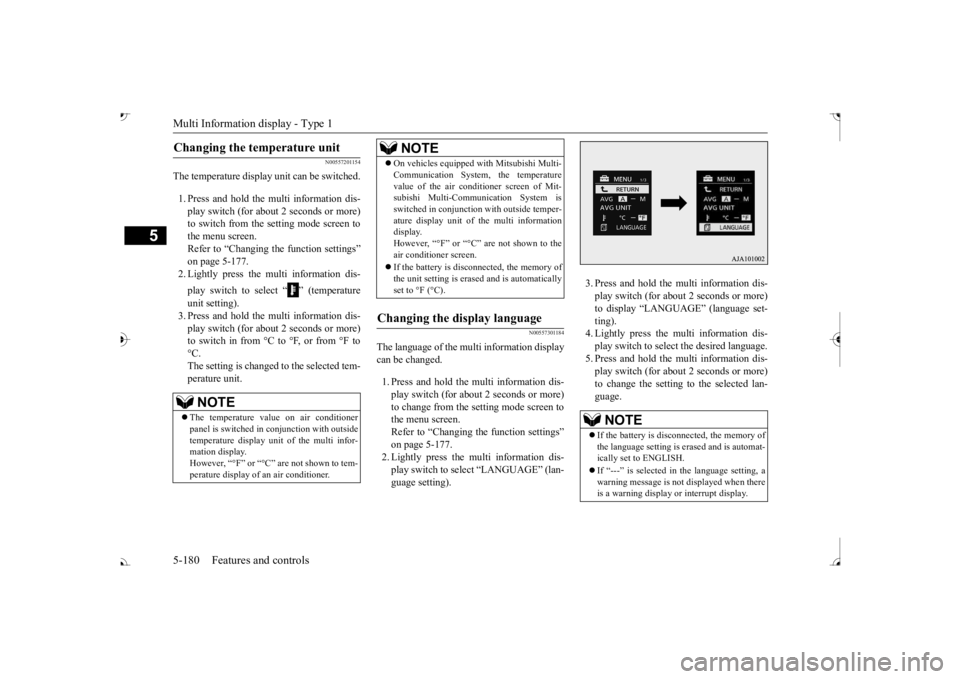
The temperature display unit can be switched. 1. Press and hold the multi information dis- play switch (for about 2 seconds or more) to switch from the setting mode screen tothe menu screen. Refer to “Changing the function settings” on page 5-177.2. Lightly press the multi information dis- play switch to select “ ” (temperature unit setting). 3. Press and hold the multi information dis- play switch (for about 2 seconds or more)to switch in from °C to °F, or from °F to °C. The setting is changed to the selected tem-perature unit.
N00557301184
The language of the multi information displaycan be changed. 1. Press and hold the mu
lti information dis-
play switch (for about 2 seconds or more) to change from the setting mode screen to the menu screen.Refer to “Changing th
e function settings”
on page 5-177. 2. Lightly press the multi information dis-play switch to se
lect “LANGUAGE” (lan-
guage setting).
3. Press and hold the multi information dis- play switch (for about 2 seconds or more)to display “LANGUAGE” (language set- ting). 4. Lightly press the multi information dis-play switch to select
the desired language.
5. Press and hold the multi information dis- play switch (for about 2 seconds or more)to change the setting to the selected lan- guage.
Changing the temperature unit
NOTE
The temperature value on air conditioner panel is switched in
conjunction with outside
temperature display unit of the multi infor-mation display. However, “°F” or “°C” are not shown to tem- perature display of
an air conditioner.
On vehicles equipped
with Mitsubishi Multi-
Communication System, the temperaturevalue of the air conditioner screen of Mit-subishi Multi-Communication System is switched in conjunction
with outside temper-
ature display unit of the multi informationdisplay. However, “°F” or “°C” air conditioner screen. If the battery is disconnected, the memory of the unit setting is erased and is automaticallyset to °F (°C).
Changing the display language
NOTE
NOTE
If the battery is disconnected, the memory of the language setting is erased and is automat- ically set to ENGLISH. If “---” is selected in the language setting, a warning message is not displayed when there is a warning display or interrupt display.
BK0239700US.book 180 ページ 2016年6月16日 木曜日 午前10時58分
Page 267 of 521
Multi Information display - Type 2 5-186 Features and controls
5
N00575301030
This displays the average fuel consumption from the last reset to the present. The reset mode conditions for the average fuel consumption disp
lay can be switched
between “Auto reset”
and “Manual reset”.
For information on how to change the aver- age fuel consumption display setting, refer to“Changing the function settings” on page 5-189.
N00556501121
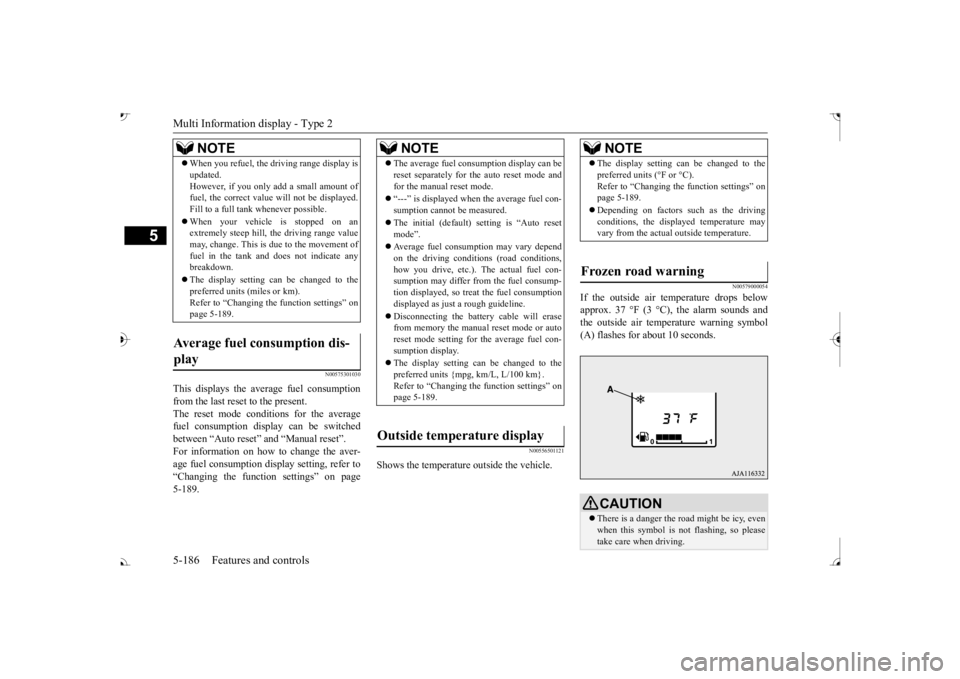
Shows the temperature
outside the vehicle.
N00579000054
If the outside air temperature drops below approx. 37 °F (3 °C), the alarm sounds andthe outside air temperature warning symbol (A) flashes for about 10 seconds.
When you refuel, the driving range display is updated.However, if you only add a small amount offuel, the correct value
will not be displayed.
Fill to a full tank whenever possible. When your vehicle is stopped on an extremely steep hill, th
e driving range value
may, change. This is due to the movement offuel in the tank and does not indicate any breakdown. The display setting can be changed to the preferred units (miles or km). Refer to “Changing th
e function settings” on
page 5-189.
Average fuel consumption dis- play
NOTE
NOTE
The average fuel cons
umption display can be
reset separately for the auto reset mode andfor the manual reset mode. “---” is displayed when the average fuel con- sumption cannot be measured. The initial (default) setting is “Auto reset mode”. Average fuel consumption may vary depend on the driving conditi
ons (road conditions,
how you drive, etc.). The actual fuel con- sumption may differ from the fuel consump- tion displayed, so treat the fuel consumptiondisplayed as just
a rough guideline.
Disconnecting th
e battery cable will erase
from memory the manual reset mode or auto reset mode setting for the average fuel con- sumption display. The display setting can be changed to the preferred units {mpg, km/L, L/100 km}.Refer to “Changing the
function settings” on
page 5-189.
Outside temperature display
NOTE
The display setting ca
n be changed to the
preferred units (°F or °C).
e function settings” on
page 5-189. Depending on factors such as the driving conditions, the displa
yed temperature may
vary from the actual outside temperature.
Frozen road warning
CAUTION There is a danger the ro
ad might be icy, even
when this symbol is not flashing, so pleasetake care when driving.
BK0239700US.book 186 ページ 2016年6月16日 木曜日 午前10時58分