tire pressure MITSUBISHI OUTLANDER III 2017 User Guide
[x] Cancel search | Manufacturer: MITSUBISHI, Model Year: 2017, Model line: OUTLANDER III, Model: MITSUBISHI OUTLANDER III 2017Pages: 521, PDF Size: 14.95 MB
Page 227 of 521
Tire pressure monitoring system 5-146 Features and controls
5
N00584300026
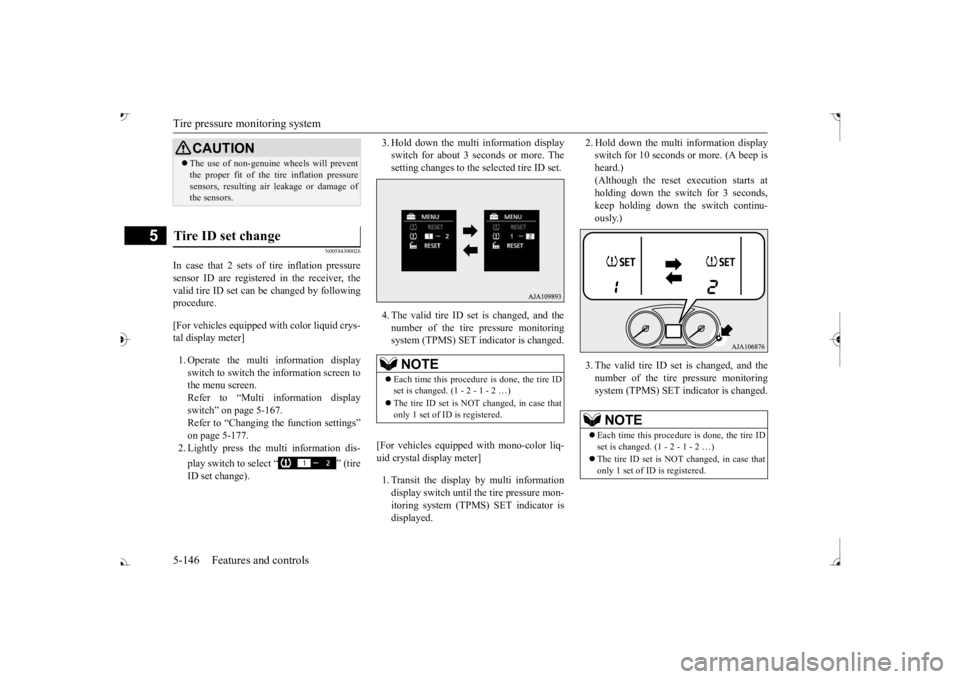
In case that 2 sets of tire inflation pressure sensor ID are registered in the receiver, the valid tire ID set can be changed by following procedure. [For vehicles equipped
with color liquid crys-
tal display meter] 1. Operate the multi information display switch to switch the information screen to the menu screen.Refer to “Multi in
formation display
switch” on page 5-167. Refer to “Changing the function settings”on page 5-177. 2. Lightly press the multi information dis- play switch to select “ ” (tire ID set change).
3. Hold down the multi information display switch for about 3 seconds or more. Thesetting changes to the selected tire ID set. 4. The valid tire ID se
t is changed, and the
number of the tire pressure monitoring system (TPMS) SET in
dicator is changed.
[For vehicles equipped
with mono-color liq-
uid crystal display meter] 1. Transit the display by multi information display switch until th
e tire pressure mon-
itoring system (TPMS) SET indicator isdisplayed.
2. Hold down the multi information display switch for 10 seconds or more. (A beep isheard.) (Although the reset execution starts at holding down the switch for 3 seconds,keep holding down the switch continu- ously.) 3. The valid tire ID set is changed, and the number of the tire
pressure monitoring
system (TPMS) SET i
ndicator is changed.
CAUTIONThe use of non-genuine wheels will prevent the proper fit of the tire inflation pressuresensors, resulting air
leakage or damage of
the sensors.
Tire ID set change
NOTE
Each time this procedure is done, the tire ID set is changed. (1 - 2 - 1 - 2 …) only 1 set of ID is registered.
NOTE
Each time this procedure is done, the tire ID set is changed. (1 - 2 - 1 - 2 …) only 1 set of ID is registered.
BK0239700US.book 146 ページ 2016年6月16日 木曜日 午前10時58分
Page 228 of 521
Parking sensors (Front/Rear) (if so equipped)
Features and controls 5-147
5
N00533001233
Your tire pressure monitoring system oper- ates on a radio frequency subject to Federal Communications Commission (FCC) Rules(For vehicles sold in
U.S.A.) and Industry
Canada Rules (For vehicles sold in Canada). This device complies with part 15 of FCCRules and Industry Ca
nada licence-exempt
RSS standard(s). Operation is subject to the following two con- ditions. This device may not
cause harmful inter-
ference. This device must ac
cept any interference
received, including interference that may cause undesired operation.
N00589800039
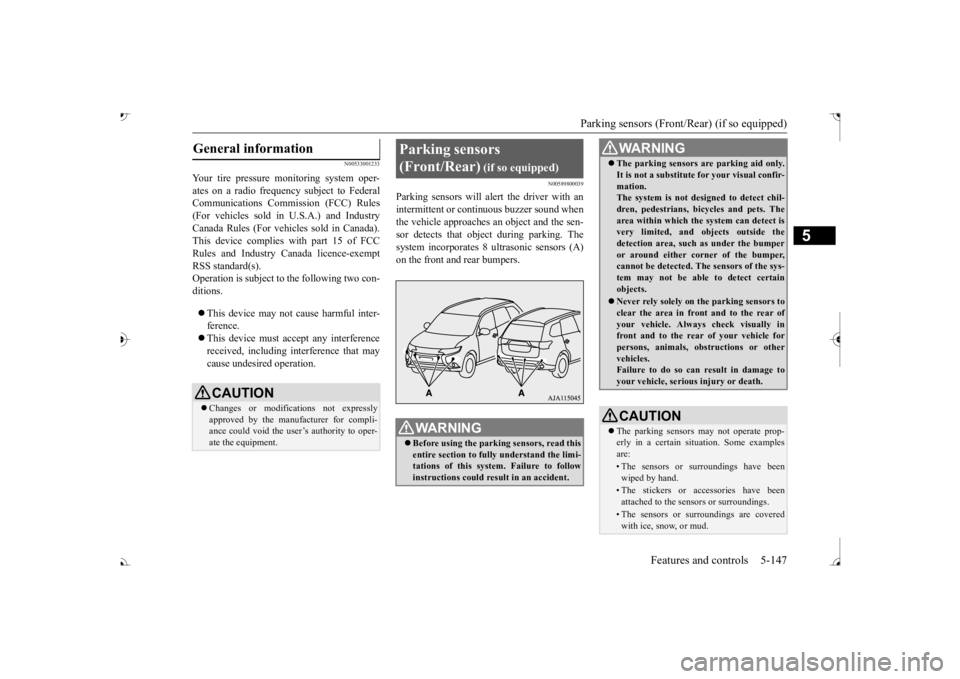
Parking sensors will al
ert the driver with an
intermittent or contin
uous buzzer sound when
the vehicle approaches
an object and the sen-
sor detects that object
during parking. The
system incorporates 8 ultrasonic sensors (A)
General information
CAUTION Changes or modifica
tions not expressly
approved by the manufacturer for compli- ance could void the user’s authority to oper-ate the equipment.
Parking sensors (Front/Rear)
(if so equipped)
WA R N I N G Before using the parkin
g sensors, read this
entire section to fully understand the limi- tations of this system. Failure to followinstructions could result in an accident.
The parking sensors ar
e parking aid only.
It is not a substitute for your visual confir-mation.The system is not designed to detect chil- dren, pedestrians, bicycles and pets. The area within which the system can detect isvery limited, and objects outside the detection area, such as under the bumper or around either co
rner of the bumper,
cannot be detected. The sensors of the sys- tem may not be able to detect certain objects. Never rely solely on
the parking sensors to
clear the area in fron
t and to the rear of
your vehicle. Always
check visually in
front and to the rear
of your vehicle for
persons, animals, ob
structions or other
vehicles. Failure to do so can result in damage to your vehicle, seriou
s injury or death.
CAUTIONThe parking sensors
may not operate prop-
erly in a certain situation. Some examplesare:• The sensors or surroundings have beenwiped by hand.• The stickers or ac
cessories have been
attached to the sensors or surroundings.• The sensors or surroundings are coveredwith ice, snow, or mud.WA R N I N G
BK0239700US.book 147 ページ 2016年6月16日 木曜日 午前10時58分
Page 235 of 521
Multi Around Monitor (if so equipped)
5
N00587200042
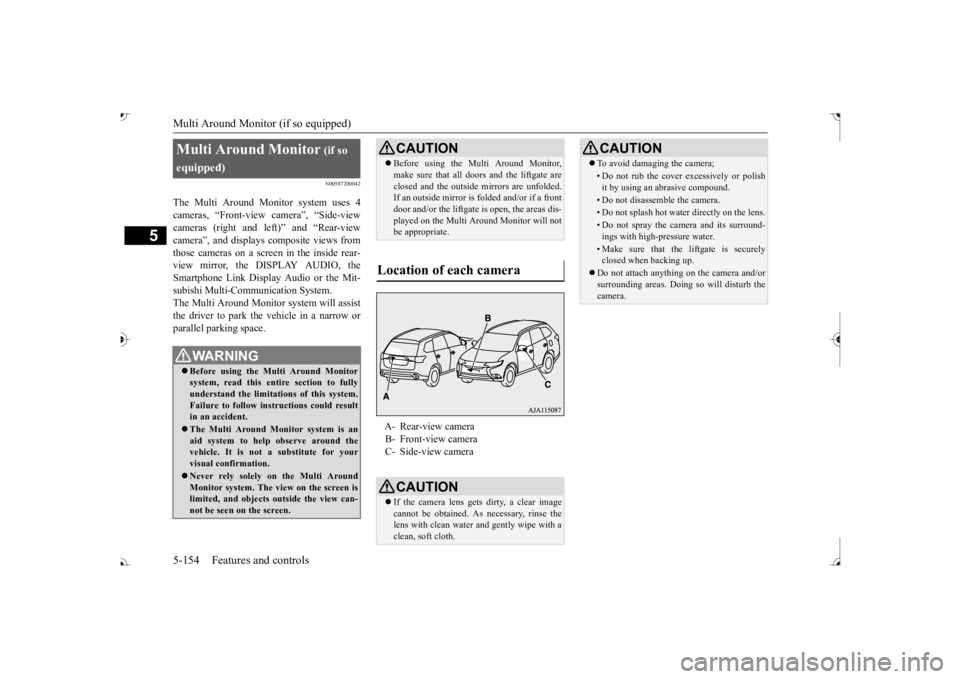
The Multi Around Monitor system uses 4 cameras, “Front-view camera”, “Side-viewcameras (right and le
ft)” and “Rear-view
camera”, and displays
composite views from
those cameras on a screen in the inside rear-view mirror, the DISPLAY AUDIO, the Smartphone Link Display Audio or the Mit- subishi Multi-Comm
unication System.
The Multi Around Monitor
system wi
ll assist
the driver to park the vehicle in a narrow orparallel parking space. Multi Around Monitor
(if so
equipped) Before using the Multi Around Monitor system, read this entire section to fully understand the limitations of this system. Failure to follow instructions could resultin an accident. The Multi Around Monitor system is an aid system to help observe around the vehicle. It is not a substitute for your visual confirmation. Never rely solely on the Multi Around Monitor system. The view on the screen islimited, and objects
outside the view can-
not be seen on the screen.
CAUTION Before using the Multi Around Monitor, make sure that all doors and the liftgate areclosed and the outside mirrors are unfolded.If an outside mirror is folded and/or if a front door and/or the liftgate
is open, the areas dis-
played on the Multi Around Monitor will notbe appropriate.
Location of each camera
A- Rear-view camera B- Front-view camera C- Side-view cameraCAUTION If the camera lens gets
dirty, a clear image
cannot be obtained. As necessary, rinse the lens with clean water and gently wipe with aclean, soft cloth.
To avoid damaging the camera;• Do not rub the cover excessively or polish it by using an abrasive compound.• Do not disassemble the camera.• Do not splash hot wate
r directly on the lens.
• Do not spray the camera and its surround- ings with high-pressure water.• Make sure that the liftgate is securelyclosed when backing up.
Do not attach anythi
ng on the camera and/or
surrounding areas. Doing
so will disturb the
camera.CAUTION
BK0239700US.book 154 ページ 2016年6月16日 木曜日 午前10時58分
Page 265 of 521
Multi Information display - Type 2 5-184 Features and controls
5
N00574801067
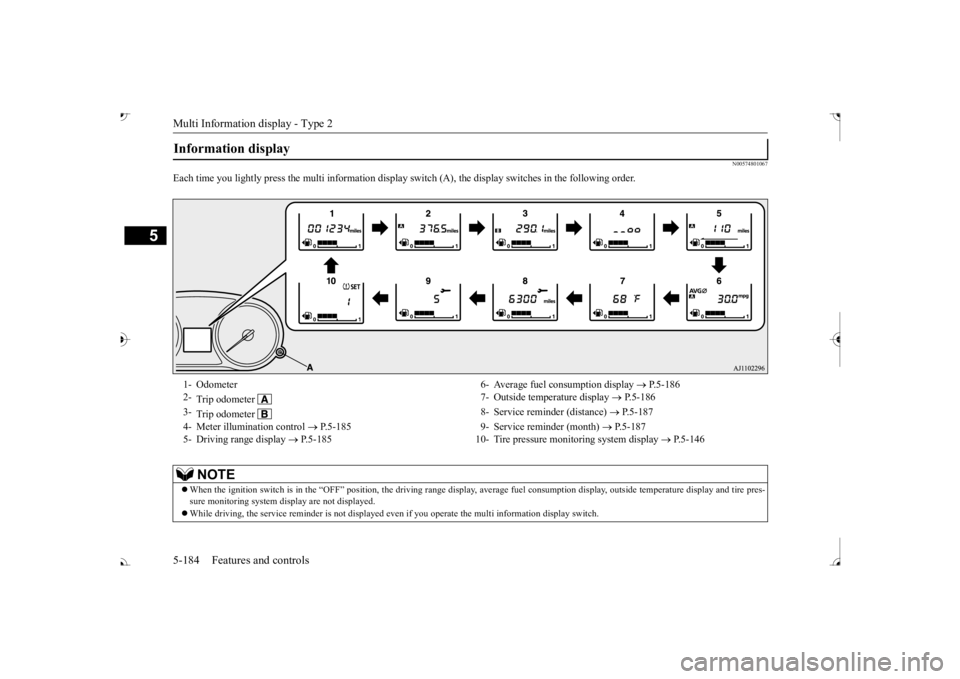
Each time you lightly press th
e multi information display switch (A), th
e display switches in
the following order.
Information display 1- Odometer 6- Average fuel
consumption display
P.5-186
2-
Trip odometer
7- Outside temperature display
P.5-186
3-
Trip odometer
8- Service reminder (distance)
P.5-187
4- Meter illumination control
P.5-185 9- Service reminder (month)
P.5-187
5- Driving range display
P.5-185 10- Tire pressure monitoring system display
P.5-146
NOTE
When the ignition switch is in the “OFF” position, the driving ra
nge display, average fuel consum
ption display, outside tempera
ture display and tire pres-
sure monitoring system di
splay are not displayed.
While driving, the service reminder is
not displayed even if you operate th
e multi information display switch.
BK0239700US.book 184 ページ 2016年6月16日 木曜日 午前10時58分
Page 273 of 521

Indicator light, warning light, and information screen display list (multi information display - Type 1)
5
N00557901092
When there is information to be announced,
such as light reminder, the
tone sounds and the screen sw
itches to the displays show
n below. Refer to
the appropriate page and ta
ke the necessary measures.
When the cause of the warning display is elimin
ated, the warning displa
y goes out automatically.
Refer to Warning disp
lay list on page 5-193.
Refer to Navigation informat
ion display on page 5-209.
Refer to Other interrupt displays on page 5-210. 15- Seat belt remi
nder/warning light
P.4-23
16- Tire pressure monitoring system warn-
ing light
P.5-143
17- Brake auto hold indicator (if so
equipped)
P.5-93
18- Brake warning light (red)
P.5-216
19- Information screen display list
P.5-192
Information screen display list
NOTE
In the following cases, a warning may be
displayed on the information screen and th
e buzzer may sound for a
few seconds, at tim
es.
This is caused by the system picking up in
terference such as strong el
ectromagnetic waves
or noise, and is not a functional pro
blem.
• An extremely strong electrom
agnetic wave is received from a s
ource such as an illegal radio se
t, a spark from a wire, or a rad
ar station.
• Abnormal voltage or a static
electricity disc
harge is generated by the operation of
your vehicle’s electr
onics (including afte
r-market parts).
If the warning display has oc
curred a number of times, take your
vehicle to an author
ized Mitsubishi Motors
dealer or a repair
facility of your choice and
have the system checked.
BK0239700US.book 192 ページ 2016年6月16日 木曜日 午前10時58分
Page 277 of 521
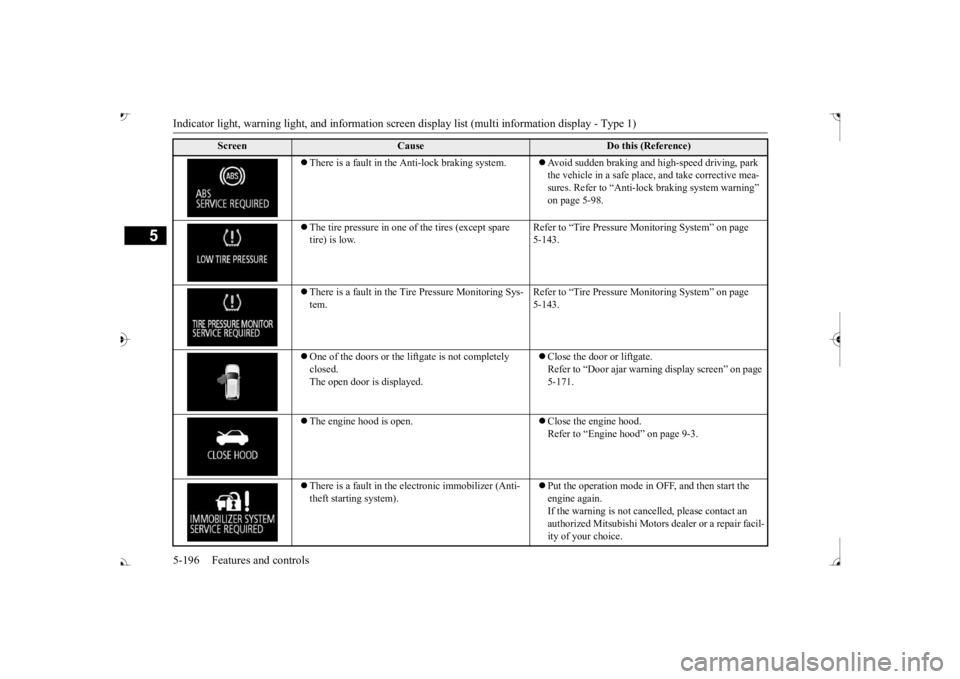
Indicator light, warning light, and information screen display list (multi information display - Type 1)
5
There is a fault in the Anti-lock braking system.
Avoid sudden braking and high-speed driving, park the vehicle in a safe place, and take corrective mea-sures. Refer to “Anti-lock
braking system warning”
on page 5-98.
The tire pressure in one of the tires (except spare tire) is low.
Refer to “Tire Pressure Monitoring System” on page 5-143.
There is a fault in the Tire Pressure Monitoring Sys- tem.
Refer to “Tire Pressure Monitoring System” on page 5-143.
One of the doors or the liftgate is not completely closed. The open door is displayed.
Close the door or liftgate. Refer to “Door ajar warnin
g display screen” on page
5-171.
The engine hood is open.
Close the engine hood. Refer to “Engine hood” on page 9-3.
There is a fault in the electronic immobilizer (Anti- theft starting system).
Put the operation mode in OFF, and then start the engine again.If the warning is not cancel
led, please contact an
authorized Mitsubishi Motors dealer or a repair facil- ity of your choice.
Screen
Cause
Do this (Reference)
BK0239700US.book 196 ページ 2016年6月16日 木曜日 午前10時58分
Page 296 of 521
Indicators
Features and controls 5-215
5
N00519900127 N00520000216
The arrows will flash in time with the corre- sponding exterior turn signals when the turnsignal lever is used. Both arrows will flash when the hazard warn- ing flasher switch is pressed.
N00520100086
A blue light comes on when the headlightsare on high beam.
N00520200175
This indicator comes on while the front foglights are on.
N00551301078
This indicator light illuminates while theparking lights are on.
N00575601020
This indicator comes on in blue while thecoolant temperature is low.
N00579200030
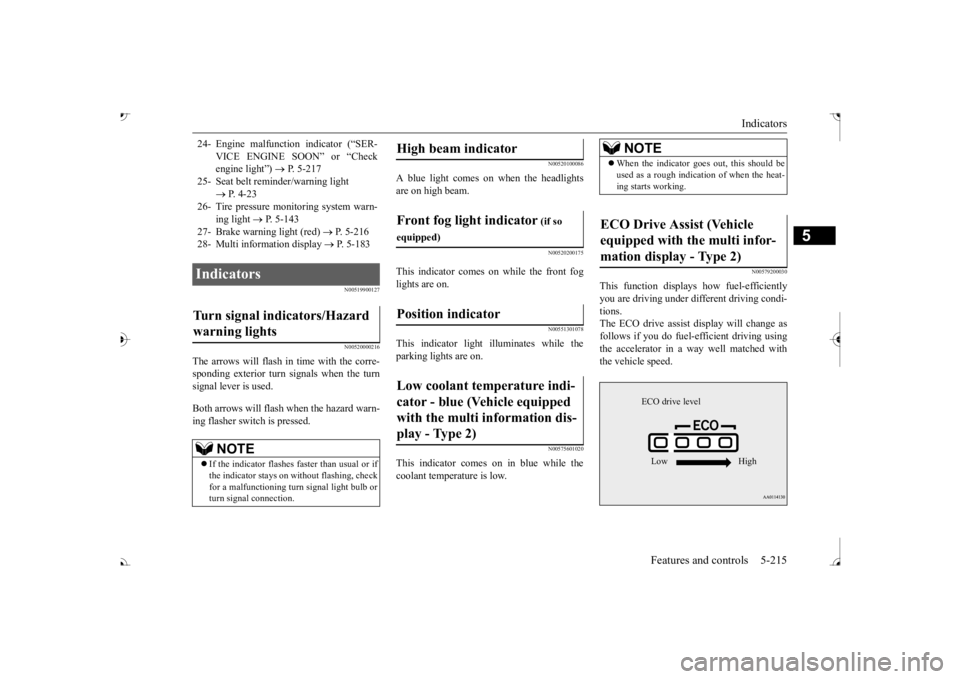
This function displays
how fuel-efficiently
you are driving under different driving condi- tions. The ECO drive assist display will change asfollows if you do fuel-efficient driving using the accelerator in a way well matched with the vehicle speed.
24- Engine malfuncti
on indicator (“SER-
VICE ENGINE SOON” or “Check engine light”)
P. 5-217
25- Seat belt
reminder/warning light
P. 4-23
26- Tire pressure moni
toring system warn-
ing light
P. 5-143
27- Brake warning light (red)
P. 5-216
28- Multi information display
P. 5-183
Indicators Turn signal indicators/Hazard warning lights
NOTE
If the indicator flashes faster than usual or if the indicator stays on wi
thout flashing, check
for a malfunctioning turn signal light bulb or turn signal connection.
High beam indicator Front fog light indicator
(if so
equipped)Position indicator Low coolant temperature indi- cator - blue (Vehicle equipped with the multi information dis- play - Type 2)
NOTE
When the indicator goes out, this should be used as a rough indication of when the heat-ing starts working.
ECO Drive Assist (Vehicle equipped with the multi infor-mation display - Type 2)
ECO drive level Low High
BK0239700US.book 215 ページ 2016年6月16日 木曜日 午前10時58分
Page 367 of 521
Driving precaution 6-2 Driving safety
6
N00629301092
Your vehicle has been designed for both nor- mal and occasional off-road use. However, avoid driving the vehicle through areas wherethe tires may get stuck in deep sand or mud as your vehicle is designe
d primarily for use on
pavement, unlike a conventional off-roadvehicle. Keep in mind that 2-wheel drive vehicles are less capable than 4-wh
eel drive vehicles for
driving on muddy, slippery, wet or snow-cov- ered roads. Utility vehicles have
higher ground clearance
and a narrower track, which enables them toperform in a wide variety of off-road situa- tions. Because of the higher ground clear- ance, these vehicles have a higher center ofgravity, which makes them handle differently than ordinary vehicles when driving on pave- ment. They are not designed to maneuver orcorner at the same speed on pavement as con- ventional 2-wheel driv
e passenger cars any
more than low-slung sports cars are designed
to perform satisfactorily in off-road condi- tions.Always drive safely
and steer the vehicle
carefully. Avoid operating the vehicle in a manner that might require sharp turns orabrupt maneuvers. As wi
th other vehicles of
this type, failure to operate this vehicle cor- rectly can result in lo
ss of control or vehicle
rollover. In a rollover crash, an unbelted person is sig- nificantly more likely to die than a person wearing a seat belt. Be
fore starting the vehi-
cle, always make cert
ain that you and all your
passengers are properly wearing their seat belts (with children in the rear seat, in appro- priate restraints).
N00628801191
Fuel economy is depe
ndent on many factors.
Your personal driving habits can have a sig-nificant effect on your fuel consumption. Several recommendations
for achieving the
greatest fuel economy are listed below. Whenever accelerating from a stop, always accelerate
slowly and smoothly.
When parked for even a short period, do not idle the engine. Shut it off. Plan your trips to avoid unnecessary stops.
Keep your tires inflated to the recom- mended pressures. When driving a 4-wheel drive vehicle on highways or dry improved roads, set the drive mode to “4WD ECO” or “4WDAUTO” (Electronically controlled 4WD), or “AWC ECO” or “NORMAL” (S- AW C ) . For freeway driving, maintain a speed of approximately 50 mph (80 km/h) when traffic, roadway and weather conditions safely permit. Keep your air filter clean and your vehicle lubricated according
to the recommenda-
tions in this manual. Always keep your ve
hicle well main-
tained. A poorly maintained engine wastes fuel and costs money. Never overload your vehicle.
N00628900049
Drunk driving is one of the most frequent causes of accidents.Your driving ability ca
n be seriously impaired
even with blood alcohol levels far below the legal minimum. If you
have been drinking,
don’t drive. Ride with a designated non- drinking driver, call a cab or a friend, or use public transportation. Drinking coffee or tak-ing a cold shower will not make you sober.
Driving precaution
WA R N I N G Utility vehicles have
a significantly higher
rollover rate than othe
r types of vehicles.
Avoid abrupt maneuvers and excessive speed. Always buckle up.
Fuel economy
Driving, alcohol and drugs
BK0239700US.book 2 ページ 2016年6月16日 木曜日 午前10時58分
Page 369 of 521
Vehicle preparation before driving 6-4 Driving safety
6
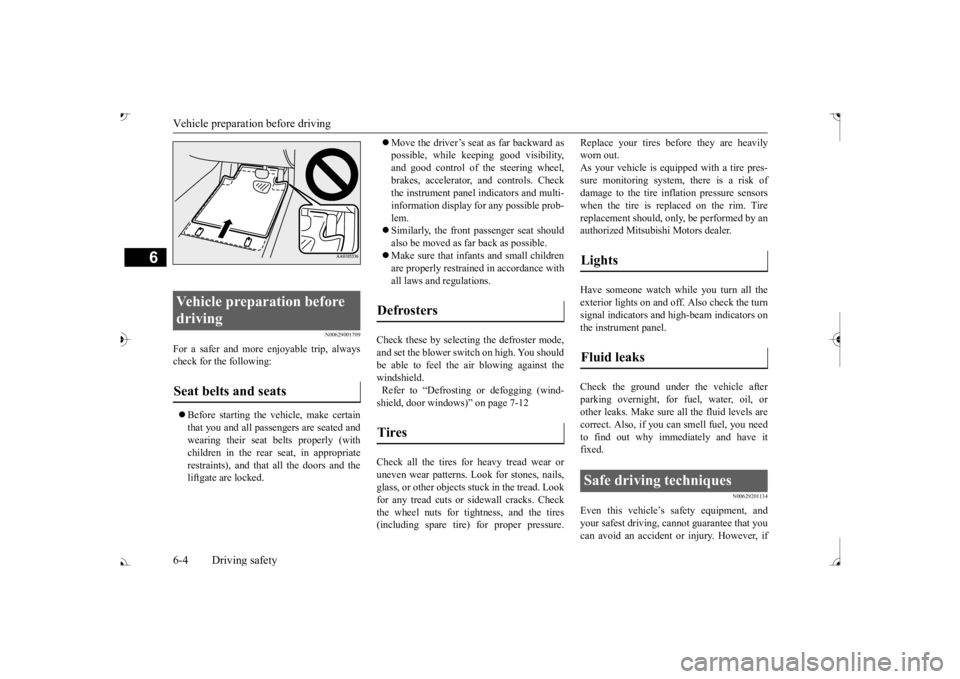
N00629001709
For a safer and more enjoyable trip, always check for the following: Before starting the vehicle, make certain that you and all passengers are seated andwearing their seat
belts properly (with
children in the rear seat, in appropriate restraints), and that all the doors and theliftgate are locked.
Move the driver’s seat as far backward as possible, while keeping good visibility,and good control of the steering wheel, brakes, accelerator, and controls. Check the instrument panel indicators and multi-information display
for any possible prob-
lem. Similarly, the front
passenger seat should
also be moved as fa
r back as possible.
Make sure that infants and small children are properly restrained in accordance with all laws and
regulations.
Check these by selecting the defroster mode, and set the blower swit
ch on high. You should
be able to feel the air blowing against thewindshield. Refer to “Defrosti
ng or defogging (wind-
shield, door windows)” on page 7-12 Check all the tires for heavy tread wear or uneven wear patterns. Look for stones, nails,glass, or other objects
stuck in the tread. Look
for any tread cuts or
sidewall cracks. Check
the wheel nuts for tightness, and the tires(including spare tire) for proper pressure.
Replace your tires before they are heavily worn out.As your vehicle is equi
pped with a tire pres-
sure monitoring system, there is a risk of damage to the tire inflation pressure sensorswhen the tire is replaced on the rim. Tire replacement should, onl
y, be performed by an
authorized Mitsubishi Motors dealer. Have someone watch wh
ile you turn all the
exterior lights on and off. Also check the turn signal indicators and hi
gh-beam indicators on
the instrument panel. Check the ground under the vehicle after parking overnight, for
fuel, water, oil, or
other leaks. Make sure
all the fluid levels are
correct. Also, if you
can smell fuel, you need
to find out why imme
diately and have it
fixed.
N00629201134
Even this vehicle’s sa
fety equipment, and
your safest driving, ca
nnot guarantee that you
can avoid an accident or injury. However, if
Vehicle preparation before driving Seat belts and seats
Defrosters Tires
Lights Fluid leaks Safe driving techniques
BK0239700US.book 4 ページ 2016年6月16日 木曜日 午前10時58分
Page 373 of 521
Loading information 6-8 Driving safety
6
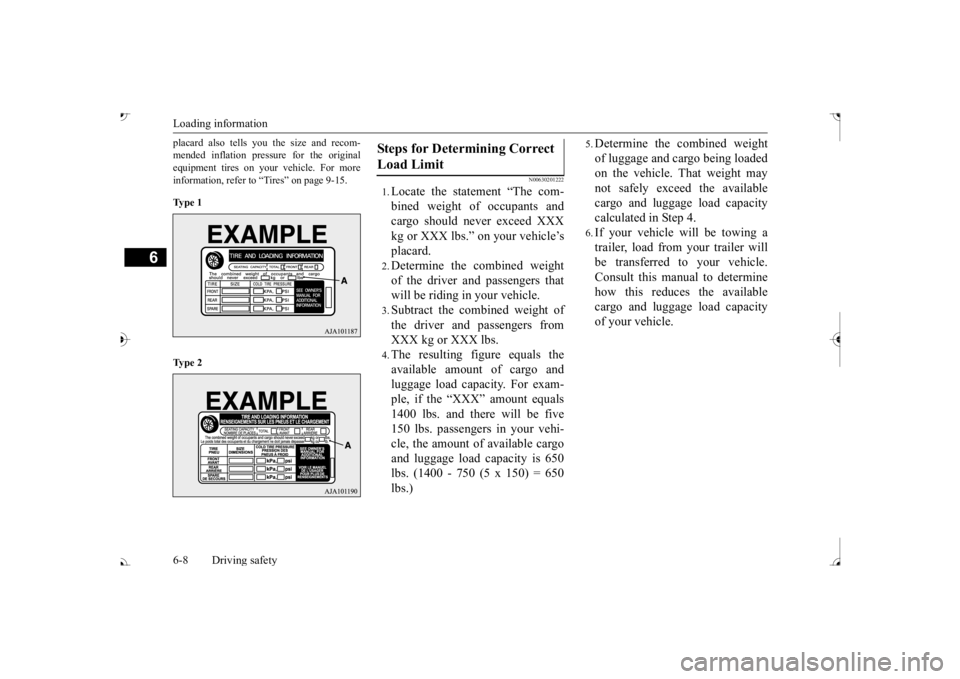
placard also tells you the size and recom- mended inflation pressure for the originalequipment tires on your vehicle. For more information, refer to “Tires” on page 9-15. Ty p e 1 Ty p e 2
N00630201222
1.Locate the statement “The com- bined weight of occupants and cargo should never exceed XXX kg or XXX lbs.” on your vehicle’splacard.2.Determine the combined weightof the driver and passengers thatwill be riding in your vehicle.3.Subtract the combined weight ofthe driver and passengers fromXXX kg or XXX lbs.4.The resulting figure equals theavailable amount of cargo andluggage load capacity. For exam- ple, if the “XXX” amount equals 1400 lbs. and there will be five150 lbs. passengers in your vehi- cle, the amount of available cargo and luggage load
capacity is 650
lbs. (1400 - 750 (5 x 150) = 650lbs.)
5.Determine the combined weightof luggage and cargo being loaded on the vehicle. That weight may not safely exceed the availablecargo and luggage load capacity calculated in Step 4.6.If your vehicle will be towing a trailer, load from your trailer will be transferred to your vehicle. Consult this manual to determinehow this reduces the available cargo and luggage load capacity of your vehicle.
Steps for Determining Correct Load Limit
BK0239700US.book 8 ページ 2016年6月16日 木曜日 午前10時58分