warning lights MITSUBISHI OUTLANDER III 2017 User Guide
[x] Cancel search | Manufacturer: MITSUBISHI, Model Year: 2017, Model line: OUTLANDER III, Model: MITSUBISHI OUTLANDER III 2017Pages: 521, PDF Size: 14.95 MB
Page 199 of 521
Forward Collision Mitigation System (FCM) (if so equipped) 5-118 Features and controls
5
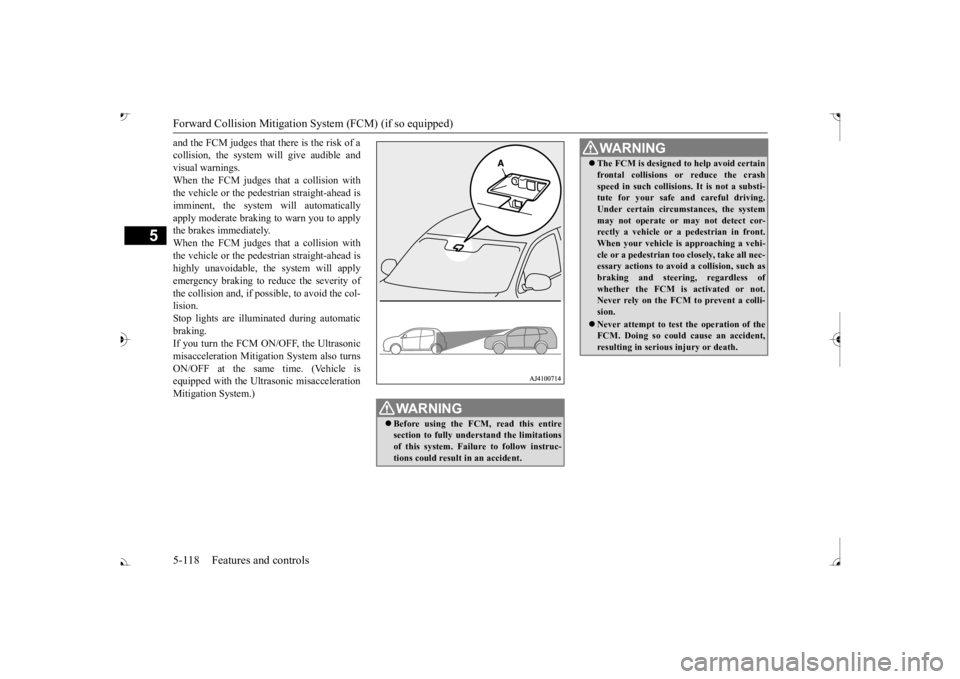
and the FCM judges that there is the risk of a collision, the system
will give audible and
visual warnings. When the FCM judges that a collision with the vehicle or the pedest
rian straight-ahead is
imminent, the system will automatically apply moderate braking to warn you to apply the brakes immediately. When the FCM judges that a collision with the vehicle or the pedest
rian straight-ahead is
highly unavoidable, th
e system will apply
emergency braking to reduce the severity of the collision and, if possible, to avoid the col-lision. Stop lights are illuminated during automatic braking.If you turn the FCM ON/OFF, the Ultrasonic misacceleration Mitigation System also turns ON/OFF at the same time. (Vehicle isequipped with the Ultr
asonic misacceleration
Mitigation System.)
WA R N I N G Before using the FCM, read this entire section to fully understand the limitationsof this system. Failure to follow instruc- tions could result
in an accident.
The FCM is designed
to help avoid certain
frontal collisions or reduce the crashspeed in such collisions. It is not a substi-tute for your safe and careful driving. Under certain circumstances, the system may not operate or may not detect cor-rectly a vehicle or a
pedestrian in front.
When your vehicle is
approaching a vehi-
cle or a pedestri
an too closely, take all nec-
essary actions to avoid
a collision, such as
braking and
steering, regardless of
whether the FCM is
activated or not.
Never rely on the FCM to prevent a colli- sion. Never attempt to test the operation of the FCM. Doing so could cause an accident, resulting in seriou
s injury or death.
WA R N I N G
BK0239700US.book 118 ページ 2016年6月16日 木曜日 午前10時58分
Page 218 of 521
Rear Cross Traffic Alert
(RCTA) (if so equipped)
Features and controls 5-137
5
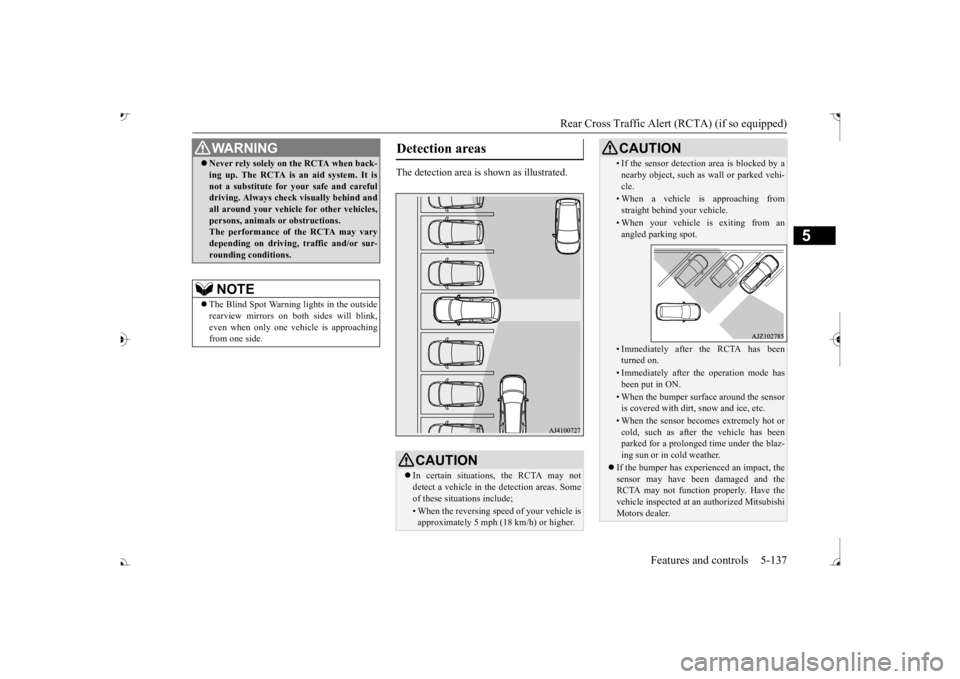
The detection area is shown as illustrated.
Never rely solely on the RCTA when back- ing up. The RCTA is an aid system. It isnot a substitute for your safe and carefuldriving. Always check
visually behind and
all around your vehicl
e for other vehicles,
persons, animals
or obstructions.
The performance of the RCTA may vary depending on driving,
traffic and/or sur-
rounding conditions.NOTE
The Blind Spot Warning lights in the outside rearview mirrors on bot
h sides will blink,
even when only one vehicle is approaching from one side.WA R N I N G
Detection areas
CAUTION In certain situations, the RCTA may not detect a vehicle in the detection areas. Some of these situations include;• When the reversing sp
eed of your vehicle is
approximately 5 mph (18 km/h) or higher.
• If the sensor detection area is blocked by a nearby object, such as
wall or parked vehi-
cle.• When a vehicle is approaching fromstraight behind your vehicle.• When your vehicle is exiting from anangled parking spot.• Immediately after the RCTA has been turned on.• Immediately after the operation mode hasbeen put in ON.• When the bumper surface around the sensoris covered with dirt
, snow and ice, etc.
• When the sensor becomes extremely hot or cold, such as after the vehicle has been parked for a prolonged time under the blaz-ing sun or in cold weather.
If the bumper has experienced an impact, the sensor may have be
en damaged and the
RCTA may not function properly. Have the vehicle inspected at an
authorized Mitsubishi
Motors dealer.CAUTION
BK0239700US.book 137 ページ 2016年6月16日 木曜日 午前10時58分
Page 219 of 521
Rear Cross Traffic Alert
(RCTA) (if so equipped)
5-138 Features and controls
5
1. Press the Blind Spot Warning switch while the operation mode is put in ON. (Refer to “Blind Spot Warning (BSW): To operate” on page 5-134.)2. When the selector le
ver is moved to the
“R” (REVERSE) position, the RCTA will operate.
If the system detects a problem, a warning is displayed on the information screen in themulti-information display. Refer to “Blind Spot Warning (BSW): Sys- tem problem warning” on page 5-134.
N00594000026
For vehicles sold in U.S.A FCC ID:OAYSRR3A For vehicles sold in Canada Applicable law: Canada 310 Frequency bands: 24.05 - 24.25GHz Output power: less than 20 milliwatts This device complies with Part 15 of FCC Rules and Industry Ca
nada licence-exempt
RSS standard(s).Operation is subject to the following two con- ditions: This device may not
cause harmful inter-
ference. This device must ac
cept any interference
received, including interference that may cause undesired operation.
To operate
NOTE
Set the RCTA to OFF when towing. The Blind Spot Warning light in the outside rearview mirror may not look due to strongdirect sunlight or th
e glare from the head-
lights of vehicles
behind you during night
driving.
When a problem is detected in the system
General information
CAUTION Changes or modifica
tions not expressly
approved by the manufacturer for compli- ance could void the user’s authority to oper-ate the equipment.
BK0239700US.book 138 ページ 2016年6月16日 木曜日 午前10時58分
Page 222 of 521
Lane Departure Warning System (LDW) (if so equipped)
Features and controls 5-141
5
N00578100045
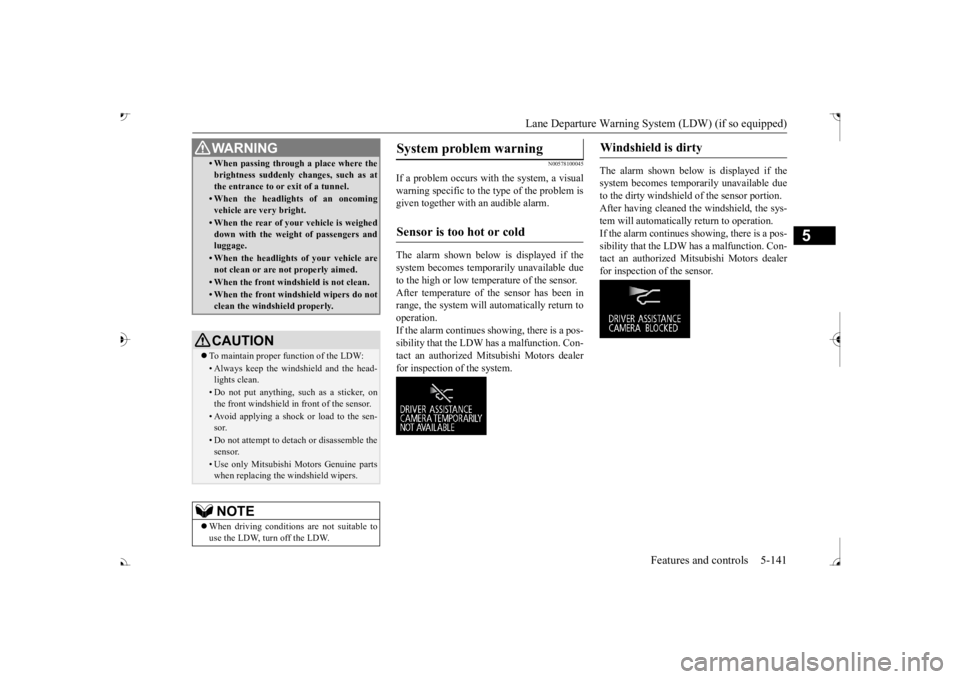
If a problem occurs with the system, a visual warning specific to the type of the problem is given together with an audible alarm. The alarm shown below is displayed if the system becomes tempor
arily unavailable due
to the high or low temperature of the sensor. After temperature of the sensor has been in range, the system will automatically return tooperation. If the alarm continues s
howing, there is a pos-
sibility that the LDW has a malfunction. Con-tact an authorized Mitsubishi Motors dealer for inspection of the system.
The alarm shown below is displayed if the system becomes temporarily unavailable due to the dirty windshield of the sensor portion. After having cleaned the windshield, the sys-tem will automatically return to operation. If the alarm continues showing, there is a pos- sibility that the LDW has a malfunction. Con-tact an authorized Mitsubishi Motors dealer for inspection of the sensor.
• When passing through a place where the brightness suddenly changes, such as atthe entrance to or exit of a tunnel.• When the headlights of an oncomingvehicle are very bright. • When the rear of your vehicle is weigheddown with the weight of passengers andluggage.• When the headlights
of your vehicle are
not clean or are not properly aimed.• When the front windshield is not clean.• When the front windshield wipers do notclean the windshield properly.CAUTION To maintain proper function of the LDW:• Always keep the windshield and the head- lights clean.• Do not put anything, such as a sticker, onthe front windshield in front of the sensor.• Avoid applying a shock or load to the sen-sor.• Do not attempt to deta
ch or disassemble the
sensor.• Use only Mitsubishi Motors Genuine parts when replacing the
windshield wipers.
NOTE
When driving conditions are not suitable to use the LDW, turn off the LDW.WA R N I N G
System problem warning
Sensor is too hot or cold
Windshield is dirty
BK0239700US.book 141 ページ 2016年6月16日 木曜日 午前10時58分
Page 245 of 521
Multi Information display - Type 1 5-164 Features and controls
5
N00554901248
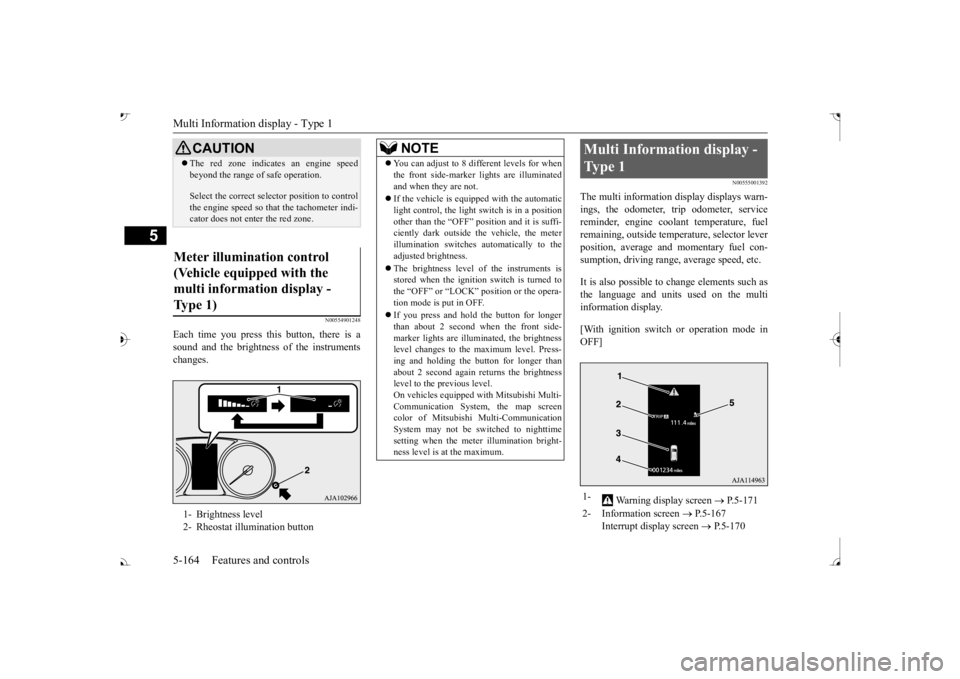
Each time you press this button, there is a sound and the brightness of the instruments changes.
N00555001392
The multi information display displays warn- ings, the odometer, trip odometer, service reminder, engine cool
ant temperature, fuel
remaining, outside temper
ature, selector lever
position, average and momentary fuel con- sumption, driving range, average speed, etc. It is also possible to change elements such as the language and units used on the multi information display. [With ignition switch or operation mode in OFF]
CAUTION The red zone indicate
s an engine speed
beyond the range of
safe operation.
Select the correct selector position to control the engine speed so that
the tachometer indi-
cator does not ente
r the red zone.
Meter illumination control (Vehicle equipped with the multi information display - Type 1) 1- Brightness level 2- Rheostat illumination button
NOTE
You can adjust to 8 different levels for when the front side-marker
lights are illuminated
and when they are not. If the vehicle is equi
pped with the automatic
light control, the light switch is in a positionother than the “OFF” position and it is suffi- ciently dark outside th
e vehicle, the meter
illumination switches automatically to theadjusted brightness. The brightness level of the instruments is stored when the ignition switch is turned to the “OFF” or “LOCK”
position or the opera-
tion mode is put in OFF. If you press and hold the button for longer than about 2 second when the front side-marker lights are illumi
nated, the brightness
level changes to the maximum level. Press- ing and holding the button for longer thanabout 2 second again returns the brightness level to the previous level. On vehicles equipped
with Mitsubishi Multi-
Communication System
, the map screen
color of Mitsubishi Multi-Communication System may not be sw
itched to nighttime
setting when the meter illumination bright- ness level is at the maximum.
Multi Information display - Type 1 1-
Warning display screen
P.5-171
2- Information screen
P.5-167
Interrupt display screen
P.5-170
BK0239700US.book 164 ページ 2016年6月16日 木曜日 午前10時58分
Page 272 of 521
Indicator light, warning light, and information screen display list (multi information display - Type 1)
Features and controls 5-191
5
N00557701074 N00557801349
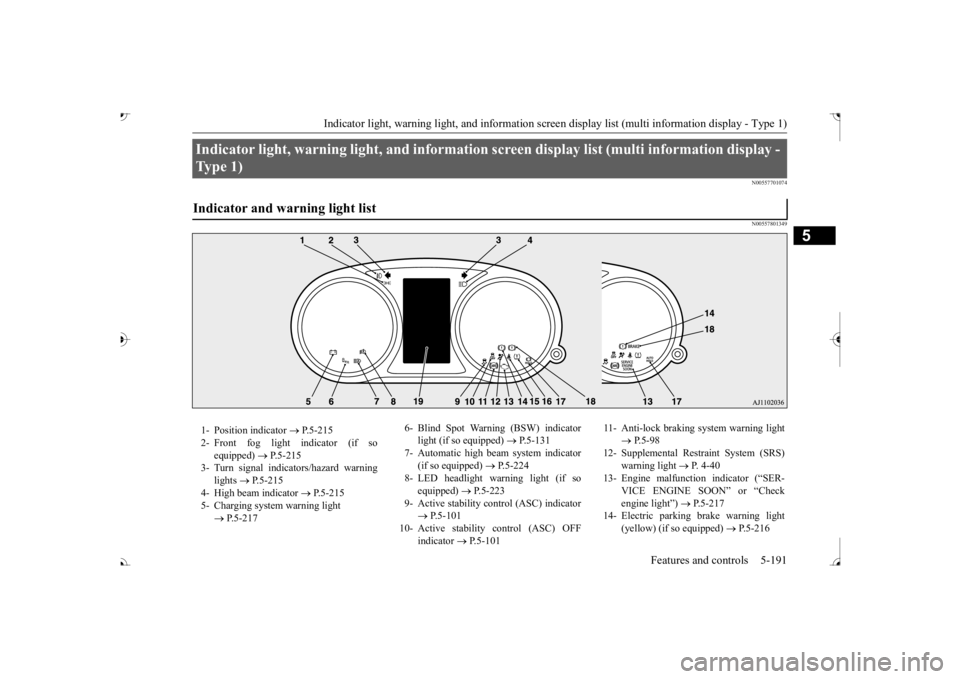
Indicator light, warning light, and information
screen display list (multi information display -
Type 1) Indicator and warning light list 1- Position indicator
P.5-215
2- Front fog light indicator (if so
equipped)
P.5-215
3- Turn signal indicators/hazard warning
lights
P.5-215
4- High beam indicator
P.5-215
5- Charging system warning light
P.5-217
6- Blind Spot Warning (BSW) indicator
light (if so equipped)
P.5-131
7- Automatic high beam system indicator
(if so equipped)
P.5-224
8- LED headlight warning light (if so
equipped)
P.5-223
9- Active stability control (ASC) indicator
P.5-101
10- Active stability
control (ASC) OFF
indicator
P.5-101
11- Anti-lock braking
system warning light
P.5-98
12- Supplemental Restra
int System (SRS)
warning light
P. 4 - 4 0
13- Engine malfuncti
on indicator (“SER-
VICE ENGINE SOON” or “Check engine light”)
P.5-217
14- Electric parking
brake warning light
(yellow) (if so equipped)
P.5-216
BK0239700US.book 191 ページ 2016年7月1日 金曜日 午後3時15分
Page 274 of 521
Indicator light, warning light, and information screen display list (multi information display - Type 1)
Features and controls 5-193
5
N00558001289
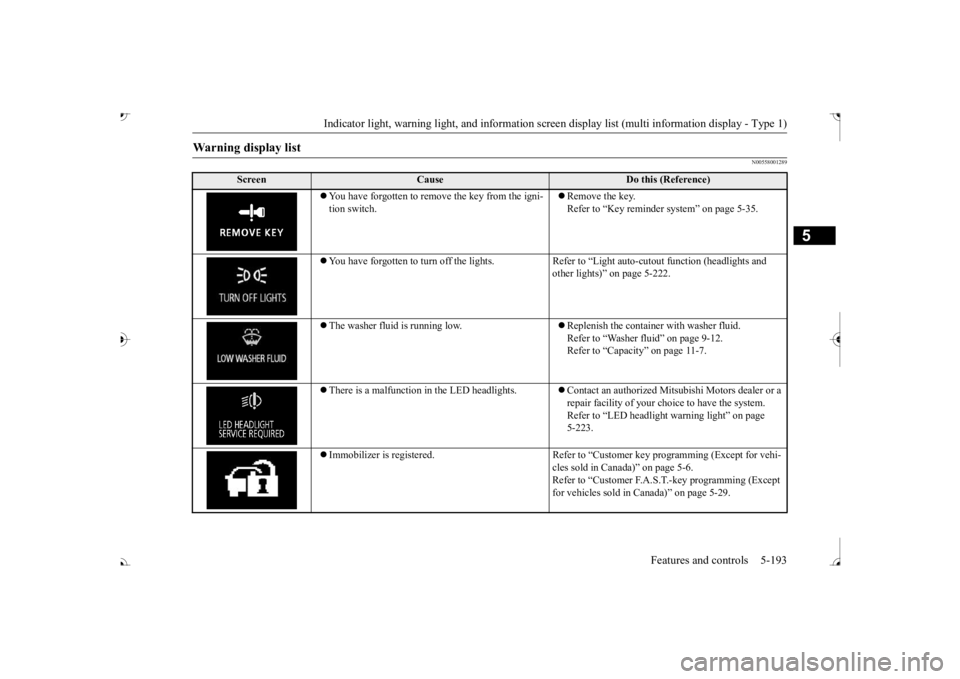
Warning display list
Screen
Cause
Do this (Reference)
ove the key from the igni-
tion switch.
Remove the key. Refer to “Key reminder system” on page 5-35.
You have forgotten to turn off
the lights. Refer to “Light auto
-cutout function (headlights and
other lights)” on page 5-222.
The washer fluid is running low.
Replenish the container with washer fluid. Refer to “Washer fluid” on page 9-12.Refer to “Capacity” on page 11-7.
There is a malfunction
in the LED headlights.
Contact an authorized Mitsubishi Motors dealer or a repair facility of your choi
ce to have the system.
Refer to “LED headlight
warning light” on page
5-223.
Immobilizer is registered. Refer to “Cus
tomer key programming (Except for vehi-
cles sold in Canada)” on page 5-6.Refer to “Customer F.A.S.
T.-key programming (Except
for vehicles sold in Canada)” on page 5-29.
BK0239700US.book 193 ページ 2016年6月16日 木曜日 午前10時58分
Page 295 of 521
Indicator and warning light package (multi information display - Type 2) 5-214 Features and controls
5
N00519801918
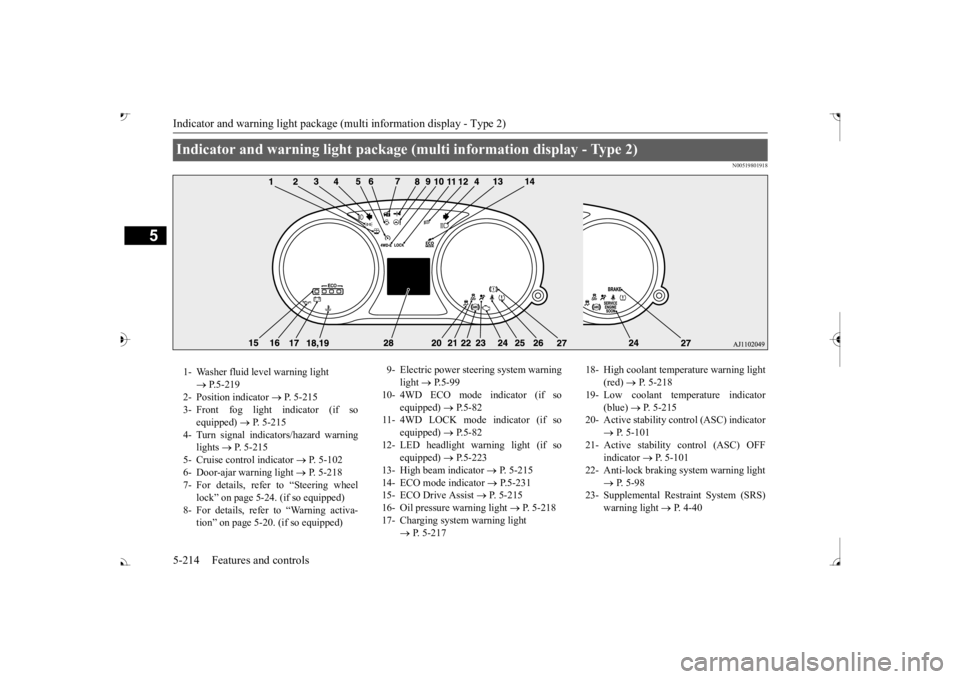
Indicator and warning light package (multi information display - Type 2) 1- Washer fluid level warning light
P.5-219
2- Position indicator
P. 5-215
3- Front fog light indicator (if so
equipped)
P. 5-215
4- Turn signal indicators/hazard warning
lights
P. 5-215
5- Cruise control indicator
P. 5-102
6- Door-ajar warning light
P. 5-218
7- For details, refer to “Steering wheel
lock” on page 5-24. (if so equipped)
8- For details, refer
to “Warning activa-
tion
Page 296 of 521
Indicators
Features and controls 5-215
5
N00519900127 N00520000216
The arrows will flash in time with the corre- sponding exterior turn signals when the turnsignal lever is used. Both arrows will flash when the hazard warn- ing flasher switch is pressed.
N00520100086
A blue light comes on when the headlightsare on high beam.
N00520200175
This indicator comes on while the front foglights are on.
N00551301078
This indicator light illuminates while theparking lights are on.
N00575601020
This indicator comes on in blue while thecoolant temperature is low.
N00579200030
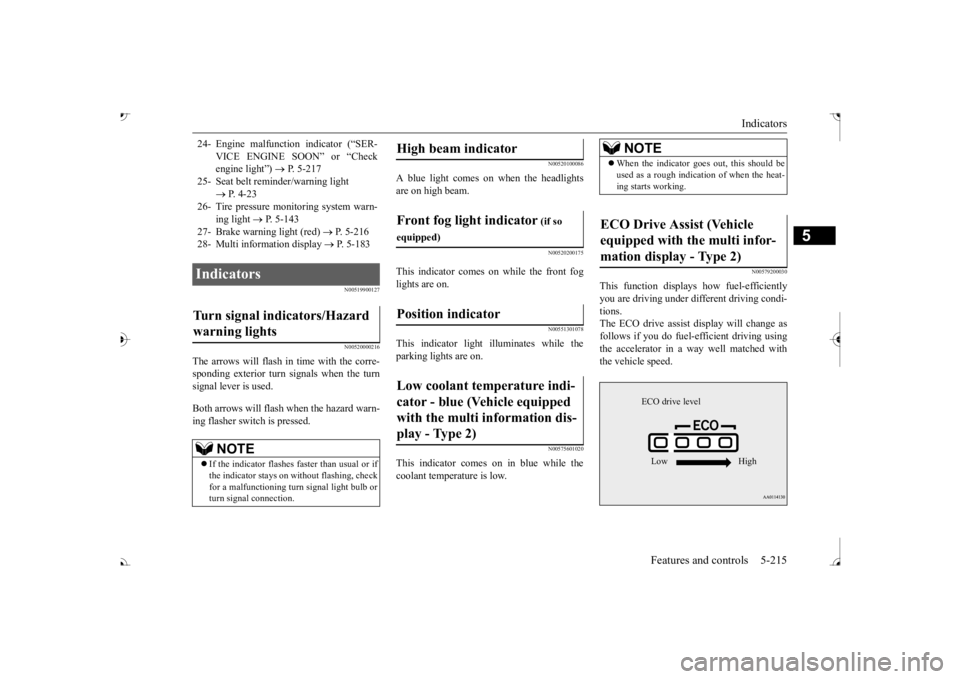
This function displays
how fuel-efficiently
you are driving under different driving condi- tions. The ECO drive assist display will change asfollows if you do fuel-efficient driving using the accelerator in a way well matched with the vehicle speed.
24- Engine malfuncti
on indicator (“SER-
VICE ENGINE SOON” or “Check engine light”)
P. 5-217
25- Seat belt
reminder/warning light
P. 4-23
26- Tire pressure moni
toring system warn-
ing light
P. 5-143
27- Brake warning light (red)
P. 5-216
28- Multi information display
P. 5-183
Indicators Turn signal indicators/Hazard warning lights
NOTE
If the indicator flashes faster than usual or if the indicator stays on wi
thout flashing, check
for a malfunctioning turn signal light bulb or turn signal connection.
High beam indicator Front fog light indicator
(if so
equipped)Position indicator Low coolant temperature indi- cator - blue (Vehicle equipped with the multi information dis- play - Type 2)
NOTE
When the indicator goes out, this should be used as a rough indication of when the heat-ing starts working.
ECO Drive Assist (Vehicle equipped with the multi infor-mation display - Type 2)
ECO drive level Low High
BK0239700US.book 215 ページ 2016年6月16日 木曜日 午前10時58分
Page 297 of 521
Warning lights 5-216 Features and controls
5
N00520300147 N00520401552
This light comes on when the ignition switch is turned to the “ON” position (engine off) orthe operation mode is put in ON. When the engine is started, the light should go off a few seconds later. A warning is alsodisplayed in the multi information display. The warning light also illuminates after start- ing the engine under the following condi-tions. When the parking brake is still applied. When the brake fluid level is low. When the brake system circuit is not working properly.
When the vehicle is moving at more than 5 mph (8 km/h) and parking brake applied, abuzzer will sound to inform the driver that the parking brake is not properly release. Before driving, be sure
that the parking brake
is fully released and
brake warning light is
off.
N00591200030
This warning light will illuminate when there is a fault in the Electric parking brake system. Normally, this warning light illuminateswhen the operation mode is put in ON, and goes off in a few seconds.
NOTE
The ECO drive assist is displayed only when vehicle is driven with
the selector lever in
the “D” (DRIVE) positi
on or when vehicle is
driven in the sport mode (for vehicles equipped with sportroni
c steering wheel pad-
dle shifter).
Warning lights Brake warning light (red) and buzzer
CAUTION If the brake warning light and the Anti-lock braking system warning
light are illuminated
at the same time, the braking force distribu- tion function will not ope
rate, so the vehicle
may be destabilized
during sudden braking
under the following conditions.• When the brake warn
ing light does not go
out even when the parking brake is released.• When the brake warning light stays onwhile driving.• If the above occurs,
avoid sudden braking
and high-speed driving. Park the vehicle in a safe place, and contact an authorized Mit-subishi Motors dealer or a repair facility of your choice as soon as possible.
The vehicle should be bro
ught to a halt in the
following manner when
brake performance
is deteriorated.• Confirm that the vehicle slows down whenyou press down on the brake pedal harderthan usual. In some cases, the brake pedal may go all the way to the floor.
• Should the brakes fail, use engine braking to reduce your speed and observe the fol-lowings.[Vehicles with the parking brake of the lever type] Carefully pull the parking brake lever.[Vehicles with the Electric parking brake] Keep pulling the Electric parking brake switch. (Refer to “Electric parking brake” Depress the brake peda
l to illuminate the
stop lights to alert
the vehicles behind you.
Electric parking brake warning light (yellow)
(if so equipped)
BK0239700US.book 216 ページ 2016年6月16日 木曜日 午前10時58分