audio MITSUBISHI OUTLANDER III 2017 Owner's Guide
[x] Cancel search | Manufacturer: MITSUBISHI, Model Year: 2017, Model line: OUTLANDER III, Model: MITSUBISHI OUTLANDER III 2017Pages: 521, PDF Size: 14.95 MB
Page 414 of 521
Listen to MP3s
Comfort controls 7-31
7
Press the SCAN key. Play the first 10 seconds of each of the tracks on the whole disc in order.
N00717200027
This explains how to list
en to audio files on a
disc. Insert the disc. Insert a disc to automa
tically start playback.
“Insert/Eject Discs” (P.7-24)
If a disc is already within the product, press the MEDIA key to switch to CD as thesource. Press the key or key to select the track. This enables selection of
the next or previous
track. Hold down the 3 key or the 4 key. Fast forward/rewind is possible. Repeat playback, random
playback, and scan
playback are possible.
Press the 1RPT key. Repeat playback of the track currently being played. Hold down the 1RPT key. Repeat playback of the tracks within the folder currently being played. Press the 2RDM key.
Scan Playback (SCAN)
NOTE
Press this button again during playback if you wish to hear that track, and that track will play normally.
Listen to MP3s
CAUTION CD-ROM and CD-R/R
W media can only
play back MP3 format audio files.
To Listen to MP3s
NOTE
Depending on the file st
ructure, it may take
some time to read the contents of the disc.
Select the Track (File) Fast Forward or Rewind Switch Playback Mode
Repeat Playback (RPT)
NOTE
Pressing again will cancel. Selecting a file, ejecti
ng, fast forwarding, or
rewinding will cancel.
Folder Repeat Playback
NOTE
Pressing again will cancel. Even if the file is selected, folder repeat playback will not
be cancelled.
Random Playback (RDM)
BK0239700US.book 31 ページ 2016年6月16日 木曜日 午前10時58分
Page 415 of 521
Listen to an iPod 7-32 Comfort controls
7
Play the tracks in the folder in a random order. Hold down the 2RDM key. Play all tracks in folders on the disc in a ran- dom order. Press the SCAN key. Play the first 10 seconds of each of the tracks in the folder currently being played in order.
Search folders and files, and select a track. 1. Turn the /SEL key to select the folder. 2. Press the /SEL key. Files within the selected folder are dis- played. 3. Turn the /SEL key to select the file.4. Press the /SEL key. This plays the selected file (track).
N00717300103
By connecting comme
rcially-available
iPod/iPhone devices to
this product, you can
play back tracks on these through the product.
NOTE
Pressing again will cancel.
Folder Random Playback
NOTE
Pressing again will cancel.
Scan Playback (SCAN)
NOTE
Press this button again during playback if you wish to hear that track, and that track will play normally.
Search Tracks
NOTE
While the folder is selected, press the 6 key to cancel track search mode. If there is no operation for 10 seconds after selecting the folder, then track search mode will be cancelled. Select the folder, and hold down the /SEL key to start playback from the first track inthat folder. While the file is selected, press the 6 key to return to the previous operation. While the file is selected, hold down the 6 key to cancel tr
ack search mode.
If there is no operation
for five seconds after
selecting the file, that file is played back. Disc operations such as
selecting a track will
cancel track search mode.
Listen to an iPod
CAUTION Do not leave the iP
od/iPhone unattended in
the vehicle. Never hold these devices in your hand to operate while driving, as this is dangerous. No indemnification for data loss resulting when the iPod/iPhone is
connected to the
product will be possible. Depending on how the devices are handled, audio files being damage
d or lost, therefore
it is recommended that
data be backed up.
NOTE
Depending on the generation, model, or soft- ware version of th
e iPod/iPhone, playback
on this product may not be possible. ( P.7-15) Additionally, playback as
explained in this docum
ent may not be possi-
ble.
BK0239700US.book 32 ページ 2016年6月16日 木曜日 午前10時58分
Page 416 of 521
Listen to an iPod
Comfort controls 7-33
7
Press the MEDIA key to set the iPod as the source. The selected source is indicated on the dis- play.
Press the key or key to select the track. This enables selection of the next or previous track. Hold down the 3 key or the 4 key. Fast forward/rewind is possible. Repeat playback and
shuffle playback are
possible. Press the 1RPT key. Repeat playback of the track currently being played.
The types of devices
that can be connected
may vary.[For vehicles sold in U.S.A.]For details, access the Mitsubishi Motors North America website. [For vehicles sold in Canada and Mexico]For details, access the Mitsubishi Motors website. Please read and agree to the “Warn- ing about Links to the Web Sites of OtherCompanies”. The webs
ites mentioned above
may connect you to websites other than the Mitsubishi Motors website.http://www.mitsubishi-motors.com/en/prod- ucts/index.html Regarding how to connect the iPod/iPhone, refer to “How to connect an iPod” on page 5-264. When connecting the iPod/iPhone, use a commercially-availab
le iPod connection
cable. Set up the device in
order that no unsafe
actions, such as plugging in the connection cable are taken while driving. When inserting and removing the iPod/iPhone, for safety’s
sake first stop the
vehicle. Depending on the status of the iPod/iPhone, it may take some time unt
il the device is rec-
ognized, or playback starts. Buttons on the product will not operate while iPod/iPhone is
connected.
NOTE
iPod/iPhone spec
ifications and settings may
mean that connection
is not possible, or
result in differences
in operation or display.
Depending on audio data
in the iPod/iPhone,
track information may
not be displayed cor-
rectly. Depending on the status of the vehicle and device, the iPod/iPhone
may not play back
after starting
the engine.
Data containing copyri
ght information may
not play back. It is recommended that the iPod/iPhone equalizer settings be set to flat. Operate the iPod/iPhone
while connected to
this product. If the iPod/iPhone is c
onnected via Bluetooth
as a Bluetooth-capable
audio device, then do
not connect the iPod/
iPhone using an iPod
cable. Connection us
ing both methods will
result in err
oneous operation.
If an iPod/iPhone does not
operate correctly,
then remove the iPod/iPhone from the prod- uct, reset, then reconnect.
Play iPod
NOTE
Select the Track (File) Fast Forward or Rewind Switch Playback Mode Repeat Playback (RPT)
NOTE
Pressing again will cancel.
BK0239700US.book 33 ページ 2016年6月16日 木曜日 午前10時58分
Page 417 of 521
Listen to Audio Files on a USB Device 7-34 Comfort controls
7
Press the 2RDM key. Play tracks in the category currently being played in a random order. Hold down the 2RDM key. Play back the album in a random order (tracks in any order on the album). Search categories or track names, and select a track. 1. Turn the /SEL key to select the cate- gory.
2. Press the /SEL key. Categories or tracks within the selected category aredisplayed. 3. Turn the /SEL key to select the cate- gory or track. 4. Press the /SEL key. Repeat steps 1 to 4,
and search for tracks.
Select the track, and press the /SEL key to play.
N00717400117
By connecting commerci
ally-available USB
devices such as USB me
mory to this product,
you can play back audio files on thesethrough the product.
Shuffle Playback (RDM)
NOTE
Pressing again will cancel.
Album Shuffle Playback
NOTE
Pressing again will cancel.
Search Tracks
NOTE
While the category (1st level) is selected, press the 6 key to cancel track search mode. If there is no operation for 10 seconds after selecting the category, then track searchmode will be cancelled. Select the category, and hold down the
/SEL key to start playback from the first
track in that category. While the track is selected, press the 6 key to return to the previous operation. While the track is se
lected, hold down the
6 key to cancel tr
ack search mode.
If there is no operation
for five seconds after
selecting the track, that file is played back. iPod operations such as selecting a track will cancel track search mode.
Listen to Audio Files on a USB Device
CAUTION Do not leave the USB
device unattended in
the vehicle. Never hold these devices in your hand to operate while driving, as this is dangerous. Do not use hard discs, card readers, or mem- ory readers, as damage may occur to these orto the data contained therein. If these are erroneously connected, th
en turn the ignition
switch to the “OFF” or “LOCK” position orput the operation mode in
OFF, then remove.
Because of the risk of data loss, it is recom- mended that files be backed up. No guarantee is made
as regards damage to
the USB device, nor re
garding loss or dam-
age to data contained therein. Depending on how the devices are handled, audio files being damage
d or lost, therefore
it is recommended that
data be backed up.
BK0239700US.book 34 ページ 2016年6月16日 木曜日 午前10時58分
Page 418 of 521
Listen to Audio Files on a USB Device
Comfort controls 7-35
7
Press the MEDIA key to set USB as the source. The selected source is indicated on the dis- play.
Press the key or key to select the track. This enables selection of the next or previous track. Hold down the 3 key or the 4 key. Fast forward/rewind is possible. Repeat playback, random
playback, and scan
playback are possible. Press the 1RPT key. Repeat playback of the track currently being played.
NOTE
Digital audio players
that support the mass
storage class specific
ations can be con-
nected. For details regarding the types of USB devices that can be c
onnected and the types
of files that can be
played back, refer to
“Types of connectable
devices and supported
file specifications” on page 5-265. Regarding how to c
onnect USB devices,
refer to “How to connect a USB memorydevice” on page 5-263. When connecting a US
B device, use a con-
nection cable. Failur
e to use a connection
cable when connecti
ng may place undue load
on, or damage the USB connector. Set up the device in
order that no unsafe
actions, such as plugging in the connectioncable are taken while driving. When inserting and removing the USB device, for safety’s sa
ke first stop the vehi-
cle. Do not insert other than audio devices into the USB port. Damage to the device or equipment may result. Depending on the status of the USB device, it may take some time unt
il the device is rec-
ognized, or playback starts. Depending on USB device
s, buttons on the
product will not opera
te while the USB
device is connected. USB device specificati
ons and settings may
mean that connection is not possible, or result in differences
in operation or display.
Depending on audio data
in the USB device,
track information may
not be displayed cor-
rectly. Depending on the status of the vehicle and device, the iPod/iPhone
may not play back
after starting
the engine.
Data containing copyri
ght information may
not play back. This product can play back MP3, WMA, and AAC format audio files. Depending on the type of
USB device, usage
may not be possible, or functions that can be used may be restricted. The recommended file system for USB memory is FAT32. The maximum supported capacity for USB memory is 32GB. Operate the USB device containing recorded audio files while conne
cted to this product.
Play Back of Audio Files on a USB Device
NOTE
Select the Track (File) Fast Forward or Rewind Switch Playback Mode Repeat Playback (RPT)
NOTE
Pressing again will cancel.
BK0239700US.book 35 ページ 2016年6月16日 木曜日 午前10時58分
Page 419 of 521
Listen to Audio Files on a USB Device 7-36 Comfort controls
7
Hold down the 1RPT key. Repeat playback of the tracks within the folder currently being played. Press the 2RDM key. Play tracks in the folder currently being played in a random order.
Hold down the 2RDM key. Play the tracks in all folders in a random order. Press the SCAN key. Play the first 10 seconds of each of the tracks on the whole USB device in order.
Hold down the SCAN key. Play the first 10 seconds of the first track in each folder on the USB device in order. Search folders and files, and select a track. 1. Turn the /SEL key to select the folder. 2. Press the /SEL key. Files within the selected folder are dis- played. 3. Turn the /SEL key to select the file.4. Press the /SEL key.
Selecting a file will cancel this. However, it will not be
cancelled in vehicles
with a Bluetooth
® 2.0 interface.
Folder Repeat Playback
NOTE
Pressing again will cancel. Selecting a folder will cancel this. Cycling up/down through files will cancel this. Even if the file is
selected, folder repeat
playback will not
be cancelled.
Folder Random Playback (RDM)
NOTE
Pressing again will cancel. Selecting a folder will cancel this.NOTE
Cycling up/down through
files will cancel
this. Even if the file is selected, folder random playback will not
be cancelled.
All Folder Random Playback
NOTE
Pressing again will cancel. Selecting a folder will cancel this. Cycling up/down through
files will cancel
this. Even if the file is selected, all folder random playback will not
be cancelled.
Scan Playback (SCAN)
NOTE
NOTE
Press this button again during playback if you wish to hear that track, and that trackwill play normally.
Folder Scan Playback
NOTE
Press this button again during playback if you wish to hear that track, and that trackwill play normally.
Search Tracks
BK0239700US.book 36 ページ 2016年6月16日 木曜日 午前10時58分
Page 423 of 521
Listen to Bluetooth Audio 7-40 Comfort controls
7
6. After the voice gui
de says “Playing
N00717500062
This product can play back tracks on com-mercially-available Bl
uetooth-capable audio
devices.
Regarding how to connect your Bluetooth device, refer to “Conne
cting the Bluetooth
®
2.0 interface and Blue
tooth device” on page
5-247. Operation methods belo
w describe situations
once connection has been completed. 1. Press the MEDIA key to set Bluetooth Audio as the source. The selected source is indicated on the display.
NOTE
If you say “No” to three
or all genres uttered
by the system, the voice guide will say“Genre not found, please try again” and thesystem returns to step 2.NOTE
If the confirmation function is active, the voice guide confirms if the genre is correct. If the genre is correct, say “Yes”. If not, say“No”. After the voice
guide says “Genre not
found, please try again,” the system returns to step 2. Refer to
“Confirmation function
setting” on page 5-244.
Listen to Bluetooth Audio
CAUTION Never hold these devices in your hand to operate while driving,
as this is dangerous.
Do not leave the Bluetooth audio device unattended in the vehicle. Depending on how the de
vices are handled,
audio files being damage
d or lost, therefore
it is recommended that data be backed up.NOTE
Depending on the type of
Bluetooth-capable
audio devices, usage ma
y not be possible, or
functions that can be us
ed may be restricted.
Confirm together with the user manuals for the commercially-availab
le Bluetooth-capa-
ble audio devices. Depending on the type of
Bluetooth-capable
audio devices, volume
levels may differ.
There is the danger of loud volumes, so prior to use, it is recommended that you turn the volume down. “Adjust Volume” (P.7-24)
Depending on the status of the Bluetooth audio device, it may ta
ke some time until the
device is recognized,
or playback starts.
Bluetooth audio device
specifications and
settings may mean th
at connection is not
possible, or result in
differences in operation
or display. Depending on audio data in the Bluetooth audio device, track in
formation may not be
displayed correctly.
Depending on the status of the vehicle and device, the iPod/iPhone
may not play back
after starting
the engine.
Connect a Bluetooth-capable Audio Device
NOTE
If the iPod/iPhone is c
onnected via Bluetooth
as a Bluetooth-capable
audio device, then do
not connect the iPod/
iPhone using an iPod
cable. Connection us
ing both methods will
result in err
oneous operation.
Play Bluetooth Audio
NOTE
BK0239700US.book 40 ページ 2016年6月16日 木曜日 午前10時58分
Page 424 of 521
Listen to Bluetooth Audio Comfort controls 7-41
7
2. Press the 5 key. Bluetooth Audio play- back starts.
Press the key or key to select the track. This enables selection of the next or previous track. Hold down the 3 key or the 4 key. Fast forward/rewind is possible. Repeat playback, random
playback, and scan
playback are possible.
Press the 1RPT key. Repeat playback of the track currently being played. Press the 2RDM key. Play the tracks in the Bluetooth Audio device in a random order. Press the SCAN key. Play the first 10 seconds of each of the tracks on the whole Bluetoot
h Audio device in
order.
NOTE
Hold down the 5 key to pause. Press the 6 key to stop.
Select the Track (File) Fast Forward or Rewind Switch Playback Mode
Repeat Playback (RPT)
NOTE
Each time the 1RPT
key is pressed, this
switches in the order Repeat OFF, 1 track repeat, All track repe
at, and Repeat OFF.
Random Playback (RDM)
NOTE
Pressing again will cancel.
Scan Playback (SCAN)
NOTE
Press this button again during playback if you wish to hear that track, and that trackwill play normally.
BK0239700US.book 41 ページ 2016年6月16日 木曜日 午前10時58分
Page 427 of 521
Audio Quality and Volume Balance Adjustment 7-44 Comfort controls
7
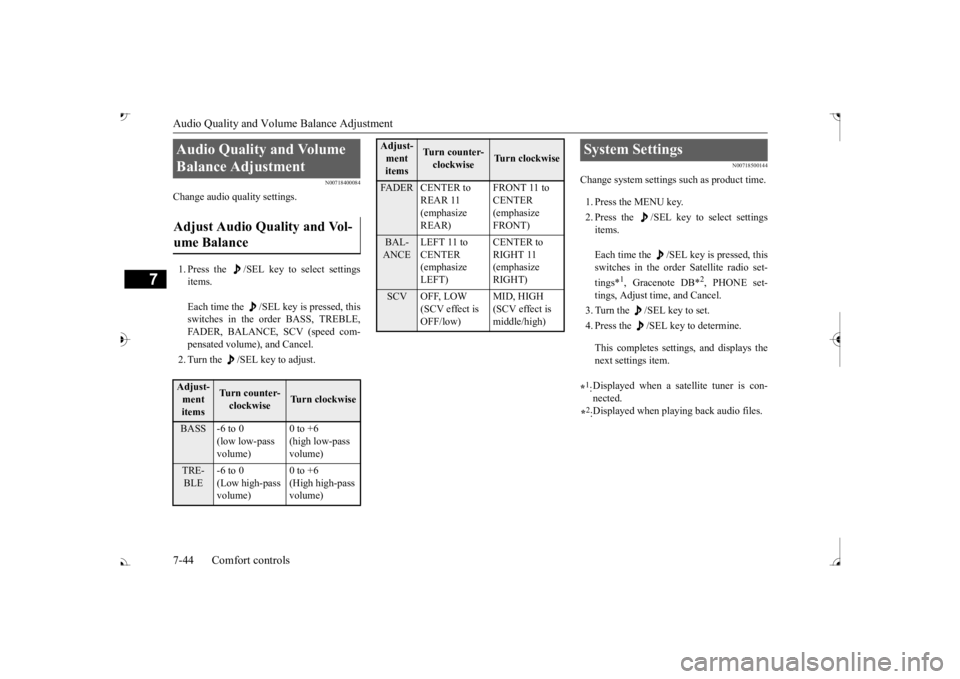
N00718400084
Change audio quality settings. 1. Press the /SEL key to select settings items. Each time the /SEL key is pressed, this switches in the order BASS, TREBLE, FADER, BALANCE, SCV (speed com- pensated volume), and Cancel. 2. Turn the /SEL key to adjust.
N00718500144
Change system settings
such as product time.
1. Press the MENU key. 2. Press the /SEL key to select settings items. Each time the /SEL key is pressed, this switches in the order Satellite radio set- tings*
1, Gracenote DB*
2, PHONE set-
tings, Adjust time, and Cancel. 3. Turn the /SEL key to set.4. Press the /SEL key to determine. This completes settings, and displays the next settings item.
Audio Quality and Volume Balance Adjustment Adjust Audio Quality and Vol- ume Balance Adjust- ment items
Turn counter-clockwise
Turn clockwise
BASS -6 to 0
(low low-pass volume)
0 to +6 (high low-pass volume)
TRE-BLE
-6 to 0 (Low high-pass volume)
0 to +6 (High high-pass volume)
FADER CENTER to
REAR 11 (emphasize REAR)
CENTER (emphasize FRONT)
BAL-ANCE
LEFT 11 to CENTER (emphasize LEFT)
RIGHT 11 (emphasize RIGHT)
SCV OFF, LOW
(SCV effect is OFF/low)
MID, HIGH (SCV effect is middle/high)
Adjust-ment items
Tu r n c o u n t e r - clockwise
Turn clockwise
System Settings *1: Displayed when a satellite tuner is con- nected.
*2: Displayed when playing back audio files.
BK0239700US.book 44 ページ 2016年6月16日 木曜日 午前10時58分
Page 482 of 521
Fuses
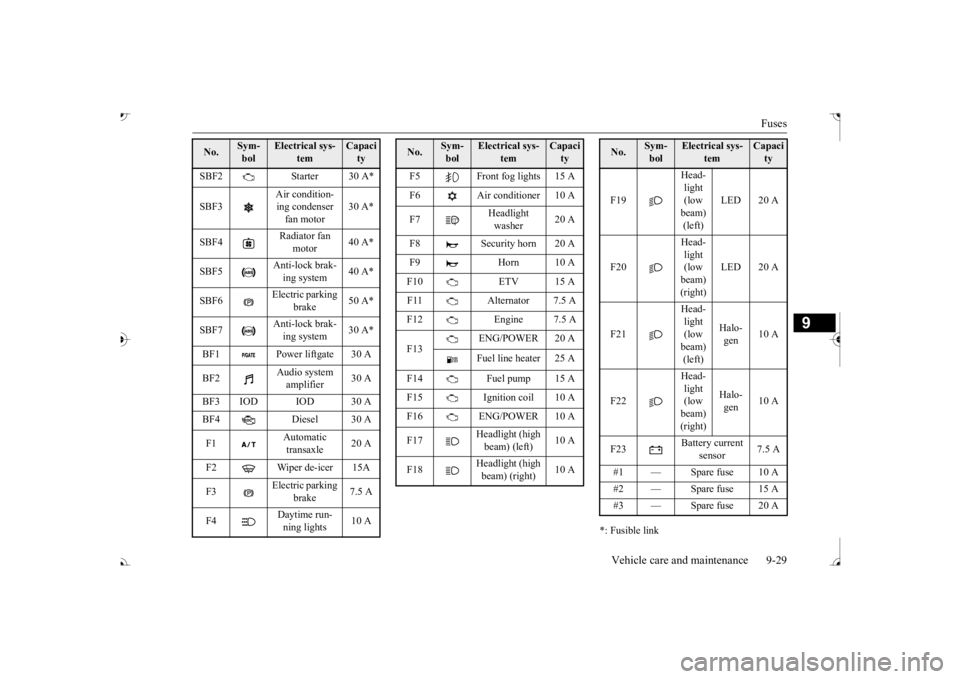
Vehicle care and maintenance 9-29
9
*: Fusible link
SBF2 Starter 30 A* SBF3
Air condition- ing condenser fan motor
30 A*
SBF4
Radiator fan
motor
40 A*
SBF5
Anti-lock brak- ing system
40 A*
SBF6
Electric parking
brake
50 A*
SBF7
Anti-lock brak- ing system
30 A*
BF1 Power liftgate 30 A BF2
Audio system amplifier
30 A
BF3 IOD IOD 30 A BF4 Diesel 30 A F1
Automatic transaxle
20 A
F2 Wiper de-icer 15A F3
Electric parking
brake
7.5 A
F4
Daytime run- ning lights
10 A
No.
Sym- bol
Electrical sys-
tem
Capacity
F5 Front fog lights 15 A F6 Air conditioner 10 A F7
Headlight washer
20 A
F8 Security horn 20 A F9 Horn 10 A F10 ETV 15 AF11 Alternator 7.5 AF12 Engine 7.5 A F13
ENG/POWER 20 A Fuel line heater 25 A
F14 Fuel pump 15 A F15 Ignition coil 10 AF16 ENG/POWER 10 A F17
Headlight (high beam) (left)
10 A
F18
Headlight (high beam) (right)
10 A
No.
Sym- bol
Electrical sys-
tem
Capacity
F19
Head- light (low beam) (left)
LED 20 A
F20
Head- light (low beam) (right)
LED 20 A
F21
Head- light (low beam) (left)
Halo- gen
10 A
F22
Head- light (low beam) (right)
Halo- gen
10 A
F23
Battery current
sensor
7.5 A
#1 — Spare fuse 10 A #2 — Spare fuse 15 A #3 — Spare fuse 20 ANo.
Sym- bol
Electrical sys-
tem
Capacity
BK0239700US.book 29 ページ 2016年6月16日 木曜日 午前10時58分