door lock MITSUBISHI OUTLANDER III 2017 Service Manual
[x] Cancel search | Manufacturer: MITSUBISHI, Model Year: 2017, Model line: OUTLANDER III, Model: MITSUBISHI OUTLANDER III 2017Pages: 521, PDF Size: 14.95 MB
Page 143 of 521
Outside rearview mirrors 5-62 Features and controls
5
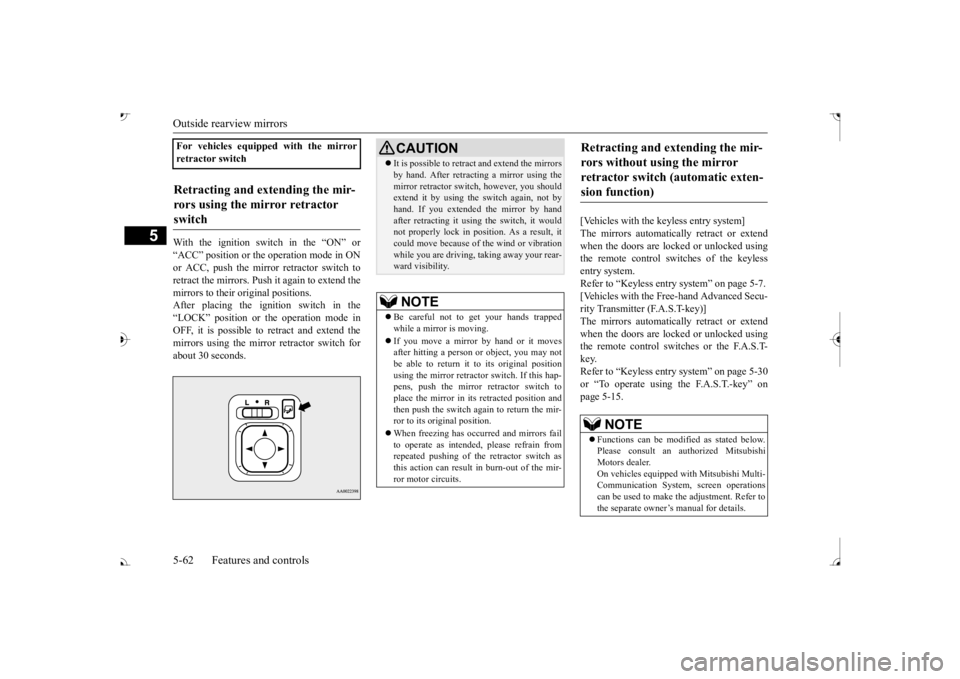
With the ignition switch in the “ON” or “ACC” position or the
operation mode in ON
or ACC, push the mirror retractor switch to retract the mirrors. Push it again to extend the mirrors to their original positions. After placing the ignition switch in the“LOCK” position or the operation mode in OFF, it is possible to
retract and extend the
mirrors using the mirror retractor switch forabout 30 seconds.
[Vehicles with the keyless entry system] The mirrors automatically retract or extend when the doors are locked or unlocked usingthe remote control switches of the keyless entry system. Refer to “Keyless entry system” on page 5-7. [Vehicles with the Free-hand Advanced Secu- rity Transmitter (F.A.S.T-key)]The mirrors automatically retract or extend when the doors are locked or unlocked using the remote control switches or the F.A.S.T-key. Refer to “Keyless entry system” on page 5-30 or “To operate using the F.A.S.T.-key” onpage 5-15.
For vehicles equipped with the mirror retractor switchRetracting and extending the mir- rors using the mirror retractor switch
CAUTION It is possible to retract and extend the mirrors by hand. After retracti
ng a mirror using the
mirror retractor switch, however, you shouldextend it by using the switch again, not by hand. If you extended the mirror by hand after retracting it using
the switch, it would
not properly lock in pos
ition. As a result, it
could move because of the wind or vibration while you are driving, taking away your rear-ward visibility.NOTE
Be careful not to get your hands trapped while a mirror is moving. If you move a mirror by hand or it moves after hitting a person or object, you may not be able to return it to its original positionusing the mirror retractor switch. If this hap- pens, push the mirror retractor switch to place the mirror in its
retracted position and
then push the switch again to return the mir- ror to its original position. When freezing has occurred and mirrors fail to operate as intended,
please refrain from
repeated pushing of the retractor switch asthis action can result in burn-out of the mir-ror motor circuits.
Retracting and extending the mir- rors without using the mirror retractor switch (automatic exten- sion function)
NOTE
Functions can be modified as stated below. Please consult an authorized Mitsubishi Motors dealer. On vehicles e
quipped with Mitsubishi Multi-
Communication System, screen operations can be used to make
the adjustment. Refer to
the separate owner’s manual for details.
BK0239700US.book 62 ページ 2016年6月16日 木曜日 午前10時58分
Page 144 of 521
Ignition switch
Features and controls 5-63
5
N00549301260
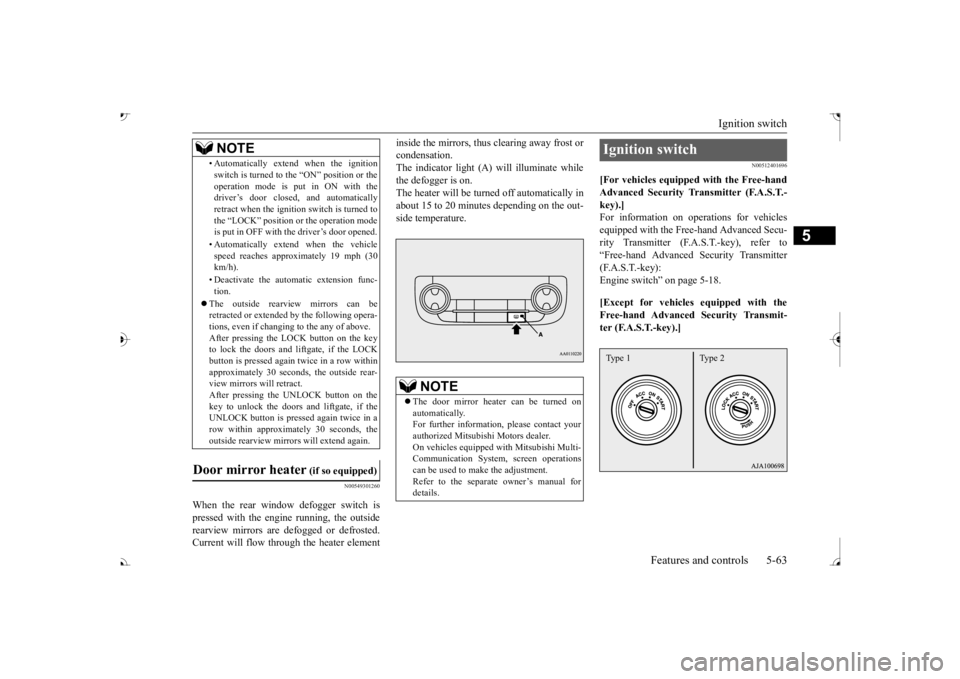
When the rear window defogger switch is pressed with the engine running, the outside rearview mirrors are defogged or defrosted. Current will flow thr
ough the heater element
inside the mirrors, thus clearing away frost or condensation.The indicator light (A) will illuminate while the defogger is on. The heater will be turned off automatically inabout 15 to 20 minutes depending on the out- side temperature.
N00512401696
[For vehicles equipped with the Free-handAdvanced Security Tr
ansmitter (F.A.S.T.-
key).]For information on operations for vehicles equipped with the Free-hand Advanced Secu- rity Transmitter (F.A
.S.T.-key), refer to
“Free-hand Advanced
Security Transmitter
(F.A.S.T.-key): Engine switch” on page 5-18. [Except for vehicles equipped with the Free-hand Advanced Security Transmit- ter (F.A.S.T.-key).]
• Automatically extend when the ignition switch is turned to the “ON” position or theoperation mode is put in ON with thedriver’s door closed, and automatically retract when the ignition switch is turned to the “LOCK” position or the operation modeis put in OFF with the driver’s door opened. • Automatically extend when the vehicle speed reaches approximately 19 mph (30 km/h). • Deactivate the automatic extension func- tion.
The outside rearvi
ew mirrors can be
retracted or extended
by the following opera-
tions, even if changing to the any of above.After pressing the LOCK
button on the key
to lock the doors and liftgate, if the LOCK button is pressed again twice in a row withinapproximately 30 seconds
, the outside rear-
view mirrors will retract. After pressing the
UNLOCK button on the
key to unlock the doors and liftgate, if the UNLOCK button is pressed again twice in a row within approximately 30 seconds, theoutside rearview mirro
rs will extend again.
Door mirror heater
(if so equipped)
NOTE
The door mirror heater can be turned on automatically.For further informati
on, please contact your
authorized Mitsubishi Motors dealer. On vehicles equipped
with Mitsubishi Multi-
Communication System, screen operations can be used to ma
ke the adjustment.
Refer to the separate
owner’s manual for
details.
Ignition switch Type 1 Type 2
BK0239700US.book 63 ページ 2016年6月16日 木曜日 午前10時58分
Page 252 of 521
Multi Information display - Type 1
Features and controls 5-171
5
Warning display screens with a “ ” or “ ” screen can be switched. If you want to switch the display, press the multi information dis- play switch as follows. “ ”: Press lightly. “ ”: Press for approximately 2 seconds or more.
N00579600021
When the warning is displayed, if youlightly press the multi information display switch a few times, the warning display screen you switched
from is redisplayed.
N00579700022
The operation status of each system is dis- played on the information screen. For further details, re
fer to the appropriate
page in the warn
ing display list.
Refer to “Other interrupt displays” on page 5-210.
N00555201222
This is displayed when you press the multiinformation display switch and return from the warning display screen to the previousscreen. This mark is also displa
yed if there is another
warning other than the one displayed.When the cause of the warning display is eliminated, the warning goes out automat- ically.
N00529700030
If any of the doors or the liftgate is not com- pletely closed, this displays the open door orliftgate. If the speed increases to about 5 mph (8 km/h) or higher with a door ajar, a tone willsound 4 times to inform you that a door is ajar.
N00578200020
Shows the engine coolant temperature. If the coolant becomes hot, “ ” will blink. Pay careful attention to the engine coolant temperature display while you are driving.
If you want to switch the displayRedisplay of a warning display screen Other interrupt displays
warning display screen
NOTE
When the warning is displayed, the warn- ing display screen can be redisplayed on the information screen.Refer to “Information sc
reen (with the igni-
tion switch in “OFF” or
“LOCK” position or
the operation mode in
OFF)” on page 5-167.
Refer to “Information sc
reen (with the igni-
tion switch or the operation mode in ON)” on page 5-169.
Door ajar warning display screen
CAUTION Always make sure that
the warning display
goes out before beginning to drive.
Engine coolant temperature display
BK0239700US.book 171 ページ 2016年6月16日 木曜日 午前10時58分
Page 276 of 521
Indicator light, warning light, and information screen display list (multi information display - Type 1)
Features and controls 5-195
5
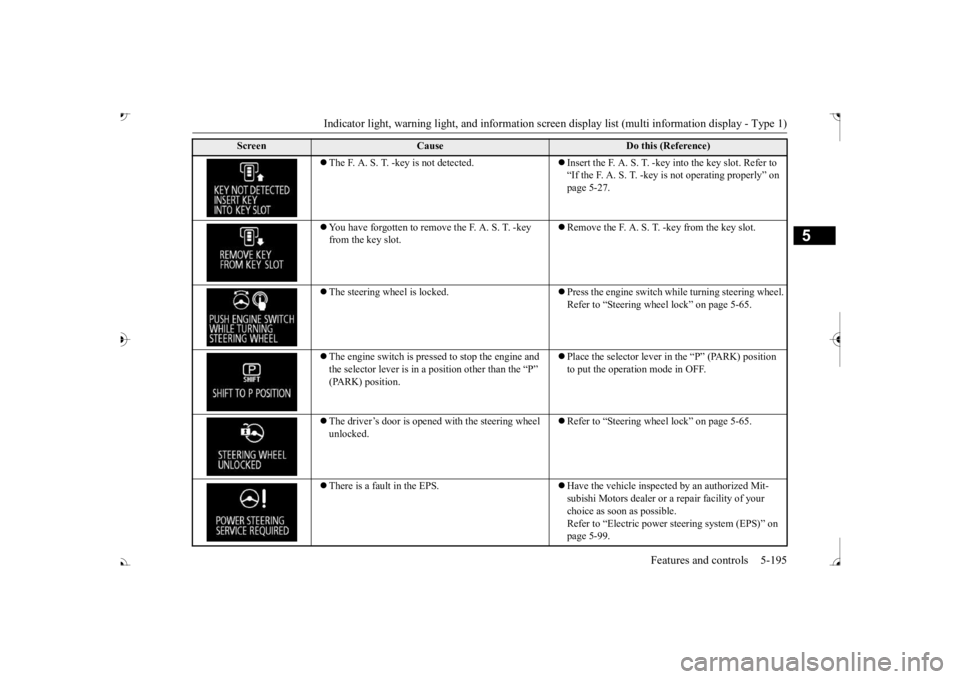
The F. A. S. T. -key is not detected.
Insert the F. A. S. T. -key into the key slot. Refer to “If the F. A. S. T. -key
is not operating properly” on
page 5-27.
You have forgotten to remove
the F. A. S. T. -key
from the key slot.
Remove the F. A. S. T.
-key from the key slot.
The steering wheel is locked.
Press the engine switch wh
ile turning steering wheel.
Refer to “Steering wheel lock” on page 5-65.
The engine switch is pre
ssed to stop the engine and
the selector lever is in a position other than the “P”
Place the selector lever in
the “P” (PARK) position
to put the operati
on mode in OFF.
The driver’s door is opened with the steering wheel unlocked.
Refer to “Steering wheel lock” on page 5-65.
There is a fault in the EPS.
Have the vehicle inspected by an authorized Mit- subishi Motors dealer or a
repair facility of your
choice as soon as possible. Refer to “Electric power
steering system (EPS)” on
page 5-99.
Screen
Cause
Do this (Reference)
BK0239700US.book 195 ページ 2016年6月16日 木曜日 午前10時58分
Page 277 of 521
Indicator light, warning light, and information screen display list (multi information display - Type 1)
5
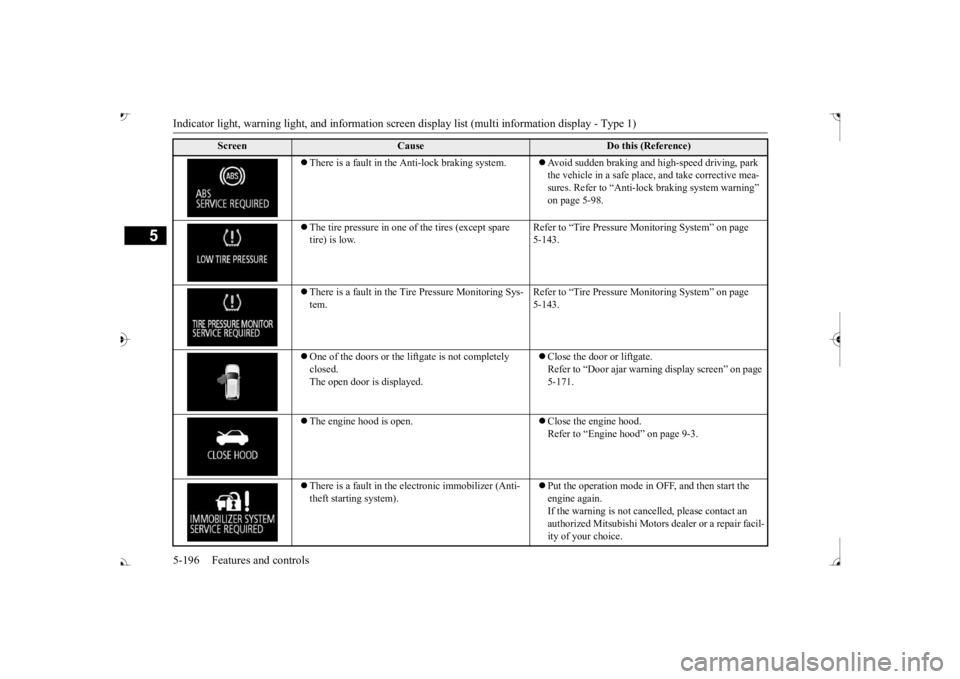
There is a fault in the Anti-lock braking system.
Avoid sudden braking and high-speed driving, park the vehicle in a safe place, and take corrective mea-sures. Refer to “Anti-lock
braking system warning”
on page 5-98.
The tire pressure in one of the tires (except spare tire) is low.
Refer to “Tire Pressure Monitoring System” on page 5-143.
There is a fault in the Tire Pressure Monitoring Sys- tem.
Refer to “Tire Pressure Monitoring System” on page 5-143.
One of the doors or the liftgate is not completely closed. The open door is displayed.
Close the door or liftgate. Refer to “Door ajar warnin
g display screen” on page
5-171.
The engine hood is open.
Close the engine hood. Refer to “Engine hood” on page 9-3.
There is a fault in the electronic immobilizer (Anti- theft starting system).
Put the operation mode in OFF, and then start the engine again.If the warning is not cancel
led, please contact an
authorized Mitsubishi Motors dealer or a repair facil- ity of your choice.
Screen
Cause
Do this (Reference)
BK0239700US.book 196 ページ 2016年6月16日 木曜日 午前10時58分
Page 278 of 521
Indicator light, warning light, and information screen display list (multi information display - Type 1)
Features and controls 5-197
5
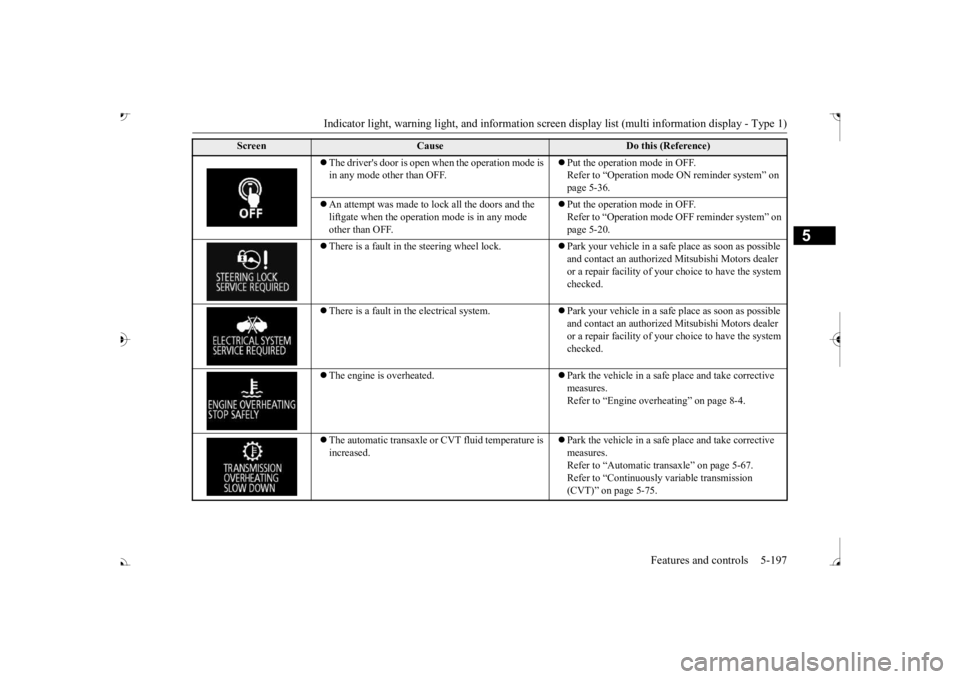
The driver's door is open when the operation mode is in any mode other than OFF.
Put the operation mode in OFF. Refer to “Operation mode
ON reminder system” on
page 5-36.
An attempt was made to lock all the doors and the liftgate when the operati
on mode is in any mode
other than OFF.
Put the operation mode in OFF. Refer to “Operation mode
OFF reminder system” on
page 5-20.
There is a fault in the steering wheel lock.
Park your vehicle in a safe
place as soon as possible
and contact an authorized
Mitsubishi Motors dealer
or a repair facility of your
choice to have the system
checked.
There is a fault in the electrical system.
Park your vehicle in a safe
place as soon as possible
and contact an authorized
Mitsubishi Motors dealer
or a repair facility of your
choice to have the system
checked.
The engine is overheated.
Park the vehicle in a safe place and take corrective measures. Refer to “Engine overh
eating” on page 8-4.
The automatic transaxle or CVT fluid temperature is increased.
Park the vehicle in a safe place and take corrective measures. Refer to “Automatic tr
ansaxle” on page 5-67.
Refer to “Continuously variable transmission (CVT)” on page 5-75.
Screen
Cause
Do this (Reference)
BK0239700US.book 197 ページ 2016年6月16日 木曜日 午前10時58分
Page 295 of 521
Indicator and warning light package (multi information display - Type 2) 5-214 Features and controls
5
N00519801918
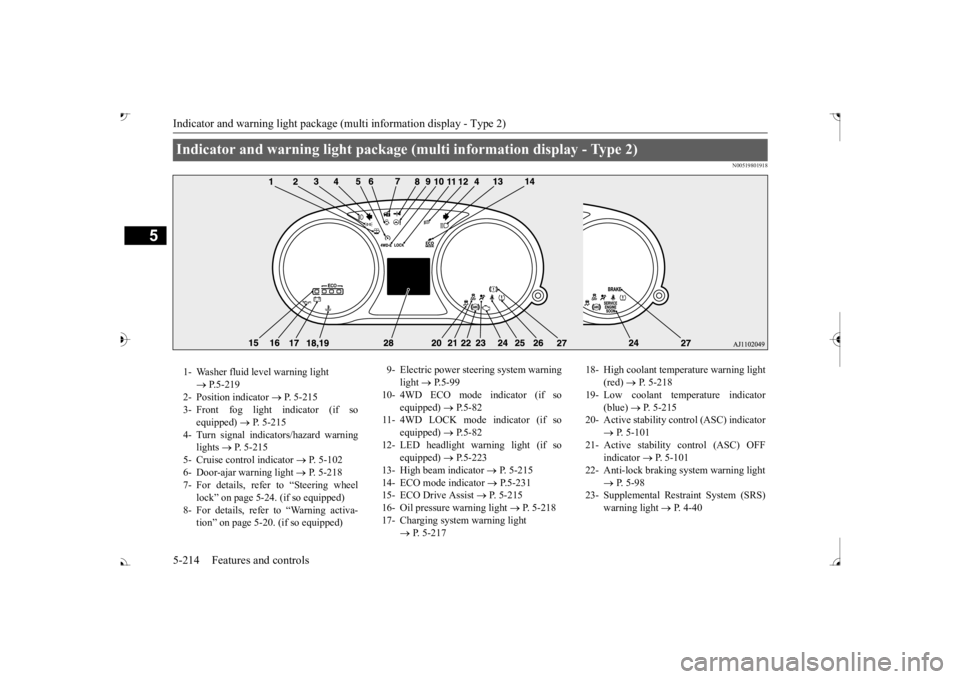
Indicator and warning light package (multi information display - Type 2) 1- Washer fluid level warning light
P.5-219
2- Position indicator
P. 5-215
3- Front fog light indicator (if so
equipped)
P. 5-215
4- Turn signal indicators/hazard warning
lights
P. 5-215
5- Cruise control indicator
P. 5-102
6- Door-ajar warning light
P. 5-218
7- For details, refer to “Steering wheel
lock” on page 5-24. (if so equipped)
8- For details, refer
to “Warning activa-
tion
Page 304 of 521
![MITSUBISHI OUTLANDER III 2017 Service Manual Combination headlights and dimmer switch
Features and controls 5-223
5
[For vehicles equipped with the F.A.S.T.- key]The operation mode is changed to OFF or ACC and the driver’s door is not opened.](/img/19/58146/w960_58146-303.png "MITSUBISHI OUTLANDER III 2017 Service Manual Combination headlights and dimmer switch
Features and controls 5-223
5
[For vehicles equipped with the F.A.S.T.- key]The operation mode is changed to OFF or ACC and the driver’s door is not opened.")
Combination headlights and dimmer switch
Features and controls 5-223
5
[For vehicles equipped with the F.A.S.T.- key]The operation mode is changed to OFF or ACC and the driver’s door is not opened.
If the combination
headlights and dimmer
switch is turned to the “ ” or “ ” posi- tion again after the engine is turned off, the about 3-minute auto
-cutout function
described above will not
work. The lights (the
parking lights, tail lig
hts and license plate
lights) will stay on and will not turn off auto- matically.
N00584500028
This warning light will illuminate when thereis a malfunction in the LED headlights.
N00549801236
[When using a key to
start the engine]
If the driver’s door is opened with the key in the “OFF” or “LOCK” or “ACC” position orremoved from the ignition switch while the lights are on, the tone will sound to remind you to turn off the lights. [When using the F.A.S.T.-key to start the engine] If the driver’s door is opened with the opera-tion mode is put in OFF or ACC, or if the operation mode is changed to OFF while the lights are on, the tone will sound to remindyou to turn off the lights. In either case, the lights will turn off automat- ically and so will the tone. Or you can turn the light switch to th
e “OFF” position to stop
the tone.
N00549901178
To change the headlights from high beam to low beam and vice vers
a, pull the turn signal
lever to (1). Switch the headlights to lowbeam as a courtesy whenever there are oncoming vehicles, or when there is traffic moving ahead of you. An illuminated blue
NOTE
The light auto-cutout f
unction can be deacti-
vated. See your authorized Mitsubishi Motorsdealer for details. For vehicles equipped
with the Mitsubishi
Multi-Communication System, adjustmentscan be made using screen operations. For further details, refer to the separate owner’s manual.
When you want to keep the lights on:
LED headlight warning light
(if
so equipped)
NOTE
If the warning light illuminates, there may be a malfunction in the unit. Contact an autho- rized Mitsubishi Motors
dealer or a repair
facility of your choice
to have the system
checked.Type 1 Type 2
Headlight reminder buzzer Dimmer (high/low beam change)
BK0239700US.book 223 ページ 2016年6月16日 木曜日 午前10時58分
Page 349 of 521
HomeLink® Wireless Control System (if so equipped) 5-268 Features and controls
5
N00554301040
HomeLink
® Wireless Contro
l System is a
registered trademark of Gentex Corporation. HomeLink
® provides a convenient way to
replace up to 3 hand-held radio-frequency (RF) transmitters used to activate devicessuch as gate operators
, garage door openers,
entry door locks, security systems, even home lighting. Additional HomeLink
® information
can be found at www.homelink.com, www.youtube.com/HomeLinkGentex, or by calling the toll-free HomeLink
®-Hotline at 1-
800-355-3515.
N00584600029
Some garage door openers manufactured after 1995 have “rolli
ng code protection”.
To program a garage door openerequipped with “rolli
ng code protection”; cess the garage door
opener motor to press the motor’s “Learn”
For convenience, use
a ladder and another pe
rson to assist you.
It is recommended that a new battery be placed in the hand-held
transmitter of the
device being progr
ammed to HomeLink
®
for quicker training and accurate trans- mission of the radio-frequency signal.
HomeLink
® Wireless Con-
trol System
(if so equipped)
WA R N I N G Do not use HomeLink
® with any garage
door opener that la
cks safety stop and
reverse features as required by U.S. Fed- eral Regulations.
A garage door opener
which cannot detect an object in the path of a closing garage d
oor and then auto-
matically stop and reverse, does not meetcurrent U.S. Federal
Regulations. Using a
garage door opener wi
thout these features
increases the risk of serious injury ordeath.
During programming, your garage door or gate may open or close. Make sure thatpeople and objects are clear of the garagedoor or gate that
you are programming.
NOTE
Once HomeLink
® is programmed, retain the
original transmitter for future programming procedures (for example, new vehicle pur-chases). Upon sale of the vehicle, the pro- grammed HomeLink
® buttons should be
erased for security purposes. Refer to “Cleaning the progra
mmed information” on
page 5-272. You can program a ma
ximum of 3 devices.
To change or replace any of the 3 devicesafter it has been in
itially programmed, you
must first erase the current settings. See “Cleaning the programmed information”on page 5-272 or “Reprogramming a single HomeLink
® button” on page 5-272.
WA R N I N G
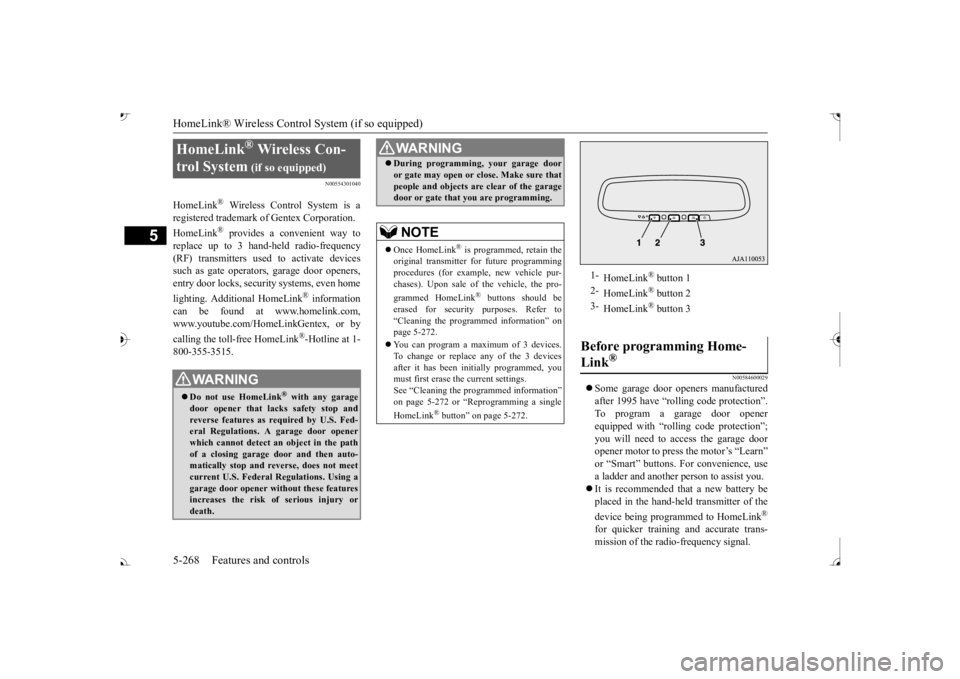
1-
HomeLink
® button 1
2-
HomeLink
® button 2
3-
HomeLink
® button 3
Before programming Home- Link
®
BK0239700US.book 268 ページ 2016年6月16日 木曜日 午前10時58分
Page 352 of 521
HomeLink® Wireless Control System (if so equipped)
Features and controls 5-271
5
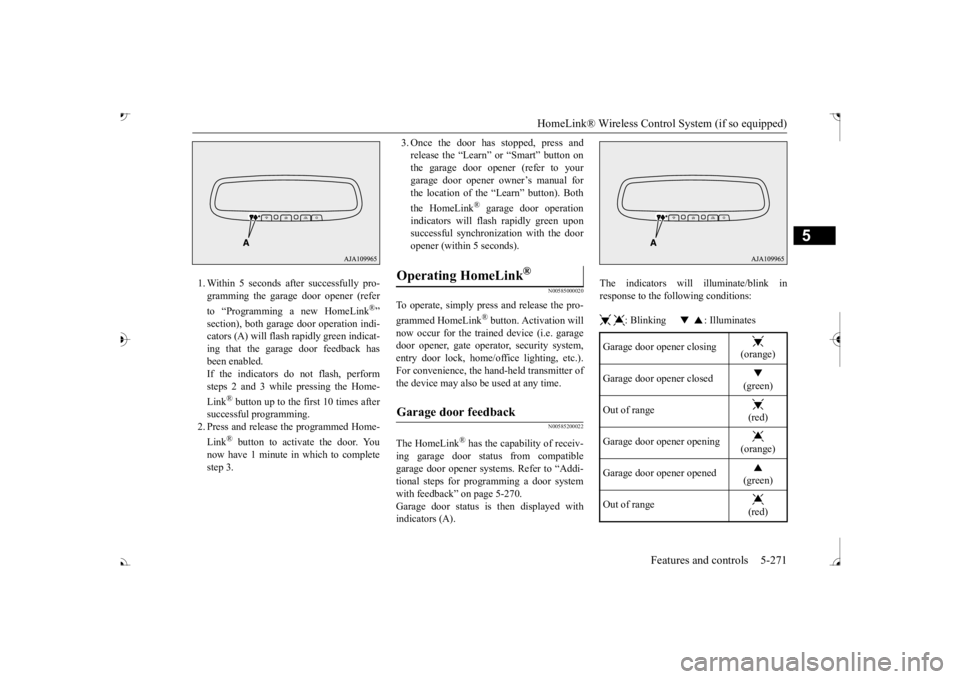
1. Within 5 seconds after successfully pro- gramming the garage door opener (refer to “Programming a new HomeLink
®”
section), both garage door operation indi- cators (A) will flash
rapidly green indicat-
ing that the garage
door feedback has
been enabled. If the indicators do not flash, performsteps 2 and 3 while pressing the Home- Link
® button up to the first 10 times after
successful programming.2. Press and release the programmed Home- Link
® button to activate the door. You
now have 1 minute in which to completestep 3.
3. Once the door has stopped, press and release the “Learn”
or “Smart” button on
the garage door opener (refer to your garage door opener owner’s manual for the location of the “Learn” button). Both the HomeLink
® garage door operation
indicators will fl
ash rapidly green upon
successful synchron
ization with the door
opener (within 5 seconds).
N00585000020
To operate, simply press and release the pro- grammed HomeLink
® button. Activation will
now occur for the traine
d device (i.e. garage
door opener, gate operat
or, security system,
entry door lock, home/of
fice lighting, etc.).
For convenience, the ha
nd-held transmitter of
the device may also be
used at any time.
N00585200022
The HomeLink
® has the capability of receiv-
ing garage door status from compatible garage door opener systems. Refer to “Addi- tional steps for programming a door systemwith feedback” on page 5-270. Garage door status is then displayed with indicators (A).
The indicators will illuminate/blink in response to the following conditions: : Blinking : Illuminates
Operating HomeLink
®
Garage door feedback
Garage door opener closing
(orange)
Garage door opener closed
(green)
Out of range
(red)
Garage door opener opening
(orange)
Garage door opener opened
(green)
Out of range
(red)
BK0239700US.book 271 ページ 2016年6月16日 木曜日 午前10時58分