engine MITSUBISHI OUTLANDER III 2017 Manual Online
[x] Cancel search | Manufacturer: MITSUBISHI, Model Year: 2017, Model line: OUTLANDER III, Model: MITSUBISHI OUTLANDER III 2017Pages: 521, PDF Size: 14.95 MB
Page 214 of 521
Blind Spot Warning (BSW) (with Lane Change Assist) (if so equipped)
Features and controls 5-133
5
N00593500037
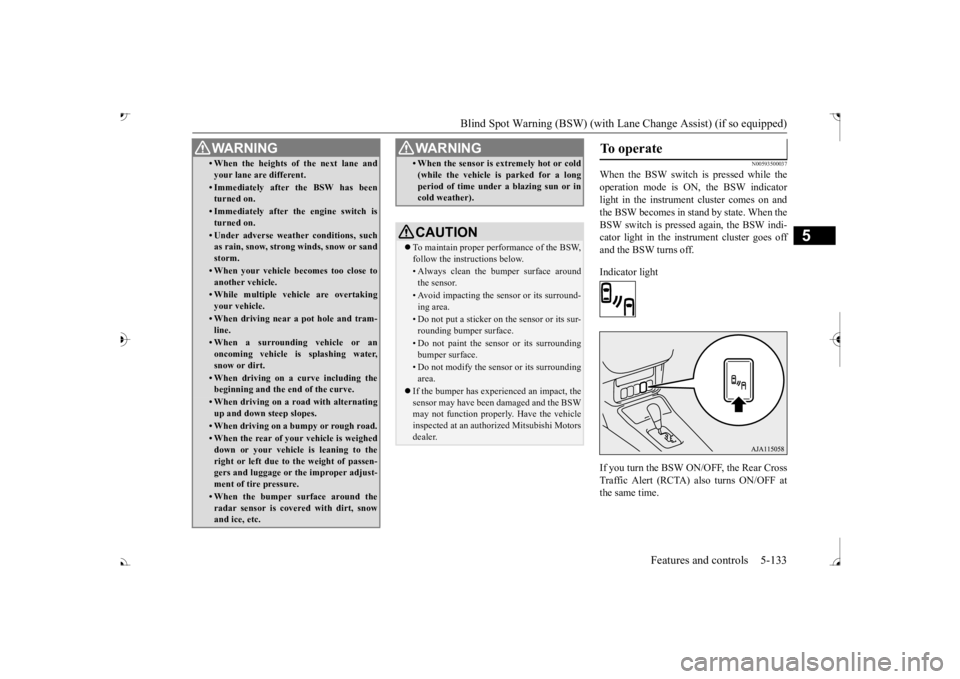
When the BSW switch is pressed while the operation mode is ON, the BSW indicator light in the instrument cluster comes on andthe BSW becomes in stand by state. When the BSW switch is pressed again, the BSW indi- cator light in the instrument cluster goes offand the BSW turns off. Indicator light If you turn the BSW ON/OFF, the Rear Cross Traffic Alert (RCTA) also turns ON/OFF atthe same time.
• When the heights of the next lane and your lane are different.• Immediately after the BSW has been turned on.• Immediately after the engine switch isturned on.• Under adverse weather conditions, suchas rain, snow, strong winds, snow or sand storm.• When your vehicle becomes too close toanother vehicle.• While multiple ve
hicle are overtaking
your vehicle.• When driving near a pot hole and tram-line.• When a surroundin
g vehicle or an
oncoming vehicle is splashing water,snow or dirt.• When driving on a
curve including the
beginning and the end of the curve.• When driving on a r
oad with alternating
up and down steep slopes.• When driving on a bumpy or rough road.• When the rear of your vehicle is weigheddown or your vehicle
is leaning to the
right or left due to the weight of passen- gers and luggage or th
e improper adjust-
ment of tire pressure. • When the bumper su
rface around the
radar sensor is covered with dirt, snowand ice, etc.WA R N I N G
• When the sensor is extremely hot or cold(while the vehicle is parked for a longperiod of time unde
r a blazing sun or in
cold weather).CAUTION To maintain proper performance of the BSW, follow the instructions below.• Always clean the bumper surface aroundthe sensor.• Avoid impacting the sensor or its surround-ing area.• Do not put a sticker on the sensor or its sur-rounding bumper surface.• Do not paint the sensor or its surroundingbumper surface.• Do not modify the sensor or its surroundingarea.
If the bumper has experienced an impact, the sensor may have been
damaged and the BSW
may not function properl
y. Have the vehicle
inspected at an authorized Mitsubishi Motorsdealer.WA R N I N G
To operate
BK0239700US.book 133 ページ 2016年6月16日 木曜日 午前10時58分
Page 224 of 521
Tire pressure monitoring system
Features and controls 5-143
5
N00532701334
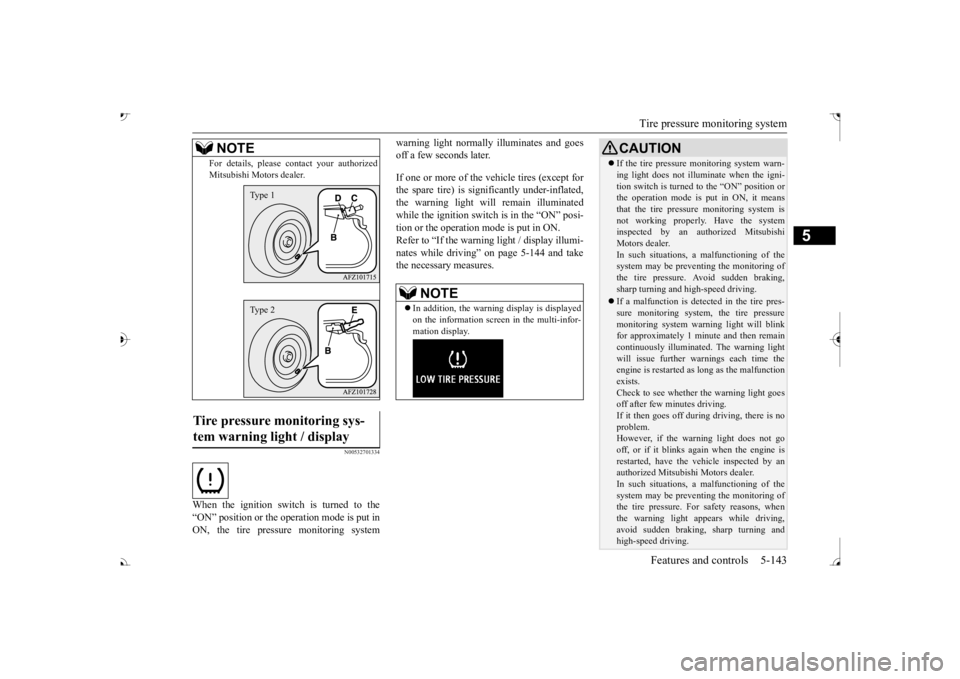
When the ignition switch is turned to the “ON” position or the operation mode is put inON, the tire pressure monitoring system
warning light normally
illuminates and goes
off a few seconds later. If one or more of the vehicle tires (except for the spare tire) is signi
ficantly under-inflated,
the warning light will remain illuminated while the ignition switch is in the “ON” posi-tion or the operation mode is put in ON. Refer to “If the warning light / display illumi- nates while driving” on page 5-144 and takethe necessary measures.
For details, please
contact your authorized
Mitsubishi Motors dealer.
Tire pressure monitoring sys- tem warning light / display
NOTE
Type 1Type 2
NOTE
In addition, the warni
ng display is displayed
on the information screen in the multi-infor-mation display.
CAUTION If the tire pressure monitoring system warn- ing light does not illumi
nate when the igni-
tion switch is turned to the “ON” position orthe operation mode is put in ON, it means that the tire pressure monitoring system is not working properly. Have the systeminspected by an authorized Mitsubishi Motors dealer. In such situations, a malfunctioning of thesystem may be preventing the monitoring of the tire pressure. Avoid sudden braking, sharp turning and high-speed driving. If a malfunction is detected in the tire pres- sure monitoring system, the tire pressuremonitoring system warning light will blink for approximately 1 mi
nute and then remain
continuously illuminate
d. The warning light
will issue further warnings each time the engine is restarted as
long as the malfunction
exists.Check to see whether the warning light goes off after few minutes driving. If it then goes off during driving, there is noproblem. However, if the warning light does not go off, or if it blinks again when the engine isrestarted, have the
vehicle inspected by an
authorized Mitsubish
i Motors dealer.
In such situations, a malfunctioning of thesystem may be preventing the monitoring of the tire pressure. For safety reasons, when the warning light appears while driving,avoid sudden braking, sharp turning and high-speed driving.
BK0239700US.book 143 ページ 2016年6月16日 木曜日 午前10時58分
Page 229 of 521
Parking sensors (Front/Rear) (if so equipped) 5-148 Features and controls
5
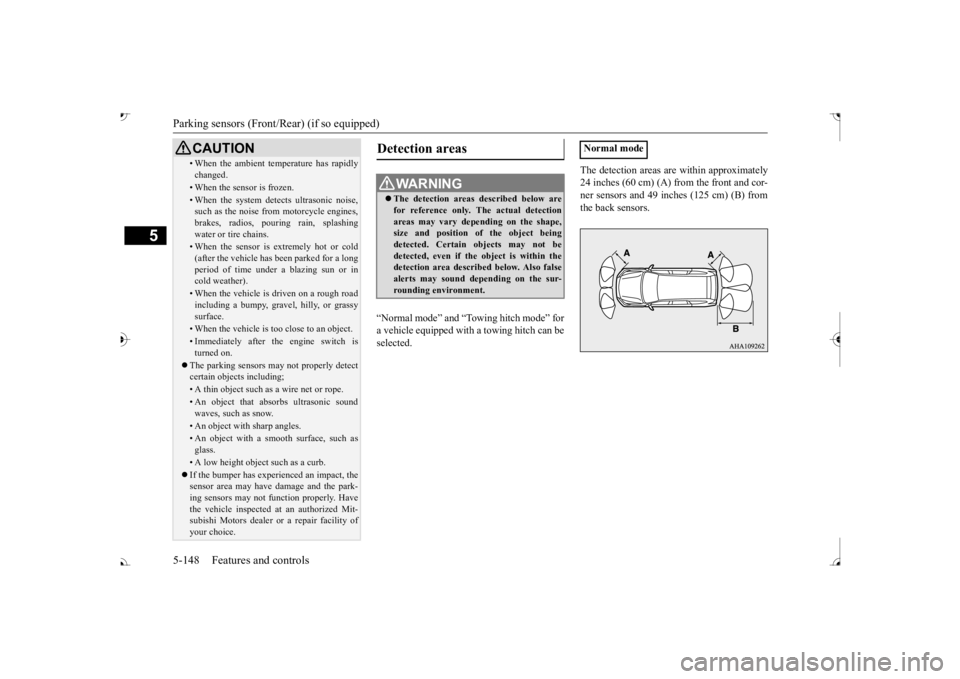
“Normal mode” and “Tow
ing hitch mode” for
a vehicle equipped with a towing hitch can beselected.
The detection areas are within approximately 24 inches (60 cm) (A) from the front and cor-ner sensors and 49 inches (125 cm) (B) from the back sensors.
• When the ambient temp
erature has rapidly
changed.• When the sensor is frozen.• When the system detects ultrasonic noise,such as the noise from motorcycle engines, brakes, radios, pouring rain, splashing water or tire chains.• When the sensor is extremely hot or cold(after the vehicle has
been parked for a long
period of time under
a blazing sun or in
cold weather).• When the vehicle is driven on a rough roadincluding a bumpy, gravel, hilly, or grassy surface.• When the vehicle is too close to an object.• Immediately after the engine switch is turned on.
The parking sensors may not properly detect certain objects including;• A thin object such as a wire net or rope.• An object that absorbs ultrasonic sound waves, such as snow.• An object with sharp angles.• An object with a sm
ooth surface, such as
glass.• A low height object such as a curb. If the bumper has experienced an impact, the sensor area may have
damage and the park-
ing sensors may not f
unction properly. Have
the vehicle inspected at an authorized Mit- subishi Motors dealer or a repair facility of your choice.CAUTION
Detection areas
WA R N I N G The detection areas described below are for reference only. The actual detectionareas may vary depend
ing on the shape,
size and position of
the object being
detected. Certain objects may not bedetected, even if the object is within the detection area described below. Also false alerts may sound de
pending on the sur-
rounding environment.
Normal mode
BK0239700US.book 148 ページ 2016年6月16日 木曜日 午前10時58分
Page 230 of 521
Parking sensors (Front/Rear) (if so equipped)
Features and controls 5-149
5
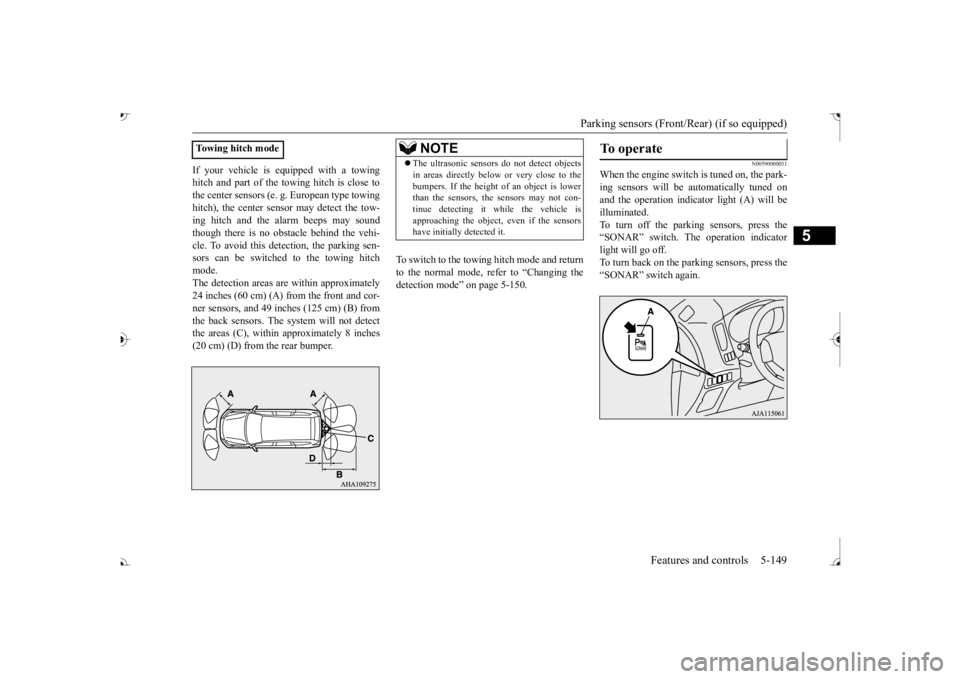
If your vehicle is equipped with a towing hitch and part of the towing hitch is close tothe center sensors (e. g.
European type towing
hitch), the center sens
or may detect the tow-
ing hitch and the alarm beeps may soundthough there is no obstacle behind the vehi- cle. To avoid this dete
ction, the parking sen-
sors can be switched to the towing hitchmode. The detection areas ar
e within approximately
24 inches (60 cm) (A) from the front and cor- ner sensors, and 49 inches (125 cm) (B) from the back sensors. The
system will not detect
the areas (C), within approximately 8 inches (20 cm) (D) from the rear bumper.
To switch to the towing hitch mode and return to the normal mode, refer to “Changing thedetection mode” on page 5-150.
N00590000031
When the engine switch is tuned on, the park- ing sensors will be
automatically tuned on
and the operation indica
tor light (A) will be
illuminated. To turn off the parking sensors, press the “SONAR” switch. The operation indicatorlight will go off. To turn back on the parking sensors, press the “SONAR” switch again.
Towing hitch mode
NOTE
The ultrasonic sensors
do not dete
ct objects
in areas directly below or very close to thebumpers. If the height of an object is lowerthan the sensors, the sensors may not con- tinue detecting it
while the vehicle is
approaching the object, even if the sensorshave initially detected it.
To operate
BK0239700US.book 149 ページ 2016年6月16日 木曜日 午前10時58分
Page 244 of 521
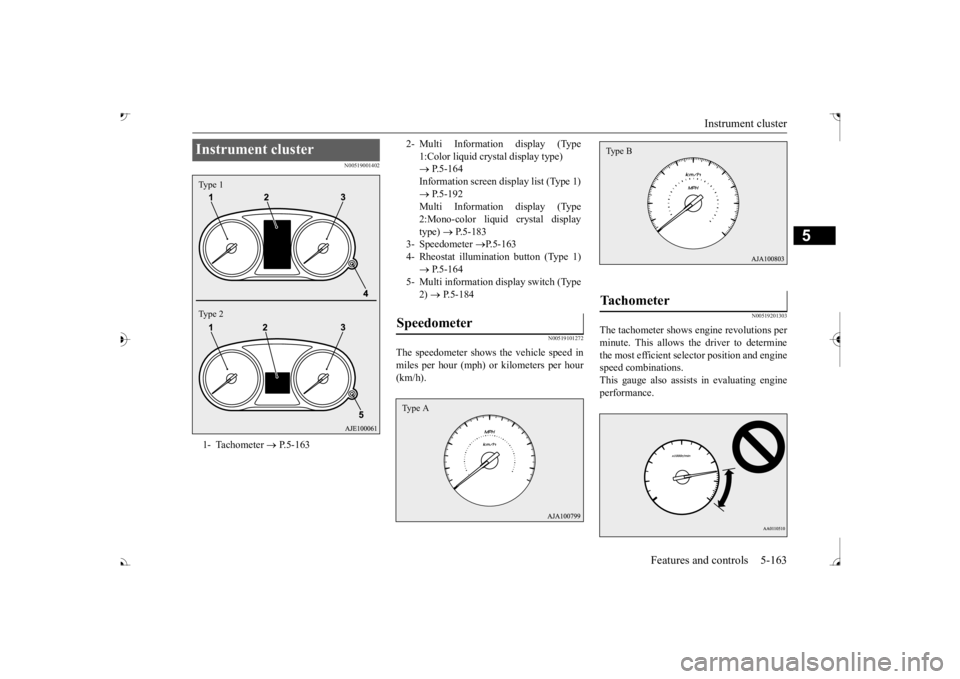
Instrument cluster
Features and controls 5-163
5
N00519001402
N00519101272
The speedometer shows
the vehicle speed in
miles per hour (mph) or kilometers per hour(km/h).
N00519201303
The tachometer shows en
gine revolutions per
minute. This allows the driver to determine the most efficient selector position and engine speed combinations.This gauge also assists in evaluating engine performance.
Instrument cluster 1- Tachometer
P.5-163
Type 1 Type 2
2- Multi Information display (Type
1:Color liquid crystal display type) P.5-164 Information screen display list (Type 1) Multi Information display (Type2:Mono-color liquid crystal display type)
P.5-183
3- Speedometer
P.5-163
4- Rheostat illumination button (Type 1) 5- Multi information display switch (Type
2) P.5-184
Speedometer Type A
Tachometer Type B
BK0239700US.book 163 ページ 2016年6月16日 木曜日 午前10時58分
Page 245 of 521
Multi Information display - Type 1 5-164 Features and controls
5
N00554901248
Each time you press this button, there is a sound and the brightness of the instruments changes.
N00555001392
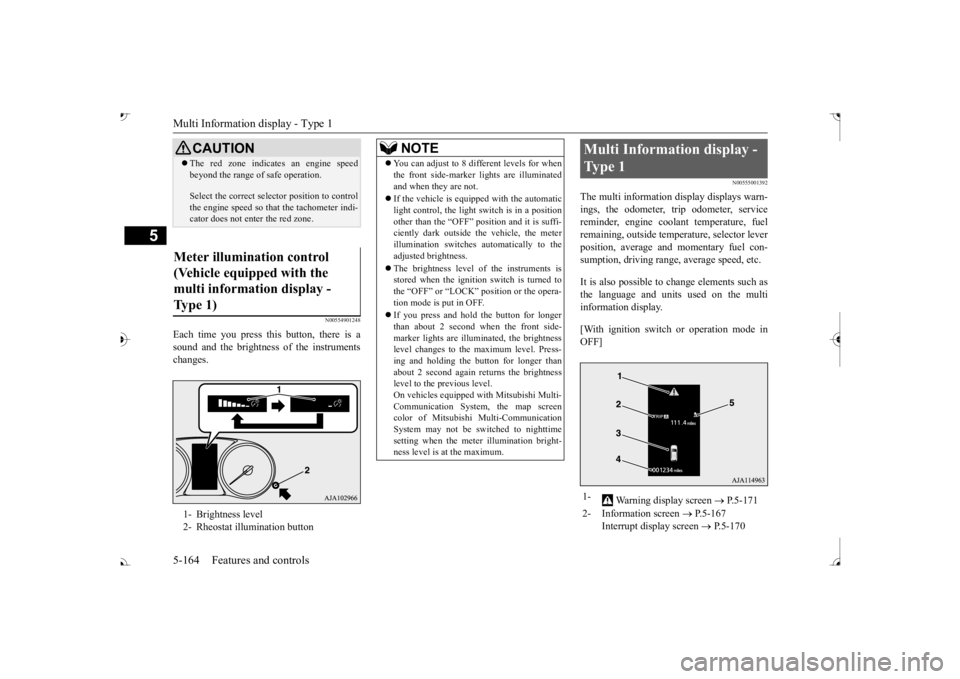
The multi information display displays warn- ings, the odometer, trip odometer, service reminder, engine cool
ant temperature, fuel
remaining, outside temper
ature, selector lever
position, average and momentary fuel con- sumption, driving range, average speed, etc. It is also possible to change elements such as the language and units used on the multi information display. [With ignition switch or operation mode in OFF]
CAUTION The red zone indicate
s an engine speed
beyond the range of
safe operation.
Select the correct selector position to control the engine speed so that
the tachometer indi-
cator does not ente
r the red zone.
Meter illumination control (Vehicle equipped with the multi information display - Type 1) 1- Brightness level 2- Rheostat illumination button
NOTE
You can adjust to 8 different levels for when the front side-marker
lights are illuminated
and when they are not. If the vehicle is equi
pped with the automatic
light control, the light switch is in a positionother than the “OFF” position and it is suffi- ciently dark outside th
e vehicle, the meter
illumination switches automatically to theadjusted brightness. The brightness level of the instruments is stored when the ignition switch is turned to the “OFF” or “LOCK”
position or the opera-
tion mode is put in OFF. If you press and hold the button for longer than about 2 second when the front side-marker lights are illumi
nated, the brightness
level changes to the maximum level. Press- ing and holding the button for longer thanabout 2 second again returns the brightness level to the previous level. On vehicles equipped
with Mitsubishi Multi-
Communication System
, the map screen
color of Mitsubishi Multi-Communication System may not be sw
itched to nighttime
setting when the meter illumination bright- ness level is at the maximum.
Multi Information display - Type 1 1-
Warning display screen
P.5-171
2- Information screen
P.5-167
Interrupt display screen
P.5-170
BK0239700US.book 164 ページ 2016年6月16日 木曜日 午前10時58分
Page 247 of 521
![MITSUBISHI OUTLANDER III 2017 Manual Online Multi Information display - Type 1 5-166 Features and controls
5
[With ignition switch or operation mode in ON] 1- Drive mode indicator display screen (if
so equipped)
P.5-84
2- S-AWC drive mo](/img/19/58146/w960_58146-246.png "MITSUBISHI OUTLANDER III 2017 Manual Online Multi Information display - Type 1 5-166 Features and controls
5
[With ignition switch or operation mode in ON] 1- Drive mode indicator display screen (if
so equipped)
P.5-84
2- S-AWC drive mo")
Multi Information display - Type 1 5-166 Features and controls
5
[With ignition switch or operation mode in ON] 1- Drive mode indicator display screen (if
so equipped)
P.5-84
2- S-AWC drive mode display screen (if
so equipped)
P.5-87
3-
Warning display screen
P.5-171
4- Forward Collision Mitigation System
(FCM) OFF display screen (if so equipped)
P.5-117
Ultrasonic misacceleration MitigationSystem OFF display screen (if so equipped)
P.5-127
5- Lane Departure Warning (LDW) sys-
tem display screen (if so equipped) P.5-139
6- ECO mode indicator display screen
P.5-231
7- Information screen
P.5-167
8- Selector lever
position display
P.5-70, 5-77
9- Engine coolant temperature display
P.5-171
10- Odometer
P.5-172
11- Cruise control display screen (if so
equipped)
P.5-102
12- Adaptive Cruise Control System (ACC)
display screen (if so equipped) P.5-106
13- ECO indicator
P.5-176
14-
“ ” or “ ” mark indicator
P.5-170
15- Fuel remaining display screen
P.5-172
16- Outside temperature display screen
P.5-172NOTE
The fuel units, outside temperature units, display language, and ot
her settings can be
changed. Refer to “Changing th
e function settings” on
page 5-177.
BK0239700US.book 166 ページ 2016年6月16日 木曜日 午前10時58分
Page 252 of 521
Multi Information display - Type 1
Features and controls 5-171
5
Warning display screens with a “ ” or “ ” screen can be switched. If you want to switch the display, press the multi information dis- play switch as follows. “ ”: Press lightly. “ ”: Press for approximately 2 seconds or more.
N00579600021
When the warning is displayed, if youlightly press the multi information display switch a few times, the warning display screen you switched
from is redisplayed.
N00579700022
The operation status of each system is dis- played on the information screen. For further details, re
fer to the appropriate
page in the warn
ing display list.
Refer to “Other interrupt displays” on page 5-210.
N00555201222
This is displayed when you press the multiinformation display switch and return from the warning display screen to the previousscreen. This mark is also displa
yed if there is another
warning other than the one displayed.When the cause of the warning display is eliminated, the warning goes out automat- ically.
N00529700030
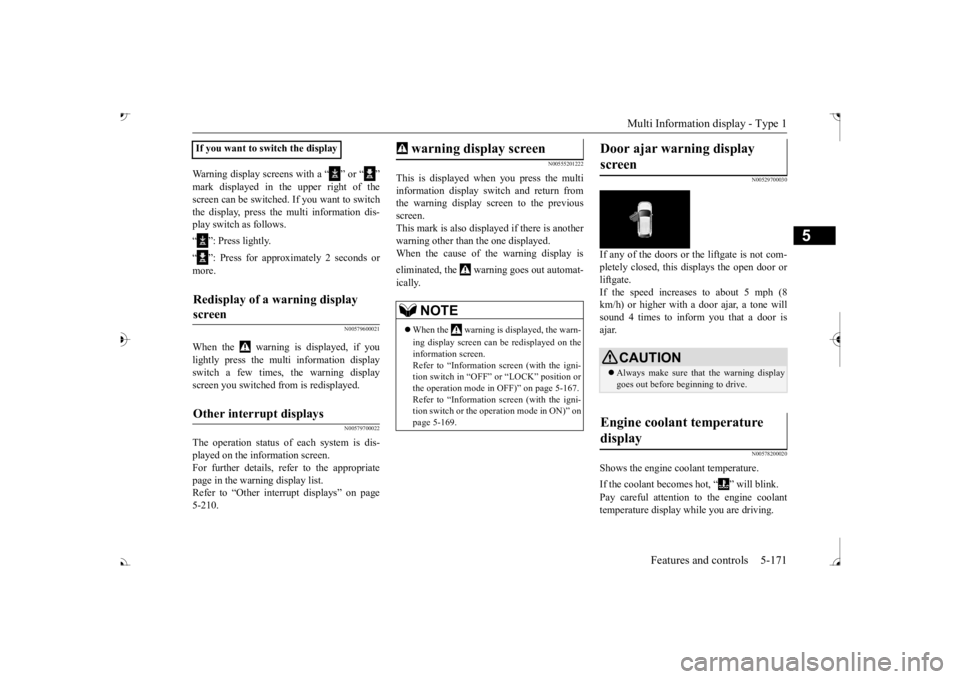
If any of the doors or the liftgate is not com- pletely closed, this displays the open door orliftgate. If the speed increases to about 5 mph (8 km/h) or higher with a door ajar, a tone willsound 4 times to inform you that a door is ajar.
N00578200020
Shows the engine coolant temperature. If the coolant becomes hot, “ ” will blink. Pay careful attention to the engine coolant temperature display while you are driving.
If you want to switch the displayRedisplay of a warning display screen Other interrupt displays
warning display screen
NOTE
When the warning is displayed, the warn- ing display screen can be redisplayed on the information screen.Refer to “Information sc
reen (with the igni-
tion switch in “OFF” or
“LOCK” position or
the operation mode in
OFF)” on page 5-167.
Refer to “Information sc
reen (with the igni-
tion switch or the operation mode in ON)” on page 5-169.
Door ajar warning display screen
CAUTION Always make sure that
the warning display
goes out before beginning to drive.
Engine coolant temperature display
BK0239700US.book 171 ページ 2016年6月16日 木曜日 午前10時58分
Page 253 of 521
Multi Information display - Type 1 5-172 Features and controls
5
N00556601180
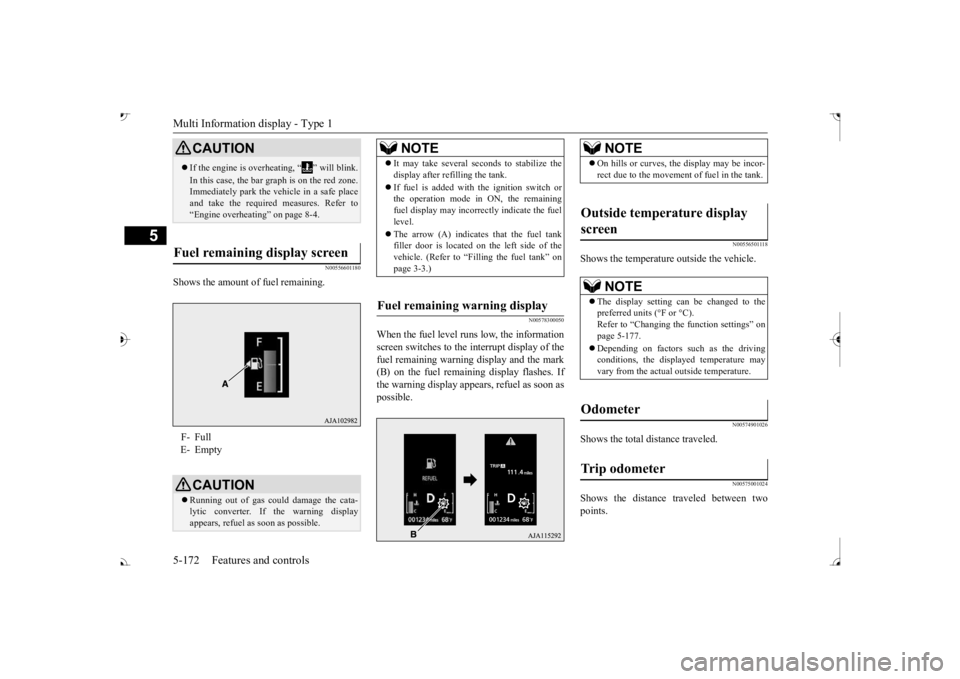
Shows the amount of fuel remaining.
N00578300050
When the fuel level runs low, the information screen switches to the interrupt display of the fuel remaining warning display and the mark(B) on the fuel remaini
ng display flashes. If
the warning display appear
s, refuel as soon as
possible.
N00556501118
Shows the temperature outside the vehicle.
N00574901026
Shows the total distance traveled.
N00575001024
Shows the distance traveled between twopoints.
CAUTION If the engine is overheating, “ ” will blink. In this case, the bar graph is on the red zone. Immediately park the vehicle in a safe place and take the require
d measures. Refer to
“Engine overheating” on page 8-4.
Fuel remaining display screen F- Full E- Empty
CAUTION Running out of gas coul
d damage the cata-
lytic converter. If the warning display appears, refuel as soon as possible.
NOTE
It may take several se
conds to stabilize the
display after re
filling the tank.
If fuel is added with
the ignition switch or
the operation mode in ON, the remaining fuel display may incorre
ctly indicate the fuel
level. The arrow (A) indicates that the fuel tank filler door is located on
the left side of the
vehicle. (Refer to “F
illing the fuel tank” on
page 3-3.)
Fuel remaining warning display
NOTE
On hills or curves, the display may be incor- rect due to the movement
of fuel in the tank.
Outside temperature display screen
NOTE
The display setting ca
n be changed to the
preferred units (°F or °C).
e function settings” on
page 5-177. Depending on factors such as the driving conditions, the displa
yed temperature may
vary from the actual outside temperature.
Odometer Trip odometer
BK0239700US.book 172 ページ 2016年6月16日 木曜日 午前10時58分
Page 260 of 521
Multi Information display - Type 1
Features and controls 5-179
5
When the engine switch or the operation mode is in the following conditions, theaverage fuel consumption display and the average speed display will automatically reset. [Except for vehicles equipped with the F. A . S . T. - k e y ] The ignition switch has been set to the “ACC”, “LOCK” or
“OFF” position for
about 4 hours or more. [For vehicles equipped with the F.A.S.T.- key]The operation mode has been in ACC or OFF for about 4 hours or more.
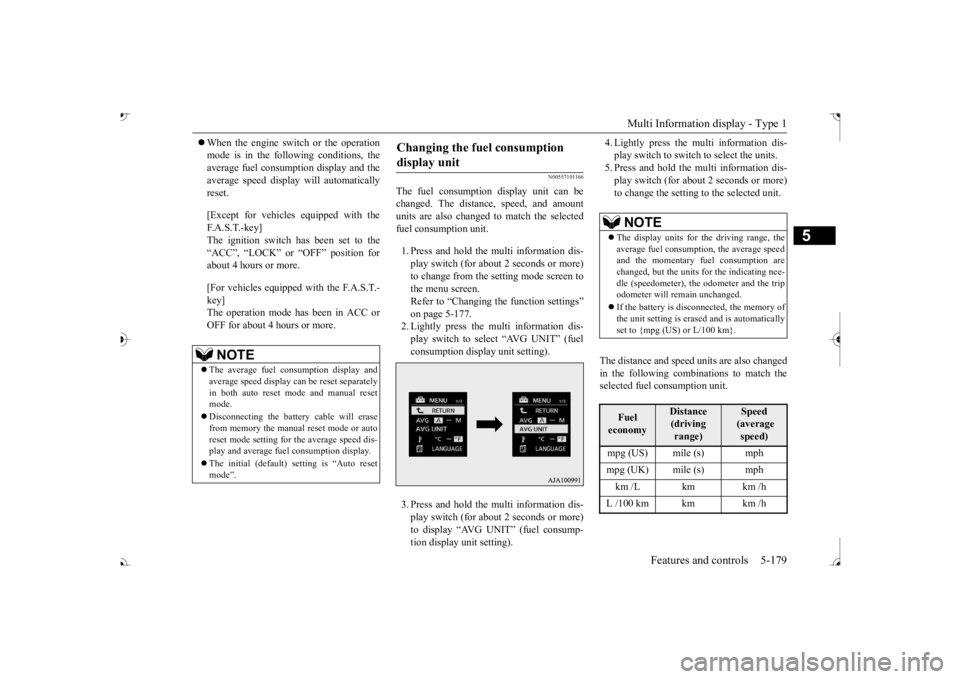
N00557101166
The fuel consumption display unit can be changed. The distan
ce, speed, and amount
units are also changed to match the selected fuel consumption unit. 1. Press and hold the multi information dis- play switch (for about 2 seconds or more) to change from the setting mode screen to the menu screen. Refer to “Changing the function settings” on page 5-177.2. Lightly press the multi information dis- play switch to select “AVG UNIT” (fuel consumption display unit setting). 3. Press and hold the multi information dis- play switch (for about 2 seconds or more) to display “AVG UNIT” (fuel consump- tion display unit setting).
4. Lightly press the multi information dis- play switch to switch to select the units.5. Press and hold the multi information dis- play switch (for about 2 seconds or more) to change the setting to the selected unit.
The distance and speed units are also changed in the following combinations to match theselected fuel consumption unit.
NOTE
The average fuel consumption display and average speed display ca
n be reset separately
in both auto reset mode and manual reset mode. Disconnecting the batter
y cable wi
ll erase
from memory the manual reset mode or auto reset mode setting for
the average speed dis-
play and average fuel consumption display. The initial (default) setting is “Auto reset mode”.
Changing the fuel consumption display unit
NOTE
The display units for the driving range, the average fuel consumption, the average speed and the momentary fuel consumption are changed, but the units
for the indicating nee-
dle (speedometer), the odometer and the trip odometer will remain unchanged. If the battery is disconnected, the memory of the unit setting is erased and is automatically set to {mpg (US) or L/100 km}.Fuel economy
Distance (driving range)
Speed (average speed)
mpg (UK) mile (s) mph km /L km km /h L /100 km km km /h
BK0239700US.book 179 ページ 2016年6月16日 木曜日 午前10時58分