Sec pressure MITSUBISHI OUTLANDER III 2017 Owners Manual
[x] Cancel search | Manufacturer: MITSUBISHI, Model Year: 2017, Model line: OUTLANDER III, Model: MITSUBISHI OUTLANDER III 2017Pages: 521, PDF Size: 14.95 MB
Page 12 of 521
2-1
2
If this warning light comes on or
flashes while you’re driving...
Quick index
N00200702276
If this warning light comes on
or flashes while you’re driving...
NOTE
For information regarding warning
displays in the multi-information display (Color
liquid crystal display
type), refer to “Mult
i-information display” on
page 5-164. These warning lights will co
me on for a few seconds for a bulb check when the i
gnition switch is
first turned to “ON” or the op
eration mode is put in ON.
Wa rn in g l ig h t s
Do this
Ref. Page
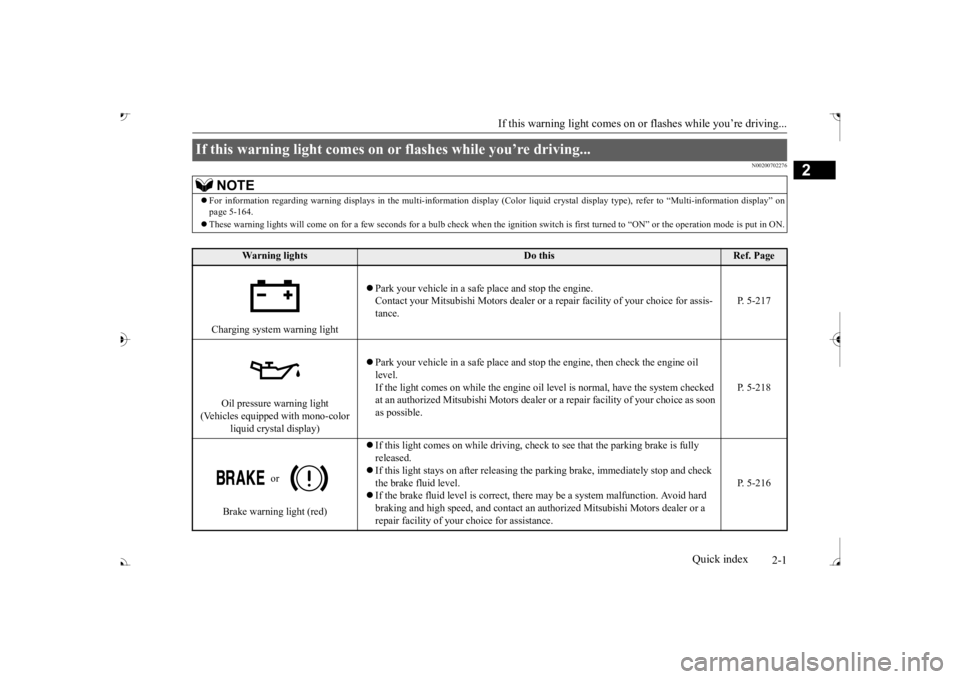
Charging system warning light
Park your vehicle in a safe
place and stop the engine.
Contact your Mitsubishi Motors dealer or a re
pair facility of your choice for assis-
tance.
P. 5-217
Oil pressure warning light
(Vehicles equipped with mono-color
liquid crystal display)
Park your vehicle in a safe
place and stop the engine, then check the engine oil
level. If the light comes on while the engine oil le
vel is normal, have the system checked
at an authorized Mitsubishi
Motors dealer or a repair fa
cility of your choice as soon
as possible.
P. 5-218
or
Brake warning light (red)
released. If this light stays on after
releasing the parking brake,
immediately stop and check
the brake fluid level. If the brake fluid level is correct, there
may be a system malfunction. Avoid hard
braking and high speed, and contact an au
thorized Mitsubishi Mo
tors dealer or a
repair facility of your
choice for assistance.
P. 5-216
BK0239700US.book 1 ページ 2016年6月16日 木曜日 午前10時58分
Page 82 of 521
5
Features and controlsBreak-in recommendations ..............................................................5-3 Keys .................................................................................................5-3 Electronic immobilizer (Anti-theft starting system) ........................5-4Keyless entry system (if so equipped) ..............................................5-7 Free-hand Advanced Security
Transmitter (F.A.S.T.-key)
(if so equipped) ..........................................................................5-13Door locks ......................................................................................5-34 Power door locks ......
...........
...........
...........
...........
...........
.........
.....5-36
Child safety locks for rear door ..........
...........
.........
.........
.........
.....5-37
Liftgate (except for vehi
cles equipped with the
power liftgate) ....5-38
Power liftgate (if so equipped) .......................................................5-39 Inside liftgate release .....................................................................5-46Theft-alarm system ........................................................................5-46 Power window control ...................................................................5-49 Sunroof (if so equipped) .................................................................5-51Parking brake .................................................................................5-53 Steering wheel height and reach adjustment ..................................5-57 Inside rearview mirror ...................................................................5-57Outside rearview mirrors ...............................................................5-60 Ignition switch ...............................................................................5-63 Steering wheel lock (if so equipped) ..............................................5-65Starting the engine .........................................................................5-66 Automatic transaxle (if so equipped)..............................................5-67 Continuously variable transmission
(CVT) (if so equipped)..........5-75
Electronically controlled
4WD system (if so equipped).................5-82
S-AWC (Super-All Wheel Control) (if
so equipped) .....................5-85
4-wheel drive operation .................................................................5-88Inspection and maintenance followi
ng rough road operation ........5-91
Cautions on the handling of 4-wheel dr
ive vehicles ..................... 5-91
Service brake ................................................................................. 5-92 Brake auto hold (if so equipped) .................................................... 5-93Hill start assist (if so equipped) ...................................................... 5-95 Brake assist system ........................................................................ 5-96 Anti-lock braking system .............................................................. 5-97Electric power steering system (EPS) ........................................... 5-99 Active stability control (ASC) ..................................................... 5-100 Cruise control (if so equipped) ..................................................... 5-102Adaptive Cruise Control System (ACC)
(if so equipped) ............ 5-106
Forward Collision Mitigation System
(FCM) (if so equipped) .... 5-117
Ultrasonic misacceleration Mitigati
on System (if so equipped) .. 5-127
Blind Spot Warning (BSW) (wit
h Lane Change Assist) (if so
equipped) .................................................................................. 5-131 Rear Cross Traffic Alert (RCTA) (if so equipped) ....................... 5-136Lane Departure Warning System (LDW
) (if so equipped)........... 5-139
Tire pressure monitoring system ................................................. 5-142 Parking sensors (Front/Rear) (if so equipped).............................. 5-147Rear-view camera (if so equipped)............................................... 5-151 Multi Around Monitor (if so
equipped)..................
...........
........... 5-154
Instrument cluster ........................................................................ 5-163Multi Information display - Type 1 ............................................. 5-164 Multi Information display - Type 2 ............................................. 5-183 Indicator light, warning light, and information screen display list (multi informati
on display - Type 1) .......... 5-191
Indicator and warning light package (multi information display - Type 2) ....................................... 5-214Indicators ..................................................................................... 5-215
BK0239700US.book 1 ページ 2016年6月16日 木曜日 午前10時58分
Page 132 of 521
Sunroof (if so equipped)
Features and controls 5-51
5
N00528801129
If a hand or head is trapped, for safety the door window is automati
cally lowered a little.
After the obstruction is removed, pull up the switch again to close the door window.
N00551400014
Wind buffeting can be described as the per-ception of pressure on the ears or a boomingor rumbling sound. Your vehicle may exhibit wind buffeting when driving with one or both rear door windows down or partially opened.This is a normal occurrence that can be mini- mized. If the buffeting
occurs with the rear
door windows open, open the front door win- dows as well as the rear door windows to minimize the condition.
N00511001682
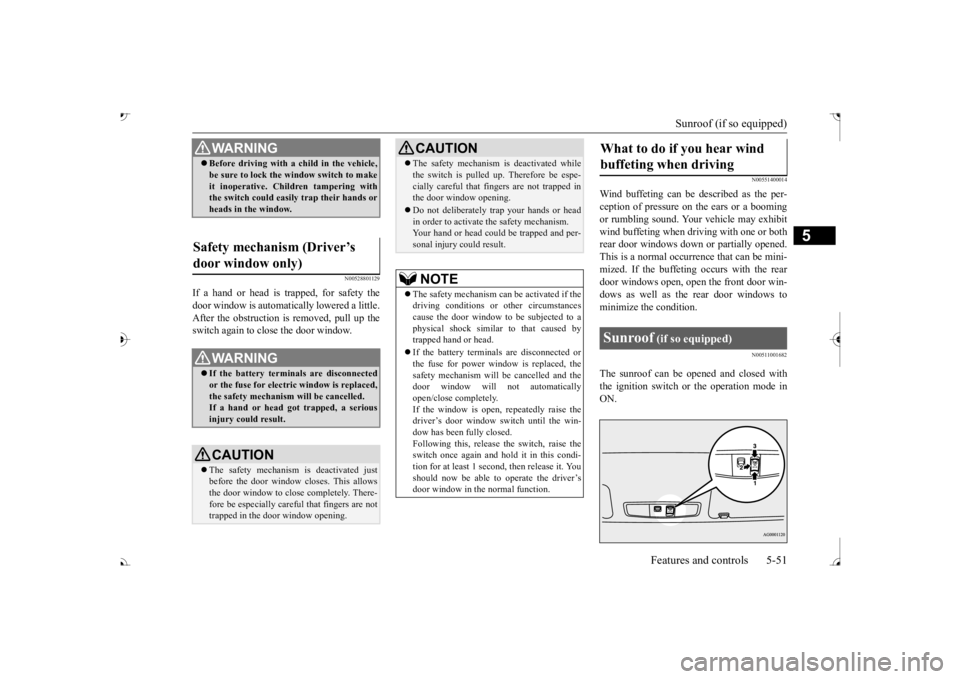
The sunroof can be ope
ned and closed with
the ignition switch or the operation mode in ON.
WA R N I N G Before driving with a child in the vehicle, be sure to lock the window switch to makeit inoperative. Children tampering withthe switch could easily trap their hands or heads in the window.
Safety mechanism (Driver’s door window only)
WA R N I N G If the battery terminals are disconnected or the fuse for electric window is replaced, the safety mechanism will be cancelled.If a hand or head got
trapped, a serious
injury could result.CAUTION The safety mechanism is deactivated just before the door window closes. This allows the door window to close completely. There-fore be especially care
ful that fingers are not
trapped in the door window opening.
The safety mechanism is deactivated while the switch is pulled up.
Therefore be espe-
cially careful that fi
ngers are not trapped in
the door window opening. Do not deliberately trap your hands or head in order to activate the safety mechanism. Your hand or head coul
d be trapped and per-
sonal injury could result.NOTE
The safety mechanism can be activated if the driving conditions or
other circumstances
cause the door window to be subjected to a physical shock similar to that caused by trapped hand or head. If the battery terminals are disconnected or the fuse for power window is replaced, thesafety mechanism will
be cancelled and the
door window will not automatically open/close completely.If the window is open,
repeatedly raise the
driver’s door window switch until the win- dow has been fully closed.Following this, release the switch, raise theswitch once again and hold it in this condi- tion for at least 1 second, then release it. You should now be able to operate the driver’sdoor window in the normal function.CAUTION
What to do if you hear wind buffeting when driving Sunroof
(if so equipped)
BK0239700US.book 51 ページ 2016年6月16日 木曜日 午前10時58分
Page 193 of 521
Adaptive Cruise Control System (ACC) (if so equipped) 5-112 Features and controls
5
N00581500027
There are two ways to increase the set speed. The set speed will increase by 1 mph (1 km/h) every time you push up the “RES +” switch while the ACC is activated. If youhold the switch pushed up, the set speed increases in 5 mph (5 km/h) increments.
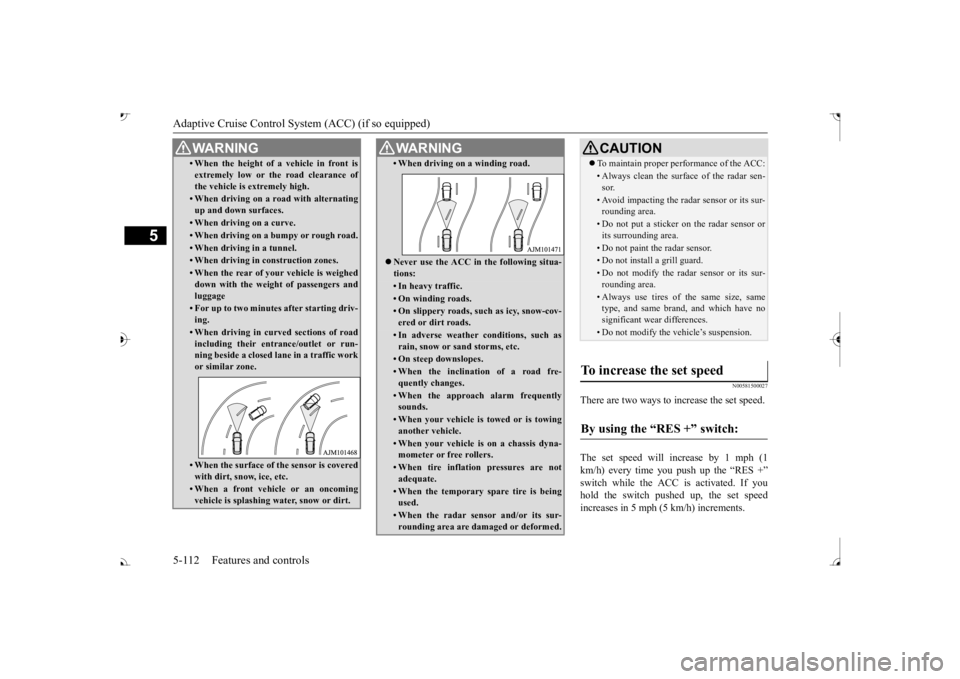
• When the height of a vehicle in front is extremely low or the road clearance ofthe vehicle is extremely high.• When driving on a r
oad with alternating
up and down surfaces.• When driving on a curve.• When driving on a bumpy or rough road.• When driving in a tunnel.• When driving in construction zones.• When the rear of your vehicle is weighed down with the weight of passengers and luggage• For up to two minutes after starting driv-ing.• When driving in curved sections of roadincluding their entrance/outlet or run-ning beside a closed lane in a traffic work or similar zone.• When the surface of th
e sensor is covered
with dirt, snow, ice, etc.• When a front vehicle or an oncomingvehicle is splashing wa
ter, snow or dirt.
WA R N I N G
• When driving on
a winding road.
Never use the ACC in the following situa- tions:• In heavy traffic.• On winding roads.• On slippery roads, such as icy, snow-cov-ered or dirt roads.• In adverse weather conditions, such asrain, snow or sand storms, etc.• On steep downslopes.• When the inclination of a road fre-quently changes.• When the approach alarm frequentlysounds.• When your vehicle is towed or is towinganother vehicle.• When your vehicle is on a chassis dyna-mometer or free rollers.• When tire inflation pressures are notadequate.• When the temporary sp
are tire is being
used.• When the radar sensor and/or its sur-rounding area are damaged or deformed.WA R N I N G
CAUTION To maintain proper performance of the ACC:• Always clean the surface of the radar sen- sor.• Avoid impacting the radar sensor or its sur-rounding area.• Do not put a sticker on the radar sensor orits surrounding area.• Do not paint the radar sensor.• Do not install a grill guard.• Do not modify the radar sensor or its sur- rounding area.• Always use tires of the same size, sametype, and same brand, and which have no significant wear differences.• Do not modify the vehicle’s suspension.
To increase the set speed
By using the “RES +” switch:
BK0239700US.book 112 ページ 2016年6月16日 木曜日 午前10時58分
Page 224 of 521
Tire pressure monitoring system
Features and controls 5-143
5
N00532701334
When the ignition switch is turned to the “ON” position or the operation mode is put inON, the tire pressure monitoring system
warning light normally
illuminates and goes
off a few seconds later. If one or more of the vehicle tires (except for the spare tire) is signi
ficantly under-inflated,
the warning light will remain illuminated while the ignition switch is in the “ON” posi-tion or the operation mode is put in ON. Refer to “If the warning light / display illumi- nates while driving” on page 5-144 and takethe necessary measures.
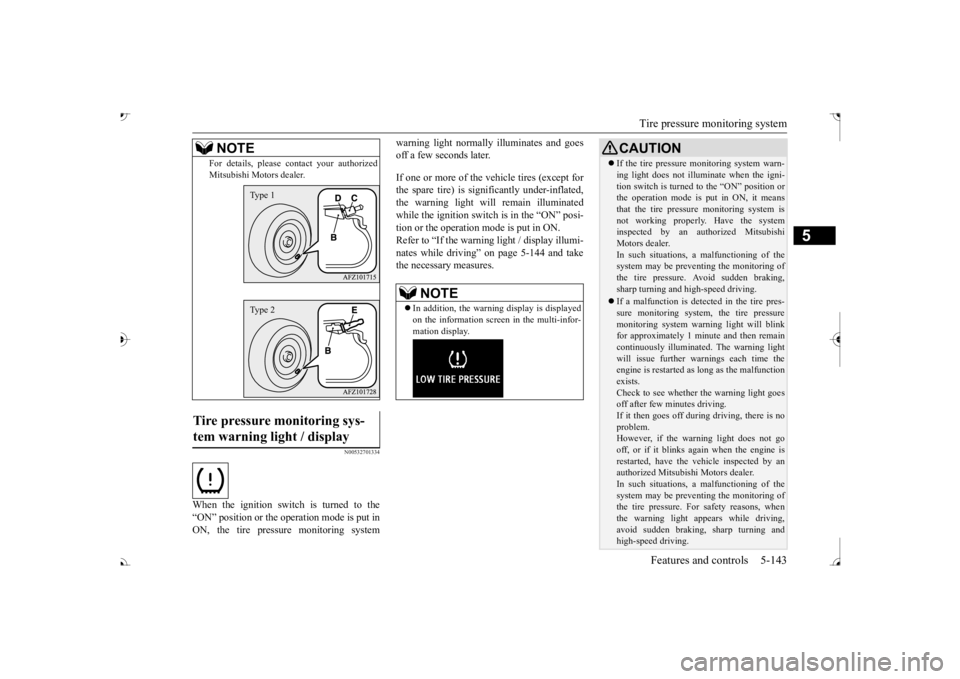
For details, please
contact your authorized
Mitsubishi Motors dealer.
Tire pressure monitoring sys- tem warning light / display
NOTE
Type 1Type 2
NOTE
In addition, the warni
ng display is displayed
on the information screen in the multi-infor-mation display.
CAUTION If the tire pressure monitoring system warn- ing light does not illumi
nate when the igni-
tion switch is turned to the “ON” position orthe operation mode is put in ON, it means that the tire pressure monitoring system is not working properly. Have the systeminspected by an authorized Mitsubishi Motors dealer. In such situations, a malfunctioning of thesystem may be preventing the monitoring of the tire pressure. Avoid sudden braking, sharp turning and high-speed driving. If a malfunction is detected in the tire pres- sure monitoring system, the tire pressuremonitoring system warning light will blink for approximately 1 mi
nute and then remain
continuously illuminate
d. The warning light
will issue further warnings each time the engine is restarted as
long as the malfunction
exists.Check to see whether the warning light goes off after few minutes driving. If it then goes off during driving, there is noproblem. However, if the warning light does not go off, or if it blinks again when the engine isrestarted, have the
vehicle inspected by an
authorized Mitsubish
i Motors dealer.
In such situations, a malfunctioning of thesystem may be preventing the monitoring of the tire pressure. For safety reasons, when the warning light appears while driving,avoid sudden braking, sharp turning and high-speed driving.
BK0239700US.book 143 ページ 2016年6月16日 木曜日 午前10時58分
Page 227 of 521
Tire pressure monitoring system 5-146 Features and controls
5
N00584300026
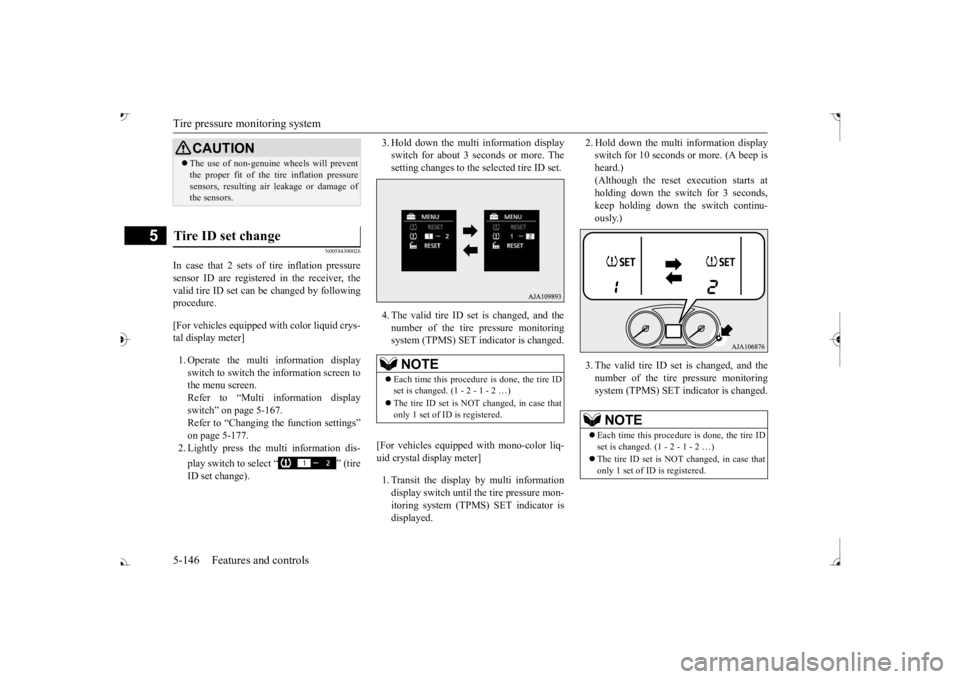
In case that 2 sets of tire inflation pressure sensor ID are registered in the receiver, the valid tire ID set can be changed by following procedure. [For vehicles equipped
with color liquid crys-
tal display meter] 1. Operate the multi information display switch to switch the information screen to the menu screen.Refer to “Multi in
formation display
switch” on page 5-167. Refer to “Changing the function settings”on page 5-177. 2. Lightly press the multi information dis- play switch to select “ ” (tire ID set change).
3. Hold down the multi information display switch for about 3 seconds or more. Thesetting changes to the selected tire ID set. 4. The valid tire ID se
t is changed, and the
number of the tire pressure monitoring system (TPMS) SET in
dicator is changed.
[For vehicles equipped
with mono-color liq-
uid crystal display meter] 1. Transit the display by multi information display switch until th
e tire pressure mon-
itoring system (TPMS) SET indicator isdisplayed.
2. Hold down the multi information display switch for 10 seconds or more. (A beep isheard.) (Although the reset execution starts at holding down the switch for 3 seconds,keep holding down the switch continu- ously.) 3. The valid tire ID set is changed, and the number of the tire
pressure monitoring
system (TPMS) SET i
ndicator is changed.
CAUTIONThe use of non-genuine wheels will prevent the proper fit of the tire inflation pressuresensors, resulting air
leakage or damage of
the sensors.
Tire ID set change
NOTE
Each time this procedure is done, the tire ID set is changed. (1 - 2 - 1 - 2 …) only 1 set of ID is registered.
NOTE
Each time this procedure is done, the tire ID set is changed. (1 - 2 - 1 - 2 …) only 1 set of ID is registered.
BK0239700US.book 146 ページ 2016年6月16日 木曜日 午前10時58分
Page 228 of 521
Parking sensors (Front/Rear) (if so equipped)
Features and controls 5-147
5
N00533001233
Your tire pressure monitoring system oper- ates on a radio frequency subject to Federal Communications Commission (FCC) Rules(For vehicles sold in
U.S.A.) and Industry
Canada Rules (For vehicles sold in Canada). This device complies with part 15 of FCCRules and Industry Ca
nada licence-exempt
RSS standard(s). Operation is subject to the following two con- ditions. This device may not
cause harmful inter-
ference. This device must ac
cept any interference
received, including interference that may cause undesired operation.
N00589800039
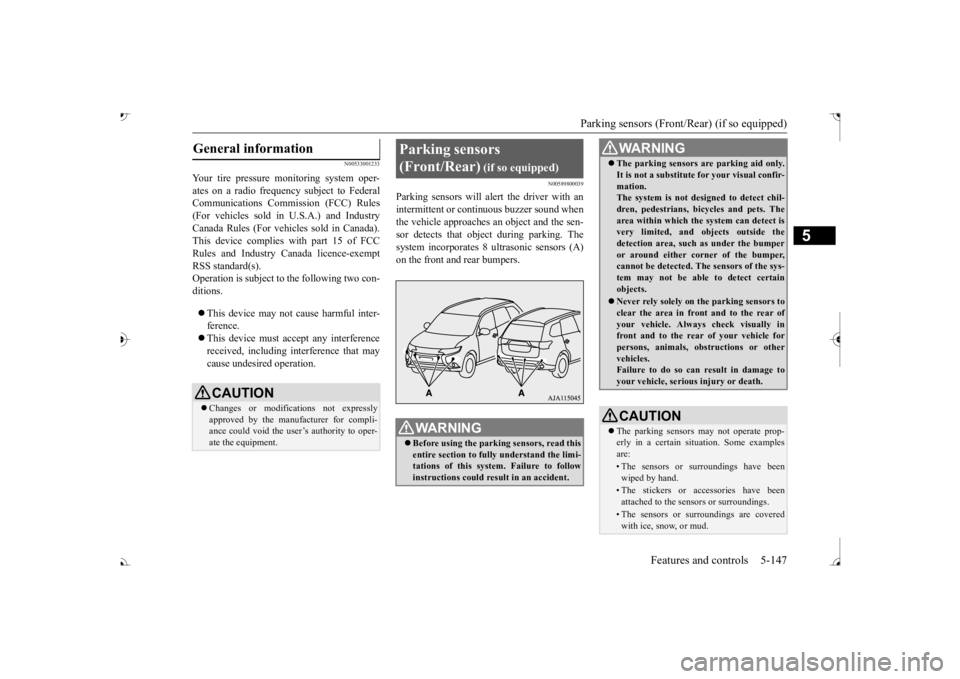
Parking sensors will al
ert the driver with an
intermittent or contin
uous buzzer sound when
the vehicle approaches
an object and the sen-
sor detects that object
during parking. The
system incorporates 8 ultrasonic sensors (A)
General information
CAUTION Changes or modifica
tions not expressly
approved by the manufacturer for compli- ance could void the user’s authority to oper-ate the equipment.
Parking sensors (Front/Rear)
(if so equipped)
WA R N I N G Before using the parkin
g sensors, read this
entire section to fully understand the limi- tations of this system. Failure to followinstructions could result in an accident.
The parking sensors ar
e parking aid only.
It is not a substitute for your visual confir-mation.The system is not designed to detect chil- dren, pedestrians, bicycles and pets. The area within which the system can detect isvery limited, and objects outside the detection area, such as under the bumper or around either co
rner of the bumper,
cannot be detected. The sensors of the sys- tem may not be able to detect certain objects. Never rely solely on
the parking sensors to
clear the area in fron
t and to the rear of
your vehicle. Always
check visually in
front and to the rear
of your vehicle for
persons, animals, ob
structions or other
vehicles. Failure to do so can result in damage to your vehicle, seriou
s injury or death.
CAUTIONThe parking sensors
may not operate prop-
erly in a certain situation. Some examplesare:• The sensors or surroundings have beenwiped by hand.• The stickers or ac
cessories have been
attached to the sensors or surroundings.• The sensors or surroundings are coveredwith ice, snow, or mud.WA R N I N G
BK0239700US.book 147 ページ 2016年6月16日 木曜日 午前10時58分
Page 233 of 521
Rear-view camera (if so equipped) 5-152 Features and controls
5
When the selector lever is shifted out of the “R” (REVERSE) position, the rear-viewimage will go off.
The rear-view camera (A) is in the liftgate, at the left side of the liftgate handle.
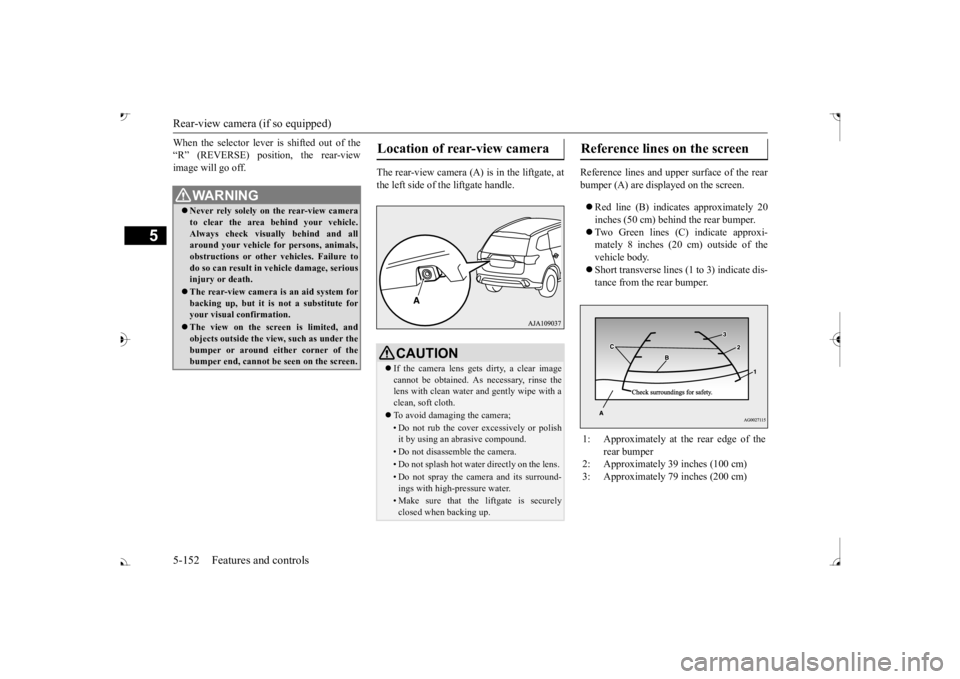
Reference lines and uppe
r surface of the rear
bumper (A) are displayed on the screen. Red line (B) indicates approximately 20 inches (50 cm) behind the rear bumper. Two Green lines (C) indicate approxi- mately 8 inches (20 cm) outside of the vehicle body. Short transverse lines (1
to 3) indicate dis-
tance from the rear bumper.
WA R N I N G Never rely solely on the rear-view camera to clear the area behind your vehicle.Always check visua
lly behind and all
around your vehicle fo
r persons, animals,
obstructions or other vehicles. Failure todo so can result in
vehicle damage, serious
injury or death. The rear-view camera is an aid system for backing up, but it is not a substitute for your visual confirmation. The view on the scre
en is limited, and
objects outside the view, such as under thebumper or around ei
ther corner of the
bumper end, cannot be seen on the screen.
Location of rear-view camera
CAUTION If the camera lens gets
dirty, a clear image
cannot be obtained. As necessary, rinse the lens with clean water and gently wipe with a clean, soft cloth. To avoid damaging the camera;• Do not rub the cover excessively or polish it by using an abrasive compound. • Do not disassemble the camera.• Do not splash hot wate
r directly on the lens.
• Do not spray the camera and its surround- ings with high-pressure water.• Make sure that the liftgate is securelyclosed when backing up.
Reference lines on the screen
1: Approximately at the rear edge of the
rear bumper
2: Approximately 39 inches (100 cm) 3: Approximately 79 inches (200 cm)
BK0239700US.book 152 ページ 2016年6月16日 木曜日 午前10時58分
Page 235 of 521
Multi Around Monitor (if so equipped)
5
N00587200042
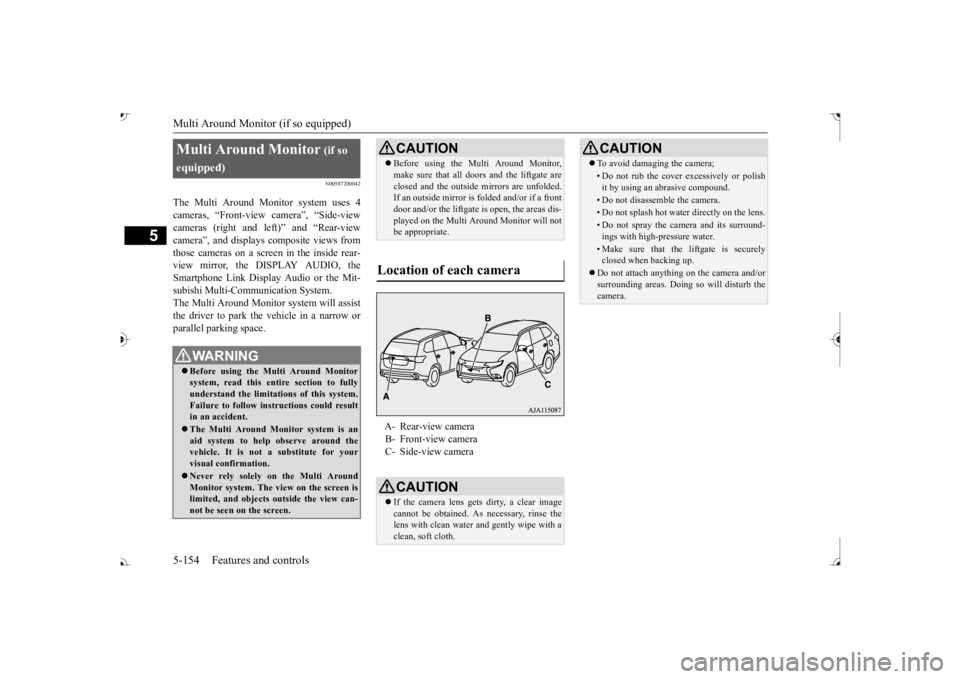
The Multi Around Monitor system uses 4 cameras, “Front-view camera”, “Side-viewcameras (right and le
ft)” and “Rear-view
camera”, and displays
composite views from
those cameras on a screen in the inside rear-view mirror, the DISPLAY AUDIO, the Smartphone Link Display Audio or the Mit- subishi Multi-Comm
unication System.
The Multi Around Monitor
system wi
ll assist
the driver to park the vehicle in a narrow orparallel parking space. Multi Around Monitor
(if so
equipped) Before using the Multi Around Monitor system, read this entire section to fully understand the limitations of this system. Failure to follow instructions could resultin an accident. The Multi Around Monitor system is an aid system to help observe around the vehicle. It is not a substitute for your visual confirmation. Never rely solely on the Multi Around Monitor system. The view on the screen islimited, and objects
outside the view can-
not be seen on the screen.
CAUTION Before using the Multi Around Monitor, make sure that all doors and the liftgate areclosed and the outside mirrors are unfolded.If an outside mirror is folded and/or if a front door and/or the liftgate
is open, the areas dis-
played on the Multi Around Monitor will notbe appropriate.
Location of each camera
A- Rear-view camera B- Front-view camera C- Side-view cameraCAUTION If the camera lens gets
dirty, a clear image
cannot be obtained. As necessary, rinse the lens with clean water and gently wipe with aclean, soft cloth.
To avoid damaging the camera;• Do not rub the cover excessively or polish it by using an abrasive compound.• Do not disassemble the camera.• Do not splash hot wate
r directly on the lens.
• Do not spray the camera and its surround- ings with high-pressure water.• Make sure that the liftgate is securelyclosed when backing up.
Do not attach anythi
ng on the camera and/or
surrounding areas. Doing
so will disturb the
camera.CAUTION
BK0239700US.book 154 ページ 2016年6月16日 木曜日 午前10時58分
Page 273 of 521

Indicator light, warning light, and information screen display list (multi information display - Type 1)
5
N00557901092
When there is information to be announced,
such as light reminder, the
tone sounds and the screen sw
itches to the displays show
n below. Refer to
the appropriate page and ta
ke the necessary measures.
When the cause of the warning display is elimin
ated, the warning displa
y goes out automatically.
Refer to Warning disp
lay list on page 5-193.
Refer to Navigation informat
ion display on page 5-209.
Refer to Other interrupt displays on page 5-210. 15- Seat belt remi
nder/warning light
P.4-23
16- Tire pressure monitoring system warn-
ing light
P.5-143
17- Brake auto hold indicator (if so
equipped)
P.5-93
18- Brake warning light (red)
P.5-216
19- Information screen display list
P.5-192
Information screen display list
NOTE
In the following cases, a warning may be
displayed on the information screen and th
e buzzer may sound for a
few seconds, at tim
es.
This is caused by the system picking up in
terference such as strong el
ectromagnetic waves
or noise, and is not a functional pro
blem.
• An extremely strong electrom
agnetic wave is received from a s
ource such as an illegal radio se
t, a spark from a wire, or a rad
ar station.
• Abnormal voltage or a static
electricity disc
harge is generated by the operation of
your vehicle’s electr
onics (including afte
r-market parts).
If the warning display has oc
curred a number of times, take your
vehicle to an author
ized Mitsubishi Motors
dealer or a repair
facility of your choice and
have the system checked.
BK0239700US.book 192 ページ 2016年6月16日 木曜日 午前10時58分