cruise control MITSUBISHI OUTLANDER III 2017 Owners Manual
[x] Cancel search | Manufacturer: MITSUBISHI, Model Year: 2017, Model line: OUTLANDER III, Model: MITSUBISHI OUTLANDER III 2017Pages: 521, PDF Size: 14.95 MB
Page 3 of 521
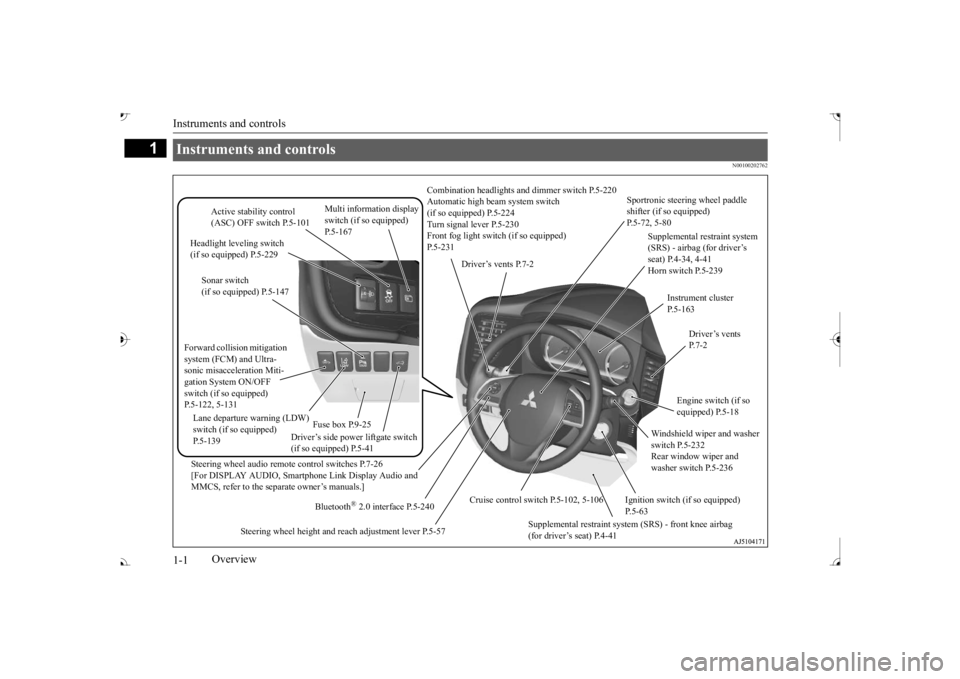
Instruments and controls 1-1
1
Overview
N00100202762
Instruments and controls
Combination headlights an
d dimmer switch P.5-220
Automatic high beam system switch (if so equipped) P.5-224 Turn signal lever P.5-230 Front fog light switc
h (if so equipped)
P.5-231
Steering wheel audio remote control switches P.7-26 [For DISPLAY AUDIO, Smartphone Link Display Audio and MMCS, refer to the separate owner’s manuals.]
Active stability control (ASC) OFF switch P.5-101
Supplemental restraint system (SRS) - airbag (for driver’s seat) P.4-34, 4-41 Horn switch P.5-239
Instrument cluster P.5-163
Windshield wiper and washer switch P.5-232 Rear window wiper and washer switch P.5-236
Cruise control switch P.5-102, 5-106
Steering wheel height and reach adjustment lever P.5-57
Engine switch (if so equipped) P.5-18
Bluetooth
® 2.0 interface P.5-240
Driver’s vents P. 7 - 2
Sportronic steering wheel paddle shifter (if so equipped) P.5-72, 5-80
Driver’s vents P.7-2
Multi information display switch (if so equipped)
Headlight leveling switch (if so equipped) P.5-229
Driver’s side power liftgate switch (if so equipped) P.5-41
Fuse box P.9-25
Lane departure warning (LDW) switch (if so equipped) P.5-139 Forward collisio
n mitigation
system (FCM) and Ultra-sonic misacceleration Miti- gation System ON/OFF switch (if so equipped)P.5-122, 5-131
Supplemental restraint system (SRS) - front knee airbag (for driver’s seat) P.4-41
Ignition switch (if so equipped) P.5-63
Sonar switch (if so equipped) P.5-147
BK0239700US.book 1 ページ 2016年6月16日 木曜日 午前10時58分
Page 82 of 521
5
Features and controlsBreak-in recommendations ..............................................................5-3 Keys .................................................................................................5-3 Electronic immobilizer (Anti-theft starting system) ........................5-4Keyless entry system (if so equipped) ..............................................5-7 Free-hand Advanced Security
Transmitter (F.A.S.T.-key)
(if so equipped) ..........................................................................5-13Door locks ......................................................................................5-34 Power door locks ......
...........
...........
...........
...........
...........
.........
.....5-36
Child safety locks for rear door ..........
...........
.........
.........
.........
.....5-37
Liftgate (except for vehi
cles equipped with the
power liftgate) ....5-38
Power liftgate (if so equipped) .......................................................5-39 Inside liftgate release .....................................................................5-46Theft-alarm system ........................................................................5-46 Power window control ...................................................................5-49 Sunroof (if so equipped) .................................................................5-51Parking brake .................................................................................5-53 Steering wheel height and reach adjustment ..................................5-57 Inside rearview mirror ...................................................................5-57Outside rearview mirrors ...............................................................5-60 Ignition switch ...............................................................................5-63 Steering wheel lock (if so equipped) ..............................................5-65Starting the engine .........................................................................5-66 Automatic transaxle (if so equipped)..............................................5-67 Continuously variable transmission
(CVT) (if so equipped)..........5-75
Electronically controlled
4WD system (if so equipped).................5-82
S-AWC (Super-All Wheel Control) (if
so equipped) .....................5-85
4-wheel drive operation .................................................................5-88Inspection and maintenance followi
ng rough road operation ........5-91
Cautions on the handling of 4-wheel dr
ive vehicles ..................... 5-91
Service brake ................................................................................. 5-92 Brake auto hold (if so equipped) .................................................... 5-93Hill start assist (if so equipped) ...................................................... 5-95 Brake assist system ........................................................................ 5-96 Anti-lock braking system .............................................................. 5-97Electric power steering system (EPS) ........................................... 5-99 Active stability control (ASC) ..................................................... 5-100 Cruise control (if so equipped) ..................................................... 5-102Adaptive Cruise Control System (ACC)
(if so equipped) ............ 5-106
Forward Collision Mitigation System
(FCM) (if so equipped) .... 5-117
Ultrasonic misacceleration Mitigati
on System (if so equipped) .. 5-127
Blind Spot Warning (BSW) (wit
h Lane Change Assist) (if so
equipped) .................................................................................. 5-131 Rear Cross Traffic Alert (RCTA) (if so equipped) ....................... 5-136Lane Departure Warning System (LDW
) (if so equipped)........... 5-139
Tire pressure monitoring system ................................................. 5-142 Parking sensors (Front/Rear) (if so equipped).............................. 5-147Rear-view camera (if so equipped)............................................... 5-151 Multi Around Monitor (if so
equipped)..................
...........
........... 5-154
Instrument cluster ........................................................................ 5-163Multi Information display - Type 1 ............................................. 5-164 Multi Information display - Type 2 ............................................. 5-183 Indicator light, warning light, and information screen display list (multi informati
on display - Type 1) .......... 5-191
Indicator and warning light package (multi information display - Type 2) ....................................... 5-214Indicators ..................................................................................... 5-215
BK0239700US.book 1 ページ 2016年6月16日 木曜日 午前10時58分
Page 183 of 521
Cruise control (if so equipped)
5
N00546601129
If an abnormal condition occurs in the sys- tem, the following display/indicator will turn on. Warning display
N00546301070
N00518301626
Cruise control is an automatic speed control system that keeps a set speed. It can be acti-vated at speeds from about 25 mph (40 km/h). Cruise cont
rol does not work at
speeds below about 25 mph (40 km/h).
NOTE
The indicator may come on when you start the engine. This means that the battery voltage momentarily dropped when theengine was started. It
does not indicate a
malfunction, provided th
at the display goes
out immediately. When a spare tire has been put on your vehi- cle, the gripping ability of the tire will be lower, making it more
likely that the dis-
play/indicator will blink.
ASC warning display
-
ASC indicator
-
ASC OFF indicator
CAUTION The system may be malfunctioning. Park your vehicle in a
safe place and stop the
engine. Restart the engi
ne and check whether
the display/indicator goes out. If they go out, there is no abnormal condition. If they do not go out or if they turn on frequently, it is notnecessary to stop the
vehicle immediately,
but you should have your
vehicle inspected
by an authorized Mitsubishi Motors dealer ora repair facility of
your choice as soon as
possible.
To w i n g
CAUTION If the 2WD vehicle is
towed with the ignition
switch in the “ON” pos
ition or the operation
mode in ON and only the front wheels or only the rear wheels raised off the ground, the ASC may operate, resulting in an acci-dent. When towing the 2WD vehicle with the front wheels raised, ke
ep the ignition switch
in the “OFF”, “LOCK” the operation mode in ACC or OFF. Whentowing the vehicle with the rear wheels raised, keep the ignition switch in the “ACC”Refer to “Towing” on page 8-14.
Cruise control
(if so equipped)
When you do not wish to drive at a set speed, turn off the cruise control for safety. Do not use cruise control when driving con- ditions will not allow
you to stay at the same
speed, such as in heavy traffic or on roads that are winding, icy, snow-covered, wet,slippery, on a steep downhill slope.NOTE
Cruise control may not
be able to keep your
speed on uphills or downhills. Your speed may decr
ease on a steep uphill.
You may use the accelerator pedal if you want to stay at your set speed. Your speed may increase to more than the set speed on a steep downhill. You have to use the brake to control your speed. As a result,the set speed driving is deactivated.
BK0239700US.book 102 ページ 2016年6月16日 木曜日 午前10時58分
Page 184 of 521
Cruise control (if so equipped) Features and controls 5-103
5
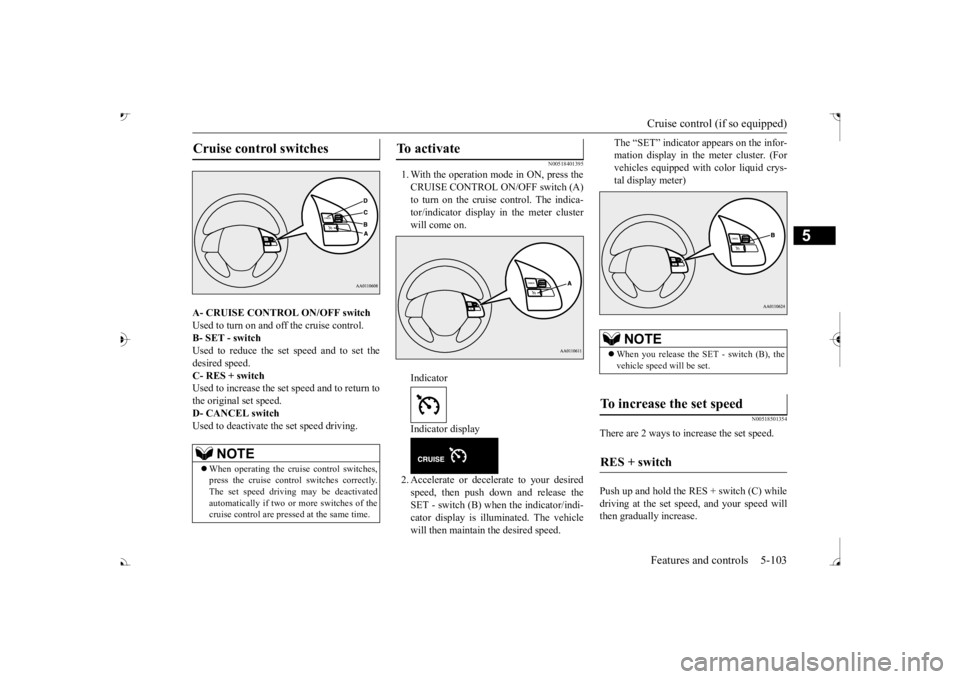
A- CRUISE CONTROL ON/OFF switch Used to turn on and off the cruise control. B- SET - switch Used to reduce the set speed and to set thedesired speed. C- RES + switch Used to increase the set speed and to return tothe original set speed. D- CANCEL switch Used to deactivate the set speed driving.
N00518401395
1. With the operation mode in ON, press the CRUISE CONTROL ON/OFF switch (A)tor/indicator display in the meter cluster will come on. Indicator Indicator display2. Accelerate or decele
rate to your desired
speed, then push down and release theSET - switch (B) when the indicator/indi- cator display is illuminated. The vehicle will then maintain the desired speed.
The “SET” indicator appears on the infor- mation display in the meter cluster. (Forvehicles equipped with
color liquid crys-
tal display meter)
N00518501354
There are 2 ways to increase the set speed. Push up and hold the RES + switch (C) while driving at the set speed, and your speed willthen gradually increase.
Cruise control switches
NOTE
When operating the crui
se control switches,
press the cruise control switches correctly. The set speed driving may be deactivatedautomatically if two or
more switches of the
cruise control are pre
ssed at the same time.
To activate
NOTE
When you release the SET - switch (B), the vehicle speed
will be set.
To increase the set speed
RES + switch
BK0239700US.book 103 ページ 2016年6月16日 木曜日 午前10時58分
Page 185 of 521
Cruise control (if so equipped)
5
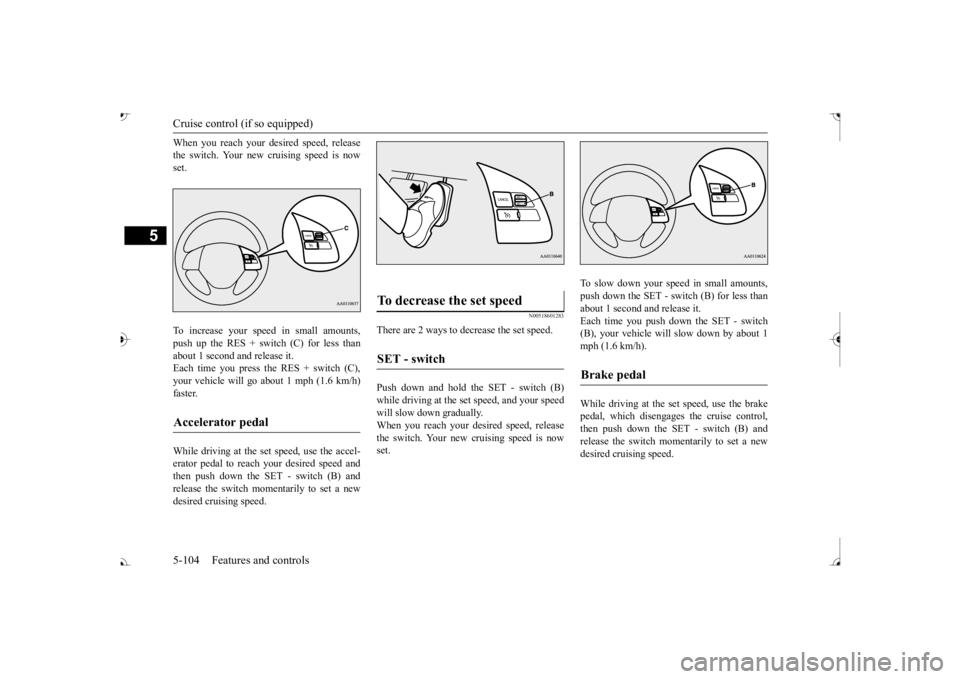
When you reach your desired speed, release the switch. Your new cruising speed is nowset. To increase your speed in small amounts, push up the RES + switch (C) for less than about 1 second and release it.Each time you press the RES + switch (C), your vehicle will go about 1 mph (1.6 km/h) faster. While driving at the set speed, use the accel- erator pedal to reach your desired speed andthen push down the SET - switch (B) and release the switch momentarily to set a new desired cruising speed.
N00518601283
There are 2 ways to decrease the set speed. Push down and hold the SET - switch (B) while driving at the set speed, and your speedwill slow down gradually. When you reach your desired speed, release the switch. Your new cruising speed is nowset.
To slow down your sp
eed in small amounts,
push down the SET - switch (B) for less thanabout 1 second and release it. Each time you push dow
n the SET - switch
(B), your vehicle will
slow down by about 1
mph (1.6 km/h). While driving at the set speed, use the brake pedal, which disengage
s the cruise control,
then push down the SET - switch (B) and release the switch momentarily to set a newdesired cruising speed.
Accelerator pedal
To decrease the set speed
SET - switch
Brake pedal
BK0239700US.book 104 ページ 2016年6月16日 木曜日 午前10時58分
Page 186 of 521
Cruise control (if so equipped) Features and controls 5-105
5
N00541701066
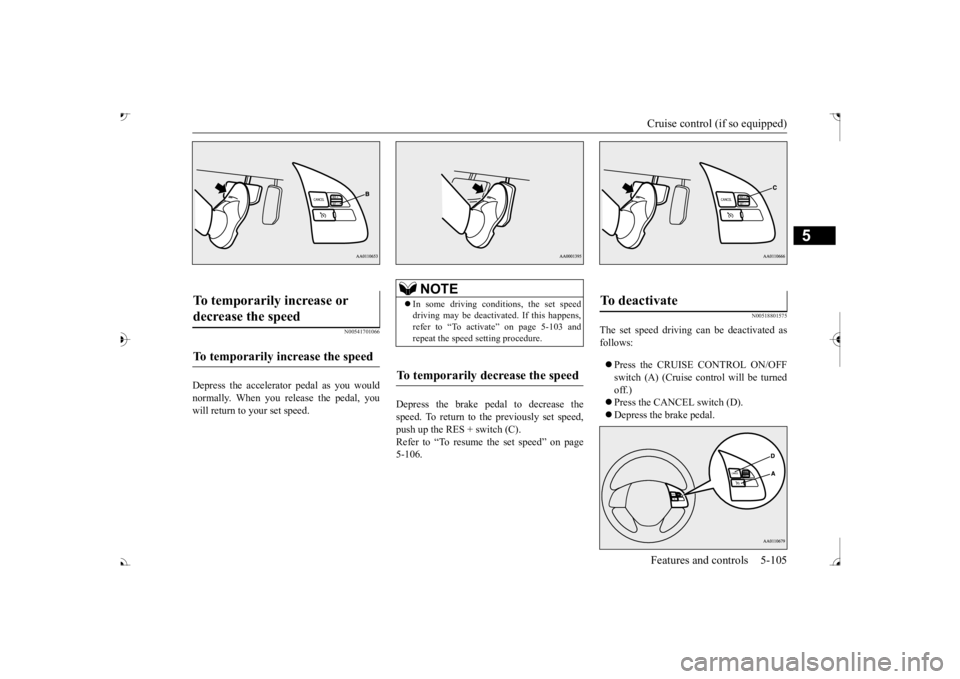
Depress the accelerator pedal as you would normally. When you release the pedal, you will return to your set speed.
Depress the brake pedal to decrease the speed. To return to the previously set speed, push up the RES + switch (C). Refer to “To resume the set speed” on page5-106.
N00518801575
The set speed driving can be deactivated asfollows: Press the CRUISE CONTROL ON/OFF switch (A) (Cruise control will be turned off.) Press the CANCEL switch (D). Depress the brake pedal.
To temporarily increase or decrease the speed
To temporarily increase the speed
NOTE
In some driving conditions, the set speed driving may be deactiva
ted. If this happens,
refer to “To activate” on page 5-103 and repeat the speed
setting procedure.
To temporarily decrease the speed
To deactivate
BK0239700US.book 105 ページ 2016年6月16日 木曜日 午前10時58分
Page 187 of 521
Adaptive Cruise Control System (ACC) (if so equipped) 5-106 Features and controls
5
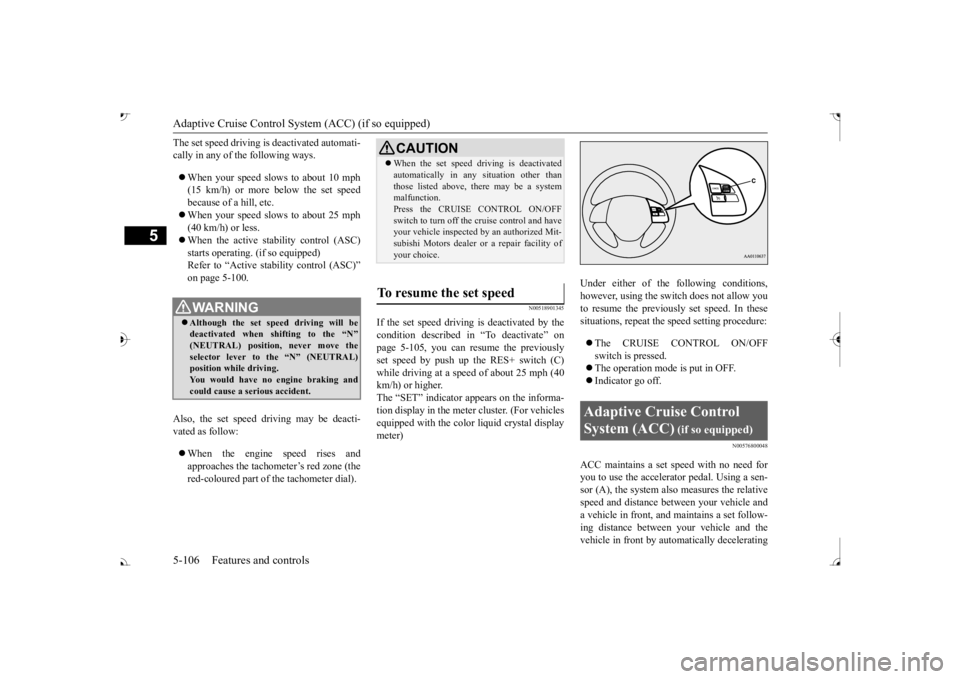
The set speed driving is deactivated automati- cally in any of th
e following ways.
When your speed slows to about 10 mph (15 km/h) or more below the set speed because of a hill, etc. When your speed slows to about 25 mph (40 km/h) or less. When the active stability control (ASC) starts operating. (if so equipped)Refer to “Active stab
ility control (ASC)”
on page 5-100.
Also, the set speed driving may be deacti- vated as follow: When the engine speed rises and approaches the tachometer
Page 188 of 521
Adaptive Cruise Control System (ACC) (if so equipped)
Features and controls 5-107
5
your vehicle if it becomes too close to the vehicle in front.The cruising set speed can be set from 25 mph (40 km/h) to 110 mph (180 km/h). The distance can be select
ed from three levels.
If the vehicle in front decelerates, the ACC will automatically apply limited braking to maintain the distance, a
nd if the front vehicle
then accelerates, the ACC will automatically accelerate your vehicle up to the set speed. If your vehicle is approa
ching too close to the
front vehicle, a buzzer will sound and a warn- ing is shown in the multi information display.When the ACC detects no vehicle ahead, the set speed will be maintained. Conventional cruise cont
rol mode without the
distance control can
also be selected.
Stop lights are illuminated during automatic braking.
N00577000021
N00577100035
While the ACC is turned on, indicators for the ACC are shown in the multi information display.
WA R N I N G Before using the ACC, read this entire sec- tion to understand th
e limitations of this
system. Failure to follow instructionscould result in an accident. Never rely solely on the ACC. The ACC is not a collision avoidance system or an automatic driving system. It is designed to use only limited brak
ing and is never a
substitute for your safe and careful driv- ing. Always be ready to apply the brakes manually.
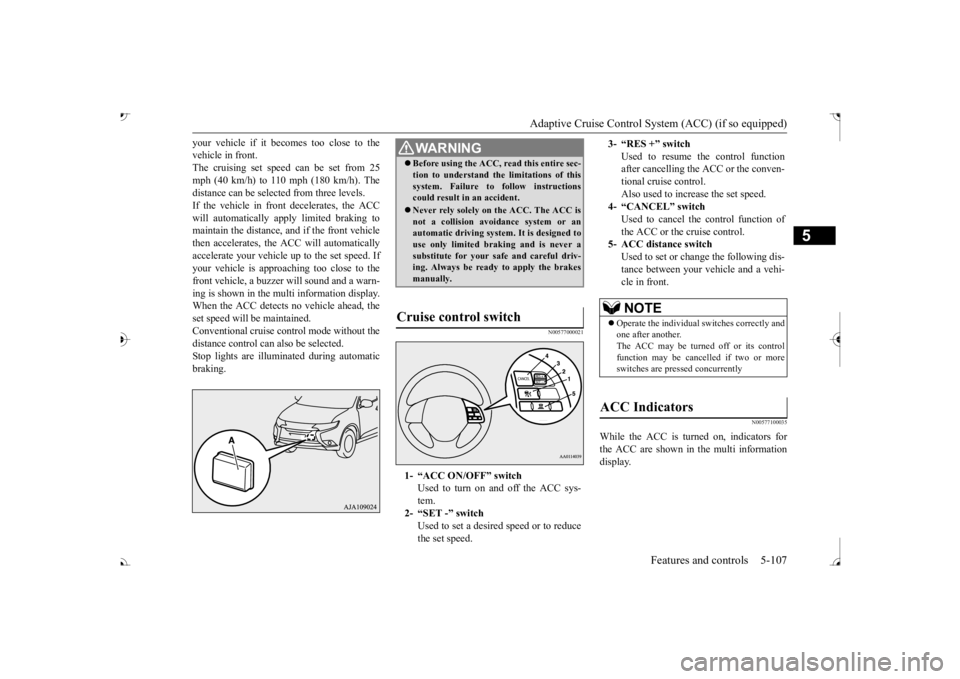
Cruise control switch
1- “ACC ON/OFF” switch
Used to turn on and off the ACC sys-tem.
2- “SET -” switch
Used to set a desired speed or to reducethe set speed.
3- “RES +” switch
Used to resume the control function after cancelling the ACC or the conven-tional cruise control. Also used to increase the set speed.
4- “CANCEL” switch
Used to cancel the control function of the ACC or the cruise control.
5- ACC distance switch
Used to set or change the following dis- tance between your
vehicle and a vehi-
cle in front.NOTE
Operate the individual
switches correctly and
one after another. The ACC may be turned off or its control function may be canc
elled if two or more
switches are pressed concurrently
ACC Indicators
BK0239700US.book 107 ページ 2016年6月16日 木曜日 午前10時58分
Page 189 of 521
Adaptive Cruise Control System (ACC) (if so equipped) 5-108 Features and controls
5
N00577200049
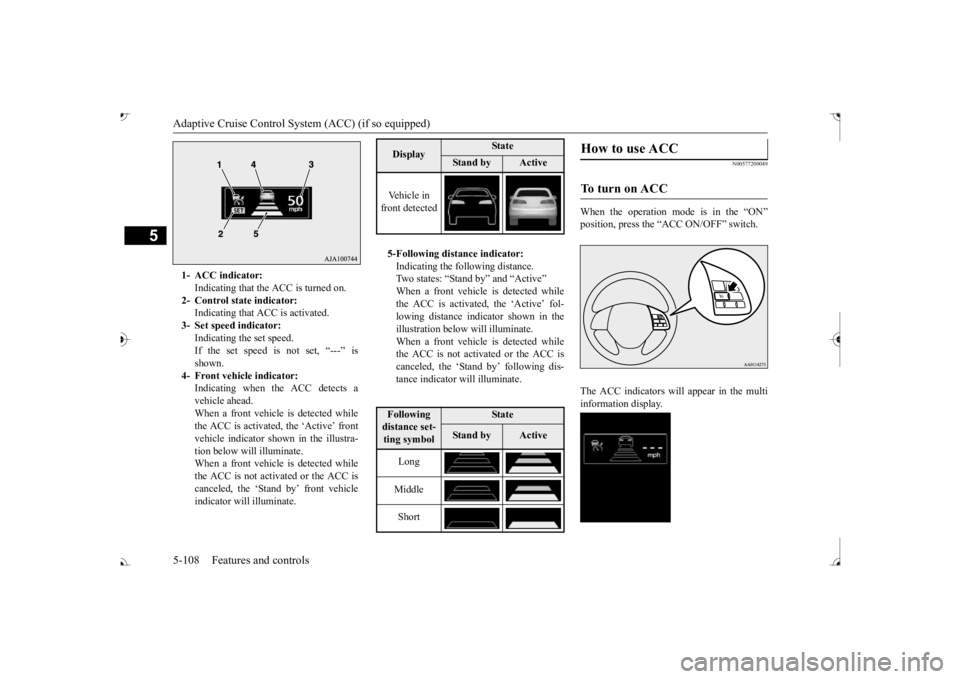
When the operation mode is in the “ON” The ACC indicators will appear in the multi information display.
1- ACC indicator:
Indicating that the ACC is turned on.
2- Control state indicator:
Indicating that A
CC is activated.
3- Set speed indicator:
Indicating the set speed. If the set speed is not set, “---” isshown.
4- Front vehicle indicator:
Indicating when the ACC detects avehicle ahead. When a front vehicle is detected while the ACC is activated, the ‘Active’ frontvehicle indicator shown in the illustra- tion below will illuminate. When a front vehicle is detected whilethe ACC is not activated or the ACC is canceled, the ‘Stand by’ front vehicle indicator will illuminate.
Display
State
Stan d b y
Active
Vehicle in front detected 5-Following distance indicator: Indicating the following distance.Two states: “Stand
by” and “Active”
When a front vehicle is detected while the ACC is activated, the ‘Active’ fol-lowing distance indicator shown in the illustration below will illuminate. When a front vehicle is detected whilethe ACC is not activated or the ACC is canceled, the ‘Stand by’ following dis- tance indicator will illuminate.Following distance set- ting symbol
State
Stan d b y
Active
Long Middle Short
How to use ACC
To turn on ACC
BK0239700US.book 108 ページ 2016年6月16日 木曜日 午前10時58分
Page 190 of 521
Adaptive Cruise Control System (ACC) (if so equipped)
Features and controls 5-109
5
Press the “ACC ON/OFF” switch to turn off the ACC.
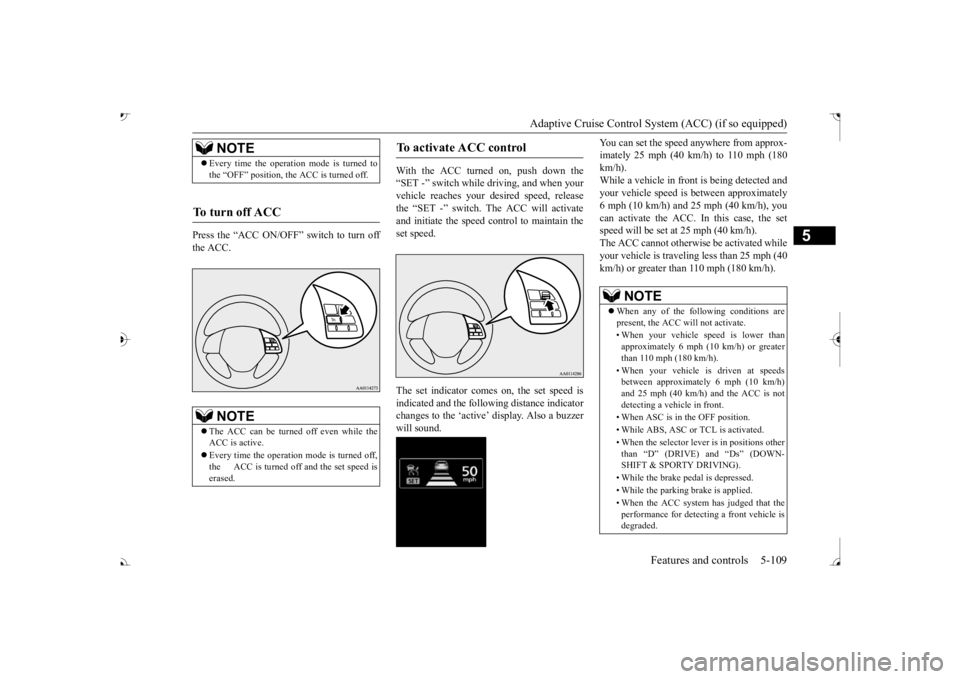
With the ACC turned on, push down the “SET -” switch while
driving, and when your
vehicle reaches your de
sired speed, release
the “SET -” switch. The ACC will activateand initiate the speed control to maintain the set speed. The set indicator comes on, the set speed is indicated and the follow
ing distance indicator
changes to the ‘active’ will sound.
You can set the speed anywhere from approx- imately 25 mph (40 km/h) to 110 mph (180km/h). While a vehicle in front
is being detected and
your vehicle speed is
between a
pproximately
6 mph (10 km/h) and 25 mph (40 km/h), you can activate the ACC. In this case, the set speed will be set at 25 mph (40 km/h).The ACC cannot otherwis
e be activated while
your vehicle is traveling less than 25 mph (40 km/h) or greater than 110 mph (180 km/h).
NOTE
Every time the operation mode is turned to the “OFF” position, the ACC is turned off.
To turn off ACC
NOTE
The ACC can be turned off even while the ACC is active. Every time the operation mode is turned off, the ACC is turned off and the set speed iserased.
To activate ACC control
NOTE
When any of the following conditions are present, the ACC will not activate. • When your vehicle speed is lower than approximately 6 mph (10 km/h) or greater than 110 mph (180 km/h). • When your vehicle is driven at speeds between approximately 6 mph (10 km/h) and 25 mph (40 km/h) and the ACC is notdetecting a vehi
cle in front.
• When ASC is in the OFF position.• While ABS, ASC or TCL is activated. • When the selector lever
is in positions other
than