radio controls MITSUBISHI OUTLANDER III 2017 Owners Manual
[x] Cancel search | Manufacturer: MITSUBISHI, Model Year: 2017, Model line: OUTLANDER III, Model: MITSUBISHI OUTLANDER III 2017Pages: 521, PDF Size: 14.95 MB
Page 88 of 521
Keyless entry system (if so equipped)
Features and controls 5-7
5
N00562301094
Your electronic immo
bilizer operates on a
radio frequency subject to Federal Communi- cations Commission (FCC)
Rules (For vehi-
cles sold in U.S.A.
) and Industry Canada
Rules (For vehicles so
ld in Canada). This
device complies with part 15 of FCC Rulesand Industry Canada
licence-exempt RSS
standard(s). Operation is subject to the following two con- ditions. This device may not
cause harmful inter-
ference. This device must ac
cept any interference
received, including interference that may cause undesired operation.
N00509002028
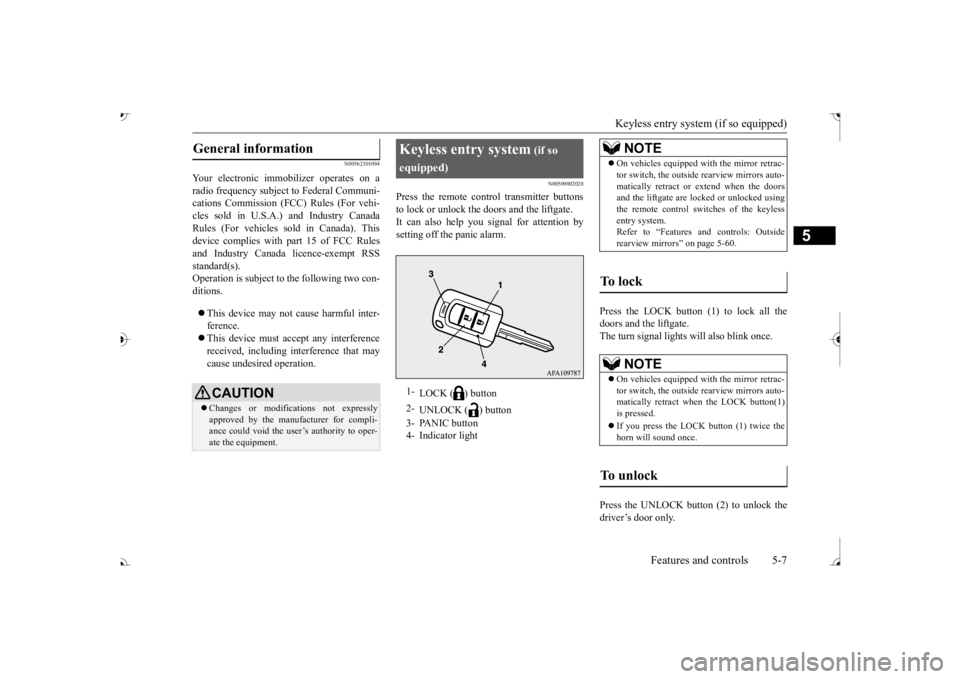
Press the remote control transmitter buttons to lock or unlock the doors and the liftgate. It can also help you signal for attention bysetting off the panic alarm.
Press the LOCK button (1) to lock all the doors and the liftgate.The turn signal lights
will also blink once.
Press the UNLOCK button (2) to unlock the driver’s door only.
General information
CAUTION Changes or modifica
tions not expressly
approved by the manufacturer for compli- ance could void the user’s authority to oper-ate the equipment.
Keyless entry system
(if so
equipped)
LOCK ( ) button
2-
UNLOCK ( ) button
3- PANIC button 4- Indicator light
NOTE
On vehicles equipped wi
th the mirror retrac-
tor switch, the outside rearview mirrors auto-matically retract or extend when the doorsand the liftgate are locked or unlocked using the remote control swit
ches of the keyless
entry system.Refer to “Features and controls: Outside rearview mirrors” on page 5-60.
To l o c k
NOTE
On vehicles equipped wi
th the mirror retrac-
tor switch, the outside rearview mirrors auto- matically retract when
the LOCK button(1)
is pressed. If you press the LOCK button (1) twice the horn will sound once.
To unlock
BK0239700US.book 7 ページ 2016年6月16日 木曜日 午前10時58分
Page 92 of 521

Keyless entry system (if so equipped)
Features and controls 5-11
5
i) Press both the LOCK and UNLOCK buttons for 2 seconds.ii) Release both the LOCK and UNLOCK buttons for 1 second. iii) Press the UNLOCK button. Theanswerback function informs you that the ID code registration of the transmitter is completed.5. To register the ID codes of additional remote control transmitters, repeat step 4 within 60 seconds after step 4. 6. If no ID code of a remote control trans- mitter is registered within 60 secondsafter step 4, the regi
stration mode is can-
celed and the normal mode returns.
N00546101124
Your keyless entry system operates on a radio frequency subject to
Federal Communica-
tions Commission (FCC)
Rules (For vehicles
sold in U.S.A.) and Industry Canada Rules (For vehicles sold in Canada). This devicecomplies with Part 15 of FCC Rules and Industry Canada licenc
e-exempt RSS stan-
dard(s).Operation is subject to the following two con- ditions. This device may not
cause harmful inter-
ference. This device must ac
cept any interference
received, including interference that may cause undesired operation.
NOTE
For verification purposes, try to lock and unlock the doors after the registration iscompleted. The indicator light (4)
comes on each time a
button is pressed. The keyless entry system does not work if the key is in the ignition switch. The remote control tr
ansmitter can be used
from about 40 feet (12 m) away. However, this distance may cha
nge if your vehicle is
near a TV transmitting tower, a power sta-tion, or a radio station.
If the UNLOCK button (2) is pressed when all doors and the liftgate are locked and nodoors or the liftgate
are opened within about
30 seconds, the doors a
nd the liftgate will
automatically re-lock. On a vehicle equippe
d with a Mitsubishi
Multi-Communication System, the functions can be adjusted on the screen. For details, refer to the separate operation manual. If the following conditi
ons are observed after
pressing the LOCK (1) or UNLOCK (2) but-ton on the remote control transmitter, the battery in the remote control transmitter may need to be replaced. • The doors and the lift
gate cannot be locked
or unlocked. • The panic alarm cannot be operated. • The indicator light
(4) is dim or does not
come on.
If you lose your remote control transmitter, please contact an au
thorized Mitsubishi
Motors dealer for a replacement. If you wish to obtain
an additional remote
control transmitter, please contact an autho-rized Mitsubishi Moto
rs dealer. A maximum
of 8 remote control tr
ansmitters can be pro-
grammed for your vehicle.NOTE
To use the new remote control transmitters, it is necessary to register
the key with both the
electronic immobilizer
and keyless entry sys-
tem. Also refer to “Electronic immobilizer (Anti- theft starting system): Customer key pro-gramming” on page 5-6.
General information
NOTE
BK0239700US.book 11 ページ 2016年6月16日 木曜日 午前10時58分
Page 93 of 521
Keyless entry system (if so equipped) 5-12 Features and controls
5
N00544101205
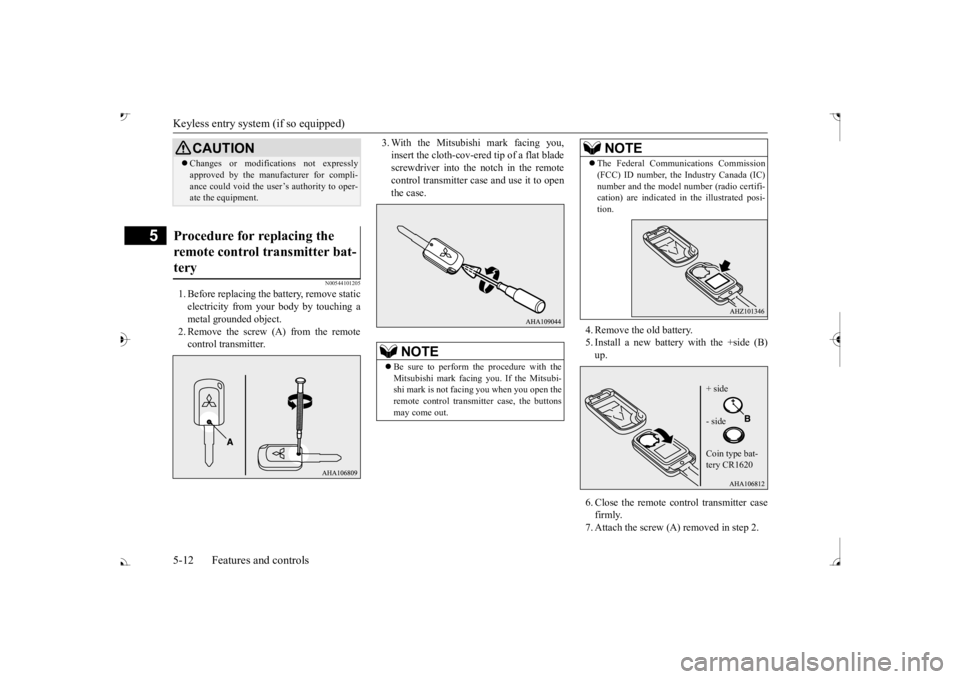
1. Before replacing the
battery, remove static
electricity from your body by touching ametal grounded object. 2. Remove the screw (A) from the remote control transmitter.
3. With the Mitsubishi mark facing you, insert the cloth-cov-ered tip of a flat bladescrewdriver into the notch in the remote control transmitter case and use it to open the case.
4. Remove the old battery. 5. Install a new battery with the +side (B)up. 6. Close the remote control transmitter case firmly. 7. Attach the screw (A) removed in step 2.
CAUTION Changes or modifica
tions not expressly
approved by the manufacturer for compli-ance could void the user’s authority to oper-ate the equipment.
Procedure for replacing the remote control transmitter bat- tery
NOTE
Be sure to perform the procedure with the Mitsubishi mark facing you. If the Mitsubi- shi mark is not facing you when you open the remote control transmitter case, the buttonsmay come out.
The Federal Communications Commission (FCC) ID number, the Industry Canada (IC)number and the model number (radio certifi-cation) are indicated in the illustrated posi- tion.NOTE
+ side - side Coin type bat- tery CR1620
BK0239700US.book 12 ページ 2016年6月16日 木曜日 午前10時58分
Page 114 of 521
Free-hand Advanced Securi
ty Transmitter (F.A.S.T.-key) (if so equipped)
Features and controls 5-33
5
N00562001062
N00562101076
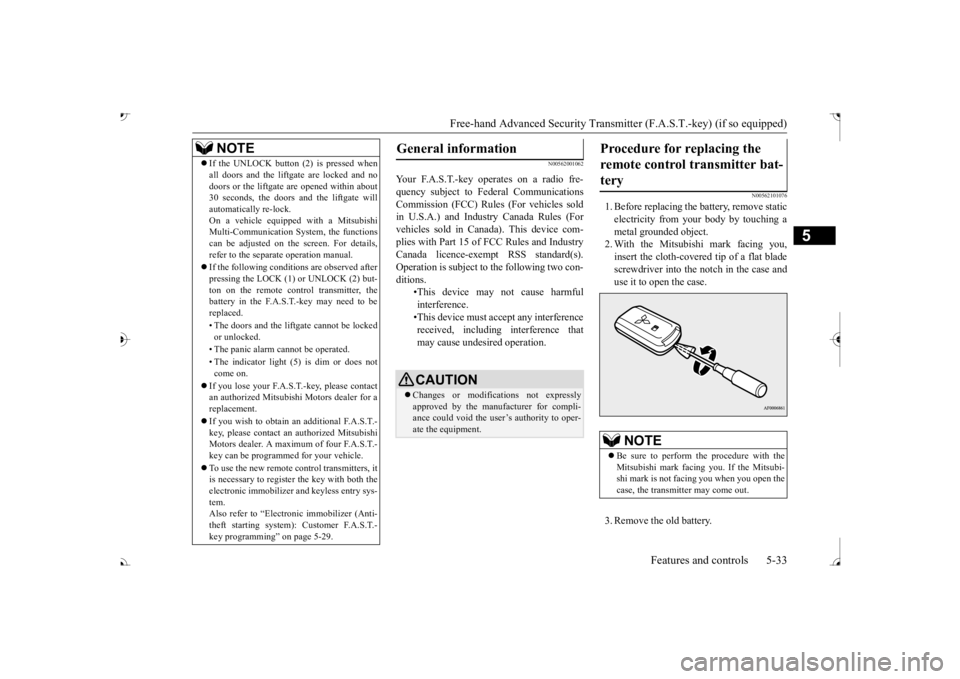
1. Before replacing the battery, remove static electricity from your body by touching a metal grounded object. 2. With the Mitsubishi mark facing you,insert the cloth-covered tip of a flat blade screwdriver into the notch in the case and use it to open the case. 3. Remove the old battery.
If the UNLOCK button (2) is pressed when all doors and the liftgate are locked and nodoors or the liftgate
are opened within about
30 seconds, the doors and the liftgate will automatically re-lock. On a vehicle equippe
d with a Mitsubishi
Multi-Communication System, the functions can be adjusted on the screen. For details, refer to the separa
te operation manual.
If the following conditions are observed after pressing the LOCK (1) or UNLOCK (2) but-ton on the remote control transmitter, the battery in the F.A.S.T.-key may need to be replaced. • The doors and the liftgate cannot be locked or unlocked. • The panic alarm
cannot be operated.
• The indicator light
(5) is dim or does not
come on.
If you lose your F.A.S.T.-key, please contact an authorized Mitsubishi Motors dealer for a replacement. If you wish to obtain an additional F.A.S.T.- key, please contact an
authorized Mitsubishi
Motors dealer. A maximum of four F.A.S.T.- key can be programmed for your vehicle. To use the new remote control transmitters, it is necessary to register the key with both the electronic immobilizer
and keyless entry sys-
tem. Also refer to “Electr
onic immobilizer (Anti-
theft starting system): Customer F.A.S.T.-key programming” on page 5-29.NOTE
General information
Your F.A.S.T.-key operates on a radio fre- quency subject to Fe
deral Communications
Commission (FCC) Rules (For vehicles sold in U.S.A.) and Industr
y Canada Rules (For
vehicles sold in Canada). This device com- plies with Part 15 of FCC Rules and Industry Canada licence-exem
pt RSS standard(s).
Operation is subject to
the following two con-
ditions.
•This device may
not cause harmful
interference. •This device must ac
cept any interference
received, including interference that may cause undesired operation.CAUTION Changes or modifica
tions not expressly
approved by the manufacturer for compli- ance could void the user’s authority to oper- ate the equipment.
Procedure for replacing the remote control transmitter bat-tery
NOTE
Be sure to perform the procedure with the Mitsubishi mark facing you. If the Mitsubi- shi mark is not facing you when you open the case, the transmitter may come out.
BK0239700US.book 33 ページ 2016年6月16日 木曜日 午前10時58分
Page 226 of 521
Tire pressure monitoring system
Features and controls 5-145
5
2. If the tire pressure monitoring system warning light remain
s illuminated after
you have been driving for about 20 min- utes after you adjust the tire inflation pres- sure, one or more of the tires may have apuncture. Inspect the ti
re and if it has a
puncture, have it re
paired by an autho-
rized Mitsubishi Motors dealer as soon aspossible.
The tire pressure monitoring system may not work normally in the following circum- stances: A wireless facility
or device using the
same frequency is near the vehicle. Snow or ice is stuck inside the fenders and/or on the wheels. The tire inflation pressure sensor’s battery is dead. Wheels other than Mitsubishi genuine wheels are being used. Wheels that are not fitted with tire infla- tion pressure sensors are being used. Wheels whose ID codes are not memo- rized by the vehicle are used. Compact spare tire is fitted as a road wheel.
A window tint that affects the radio wave signals is installed.
N00532900081
If new wheels with new tire inflation pressure sensors are installed,
their ID codes must be
programmed into the tire pressure monitoringsystem. Have tire and
wheel replacement per-
formed by an authorized Mitsubishi Motors dealer to avoid the risk of damaging the tireinflation pressure sensors. If the wheel replacement is not done by an authorized Mitsubishi Motors dealer
, it is not covered by
your warranty.
Once adjustments have
been made, the warn-
ing light will go off after a few minutes ofdriving.WA R N I N G If the warning light
/ display illuminates
while you are driving, avoid hard braking, sharp steering maneuvers and high speeds.Driving with an under-inflated tire adversely affe
cts vehicle performance and
can result in an accident.CAUTION If a tire has a puncture, replace that tire with the spare tire. Driving on a punctured tirecould lead to an accident. The warning light / di
splay may not illumi-
nate immediately in the
event of a tire blow-
out or rapid leak.NOTE
NOTE
To avoid the risk of damage to the tire infla- tion pressure sensors, have any puncturedtire repaired by an authorized MitsubishiMotors dealer. If the tire repair is not done by an authorized Mitsubishi Motors dealer, it is not covered by your warranty. Do not use an aerosol puncture-repair spray on any tire.Such a spray could dama
ge the tire inflation
pressure sensors. Have any puncture repa
ired by an authorized
Mitsubishi Moto
rs dealer.
NOTE
Tire inflation pressures vary with the ambi- ent temperature. If the vehicle is subjected to large variations in ambient temperature, the tire inflation pressures may be under-inflated(causing the warning light / display come on) when the ambient temperature is relatively low. If the warning light / display comes on,adjust the tire inflation pressure.
Whenever the tires and wheels are replaced with new ones
BK0239700US.book 145 ページ 2016年6月16日 木曜日 午前10時58分
Page 228 of 521
Parking sensors (Front/Rear) (if so equipped)
Features and controls 5-147
5
N00533001233
Your tire pressure monitoring system oper- ates on a radio frequency subject to Federal Communications Commission (FCC) Rules(For vehicles sold in
U.S.A.) and Industry
Canada Rules (For vehicles sold in Canada). This device complies with part 15 of FCCRules and Industry Ca
nada licence-exempt
RSS standard(s). Operation is subject to the following two con- ditions. This device may not
cause harmful inter-
ference. This device must ac
cept any interference
received, including interference that may cause undesired operation.
N00589800039
Parking sensors will al
ert the driver with an
intermittent or contin
uous buzzer sound when
the vehicle approaches
an object and the sen-
sor detects that object
during parking. The
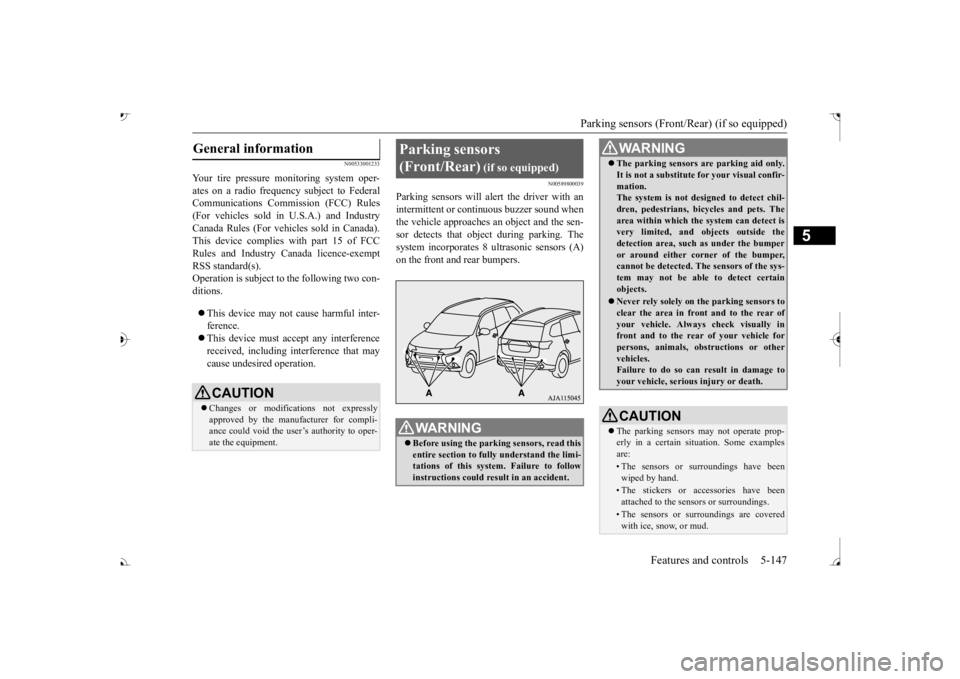
system incorporates 8 ultrasonic sensors (A)
General information
CAUTION Changes or modifica
tions not expressly
approved by the manufacturer for compli- ance could void the user’s authority to oper-ate the equipment.
Parking sensors (Front/Rear)
(if so equipped)
WA R N I N G Before using the parkin
g sensors, read this
entire section to fully understand the limi- tations of this system. Failure to followinstructions could result in an accident.
The parking sensors ar
e parking aid only.
It is not a substitute for your visual confir-mation.The system is not designed to detect chil- dren, pedestrians, bicycles and pets. The area within which the system can detect isvery limited, and objects outside the detection area, such as under the bumper or around either co
rner of the bumper,
cannot be detected. The sensors of the sys- tem may not be able to detect certain objects. Never rely solely on
the parking sensors to
clear the area in fron
t and to the rear of
your vehicle. Always
check visually in
front and to the rear
of your vehicle for
persons, animals, ob
structions or other
vehicles. Failure to do so can result in damage to your vehicle, seriou
s injury or death.
CAUTIONThe parking sensors
may not operate prop-
erly in a certain situation. Some examplesare:• The sensors or surroundings have beenwiped by hand.• The stickers or ac
cessories have been
attached to the sensors or surroundings.• The sensors or surroundings are coveredwith ice, snow, or mud.WA R N I N G
BK0239700US.book 147 ページ 2016年6月16日 木曜日 午前10時58分
Page 229 of 521
Parking sensors (Front/Rear) (if so equipped) 5-148 Features and controls
5
“Normal mode” and “Tow
ing hitch mode” for
a vehicle equipped with a towing hitch can beselected.
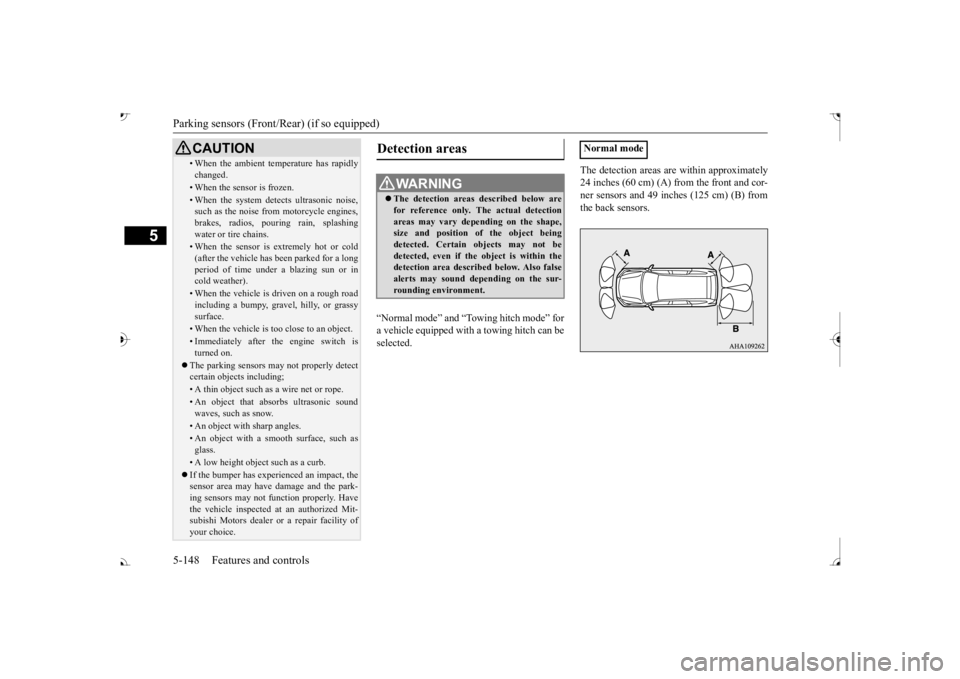
The detection areas are within approximately 24 inches (60 cm) (A) from the front and cor-ner sensors and 49 inches (125 cm) (B) from the back sensors.
• When the ambient temp
erature has rapidly
changed.• When the sensor is frozen.• When the system detects ultrasonic noise,such as the noise from motorcycle engines, brakes, radios, pouring rain, splashing water or tire chains.• When the sensor is extremely hot or cold(after the vehicle has
been parked for a long
period of time under
a blazing sun or in
cold weather).• When the vehicle is driven on a rough roadincluding a bumpy, gravel, hilly, or grassy surface.• When the vehicle is too close to an object.• Immediately after the engine switch is turned on.
The parking sensors may not properly detect certain objects including;• A thin object such as a wire net or rope.• An object that absorbs ultrasonic sound waves, such as snow.• An object with sharp angles.• An object with a sm
ooth surface, such as
glass.• A low height object such as a curb. If the bumper has experienced an impact, the sensor area may have
damage and the park-
ing sensors may not f
unction properly. Have
the vehicle inspected at an authorized Mit- subishi Motors dealer or a repair facility of your choice.CAUTION
Detection areas
WA R N I N G The detection areas described below are for reference only. The actual detectionareas may vary depend
ing on the shape,
size and position of
the object being
detected. Certain objects may not bedetected, even if the object is within the detection area described below. Also false alerts may sound de
pending on the sur-
rounding environment.
Normal mode
BK0239700US.book 148 ページ 2016年6月16日 木曜日 午前10時58分
Page 334 of 521

Bluetooth® 2.0 interface
Features and controls 5-253
5
N00565401155
For the operation of a music player connected via Bluetooth®, refer to the following sec-tions. [For vehicles equi
pped with the AM/FM
radio/CD player] Refer to “Listen to Bl
uetooth Audio” on page
7-40. [For vehicles equippe
d with the Mitsubishi
Multi-Communication System, the Smart- phone Link Display Audio or the DISPLAY AUDIO]Refer to the separate owner’s manual.
N00565501097
You can make or re
ceive hands-free calls
using a Bluetooth
® compatible cellular phone
connected to the Bluetooth
® 2.0 interface.
You can also use the phonebooks in the Blue- tooth
® 2.0 interface to make calls without
dialing telephone numbers. To make a call P.5-253 Send function P.5-255 Receiving calls P.5-255
Mute function P.5-255 Switching between hand
s-free mode and pri-
vate mode P.5-255
N00565601098
You can make a call in the following 3 ways using the Bluetooth
® 2.0 interface:
By saying a telephone number By using the Bluetooth
® 2.0 interface’s
phonebook By redialing a
telephone number
You can make a call
by saying the telephone
number. 1. Press the SPEECH button (except for vehicles with Mitsubishi Multi-Commu- nication System) or
PICK-UP button (for
vehicles with Mitsubishi Multi-Commu- nication System).
2. Say “Dial.” 3. After the voice gui
de says “Number
please,” say the
telephone number.
4. The voice guide wi
ll say “Dialing
® 2.0 interface will then
make the call. When the confirmation function is on, thesystem will confirm
the telephone number
again. To continue with that number, answer “Yes.” To change the telephone number, answer “No.” The system will say “Numberplease” then say
the telephone number
again.
Operating a music player con- nected via Bluetooth
®
How to make or receive hands- free calls
NOTE
Hands-free calls may not
operate correctly
when you place or receive the call directlyfrom your cellular phone, instead of using the Bluetooth
® 2.0 interface.
To m a k e a c a l l Making a call by us
ing the telephone
number
NOTE
In the case of English,
the system will recog-
nise both “zero” and “oh”
(Letter
Page 336 of 521

Bluetooth® 2.0 interface
Features and controls 5-255
5
You can redial the last
number called, based
on the history of dialed calls in the paired cel-lular phone. Use the following procedure to redial. 1. Press the SPEECH button (except for vehicles with Mitsubishi Multi-Commu- nication System) or PICK-UP button (forvehicles with Mitsubishi Multi-Commu- nication System). 2. Say “Redial.”
N00565700018
During a call, press the SPEECH button toenter voice recognitio
n mode, then say
“
a call you need to sim-
ulate the pressing of a phone button as a
response to an automated system, press the SPEECH button and speak “1 2 3 4 poundsend” and the 1234# will be sent via your cel- lular phone.
N00565801045
If an incoming phone call is received whilethe ignition switch or
the operation mode is in
ON or ACC, the audio sy
stem will be auto-
matically turned on and switched to the incoming call, even when the audio systemwas originally off. The voice guide a
nnouncement for the
incoming call will be output from the frontpassenger’s seat speaker. If the CD player or radio was playing when the incoming call was received, the audio sys-tem will mute the sound from the CD player or radio and output onl
y the incoming call.
To receive the call, press the PICK-UP buttonon the steering wheel control switch. When the call is over, the audio system will return to its previous state.
N00565900010
At any time during a ca
ll, you can mute the
vehicle microphone.
Pressing the SPEECH button and then saying “Mute” during a call will turn ON the mutefunction and mute the microphone. Saying “Mute off” in the same way will turn off the mute function and cancel the mute onthe microphone.
N00566600014
The Bluetooth
® 2.0 interface can switch
between hands-free m
ode (hands-free calls)
and private mode (calls
using cellular phone).
If you press the SPEECH button and say“Transfer call” duri
ng a hands-free call, you
can stop the hands-free m
ode and talk in pri-
vate mode. To return to hands-free mode, press the SPEECH button again and say “Transfer call.”The Bluetooth
® 2.0 interface has 2 types of
unique phonebooks that are different from thephonebook stored in the cellular phone. They are the vehicle phonebook and the mobile phonebook.
NOTE
When the confirmation function is on, the system will check if
the name and location of
the receiver are correct. If the name is cor-rect, answer “Yes.”
or location to call,
answer “No.” The system will return to Step3.
RedialingSend function
Receiving calls Mute function
Switching between hands-free mode and private mode Phonebook function
BK0239700US.book 255 ページ 2016年6月16日 木曜日 午前10時58分
Page 343 of 521
Bluetooth® 2.0 interface 5-262 Features and controls
5
5. The voice guide will say “Importing the contact list from the mobile phonebook.This may take several minutes to com- plete. Would you li
ke to continue?”
Answer “Yes,” transferring to the mobilephonebook the phonebook stored in the cellular phone will start. Answer “No,” the system will return tothe main menu.
6. When the transfer is complete, the voice guide will say “Import complete” andthen the system will return to the main menu.
N00566301119
Model name: MMC or MDGMY10FCC ID: CB2MDGMY10 or NT8MDGMY10 IC: 279B-MDGMY10 or 3043A-MDGMY10 Your Bluetooth
® 2.0 interface operates on a
radio frequency subject to Federal Communi- cations Commission (FCC)
Rules (For vehi-
cles sold in U.S.A.
) and Industry Canada
Rules (For vehicles so
ld in Canada). This
device complies with Part 15 of the FCC Rules and RSS-210 of the Industry CanadaRules. Operation is subject to the following two conditions: This device may not
cause harmful inter-
ference. This device must ac
cept any interference
received, including interference that may cause undesired operation.
The term “IC:” before
the radio certification
number only signifies th
at Industry Canada
technical specifications were met. The antenna used for this transmitter must not be co-located or operating in conjunctionwith any other antenna
or transmitter. End-
users and installers must be provided with installation instructions
and transmitter oper-
ating conditions for sa
tisfying RF exposure
compliance. FCC Notice: This equipment has been testedand found to comply with the limits for a Class B digital device, pursuant to part 15 of the FCC Rules. These limits are designed toprovide reasonable prot
ection against harmful
interference in a residential installation. This equipment generate
s, use and can radiate
radio frequency energy a
nd, if not installed
and used in accordance with the instructions, may cause harmful interf
erence to radio com-
munications. However, there is no guarantee that interfer- ence will not occur in a particular installation.If this equipment does
cause harmful interfer-
ence to radio or tele
vision reception, which
can be determined by turning the equipment
NOTE
The transfer may take some time to complete depending on the number of contacts. If the Bluetooth
® 2.0 interface could not be
connected to the Bluetooth
® compatible cel-
lular phone, the voice gui
de will sa
y “Unable
to transfer contact list from phone” and thenthe system will return to the main menu. If you press the HANG-UP button or press and hold the SPEECH button during the data transfer, the transfer will be cancelled and the system will return to the main menu. If an error occurs during the data transfer, all transfer will be canc
elled and the voice guide
will say “Unable to complete the phonebook import” and then the system will return to the main menu. If there are no contacts in the phonebook, the voice guide will say
“There are no contacts
on the connected phone.”
General information
CAUTION Changes or modifications made to this equipment not expressly approved by themanufacturer may void the FCC authoriza-tion to operate this equipment.
BK0239700US.book 262 ページ 2016年6月16日 木曜日 午前10時58分