heating MITSUBISHI OUTLANDER III 2018 User Guide
[x] Cancel search | Manufacturer: MITSUBISHI, Model Year: 2018, Model line: OUTLANDER III, Model: MITSUBISHI OUTLANDER III 2018Pages: 441, PDF Size: 13.71 MB
Page 197 of 441

Adaptive Cruise Control System (ACC) (if so equipped)5-116 Features and controls
5
In any of the situations listed below, the ACCcontrol is automatica
lly canceled, a buzzer
sounds and a message is shown in the multi-information display.When your vehicle stops.When the ASC is turned off.While ABS, ASC or TCL is activated.When the selector lever is in a positionother than “D” (DRIVE) and “Ds”(DOWNSHIFT & SPORTY DRIVING).When the parking brake is applied.
When the ACC system determines that itsperformance has been degraded, a buzzer willsound and a message will be displayed in themulti information display.This can occur whenForeign objects, such as dirt, snow or ice,adhere to the surface
of the radar sensor.
In adverse weather conditions, such asrain, snow or sand storms, etc.A front vehicle or an oncoming vehicle issplashing water, snow or dirt.Driving on a nonbusy road with a fewvehicles and obsta
cles in front.
The brake system is
overheating due to
continuous brake control on long down-hill slope.
If the display keeps showing the message,there is a possibility that the ACC has a mal-function. Contact your authorized MitsubishiMotors dealer.When the ACC system
detects an abnormal-
ity in the system, the ACC system will beturned off, a buzzer will sound and a messagewill be displayed in the multi information dis-play. If the message remains after the opera-tion mode has been tu
rned to the “OFF”
position, contact your au
thorized Mitsubishi
Motors dealer.
N00581800059
After the ACC control has been canceled withthe ACC turned on, the ACC control can beresumed by pushing up
and releasing the
“RES +” switch.To resume the control
BK0249100US.book 116 ページ 2017年5月10日 水曜日 午前8時49分
Page 243 of 441
Multi Information display - Type 15-162 Features and controls
5
N00556601180
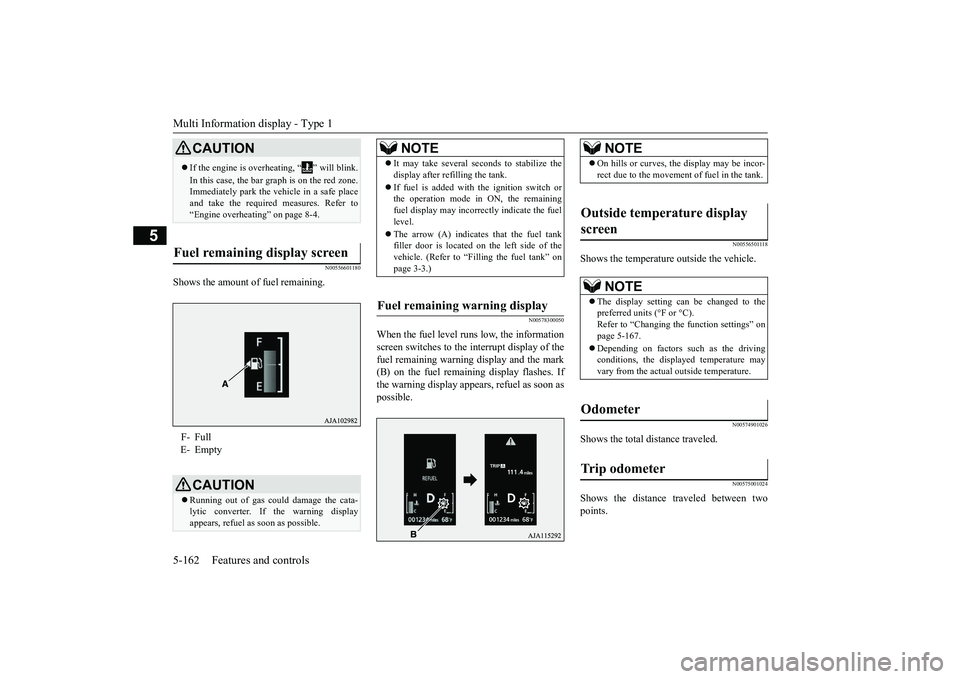
Shows the amount of fuel remaining.
N00578300050
When the fuel level runs low, the informationscreen switches to the interrupt display of thefuel remaining warning display and the mark(B) on the fuel remaini
ng display flashes. If
the warning display appear
s, refuel as soon as
possible.
N00556501118
Shows the temperature outside the vehicle.
N00574901026
Shows the total distance traveled.
N00575001024
Shows the distance traveled between twopoints.
CAUTIONIf the engine is overheating, “ ” will blink.In this case, the bar graph is on the red zone.Immediately park the vehicle in a safe placeand take the require
d measures. Refer to
“Engine overheating” on page 8-4.
Fuel remaining display screen F- FullE- Empty
CAUTIONRunning out of gas coul
d damage the cata-
lytic converter. If the warning displayappears, refuel as soon as possible.
NOTE
It may take several se
conds to stabilize the
display after re
filling the tank.
If fuel is added with
the ignition switch or
the operation mode in ON, the remainingfuel display may incorre
ctly indicate the fuel
level.The arrow (A) indicates that the fuel tankfiller door is located on
the left side of the
vehicle. (Refer to “F
illing the fuel tank” on
page 3-3.)
Fuel remaining warning display
NOTE
On hills or curves, the display may be incor-rect due to the movement
of fuel in the tank.
Outside temperature display screen
NOTE
The display setting ca
n be changed to the
preferred units (°F or °C).
e function settings” on
page 5-167.Depending on factors such as the drivingconditions, the displa
yed temperature may
vary from the actual outside temperature.
Odometer Trip odometer
BK0249100US.book 162 ページ 2017年5月10日 水曜日 午前8時49分
Page 286 of 441
Warning lights
Features and controls 5-205
5
tion switch is turned to the “ON” position(engine off) or the operation mode is put inON. On vehicle equipped with the multiinformation display - Type 1, a warning isalso displayed in the multi information dis-play. When the engine is started, the lightshould go out. Check to make sure that thelight has gone out before driving.
N00520701278
This light comes on when the engine oil pres-sure is below normal. If the light stays onwhile driving, stop the engine as soon as pos-sible. Do not run the engine until the cause ofthe low oil pressure is corrected.
N00575701021
This light comes on in red if the coolant tem-perature becomes excessively high.
N00520901339
This light comes on when any door or the lift-gate is open or not completely closed.When the vehicle is moving at more than 5mph (8 km/h) and any door or the liftgate isopen or ajar, a tone will sound 4 times toinform the driver that any door or the liftgateis not properly shut.
CAUTIONIf the warning light stays on while the engineis running, park your ve
hicle in a safe place
as soon as possible and
contact an authorized
Mitsubishi Motors dealer
or a repair facility
of your choice to have the system checked.
Oil pressure warning light (Vehicle equipped with the multi information display - Type 2)
CAUTIONIf this light comes on when the engine oillevel is not low, have
your vehicle checked at
an authorized Mitsubish
i Motors dealer or a
repair facility
of your choice.
This warning light does not show the amountof oil in the crankcase. This can only bedetermined by checking the oil level with thedipstick with the engine turned off.
High coolant temperature warning light - red (Vehicle equipped with the multi infor-mation display - Type 2)
CAUTIONIf the light comes on
during vehicle opera-
tion, it indicates that
the engine is possibly
overheating. Continue
d driving could make
the engine fail. Immedi
ately stop the vehicle
in a safe place and ta
ke appropriate action.
(Refer to “Engine overh
eating” on page 8-4.)
NOTE
The high coolant temp
erature warning light
may illuminate when
the vehicle has been
driven at high speeds or on hilly roads. Thisilluminating does not ne
cessarily indicate a
problem. It should stop if you keep theengine running for a whil
e or continue driv-
ing the vehicle.
Door-ajar warning light and buzzer (Vehicle equipped with the multi information display - Type 2)
CAUTIONBefore driving, make sure that the door-ajarwarning light is off.
BK0249100US.book 205 ページ 2017年5月10日 水曜日 午前8時49分
Page 305 of 441
Wiper deicer switch (if so equipped)5-224 Features and controls
5
N00523501277
N00584400027
The electric rear window defogger switch canbe operated when the engine is running.
NOTE
The rear window wipe
r will automatically
perform several conti
nuous operations if the
selector lever is put in the “R” position whilethe windshield wipers
or the rear window
wiper is operating.(a
utomatic operation
mode)After the automatic operation, the rear win-dow wiper will stop operating if the knob isin the “OFF” position. If the knob is in the“INT” position, the re
ar window wiper will
return to the intermittent operation.It is possible to set the rear window wiper toperform the automatic operation only if theselector lever is put in the “R” position whilethe rear window wiper
is operating with the
knob in the “INT” position.See your authorized Mitsubishi Motorsdealer for details.If the knob is in the “OFF” position, turn theknob to the “INT” position twice quickly tooperate the rear window
wiper continuously.
(continuous ope
ration mode)
Turn the knob to the “OFF” position to stopthe rear window wipe
r continuous operation.
The wiper intermittent
operation time can be
adjusted.See your authorized Mitsubishi Motorsdealer for details.For vehicles equipped with the SmartphoneLink Display Audio, adjustments can bemade using screen ope
rations. For further
details, refer to the se
parate owner’s manual.
The washer fluid reservoir is located in theengine compartment.Check the fluid level re
gularly and refill if
necessary. (Refer to
“Washer fluid” on page
9-12.)
Precautions to observe when using wipers and washers
CAUTIONIf the washer is used
in cold weather, the
washer fluid sprayed onto the glass mightfreeze, blocking your vi
ew. Heat the glass
with the defroster befo
re using the washer.
NOTE
Do not use the wipers when the windshield isdry. This could scratch the glass and wear thewiper blades prematurely.Before using the wipe
rs in cold weather,
check to be sure that the wiper blades are notfrozen to the windshield or rear window.Using the wipers while the blades are frozencould cause the wiper motor to burn out.NOTE
If the moving wipers be
come blocked part-
way through a sweep by ic
e or other deposits
on the glass, the wipers may temporarily stopoperating to prevent the motor from over-heating. In this case, park the vehicle in asafe place, turn the ignition switch to the“OFF” position or put the operation mode inOFF, and then remove
the ice or other depos-
its.Because the wipers will start operating againafter the wiper motor cools down, check thatthe wipers operate
before using them.
Avoid using the washer for more than 20 sec-onds at a time. Do not operate the washerwhen the washer fluid reservoir is empty orthe pump may fail.During cold weather, add a recommendedwasher solution that will not freeze in thewasher fluid reservoir. Otherwise the washermay not work or may be damaged.Replace the wiper blades when they areworn. Use the proper size replacementblades. For further info
rmation, please con-
tact your authorized
Mitsubishi Motors
dealer.
Wiper deicer switch
(if so
equipped)
BK0249100US.book 224 ページ 2017年5月10日 水曜日 午前8時49分
Page 306 of 441
Electric rear window defogger switch
Features and controls 5-225
5
When the front wipers have frozen to thewindshield at the parked
positions, turning on
this switch will heat the windshield to makethe wipers operable. Pr
ess the electric rear
window defogger switch and the deicer willoperate.
N00523701497
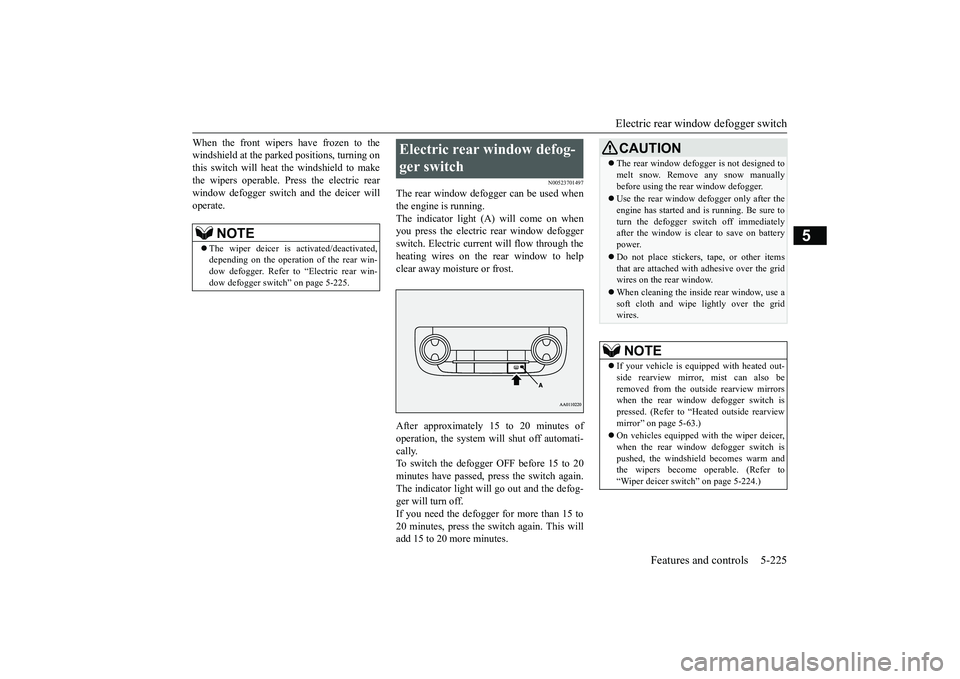
The rear window defogger can be used whenthe engine is running.The indicator light (A) will come on whenyou press the electric rear window defoggerswitch. Electric current will flow through theheating wires on the rear window to helpclear away moisture or frost.After approximately 15 to 20 minutes ofoperation, the system wi
ll shut off automati-
cally.To switch the defogger OFF before 15 to 20minutes have passed,
press the switch again.
The indicator light will
go out and the defog-
ger will turn off.If you need the defogger for more than 15 to20 minutes, press the switch again. This willadd 15 to 20 more minutes.
NOTE
The wiper deicer is
activated/de
activated,
depending on the operation of the rear win-dow defogger. Refer to
“Electric rear win-
dow defogger switch
” on page 5-225.
Electric rear window defog-ger switch
CAUTIONThe rear window defogge
r is not designed to
melt snow. Remove
any snow manually
before using the rear window defogger.Use the rear window de
fogger only after the
engine has started and
is running. Be sure to
turn the defogger swit
ch off immediately
after the window is cl
ear to save on battery
power.Do not place stickers,
tape, or other items
that are attached with adhesive over the gridwires on the rear window.When cleaning the inside
rear window, use a
soft cloth and wipe lightly over the gridwires.NOTE
If your vehicle is equi
pped with heated out-
side rearview mirror, mist can also beremoved from the outside rearview mirrorswhen the rear window defogger switch ispressed. (Refer to “Hmirror” on page 5-63.)On vehicles equipped w
ith the wiper deicer,
when the rear window defogger switch ispushed, the windshield
becomes warm and
the wipers become operable. (Refer to“Wiper deicer switch” on page 5-224.)
BK0249100US.book 225 ページ 2017年5月10日 水曜日 午前8時49分
Page 307 of 441
Heated steering wheel sw
itch (if so equipped)
5-226 Features and controls
5
N00589100032
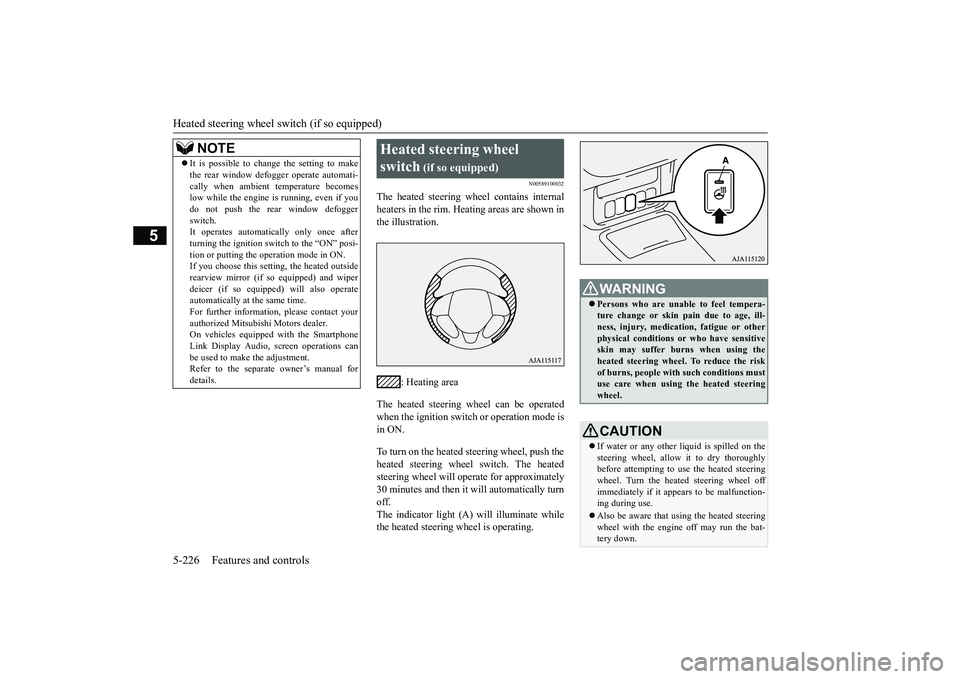
The heated steering wheel contains internalheaters in the rim. Heating areas are shown inthe illustration.
: Heating area
The heated steering wheel can be operatedwhen the ignition switch or operation mode isin ON.To turn on the heated steering wheel, push theheated steering wheel switch. The heatedsteering wheel will ope
rate for approximately
30 minutes and then it
will automatically turn
off.The indicator light (A) will illuminate whilethe heated steering wheel is operating.
It is possible to change the setting to makethe rear window def
ogger operate automati-
cally when ambient temperature becomeslow while the engine is running, even if youdo not push the rear window defoggerswitch.It operates automatica
lly only once after
turning the ignition switch to the “ON” posi-tion or putting the ope
ration mode in ON.
If you choose this setti
ng, the heated outside
rearview mirror (if so
equipped) and wiper
deicer (if so equippe
d) will also operate
automatically at the same time.For further information, please contact yourauthorized Mitsubishi Motors dealer.On vehicles equippe
d with the Smartphone
Link Display Audio, sc
reen operations can
be used to make the adjustment.Refer to the separate
owner’s manual for
details.NOTE
Heated steering wheel switch
(if so equipped)
Persons who are unable
to feel tempera-
ture change or skin
pain due to age, ill-
ness, injury, medicati
on, fatigue or other
physical conditions or
who have sensitive
skin may suffer burns when using theheated steering wheel. To reduce the riskof burns, people with such conditions mustuse care when using the heated steeringwheel.CAUTIONIf water or any other li
quid is spilled on the
steering wheel, allow it to dry thoroughlybefore attempting to use the heated steeringwheel. Turn the heated steering wheel offimmediately if it appe
ars to be malfunction-
ing during use.Also be aware that us
ing the heated steering
wheel with the engine off may run the bat-tery down.
BK0249100US.book 226 ページ 2017年5月10日 水曜日 午前8時49分
Page 314 of 441
HomeLink® Wireless Control System (if so equipped)
Features and controls 5-233
5
• If the device does not operate, continuewith “Programming a new HomeLink
®”
steps 5 to 7 to complete the program-ming of a rolling code equipped device.
5. At the garage door opener receiver(motor-head unit) in the garage, locate the“Learn” or “Smart” but
ton. This can usu-
ally be found where the hanging antennawire is attached to the motor-head unit(see the garage
door opener manual to
identify the “Learn” button.)6. Firmly press and release the “Learn” or“Smart” button. (The name and color ofthe button may vary by manufacturer.)
seconds to initiate
step 7.7. Return to the vehi
cle and firmly press,
hold for 2 seconds and release the pro-grammed HomeLink
® button. Repeat the
“press/hold/release”
sequence a second
time, and, depending on the brand of thegarage door opener (or other rolling codeequipped device), repe
at this sequence a
third time to complete the programmingprocess.HomeLink
® should now activate your
rolling code equipped device.
N00584800021
Canadian radio-frequenc
y laws require trans-
mitter signals to “time-out” (or quit) afterseveral seconds of tr
ansmission - which may
not be long enough for HomeLink
® to pick
up the signal during programming. Similar tothis Canadian law, some U.S. gate operatorsare designed to “time-
out” in the same man-
ner.The indicator LED on the hand-held transmit-ter will go off when the device times out indi-cating that it has fi
nished transmitting.
If you live in Canada or you are having diffi-culties programming a gate operator orgarage door opener by using the “Program-ming” procedures, re
place “Programming a
new HomeLink
®” step 3 with the following:
3. Press and release - every 2 seconds(“cycle”) your hand-held transmitter until theHomeLink
® indicator light changes from
slowly flashing orange to either rapidly flash-ing green (rolling code
) or continuously lit
green (fixed code). Now you may release thehand-held transmitter button.Proceed with “Programming a new Home-Link
®” step 4 to complete.
N00584900022
The HomeLink
® has the capab
ility of receiv-
ing garage door status from compatiblegarage door opener systems. Check yourgarage door opener manual for the availablefeature and HomeLink
® compatibility. Also
for a listing of compatible systems contactHomeLink
® at: www.homelink.com
NOTE
In the event that there are still programmingdifficulties or questi
ons, additional Home-
Link
® information and programming videos
can be found online at www.homelink.com,www.youtube.com/HomeLinkGentex, or bycalling the HomeLink
® Hotline.
Gate operator/Canadian pro-gramming
NOTE
If programming a garage door opener or gateoperator, it is advise
d to unplug the device
during the “cycling” pr
ocess to prevent pos-
sible overheating.
Additional steps for program-ming a door system with feed-back
BK0249100US.book 233 ページ 2017年5月10日 水曜日 午前8時49分
Page 334 of 441
Driving during cold weather
Driving safety 6-5
6
you give extra attention to the followingareas, you can better protect yourself andyour passengers:Drive defensively. Be aware of traffic,road and weather c
onditions. Leave plenty
of stopping distance
between your vehicle
and the vehicle ahead.Before changing lanes, check your mir-rors, blind spots, a
nd use your turn-signal
light.While driving, watch the behavior ofother drivers, bicycl
ists, and pedestrians.
Always obey applicab
le laws and regula-
tions. Be a polite and alert driver. Alwaysleave room for unexpected events, such assudden braking.If you plan to drive in another country,obey their vehicle re
gistration laws and
make sure you will be able to get the rightfuel.
N00629400445
Check the battery. At the same time,check the terminals and wiring. Duringextremely cold weather, the battery willnot be as strong. Also, the battery powerlevel may drop beca
use more power is
used for cold starting and driving.
Before driving the vehicle, check to see ifthe engine runs at the proper speed and ifthe headlights are as bright as normally.Charge or replace the battery if necessary.During extreme cold weather, it is possi-ble that a very low battery could freeze.Warm the engine sufficiently. After start-ing the engine, allow a short warm-uptime to distribute oil to all cylinders. Thendrive your vehicle slowly.Stay at low speeds at first so that thetransaxle, transfer case and rear axle oilhave time to spread to all lubricationpoints.Check the engine antifreeze.If there is not enough coolant because of aleak or from engine
overheating, add Mit-
subishi Motors Genuine Super Long LifeCoolant Premium or equivalent.Please read this section in conjunctionwith the “Engine coolant” on page 9-8.
N00629501528
All the parts of the brake system are criticalto safety. Have the
vehicle serviced by an
authorized Mitsubishi Motors dealer or arepair facility of your
choice at regular inter-
vals according to the “WARRANTY ANDMAINTENANCE MANUAL”.Check the brake system while driving at alow speed immediately
after starting, espe-
cially when the brakes are wet, to confirmthey work normally.A film of water can be formed on the brakediscs and prevent normal braking after driv-ing in heavy rain or through large puddles, orafter the vehicle is washed. If this occurs, drythe brakes out by drivi
ng slowly while lightly
depressing the brake pedal.
Driving during cold weather
WA R N I N GThe battery gives off explosive hydrogengas. Any spark or flame can cause the bat-tery to explode, which could cause seriousinjury or death.Always wear protecti
ve clothes and a face
mask when working with your battery, orlet a skilled mechanic do it.
WA R N I N GNever open the radiator cap when theradiator is hot. You could be seriouslyburned.
Braking When brakes are wet
BK0249100US.book 5 ページ 2017年5月10日 水曜日 午前8時49分
Page 335 of 441
Parking6-6 Driving safety
6
On snowy roads, ice can form on the brakingsystem, making the brakes less effective.While driving in such conditions, pay closeattention to surrounding
vehicles and to the
condition of the road surface. From time totime, lightly depress the brake pedal andcheck how effective the brakes are.It is important to take
advantage of the engine
braking by downshifting while driving onsteep downhill roads in order to prevent thebrakes from overheating.
N00629601385
When parking on a hill, set the parking brake,and turn the front wheels toward the curb on adownhill, or away from
the curb on an uphill.
If necessary, apply chocks to the wheels.Be sure that the parki
ng brake is firmly set
when parked and that the selector lever is inthe “P” (PARK) position.
When parking on a hill, it is important to setthe parking brake befo
re moving the selector
lever to the “P” (PARK) position. This pre-vents loading the parking brake against thetransaxle. When this ha
ppens, it is difficult to
move the selector lever out of the “P”Never leave the engine running while youtake a short nap or rest. Also, never leave theengine running in a closed or poorly venti-lated place.Your front bumper can be damaged if youscrape it over curbs or parking stop blocks.Be careful when traveling up or down steepslopes where your bumper can scrape theroad.
Always carry the key and lock all doors andthe liftgate when leaving the vehicle unat-tended.Always try to park your vehicle in a well litarea.Move effort could be required to turn thesteering wheel.Refer to “Electric power steering system(EPS)” on page 5-99.
N00629901434
It is very important to know how muchweight your vehicle can carry. This weight iscalled the vehicle ca
pacity weight and
includes the weight of
all occupants, cargo
(including the roof load), non-factory-
When driving in cold weather When driving downhill Parking Parking on a hill
Parking with the engine run-ning
WA R N I N GLeaving the engine ru
nning risks injury or
death from accidentally moving the selec-tor lever or the accumulation of toxicexhaust fumes in the passenger compart-ment.
Where you park
WA R N I N GDo not park your vehicle in areas wherecombustible materials
such as dry grass or
leaves can come in contact with a hotexhaust, since a fire could occur.
When leaving the vehicle Do not keep the steering wheel fully turned for a long time Loading information
BK0249100US.book 6 ページ 2017年5月10日 水曜日 午前8時49分
Page 343 of 441
Trailer towing6-14 Driving safety
6
Trailer lights and equipment must complywith federal, state,
and local regulations.
Check with your loca
l recreational vehicle
dealer for the requirements in your area, anduse only equipment designed for your vehi-cle.Since lighting and wiring
vary by trailer type
and brand, you should have a qualified tech-nician install a suitable connector between thevehicle and the trailer.
Improper equipment or
installation can cause da
mage to your vehi-
cle’s electrical system
and affect your vehicle
warranty.Many states and Canadi
an provinces require
special outside mirrors when towing a trailer.Even if not required,
you should install spe-
cial mirrors if you ca
nnot clearly see behind
you, or if the trailer
creates a blind spot.
Ask your trailer sales or
rental agency if any
other items are recomm
ended or required for
your towing situation.
Towing a trailer requires a certain amount ofexperience.Before setting out for the open road, you’llwant to get to know your trailer. Acquaint
yourself with the feel of handling and brakingwith the added weight of the trailer. Alwayskeep in mind that the vehicle you are drivingis now a good deal longer and not nearly asresponsive as your vehicl
e is without a trailer.
Before you start, check the trailer hitch,safety chains, tires
and mirror adjustment.
Be sure your vehicle’s ti
res are inflated to the
cold inflation pressure listed in the manual.You’ll find these numbe
rs on the tire and
loading information placard at the sill of thedriver’s door.Refer to “Tire inflati
on pressures” on page
9-19.Stay at least twice as far behind the vehicleahead as you would when driving your vehi-cle without a trailer.
This can help you avoid
situations that require
heavy braking and sud-
den turns.
Trailer lights Additional trailer equipment
Operating hints
WA R N I N GIf you have a rear window open and youtow a trailer with
your vehicle, carbon
monoxide gas which
you cannot see or
smell could come into your vehicle. It cancause unconsciousness or death. Refer to“Exhaust system” on page 9-24.To maximize your safe
ty when towing a
trailer:Have your exhaust system inspected forleaks, and make necessary repairs beforestarting on your trip.Keep the rear windows closed.If exhaust does come into your vehiclethrough a window or
another opening,
drive with your front, main heating orcooling system on an
d with the blower on
any speed. This will
bring fresh, outside
air into your vehicle. Do not use recircula-tion because it only recirculates the airinside your vehicle. Refer to “Air selectionswitch” on page 7-9.
Driver preparation
Vehicle preparation Tire Following distance
BK0249100US.book 14 ページ 2017年5月10日 水曜日 午前8時49分