warning lights MITSUBISHI OUTLANDER III 2018 User Guide
[x] Cancel search | Manufacturer: MITSUBISHI, Model Year: 2018, Model line: OUTLANDER III, Model: MITSUBISHI OUTLANDER III 2018Pages: 441, PDF Size: 13.71 MB
Page 180 of 441
Electric power steering system (EPS)
Features and controls 5-99
5
The anti-lock braking system and brake forcedistribution function ma
y not work, so hard
braking could make the vehicle unstable.Avoid hard braking and high-speed driving.Stop the vehicle in a safe place and contact anauthorized Mitsubishi Mo
tors dealer or repair
facility of your choice.
N00529201090
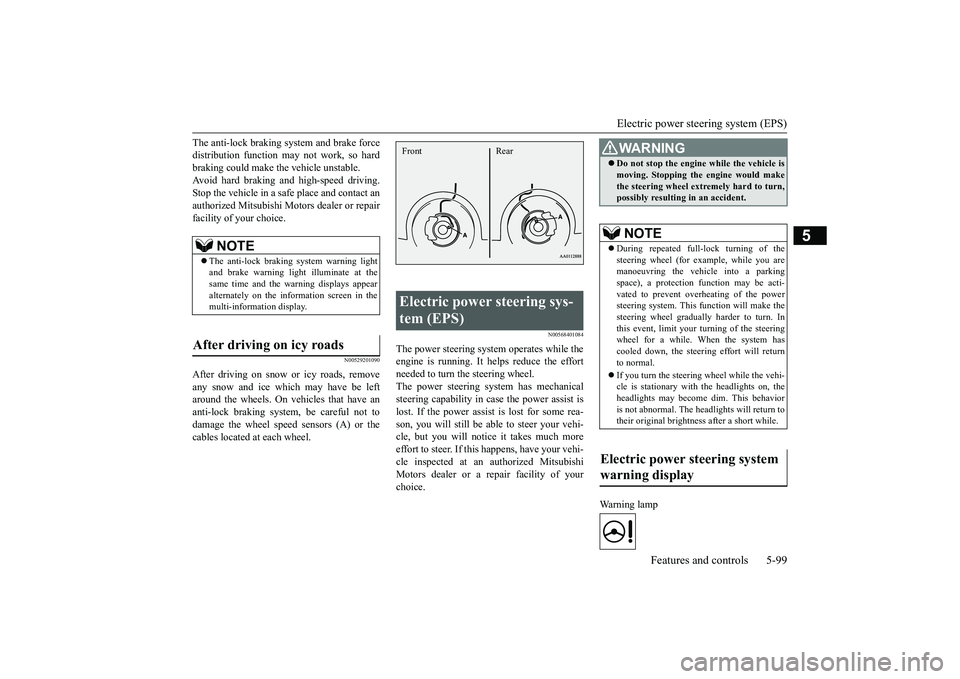
After driving on snow or icy roads, removeany snow and ice which may have be leftaround the wheels. On vehicles that have ananti-lock braking syst
em, be careful not to
damage the wheel spee
d sensors (A) or the
cables located at each wheel.
N00568401084
The power steering system operates while theengine is running. It helps reduce the effortneeded to turn the steering wheel.The power steering sy
stem has mechanical
steering capability in case the power assist islost. If the power assist is lost for some rea-son, you will still be able to steer your vehi-cle, but you will notice it takes much moreeffort to steer. If this happens, have your vehi-cle inspected at an authorized MitsubishiMotors dealer or a repair facility of yourchoice.
Warning lamp
NOTE
The anti-lock braking
system warning light
and brake warning light illuminate at thesame time and the wa
rning displays appear
alternately on the information screen in themulti-information display.
After driving on icy roads
Electric power steering sys-tem (EPS) Front Rear
WA R N I N GDo not stop the engine while the vehicle ismoving. Stopping the engine would makethe steering wheel extremely hard to turn,possibly resulting
in an accident.
NOTE
During repeated full-lock turning of thesteering wheel (for example, while you aremanoeuvring the vehicle into a parkingspace), a protection f
unction may be acti-
vated to prevent overheating of the powersteering system. This f
unction will make the
steering wheel graduall
y harder to turn. In
this event, limit your turning of the steeringwheel for a while. When the system hascooled down, the steering effort will returnto normal.If you turn the steering wheel while the vehi-cle is stationary with the headlights on, theheadlights may become
dim. This behavior
is not abnormal. The he
adlights will return to
their original brightness after a short while.
Electric power steering system warning display
BK0249100US.book 99 ページ 2017年5月10日 水曜日 午前8時49分
Page 199 of 441
Forward Collision Mitigation System (FCM) (if so equipped)5-118 Features and controls
5
N00582100046
For vehicles sold in U.S.A. FCC ID:OAYARS3-BThis device complies
with Part 15 of FCC
Rules. Operation is subject to the followingtwo conditions.(1) This device may not cause harmful inter-ference, and(2) this device must
accept any interference
received, including interference that maycause undesired operation.For vehicles sold in Canada IC: 4135A-ARS3BThis device complies with Industry Canadalicence-exempt RSS standard(s). Operation issubject to the following two conditions: (1)this device may not cause interference, and(2) this device must
accept any interference,
including interference
that may cause unde-
sired operation of the device.
N00577300095
The Forward Collision Mitigation System(FCM) is designed to help reduce the risk of acollision with a vehicle or a pedestrianstraight ahead of your vehicle. The FCM usesa sensor (A) to determine the distance andrelative speed to a vehi
cle and a pedestrian in
front. The FCM is not designed as an auto-matic driving system or as a collision avoid-ance system. When your vehicle is approaching a vehicleor a pedestrian strai
ght-ahead in your path
and the FCM judges that there is the risk of acollision, the system
will give audible and
visual warnings.When the FCM judges that a collision withthe vehicle or the pedest
rian straight-ahead is
imminent, the system will automaticallyapply moderate braking to warn you to applythe brakes immediately. When the FCM judges that a collision withthe vehicle or the pedest
rian straight-ahead is
highly unavoidable, th
e system will apply
emergency braking to reduce the severity ofthe collision and, if possible, to avoid the col-lision.Stop lights are illuminated during automaticbraking.
General information
CAUTIONChanges or modifica
tions not expressly
approved by the manufacturer for compli-ance could void the user’s authority to oper-ate the equipment.
Forward Collision Mitiga-tion System (FCM)
(if so
equipped)
BK0249100US.book 118 ページ 2017年5月10日 水曜日 午前8時49分
Page 212 of 441
Rear Cross Traffic Alert
(RCTA) (if so equipped)
Features and controls 5-131
5
N00593900044
For vehicles sold in U.S.A. FCC ID:OAYSRR3AThis device complies with Part 15 of FCCRules. Operation is subject to the followingtwo conditions:(1) This device may not
cause harmful inter-
ference, and(2) this device must
accept any interference
received, including interference that maycause undesired operation.For vehicles sold in Canada Applicable law: Canada 310This device complies with Industry Canadalicence-exempt RSS sta
ndard(s). Operation is
subject to the following two conditions: (1)this device may not ca
use interference, and
(2) this device must accept any interference,including interference that may cause unde-sired operation of the device. Frequency bands: 24.05 - 24.25GHz Output power: less than 20 milliwatts
N00593000045
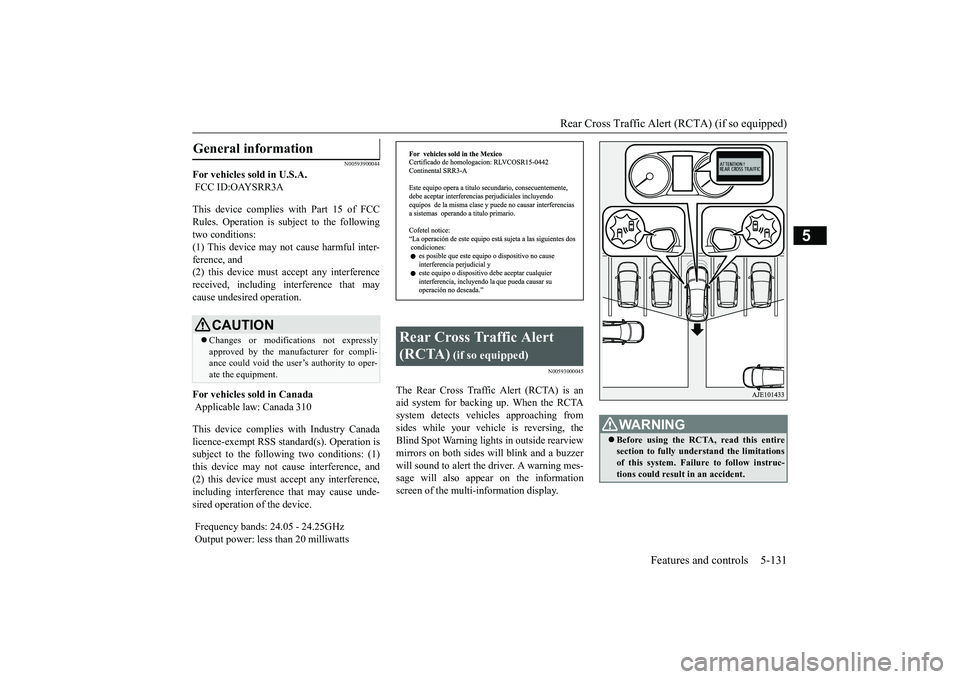
The Rear Cross Traffic Alert (RCTA) is anaid system for backing up. When the RCTAsystem detects vehicl
es approaching from
sides while your vehicle is reversing, theBlind Spot Warning lights in outside rearviewmirrors on both sides w
ill blink and a buzzer
will sound to alert the driver. A warning mes-sage will also appear on the informationscreen of the multi-information display.
General information
CAUTIONChanges or modifica
tions not expressly
approved by the manufacturer for compli-ance could void the user’s authority to oper-ate the equipment.
Rear Cross Traffic Alert (RCTA)
(if so equipped)
WA R N I N GBefore using the RCTA, read this entiresection to fully understand the limitationsof this system. Failure to follow instruc-tions could result
in an accident.
BK0249100US.book 131 ページ 2017年5月10日 水曜日 午前8時49分
Page 213 of 441
Rear Cross Traffic Alert
(RCTA) (if so equipped)
5-132 Features and controls
5
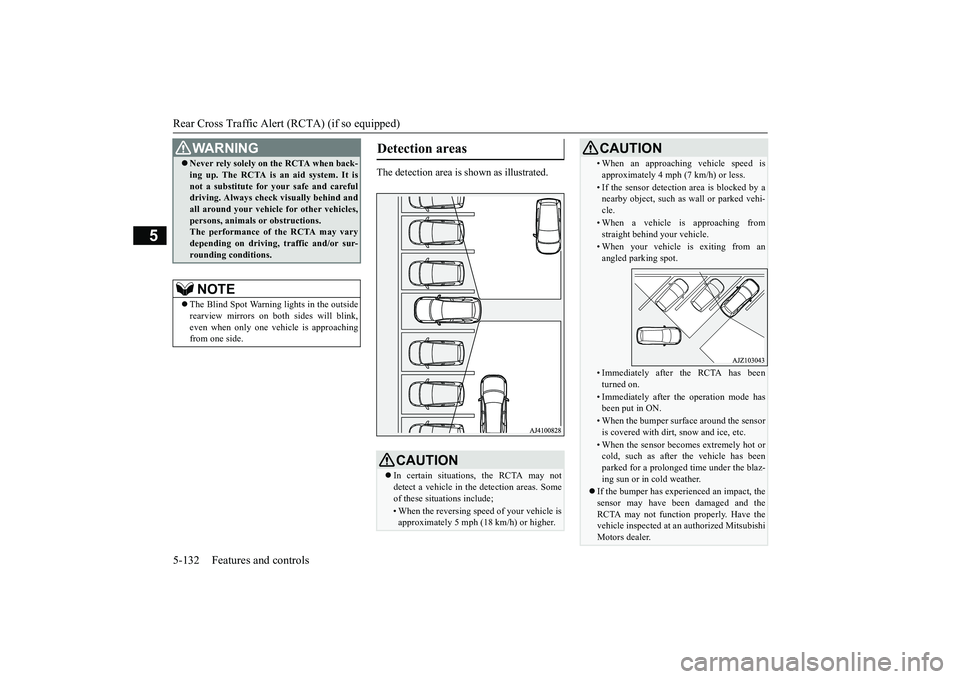
The detection area is
shown as illustrated.
Never rely solely on the RCTA when back-ing up. The RCTA is an aid system. It isnot a substitute for your safe and carefuldriving. Always check
visually behind and
all around your vehicl
e for other vehicles,
persons, animals
or obstructions.
The performance of the RCTA may varydepending on driving,
traffic and/or sur-
rounding conditions.NOTE
The Blind Spot Warning lights in the outsiderearview mirrors on bot
h sides will blink,
even when only one vehicle is approachingfrom one side.WA R N I N G
Detection areas
CAUTIONIn certain situations, the RCTA may notdetect a vehicle in the detection areas. Someof these situations include;• When the reversing sp
eed of your vehicle is
approximately 5 mph (18 km/h) or higher.
• When an approaching vehicle speed isapproximately 4 mph (7 km/h) or less.• If the sensor detectio
n area is blocked by a
nearby object, such as
wall or parked vehi-
cle.• When a vehicle is approaching fromstraight behind your vehicle.• When your vehicle is exiting from anangled parking spot.• Immediately after the RCTA has beenturned on.• Immediately after th
e operation mode has
been put in ON.• When the bumper surface around the sensoris covered with dirt
, snow and ice, etc.
• When the sensor becomes extremely hot orcold, such as after the vehicle has beenparked for a prolonged time under the blaz-ing sun or in cold weather.
If the bumper has experienced an impact, thesensor may have be
en damaged and the
RCTA may not function properly. Have thevehicle inspected at an
authorized Mitsubishi
Motors dealer.CAUTION
BK0249100US.book 132 ページ 2017年5月10日 水曜日 午前8時49分
Page 217 of 441
Lane Departure Warning System (LDW) (if so equipped)5-136 Features and controls
5
N00578100045
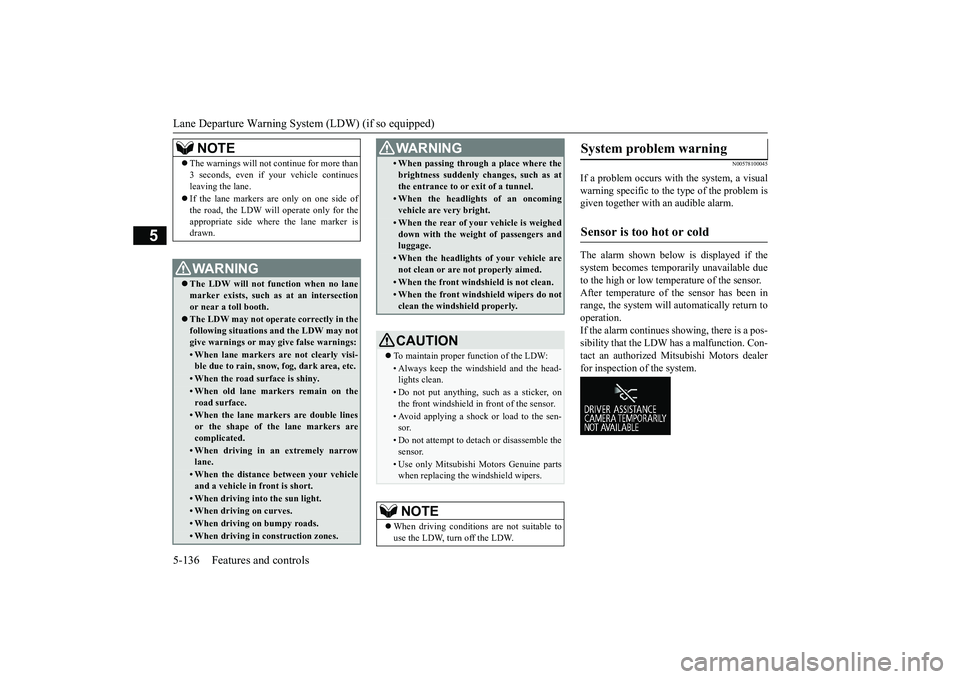
If a problem occurs with the system, a visualwarning specific to the type of the problem isgiven together with an audible alarm.The alarm shown below is displayed if thesystem becomes temporarily unavailable dueto the high or low temperature of the sensor.After temperature of the sensor has been inrange, the system will automatically return tooperation.If the alarm continues s
howing, there is a pos-
sibility that the LDW
has a malfunction. Con-
tact an authorized Mitsubishi Motors dealerfor inspection of the system.
NOTE
The warnings will not continue for more than3 seconds, even if your vehicle continuesleaving the lane.If the lane markers are only on one side ofthe road, the LDW will operate only for theappropriate side where the lane marker isdrawn.WA R N I N GThe LDW will not function when no lanemarker exists, such as at an intersectionor near a toll booth.The LDW may not operat
e correctly in the
following situations and the LDW may notgive warnings or may
give false warnings:
• When lane markers are not clearly visi-ble due to rain, snow, fog, dark area, etc.• When the road surface is shiny.• When old lane markers remain on theroad surface.• When the lane markers are double linesor the shape of the lane markers arecomplicated.• When driving in an extremely narrowlane.• When the distance between your vehicleand a vehicle in
front is short.
• When driving into the sun light.• When driving on curves.• When driving on bumpy roads.• When driving in construction zones.
• When passing through a place where thebrightness suddenly changes, such as atthe entrance to or exit of a tunnel.• When the headlights of an oncomingvehicle are very bright. • When the rear of your vehicle is weigheddown with the weight of passengers andluggage.• When the headlights
of your vehicle are
not clean or are not properly aimed.• When the front windshield is not clean.• When the front windshield wipers do notclean the windshield properly.CAUTIONTo maintain proper function of the LDW:• Always keep the windshield and the head-lights clean.• Do not put anything, such as a sticker, onthe front windshield in front of the sensor.• Avoid applying a shock or load to the sen-sor.• Do not attempt to deta
ch or disassemble the
sensor.• Use only Mitsubishi Mo
tors Genuine parts
when replacing the
windshield wipers.
NOTE
When driving conditions are not suitable touse the LDW, turn off the LDW.WA R N I N G
System problem warning
Sensor is too hot or cold
BK0249100US.book 136 ページ 2017年5月10日 水曜日 午前8時49分
Page 236 of 441
Multi Information display - Type 1
Features and controls 5-155
5
N00554901280
Each time you press this button, there is asound and the brightness
of the instruments
changes.
N00555001422
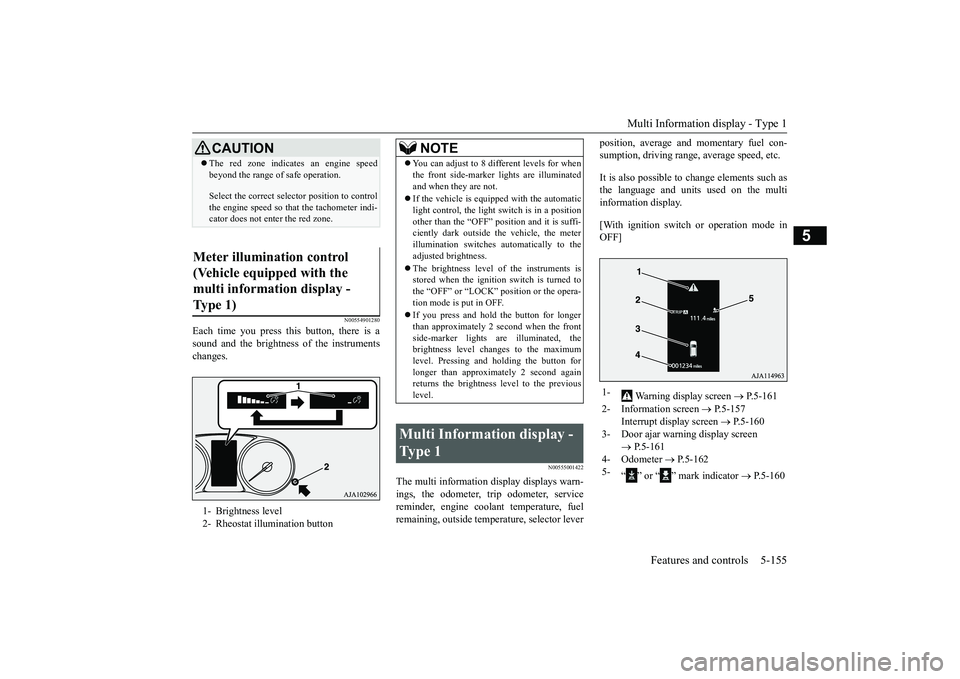
The multi information display displays warn-ings, the odometer, trip odometer, servicereminder, engine cool
ant temperature, fuel
remaining, outside temper
ature, selector lever
position, average and momentary fuel con-sumption, driving range
, average speed, etc.
It is also possible to change elements such asthe language and units used on the multiinformation display.[With ignition switch
or operation mode in
OFF]
CAUTIONThe red zone indicates an engine speedbeyond the range of safe operation.Select the correct select
or position to control
the engine speed so that
the tachometer indi-
cator does not enter the red zone.
Meter illumination control (Vehicle equipped with the multi information display - Type 1) 1- Brightness level2- Rheostat illumination button
NOTE
You can adjust to 8 different levels for whenthe front side-marker
lights are illuminated
and when they are not.If the vehicle is equippe
d with the automatic
light control, the light
switch is in a position
other than the “OFF” pos
ition and it is suffi-
ciently dark outside th
e vehicle, the meter
illumination switches automatically to theadjusted brightness.The brightness level
of the instruments is
stored when the ignition switch is turned tothe “OFF” or “LOCK” tion mode is put in OFF.If you press and hold the button for longerthan approximately 2 second when the frontside-marker lights ar
e illuminated, the
brightness level changes to the maximumlevel. Pressing and holding the button forlonger than approximately 2 second againreturns the brightness
level to the previous
level.
Multi Information display - Type 1
1-
Warning display screen
P.5-161
2- Information screen
P.5-157
Interrupt display screen
P.5-160
3- Door ajar warning display screen
P.5-161
4- Odometer
P.5-162
5-
“ ” or “ ” mark indicator
P.5-160
BK0249100US.book 155 ページ 2017年5月10日 水曜日 午前8時49分
Page 262 of 441
Indicator light, warning light, and information screen display list (multi information display - Type 1)
Features and controls 5-181
5
N00557701074N00557801349
Indicator light, warning light, and information
screen display list (multi information display -
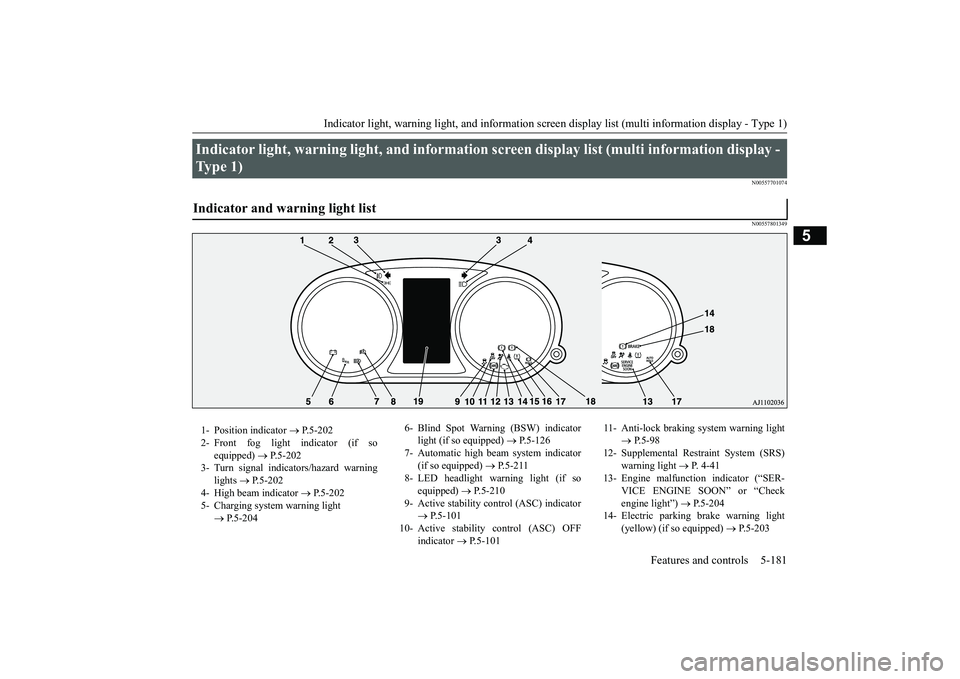
Type 1) Indicator and warning light list 1- Position indicator
P.5-202
2- Front fog light indicator (if so
equipped)
P.5-202
3- Turn signal indicators/hazard warning
lights
P.5-202
4- High beam indicator
P.5-202
5- Charging system warning light
P.5-204
6- Blind Spot Warning (BSW) indicator
light (if so equipped)
P.5-126
7- Automatic high beam system indicator
(if so equipped)
P.5-211
8- LED headlight warning light (if so
equipped)
P.5-210
9- Active stability control (ASC) indicator
P.5-101
10- Active stability
control (ASC) OFF
indicator
P.5-101
11- Anti-lock braking
system warning light
P.5-98
12- Supplemental Restra
int System (SRS)
warning light
P. 4 - 4 1
13- Engine malfuncti
on indicator (“SER-
VICE ENGINE SOON” or “Checkengine light”)
P.5-204
14- Electric parking
brake warning light
(yellow) (if so equipped)
P.5-203
BK0249100US.book 181 ページ 2017年5月10日 水曜日 午前8時49分
Page 264 of 441
Indicator light, warning light, and information screen display list (multi information display - Type 1)
Features and controls 5-183
5
N00558001292
Warning display list
Screen
Cause
Do this (Reference)
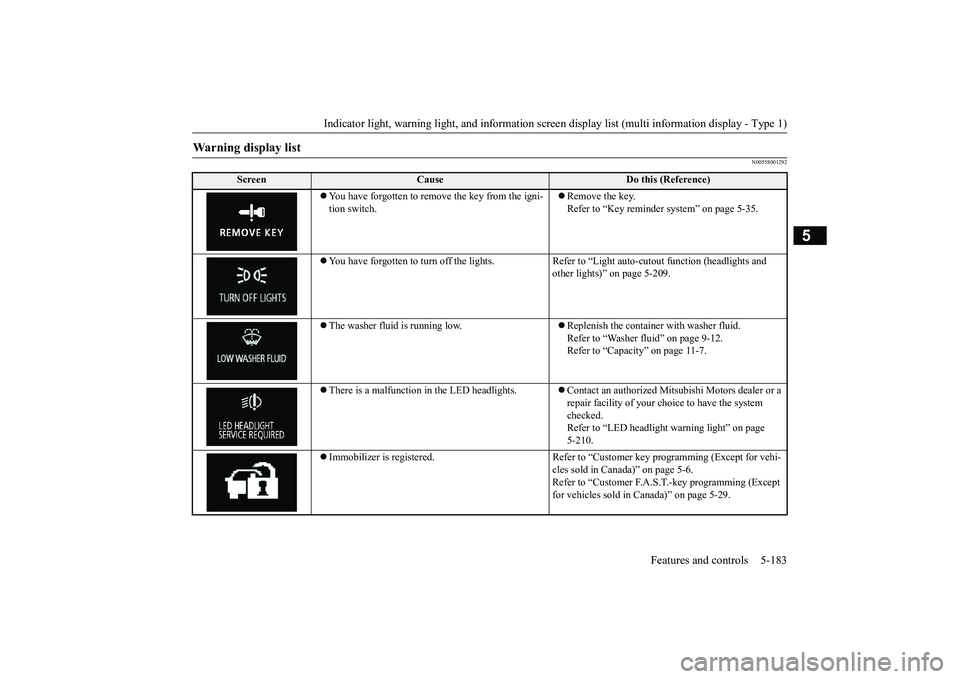
ove the key from the igni-
tion switch.
Remove the key.Refer to “Key reminder system” on page 5-35.
You have forgotten to turn off
the lights. Refer to “Light auto
-cutout function (headlights and
other lights)” on page 5-209.
The washer fluid is running low.
Replenish the container with washer fluid.Refer to “Washer fluid” on page 9-12.Refer to “Capacity” on page 11-7.
There is a malfunction
in the LED headlights.
Contact an authorized Mitsubishi Motors dealer or a repair facility of your choi
ce to have the system
checked.Refer to “LED headlight
warning light” on page
5-210.
Immobilizer is registered. Refer to “Cus
tomer key programming (Except for vehi-
cles sold in Canada)” on page 5-6.Refer to “Customer F.A.S.
T.-key programming (Except
for vehicles sold in Canada)” on page 5-29.
BK0249100US.book 183 ページ 2017年5月10日 水曜日 午前8時49分
Page 282 of 441
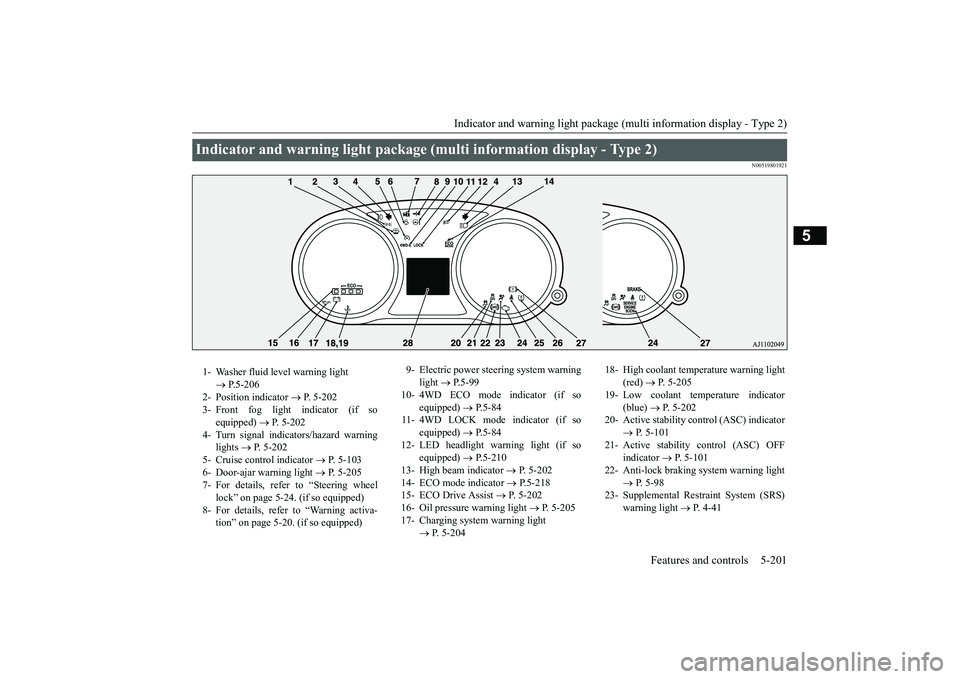
Indicator and warning light package (multi information display - Type 2)
Features and controls 5-201
5
N00519801921
Indicator and warning light package (mu
lti information display - Type 2)
1- Washer fluid level warning light
P.5-206
2- Position indicator
P. 5-202
3- Front fog light indicator (if so
equipped)
P. 5-202
4- Turn signal indicators/hazard warning
lights
P. 5-202
5- Cruise control indicator
P. 5-103
6- Door-ajar warning light
P. 5-205
7- For details, refer to “Steering wheel
lock” on page 5-24. (if so equipped)
8- For details, refer to “Warning activa-
tion” on page 5-20. (if so equipped)
9- Electric power steering system warning
light
P.5-99
10- 4WD ECO mode indicator (if so
equipped)
P.5-84
11- 4WD LOCK mode indicator (if so
equipped)
P.5-84
12- LED headlight warning light (if so
equipped)
P.5-210
13- High beam indicator
P. 5-202
14- ECO mode indicator
P.5-218
15- ECO Drive Assist
P. 5-202
16- Oil pressure warning light
P. 5-205
17- Charging system warning light
P. 5-204
18- High coolant temperature warning light
(red)
P. 5-205
19- Low coolant temp
erature indicator
(blue)
P. 5-202
20- Active stability control (ASC) indicator
P. 5-101
21- Active stability control (ASC) OFF
indicator
P. 5-101
22- Anti-lock braking system warning light
P. 5-98
23- Supplemental Restra
int System (SRS)
warning light
P. 4 - 4 1
BK0249100US.book 201 ページ 2017年5月10日 水曜日 午前8時49分
Page 283 of 441
Indicators5-202 Features and controls
5
N00519900127N00520000216
The arrows will flash in time with the corre-sponding exterior turn signals when the turnsignal lever is used.Both arrows will flash
when the hazard warn-
ing flasher swit
ch is pressed.
N00520100086
A blue light comes on when the headlightsare on high beam.
N00520200175
This indicator comes on while the front foglights are on.
N00551301078
This indicator light illuminates while theparking lights are on.
N00575601020
This indicator comes on in blue while thecoolant temperature is low.
N00579200030
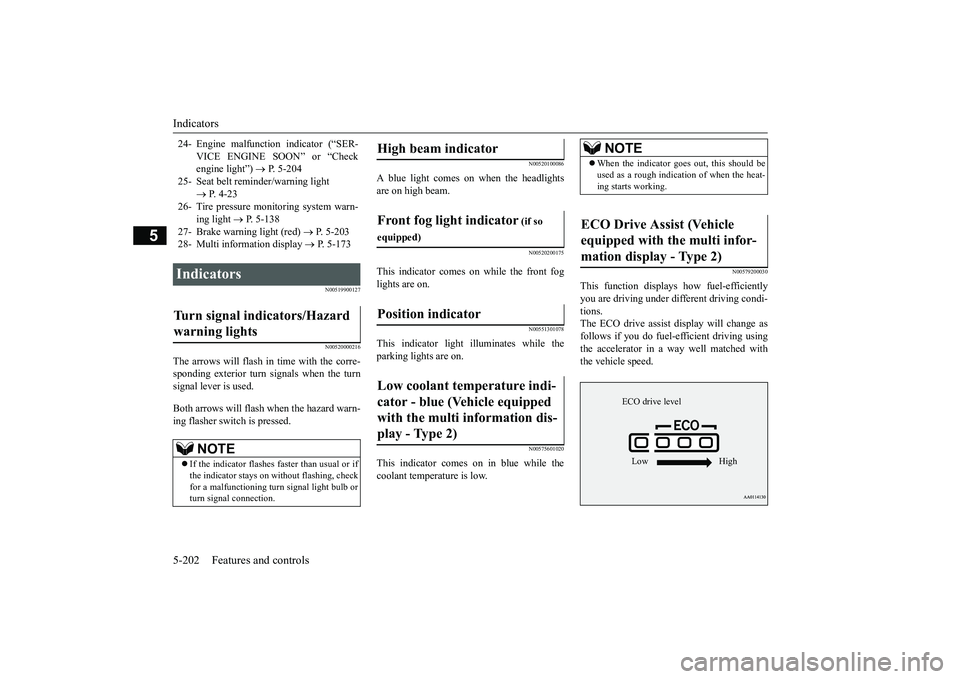
This function displays
how fuel-efficiently
you are driving under different driving condi-tions.The ECO drive assist di
splay will change as
follows if you do fuel-efficient driving usingthe accelerator in a way well matched withthe vehicle speed.
24- Engine malfuncti
on indicator (“SER-
VICE ENGINE SOON” or “Checkengine light”)
P. 5-204
25- Seat belt remi
nder/warning light
P. 4-23
26- Tire pressure moni
toring system warn-
ing light
P. 5-138
27- Brake warning light (red)
P. 5-203
28- Multi information display
P. 5-173
Indicators Turn signal indicators/Hazard warning lights
NOTE
If the indicator flashes faster than usual or ifthe indicator stays on wi
thout flashing, check
for a malfunctioning turn signal light bulb orturn signal connection.
High beam indicator Front fog light indicator
(if so
equipped)Position indicator Low coolant temperature indi-cator - blue (Vehicle equipped with the multi information dis-play - Type 2)
NOTE
When the indicator go
es out, this should be
used as a rough indication of when the heat-ing starts working.
ECO Drive Assist (Vehicle equipped with the multi infor-mation display - Type 2)
ECO drive levelLow High
BK0249100US.book 202 ページ 2017年5月10日 水曜日 午前8時49分