brake MITSUBISHI OUTLANDER III 2018 Owner's Manual
[x] Cancel search | Manufacturer: MITSUBISHI, Model Year: 2018, Model line: OUTLANDER III, Model: MITSUBISHI OUTLANDER III 2018Pages: 441, PDF Size: 13.71 MB
Page 149 of 441
Automatic transaxle (if so equipped)5-68 Features and controls
5
N00513200216
Automatic transaxle will automaticallychange its gear depe
nding on road and driv-
ing conditions. This
helps achieve smooth
driving and excellent fuel efficiency.Also you can manually shift up and shiftdown the transaxle. Refer to “Sports mode”The transaxle prevents
unnecessary upshifts
even when the accelerator pedal is releasedand ensures smooth driving.According to the condi
tions, the transaxle
will automatically shift to a lower gear toachieve stronger engine braking. This mayhelp reduce your need to use the servicebrake.
N00513801424
As an additional safe
ty precaution, models
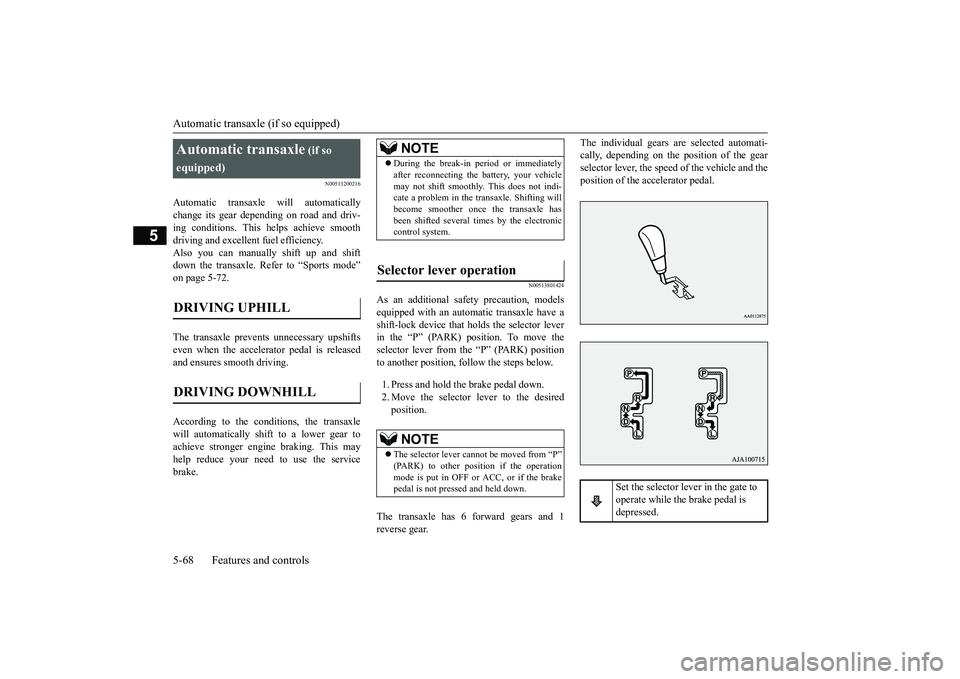
equipped with an automatic transaxle have ashift-lock device that holds the selector leverin the “P” (PARK) position. To move theselector lever from the “P” (PARK) positionto another position, follow the steps below.1. Press and hold the brake pedal down.2. Move the selector lever to the desiredposition.
The transaxle has 6 forward gears and 1reverse gear.
The individual gears are selected automati-cally, depending on the position of the gearselector lever, the speed of the vehicle and theposition of the ac
celerator pedal.
Automatic transaxle
(if so
equipped)
DRIVING DOWNHILL
NOTE
During the break-in pe
riod or immediately
after reconnecting the
battery, your vehicle
may not shift smoothly.
This does not indi-
cate a problem in the transaxle. Shifting willbecome smoother once the transaxle hasbeen shifted several
times by the electronic
control system.
Selector lever operation
NOTE
The selector lever cannot
be moved from “P”
mode is put in OFF or ACC, or if the brakepedal is not pressed and held down.
Set the selector lever in the gate to operate while the brake pedal is depressed.
BK0249100US.book 68 ページ 2017年5月10日 水曜日 午前8時49分
Page 150 of 441
Automatic transaxle (if so equipped)
Features and controls 5-69
5
N00563101086
When the selector lever cannot be shiftedfrom the “P” (PARK) position to anotherposition while the brake pedal is pressed andheld down with the operation mode in ON,the battery may be flat or the shift-lock mech-anism may be malfunctioning.Immediately have your
vehicle checked by an
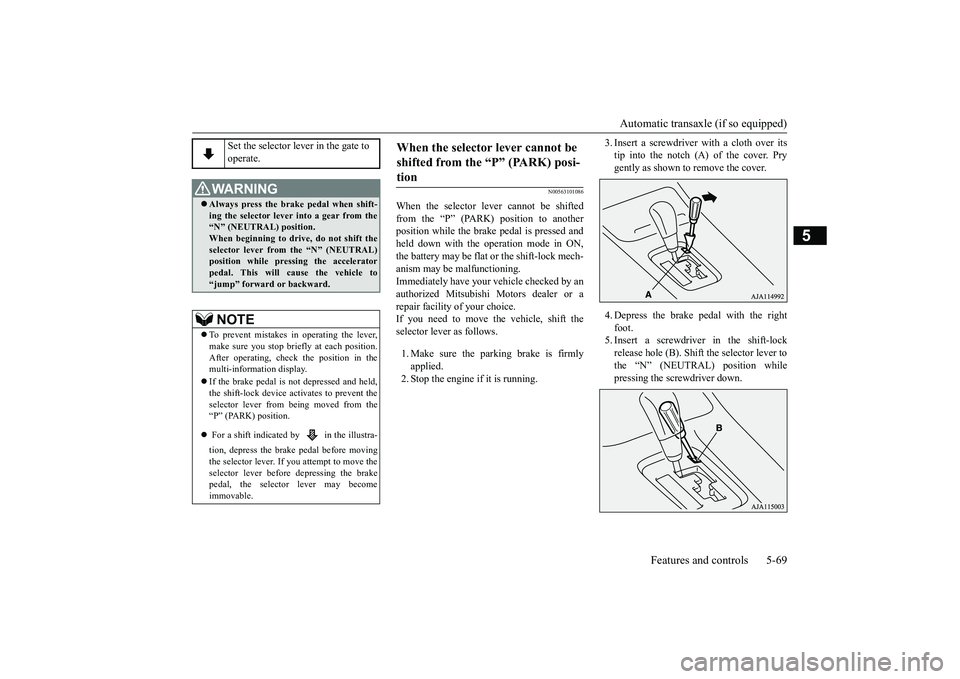
authorized Mitsubishi Motors dealer or arepair facility of your choice.If you need to move the vehicle, shift theselector lever as follows.1. Make sure the parking brake is firmlyapplied.2. Stop the engine if it is running.
3. Insert a screwdrive
r with a cloth over its
tip into the notch (A) of the cover. Prygently as shown to remove the cover.4. Depress the brake
pedal with the right
foot.5. Insert a screwdriver in the shift-lockrelease hole (B). Shift the selector lever tothe “N” (NEUTRAL) position whilepressing the screwdriver down.
Set the selector lever in the gate to operate.
WA R N I N GAlways press the brake pedal when shift-ing the selector
lever into a gear from the
“N” (NEUTRAL) position. When beginning to drive, do not shift theselector lever from
the “N” (NEUTRAL)
position while pressing the acceleratorpedal. This will cause the vehicle to“jump” forward or backward.NOTE
To prevent mistakes in operating the lever,make sure you stop brie
fly at each position.
After operating, chec
k the position in the
multi-information display.If the brake pedal is not depressed and held,the shift-lock device ac
tivates to prevent the
selector lever from being moved from the“P” (PARK) position. For a shift indicated by in the illustra-tion, depress the brake pedal before movingthe selector lever. If you attempt to move theselector lever before depressing the brakepedal, the selector lever may becomeimmovable.
When the selector lever cannot be shifted from the “P” (PARK) posi-tion
BK0249100US.book 69 ページ 2017年5月10日 水曜日 午前8時49分
Page 156 of 441
Continuously variable transmission (CVT) (if so equipped)
Features and controls 5-75
5
and then move the sele
ctor lever to the “P”
(PARK) position.If the transaxle does not change gears whiledriving, or your vehicle does not pick upenough speed when starting on an uphillslope, it may be that there is somethingunusual happening in the
transaxle, causing a
safety device to activa
te. Have your vehicle
checked at an authorized Mitsubishi Motorsdealer or a repair facility of your choiceimmediately.
N00560201060
The CVT will automati
cally and continuously
change its gear ratio depending on road anddriving conditions. This helps achievesmooth driving and excellent fuel efficiency.If your vehicle is equipped with the spor-tronic steering wheel paddle shifter, you canmanually shift up and shift down the trans-mission. Refer to “Sports mode” on page5-80.The transmission prevents unnecessaryupshifts even when the accelerator pedal isreleased and ensures smooth driving.According to the condi
tions, the transmission
will automatically shift to a lower gear ratioto achieve stronger engine braking. This mayhelp reduce your need
to use the service
brake.
N00560301090
As an additional safe
ty precaution, models
equipped with a continuously variable trans-mission have a shift-lock device that holdsthe selector lever in the “P” (PARK) position.To move the selector lever from the “P”the steps below.1. Press and hold the brake pedal down.2. Move the selector lever to the desiredposition.
The CVT selects an optimum ratio automati-cally when the selector lever is in the “D”
nding on the speed of
the vehicle and the positi
on of the accelerator
pedal.
When the automatic transaxle makes no gear change
NOTE
When the warning display and “SLOWDOWN” or the warning display and“SERVICE REQUIRED” appear on theinformation screen in
the multi-information
display, there could be
a malfunction in the
automatic transaxle. Refer to “Automatictransaxle: Warning di
splay” on page 5-70.
Continuously variable transmission (CVT)
(if so
equipped)
DRIVING DOWNHILL
Selector lever operation
NOTE
The selector lever cannot
be moved from “P”
switch is set to the “OFF” or “LOCK” or“ACC” position, or if the key has beenremoved, or the opera
tion mode is put in
OFF or ACC, or if the brake pedal is notpressed and held down.
BK0249100US.book 75 ページ 2017年5月10日 水曜日 午前8時49分
Page 157 of 441
Continuously variable transmission (CVT) (if so equipped)5-76 Features and controls
5
N00563301062
When the selector lever cannot be shiftedfrom the “P” (PARK) position to anotherposition while the brake pedal is pressed andheld down with the ignition switch at the“ON” position or the operation mode in ON,the battery may be flat or the shift-lock mech-anism may be malfunctioning.Immediately have your
vehicle checked by an
authorized Mitsubishi Motors dealer or arepair facility of your choice.If you need to move the vehicle, shift theselector lever as follows.1. Make sure the parking brake is firmlyapplied.2. Stop the engine if it is running.
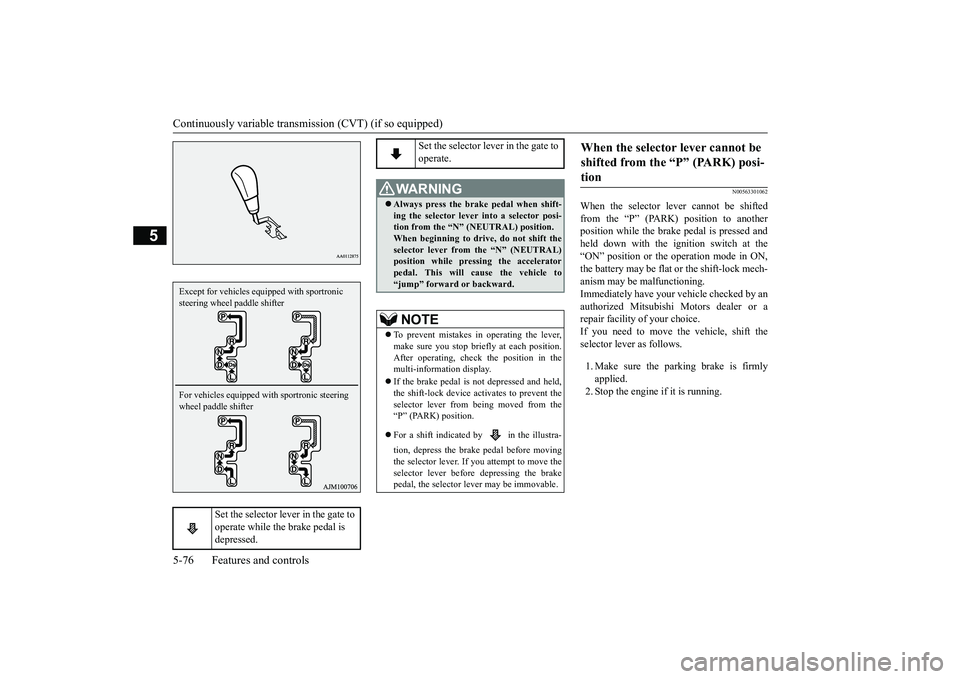
Set the selector lever in the gate to operate while the brake pedal is depressed.
Except for vehicles equipped with sportronic steering wheel paddle shifterFor vehicles equipped with sportronic steering wheel paddle shifter
Set the selector lever in the gate to operate.
WA R N I N GAlways press the brake pedal when shift-ing the selector lever into a selector posi-tion from the
Page 158 of 441
Continuously variable transmission (CVT) (if so equipped)
Features and controls 5-77
5
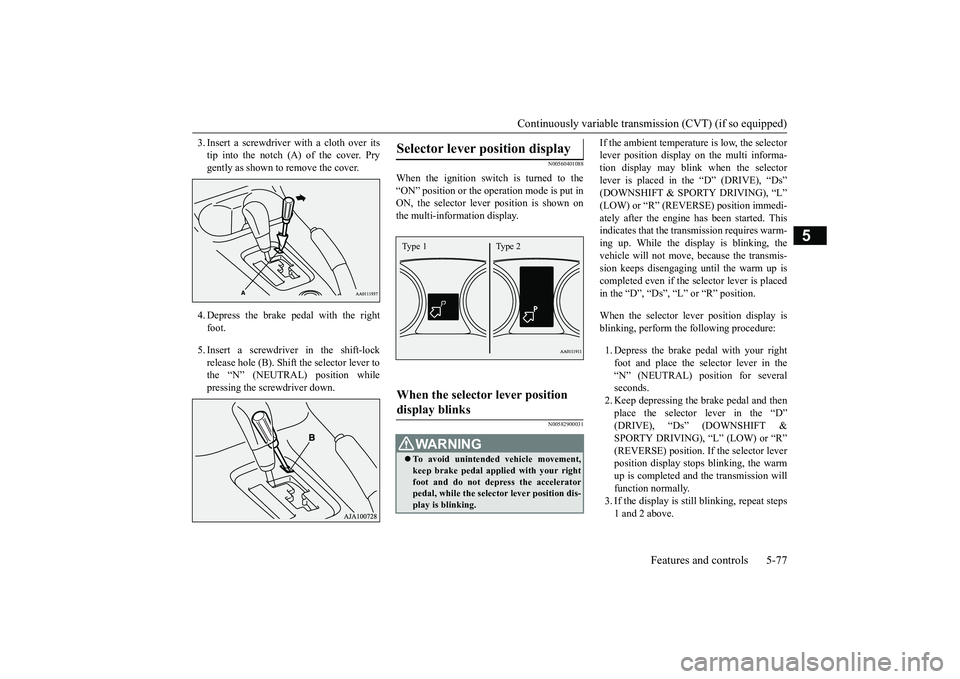
3. Insert a screwdrive
r with a cloth over its
tip into the notch (A) of the cover. Prygently as shown to remove the cover.4. Depress the brake pe
dal with the right
foot.5. Insert a screwdriver in the shift-lockrelease hole (B). Shift the selector lever tothe “N” (NEUTRAL) position whilepressing the screwdriver down.
N00560401088
When the ignition switch is turned to the“ON” position or the ope
ration mode is put in
ON, the selector leve
r position is shown on
the multi-information display.
N00582900031
If the ambient temperature is low, the selectorlever position display on the multi informa-tion display may blink when the selectorlever is placed in the “D” (DRIVE), “Ds”ately after the engine has been started. Thisindicates that the tran
smission requires warm-
ing up. While the display is blinking, thevehicle will not move,
because the transmis-
sion keeps disengaging until the warm up iscompleted even if the selector lever is placedin the “D”, “Ds”, “L” or “R” position.When the selector le
ver position display is
blinking, perform th
e following procedure:
1. Depress the brake pedal with your rightfoot and place the se
lector lever in the
“N” (NEUTRAL) position for severalseconds.2. Keep depressing the brake pedal and thenplace the selector lever in the “D”SPORTY DRIVING), “L” (LOW) or “R”(REVERSE) position. If the selector leverposition display stops
blinking, the warm
up is completed and the transmission willfunction normally.3. If the display is still
blinking, repeat steps
1 and 2 above.
Selector lever position display
When the selector lever position display blinks
WA R N I N GTo avoid unintended
vehicle movement,
keep brake pedal applied with your rightfoot and do not depress the acceleratorpedal, while the selector lever position dis-play is blinking.Type 1 Type 2
BK0249100US.book 77 ページ 2017年5月10日 水曜日 午前8時49分
Page 160 of 441
Continuously variable transmission (CVT) (if so equipped)
Features and controls 5-79
5
N00560601107
This position locks the transmission to pre-vent the vehicle from m
oving. The engine can
be started in the “P” (PARK) position.Move the lever to this position only after thevehicle has come to a complete stop.
At this position, the transmission is disen-gaged. It is the same
as the neutral position on
a manual transaxle and should be used whenthe vehicle is not m
oving for an extended
length of time during driving, such as in atraffic jam.
This position is used fo
r most city and high-
way driving. The transmission will automati-cally and continuously ch
ange its gear ratio
depending on road and driving conditions.Use when engine braking is needed, or forhigh-power sport drive.
After a while, confirm that the warningdisplay is no longer show
ing. It is safe to
continue driving if the display is no longershowing. If the warning display remains,contact an authorized Mitsubishi Motorsdealer or a repair facility of your choiceimmediately.[When warning di
splay is showing]
It may be that ther
e is something unusual
happening in the CVT, causing a safetydevice to activate
. Have your vehicle
inspected by an authorized MitsubishiMotors dealer or a repair facility of yourchoice immediately.
Selector lever positions
“P” PARK
“R” REVERSE
CAUTION
CAUTIONNever shift into the “P” (PARK) or “R”motion. If the lever is shifted into the “P”the vehicle is in motion, the transmissionmay be damaged.
“N” NEUTRAL
WA R N I N GNever move the selector lever to the “N”you could accidentally slip it into the “P”damaging the transmission.To prevent the vehicle from rolling whenstopped on a slope,
the engine should be
started in the “P” (PARK) position, not in“N” (NEUTRAL) position.
To prevent rolling, always keep your footon the brake pedal when the vehicle is in“N” (NEUTRAL) positi
on, or when shift-
ing into or out of
Page 163 of 441
Electronically controlled 4W
D system (if so equipped)
5-82 Features and controls
5
To gain extra acceleration in “D” (DRIVE)position (when passing an
other vehicle) push
the accelerator to the floor. The CVT willautomatically downshift.For short waiting periods, such as at trafficlights, the vehicle can be
left in selector lever
position and held stationary with the servicebrake.For longer waiting periods with the enginerunning, place th
e selector lever in the “N”
(NEUTRAL) position a
nd apply the parking
brake, while holding the vehicle stationarywith the service brake.Prior to moving off after having stopped thevehicle, make sure that
the selector lever is in
Page 164 of 441
Electronically controlled 4WD system (if so equipped)
Features and controls 5-83
5
Select the drive mode from the following 3types to suit the driving conditions.
4-wheel drive operation requires special driv-ing skills.Carefully read the “4-wheel drive operation”section on page 5-88 and take care to drivesafely.
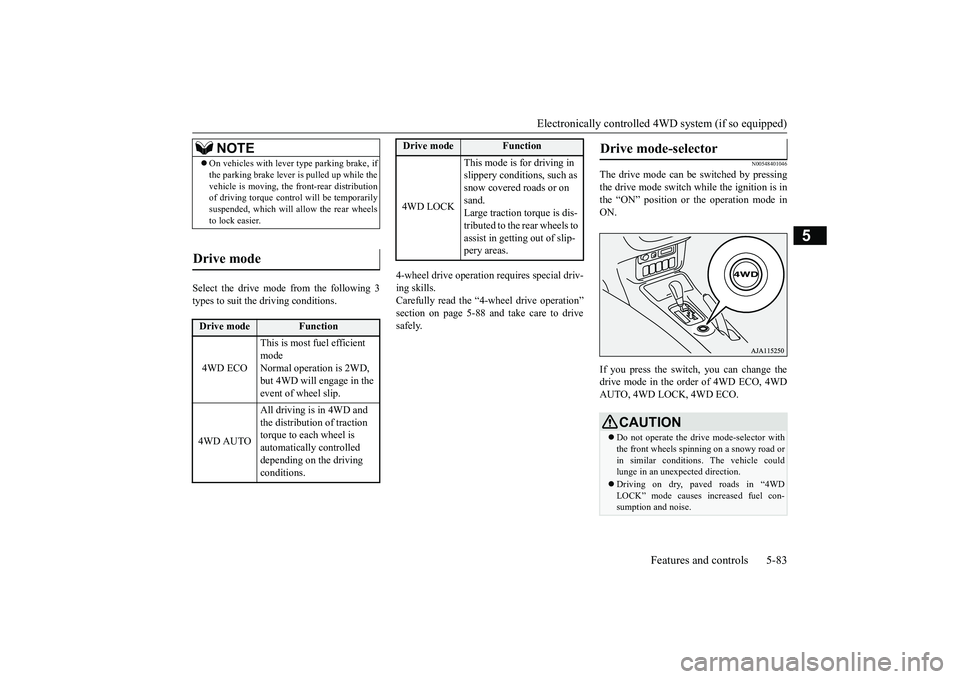
N00548401046
The drive mode can be switched by pressingthe drive mode switch while the ignition is inthe “ON” position or the operation mode inON.If you press the switch, you can change thedrive mode in the order of 4WD ECO, 4WDAUTO, 4WD LOCK, 4WD ECO.
NOTE
On vehicles with lever
type parking brake, if
the parking brake lever is pulled up while thevehicle is moving, the
front-rear distribution
of driving torque contro
l will be temporarily
suspended, which will allow the rear wheelsto lock easier.
Drive mode
Drive mode
Function
4WD ECO
This is most fuel efficient modeNormal operation is 2WD, but 4WD will engage in the event of wheel slip.
4WD AUTO
All driving is in 4WD and the distribution of traction torque to each wheel is automatically controlled depending on the driving conditions.
4WD LOCK
This mode is for driving in slippery conditions, such as snow covered roads or on sand.Large traction torque is dis-tributed to the rear wheels to assist in getting out of slip-pery areas.
Drive mode
Function
Drive mode-selector
CAUTIONDo not operate the drive mode-selector withthe front wheels spinning on a snowy road orin similar conditions
. The vehicle could
lunge in an unexpe
cted direction.
Driving on dry, paved roads in “4WDLOCK” mode causes increased fuel con-sumption and noise.
BK0249100US.book 83 ページ 2017年5月10日 水曜日 午前8時49分
Page 166 of 441
S-AWC (Super-All Wheel Co
ntrol) (if so equipped)
Features and controls 5-85
5
N00576600020
While the drive mode is in the “4WD AUTO”
ON, the drive mode will be changed to “4WDECO” mode.If the ECO mode switch is switched OFF, thedrive mode will be returned to “4WD AUTO”Refer to the “ECO mode switch” on page5-218.
N00541301088
S-AWC is an integr
ated vehicle dynamics
control system that helps enhance drivingperformance, cornering performance, andvehicle stability over a wide range of drivingconditions through integr
ated management of
the electronically cont
rolled 4WD, the AYC
(Active Yaw Control), the ABS and the ASC.
The electronically controlled 4WD is a sys-tem that improves acceleration performanceand stability performance by controllingfront-rear distribution of driving torque withoperating the electronic control couplingarranged in the rear differential assembly.The AYC is a system, with a left-right differ-ential limiting function
and yaw control func-
tion, that controls the left-rightdriving/braking force by managing the AFD*(Active Front Differential), the brake, theEPS.*: AFD (Active Front Differential)
If the drive mode indicator (4WD) is blink-ing, a problem has occurred with the elec-tronically controlled
4WD. A warning will
also be displayed in
the information screen
in the multi information display.Warning display (color
liquid crystal dis-
play)Have your vehicle in
spected by an autho-
rized Mitsubishi Motors dealer.For vehicles equipped with mono-color liq-uid crystal display mete
r, drive mode indica-
tor (“4WD-E”, “LOCK”)
is blinking at the
same time.Make sure that all four tires are the samespecified size, type, a
nd brand, and have no
significant difference
in the amount of wear.
Otherwise, the elec
tronically controlled
4WD system may not work properly, and the4WD system warning (overheating or ser-vice required) may displayed.
When the ECO mode switch is ON
CAUTION
NOTE
If the drive mode is switched in any modeafter the drive mode is switched in “4WDECO”, the drive mode
will not be changed
even if the ECO mode switch is switchedOFF.
S-AWC (Super-All Wheel Control)
(if so equipped)
Do not over-rely on the S-AWC. Even the S-AWC cannot prevent the natural laws ofphysics from acting on the vehicle. This sys-tem, like any other system, has limits andcannot help you to main
tain traction and con-
trol of the vehicle in
all circumstances. Reck-
less driving can lead to
accidents. It is the
driver’s responsibility to drive carefully.This means taking into account the traffic,road and environmental conditions.
Electronically Controlled 4WD
Active Yaw Control (AYC)
BK0249100US.book 85 ページ 2017年5月10日 水曜日 午前8時49分
Page 170 of 441
4-wheel drive operation
Features and controls 5-89
5
When turning a sharp corner in “4WDLOCK” (Electronically
controlled 4WD) or
“LOCK” (S-AWC) position at low speed, a
slight difference in
steering may be experi-
enced similar to feeling as if the brakes wereapplied. This is called tight corner brakingand results from each of the four tires being ata different distance from the corner. The phe-nomenon is typical of 4-wheel drive vehicles.If this occurs, either straighten out the steer-ing wheel or change to another mode.Set the drive mode-selector to “4WDAUTO”, “4WD LOCK” (Electronically con-trolled 4WD) or “SNOW” (S-AWC) in accor-dance with the road conditions, and thengradually depress the ac
celerator pedal for a
smooth start.
WA R N I N GDo not over-rely on th
e 4-wheel drive vehi-
cles. Even 4-wheel drive vehicles have lim-its to the system and ability to maintaincontrol and traction.
Reckless driving may
lead to accidents. Always drive carefully,taking account of the road conditions.Improperly operating
this vehicle on or
off-pavement can cause an accident orrollover in which you
and your passengers
could be seriously
injured or killed.
• Follow all instructions and guidelines inthe owner’s manual.• Keep your speed low and do not drivefaster than conditions.NOTE
Driving on rough roads can be hard on avehicle. Before you le
ave the pavement, be
sure all scheduled ma
intenance and service
has been done, and that
you have inspected
your vehicle. Pay spec
ial attention to the
condition of the ti
res, and check the tire pres-
sures.Mitsubishi Motors is not responsible to theoperator for any damage or injury caused orliability incurred by improper and negligentoperation of a vehicl
e. All techniques of
vehicle operation depend on the skill andexperience of the opera
tor and other partici-
pating parties. Any de
viation from the rec-
ommended operating instru
ctions above is at
their own risk.
Note that the stopping distance required ofthe 4-wheel drive vehicl
e differs very little
from that of the front-wheel drive vehicle.When driving on a snow-covered road or aslippery, muddy surface,
make sure that you
keep a sufficient dist
ance between your vehi-
cle and the one ahead of you.The driving posture should be more upright;adjust the seat to a good position for easysteering and pedal operati
on. Be sure to wear
the seat belt.After driving on rough roads, check eachpart of the vehicle and wash it thoroughlywith water. Refer to the “Inspection andmaintenance following rough road opera-tion” section and “Vehic
le care and Mainte-
nance” sections.CAUTIONSetting the drive mode-selector to “4WDLOCK” (Electronically
controlled 4WD) or
“LOCK” (S-AWC) position to drive on drypaved road will increa
se fuel consumption,
with possible noise generation.
Turning sharp corners
NOTE
On snowy or icy roads
NOTE
The use of snow tires is recommended.Maintain a safe distan
ce between
vehicles,
avoid sudden braking, and use engine brak-ing (downshifting).CAUTIONAvoid sudden braking,
sudden acceleration
and sharp turning. Sk
idding occurs and con-
trol of the vehicle could be lost.
BK0249100US.book 89 ページ 2017年5月10日 水曜日 午前8時49分