light MITSUBISHI OUTLANDER III 2018 Workshop Manual
[x] Cancel search | Manufacturer: MITSUBISHI, Model Year: 2018, Model line: OUTLANDER III, Model: MITSUBISHI OUTLANDER III 2018Pages: 441, PDF Size: 13.71 MB
Page 135 of 441
Parking brake5-54 Features and controls
5
N00593100020
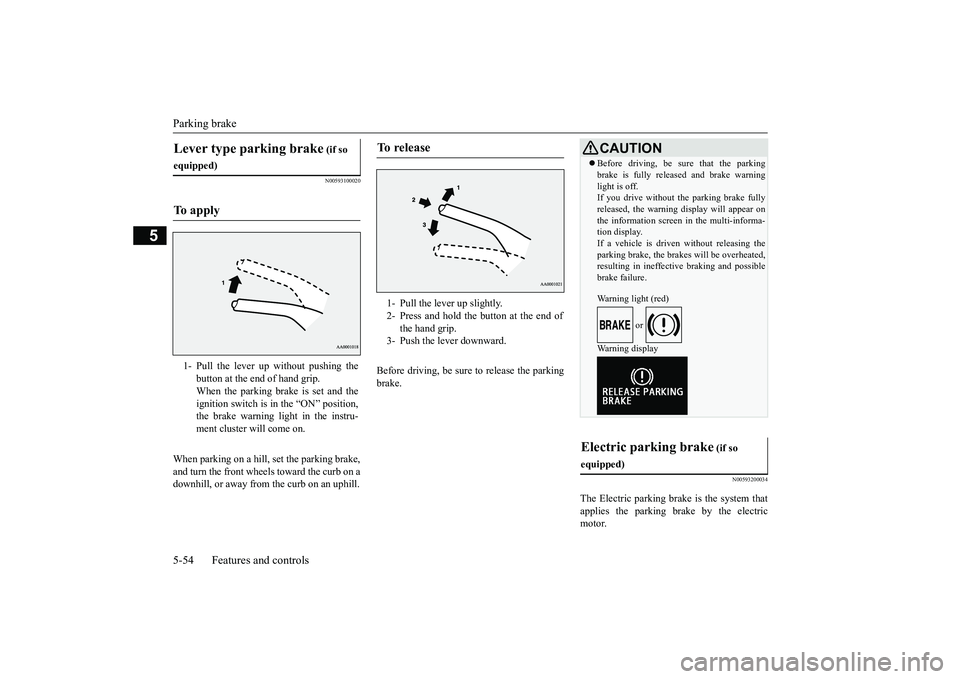
When parking on a hill, set the parking brake,and turn the front wheels toward the curb on adownhill, or away from
the curb on an uphill.
Before driving, be sure
to release the parking
brake.
N00593200034
The Electric parking brake is the system thatapplies the parking brake by the electricmotor.
Lever type parking brake
(if so
equipped)To a p p l y
1- Pull the lever up without pushing the
button at the end of hand grip.When the parking brake is set and theignition switch is in
the “ON” position,
the brake warning light in the instru-ment cluster will come on.
To r e l e a s e
1- Pull the lever up slightly.2- Press and hold the button at the end of
the hand grip.
3- Push the lever downward.
CAUTIONBefore driving, be sure that the parkingbrake is fully released and brake warninglight is off.If you drive without the parking brake fullyreleased, the warning
display will appear on
the information screen
in the multi-informa-
tion display. If a vehicle is driven without releasing theparking brake, the brakes will be overheated,resulting in ineffectiv
e braking and possible
brake failure.Warning light (red)
or
Warning display
Electric parking brake
(if so
equipped)
BK0249100US.book 54 ページ 2017年5月10日 水曜日 午前8時49分
Page 136 of 441
Parking brake
Features and controls 5-55
5
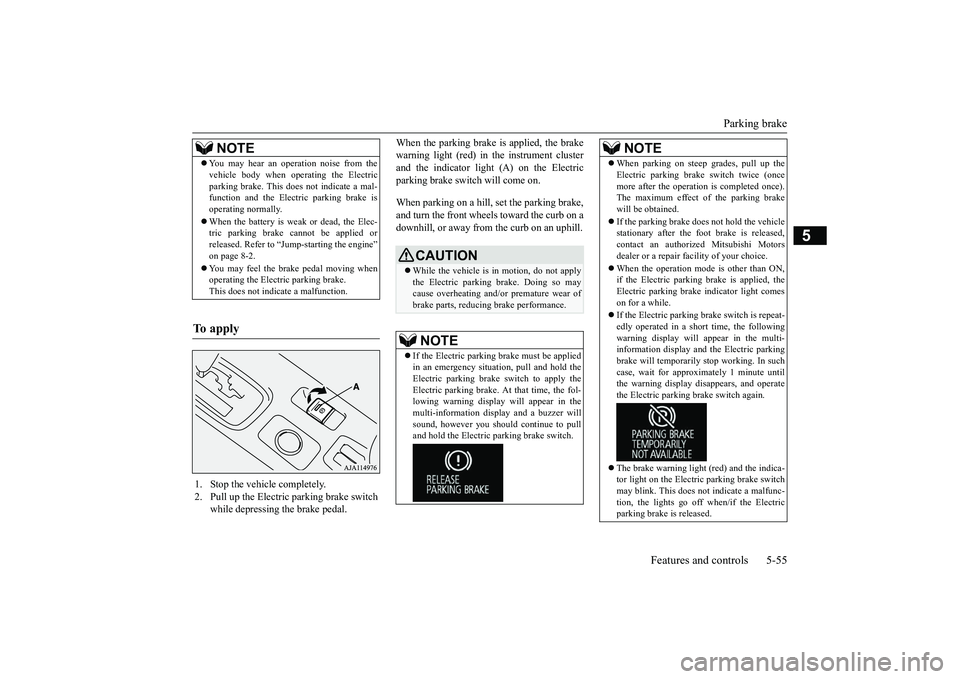
When the parking brake is applied, the brakewarning light (red) in
the instrument cluster
and the indicator light (A) on the Electricparking brake switch will come on.When parking on a hill, set the parking brake,and turn the front wheels toward the curb on adownhill, or away from
the curb on an uphill.
NOTE
You may hear an operation noise from thevehicle body when operating the Electricparking brake. This do
es not indicate a mal-
function and the Elec
tric parking brake is
operating normally.When the battery is weak or dead, the Elec-tric parking brake cannot be applied orreleased. Refer to “Jum
p-starting the engine”
on page 8-2.You may feel the brake pedal moving whenoperating the Electr
ic parking brake.
This does not indi
cate a malfunction.
To apply
1. Stop the vehicle completely.2. Pull up the Electric parking brake switch
while depressing the brake pedal.
CAUTIONWhile the vehicle is in motion, do not applythe Electric parking
brake. Doing so may
cause overheating and/or
premature wear of
brake parts, reducing brake performance. NOTE
If the Electric parking
brake must be applied
in an emergency situa
tion, pull and hold the
Electric parking brake
switch to apply the
Electric parking brake. At that time, the fol-lowing warning display
will appear in the
multi-information disp
lay and a buzzer will
sound, however you should continue to pulland hold the Electric
parking brake switch.
When parking on stee
p grades, pull up the
Electric parking brak
e switch twice (once
more after the operati
on is completed once).
The maximum effect of the parking brakewill be obtained.If the parking brake does not hold the vehiclestationary after the f
oot brake is released,
contact an authorized Mitsubishi Motorsdealer or a repair fa
cility of your choice.
When the operation mode is other than ON,if the Electric parking brake is applied, theElectric parking brake
indicator light comes
on for a while.If the Electric parking brake switch is repeat-edly operated in a short time, the followingwarning display will appear in the multi-information display and the Electric parkingbrake will temporarily stop working. In suchcase, wait for approxima
tely 1 minute until
the warning display di
sappears, and operate
the Electric parking
brake switch again.
The brake warning light (red) and the indica-tor light on the Electric
parking brake switch
may blink. This does no
t indicate a malfunc-
tion, the lights go off when/if the Electricparking brake is released.NOTE
BK0249100US.book 55 ページ 2017年5月10日 水曜日 午前8時49分
Page 138 of 441
Steering wheel height
and reach adjustment
Features and controls 5-57
5
Warning light (yellow)Warning displayIf there is a malfunction in the system, thewarning light will come on. In addition, thewarning display appears on the informationscreen in the multi information display.
Under normal conditions, the warning lightonly comes on when the operation mode isput in ON and goes off a few seconds later.
N00511501241
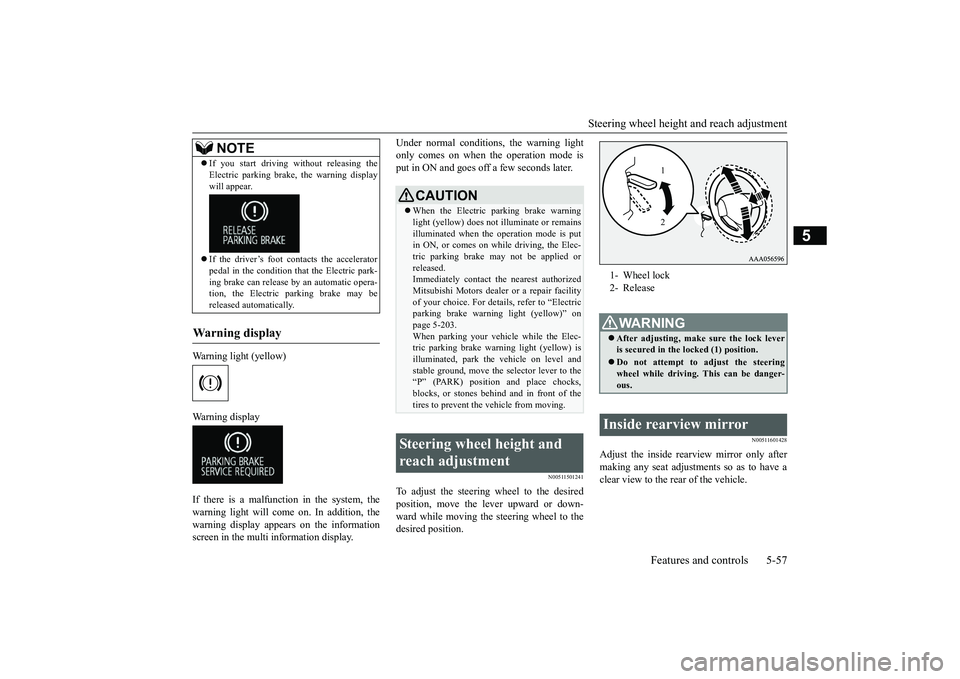
To adjust the steering wheel to the desiredposition, move the lever upward or down-ward while moving the steering wheel to thedesired position.
N00511601428
Adjust the inside rearview mirror only aftermaking any seat adjustme
nts so as to have a
clear view to the rear of the vehicle.
If you start driving wi
thout releasing the
Electric parking brake, the warning displaywill appear.If the driver’s foot contacts the acceleratorpedal in the condition th
at the Electric park-
ing brake can release by an automatic opera-tion, the Electric parking brake may bereleased automatically.
Wa r n i n g d is p la y
NOTE
CAUTIONWhen the Electric parking brake warninglight (yellow) does not
illuminate or remains
illuminated when the operation mode is putin ON, or comes on while driving, the Elec-tric parking brake may not be applied orreleased.Immediately contact the nearest authorizedMitsubishi Motors dealer
or a repair facility
of your choice. For detail
s, refer to “Electric
parking brake warni
ng light (yellow)” on
page 5-203.When parking your vehi
cle while the Elec-
tric parking brake warning light (yellow) isilluminated, park th
e vehicle on level and
stable ground, move the
selector lever to the
“P” (PARK) position and place chocks,blocks, or stones behind and in front of thetires to prevent the vehicle from moving.
Steering wheel height and reach adjustment
1- Wheel lock2- ReleaseWA R N I N GAfter adjusting, make sure the lock leveris secured in the locked (1) position.Do not attempt to adjust the steeringwheel while driving. This can be danger-ous.
Inside rearview mirror
12
BK0249100US.book 57 ページ 2017年5月17日 水曜日 午後2時31分
Page 140 of 441
Inside rearview mirror
Features and controls 5-59
5
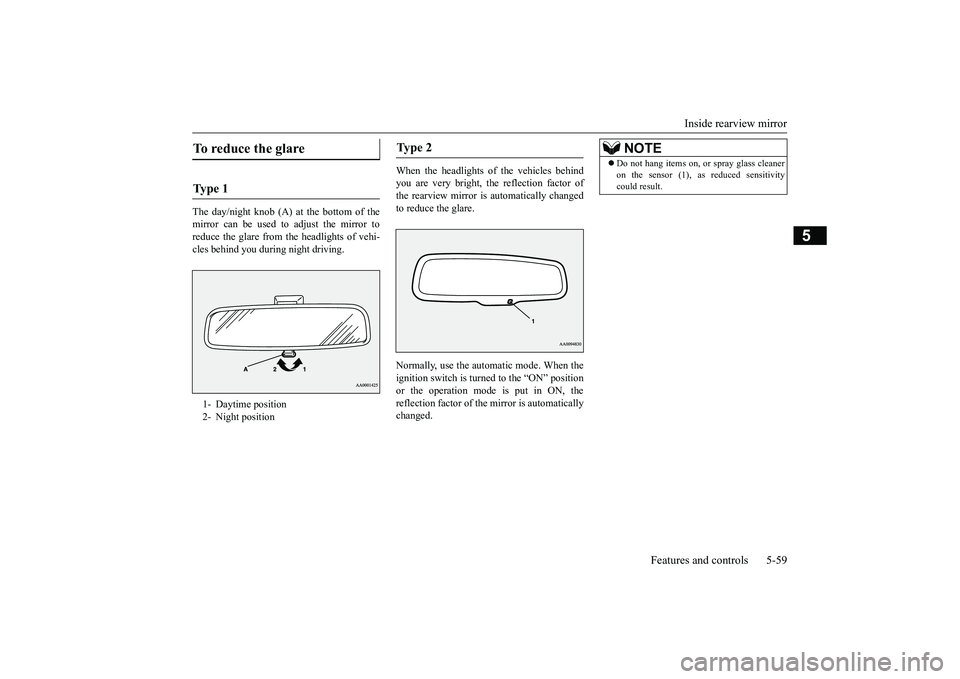
The day/night knob (A) at
the bottom of the
mirror can be used to adjust the mirror toreduce the glare from the headlights of vehi-cles behind you during night driving.
When the headlights of the vehicles behindyou are very bright, the reflection factor ofthe rearview mirror is automatically changedto reduce the glare.Normally, use the automatic mode. When theignition switch is turned to the “ON” positionor the operation mode is put in ON, thereflection factor of the mirror is automaticallychanged.
To reduce the glare Ty p e 1 1- Daytime position2- Night position
Ty p e 2
NOTE
Do not hang items on,
or spray glass cleaner
on the sensor (1), as reduced sensitivitycould result.
BK0249100US.book 59 ページ 2017年5月17日 水曜日 午後2時31分
Page 141 of 441
Outside rearview mirrors5-60 Features and controls
5
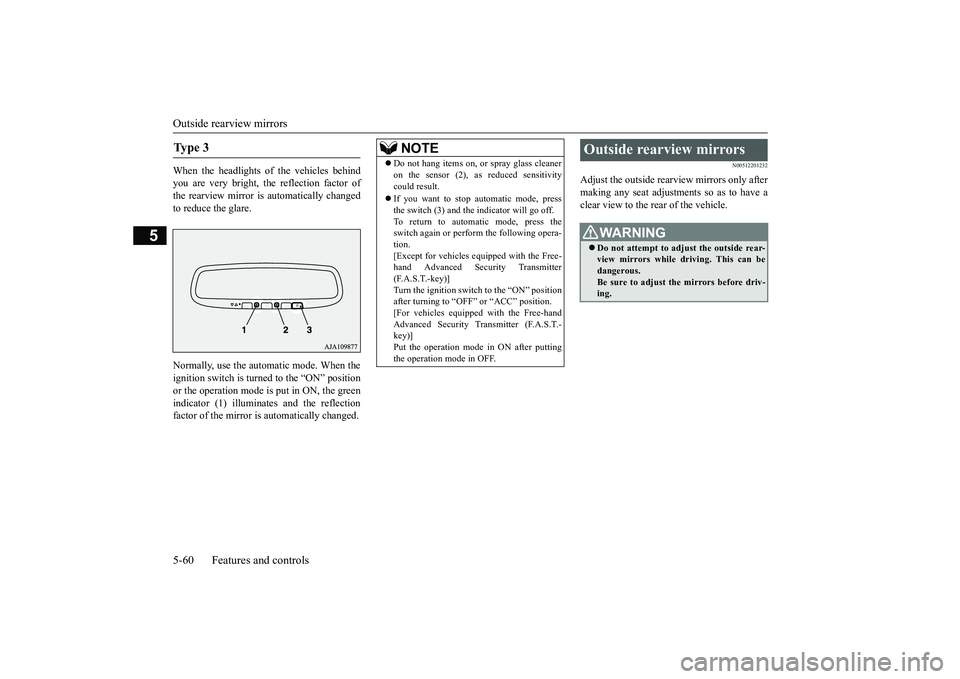
When the headlights of the vehicles behindyou are very bright, the reflection factor ofthe rearview mirror is automatically changedto reduce the glare.Normally, use the automatic mode. When theignition switch is turned to the “ON” positionor the operation mode is put in ON, the greenindicator (1) illuminates and the reflectionfactor of the mirror is automatically changed.
N00512201232
Adjust the outside rearview mirrors only aftermaking any seat adjustme
nts so as to have a
clear view to the rear of the vehicle.
Ty p e 3
NOTE
Do not hang items on,
or spray glass cleaner
on the sensor (2), as
reduced sensitivity
could result.If you want to stop automatic mode, pressthe switch (3) and the indicator will go off.To return to automatic mode, press theswitch again or perfor
m the following opera-
tion.[Except for vehicles e
quipped with the Free-
hand Advanced Secu
rity Transmitter
(F.A.S.T.-key)]Turn the ignition switch to the “ON” positionafter turning to “OFF” or “ACC” position.[For vehicles equipped with the Free-handAdvanced Security Transmitter (F.A.S.T.-key)]Put the operation mode
in ON after putting
the operation mode in OFF.
Outside rearview mirrors
WA R N I N GDo not attempt to adjust the outside rear-view mirrors while driving. This can bedangerous.Be sure to adjust the mirrors before driv-ing.
BK0249100US.book 60 ページ 2017年5月17日 水曜日 午後2時31分
Page 144 of 441

Ignition switch (if so equipped)Features and controls 5-63
5
N00549301299
When the rear window defogger switch ispressed with the engine running, the outsiderearview mirrors are defogged or defrosted.Current will flow through the heater elementinside the mirrors, thus clearing away frost orcondensation.The indicator light (A) will illuminate whilethe defogger is on.The heater will be turned off automatically inapproximately 15 to 20 minutes depending onthe outside temperature.
N00512401742
[For vehicles equipped with the Free-handAdvanced Security Tr
ansmitter (F.A.S.T.-
key).]For information on operations for vehiclesequipped with the Free-hand Advanced Secu-rity Transmitter (F.A
.S.T.-key), refer to
“Free-hand Advanced
Security Transmitter
(F.A.S.T.-key):Engine switch” on page 5-18.[Except for vehicles equipped with theFree-hand Advanced Security Transmit-ter (F.A.S.T.-key).]
• Automatically extend when the ignitionswitch is turned to the “ON” position or theoperation mode is put in ON with thedriver’s door closed, and automaticallyretract when the ignition switch is turned tothe “LOCK” position or the operation modeis put in OFF with the driver’s door opened.• Automatically extend when the vehiclespeed reaches approximately 19 mph (30km/h).• Deactivate the automatic extension func-tion.
The outside rearvi
ew mirrors can be
retracted or extended
by the following opera-
tions, even if changing to the any of above.After pressing the LOCK
button on the key
to lock the doors and liftgate, if the LOCKbutton is pressed again twice in a row withinapproximately 30 seconds
, the outside rear-
view mirrors will retract.After pressing the
UNLOCK button on the
key to unlock the doors and liftgate, if theUNLOCK button is pressed again twice in arow within approximately 30 seconds, theoutside rearview mirro
rs will extend again.
NOTE
Heated outside rearview mirror
(if so equipped)
NOTE
The heated outside re
arview mirror can be
turned on automatically.For further informati
on, please contact your
authorized Mitsubish
i Motors dealer.
On vehicles equipped with the SmartphoneLink Display Audio, sc
reen operations can
be used to make the adjustment.Refer to the separate owner’s manual fordetails.
Ignition switch
(if so equipped)
BK0249100US.book 63 ページ 2017年5月10日 水曜日 午前8時49分
Page 147 of 441
Starting the engine5-66 Features and controls
5
Remove the key at
the “LOCK” position.
Turn the steering wheel until it is locked.Turn the key to the “ACC” position whilemoving the steering
wheel slightly.
N00512601858
[For vehicles equipped with the Free-handAdvanced Security Transmitter (F.A.S.T.-key).]For information on operation for vehiclesequipped with the Free-hand Advanced Secu-rity Transmitter (F.A.S.T.-key), refer to
“Free-hand Advanced
Security Transmitter
(F.A.S.T.-key): Starting” on page 5-13.[Except for vehicles equipped with theFree-hand Advanced Se
curity Transmit-
ter (F.A.S.T.-key).]Do not operate the starter motor continu-ously for longer than 15 seconds as thiscould run the battery
down or damage the
starter motor. If the engine does not start,turn the ignition switch back to the “OFF”or “LOCK” position, wait a few seconds,and then try again. Trying repeatedly withthe engine or starter motor still turningwill damage the starter mechanism.If the engine will not
start because the bat-
tery is weak or discharged, refer to“Jump-starting the engine” (on page 8-2)for instructions.A longer warm up period will only con-sume extra fuel. The engine is warmed upenough for driving when the bar graph ofengine coolant temper
ature display starts
to move or the low coolant temperatureindicator goes out. Refer to “Engine cool-ant temperature display” on page 5-161 or“Low coolant temper
ature indicator” on
page 5-202.
This model is equipped with an electronicallycontrolled fuel injection system. This is a sys-tem that automatically controls fuel injection.There is usually no need to depress the accel-erator pedal when starting the engine.The starter should not be run for more than 15seconds at a time.To prevent battery drain, wait a few secondsbetween attempts to restart the engine.1. Make sure all occupants are properlyseated with seat belts fastened.
To l o c k
To u n l o c k
CAUTIONRemove the key when leaving the vehicle.NOTE
If the front wheels are turned, the anti-theftlock may sometimes make it difficult to turnthe key from “LOCK” to “ACC”. Firmlyturn the steering wheel to the left or to theright as you turn the key.
Starting the engine
Tips for starting
WA R N I N GNever run the engine in
a closed or poorly
ventilated area any longer than is neededto move your vehicle
out of the area. Car-
bon monoxide gas, wh
ich is odorless and
extremely poisonous, could build up andcause serious injury or death.CAUTIONDo not push-start the vehicle.Do not run the engine at high rpms or driveat high speeds until
the engine has had a
chance to warm up.Release the ignition sw
itch as soon as the
engine starts. Otherwis
e, the starter motor
will be damaged
Starting the engine
BK0249100US.book 66 ページ 2017年5月10日 水曜日 午前8時49分
Page 148 of 441

Starting the engine
Features and controls 5-67
5
2. Insert the ignition key.3. Press and hold the brake pedal downfirmly with your right foot.4. Make sure the selector
lever is in the “P”
5. Turn the ignition switch to the “ON” posi-tion and make certain that all warninglights are functioning properly beforestarting the engine.6. Turn the ignition switch to the “START”
ng the accelerator
pedal. Release the ignition switch whenthe engine starts.
After several attempts, you may experiencethat the engine still does not start.1. Make sure that all electric devices, suchas lights, air conditio
ning blower and rear
window defogger, are turned off.
2. While depressing the brake pedal, pressthe accelerator peda
l halfway and hold it
there, then crank th
e engine. Release the
accelerator pedal, immediately after theengine starts.3. If the engine still will not start, the enginecould be flooded with too much gasoline.While depressing the brake pedal, pushthe accelerator pedal all the way downand hold it there, then crank the engine for5 to 6 seconds. Retu
rn the ignition switch
to the “OFF” or “LOCK” position andrelease the accelerator pedal. Wait a fewseconds, and then crank the engine againfor 5 to 6 seconds while depressing thebrake pedal, but do no
t push the accelera-
tor pedal. Release the ignition switch ifthe engine starts. If the engine fails tostart, repeat these procedures. If theengine still will not
start, contact your
local Mitsubishi Motors dealer or a repairfacility of your choi
ce for assistance.
When the ambient temperature is -22 °F (-30°C) or lower, it may not be possible to startfrom a standstill even with the selector lever
in the
Page 163 of 441
Electronically controlled 4W
D system (if so equipped)
5-82 Features and controls
5
To gain extra acceleration in “D” (DRIVE)position (when passing an
other vehicle) push
the accelerator to the floor. The CVT willautomatically downshift.For short waiting periods, such as at trafficlights, the vehicle can be
left in selector lever
position and held stationary with the servicebrake.For longer waiting periods with the enginerunning, place th
e selector lever in the “N”
(NEUTRAL) position a
nd apply the parking
brake, while holding the vehicle stationarywith the service brake.Prior to moving off after having stopped thevehicle, make sure that
the selector lever is in
Page 170 of 441
4-wheel drive operation
Features and controls 5-89
5
When turning a sharp corner in “4WDLOCK” (Electronically
controlled 4WD) or
“LOCK” (S-AWC) position at low speed, a
slight difference in
steering may be experi-
enced similar to feeling as if the brakes wereapplied. This is called tight corner brakingand results from each of the four tires being ata different distance from the corner. The phe-nomenon is typical of 4-wheel drive vehicles.If this occurs, either straighten out the steer-ing wheel or change to another mode.Set the drive mode-selector to “4WDAUTO”, “4WD LOCK” (Electronically con-trolled 4WD) or “SNOW” (S-AWC) in accor-dance with the road conditions, and thengradually depress the ac
celerator pedal for a
smooth start.
WA R N I N GDo not over-rely on th
e 4-wheel drive vehi-
cles. Even 4-wheel drive vehicles have lim-its to the system and ability to maintaincontrol and traction.
Reckless driving may
lead to accidents. Always drive carefully,taking account of the road conditions.Improperly operating
this vehicle on or
off-pavement can cause an accident orrollover in which you
and your passengers
could be seriously
injured or killed.
• Follow all instructions and guidelines inthe owner’s manual.• Keep your speed low and do not drivefaster than conditions.NOTE
Driving on rough roads can be hard on avehicle. Before you le
ave the pavement, be
sure all scheduled ma
intenance and service
has been done, and that
you have inspected
your vehicle. Pay spec
ial attention to the
condition of the ti
res, and check the tire pres-
sures.Mitsubishi Motors is not responsible to theoperator for any damage or injury caused orliability incurred by improper and negligentoperation of a vehicl
e. All techniques of
vehicle operation depend on the skill andexperience of the opera
tor and other partici-
pating parties. Any de
viation from the rec-
ommended operating instru
ctions above is at
their own risk.
Note that the stopping distance required ofthe 4-wheel drive vehicl
e differs very little
from that of the front-wheel drive vehicle.When driving on a snow-covered road or aslippery, muddy surface,
make sure that you
keep a sufficient dist
ance between your vehi-
cle and the one ahead of you.The driving posture should be more upright;adjust the seat to a good position for easysteering and pedal operati
on. Be sure to wear
the seat belt.After driving on rough roads, check eachpart of the vehicle and wash it thoroughlywith water. Refer to the “Inspection andmaintenance following rough road opera-tion” section and “Vehic
le care and Mainte-
nance” sections.CAUTIONSetting the drive mode-selector to “4WDLOCK” (Electronically
controlled 4WD) or
“LOCK” (S-AWC) position to drive on drypaved road will increa
se fuel consumption,
with possible noise generation.
Turning sharp corners
NOTE
On snowy or icy roads
NOTE
The use of snow tires is recommended.Maintain a safe distan
ce between
vehicles,
avoid sudden braking, and use engine brak-ing (downshifting).CAUTIONAvoid sudden braking,
sudden acceleration
and sharp turning. Sk
idding occurs and con-
trol of the vehicle could be lost.
BK0249100US.book 89 ページ 2017年5月10日 水曜日 午前8時49分