phone MITSUBISHI OUTLANDER PHEV 2016 Owner's Manual (in English)
[x] Cancel search | Manufacturer: MITSUBISHI, Model Year: 2016, Model line: OUTLANDER PHEV, Model: MITSUBISHI OUTLANDER PHEV 2016Pages: 490, PDF Size: 22.02 MB
Page 8 of 490
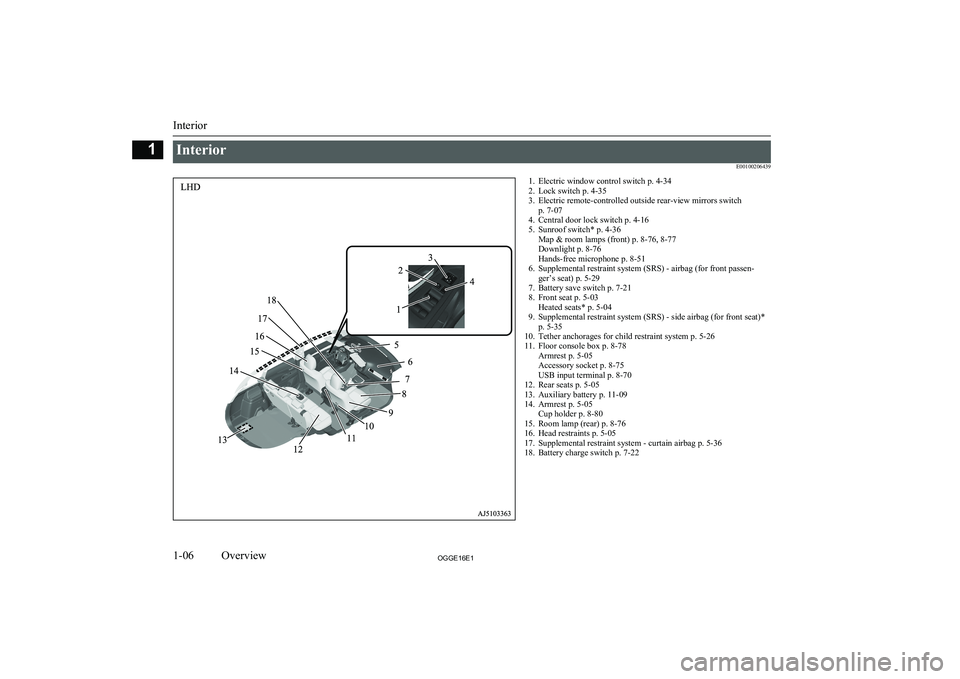
InteriorE001002064391. Electric window control switch p. 4-34
2. Lock switch p. 4-35
3. Electric remote-controlled outside rear-view mirrors switch p. 7-07
4. Central door lock switch p. 4-16
5. Sunroof switch* p. 4-36 Map & room lamps (front) p. 8-76, 8-77
Downlight p. 8-76
Hands-free microphone p. 8-51
6. Supplemental restraint system (SRS) - airbag (for front passen- ger’s seat) p. 5-29
7. Battery save switch p. 7-21
8. Front seat p. 5-03 Heated seats* p. 5-04
9. Supplemental restraint system (SRS) - side airbag (for front seat)* p. 5-35
10. Tether anchorages for child restraint system p. 5-26
11. Floor console box p. 8-78 Armrest p. 5-05
Accessory socket p. 8-75
USB input terminal p. 8-70
12. Rear seats p. 5-05
13. Auxiliary battery p. 11-09
14. Armrest p. 5-05 Cup holder p. 8-80
15. Room lamp (rear) p. 8-76
16. Head restraints p. 5-05
17. Supplemental restraint system - curtain airbag p. 5-36
18. Battery charge switch p. 7-22
Interior
1-06OGGE16E1Overview1
Page 9 of 490
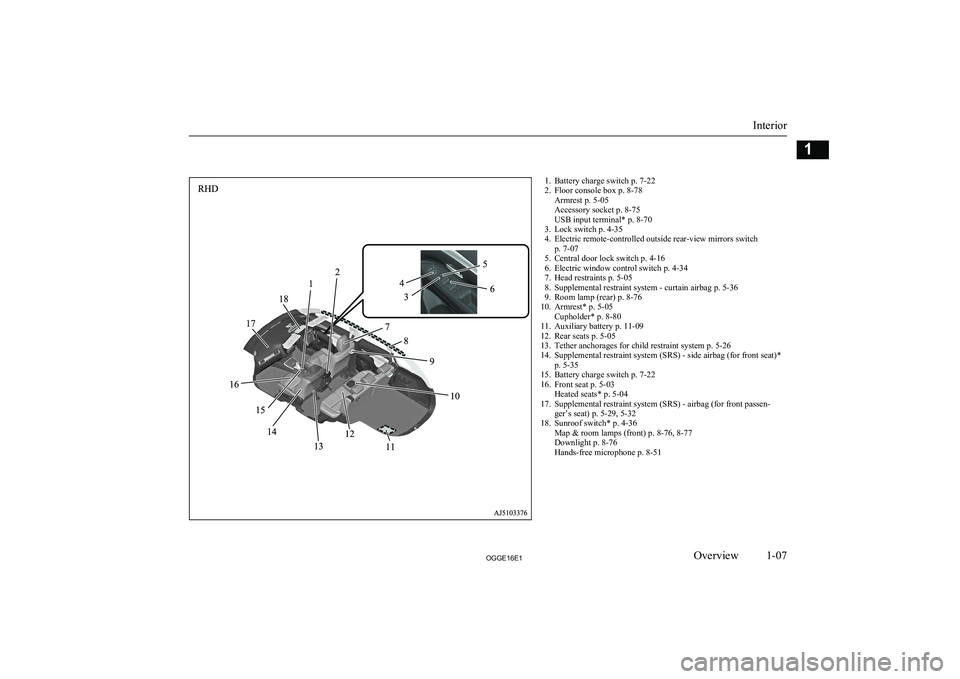
1. Battery charge switch p. 7-22
2. Floor console box p. 8-78 Armrest p. 5-05
Accessory socket p. 8-75
USB input terminal* p. 8-70
3. Lock switch p. 4-35
4. Electric remote-controlled outside rear-view mirrors switch p. 7-07
5. Central door lock switch p. 4-16
6. Electric window control switch p. 4-34
7. Head restraints p. 5-05
8. Supplemental restraint system - curtain airbag p. 5-36
9. Room lamp (rear) p. 8-76
10. Armrest* p. 5-05 Cupholder* p. 8-80
11. Auxiliary battery p. 11-09
12. Rear seats p. 5-05
13. Tether anchorages for child restraint system p. 5-26
14. Supplemental restraint system (SRS) - side airbag (for front seat)* p. 5-35
15. Battery charge switch p. 7-22
16. Front seat p. 5-03 Heated seats* p. 5-04
17. Supplemental restraint system (SRS) - airbag (for front passen- ger’s seat) p. 5-29, 5-32
18. Sunroof switch* p. 4-36 Map & room lamps (front) p. 8-76, 8-77
Downlight p. 8-76
Hands-free microphone p. 8-51
Interior
1-07OGGE16E1Overview1
Page 10 of 490
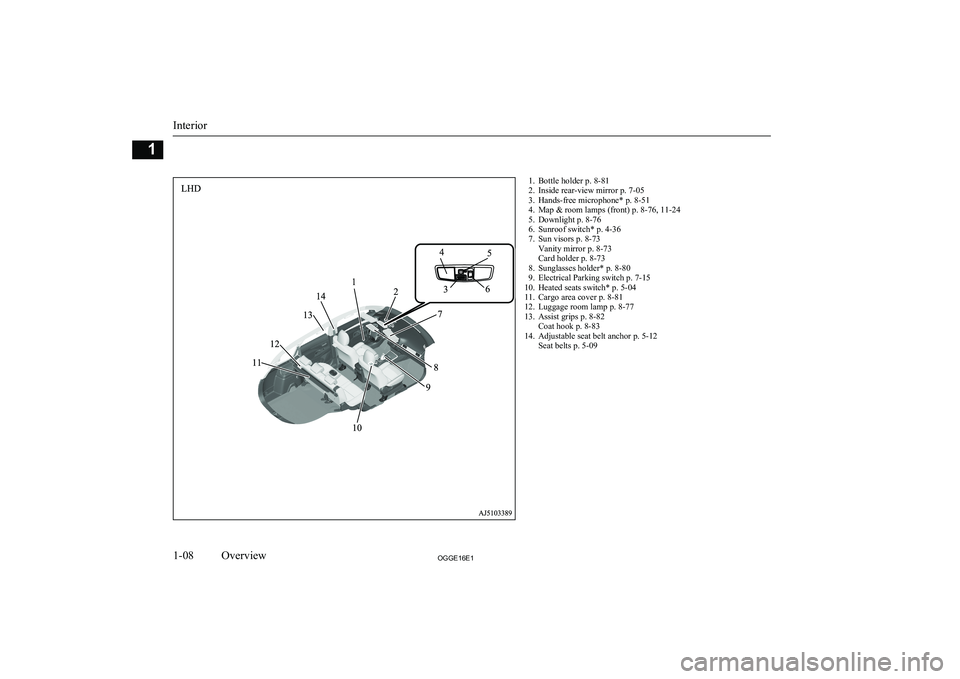
1. Bottle holder p. 8-81
2. Inside rear-view mirror p. 7-05
3. Hands-free microphone* p. 8-51
4. Map & room lamps (front) p. 8-76, 11-24
5. Downlight p. 8-76
6. Sunroof switch* p. 4-36
7. Sun visors p. 8-73 Vanity mirror p. 8-73
Card holder p. 8-73
8. Sunglasses holder* p. 8-80
9. Electrical Parking switch p. 7-15
10. Heated seats switch* p. 5-04
11. Cargo area cover p. 8-81
12. Luggage room lamp p. 8-77
13. Assist grips p. 8-82 Coat hook p. 8-83
14. Adjustable seat belt anchor p. 5-12 Seat belts p. 5-09
Interior
1-08OGGE16E1Overview1
Page 11 of 490
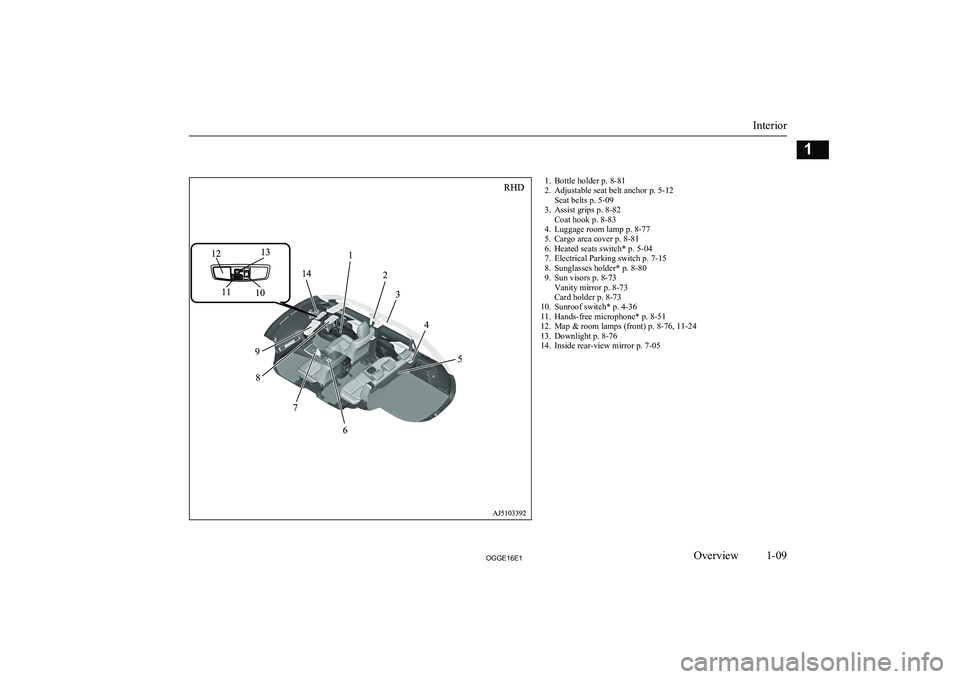
1. Bottle holder p. 8-81
2. Adjustable seat belt anchor p. 5-12 Seat belts p. 5-09
3. Assist grips p. 8-82 Coat hook p. 8-83
4. Luggage room lamp p. 8-77
5. Cargo area cover p. 8-81
6. Heated seats switch* p. 5-04
7. Electrical Parking switch p. 7-15
8. Sunglasses holder* p. 8-80
9. Sun visors p. 8-73 Vanity mirror p. 8-73
Card holder p. 8-73
10. Sunroof switch* p. 4-36
11. Hands-free microphone* p. 8-51
12. Map & room lamps (front) p. 8-76, 11-24
13. Downlight p. 8-76
14. Inside rear-view mirror p. 7-05
Interior
1-09OGGE16E1Overview1
Page 29 of 490
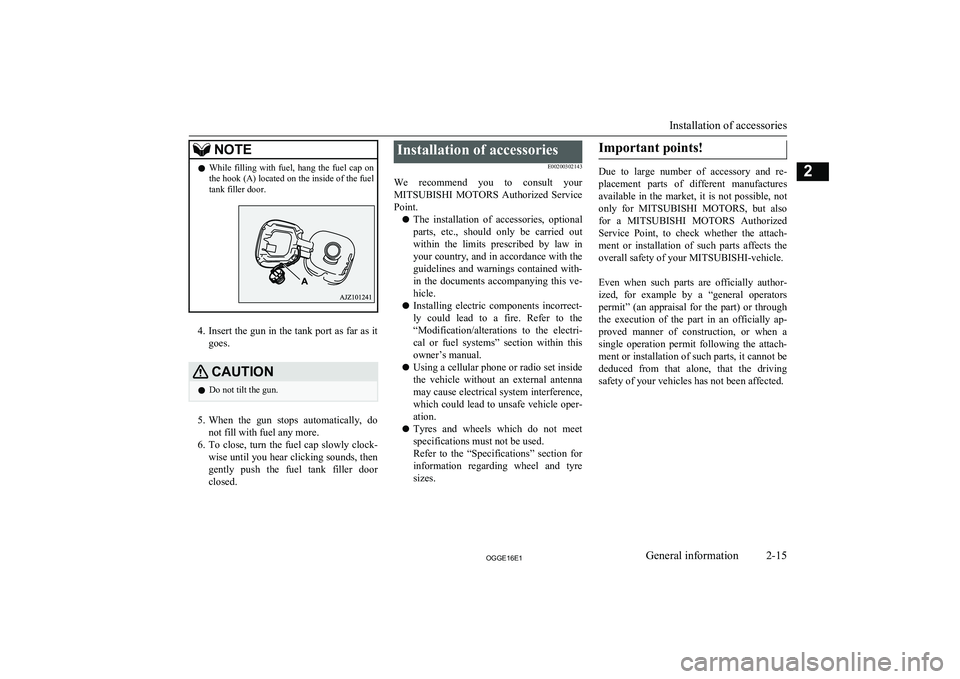
NOTElWhile filling with fuel, hang the fuel cap on
the hook (A) located on the inside of the fuel
tank filler door.
4. Insert the gun in the tank port as far as it
goes.
CAUTIONl Do not tilt the gun.
5.
When the gun stops automatically, do
not fill with fuel any more.
6. To close, turn the fuel cap slowly clock-
wise until you hear clicking sounds, then
gently push the fuel tank filler door
closed.
Installation of accessories
E00200302143
We recommend you to consult your MITSUBISHI MOTORS Authorized Service
Point.
l The installation of accessories, optional
parts, etc., should only be carried out
within the limits prescribed by law in your country, and in accordance with the
guidelines and warnings contained with-
in the documents accompanying this ve- hicle.
l Installing electric components incorrect-
ly could lead to a fire. Refer to the “Modification/alterations to the electri-
cal or fuel systems” section within this
owner’s manual.
l Using a cellular phone or radio set inside
the vehicle without an external antenna
may cause electrical system interference, which could lead to unsafe vehicle oper-ation.
l Tyres and wheels which do not meet
specifications must not be used.
Refer to the “Specifications” section for information regarding wheel and tyre
sizes.Important points!
Due to large number of accessory and re-
placement parts of different manufactures
available in the market, it is not possible, not only for MITSUBISHI MOTORS , but also
for a MITSUBISHI MOTORS Authorized
Service Point, to check whether the attach- ment or installation of such parts affects theoverall safety of your MITSUBISHI-vehicle.
Even when such parts are officially author-
ized, for example by a “general operators permit” (an appraisal for the part) or throughthe execution of the part in an officially ap-
proved manner of construction, or when a single operation permit following the attach-
ment or installation of such parts, it cannot be deduced from that alone, that the driving
safety of your vehicles has not been affected.
Installation of accessories
2-15OGGE16E1General information2
Page 57 of 490
WARNINGlDo not use the
MITSUBISHI Remote
Control if children, persons in need of care, pets, etc. are in the vehicle. Even if the remote climate control is used, thecabin may become hot or cold due to somereasons such as automatic stop of the sys-
tem. The cabin temperature may quickly
rise in sunshine, which poses a risk of heat
stroke and dehydration. In cold weather, on the other hand, the cabin temperature
may quickly drop. Either of which could lead to death in the worst case.
l The cooling fan in the engine compart-
ment may operate automatically when
charging or when operating air condition- er. Do not bring your hand close to the
cooling fan during charging.CAUTIONl Do not use a car cover except for the
MITSUBISHI MOTORS GENUINE car
cover, when using the timer charging or the remote climate control.NOTEl Keep the following points in mind when us-
ing a wireless LAN device:NOTE• Communication speed and range vary de-
pending on the wireless LAN devices and the surrounding conditions (radio environ-
ment, obstacles, parking area environ- ment, etc.).
• Due to the characteristics of radio waves,
communication speed tends to decrease as the communication distance increases.
Use your wireless LAN device at a short
distance from the vehicle for better re-
sponse.
• When a microwave oven or ISM (indus-
trial, scientific and medical) equipment is being used, the communication speed and
range of wireless LAN devices may de- crease. Use your wireless LAN device
away from these appliances and equip-
ment.
• If a wireless LAN device and Bluetooth
(registered trademark of Bluetooth SIG, Inc.) are used simultaneously, the com-
munication speed and range of each de- vice may decrease. Use your wireless
LAN device away from Bluetooth devi- ces.
l Wireless LAN devices may not communi-
cate with the vehicle, or may not operate
normally or stably in the following environ- ment or situations. Check that the device cancommunicate with your vehicle before use.
• There is an obstruction such as a concrete
or metal wall between the vehicle and
wireless LAN device.NOTE• The vehicle is surrounded by tall vehicles
in a parking lot.
• There are facilities nearby that emit strong
radio waves, such as a TV tower, trans-
former substation, broadcasting station or
airport.
• There is a communication device such as
a mobile phone or radio, or an electric de- vice such as a personal computer near the
wireless LAN device.
• The wireless LAN device is in contact
with or covered by a metal object.
• The battery of the wireless LAN device
has run down.
l The
MITSUBISHI Remote Control cannot
be used under the following conditions:
• The wireless LAN device is turned off.
• The
MITSUBISHI Remote Control appli-
cation software is not installed.
• The
MITSUBISHI Remote Control appli-
cation software is not running.
• The wireless LAN device is not registered
on the vehicle or it is not connected to the
vehicle.
• The wireless LAN device is out of the
communication range.
• The wireless LAN device is connected to
other wireless LAN device.
• The wireless LAN device has failed, or its
battery has run out.
MITSUBISHI Remote Control*
3-25OGGE16E1Charging3
Page 60 of 490
KeysE00300103817
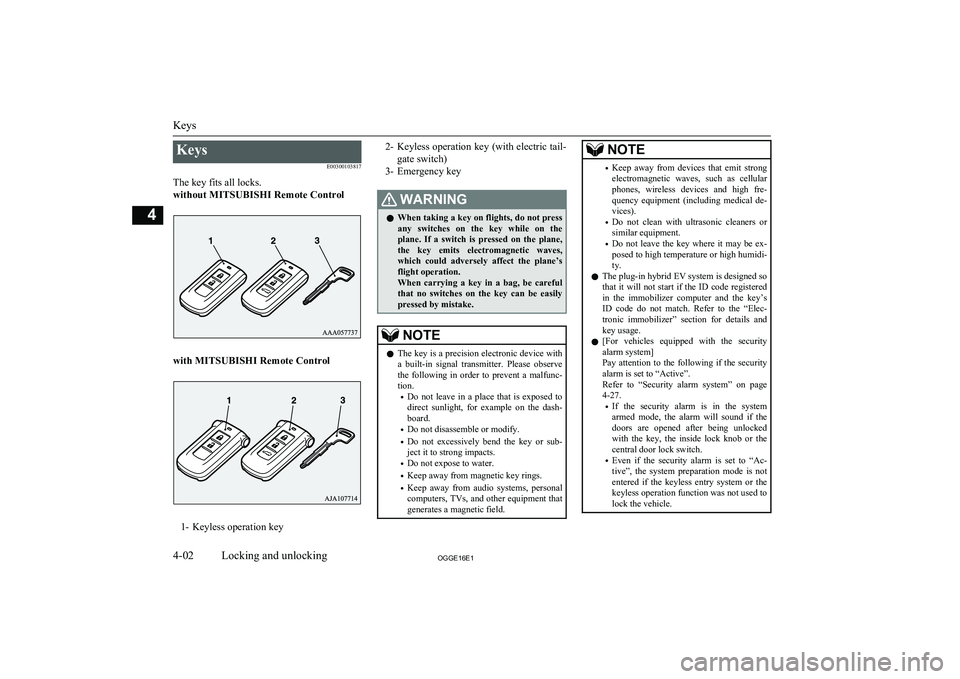
The key fits all locks.
without MITSUBISHI Remote Control
with MITSUBISHI Remote Control
1- Keyless operation key
2- Keyless operation key (with electric tail-
gate switch)
3- Emergency keyWARNINGl When taking a key on flights, do not press
any switches on the key while on the plane. If a switch is pressed on the plane,
the key emits electromagnetic waves, which could adversely affect the plane’s flight operation.
When carrying a key in a bag, be careful that no switches on the key can be easily
pressed by mistake.NOTEl The key is a precision electronic device with
a built-in signal transmitter. Please observe
the following in order to prevent a malfunc- tion.
• Do not leave in a place that is exposed to
direct sunlight, for example on the dash- board.
• Do not disassemble or modify.
• Do not excessively bend the key or sub-
ject it to strong impacts.
• Do not expose to water.
• Keep away from magnetic key rings.
• Keep away from audio systems, personal
computers, TVs, and other equipment that generates a magnetic field.NOTE• Keep away from devices that emit strong
electromagnetic waves, such as cellular
phones, wireless devices and high fre- quency equipment (including medical de-
vices).
• Do not clean with ultrasonic cleaners or
similar equipment.
• Do not leave the key where it may be ex-
posed to high temperature or high humidi- ty.
l The plug-in hybrid EV system is designed so
that it will not start if the ID code registered
in the immobilizer computer and the key’s ID code do not match. Refer to the “Elec-
tronic immobilizer” section for details and key usage.
l [For vehicles equipped with the security
alarm system]
Pay attention to the following if the security
alarm is set to “Active”.
Refer to “Security alarm system” on page 4-27.
• If the security alarm is in the system
armed mode, the alarm will sound if the
doors are opened after being unlocked with the key, the inside lock knob or the
central door lock switch.
• Even if the security alarm is set to “Ac-
tive”, the system preparation mode is not entered if the keyless entry system or thekeyless operation function was not used to
lock the vehicle.
Keys
4-02OGGE16E1Locking and unlocking4
Page 65 of 490
The driver should always carry the keylessoperation key. This key is necessary for lock-
ing and unlocking the doors and tailgate,
starting the engine and otherwise operating the vehicle, so before locking and leaving the vehicle, be sure to check that you have the
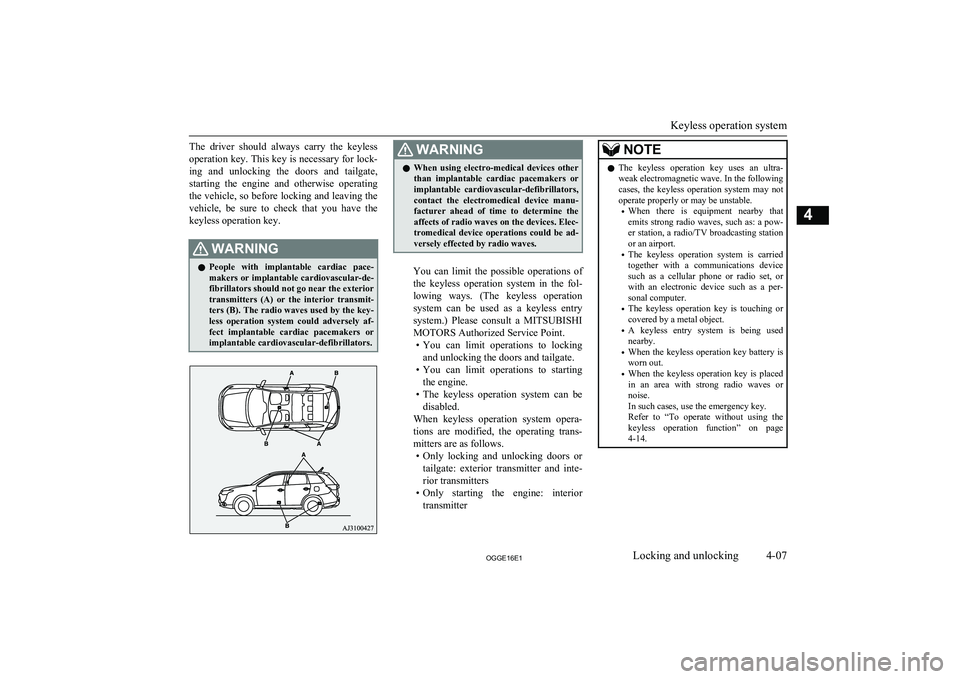
keyless operation key.WARNINGl People with implantable cardiac pace-
makers or implantable cardiovascular-de-
fibrillators should not go near the exterior transmitters (A) or the interior transmit-
ters (B). The radio waves used by the key-
less operation system could adversely af- fect implantable cardiac pacemakers orimplantable cardiovascular-defibrillators.WARNINGl When using electro-medical devices other
than implantable cardiac pacemakers or implantable cardiovascular-defibrillators,
contact the electromedical device manu- facturer ahead of time to determine theaffects of radio waves on the devices. Elec-
tromedical device operations could be ad-
versely effected by radio waves.
You can limit the possible operations of
the keyless operation system in the fol-
lowing ways. (The keyless operation system can be used as a keyless entry system.) Please consult a MITSUBISHI
MOTORS Authorized Service Point. • You can limit operations to locking
and unlocking the doors and tailgate.
• You can limit operations to starting
the engine.
• The keyless operation system can be
disabled.
When keyless operation system opera- tions are modified, the operating trans-mitters are as follows. • Only locking and unlocking doors or
tailgate: exterior transmitter and inte-
rior transmitters
• Only starting the engine: interior
transmitter
NOTEl The keyless operation key uses an ultra-
weak electromagnetic wave. In the following
cases, the keyless operation system may not
operate properly or may be unstable.
• When there is equipment nearby that
emits strong radio waves, such as: a pow-
er station, a radio/TV broadcasting station or an airport.
• The keyless operation system is carried
together with a communications device such as a cellular phone or radio set, or
with an electronic device such as a per- sonal computer.
• The keyless operation key is touching or
covered by a metal object.
• A keyless entry system is being used
nearby.
• When the keyless operation key battery is
worn out.
• When the keyless operation key is placed
in an area with strong radio waves or noise.
In such cases, use the emergency key.
Refer to “To operate without using the
keyless operation function” on page 4-14.
Keyless operation system
4-07OGGE16E1Locking and unlocking4
Page 134 of 490
WARNINGlDo not allow any rear seat occupant to
hold onto the seatback of either front seat,
in order to reduce risk of injury from the
deploying side airbag. Special care should
be taken with children.
l Do not place any objects near or in front
of the seatback of either front seat. They could interfere with proper side airbag in-
flation, and also could cause injury if thrown free by side airbag deployment.
l Do not place stickers, labels or additional
trim on the seatback of either front seat. They could interfere with proper side air-bag inflation.
l Do not install seat covers on seats with
side airbags.
Do not re-cover seats that have side air-
bags. This could interfere with proper side airbag inflation.
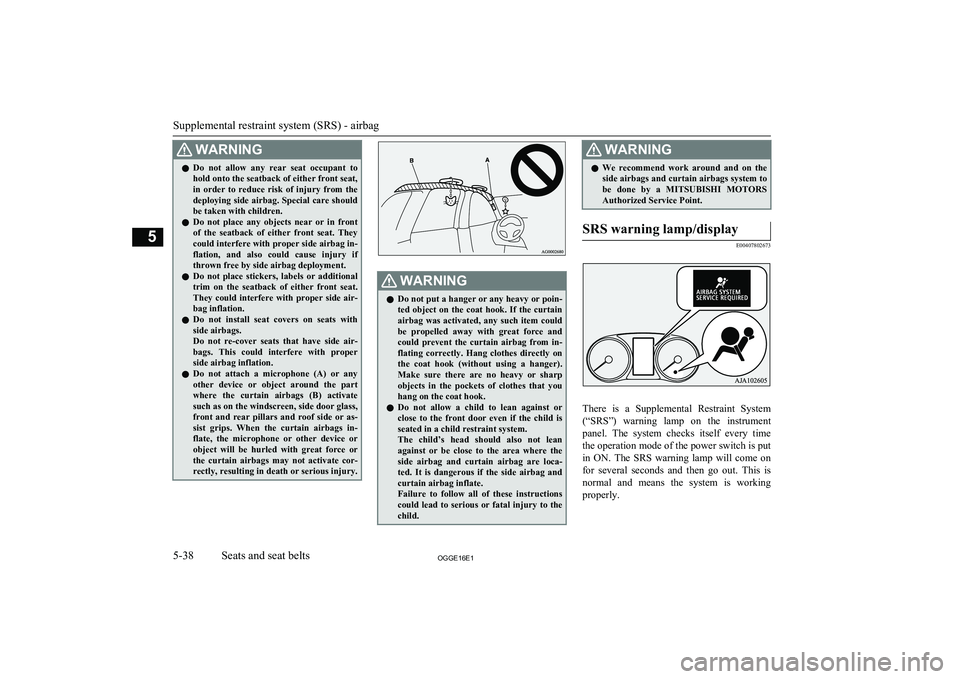
l Do not attach a microphone (A) or any
other device or object around the part
where the curtain airbags (B) activate
such as on the windscreen, side door glass, front and rear pillars and roof side or as- sist grips. When the curtain airbags in-
flate, the microphone or other device or object will be hurled with great force orthe curtain airbags may not activate cor-
rectly, resulting in death or serious injury.WARNINGl Do not put a hanger or any heavy or poin-
ted object on the coat hook. If the curtain
airbag was activated, any such item could
be propelled away with great force and could prevent the curtain airbag from in-
flating correctly. Hang clothes directly on the coat hook (without using a hanger).
Make sure there are no heavy or sharp objects in the pockets of clothes that you
hang on the coat hook.
l Do not allow a child to lean against or
close to the front door even if the child is
seated in a child restraint system.
The child’s head should also not lean against or be close to the area where the
side airbag and curtain airbag are loca-
ted. It is dangerous if the side airbag and curtain airbag inflate.
Failure to follow all of these instructions
could lead to serious or fatal injury to the
child.WARNINGl We recommend work around and on the
side airbags and curtain airbags system to
be done by a MITSUBISHI MOTORS
Authorized Service Point.SRS warning lamp/display
E00407802673
There is a Supplemental Restraint System
(“SRS”) warning lamp on the instrument
panel. The system checks itself every time
the operation mode of the power switch is put in ON. The SRS warning lamp will come on
for several seconds and then go out. This is
normal and means the system is working
properly.
Supplemental restraint system (SRS) - airbag
5-38OGGE16E1Seats and seat belts5
Page 314 of 490
HeatingE00733901059
When heating, the engine starts running be-
cause the heating system uses the heat of en-
gine coolant.
On vehicles with electric heater, it can de-
crease the number of times engine starting because electrical power stored in the drive battery is also used when heating.LW/MW/FM radio/CD
player* E00708503387
The audio system can only be used when theoperation mode of the power switch is in ON
or ACC.
NOTEl To listen to the audio system while the Plug-
in Hybrid EV system is not operating, put the operation mode of the power switch in
ACC.
If the operation mode of the power switch is
left in ACC, the accessory power will auto- matically turn off after a certain period oftime and you will no longer be able to use
the audio system. The accessory power comes on again if the operation mode of the
power switch is operated with is in the ACC.
Refer to “ACC power auto-cutout function” on page 7-10.
l If a cellular phone is used inside the vehicle,
it may create noise from the audio equip-
ment. This does not mean that anything is wrong with your audio equipment. In such acase, use the cellular phone at a place as far
away as possible from the audio equipment.
l If foreign objects or water get into the audio
equipment, or if smoke or a strange odour comes from it, immediately turn off the au-
dio system. We recommend you to have it checked. Never try to repair it by yourself.
Avoid continuous usage without inspection
by a qualified person.Important Points on Usage
E00735500023
iPod/iPhone Playback Func- tion*
l This product supports audio playback
from iPod/iPhone devices, however dif-fering versions mean that playback can-
not be guaranteed.
l Please be aware that depending on the
iPod/iPhone model or version, operation
may differ.
How to Clean
E00735700025
l If the product becomes dirty, wipe with
a soft cloth.
l If very dirty, use a soft cloth dipped in
neutral detergent diluted in water, and then wrung out. Do not use benzene,
thinners, or other chemical wipes. This
may harm the surface.
Trademarks
E00735801238
l Product names and other proper names
are the trademarks or registered trade- marks of their respective owners.
l Furthermore, even if there is no specific
denotation of trademarks or registered
trademarks, these are to be observed in
their entirety.
Heating
8-14OGGE16E1For pleasant driving8