display MITSUBISHI OUTLANDER PHEV 2017 Owner's Manual (in English)
[x] Cancel search | Manufacturer: MITSUBISHI, Model Year: 2017, Model line: OUTLANDER PHEV, Model: MITSUBISHI OUTLANDER PHEV 2017Pages: 548, PDF Size: 25.5 MB
Page 341 of 548
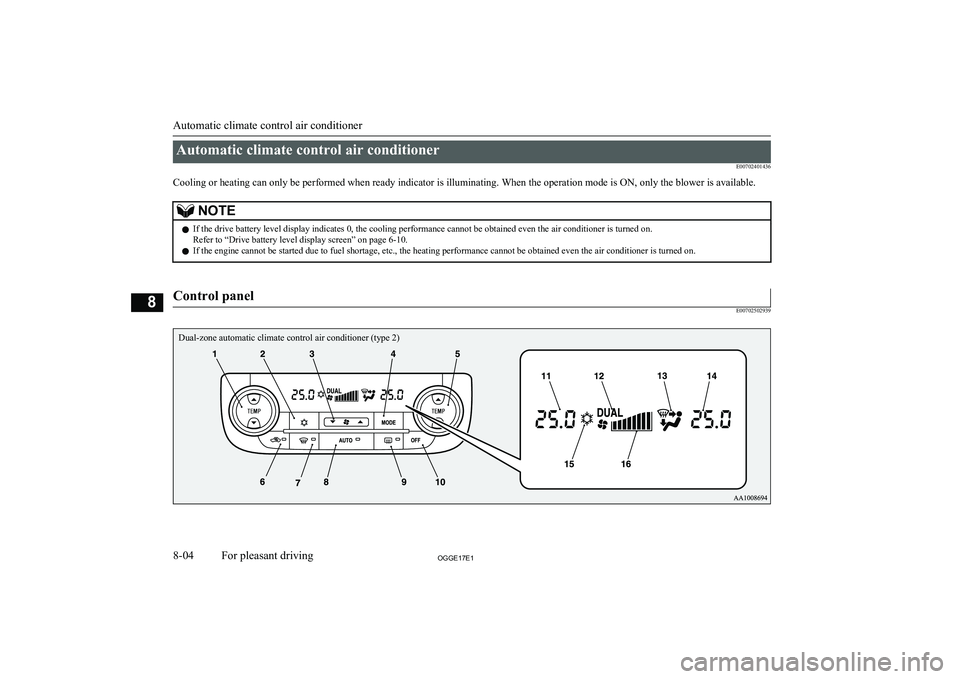
Automatic climate control air conditionerE00702401436
Cooling or heating can only be performed when ready indicator is illuminating. When the operation mode is ON, only the blower is available.NOTEl If the drive battery level display indicates 0, the cooling performance cannot be obtained even the air conditioner is turned on.
Refer to “Drive battery level display screen” on page 6-10.
l If the engine cannot be started due to fuel shortage, etc., the heating performance cannot be obtained even the air conditioner is turned on.
Control panel
E00702502939
Automatic climate control air conditioner
8-04OGGE17E1For pleasant driving8 Dual-zone automatic climate control air conditioner (type 2)
Page 342 of 548
1- Driver’s side temperature control switch(LHD vehicles)
Passenger’s side temperature control
switch (RHD vehicles)
2- Air conditioning switch
3- Blower speed selection switch
4- MODE switch
5- Passenger’s side temperature control switch (LHD vehicles)
Driver’s side temperature control switch
(RHD vehicles)6- Air selection switch
7- Demister switch
8- AUTO switch
9- Rear window demister switch ® p. 6-69
10- OFF switch
11- Driver’s side temperature display (LHD vehicles) ® p. 8-07
Passenger’s side temperature display
(RHD vehicles) ® p. 8-07
12- DUAL indicator13- Mode selection display
14- Passenger’s side temperature display (LHD vehicles) ® p. 8-07
Driver’s side temperature display (RHD
vehicles) ® p. 8-07
15- Air conditioning indicator
16- Blower speed display
Automatic climate control air conditioner
8-05OGGE17E1For pleasant driving8
Page 343 of 548
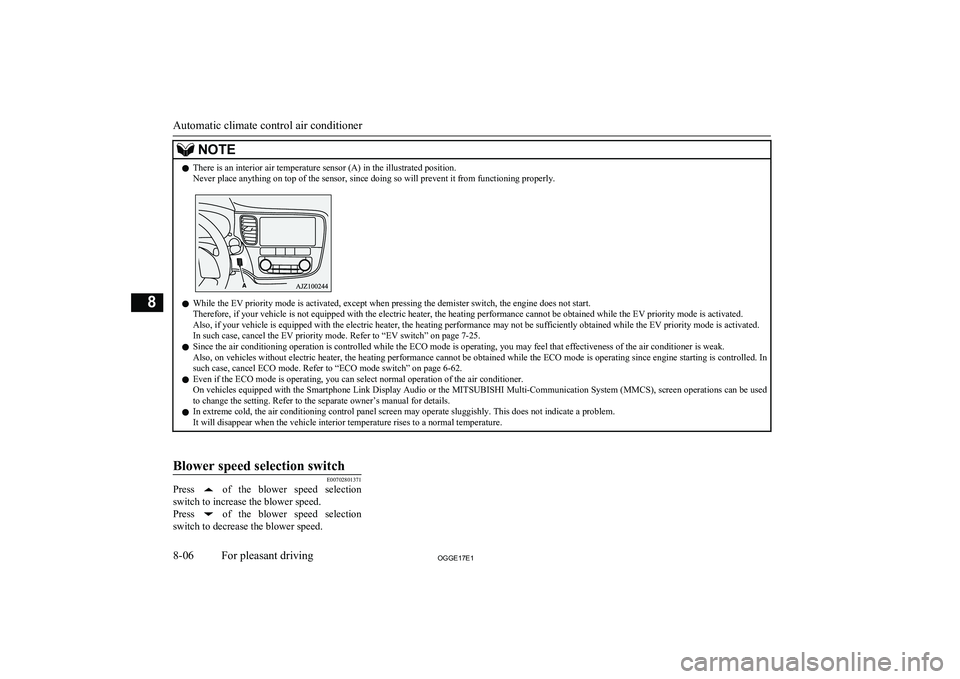
NOTElThere is an interior air temperature sensor (A) in the illustrated position.
Never place anything on top of the sensor, since doing so will prevent it from functioning properly.
l While the EV priority mode is activated, except when pressing the demister switch, the engine does not start.
Therefore, if your vehicle is not equipped with the electric heater, the heating performance cannot be obtained while the EV priority mode is activated.
Also, if your vehicle is equipped with the electric heater, the heating performance may not be sufficiently obtained while the EV priority mode is activated. In such case, cancel the EV priority mode. Refer to “EV switch” on page 7-25.
l Since the air conditioning operation is controlled while the ECO mode is operating, you may feel that effectiveness of the air conditioner is weak.
Also, on vehicles without electric heater, the heating performance cannot be obtained while the ECO mode is operating since engine starting is controlled. In such case, cancel ECO mode. Refer to “ECO mode switch” on page 6-62.
l Even if the ECO mode is operating, you can select normal operation of the air conditioner.
On vehicles equipped with the Smartphone Link Display Audio or the MITSUBISHI Multi-Communication System (MMCS), screen operations can be used
to change the setting. Refer to the separate owner’s manual for details.
l In extreme cold, the air conditioning control panel screen may operate sluggishly. This does not indicate a problem.
It will disappear when the vehicle interior temperature rises to a normal temperature.
Blower speed selection switch
E00702801371
Press of the blower speed selection
switch to increase the blower speed.
Press
of the blower speed selection
switch to decrease the blower speed.
Automatic climate control air conditioner
8-06OGGE17E1For pleasant driving8
Page 344 of 548
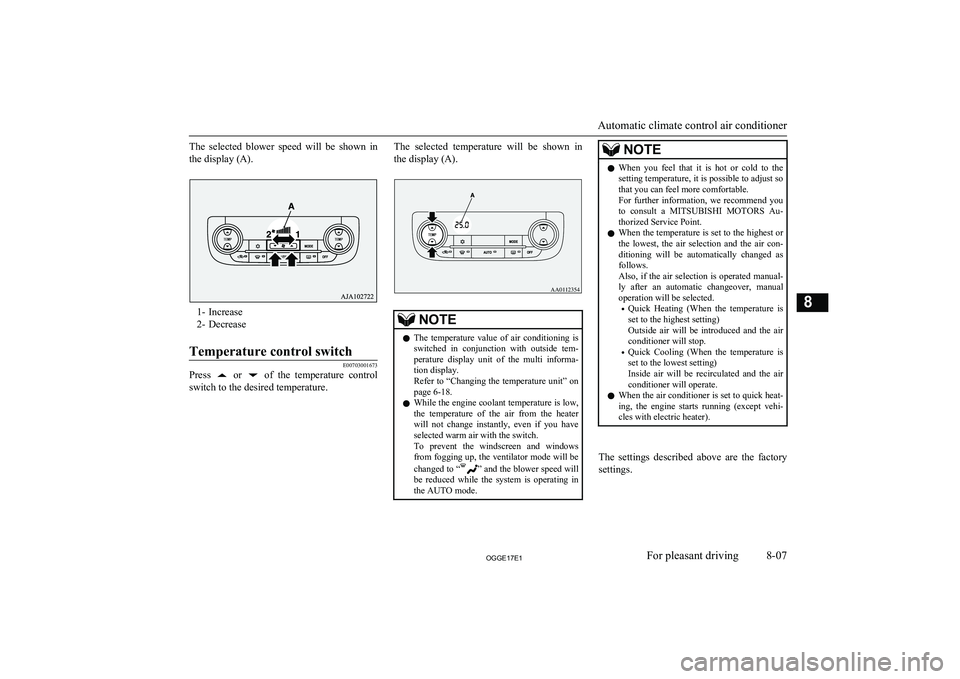
The selected blower speed will be shown inthe display (A).
1- Increase
2- Decrease
Temperature control switch
E00703001673
Press or of the temperature control
switch to the desired temperature.
The selected temperature will be shown in
the display (A).NOTEl The temperature value of air conditioning is
switched in conjunction with outside tem- perature display unit of the multi informa- tion display.
Refer to “Changing the temperature unit” on
page 6-18.
l While the engine coolant temperature is low,
the temperature of the air from the heaterwill not change instantly, even if you have selected warm air with the switch.
To prevent the windscreen and windows from fogging up, the ventilator mode will be
changed to “
” and the blower speed will
be reduced while the system is operating in the AUTO mode.
NOTEl When you feel that it is hot or cold to the
setting temperature, it is possible to adjust sothat you can feel more comfortable.
For further information, we recommend you
to consult a MITSUBISHI MOTORS Au-
thorized Service Point.
l When the temperature is set to the highest or
the lowest, the air selection and the air con- ditioning will be automatically changed as
follows.
Also, if the air selection is operated manual- ly after an automatic changeover, manualoperation will be selected.
• Quick Heating (When the temperature is
set to the highest setting)
Outside air will be introduced and the air conditioner will stop.
• Quick Cooling (When the temperature is
set to the lowest setting)
Inside air will be recirculated and the air
conditioner will operate.
l When the air conditioner is set to quick heat-
ing, the engine starts running (except vehi-
cles with electric heater).
The settings described above are the factory settings.
Automatic climate control air conditioner
8-07OGGE17E1For pleasant driving8 AA0112354
Page 345 of 548
The air selection and air conditioningswitches can be customized (function setting
changed), and the automatic switching of out-
side air and the air conditioner according to operating conditions can be changed as de-
sired.
For further information, we recommend you to consult a MITSUBISHI MOTORS Au-
thorized Service Point.
Refer to “Customizing the air conditioning
switch” on page 8-10.
Refer to “Customizing the air selection” on page 8-08.
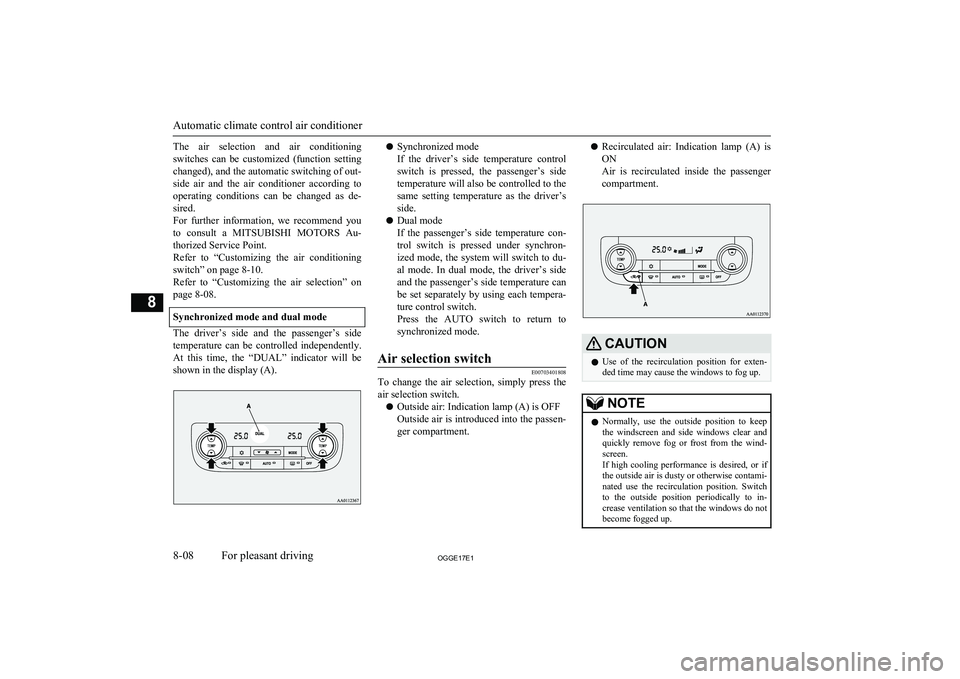
Synchronized mode and dual mode
The driver’s side and the passenger’s side
temperature can be controlled independently. At this time, the “DUAL” indicator will be shown in the display (A).
l Synchronized mode
If the driver’s side temperature control switch is pressed, the passenger’s side temperature will also be controlled to the
same setting temperature as the driver’s
side.
l Dual mode
If the passenger’s side temperature con-
trol switch is pressed under synchron- ized mode, the system will switch to du-
al mode. In dual mode, the driver’s side
and the passenger’s side temperature can
be set separately by using each tempera-
ture control switch.
Press the AUTO switch to return to
synchronized mode.Air selection switch
E00703401808
To change the air selection, simply press the air selection switch.
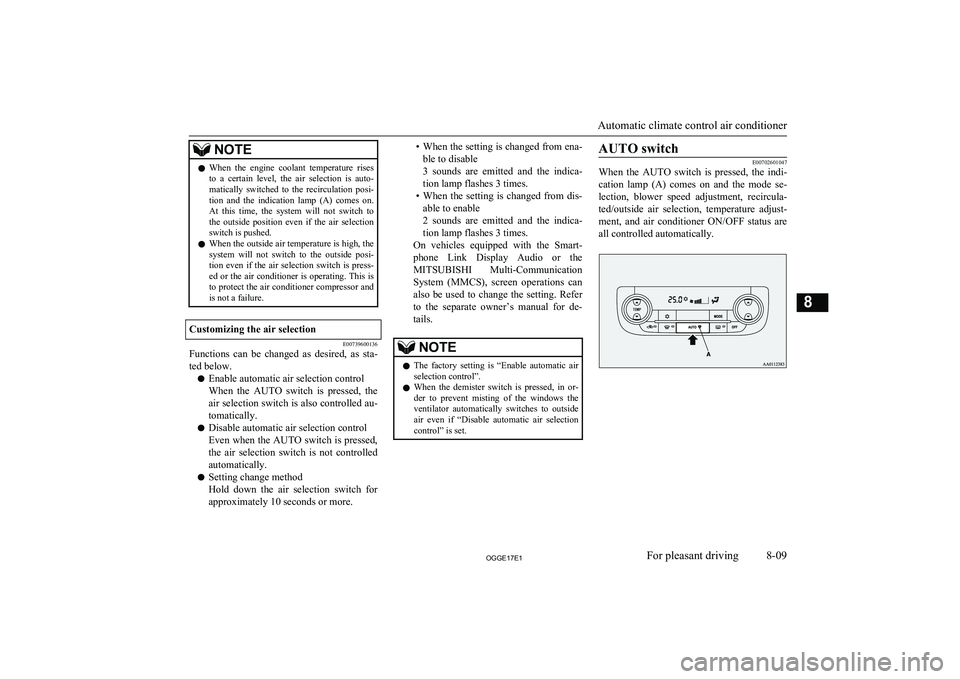
l Outside air: Indication lamp (A) is OFF
Outside air is introduced into the passen- ger compartment.
l Recirculated air: Indication lamp (A) is
ON
Air is recirculated inside the passenger
compartment.CAUTIONl Use of the recirculation position for exten-
ded time may cause the windows to fog up.NOTEl Normally, use the outside position to keep
the windscreen and side windows clear and
quickly remove fog or frost from the wind- screen.
If high cooling performance is desired, or if
the outside air is dusty or otherwise contami- nated use the recirculation position. Switch
to the outside position periodically to in- crease ventilation so that the windows do notbecome fogged up.
Automatic climate control air conditioner
8-08OGGE17E1For pleasant driving8
Page 346 of 548
NOTElWhen the engine coolant temperature rises
to a certain level, the air selection is auto-
matically switched to the recirculation posi- tion and the indication lamp (A) comes on.
At this time, the system will not switch to the outside position even if the air selection
switch is pushed.
l When the outside air temperature is high, the
system will not switch to the outside posi- tion even if the air selection switch is press-ed or the air conditioner is operating. This is
to protect the air conditioner compressor and is not a failure.Customizing the air selection
E00739600136
Functions can be changed as desired, as sta-
ted below.
l Enable automatic air selection control
When the AUTO switch is pressed, the
air selection switch is also controlled au- tomatically.
l Disable automatic air selection control
Even when the AUTO switch is pressed, the air selection switch is not controlled
automatically.
l Setting change method
Hold down the air selection switch for approximately 10 seconds or more.
• When the setting is changed from ena-
ble to disable
3 sounds are emitted and the indica- tion lamp flashes 3 times.
• When the setting is changed from dis-
able to enable
2 sounds are emitted and the indica- tion lamp flashes 3 times.
On vehicles equipped with the Smart-
phone Link Display Audio or the
MITSUBISHI Multi-Communication
System (MMCS), screen operations can also be used to change the setting. Refer
to the separate owner’s manual for de-
tails.NOTEl The factory setting is “Enable automatic air
selection control”.
l When the demister switch is pressed, in or-
der to prevent misting of the windows the
ventilator automatically switches to outside air even if “Disable automatic air selection
control” is set.AUTO switch
E00702601047
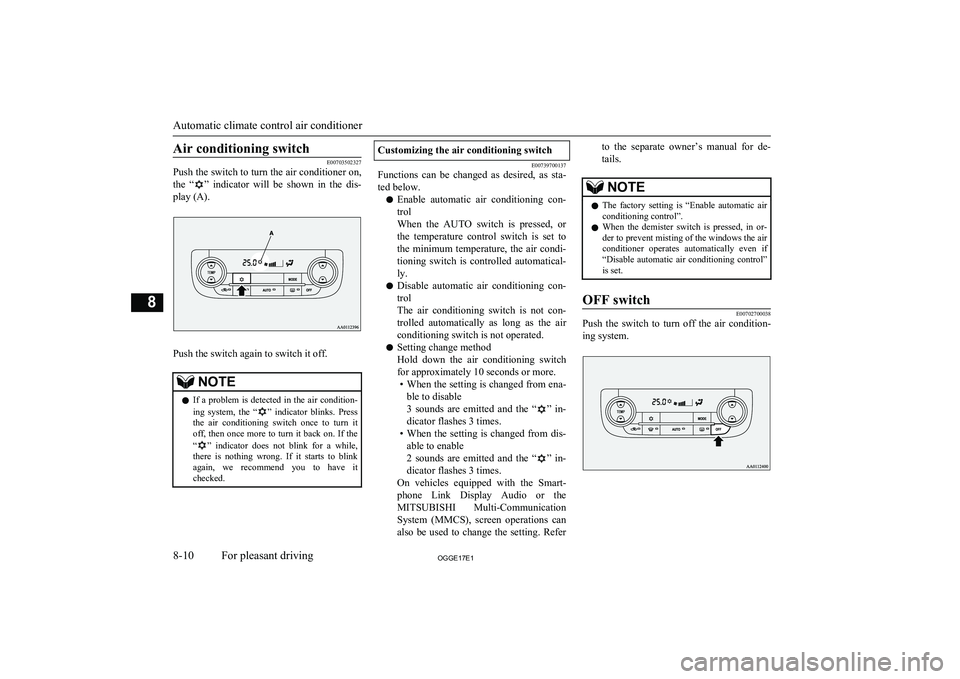
When the AUTO switch is pressed, the indi-
cation lamp (A) comes on and the mode se- lection, blower speed adjustment, recircula-
ted/outside air selection, temperature adjust- ment, and air conditioner ON/OFF status are all controlled automatically.
Automatic climate control air conditioner
8-09OGGE17E1For pleasant driving8
Page 347 of 548
Air conditioning switch
E00703502327
Push the switch to turn the air conditioner on,
the “
” indicator will be shown in the dis-
play (A).
Push the switch again to switch it off.
NOTEl If a problem is detected in the air condition-
ing system, the “” indicator blinks. Press
the air conditioning switch once to turn it off, then once more to turn it back on. If the
“
” indicator does not blink for a while,
there is nothing wrong. If it starts to blink again, we recommend you to have it
checked.
Customizing the air conditioning switch
E00739700137
Functions can be changed as desired, as sta-
ted below.
l Enable automatic air conditioning con-
trol
When the AUTO switch is pressed, or the temperature control switch is set to
the minimum temperature, the air condi- tioning switch is controlled automatical-
ly.
l Disable automatic air conditioning con-
trol
The air conditioning switch is not con-
trolled automatically as long as the air
conditioning switch is not operated.
l Setting change method
Hold down the air conditioning switch
for approximately 10 seconds or more. • When the setting is changed from ena-
ble to disable
3 sounds are emitted and the “
” in-
dicator flashes 3 times.
• When the setting is changed from dis-
able to enable
2 sounds are emitted and the “
” in-
dicator flashes 3 times.
On vehicles equipped with the Smart- phone Link Display Audio or the
MITSUBISHI Multi-Communication
System (MMCS), screen operations can
also be used to change the setting. Refer
to the separate owner’s manual for de-
tails.NOTEl The factory setting is “Enable automatic air
conditioning control”.
l When the demister switch is pressed, in or-
der to prevent misting of the windows the air
conditioner operates automatically even if “Disable automatic air conditioning control”
is set.OFF switch
E00702700038
Push the switch to turn off the air condition-
ing system.
Automatic climate control air conditioner
8-10OGGE17E1For pleasant driving8
Page 348 of 548
MODE switch
E00703300031
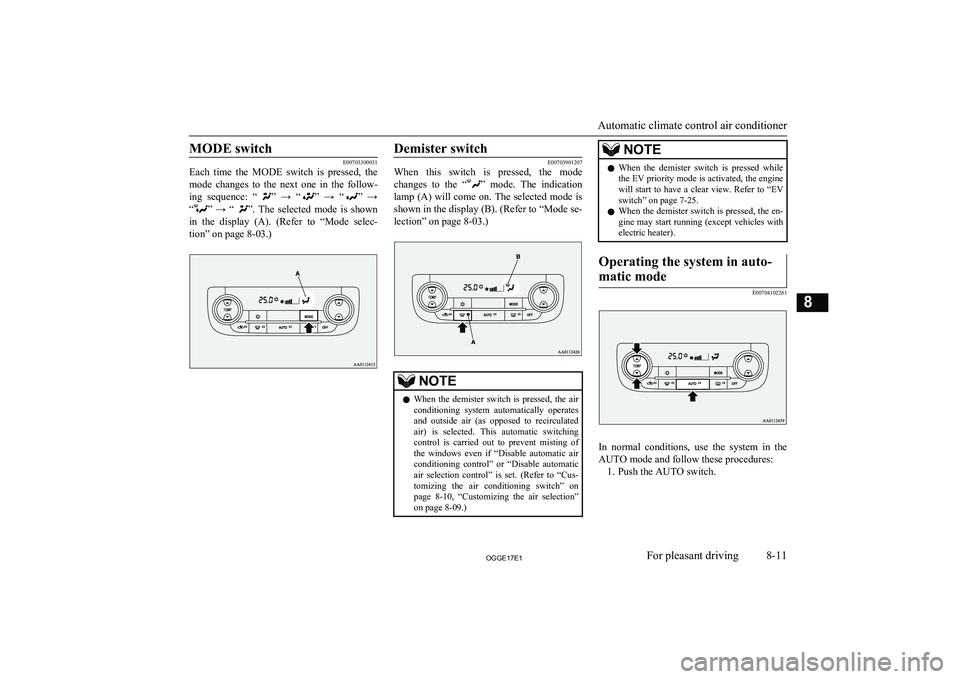
Each time the MODE switch is pressed, the
mode changes to the next one in the follow-
ing sequence: “
” → “” → “” →
“
” → “”. The selected mode is shown
in the display (A). (Refer to “Mode selec- tion” on page 8-03.)
Demister switch
E00703901207
When this switch is pressed, the mode
changes to the “
” mode. The indication
lamp (A) will come on. The selected mode is shown in the display (B). (Refer to “Mode se-lection” on page 8-03.)
NOTEl When the demister switch is pressed, the air
conditioning system automatically operates and outside air (as opposed to recirculated air) is selected. This automatic switching control is carried out to prevent misting of
the windows even if “Disable automatic air conditioning control” or “Disable automaticair selection control” is set. (Refer to “Cus-
tomizing the air conditioning switch” on page 8-10, “Customizing the air selection”
on page 8-09.)NOTEl When the demister switch is pressed while
the EV priority mode is activated, the enginewill start to have a clear view. Refer to “EV
switch” on page 7-25.
l When the demister switch is pressed, the en-
gine may start running (except vehicles with electric heater).Operating the system in auto-
matic mode
E00704102261
In normal conditions, use the system in the
AUTO mode and follow these procedures: 1. Push the AUTO switch.
Automatic climate control air conditioner
8-11OGGE17E1For pleasant driving8
Page 356 of 548
lDo not insert irregularly-shaped discs
(for example, heart-shaped), as these
may result in malfunction. Additionally, discs that have transparent portions may
not be played back.
l Discs that have not been finalized cannot
be played back.
l Even if recorded using the correct for-
mat on a recorder or computer, applica- tion software settings and environments;
disc peculiarities, damage, or marking;
or dirt or condensation on the lens inside the product may render the disc unplaya-
ble.
l Depending on the disc, some functions
may not be used, or the disc may not
play back.
l Do not use discs with cracks or warps.
l If the disc has stickers affixed, remains
from removed stickers, or affixed adhe- sive, then do not use the disc.
l Discs that have decorative labels or
stickers may not be used.
Nonstandard CDs
This product will play back audio CDs, how-
ever please be aware of the following points regarding CD standards.
l Ensure that you use discs with
on the
label surface.
l Playback of other than standard CDs is
not guaranteed. Even if the audio can be played back, the audio quality cannot be
guaranteed.
l When playing back other than standard
CDs, the following may occur. • There may be noise during playback.
• There may be jumping in the audio.
• The disc may not be recognized.
• The first track may not be played
back.
• It may take longer than usual until
start of playback of tracks.
• Playback may start from within the
track.
• Some parts may not be played back.
• Tracks may freeze during playback.
• Tracks may be displayed erroneously.Audio Files
(MP3/WMA/AAC) E00736100026
This product can play back MP3/WMA/AAC
format audio files recorded on CD-ROM, CD-R/RW, and USB devices.
There are limitations on the files and media that can be used, therefore read the following
prior to recording MP3/WMA/AAC format audio files on discs or USB devices.
Additionally, ensure you read the user man-
uals for your CD-R/RW drive and the writing software, and ensure these are used correctly.If the MP3/WMA/AAC format audio files in-
cludes title information or other data, then this can be displayed.CAUTIONl CD-ROM and CD-R/RW media can only
play back MP3 format audio files.
l Actions such as copying audio CDs or files
and either distributing these to others for free or for charge, or uploading files via the Internet or other means to servers is an in- fringement of the law.
l Do not append the file extensions “.mp3”,
“.wma”, or “.m4a”, to other than
MP3/WMA/AAC format files. Playing back
discs with these types of files recorded upon them may cause the files to be incorrectly
identified for playback, which may lead to
loud noise, resulting in speaker damage or
accident.NOTEl Depending on the condition of the disc re-
corder or recording software used, correct
playback may not be possible. In these ca- ses, refer to the user manual for your product or software.
Audio Files (MP3/WMA/AAC)
8-19OGGE17E1For pleasant driving8
Page 357 of 548
NOTElDepending on your computer’s operating
system, version, software, or settings, filesmay not have a file extension appended. In these cases, append the file extensions
“.mp3”, “.wma”, or “.m4a” when copying
the files.
l Files larger than 2GB in size cannot be
played back.Data Formats That Can Be
Played Back
E00736200027
Data formats that can be played on discs
(CD-ROM, CDR/RW) and USB devices dif-
fer.
Data formatDISCUSB deviceMP3WMAXAACXFolder Structure
E00736300031
Up to 8 folder levels can be recognized.
You can create a folder structure as in Genre
- Artist - Album - Track (MP3/WMA/AAC
format audio files) for management of tracks.FolderROOTAudio file1 level2 level3 level4 level5 level
Name
Speci- fica-tion
Explanation
Format
specifica- tions
ISO96
60Level
1Maximum 8
character file
name, and 3
character file
extension. (sin-
gle-byte alpha-
numeric capital
letters, numer-
als, “_” may be
used)
Name
Speci- fica-tion
ExplanationFormat
specifica- tionsISO96
60 ex-
tensionJolietFiles names up
to a maximum 64 characters
can be used.Multises- sionNot supported (only first session
supported)Maxi- mum
number
of levels8 levels (if the root is the 1 st
lev-
el)Maxi- mum
folder
number700 folders (including root)Maxi-
mum file
number* 165,535 files (total number on
media. Other than MP3, WMA,
and AAC files not included)File name and fold- er namerestric- tionsMaximum 64 bytes (for Uni-
code, 32 characters), files/folders
with file/folder names longer
than this will not be displayed or
played back.USB sup- ported
formatsThe recommended file system is
FAT32.
1 partition only
Audio Files (MP3/WMA/AAC)
8-20OGGE17E1For pleasant driving8