4WD MITSUBISHI OUTLANDER PHEV 2017 Owner's Manual (in English)
[x] Cancel search | Manufacturer: MITSUBISHI, Model Year: 2017, Model line: OUTLANDER PHEV, Model: MITSUBISHI OUTLANDER PHEV 2017Pages: 548, PDF Size: 25.5 MB
Page 9 of 548
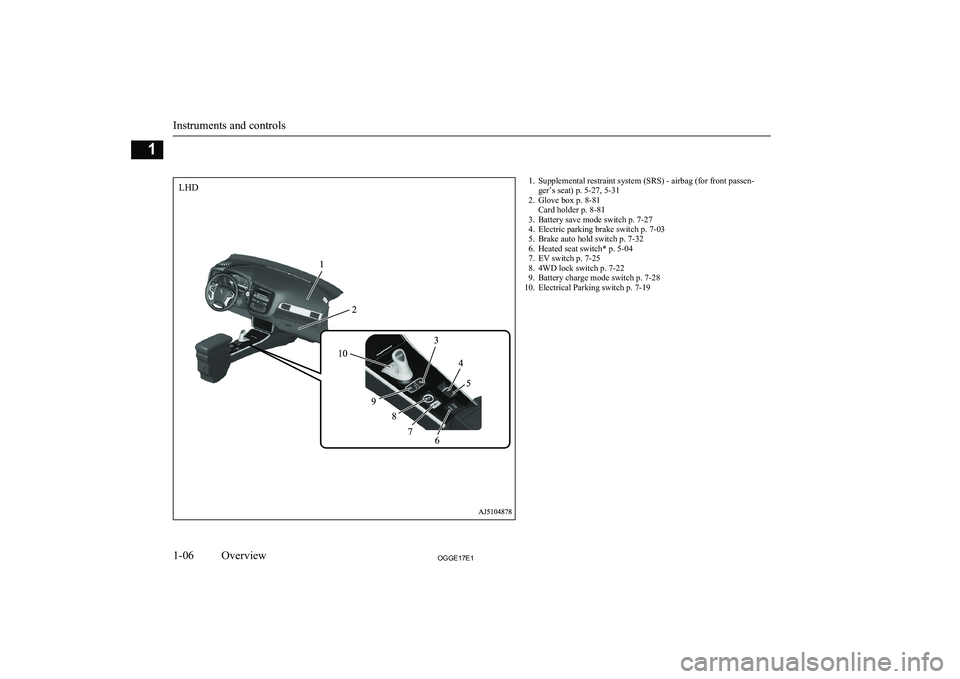
1. Supplemental restraint system (SRS) - airbag (for front passen-ger’s seat) p. 5-27, 5-31
2. Glove box p. 8-81 Card holder p. 8-81
3. Battery save mode switch p. 7-27
4. Electric parking brake switch p. 7-03
5. Brake auto hold switch p. 7-32
6. Heated seat switch* p. 5-04
7. EV switch p. 7-25
8. 4WD lock switch p. 7-22
9. Battery charge mode switch p. 7-28
10. Electrical Parking switch p. 7-19
Instruments and controls
1-06OGGE17E1Overview1LHD
Page 10 of 548
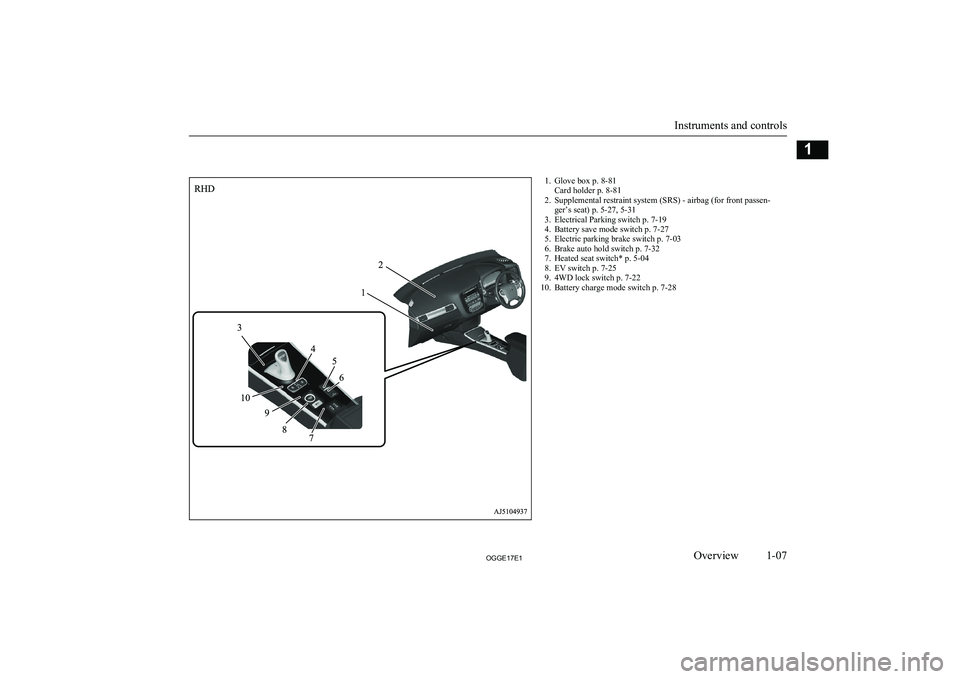
1. Glove box p. 8-81Card holder p. 8-81
2. Supplemental restraint system (SRS) - airbag (for front passen- ger’s seat) p. 5-27, 5-31
3. Electrical Parking switch p. 7-19
4. Battery save mode switch p. 7-27
5. Electric parking brake switch p. 7-03
6. Brake auto hold switch p. 7-32
7. Heated seat switch* p. 5-04
8. EV switch p. 7-25
9. 4WD lock switch p. 7-22
10. Battery charge mode switch p. 7-28
Instruments and controls
1-07OGGE17E1Overview1
Page 24 of 548
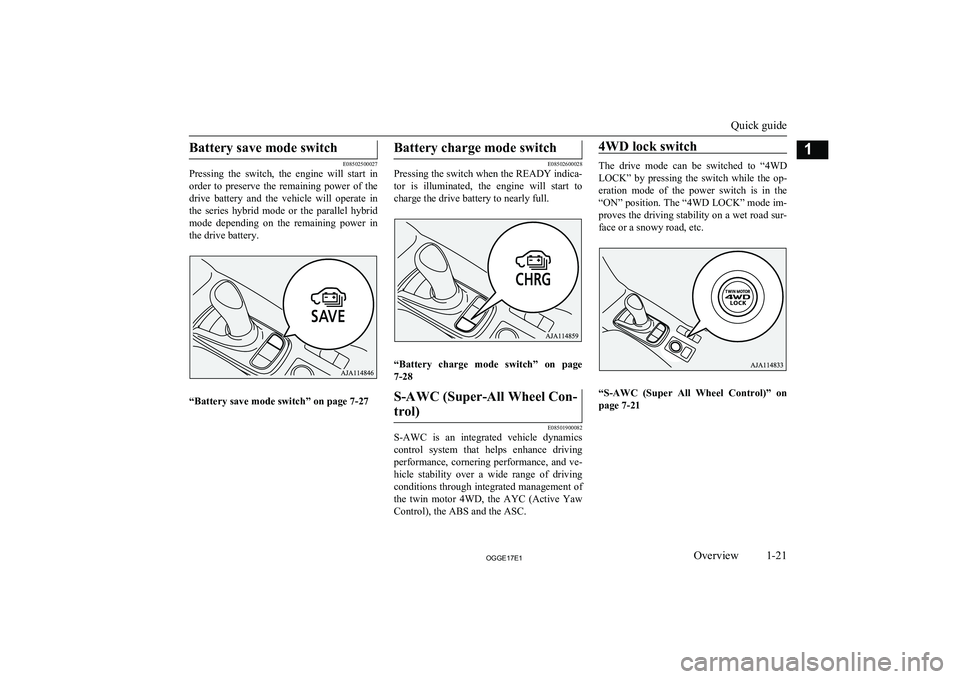
Battery save mode switch
E08502500027
Pressing the switch, the engine will start in
order to preserve the remaining power of the
drive battery and the vehicle will operate in the series hybrid mode or the parallel hybrid mode depending on the remaining power in
the drive battery.
“Battery save mode switch” on page 7-27
Battery charge mode switch
E08502600028
Pressing the switch when the READY indica-
tor is illuminated, the engine will start to
charge the drive battery to nearly full.
“Battery charge mode switch” on page
7-28
S-AWC (Super-All Wheel Con-
trol)
E08501900082
S-AWC is an integrated vehicle dynamics control system that helps enhance driving
performance, cornering performance, and ve-
hicle stability over a wide range of driving
conditions through integrated management of the twin motor 4WD, the AYC (Active Yaw
Control), the ABS and the ASC.
4WD lock switch
The drive mode can be switched to “4WD
LOCK” by pressing the switch while the op-
eration mode of the power switch is in the “ON” position. The “4WD LOCK” mode im-proves the driving stability on a wet road sur-
face or a snowy road, etc.
“S-AWC (Super All Wheel Control)” on page 7-21
Quick guide
1-21OGGE17E1Overview1
Page 151 of 548
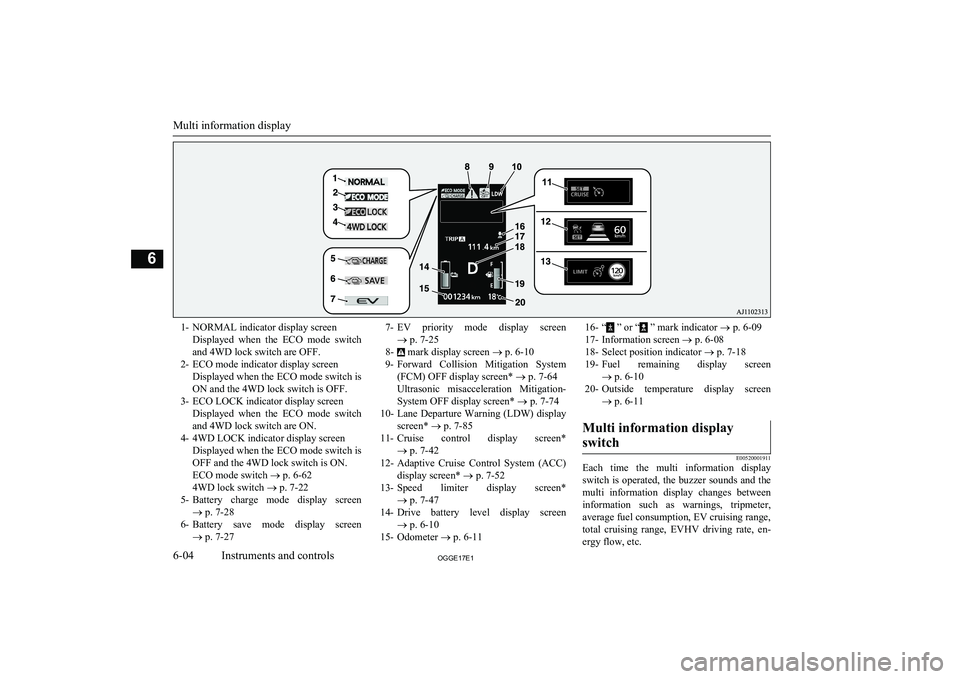
1- NORMAL indicator display screenDisplayed when the ECO mode switchand 4WD lock switch are OFF.
2- ECO mode indicator display screen Displayed when the ECO mode switch isON and the 4WD lock switch is OFF.
3- ECO LOCK indicator display screen Displayed when the ECO mode switchand 4WD lock switch are ON.
4- 4WD LOCK indicator display screen Displayed when the ECO mode switch isOFF and the 4WD lock switch is ON.ECO mode switch ® p. 6-62
4WD lock switch ® p. 7-22
5- Battery charge mode display screen
® p. 7-28
6- Battery save mode display screen
® p. 7-277- EV priority mode display screen
® p. 7-25
8-
mark display screen ® p. 6-10
9- Forward Collision Mitigation System
(FCM) OFF display screen* ® p. 7-64
Ultrasonic misacceleration Mitigation- System OFF display screen* ® p. 7-74
10- Lane Departure Warning (LDW) display
screen* ® p. 7-85
11- Cruise control display screen*
® p. 7-42
12- Adaptive Cruise Control System (ACC)
display screen* ® p. 7-52
13- Speed limiter display screen*
® p. 7-47
14- Drive battery level display screen
® p. 6-10
15- Odometer ® p. 6-11
16- “ ” or “ ” mark indicator ® p. 6-09
17- Information screen ® p. 6-08
18- Select position indicator ® p. 7-18
19- Fuel remaining display screen
® p. 6-10
20- Outside temperature display screen
® p. 6-11Multi information display
switch
E00520001911
Each time the multi information display
switch is operated, the buzzer sounds and the multi information display changes betweeninformation such as warnings, tripmeter,
average fuel consumption, EV cruising range,
total cruising range, EVHV driving rate, en- ergy flow, etc.
Multi information display
6-04OGGE17E1Instruments and controls6
Page 192 of 548
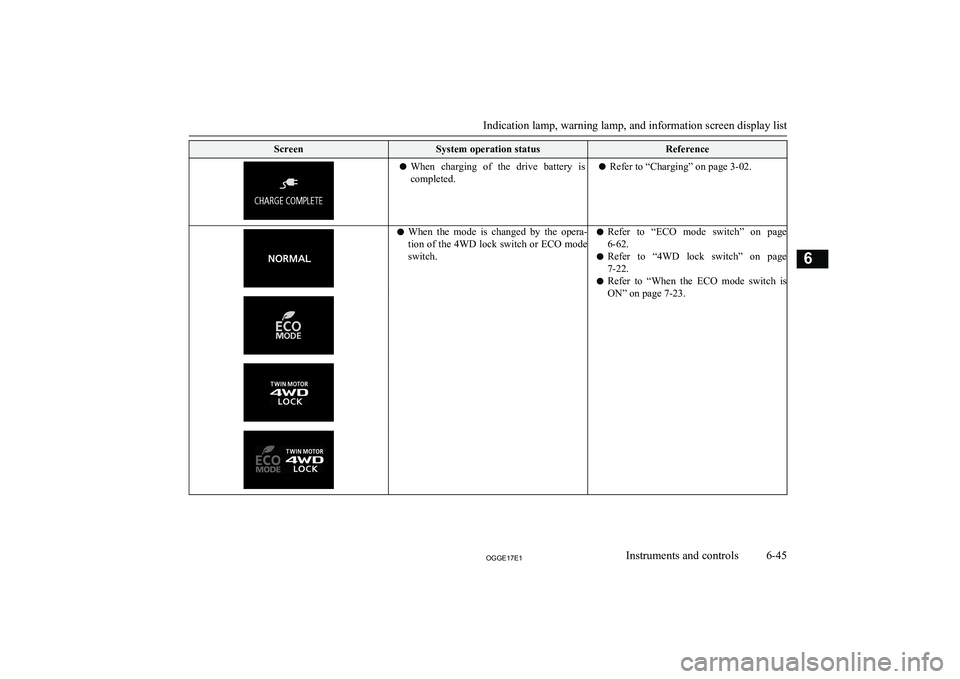
ScreenSystem operation statusReferencelWhen charging of the drive battery is
completed.l Refer to “Charging” on page 3-02.lWhen the mode is changed by the opera-
tion of the 4WD lock switch or ECO mode
switch.l Refer to “ECO mode switch” on page
6-62.
l Refer to “4WD lock switch” on page
7-22.
l Refer to “When the ECO mode switch is
ON” on page 7-23.
Indication lamp, warning lamp, and information screen display list
6-45OGGE17E1Instruments and controls6
Page 240 of 548
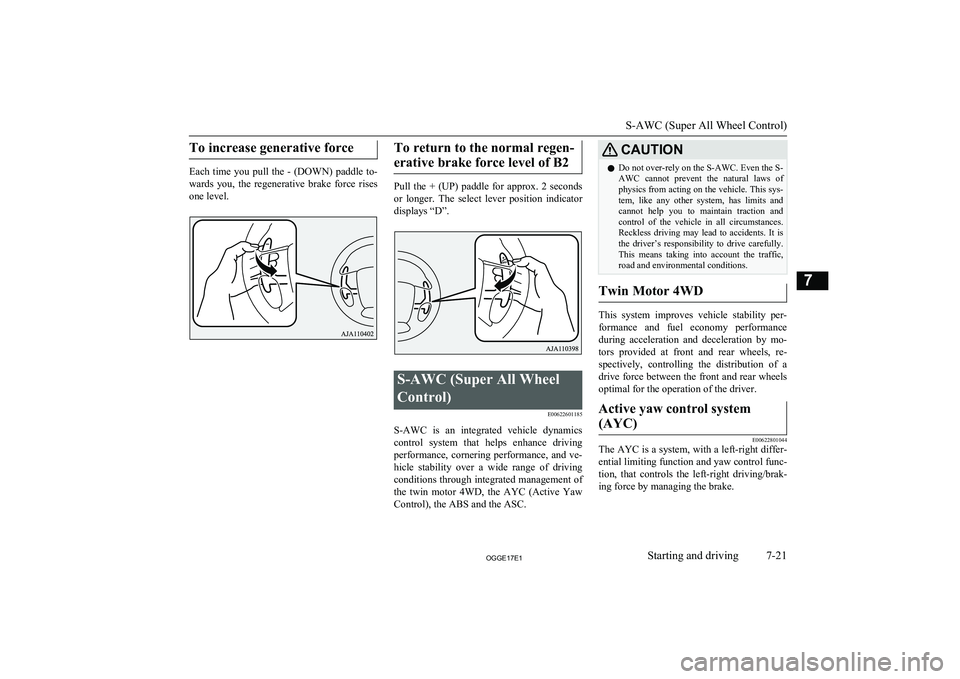
To increase generative force
Each time you pull the - (DOWN) paddle to-
wards you, the regenerative brake force rises one level.
To return to the normal regen-
erative brake force level of B2
Pull the + (UP) paddle for approx. 2 seconds
or longer. The select lever position indicator displays “D”.
S-AWC (Super All Wheel
Control) E00622601185
S-AWC is an integrated vehicle dynamics
control system that helps enhance driving
performance, cornering performance, and ve-
hicle stability over a wide range of driving conditions through integrated management of the twin motor 4WD, the AYC (Active Yaw
Control), the ABS and the ASC.
CAUTIONl Do not over-rely on the S-AWC. Even the S-
AWC cannot prevent the natural laws of
physics from acting on the vehicle. This sys- tem, like any other system, has limits and
cannot help you to maintain traction and
control of the vehicle in all circumstances. Reckless driving may lead to accidents. It is the driver’s responsibility to drive carefully.
This means taking into account the traffic,
road and environmental conditions.
Twin Motor 4WD
This system improves vehicle stability per-
formance and fuel economy performanceduring acceleration and deceleration by mo-
tors provided at front and rear wheels, re- spectively, controlling the distribution of a
drive force between the front and rear wheels optimal for the operation of the driver.
Active yaw control system
(AYC)
E00622801044
The AYC is a system, with a left-right differ- ential limiting function and yaw control func-
tion, that controls the left-right driving/brak-
ing force by managing the brake.
S-AWC (Super All Wheel Control)
7-21OGGE17E1Starting and driving7
Page 241 of 548
CAUTIONlControl of the braking force does not en-
hance the stopping performance of the vehi-
cle, therefore, pay careful attention to the safety of your surroundings when driving.
Left-right differential limiting
function
The left-right differential limiting function is
a function that enhances driving performance and vehicle stability by preventing idle spin-
ning of a wheel when driving on a slippery road or when the road surfaces of left andright wheels are different.
Yaw control function
The yaw control function is a function thatenhances vehicle cornering performance and vehicle stability with management of vehicle
turning power (yaw moment) by controlling the brake force when the vehicle does not
turn in response to steering input, such as
when the steering wheel is turned quickly or when driving on a slippery road.
4WD lock switch
E00637000063
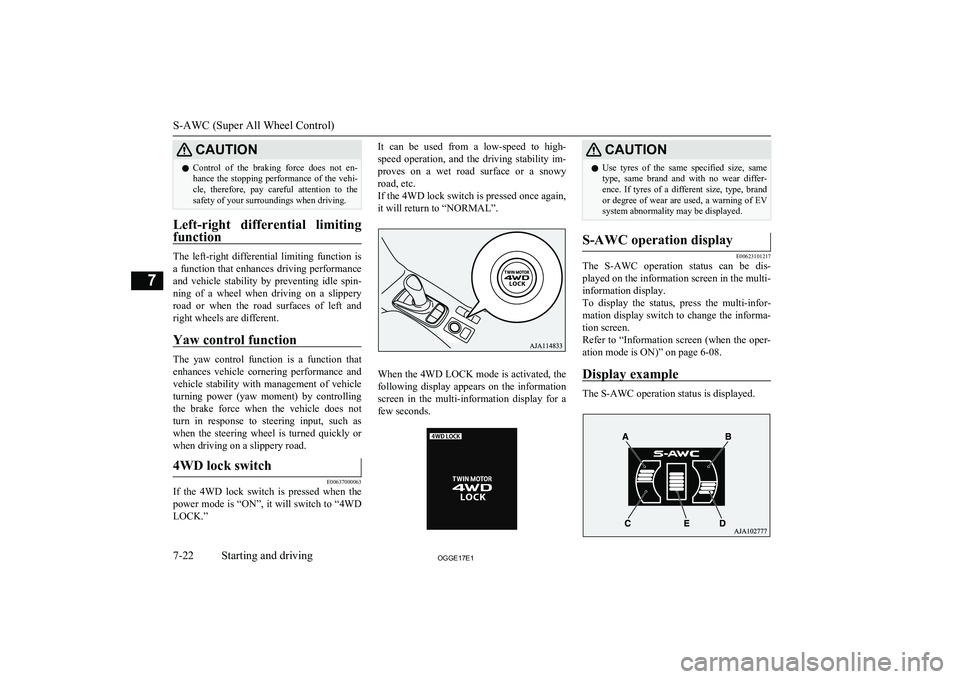
If the 4WD lock switch is pressed when the
power mode is “ON”, it will switch to “4WD LOCK.”
It can be used from a low-speed to high-
speed operation, and the driving stability im- proves on a wet road surface or a snowyroad, etc.
If the 4WD lock switch is pressed once again, it will return to “NORMAL”.
When the 4WD LOCK mode is activated, the
following display appears on the information
screen in the multi-information display for a few seconds.
CAUTIONl Use tyres of the same specified size, same
type, same brand and with no wear differ- ence. If tyres of a different size, type, brandor degree of wear are used, a warning of EVsystem abnormality may be displayed.S-AWC operation display
E00623101217
The S-AWC operation status can be dis-
played on the information screen in the multi-
information display.
To display the status, press the multi-infor-
mation display switch to change the informa- tion screen.
Refer to “Information screen (when the oper- ation mode is ON)” on page 6-08.
Display example
The S-AWC operation status is displayed.
S-AWC (Super All Wheel Control)
7-22OGGE17E1Starting and driving7
Page 242 of 548
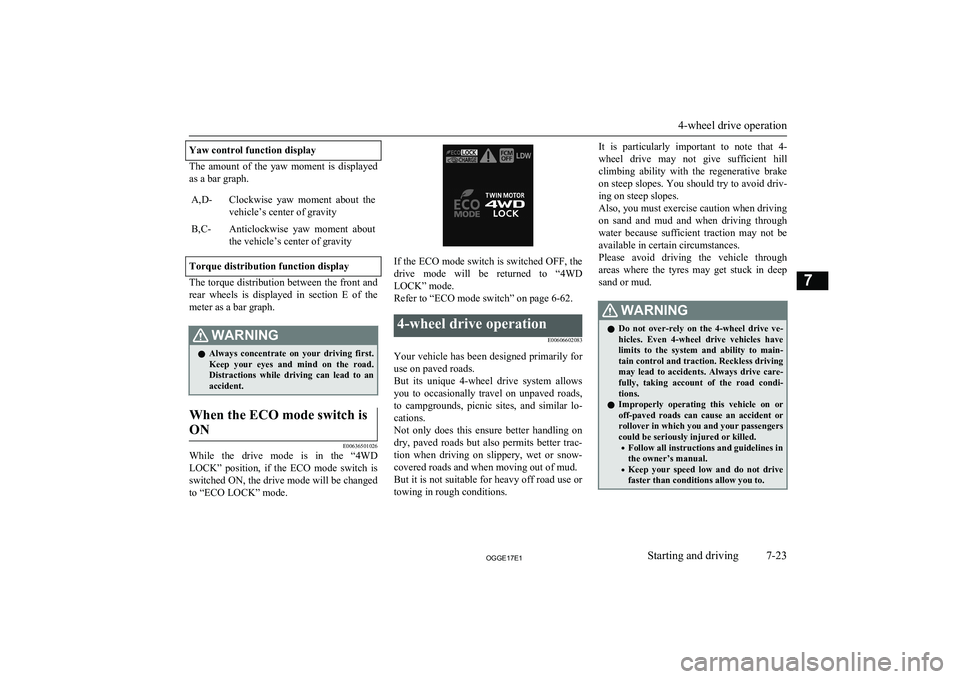
Yaw control function display
The amount of the yaw moment is displayed
as a bar graph.
A,D-Clockwise yaw moment about the vehicle’s center of gravityB,C-Anticlockwise yaw moment about
the vehicle’s center of gravity
Torque distribution function display
The torque distribution between the front and rear wheels is displayed in section E of the
meter as a bar graph.
WARNINGl Always concentrate on your driving first.
Keep your eyes and mind on the road.
Distractions while driving can lead to an accident.When the ECO mode switch is
ON
E00636501026
While the drive mode is in the “4WD
LOCK” position, if the ECO mode switch is switched ON, the drive mode will be changed to “ECO LOCK” mode.
If the ECO mode switch is switched OFF, the
drive mode will be returned to “4WD LOCK” mode.
Refer to “ECO mode switch” on page 6-62.
4-wheel drive operation
E00606602083
Your vehicle has been designed primarily foruse on paved roads.
But its unique 4-wheel drive system allows
you to occasionally travel on unpaved roads, to campgrounds, picnic sites, and similar lo-
cations.
Not only does this ensure better handling on
dry, paved roads but also permits better trac-
tion when driving on slippery, wet or snow- covered roads and when moving out of mud.
But it is not suitable for heavy off road use or
towing in rough conditions.
It is particularly important to note that 4-
wheel drive may not give sufficient hill
climbing ability with the regenerative brake on steep slopes. You should try to avoid driv- ing on steep slopes.
Also, you must exercise caution when driving on sand and mud and when driving through
water because sufficient traction may not be
available in certain circumstances.
Please avoid driving the vehicle through
areas where the tyres may get stuck in deep sand or mud.WARNINGl Do not over-rely on the 4-wheel drive ve-
hicles. Even 4-wheel drive vehicles have
limits to the system and ability to main- tain control and traction. Reckless driving may lead to accidents. Always drive care-
fully, taking account of the road condi-
tions.
l Improperly operating this vehicle on or
off-paved roads can cause an accident or
rollover in which you and your passengers
could be seriously injured or killed.
• Follow all instructions and guidelines in
the owner’s manual.
• Keep your speed low and do not drive
faster than conditions allow you to.
4-wheel drive operation
7-23OGGE17E1Starting and driving7
Page 243 of 548
NOTElDriving on rough roads can be hard on a ve-
hicle. Before you leave paved roads, be sure all scheduled maintenance and service has
been done, and that you have inspected your vehicle. Pay special attention to the condi- tion of the tyres, and check the tyre pres-
sures.
l MITSUBISHI
MOTORS is not responsible
for any damage or injury caused or liability
incurred by improper and negligent opera- tion of a vehicle by the operator. All techni-
ques of vehicle operation depend on the skill and experience of the operator and other par- ticipating parties. Any deviation from the
recommended operating instructions above is at their own risk.
l Note that the stopping distance required of a
4-wheel drive vehicle differs very little from
that of a 2-wheel drive vehicle. When driv- ing on a snow-covered road or a slippery,muddy surface, make sure that you keep a
sufficient distance between your vehicle and
the one ahead of you.
l The driving posture should be more upright;
adjust the seat to a good position for easy steering and pedal operation. Be sure to wear
the seat belt.
l After driving on rough roads, check each
part of the vehicle and wash it thoroughlywith water. Refer to the “Inspection andmaintenance following rough road opera-
tion” section and “Maintenance” section.NOTEl When moving out of mud, sand or fresh
snow, pressing the accelerator pedal may not
allow the Plug-in Hybrid EV system output to increase. In such situations, switching to
“4WD LOCK” with the 4WD lock switch and temporarily turning off the Active Sta- bility Control (ASC) with the “ASC OFF”
switch will make it easier to move out your vehicle.
Refer to “Operation under adverse driving
conditions: If your vehicle becomes stuck in sand, mud or snow” on page 9-26.
Climbing/descending sharp
grades
Your vehicle may not provide sufficient hill
climbing ability and regenerative brake on steep slope. Avoid driving on steep slopes
even though the vehicle is a 4-wheel drive vehicle.
Inspection and maintenance
following rough roadoperation E00606701407
After operating the vehicle in rough road
conditions, be sure to perform the following inspection and maintenance procedures:
l Check that the vehicle has not been dam-
aged by rocks, gravel, etc.
l Carefully wash the vehicle with water.
Drive the vehicle slowly while lightly
depressing the brake pedal in order to dry out the brakes. If the brakes still do
not function properly, we recommend you to have the brakes checked as soon
as possible.
l Remove the insects, dried grass, etc.
clogging the radiator core.
l Check the inside of the vehicle. If water
entry is found, dry the carpet etc.
l Inspect the headlamps. If the headlamp
bulb is flooded with water, we recom-
mend you to have it drained.Cautions on handling of 4-
wheel drive vehicles E00606801844
Tyres and wheels
Since the driving torque can be applied to the
4 wheels, the driving performance of the ve- hicle when operating in 4-wheel drive is
greatly affected by the condition of the tyres.
Pay close attention to the tyres.
Inspection and maintenance following rough road operation
7-24OGGE17E1Starting and driving7
Page 260 of 548
Traction control function
E00619000087
On slippery surfaces, the traction control
function prevents the drive wheels from ex-
cessive spinning, thus helping the vehicle to
start moving from a stopped condition. It also
provides sufficient driving force and steering
performance as the vehicle turns while press- ing the acceleration pedal.
CAUTIONl When driving a vehicle on a snowy or icy
road, be sure to install snow tyres and drive
the vehicle at moderate speeds.Stability control function
E00619101098
The stability control function is designed to
help the driver maintain control of the vehicle
on slippery roads or during rapid steering ma-
noeuvres. It works by controlling the Plugin
Hybrid EV System output and the brake on
each wheel.
NOTEl The stability control function operates at
speeds of about 15 km/h (9 mph) or higher.ASC OFF switch
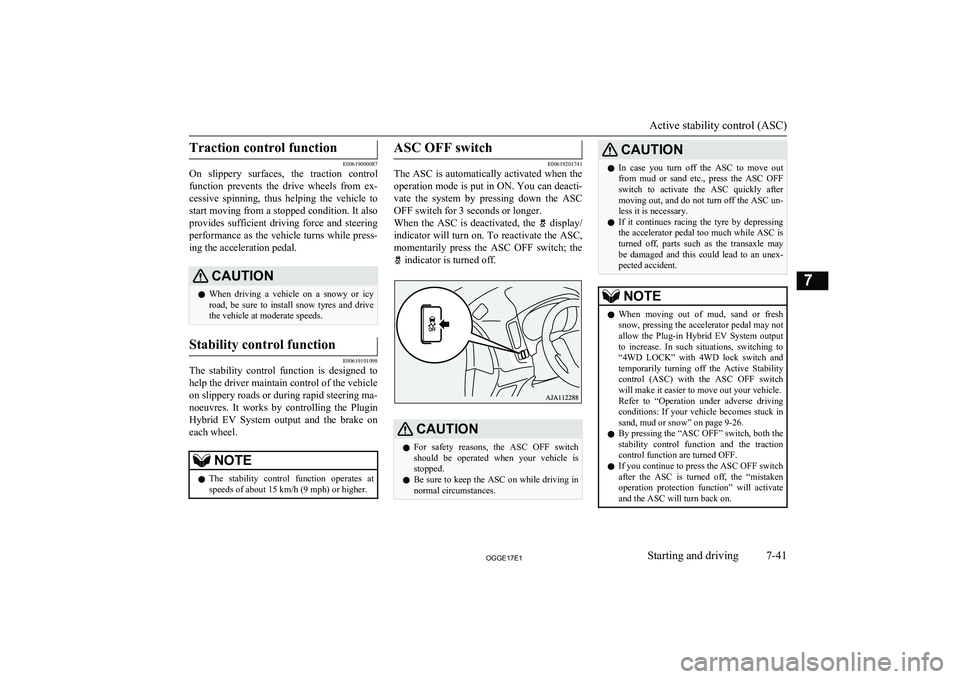
E00619201741
The ASC is automatically activated when the
operation mode is put in ON. You can deacti- vate the system by pressing down the ASC
OFF switch for 3 seconds or longer.
When the ASC is deactivated, the
display/
indicator will turn on. To reactivate the ASC, momentarily press the ASC OFF switch; the
indicator is turned off.
CAUTIONl For safety reasons, the ASC OFF switch
should be operated when your vehicle is stopped.
l Be sure to keep the ASC on while driving in
normal circumstances.CAUTIONl In case you turn off the ASC to move out
from mud or sand etc., press the ASC OFF switch to activate the ASC quickly after moving out, and do not turn off the ASC un-
less it is necessary.
l If it continues racing the tyre by depressing
the accelerator pedal too much while ASC is turned off, parts such as the transaxle may
be damaged and this could lead to an unex- pected accident.NOTEl When moving out of mud, sand or fresh
snow, pressing the accelerator pedal may not
allow the Plug-in Hybrid EV System output to increase. In such situations, switching to
“4WD LOCK” with 4WD lock switch and temporarily turning off the Active Stability
control (ASC) with the ASC OFF switch
will make it easier to move out your vehicle.
Refer to “Operation under adverse driving
conditions: If your vehicle becomes stuck in sand, mud or snow” on page 9-26.
l By pressing the “ASC OFF” switch, both the
stability control function and the tractioncontrol function are turned OFF.
l If you continue to press the ASC OFF switch
after the ASC is turned off, the “mistaken
operation protection function” will activate
and the ASC will turn back on.
Active stability control (ASC)
7-41OGGE17E1Starting and driving7