audio MITSUBISHI OUTLANDER PHEV 2017 Owner's Manual (in English)
[x] Cancel search | Manufacturer: MITSUBISHI, Model Year: 2017, Model line: OUTLANDER PHEV, Model: MITSUBISHI OUTLANDER PHEV 2017Pages: 548, PDF Size: 25.5 MB
Page 5 of 548
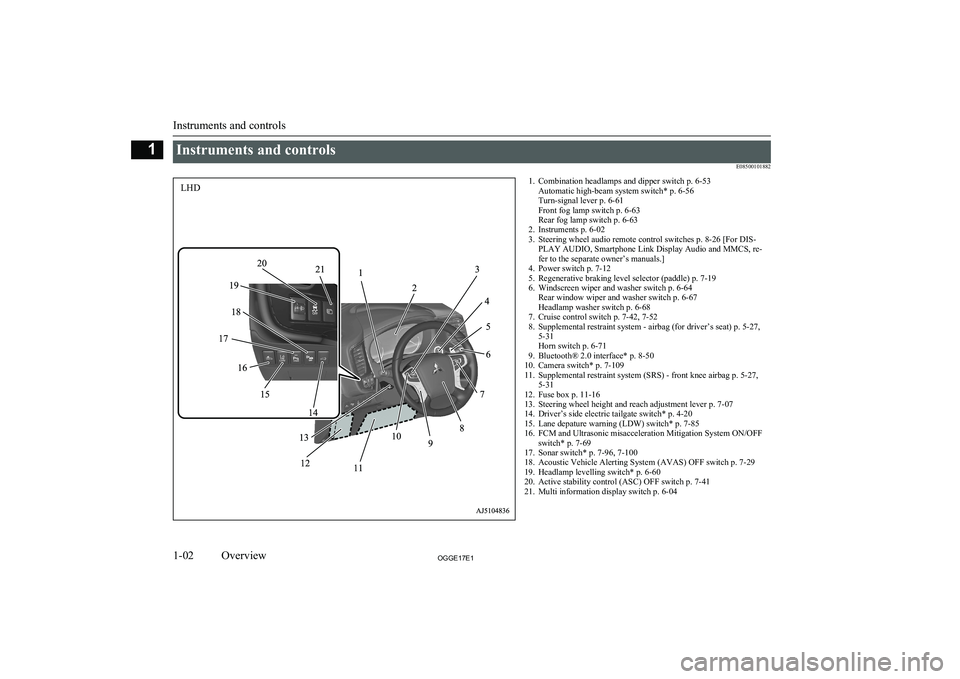
Instruments and controlsE085001018821. Combination headlamps and dipper switch p. 6-53Automatic high-beam system switch* p. 6-56
Turn-signal lever p. 6-61
Front fog lamp switch p. 6-63
Rear fog lamp switch p. 6-63
2. Instruments p. 6-02
3. Steering wheel audio remote control switches p. 8-26 [For DIS- PLAY AUDIO, Smartphone Link Display Audio and MMCS, re-
fer to the separate owner’s manuals.]
4. Power switch p. 7-12
5. Regenerative braking level selector (paddle) p. 7-19
6. Windscreen wiper and washer switch p. 6-64 Rear window wiper and washer switch p. 6-67
Headlamp washer switch p. 6-68
7. Cruise control switch p. 7-42, 7-52
8. Supplemental restraint system - airbag (for driver’s seat) p. 5-27, 5-31
Horn switch p. 6-71
9. Bluetooth® 2.0 interface* p. 8-50
10. Camera switch* p. 7-109
11. Supplemental restraint system (SRS) - front knee airbag p. 5-27, 5-31
12. Fuse box p. 11-16
13. Steering wheel height and reach adjustment lever p. 7-07
14. Driver’s side electric tailgate switch* p. 4-20
15. Lane depature warning (LDW) switch* p. 7-85
16. FCM and Ultrasonic misacceleration Mitigation System ON/OFF switch* p. 7-69
17. Sonar switch* p. 7-96, 7-100
18. Acoustic Vehicle Alerting System (AVAS) OFF switch p. 7-29
19. Headlamp levelling switch* p. 6-60
20. Active stability control (ASC) OFF switch p. 7-41
21. Multi information display switch p. 6-04
Instruments and controls
1-02OGGE17E1Overview1LHD
Page 6 of 548
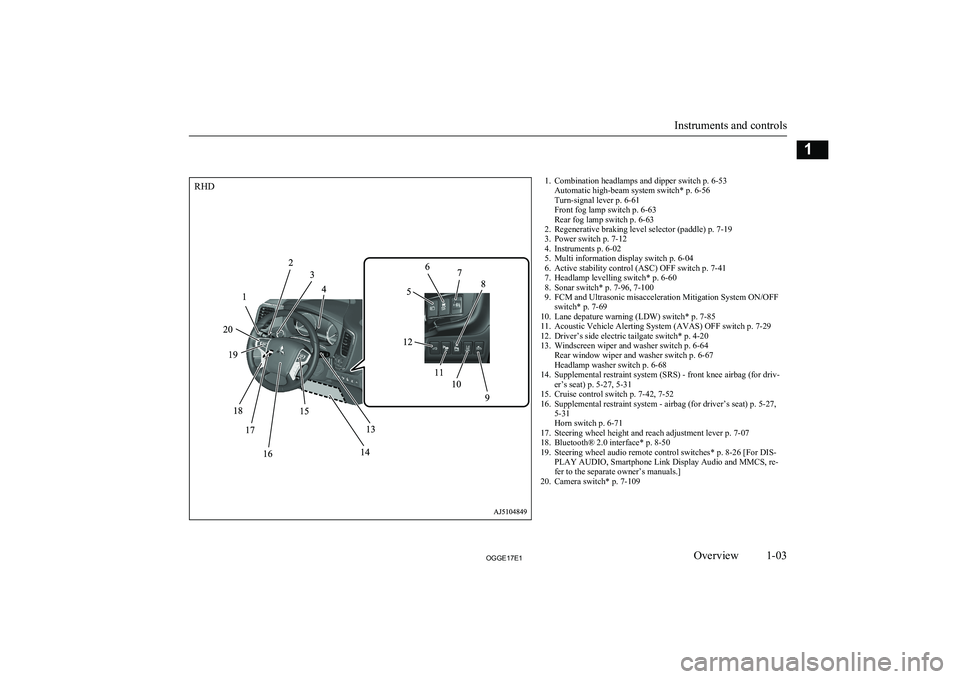
1. Combination headlamps and dipper switch p. 6-53Automatic high-beam system switch* p. 6-56
Turn-signal lever p. 6-61
Front fog lamp switch p. 6-63
Rear fog lamp switch p. 6-63
2. Regenerative braking level selector (paddle) p. 7-19
3. Power switch p. 7-12
4. Instruments p. 6-02
5. Multi information display switch p. 6-04
6. Active stability control (ASC) OFF switch p. 7-41
7. Headlamp levelling switch* p. 6-60
8. Sonar switch* p. 7-96, 7-100
9. FCM and Ultrasonic misacceleration Mitigation System ON/OFF switch* p. 7-69
10. Lane depature warning (LDW) switch* p. 7-85
11. Acoustic Vehicle Alerting System (AVAS) OFF switch p. 7-29
12. Driver’s side electric tailgate switch* p. 4-20
13. Windscreen wiper and washer switch p. 6-64 Rear window wiper and washer switch p. 6-67
Headlamp washer switch p. 6-68
14. Supplemental restraint system (SRS) - front knee airbag (for driv- er’s seat) p. 5-27, 5-31
15. Cruise control switch p. 7-42, 7-52
16. Supplemental restraint system - airbag (for driver’s seat) p. 5-27, 5-31
Horn switch p. 6-71
17. Steering wheel height and reach adjustment lever p. 7-07
18. Bluetooth® 2.0 interface* p. 8-50
19. Steering wheel audio remote control switches* p. 8-26 [For DIS- PLAY AUDIO, Smartphone Link Display Audio and MMCS, re-
fer to the separate owner’s manuals.]
20. Camera switch* p. 7-109
Instruments and controls
1-03OGGE17E1Overview1RHD
Page 7 of 548
![MITSUBISHI OUTLANDER PHEV 2017 Owners Manual (in English) 1. Audio* p. 8-14MITSUBISHI Multi-Communication System (MMCS)*
Multi Around Monitor* p. 7-106
[For DISPLAY AUDIO, Smartphone Link Display Audio and
MMCS,
refer to the separate owner’s manuals.]
2. H](/img/19/34889/w960_34889-6.png "MITSUBISHI OUTLANDER PHEV 2017 Owners Manual (in English) 1. Audio* p. 8-14MITSUBISHI Multi-Communication System (MMCS)*
Multi Around Monitor* p. 7-106
[For DISPLAY AUDIO, Smartphone Link Display Audio and
MMCS,
refer to the separate owner’s manuals.]
2. H")
1. Audio* p. 8-14MITSUBISHI Multi-Communication System (MMCS)*
Multi Around Monitor* p. 7-106
[For DISPLAY AUDIO, Smartphone Link Display Audio and
MMCS,
refer to the separate owner’s manuals.]
2. Hazard warning flasher switch p. 6-62
3. ECO mode switch p. 6-62
4. Front passenger’s airbag indicator p. 5-30
5. Passenger’s ventilators p. 8-02
6. Accessory socket* p. 8-75 Cigarette lighter* p. 8-74
7. Electric tailgate power switch* p. 4-20
8. Key slot p. 7-15
9. 220-240 V AC power supply switch* p. 8-76
10. Blind Spot Warning (BSW) switch* p. 7-80
11. Heated steering wheel switch* p. 6-71
12. Heated windscreen switch* p. 6-70
13. Cup holder p. 8-83
14. Selector lever (Joystick type) p. 7-16
15. 220-240 V AC power supply* p. 8-76
16. Floor console box p. 8-82 Arm rest
Accessory socket p. 8-75
USB input terminal p. 8-70
17. Fuel tank filler door release lever p. 2-15
18. Bonnet release lever p. 11-04
19. Rear window demister switch p. 6-69 Wiper de-icer switch* p. 6-69
20. Air conditioner p. 8-04
21. Seat belt reminder p. 5-11
Instruments and controls
1-04OGGE17E1Overview1LHD
Page 8 of 548
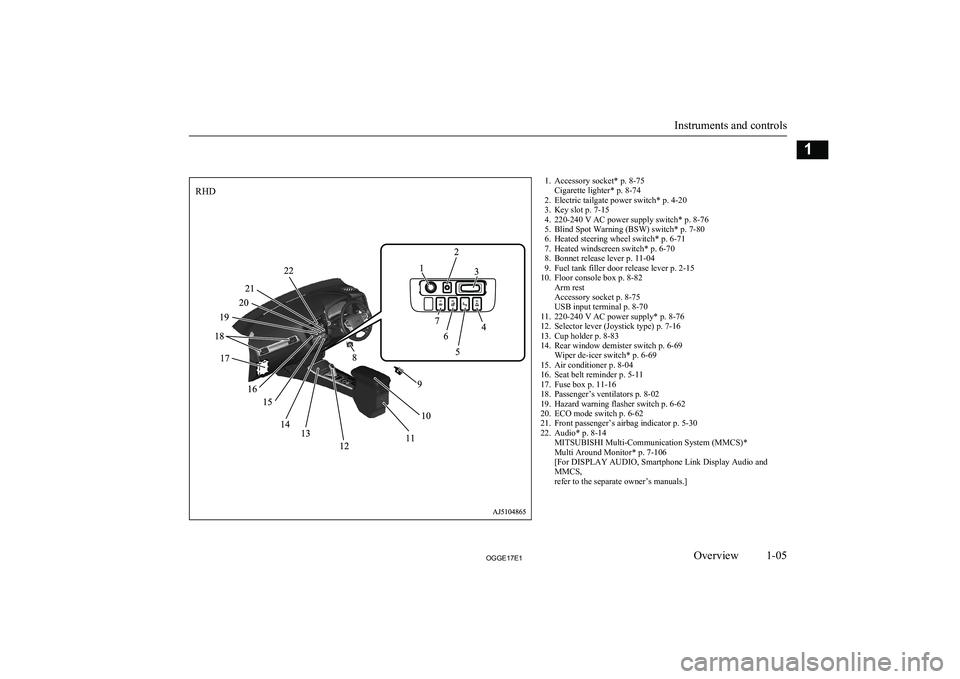
1. Accessory socket* p. 8-75Cigarette lighter* p. 8-74
2. Electric tailgate power switch* p. 4-20
3. Key slot p. 7-15
4. 220-240 V AC power supply switch* p. 8-76
5. Blind Spot Warning (BSW) switch* p. 7-80
6. Heated steering wheel switch* p. 6-71
7. Heated windscreen switch* p. 6-70
8. Bonnet release lever p. 11-04
9. Fuel tank filler door release lever p. 2-15
10. Floor console box p. 8-82 Arm rest
Accessory socket p. 8-75
USB input terminal p. 8-70
11. 220-240 V AC power supply* p. 8-76
12. Selector lever (Joystick type) p. 7-16
13. Cup holder p. 8-83
14. Rear window demister switch p. 6-69 Wiper de-icer switch* p. 6-69
15. Air conditioner p. 8-04
16. Seat belt reminder p. 5-11
17. Fuse box p. 11-16
18. Passenger’s ventilators p. 8-02
19. Hazard warning flasher switch p. 6-62
20. ECO mode switch p. 6-62
21. Front passenger’s airbag indicator p. 5-30
22. Audio* p. 8-14 MITSUBISHI Multi-Communication System (MMCS)*
Multi Around Monitor* p. 7-106
[For DISPLAY AUDIO, Smartphone Link Display Audio and
MMCS,
refer to the separate owner’s manuals.]
Instruments and controls
1-05OGGE17E1Overview1RHD
Page 48 of 548
WARNINGlTo reduce the risk of electric shock or fire
due to electric leak, always use an earthed
outlet protected by a residual current de-
tector, rated for amperage equal to or greater than the value specified by MITSUBISHI MOTORS , and that is con-
nected to a dedicated branch circuit. If
the circuit is shared, and another electri- cal device is being used at the same time
the vehicle is charging, the circuit may heat abnormally, the breaker may trip
and the circuit may cause adverse inter-
ference on the household electrical appli- ances such as TVs and audio systems.
l It is possible to charge even in rain or
snow. However, be sure to pay attention
to the following:
• Do not touch normal charge port, nor-
mal charge connector, outlet and plug with wet hands.
• Keep away from water when connect-
ing the normal charge port, normal
charge connector, outlet and plug.
• Do not perform the charging in the out
of doors when heavy rain, heavy snow, strong winds, and when bad weather is
expected.
• Do not charge if there is possibility a
lightning strike. When thunder rum-
bling begins suddenly during normal charging, do not touch the vehicle andthe EV charging cable and turn off the
breaker.WARNINGl If water goes into the normal charge port
or the normal charge connector, it couldcause a short circuit, a fire and an electric shock.
Be sure to completely close the charging
lid and the inner lid and do not leave the EV charging cable in an outdoors.
l If the connected part of the charging plug
has been buried in snow while charging, turn off the hand switch or the breaker
connected with the outlet first, then re- move the snow and disconnect the charg-
ing plug. If your vehicle body has been buried in snow while charging, remove
the snow and then disconnect the charge connector.
l When you perform the normal charging
at away from home, some normal charg-
ers may not correspond to your vehicle. Consult an administrator or a maker of
the normal charger that it corresponds to your vehicle before using it. Also perform
normal charging according to the operat-
ing procedure indicated on the body of
normal charger.
l Do not open the charging lid for anything
other than charging and using the exter-
nal power feed.CAUTIONl Do not attempt to perform a jump start on
the auxiliary battery at the same time that the
drive battery is being charged. Doing so may
damage the vehicle or charging cable and
could cause injury.
Refer to “Emergency starting” on page 9-07.NOTEl If you open the charging lid with the opera-
tion mode of the power switch is ON, a buz- zer sounds approximately 10 minutes inter-mittently to alert the charging cannot be star- ted. If you close the charging lid or put theoperation mode in OFF, the buzzer stops.
l If you insert the charge connector to the
charge port with the operation mode is ON,
a buzzer sounds continuously approximately
10 minutes to alert the charging cannot be started.
If you pull the charge connector out or put the operation mode in OFF, the buzzer stops.
l Repeatedly performing only quick charging
may reduce the battery capacity.
In usual charge, normal charging is recom-
mended.
l To maintain the capacity of the drive battery,
the following is recommended:
• If you repeatedly perform only the quick
charging, fully charge the vehicle in nor- mal charging every 2 weeks.
Basic knowledge for charging
3-05OGGE17E1Charging3
Page 56 of 548
5.Insert the charging cable plug into an
outlet.WARNINGl Make sure that the plug is inserted all the
way into the outlet before use. If charging
is continued in the state where it is not
fully inserted the plug, there is a possibili- ty of generating abnormal heat and re-sulting in a fire.
l To prevent an electric shock or fire due to
an electric leak, perform charging using a waterproofed outlet with earthing whichis connected to an earth leakage circuitbreaker.
l To reduce the risk of an electric shock or
fire due to an electric leak, always use an
outlet protected by a residual current de-
tector, rated for amperage equal to or greater than the value specified by MITSUBISHI MOTORS , and that is con-
nected to a dedicated branch circuit. If
the circuit is shared, and another electri- cal device is being used at the same time
the vehicle is charging, the breaker may trip and the circuit may cause adverse in-
terference on MCB (Moulded Circuit Board) and household electrical applian- ces such as TVs and audio systems.
l If a multi plug adapter is connected and
used with the EV charging cable together
with other devices, the outlet may over- heat, resulting in a fire.WARNINGl Do not use a multi type outlet to prevent
an electric shock or fire. There is no guar-
antee of safety because you cannot make
an earth connection in some multi type outlet and it is not a dedicated type outlet.
l Use an outlet for EV charging with water-
proofing processing installed if the instal- led position is outdoors or may get wet by
rain etc.CAUTIONl Use the outlet that is installed approx. 1 me-
ter above the ground. If the outlet position is
too low, the control box may touch the ground, which may lead to troubles such as
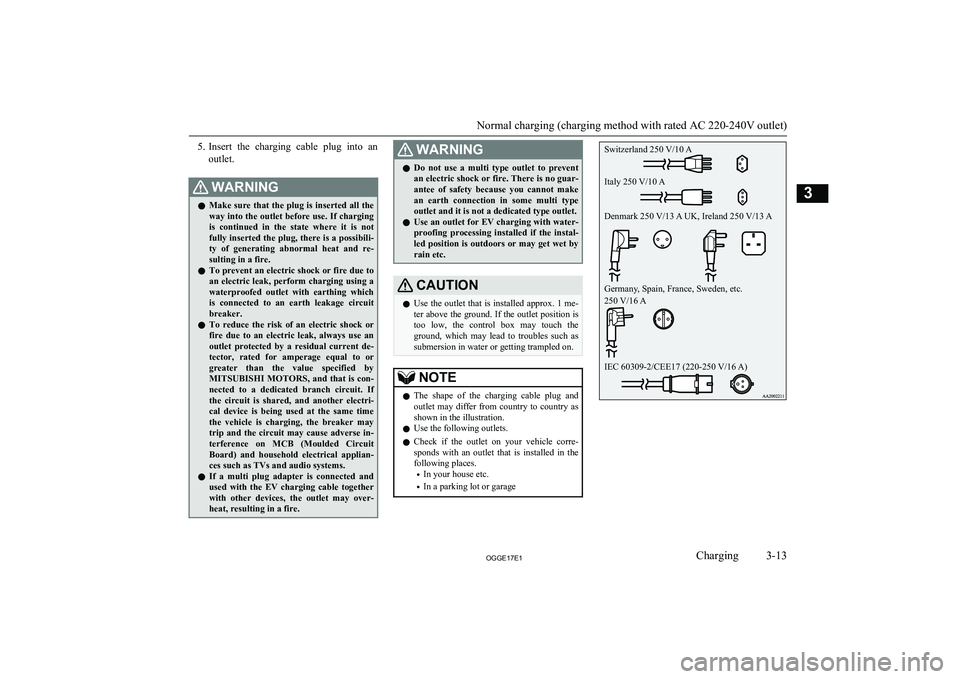
submersion in water or getting trampled on.NOTEl The shape of the charging cable plug and
outlet may differ from country to country as shown in the illustration.
l Use the following outlets.
l Check if the outlet on your vehicle corre-
sponds with an outlet that is installed in the
following places.
• In your house etc.
• In a parking lot or garage
Normal charging (charging method with rated AC 220-240V outlet)
3-13OGGE17E1Charging3 Switzerland 250 V/10 A
Italy 250 V/10 A
Denmark 250 V/13 A UK, Ireland 250 V/13 A
Germany, Spain, France, Sweden, etc.
250 V/16 A
IEC 60309-2/CEE17 (220-250 V/16 A)
Page 73 of 548
KeysE00300103817
The key fits all locks.
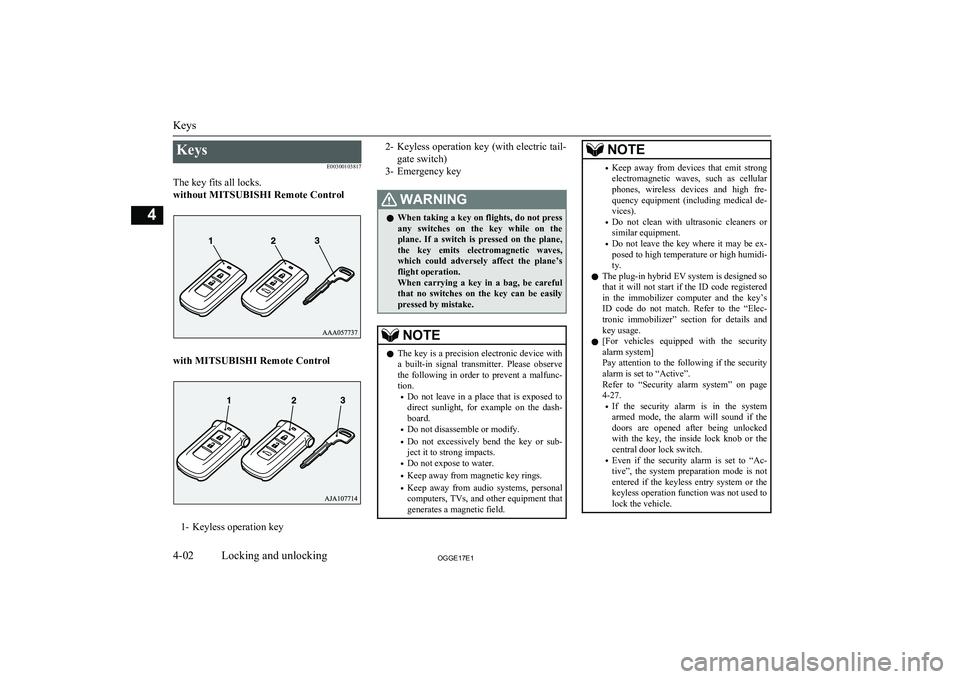
without MITSUBISHI Remote Control
with MITSUBISHI Remote Control
1- Keyless operation key
2- Keyless operation key (with electric tail-
gate switch)
3- Emergency keyWARNINGl When taking a key on flights, do not press
any switches on the key while on the plane. If a switch is pressed on the plane,
the key emits electromagnetic waves, which could adversely affect the plane’s flight operation.
When carrying a key in a bag, be careful that no switches on the key can be easily
pressed by mistake.NOTEl The key is a precision electronic device with
a built-in signal transmitter. Please observe
the following in order to prevent a malfunc- tion.
• Do not leave in a place that is exposed to
direct sunlight, for example on the dash- board.
• Do not disassemble or modify.
• Do not excessively bend the key or sub-
ject it to strong impacts.
• Do not expose to water.
• Keep away from magnetic key rings.
• Keep away from audio systems, personal
computers, TVs, and other equipment that generates a magnetic field.NOTE• Keep away from devices that emit strong
electromagnetic waves, such as cellular
phones, wireless devices and high fre- quency equipment (including medical de-
vices).
• Do not clean with ultrasonic cleaners or
similar equipment.
• Do not leave the key where it may be ex-
posed to high temperature or high humidi- ty.
l The plug-in hybrid EV system is designed so
that it will not start if the ID code registered
in the immobilizer computer and the key’s ID code do not match. Refer to the “Elec-
tronic immobilizer” section for details and key usage.
l [For vehicles equipped with the security
alarm system]
Pay attention to the following if the security
alarm is set to “Active”.
Refer to “Security alarm system” on page 4-27.
• If the security alarm is in the system
armed mode, the alarm will sound if the
doors are opened after being unlocked with the key, the inside lock knob or the
central door lock switch.
• Even if the security alarm is set to “Ac-
tive”, the system preparation mode is not entered if the keyless entry system or thekeyless operation function was not used to
lock the vehicle.
Keys
4-02OGGE17E1Locking and unlocking4
Page 75 of 548
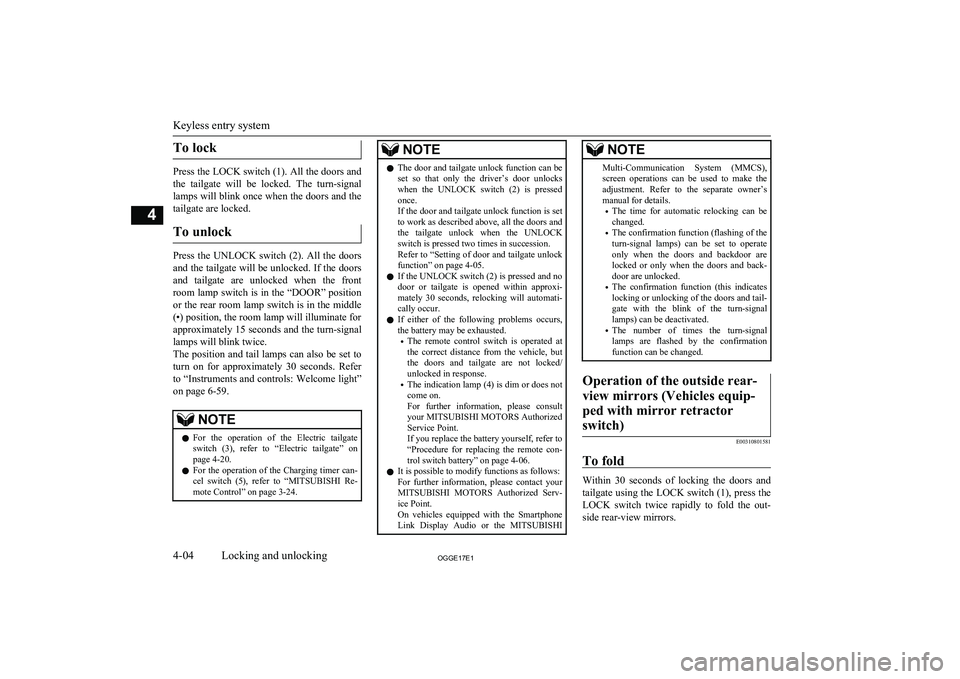
To lock
Press the LOCK switch (1). All the doors andthe tailgate will be locked. The turn-signal
lamps will blink once when the doors and the
tailgate are locked.
To unlock
Press the UNLOCK switch (2). All the doors
and the tailgate will be unlocked. If the doors and tailgate are unlocked when the frontroom lamp switch is in the “DOOR” positionor the rear room lamp switch is in the middle
(•) position, the room lamp will illuminate for
approximately 15 seconds and the turn-signal lamps will blink twice.
The position and tail lamps can also be set to
turn on for approximately 30 seconds. Refer to “Instruments and controls: Welcome light”
on page 6-59.
NOTEl For the operation of the Electric tailgate
switch (3), refer to “Electric tailgate” onpage 4-20.
l For the operation of the Charging timer can-
cel switch (5), refer to “MITSUBISHI Re-
mote Control” on page 3-24.NOTEl The door and tailgate unlock function can be
set so that only the driver’s door unlocks
when the UNLOCK switch (2) is pressed once.
If the door and tailgate unlock function is set
to work as described above, all the doors and
the tailgate unlock when the UNLOCK switch is pressed two times in succession.
Refer to “Setting of door and tailgate unlock
function” on page 4-05.
l If the UNLOCK switch (2) is pressed and no
door or tailgate is opened within approxi-mately 30 seconds, relocking will automati-
cally occur.
l If either of the following problems occurs,
the battery may be exhausted.
• The remote control switch is operated at
the correct distance from the vehicle, but
the doors and tailgate are not locked/
unlocked in response.
• The indication lamp (4) is dim or does not
come on.
For further information, please consult your MITSUBISHI MOTORS Authorized
Service Point.
If you replace the battery yourself, refer to
“Procedure for replacing the remote con-
trol switch battery” on page 4-06.
l It is possible to modify functions as follows:
For further information, please contact your MITSUBISHI MOTORS Authorized Serv-
ice Point.
On vehicles equipped with the Smartphone Link Display Audio or the MITSUBISHINOTEMulti-Communication System (MMCS),
screen operations can be used to make theadjustment. Refer to the separate owner’s
manual for details.
• The time for automatic relocking can be
changed.
• The confirmation function (flashing of the
turn-signal lamps) can be set to operateonly when the doors and backdoor arelocked or only when the doors and back-
door are unlocked.
• The confirmation function (this indicates
locking or unlocking of the doors and tail-
gate with the blink of the turn-signal lamps) can be deactivated.
• The number of times the turn-signal
lamps are flashed by the confirmation function can be changed.Operation of the outside rear-
view mirrors (Vehicles equip- ped with mirror retractorswitch)
E00310801581
To fold
Within 30 seconds of locking the doors and tailgate using the LOCK switch (1), press the LOCK switch twice rapidly to fold the out-
side rear-view mirrors.
Keyless entry system
4-04OGGE17E1Locking and unlocking4
Page 76 of 548
To extend
Within 30 seconds of unlocking the doors
and tailgate using the UNLOCK switch (2),
press the UNLOCK switch twice rapidly to return the outside rear-view mirrors to their
extended positions.
The outside rear-view mirrors are not initially
set to work as described above. If you want them to work as described above, you need to
set them so that they do not retract/extend when the doors and tailgate are locked/
unlocked using the keyless entry system or
keyless operation function.
Refer to “Starting and driving: Outside rear-
view mirrors” on page 7-09.
For details, please consult a MITSUBISHI
MOTORS Authorized Service Point.
In a vehicle equipped with the Smartphone Link Display Audio or the MITSUBISHI
Multi-Communication System (MMCS), it is possible to change the setting by means of
screen operations.
Refer to the separate owner’s manual for de- tails.
NOTEl The outside rear-view mirrors automatically
retract when all the doors and tailgate are
locked using the keyless operation function.
Refer to “Starting and driving: Outside rear- view mirrors” on page 7-09.
l The keyless entry system does not operate
when the door or tailgate is open.
l The remote control switch will operate with-
in approximately 4 m from the vehicle.
However, the operating range of the remote control switch may change if the vehicle is
located near a power station, or radio/TV broadcasting station.
l If your remote control switch is lost or dam-
aged, please contact your MITSUBISHI
MOTORS Authorized Service Point for a re-
placement remote control switch.
l If you wish to add a remote control switch,
we recommend you to contact your
MITSUBISHI MOTORS Authorized Serv-
ice Point.
The below remote control switches are avail-
able for your vehicle.
• Keyless operation key: up to 4 remote
control switchesSetting of door and tailgate un-
lock function
E00310301368
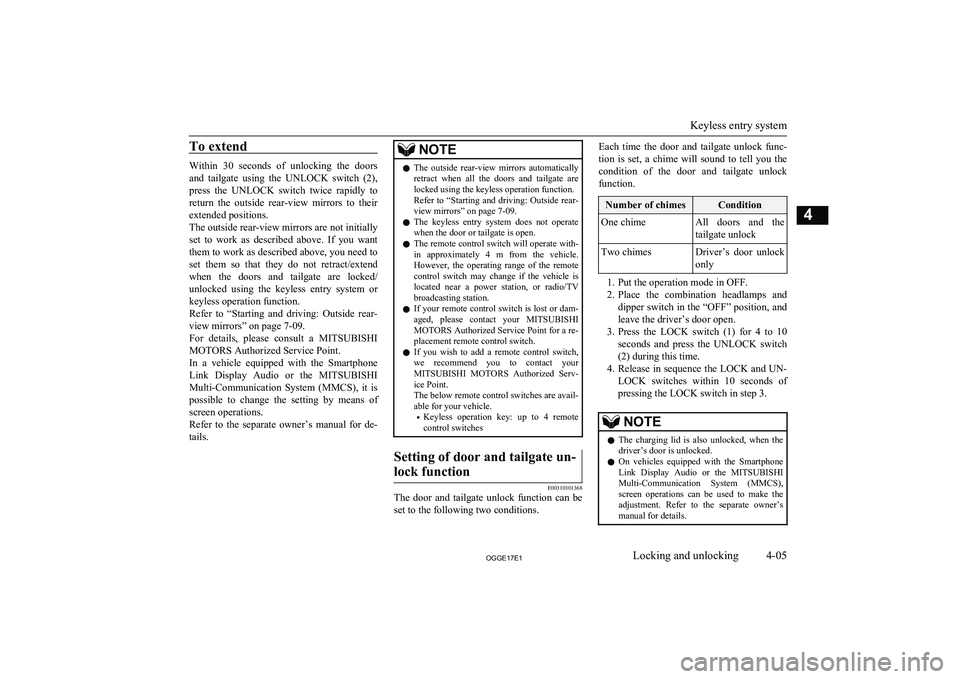
The door and tailgate unlock function can be set to the following two conditions.
Each time the door and tailgate unlock func-
tion is set, a chime will sound to tell you the condition of the door and tailgate unlock
function.Number of chimesConditionOne chimeAll doors and the
tailgate unlockTwo chimesDriver’s door unlock only
1. Put the operation mode in OFF.
2. Place the combination headlamps and
dipper switch in the “OFF” position, and leave the driver’s door open.
3. Press the LOCK switch (1) for 4 to 10
seconds and press the UNLOCK switch
(2) during this time.
4. Release in sequence the LOCK and UN-
LOCK switches within 10 seconds of pressing the LOCK switch in step 3.
NOTEl The charging lid is also unlocked, when the
driver’s door is unlocked.
l On vehicles equipped with the Smartphone
Link Display Audio or the MITSUBISHI
Multi-Communication System (MMCS), screen operations can be used to make theadjustment. Refer to the separate owner’s
manual for details.
Keyless entry system
4-05OGGE17E1Locking and unlocking4
Page 81 of 548
NOTElFor vehicles equipped with the mirror retrac-
tor switch, the outside rear-view mirrors au-
tomatically retract when all the doors and
tailgate are locked using the keyless opera- tion function.
Refer to “Starting and driving: Outside rear- view mirrors” on page 7-09.
l The keyless operation function does not op-
erate under the following conditions:
• The keyless operation key is inside the
vehicle.
• A door or the tailgate is open or ajar.
l The tailgate open switch (C) can be used to
check that the vehicle is locked properly.Press the tailgate open switch within approx-
imately 3 seconds of locking the vehicle. If
you wait longer than 3 seconds and press the tailgate open switch, the doors and tailgate
will be unlocked.
l The time allowed for checking that the vehi-
cle is locked can be adjusted. For further in- formation, please contact your
MITSUBISHI MOTORS Authorized Serv-
ice Point.
On vehicles equipped with the Smartphone
Link Display Audio or the MITSUBISHI
Multi-Communication System (MMCS), screen operations can be used to make the
adjustment. Refer to the separate owner’s
manual for details.Unlocking the doors and tail-
gate
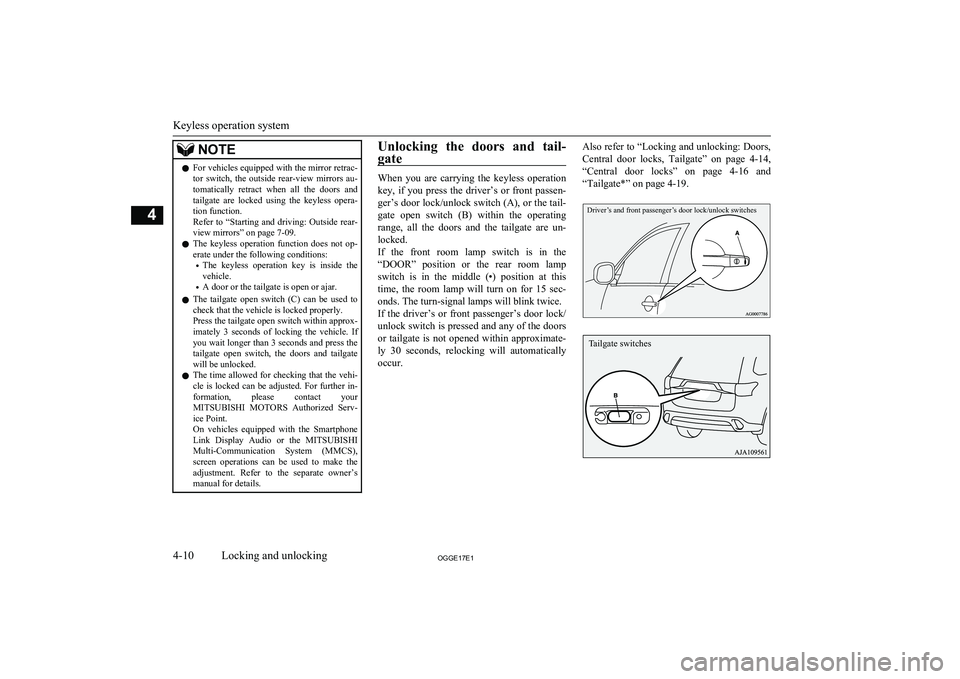
When you are carrying the keyless operation
key, if you press the driver’s or front passen- ger’s door lock/unlock switch (A), or the tail-gate open switch (B) within the operating
range, all the doors and the tailgate are un-
locked.
If the front room lamp switch is in the “DOOR” position or the rear room lampswitch is in the middle (•) position at this
time, the room lamp will turn on for 15 sec-
onds. The turn-signal lamps will blink twice. If the driver’s or front passenger’s door lock/
unlock switch is pressed and any of the doors or tailgate is not opened within approximate-
ly 30 seconds, relocking will automatically occur.
Also refer to “Locking and unlocking: Doors,
Central door locks, Tailgate” on page 4-14,
“Central door locks” on page 4-16 and
“Tailgate*” on page 4-19.Driver’s and front passenger’s door lock/unlock switches
Keyless operation system
4-10OGGE17E1Locking and unlocking4 Tailgate switches