brake MITSUBISHI OUTLANDER PHEV 2018 (in English) User Guide
[x] Cancel search | Manufacturer: MITSUBISHI, Model Year: 2018, Model line: OUTLANDER PHEV, Model: MITSUBISHI OUTLANDER PHEV 2018Pages: 538, PDF Size: 25.01 MB
Page 36 of 538
Approx. ambi-
ent temperaturePhenomenaCorrective actionl The motor output may be restricted and the regenerative
braking performance may be decreased or lost when
“BATTERY TOO COLD” is displayed.* 3l
Immediately stop the vehicle in
a safe place.
Also, when braking, depress the
brake pedal harder.Charging and batteryl Charging may become impossible or charging may stop
during charging, before the battery is fully charged.l In the daytime, wait for the
temperature to rise, restart the plug-in hybrid EV system.CAUTIONl “BATTERY TOO COLD” is displayed* 3
, contact a MITSUBISHI MOTORS Authorized Service Point.
l When blinking of the ready indicator* 2
continues and “BATTERY TOO COLD” is displayed* 3
on the multi information display with vehicle conditions, the
drive battery cannot be warmed up.
Cautions and actions to deal with intense cold
2-12OGGE18E1General information2
Page 54 of 538
NOTElWhen connecting or disconnecting the nor-
mal charge connector, insert/pull out the
connector straight.
Also, do not incline or twist the connector. Doing so could cause a bad connection or malfunction.
l Make sure to lock the doors to prevent theft,
etc. during charging.
l Do not push the rear portion of the charging
lid when the charging lid is locked.There is a possibility that the charging lid
opens unexpectedly when the doors are un- locked while using the central door locks,keyless entry system or keyless operation
function.Charging from rated AC
220-240 V outlet
E08301001352
1. Firmly apply the parking brake, press the electrical parking switch to shift into the
“P” (PARK) position and put the opera- tion mode of the power switch in the
“OFF” position.
2. Unlock the driver’s door to unlock the
charging lid.
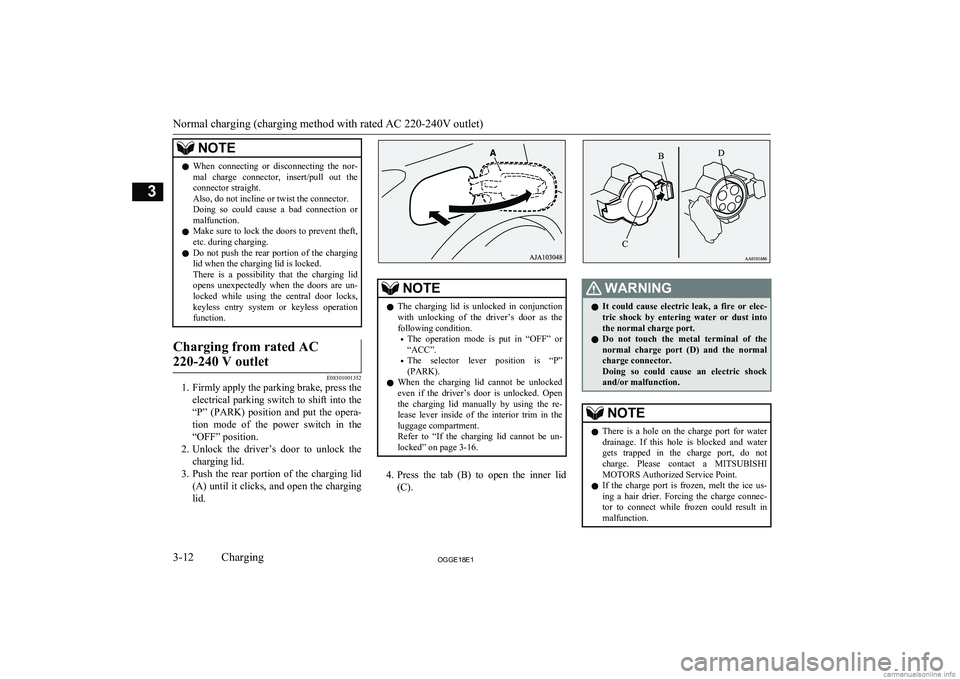
3. Push the rear portion of the charging lid
(A) until it clicks, and open the charging lid.
NOTEl The charging lid is unlocked in conjunction
with unlocking of the driver’s door as thefollowing condition.
• The operation mode is put in “OFF” or
“ACC”.
• The selector lever position is “P”
(PARK).
l When the charging lid cannot be unlocked
even if the driver’s door is unlocked. Open
the charging lid manually by using the re- lease lever inside of the interior trim in theluggage compartment.
Refer to “If the charging lid cannot be un- locked” on page 3-16.
4. Press the tab (B) to open the inner lid
(C).
WARNINGl It could cause electric leak, a fire or elec-
tric shock by entering water or dust intothe normal charge port.
l Do not touch the metal terminal of the
normal charge port (D) and the normal
charge connector.
Doing so could cause an electric shock and/or malfunction.NOTEl There is a hole on the charge port for water
drainage. If this hole is blocked and watergets trapped in the charge port, do not
charge. Please contact a MITSUBISHI
MOTORS Authorized Service Point.
l If the charge port is frozen, melt the ice us-
ing a hair drier. Forcing the charge connec- tor to connect while frozen could result in malfunction.
Normal charging (charging method with rated AC 220-240V outlet)
3-12OGGE18E1Charging3
Page 56 of 538
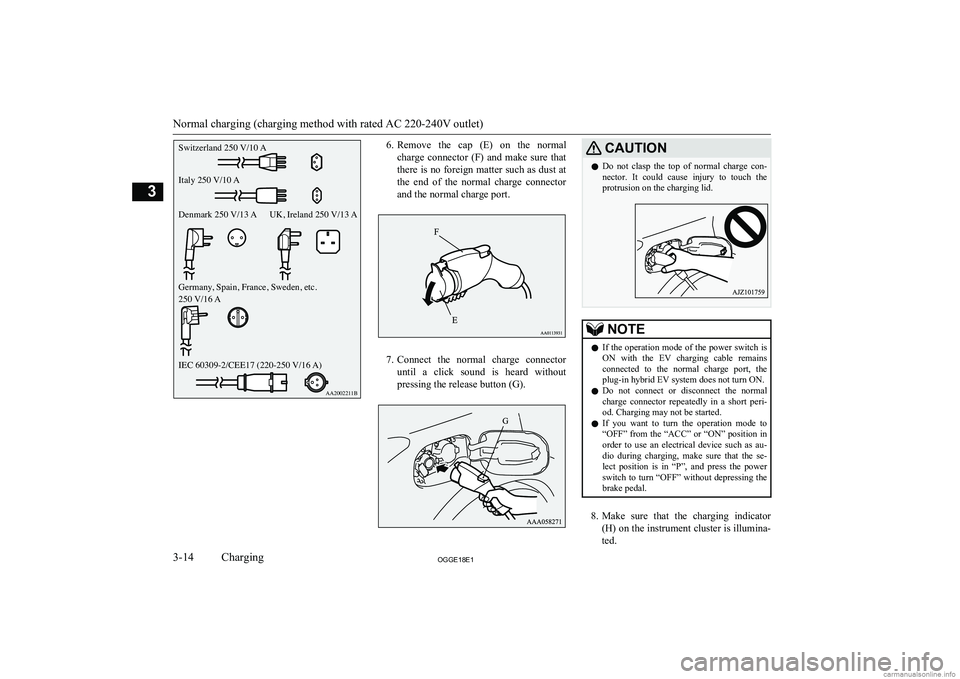
6.Remove the cap (E) on the normal
charge connector (F) and make sure that
there is no foreign matter such as dust at
the end of the normal charge connector and the normal charge port.
7. Connect the normal charge connector
until a click sound is heard without pressing the release button (G).
CAUTIONl Do not clasp the top of normal charge con-
nector. It could cause injury to touch the protrusion on the charging lid.NOTEl If the operation mode of the power switch is
ON with the EV charging cable remains
connected to the normal charge port, the
plug-in hybrid EV system does not turn ON.
l Do not connect or disconnect the normal
charge connector repeatedly in a short peri- od. Charging may not be started.
l If you want to turn the operation mode to
“OFF” from the “ACC” or “ON” position in
order to use an electrical device such as au- dio during charging, make sure that the se-lect position is in “P”, and press the power
switch to turn “OFF” without depressing the brake pedal.
8. Make sure that the charging indicator
(H) on the instrument cluster is illumina-
ted.
Normal charging (charging method with rated AC 220-240V outlet)
3-14OGGE18E1Charging3Switzerland 250 V/10 A
Italy 250 V/10 A
Denmark 250 V/13 A UK, Ireland 250 V/13 A
Germany, Spain, France, Sweden, etc.
250 V/16 A
IEC 60309-2/CEE17 (220-250 V/16 A)AA2002211B
Page 59 of 538
Quick charging (chargingmethod with quick charger) E08301401268WARNINGlBe sure to use the quick charger applica-
ble to CHAdeMO standard and certified by CHAdeMO association. Use of the oth-
er quick charger may cause the fire or malfunction.
l For operation of quick chargers, follow
the manual of each quick charger.
l If you use electro-medical apparatus such
as implantable cardiac pacemaker or im- plantable cardioverter-defibrillator, be careful the following precautions.
• Please do not use a quick charger.
• Keep away as much as possible from
the place where the quick charger is
stored. If you approach it carelessly, leave quickly without standing still.
• Please ask someone to perform the
quick charging if necessary.
l Before charging, make sure that there is
no foreign matter such as dust at the
quick charge port and the quick charge
connector.
At this time, do not touch the quick charge port.WARNINGl When the quick charge connector is con-
nected to the quick charge port, prevent foreign matter such as water or dust fromentering in the port.
Connection with foreign matter such as
water or dust may cause fire or an electric shock. Do not perform charging if there
might be strong exposure to water at the
connection.
l During charging, the cooling fans inside
the bonnet room may automatically be operated even if the operation mode of the
power switch is in OFF.
Keep your hands away from the cooling
fan during charging.NOTEl During quick charging, quick charging is
stopped by putting the operation mode of thepower switch in ON.
l If the charge connector is not easily connec-
ted to the charge port due to foreign material
entering, never force the connection. Doing so could damage the charging equipment or the vehicle. Contact a MITSUBISHI
MOTORS Authorized Service Point.
l The quick charger might be installed in the
public parking space, some chargers are not
suitable for this vehicle. Check the manual
of each quick charger when charging.NOTEl The charge connector and the EV charging
cable stick out of the vehicle body while charging, so be careful that your body does
not get stuck with them or they do not touch the next vehicle.
l The vehicle equipped with a quick charge
port is compatible with most CHAdeMO *1
connectors on charging stations.
l Make sure to lock the doors to prevent theft,
etc. during charging.
l When using a quick charger, make sure that
the time available is enough so that the quick
charging can be finished in the time availa- ble.
If the power supply of the quick charger is shut off during quick charging, it could leadto a vehicle failure.
1. Firmly apply the parking brake, press the
electrical parking switch to shift into the
“P” (PARK) position and put the opera-
tion mode of the power switch in the “OFF” position.
2. Unlock the driver’s door to unlock the
charging lid.
*1 CHAdeMO is a standard for quick charging of
electric vehicle originally started in Japan, andthe contents have also become an international
standard.
Quick charging (charging method with quick charger)
3-17OGGE18E1Charging3
Page 146 of 538
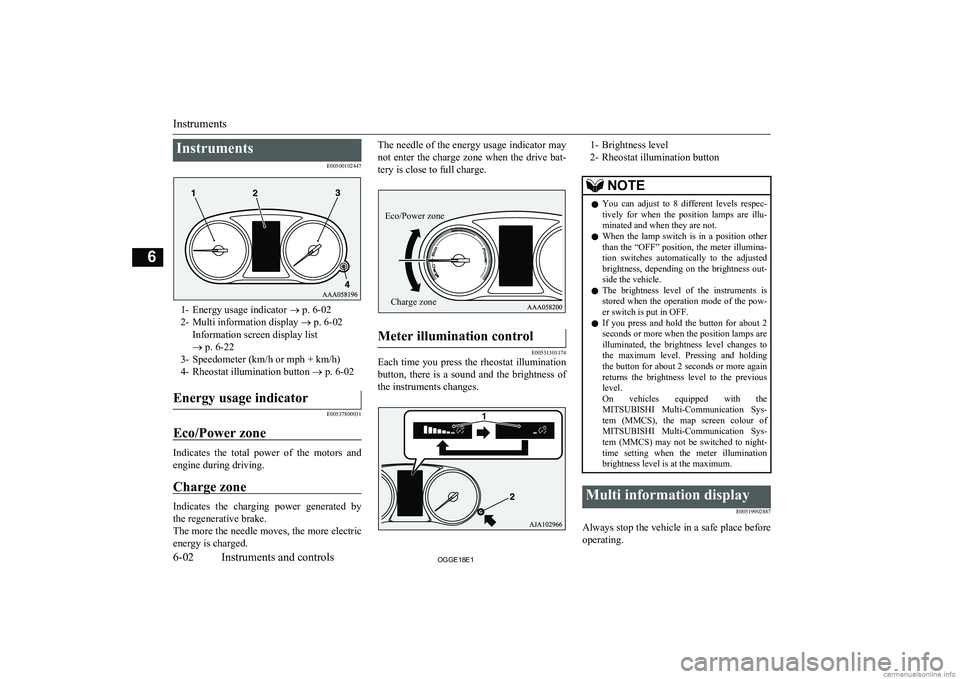
InstrumentsE00500102447
1- Energy usage indicator ® p. 6-02
2- Multi information display ® p. 6-02
Information screen display list
® p. 6-22
3- Speedometer (km/h or mph + km/h)
4- Rheostat illumination button ® p. 6-02
Energy usage indicator
E00537800031
Eco/Power zone
Indicates the total power of the motors and
engine during driving.
Charge zone
Indicates the charging power generated by the regenerative brake.
The more the needle moves, the more electric
energy is charged.
The needle of the energy usage indicator may
not enter the charge zone when the drive bat-tery is close to full charge.Meter illumination control
E00531301174
Each time you press the rheostat illumination
button, there is a sound and the brightness of the instruments changes.
1- Brightness level
2- Rheostat illumination buttonNOTEl You can adjust to 8 different levels respec-
tively for when the position lamps are illu- minated and when they are not.
l When the lamp switch is in a position other
than the “OFF” position, the meter illumina-
tion switches automatically to the adjusted brightness, depending on the brightness out- side the vehicle.
l The brightness level of the instruments is
stored when the operation mode of the pow- er switch is put in OFF.
l If you press and hold the button for about 2
seconds or more when the position lamps are illuminated, the brightness level changes to
the maximum level. Pressing and holding the button for about 2 seconds or more again
returns the brightness level to the previous
level.
On vehicles equipped with the MITSUBISHI Multi-Communication Sys-
tem (MMCS), the map screen colour of MITSUBISHI Multi-Communication Sys-
tem (MMCS) may not be switched to night-
time setting when the meter illumination brightness level is at the maximum.Multi information display
E00519902887
Always stop the vehicle in a safe place beforeoperating.
Instruments
6-02OGGE18E1Instruments and controls6 Eco/Power zoneCharge zone
Page 152 of 538
NOTElWhile driving, the service reminder is not displayed even if you operate the multi information display switch. Always stop the vehicle in a safe place before
operating.
l While driving, the function setting screen is not displayed even if you operate the multi information display switch.
Before operation, park the vehicle in a safe place, firmly apply the parking brake, press the electrical parking switch, and shift to “P” (PARK) position.
Refer to “Changing the function settings” on page 6-15.
l When there is information to be announced, such as a system fault, the buzzer sounds and the screen display is switched.
Refer to “Interrupt display screen” on page 6-08.
Interrupt display screen
E00522001928
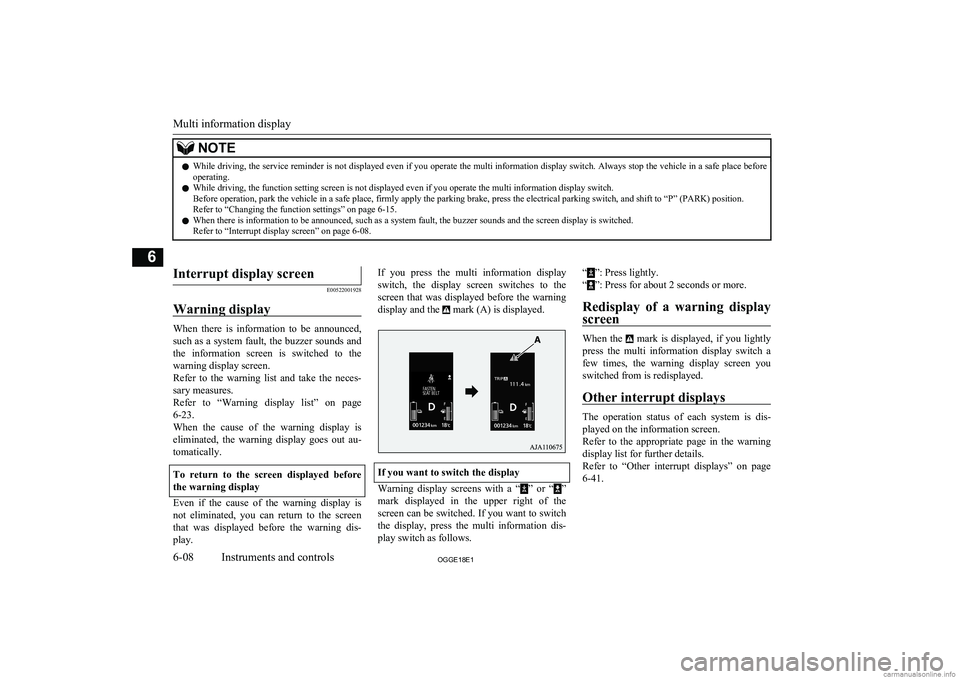
Warning display
When there is information to be announced, such as a system fault, the buzzer sounds and the information screen is switched to the
warning display screen.
Refer to the warning list and take the neces- sary measures.
Refer to “Warning display list” on page
6-23.
When the cause of the warning display is eliminated, the warning display goes out au-
tomatically.
To return to the screen displayed before the warning display
Even if the cause of the warning display is not eliminated, you can return to the screen
that was displayed before the warning dis- play.
If you press the multi information display
switch, the display screen switches to the screen that was displayed before the warning
display and the
mark (A) is displayed.
If you want to switch the display
Warning display screens with a “” or “”
mark displayed in the upper right of the
screen can be switched. If you want to switch the display, press the multi information dis-
play switch as follows.
“”: Press lightly.
“
”: Press for about 2 seconds or more.
Redisplay of a warning display screen
When the mark is displayed, if you lightly
press the multi information display switch a
few times, the warning display screen you
switched from is redisplayed.
Other interrupt displays
The operation status of each system is dis-
played on the information screen.
Refer to the appropriate page in the warning display list for further details.
Refer to “Other interrupt displays” on page
6-41.
Multi information display
6-08OGGE18E1Instruments and controls6
Page 159 of 538
When charging the drive battery
When there is no energy flow
ECO Score
E00531601207
ECO score indicates the points you havescored on fuel-efficient driving by the num-
ber of leaves as follows:
[When the operation mode is ON]
The display shows the score you achieved in the last several minutes.
[When the operation mode is put in OFF]
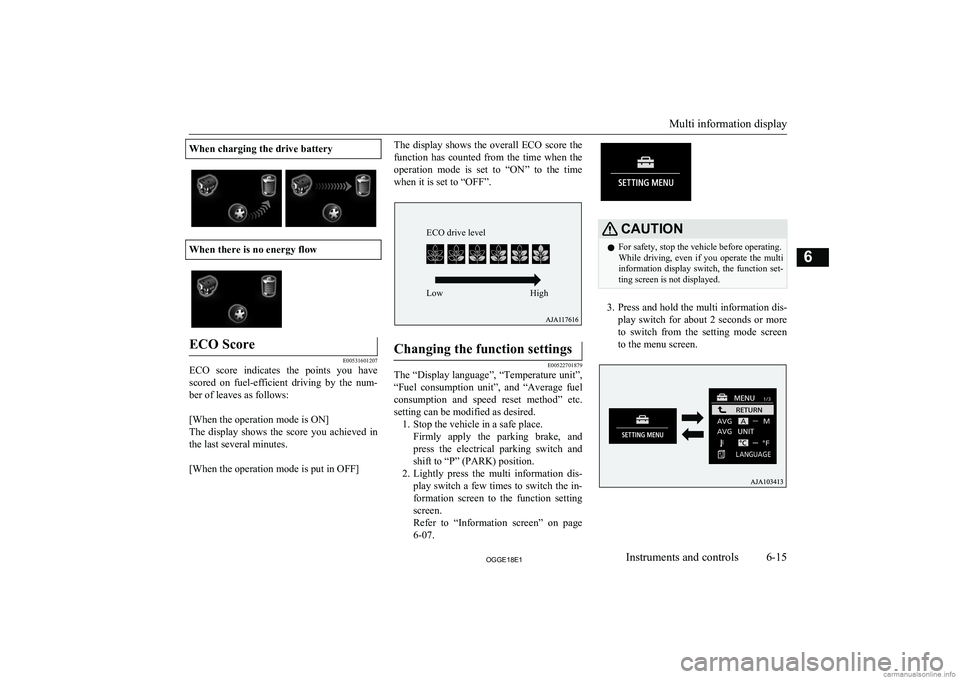
The display shows the overall ECO score the
function has counted from the time when the operation mode is set to “ON” to the time when it is set to “OFF”.Changing the function settings
E00522701879
The “Display language”, “Temperature unit”,
“Fuel consumption unit”, and “Average fuel
consumption and speed reset method” etc. setting can be modified as desired. 1. Stop the vehicle in a safe place.
Firmly apply the parking brake, andpress the electrical parking switch andshift to “P” (PARK) position.
2. Lightly press the multi information dis-
play switch a few times to switch the in-
formation screen to the function setting screen.
Refer to “Information screen” on page
6-07.
CAUTIONl For safety, stop the vehicle before operating.
While driving, even if you operate the multi information display switch, the function set- ting screen is not displayed.
3. Press and hold the multi information dis-
play switch for about 2 seconds or more to switch from the setting mode screen
to the menu screen.
Multi information display
6-15OGGE18E1Instruments and controls6 ECO drive level
Low High
Page 165 of 538
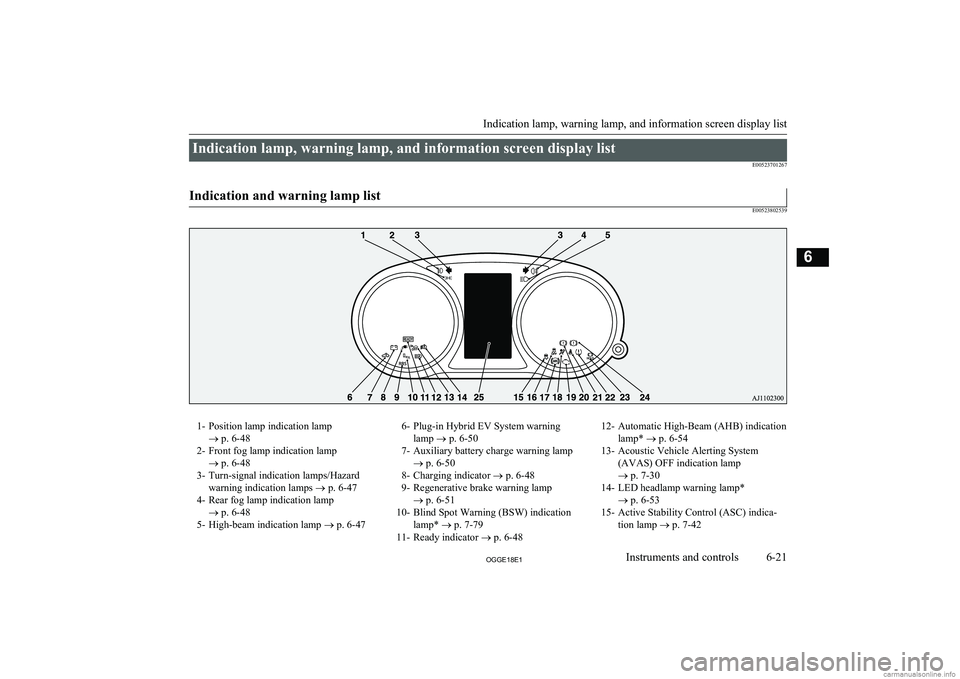
Indication lamp, warning lamp, and information screen display listE00523701267
Indication and warning lamp list
E00523802539
1- Position lamp indication lamp ® p. 6-48
2- Front fog lamp indication lamp ® p. 6-48
3- Turn-signal indication lamps/Hazard warning indication lamps ® p. 6-47
4- Rear fog lamp indication lamp ® p. 6-48
5- High-beam indication lamp ® p. 6-476- Plug-in Hybrid EV System warning
lamp ® p. 6-50
7- Auxiliary battery charge warning lamp ® p. 6-50
8- Charging indicator ® p. 6-48
9- Regenerative brake warning lamp ® p. 6-51
10- Blind Spot Warning (BSW) indication lamp* ® p. 7-79
11- Ready indicator ® p. 6-4812- Automatic High-Beam (AHB) indication
lamp* ® p. 6-54
13- Acoustic Vehicle Alerting System (AVAS) OFF indication lamp
® p. 7-30
14- LED headlamp warning lamp* ® p. 6-53
15- Active Stability Control (ASC) indica- tion lamp ® p. 7-42
Indication lamp, warning lamp, and information screen display list
6-21OGGE18E1Instruments and controls6
Page 166 of 538
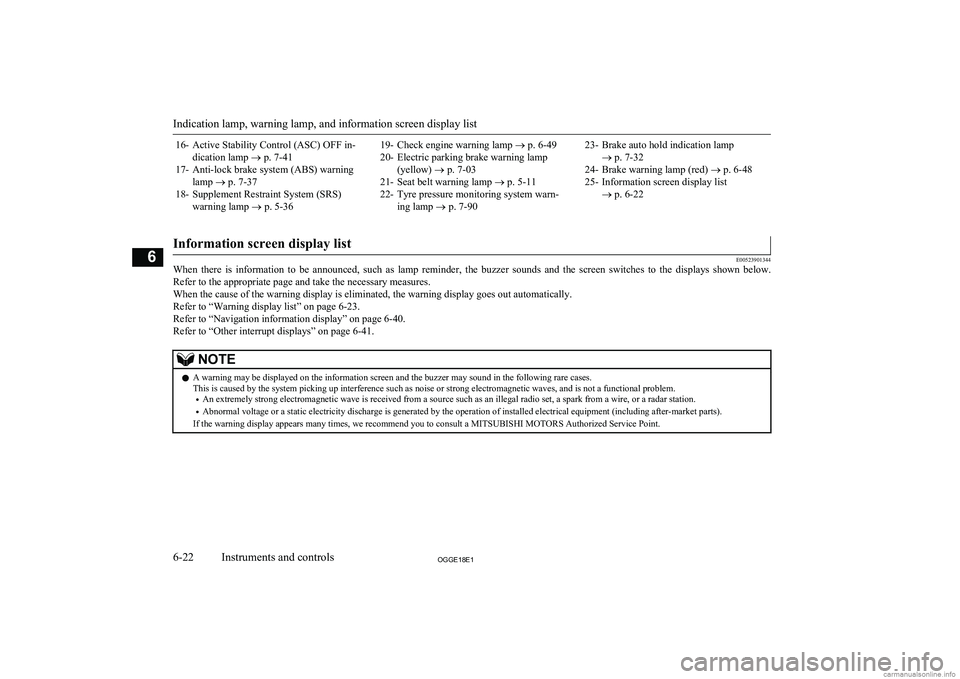
16- Active Stability Control (ASC) OFF in-dication lamp ® p. 7-41
17- Anti-lock brake system (ABS) warning lamp ® p. 7-37
18- Supplement Restraint System (SRS) warning lamp ® p. 5-3619- Check engine warning lamp ® p. 6-49
20- Electric parking brake warning lamp (yellow) ® p. 7-03
21- Seat belt warning lamp ® p. 5-11
22- Tyre pressure monitoring system warn- ing lamp ® p. 7-9023- Brake auto hold indication lamp
® p. 7-32
24- Brake warning lamp (red) ® p. 6-48
25- Information screen display list ® p. 6-22
Information screen display list
E00523901344
When there is information to be announced, such as lamp reminder, the buzzer sounds and the screen switches to the displays shown below.
Refer to the appropriate page and take the necessary measures.
When the cause of the warning display is eliminated, the warning display goes out automatically. Refer to “Warning display list” on page 6-23.
Refer to “Navigation information display” on page 6-40. Refer to “Other interrupt displays” on page 6-41.
NOTEl A warning may be displayed on the information screen and the buzzer may sound in the following rare cases.
This is caused by the system picking up interference such as noise or strong electromagnetic waves, and is not a functional problem.
• An extremely strong electromagnetic wave is received from a source such as an illegal radio set, a spark from a wire, or a radar station.
• Abnormal voltage or a static electricity discharge is generated by the operation of installed electrical equipment (including after-market parts).
If the warning display appears many times, we recommend you to consult a MITSUBISHI MOTORS Authorized Service Point.
Indication lamp, warning lamp, and information screen display list
6-22OGGE18E1Instruments and controls6
Page 167 of 538
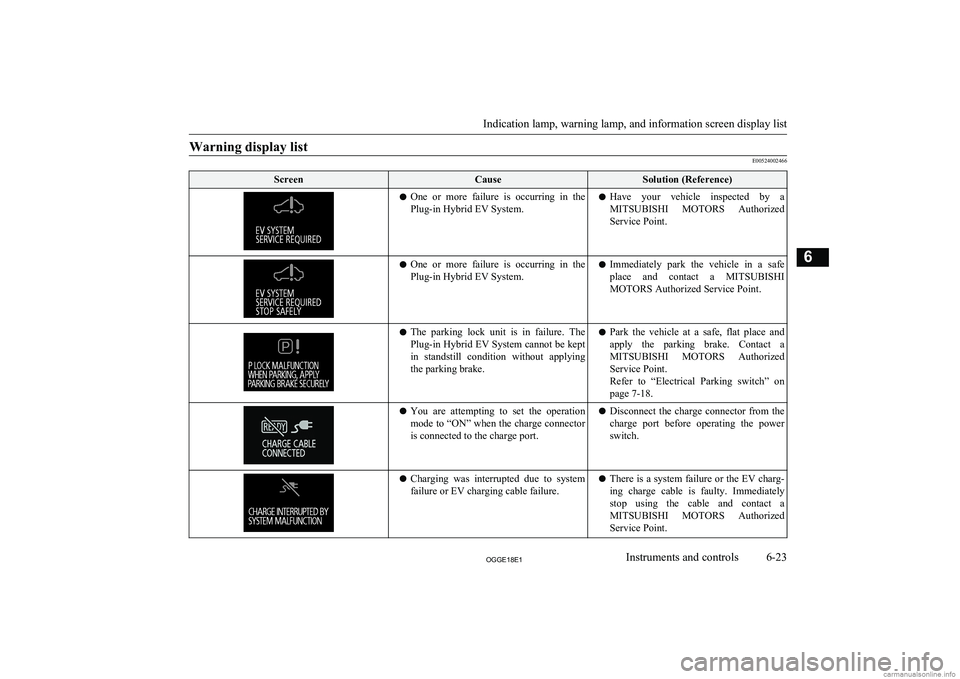
Warning display list
E00524002466
ScreenCauseSolution (Reference)lOne or more failure is occurring in the
Plug-in Hybrid EV System.l Have your vehicle inspected by a
MITSUBISHI MOTORS Authorized
Service Point.l One or more failure is occurring in the
Plug-in Hybrid EV System.l Immediately park the vehicle in a safe
place and contact a MITSUBISHI
MOTORS Authorized Service Point.l The parking lock unit is in failure. The
Plug-in Hybrid EV System cannot be keptin standstill condition without applying the parking brake.l Park the vehicle at a safe, flat place and
apply the parking brake. Contact a
MITSUBISHI MOTORS Authorized
Service Point.
Refer to “Electrical Parking switch” on page 7-18.l You are attempting to set the operation
mode to “ON” when the charge connector
is connected to the charge port.l Disconnect the charge connector from the
charge port before operating the power switch.l Charging was interrupted due to system
failure or EV charging cable failure.l There is a system failure or the EV charg-
ing charge cable is faulty. Immediately
stop using the cable and contact a
MITSUBISHI MOTORS Authorized
Service Point.
Indication lamp, warning lamp, and information screen display list
6-23OGGE18E1Instruments and controls6