change time MITSUBISHI OUTLANDER PHEV 2018 (in English) Repair Manual
[x] Cancel search | Manufacturer: MITSUBISHI, Model Year: 2018, Model line: OUTLANDER PHEV, Model: MITSUBISHI OUTLANDER PHEV 2018Pages: 538, PDF Size: 25.01 MB
Page 397 of 538
NOTElIf the Bluetooth ®
2.0 interface cannot recog-
nise the Bluetooth ®
compatible cellular
phone or the connection takes too much time, the voice guide will say “Import con- tact has timed out” and then the system will
cancel the registration. In such case, start
over again from Step 1.
l Pressing the
HANG-UP button or pressing
and holding the SPEECH button will cancel the registration.
7. When the reception is complete, the
voice guide will say “
like to use for these numbers?”
Say the name you want to register for
this phone book entry.
NOTEl If the entered name is already used for other
phone book entry or similar to a name used
for other phone book entry, that name cannot
be registered.8. The voice guide will say “Adding
When the confirmation function is on, the system will ask if the name is cor-
rect. Answer “Yes.”
Answer “No,” and the voice guide will say “Name please.” Register a differentname.
9. The voice guide will say “Numbers
saved.”
10. The voice guide will say “Would you
like to import another contact?”
Answer “Yes” if you want to continue
with the registration. You can continueto register a new phone book entry from
Step 5.
Answer “No,” to return to the main menu.To change the content registered in the ve-
hicle phone book
E00739800024
You can change or delete a name or tele- phone number registered in the vehicle phonebook.
You can also listen to the list of names regis-
tered in the vehicle phone book.
NOTEl The system must have at least one entry.Editing a telephone number
1. Press the SPEECH button.
2. Say “Phone book.”
3. The voice guide will say “Select one of
the following: new entry, edit number, edit name, list names, delete, erase all, or
import contact.” Say “Edit number.”
4. The voice guide will say “Please say the
name of the entry you would like to edit, or say list names.” Say the name of the
phone book entry you want to edit.NOTEl Say “List names,” and the names registered
in the phone book will be read out in order.
Refer to “Listening to the list of registered names” on page 8-66.
5. The voice guide will say “Home, work,
mobile or other?” Select and say the lo- cation where the telephone number youwant to change or add is registered.
When the confirmation function is on,
the system will check the target name
and location again. Answer “Yes” if you want to continue with the editing.
Answer “No” to return to Step 3.
6. The voice guide will say “Number
please.” Say the telephone number you
want to register.
Bluetooth ®
2.0 interface*
8-65OGGE18E1For pleasant driving8
Page 400 of 538
Up to 7 mobile phone books, each containing
up to 1,000 names, can be registered.
The Bluetooth ®
2.0 interface automatically
converts from text to voice the names regis- tered in the transferred phone book entries,
and creates names.NOTEl Only the mobile phone book transferred
from the connected cellular phone can be
used with that cellular phone.
l You cannot change the names and telephone
numbers in the phone book entries registered
in the mobile phone book. You cannot select and delete specific phone book entries, ei- ther. To change or delete any of the above,
change the applicable information in the source phone book of the cellular phone and
then transfer the phone book again.
To import a devices phone book
Follow the steps below to transfer to the mo-
bile phone book the phone book stored in the
cellular phone.
NOTEl Transfer should be completed while the ve-
hicle is parked. Before transferring, makesure that the vehicle is parked in a safe loca-
tion.NOTEl The already stored phone book in the mobile
phone book is overwritten by the storedphone book in the cellular phone.
l All or part of data may not be transferred,
even when the cellular phone supports Blue-
tooth ®
, depending on the compatibility of
the device.
l Only a home, a work, and a mobile number
can be imported.
l The maximum supported telephone number
length is 19 digits. Any telephone number of
20 digits or more will be truncated to the first 19 digits.
l If telephone numbers contain characters oth-
er than 0 to 9, *, # or +, these characters aredeleted before the transfer.
l For the connection settings on the cellular
phone side, refer to the instructions for the
cellular phone.
1. Press the SPEECH button.
2. Say “Phone book.”
3. The voice guide will say “Select one of
the following: new entry, edit number, edit name, list names, delete, erase all, or
import contact.” Say “Import contact.”
4. The voice guide will say “Would you
like to import a single entry or all con-
tacts?” Say “All contacts.”
5. The voice guide will say “Importing the
contact list from the mobile phone book. This may take several minutes to com-
plete. Would you like to continue?” An-
swer “Yes,” transferring to the mobile
phone book the phone book stored in the cellular phone will start.
Answer “No,” to return to the main menu.NOTEl The transfer may take some time to com-
plete depending on the number of contacts.
l If the Bluetooth ®
2.0 interface could not be
connected to the Bluetooth ®
compatible cel-
lular phone, the voice guide will say “Un- able to transfer contact list from phone” and
then the system will return to the main menu.
l If you press the
HANG-UP button or press
and hold the SPEECH button during the data
transfer, the transfer will be cancelled and
the system will return to the main menu.
l If an error occurs during the data transfer, all
transfer will be cancelled and the voice
guide will say “Unable to complete the phone book import” and then the system willreturn to the main menu.
l If there are no contacts in the phone book,
the voice guide will say “There are no con- tacts on the connected phone.”
6. When the transfer is complete, the voice
guide will say “Import complete” and then the system will return to the main
menu.
Bluetooth ®
2.0 interface*
8-68OGGE18E1For pleasant driving8
Page 431 of 538
NOTElIn cold conditions (when the ambient tem-
perature is 0 °C or lower), the time and driv-ing distance necessary until completion of
the repair can be longer than in warmer con- ditions, meaning that the tyre pressure candrop below the specified level even when
you have inflated the tyre a second time and
subsequently driven the vehicle. If this hap- pens, inflate the tyre to the specified pres-
sure once more, drive for about 10 minutes or 5 km, then check the tyre pressure again.
If the tyre pressure has again dropped below
the specified level, stop driving the vehicle and contact a MITSUBISHI MOTORS Au-
thorized Service Point or another specialist.
21. Immediately drive with great care to a
MITSUBISHI MOTORS Authorized
Service Point and have tyre repair/
replacement performed.
CAUTIONl Be sure to check the tyre pressure for confir-
mation that the emergency repair procedureis complete.NOTEl Please give the empty sealant bottle to your
MITSUBISHI MOTORS Authorized Serv-
ice Point when you purchase new sealant or dispose of the sealant bottle according to na-
tional regulations for the disposal of chemi- cal waste.
l A tyre in which puncture sealant has been
used should ideally be replaced with a newone. If you wish to have such a tyre properly
repaired for reuse, please contact a MITSUBISHI MOTORS Authorized Serv-
ice Point or another specialist. Note that a
proper repair is impossible following an emergency repair if the puncture hole cannot
be located.
l The manufacturer is unable to guarantee that
all tyre punctures can be repaired with the
tyre repair kit, in particular cuts or perfora- tions with a diameter of more than 4 mm or
away from the tyre’s tread. The manufactur- er is not liable for damage sustained throughimproper use of the tyre repair kit.
l The manufacturer is not liable for damage
sustained through re-use of any tyre in which tyre sealant has been used.How to change a tyre
E00801203924
Before changing a tyre, first stop your vehi-cle in a safe, flat location. 1. Park the vehicle on level and stable
ground, free of loose pebbles, etc.
2. Set the parking brake firmly.
3. Put the select position in “P” (PARK)
position and stop the Plug-in Hybrid EV
system.
4. Have all your passengers get out of the
vehicle.
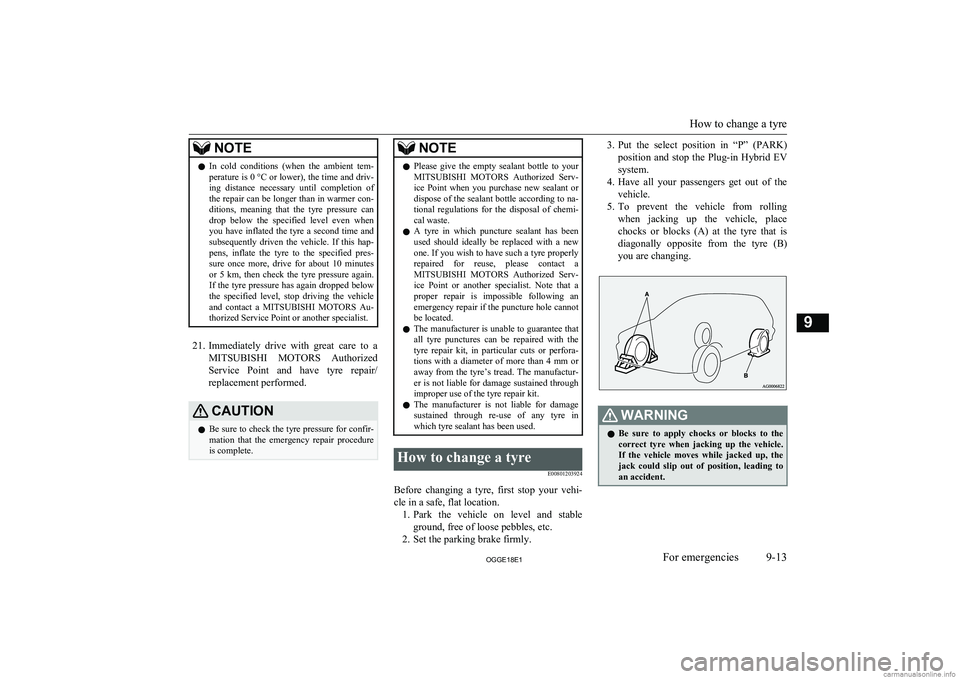
5. To prevent the vehicle from rolling
when jacking up the vehicle, place chocks or blocks (A) at the tyre that is diagonally opposite from the tyre (B)
you are changing.WARNINGl Be sure to apply chocks or blocks to the
correct tyre when jacking up the vehicle.If the vehicle moves while jacked up, the
jack could slip out of position, leading to
an accident.
How to change a tyre
9-13OGGE18E1For emergencies9
Page 433 of 538
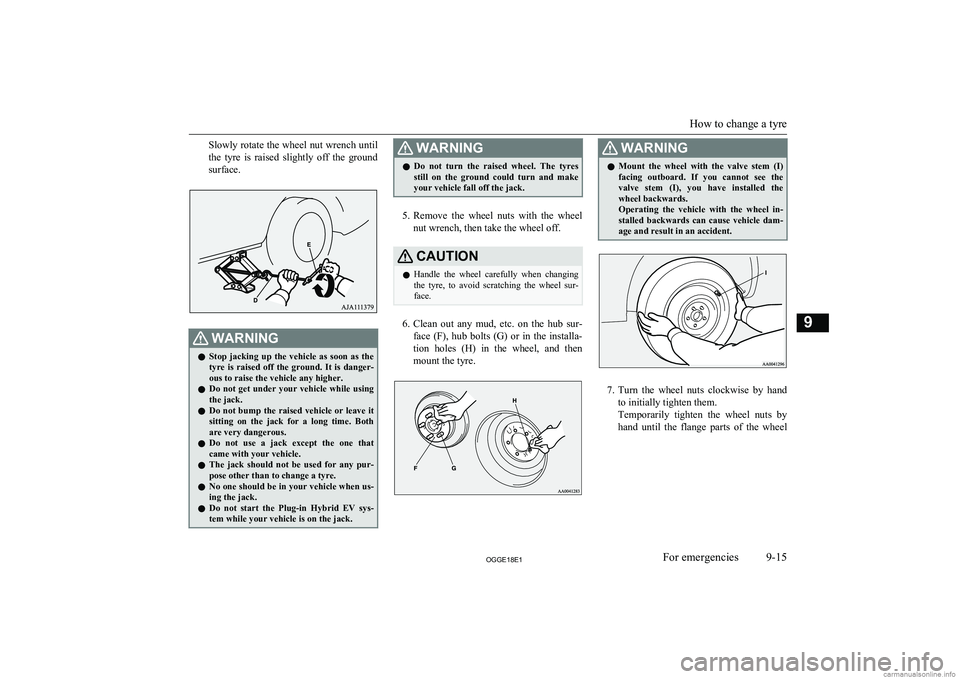
Slowly rotate the wheel nut wrench untilthe tyre is raised slightly off the ground
surface.WARNINGl Stop jacking up the vehicle as soon as the
tyre is raised off the ground. It is danger-
ous to raise the vehicle any higher.
l Do not get under your vehicle while using
the jack.
l Do not bump the raised vehicle or leave it
sitting on the jack for a long time. Both are very dangerous.
l Do not use a jack except the one that
came with your vehicle.
l The jack should not be used for any pur-
pose other than to change a tyre.
l No one should be in your vehicle when us-
ing the jack.
l Do not start the Plug-in Hybrid EV sys-
tem while your vehicle is on the jack.WARNINGl Do not turn the raised wheel. The tyres
still on the ground could turn and make
your vehicle fall off the jack.
5. Remove the wheel nuts with the wheel
nut wrench, then take the wheel off.
CAUTIONl Handle the wheel carefully when changing
the tyre, to avoid scratching the wheel sur- face.
6. Clean out any mud, etc. on the hub sur-
face (F), hub bolts (G) or in the installa- tion holes (H) in the wheel, and then
mount the tyre.
WARNINGl Mount the wheel with the valve stem (I)
facing outboard. If you cannot see the
valve stem (I), you have installed the wheel backwards.
Operating the vehicle with the wheel in-
stalled backwards can cause vehicle dam- age and result in an accident.
7. Turn the wheel nuts clockwise by hand
to initially tighten them.
Temporarily tighten the wheel nuts by hand until the flange parts of the wheel
How to change a tyre
9-15OGGE18E1For emergencies9
Page 492 of 538
Time Setting.................................................. 8-45
Dimensions...................................................... 12-04
Dipper (High/Low beam change)......................6-54
Disposal information for used batteries............ 2-17
Doors Central door locks......................................... 4-16
Child-protection............................................ 4-18
Dead Lock System........................................ 4-17
Lock and unlock............................................ 4-14
Drive battery......................................................2-04
Driving, alcohol and drugs................................ 7-02
E
Economical driving........................................... 7-02
Electric motor model....................................... 12-02
Electric motor number.....................................12-02
Electric motor specifications........................... 12-08
Electric parking brake....................................... 7-03
Electric power steering system (EPS)............... 7-39
Electric tailgate..................................................4-20
Electric window control.................................... 4-34
Electrical Parking switch...................................7-18
Electronic immobilizer (Anti-theft starting system)................................................ 4-03
Emergency starting............................................9-02
Emergency stop signal system.......................... 7-36
Engine specifications.......................................12-06
Engine Coolant..............................................11-06,12-10Model.......................................................... 12-02
Number....................................................... 12-02
Oil............................................................... 11-05
Oil and oil filter........................................... 12-10
Overheating................................................... 9-04
Specifications.............................................. 12-06
Used engine oils safety instructions and disposal information............................. 2-17
EV charging cable............................................. 3-07
EV cruising range.............................................. 2-05
EV switch.......................................................... 7-25
Exterior and interior lamp operation............... 11-15
F
Fluid capacities and lubricants........................ 12-10
Fluid Brake fluid........................................ 11-08,12-10
Engine coolant.................................. 11-06,12-10
Front Motor fluid........................................ 12-10
Plug-in hybrid EV system coolant.............. 11-06
Transaxle fluid............................................ 12-10
Washer fluid..................................... 11-08,12-10
For persons with electro-medical ap- paratus such as implantable cardiac
pacemaker or implantable cardi-
overter-defibrillator..........................................2-09
Forward Collision Mitigation System (FCM)... 7-64
Front fog lamps Bulb capacity.............................................. 11-24
Indication lamp............................................. 6-48
Replacement................................................ 11-27
Switch........................................................... 6-61
Front Motor fluid ............................................12-10
Front room lamp................................................ 8-78 Bulb capacity.............................................. 11-25
Front seats......................................................... 5-03
Front turn-signal lamps Bulb capacity.............................................. 11-24
Replacement................................................ 11-27
Fuel consumption............................................ 12-09
Fuel Filling the fuel tank....................................... 2-14Fuel selection................................................ 2-13Modification/alterations to the electrical or fuel systems............................. 2-16
Tank capacity................................................ 2-14
Fuses................................................................ 11-16
Fusible links.................................................... 11-15
G
General maintenance....................................... 11-15
General vehicle data........................................ 12-04
Genuine parts.....................................................2-16
Glove box.......................................................... 8-80
Glove box lamp Bulb capacity.............................................. 11-25
H
Hazard warning flasher switch.......................... 6-60
Hazard warning indication lamps......................6-47
Head restraints................................................... 5-05
Headlamp levelling switch................................ 6-59
Headlamp washer switch...................................6-66
Headlamps Bulb capacity.............................................. 11-24
Headlamp flasher.......................................... 6-54 Replacement................................................ 11-25
Switch........................................................... 6-52
Heated mirror.................................................... 7-11
Heated seats....................................................... 5-04
Alphabetical index
13- 2 OGGE18E1Alphabetical index