radio MITSUBISHI OUTLANDER SPORT 2015 3.G Owner's Manual
[x] Cancel search | Manufacturer: MITSUBISHI, Model Year: 2015, Model line: OUTLANDER SPORT, Model: MITSUBISHI OUTLANDER SPORT 2015 3.GPages: 384, PDF Size: 61.37 MB
Page 288 of 384
Listen to Satellite Radio (if so equipped)
Comfort controls 7-41
7
1. Press the PTY key. Switches to the category search mode,and the category name is indicated on thedisplay. 2. Turn the /SEL key to select the cate- gory. 3. Press the SCAN key.The channels in the selected category are scanned.
Register the channel in advance, and select this at a later time. 1. Tune in to the channel to register.
2. Hold down any of the keys from the 1RPT key to the 6 key. A “Beep” sounds, and the preset key is registered.
Other channels can be selected while listen- ing to a channel. 1. Press the PTY key. Switches to the category search mode, and the category name is indicated on the display. 2. Turn the /SEL key to select the cate- gory. 3. Press the /SEL key. Switches to channel search mode.
4. Turn the /SEL key to select the chan- nel. 5. Press the /SEL key. A “Beep” sounds, and the selected chan-nel is received. (Channel preliminary set- ting mode) The channel name shown on the displayflashes. Press the /SEL key again to cancel the search mode and return to normal recep- tion. 6. To continue the search, turn the /SEL key to select the channel. The selected channel is received. 7. Press the /SEL key. Cancels the search mode and returns tonormal reception.
Selecting a channel will also cancel scan searching.
Scan Category Channels
NOTE
Press the SCAN key or PTY key again while receiving the channel to return to cancel scan searching. Turning the /SET key will also cancel scan searching.
Preset Memory
NOTE
NOTE
The preset memory can register a maximum of 6 stations per band. If a preset key that already has a channel reg- istered is selected, the new channel will be registered. Pressing the preset key will select the previ- ously registered channel. The preset channels on the display are shownas “P1” though “P6”.
Channel Search
NOTE
After making preliminary settings in the channel search mode, this will switch to the channel being received. Channel number “000” is for the SIRUS ID display, so it cannot be searched. If the “PTY ALL” category is selected, all channels can be searched in the channelsearch mode. In the category mode, press the PTY key to cancel search mode. In the channel search mode, press the 6 key to return to the category search mode.
BK0206700US.bo
ok 41 ページ 2014年3月25日 火曜日 午後4時42分
Page 298 of 384
Display Indicator
Comfort controls 7-51
7
N00717700022
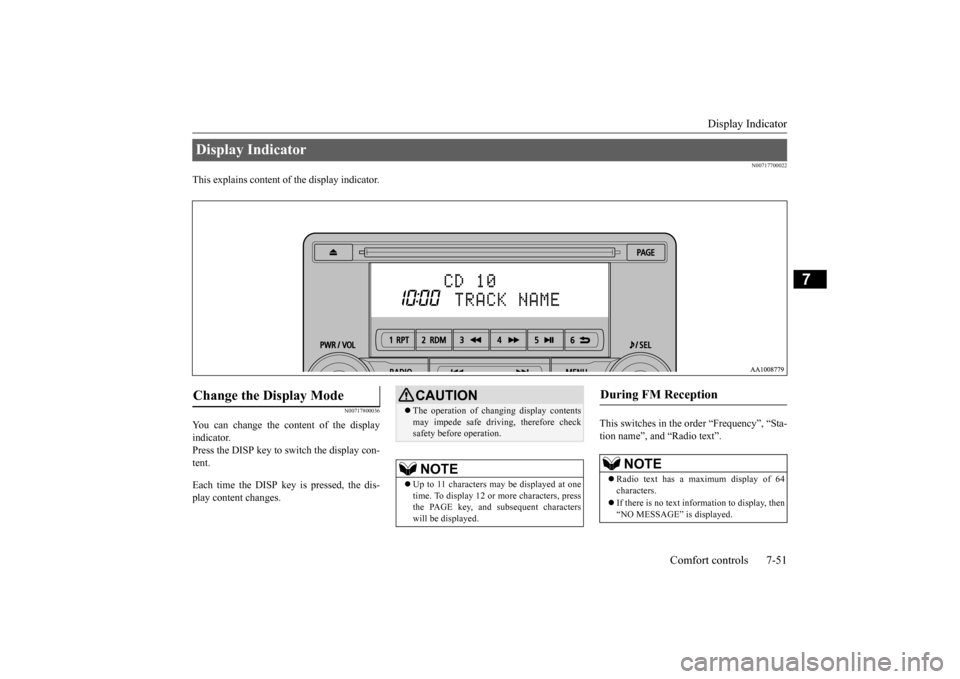
This explains content of the display indicator.
N00717800036
You can change the content of the display indicator. Press the DISP key to switch the display con- tent. Each time the DISP key is pressed, the dis- play content changes.
This switches in the order “Frequency”, “Sta- tion name”, and “Radio text”.
Display Indicator Change the Display Mode
CAUTION The operation of changing display contents may impede safe driving, therefore check safety before operation.NOTE
Up to 11 characters may be displayed at one time. To display 12 or more characters, press the PAGE key, and subsequent characterswill be displayed.
During FM Reception
NOTE
Radio text has a maximum display of 64 characters. If there is no text information to display, then “NO MESSAGE” is displayed.
BK0206700US.bo
ok 51 ページ 2014年3月25日 火曜日 午後4時42分
Page 299 of 384
Audio Quality and Volume Balance Adjustment 7-52 Comfort controls
7
This switches in the order “Channel name”, “Category name”, “Artist name”, “Trackname”, and “Composer name”. This switches in the order “Disc title”, “Track title”, and “Operating status”. This switches in the order “Folder title”, “File title”, and “Operating status”.
Hold down the DISP key. This switches the ID3tag display. [DISP] Each time the key is pressed, this switches in the order “Album name”, “Track name”, “Artist name”, “Genre name”*, and“Operating status”.
N00718200024
This switches in the order “Albums”, “Trackname”, “Artist name”, “Genre name”, and “Operating status”.
N00718300025
Operating details are the same as in “DuringiPod Playback” (P.7-52).
N00718400039
Change audio quality settings. 1. Press the /SEL key to select settings items. Each time the /SEL key is pressed, this switches in the order BASS, TREBLE, FADER, BALANCE, SCV, and Cancel. 2. Turn the /SEL key to adjust.
During Satellite Radio Reception
(if so equipped)
NOTE
The channel and category have a maximum display of 8 characters. The other items have a maximum display of 36 characters.
During CD-DA playback
NOTE
If there is no text information to display, then “NO TITLE” is displayed.
During MP3/WMA/AAC Play- back
NOTE
If there is no text information to display, then “NO TITLE” is displayed.
Display the ID3tag
*:Displayed when playing back audio files on a USB device (vehicles with a Bluetooth
® 2.0 interface).
NOTE
During display of the ID3tag, hold down the DISP key to switch to the folder title display. The genre name display may not be possible.
During iPod Playback
NOTE
If there is no text information to display, then “NO TITLE” is displayed. Displayed genre name in equipment by type (vehicles with a Bluetooth
® 2.0 interface).
The genre name display may not be possible.
During Bluetooth
® 2.0 Audio Play-
back
(if so equipped)
Audio Quality and Volume Balance Adjustment Adjust Audio Quality and Vol- ume Balance
BK0206700US.bo
ok 52 ページ 2014年3月25日 火曜日 午後4時42分
Page 300 of 384
System Settings
Comfort controls 7-53
7
N00718500056
Change system settings such as product time. 1. Press the MENU key.
2. Press the /SEL key to select settings items. Each time the /SEL key is pressed, this switches in the order Satellite radio set- tings*
1, Gracenote DB*
2, PHONE set-
tings, Adjust time, and Cancel. 3. Turn the /SEL key to set.4. Press the /SEL key to input changes and proceed to the next setting.
Adjust- ment items
Turn counter-clockwise
Turn clockwise
BASS -6 to 0
(low low-pass volume)
0 to +6 (high low-pass volume)
TRE- BLE
-6 to 0 (Low high-pass volume)
0 to +6 (High high-pass volume)
FADER CENTER to
REAR 11 (emphasize REAR)
FRONT 11 to CENTER (emphasize FRONT)
BAL- ANCE
LEFT 11 to CENTER (emphasize LEFT)
CENTER to RIGHT 11 (emphasize RIGHT)
SCV OFF, LOW
(Low vehicle compensated volume effect)
MID, HIGH (High vehicle compensated volume effect)
System Settings
*1: Displayed when a satellite tuner is con- nected.
*2: Displayed when playing back audio files (vehicles with a Bluetooth
® 2.0 interface).
BK0206700US.bo
ok 53 ページ 2014年3月25日 火曜日 午後4時42分
Page 301 of 384
System Settings 7-54 Comfort controls
7
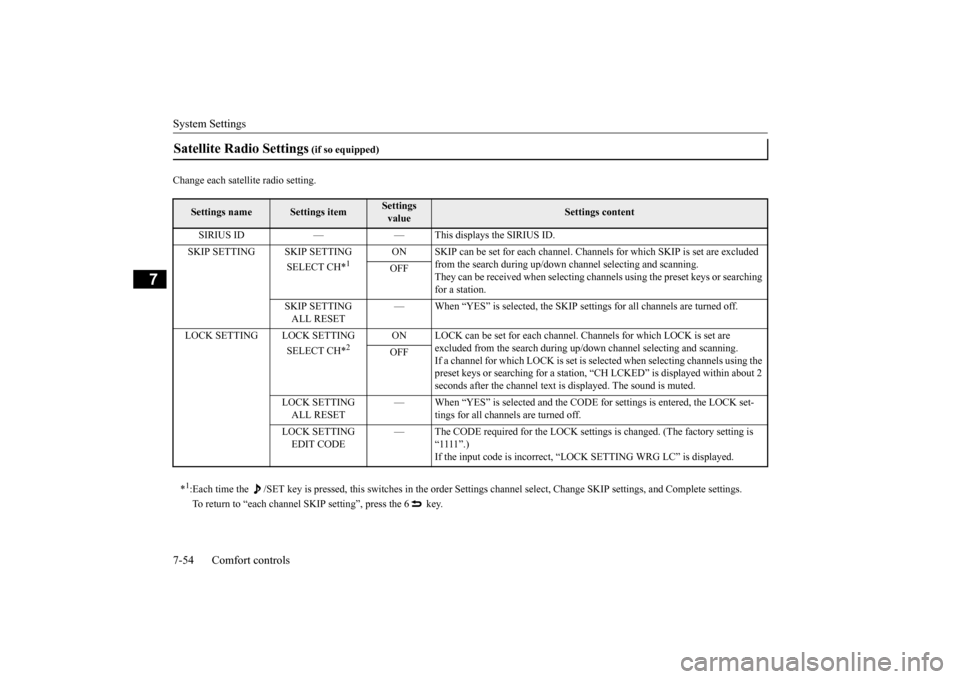
Change each satellite radio setting.Satellite Radio Settings
(if so equipped)
Settings name
Settings item
Settings value
Settings content
SIRIUS ID — — This displays the SIRIUS ID. SKIP SETTING SKIP SETTING
SELECT CH*
1
ON SKIP can be set for each channel. Channe
ls for which SKIP is set are excluded
from the search during up/down channel selecting and scanning.They can be received when selecting chan
nels using the preset keys or searching
for a station.
OFF
SKIP SETTING ALL RESET
— When “YES” is selected, the SKIP settings for all channels are turned off.
LOCK SETTING LOCK SETTING
SELECT CH*
2
ON LOCK can be set for each channel. Channels for which LOCK is set are
excluded from the search during up/do
wn channel selecting and scanning.
If a channel for which LOCK is set is sel
ected when selecting channels using the
preset keys or searching for a station, “CH LCKED” is displayed within about 2 seconds after the channel text is displayed. The sound is muted.
OFF
LOCK SETTING ALL RESET
— When “YES” is selected and the CODE
for settings is entered, the LOCK set-
tings for all channels are turned off.
LOCK SETTING EDIT CODE
— The CODE required for the LOCK settings is changed. (The factory setting is
“1111”.)If the input code is incorrect, “LOCK SETTING WRG LC” is displayed.
*1: Each time the /SET key is pressed, this switches in the order Sett
ings channel select, Change SKIP settings, and Complete setti
ngs.
To return to “each channel SKIP setting”, press the 6 key.
BK0206700US.bo
ok 54 ページ 2014年3月25日 火曜日 午後4時42分
Page 306 of 384
General information about your radio
Comfort controls 7-59
7
N00733901511
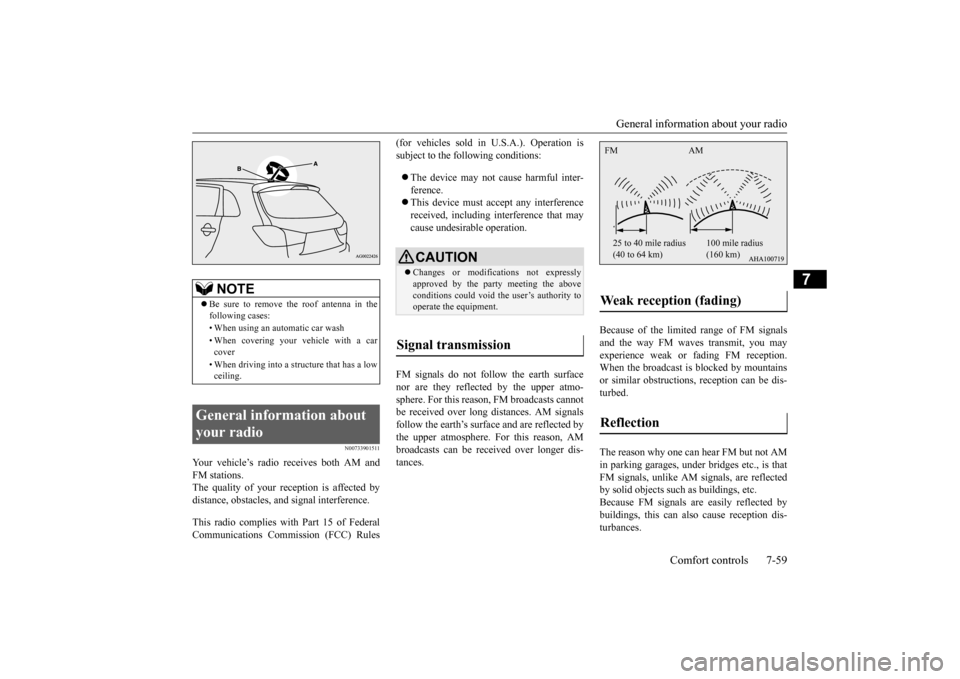
Your vehicle’s radio receives both AM and FM stations.The quality of your reception is affected by distance, obstacles, and signal interference. This radio complies with Part 15 of Federal Communications Commission (FCC) Rules
(for vehicles sold in U.S.A.). Operation is subject to the following conditions: The device may not cause harmful inter- ference. This device must accept any interference received, including interference that may cause undesirable operation.
FM signals do not follow the earth surface nor are they reflected by the upper atmo- sphere. For this reason, FM broadcasts cannot be received over long distances. AM signalsfollow the earth’s surface and are reflected by the upper atmosphere. For this reason, AM broadcasts can be received over longer dis-tances.
Because of the limited range of FM signals and the way FM waves transmit, you mayexperience weak or fading FM reception. When the broadcast is blocked by mountains or similar obstructions, reception can be dis-turbed. The reason why one can hear FM but not AM in parking garages, under bridges etc., is thatFM signals, unlike AM signals, are reflected by solid objects such as buildings, etc. Because FM signals are easily reflected bybuildings, this can also cause reception dis- turbances.
NOTE
Be sure to remove the roof antenna in the following cases: • When using an automatic car wash • When covering your vehicle with a car cover • When driving into a structure that has a low ceiling.
General information about your radio
CAUTION Changes or modifications not expressly approved by the party meeting the above conditions could void the user’s authority to operate the equipment.
Signal transmission
Weak reception (fading) Reflection FM AM 25 to 40 mile radius (40 to 64 km)
100 mile radius (160 km)
BK0206700US.bo
ok 59 ページ 2014年3月25日 火曜日 午後4時42分
Page 307 of 384
General information about your radio 7-60 Comfort controls
7
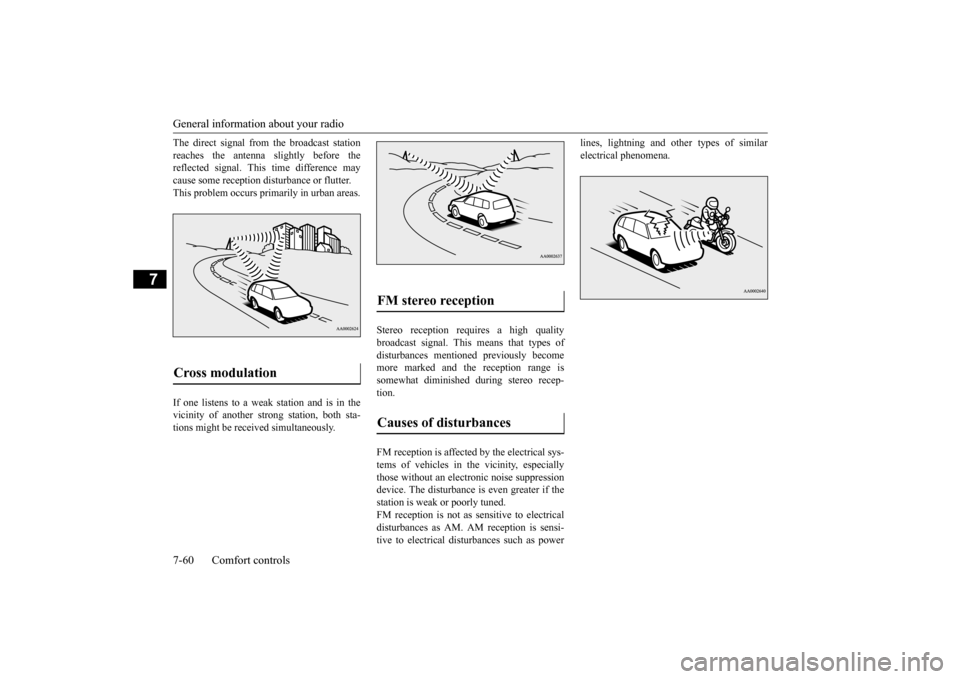
The direct signal from the broadcast station reaches the antenna slightly before the reflected signal. This time difference may cause some reception disturbance or flutter.This problem occurs primarily in urban areas. If one listens to a weak station and is in the vicinity of another strong station, both sta-tions might be received simultaneously.
Stereo reception requires a high quality broadcast signal. This means that types ofdisturbances mentioned previously become more marked and the reception range is somewhat diminished during stereo recep-tion. FM reception is affected by the electrical sys- tems of vehicles in the vicinity, especiallythose without an electro
nic noise suppression
device. The disturbance is even greater if the station is weak or poorly tuned.FM reception is not as sensitive to electrical disturbances as AM. AM reception is sensi- tive to electrical disturbances such as power
lines, lightning and other types of similar electrical phenomena.
Cross modulation
FM stereo reception Causes of disturbances
BK0206700US.bo
ok 60 ページ 2014年3月25日 火曜日 午後4時42分
Page 345 of 384
General maintenance 9-22 Vehicle care and maintenance
9
N00940900228
Spark plugs must fire properly for good engine performance and emission-control.Do not reuse them by cleaning or regapping. Change them at the mileage listed in the “WARRANTY AND MAINTENANCEMANUAL”.
N00941000040
Check the hose surfaces for any heat andmechanical damage, hard and brittle rubber,cracking, tears, cuts and abrasions. Pay spe- cial attention to the hoses closest to high heat sources such as the exhaust manifold. Checkall the hose connections, such as clamps and couplings, to make sure they are secure and that there are no leaks. If you see any wear ordamage, replace the hoses immediately.
N00950100050
Have the valve clearance checked at anauthorized Mitsubishi Motors dealer at themileage specified in the “WARRANTY AND MAINTENANCE MANUAL”. If the engine sounds abnormally loud, haveadjustments made by an authorized Mitsubishi Motors dealer.
N00941300173
Check these regularly for damage or leaks in the fuel lines and connections. Check the fuel tank filler cap for damage or looseness. Pay special attention to the fuel lines closest to
high heat sources such as the exhaust mani- fold.
N00941400187
If the fuel-vapor vent line is clogged or dam- aged, the fuel-vapor mixture will escape, pol- luting the air.Have the system checked at an authorized Mitsubishi Motors dealer at the mileage spec- ified in the “WARRANTY AND MAINTE-NANCE MANUAL”.
N00941500247
The next pages list the maintenance servicerecommended by Mitsubishi Motors Corpo- ration. In addition to the general maintenance that needs to be performed at the times listed,
NOTE
To meet government regulations and pro- mote cleaner air, your vehicle is equipped with an onboard diagnostic system (OBD). The engine electronic control module that controls OBD functions stores various data(especially about the exhaust emissions). This data will be erased if the battery cable is disconnected, which could make a rapiddiagnosis difficult. Do not disconnect the battery cable when the engine malfunction indicator (“SERVICE ENGINE SOON” or“Check engine light”) is ON.
Spark plugs
NOTE
Use the spark plugs listed under “Engine specifications” on page 11-4 or plugs that are exactly the same. Other plugs could causeengine damage, performance problems or radio noise.
Fuel hoses Intake valve clearance Fuel system (tank, pipe line and connection, and fuel tank filler cap)
WA R N I N G If you see a fuel leak or if you smell fuel, do not run the engine. Any spark (includ- ing from the ignition), flame or smokingmaterial could cause an explosion or fire. Call an authorized Mitsubishi Motors dealer or a repair facility of your choicefor assistance.
Evaporative emission control system (except evaporative emission canister) General maintenance
BK0206700US.bo
ok 22 ページ 2014年3月25日 火曜日 午後4時42分
Page 349 of 384
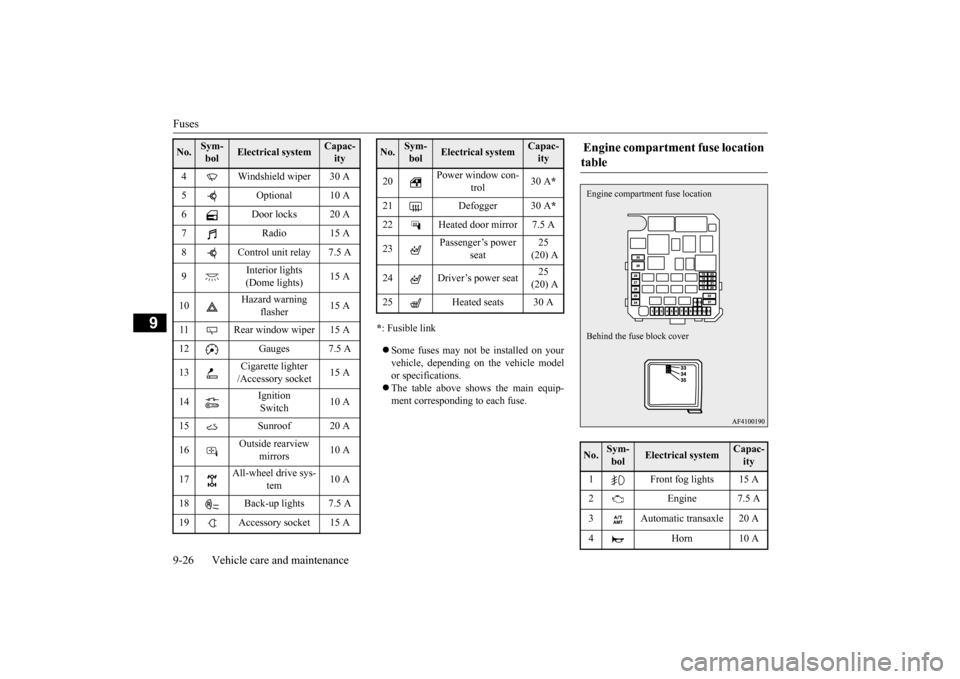
Fuses 9-26 Vehicle care and maintenance
9
* : Fusible link Some fuses may not be installed on your vehicle, depending on the vehicle model or specifications. The table above shows the main equip- ment corresponding to each fuse.
4 Windshield wiper 30 A 5 Optional 10 A 6 Door locks 20 A 7 Radio 15 A8 Control unit relay 7.5 A 9
Interior lights (Dome lights)
15 A
10
Hazard warning
flasher
15 A
11 Rear window wiper 15 A 12 Gauges 7.5 A 13
Cigarette lighter /Accessory socket
15 A
14
Ignition Switch
10 A
15 Sunroof 20 A16
Outside rearview
mirrors
10 A
17
All-wheel drive sys-
tem
10 A
18 Back-up lights 7.5 A 19 Accessory socket 15 ANo.
Sym- bol
Electrical system
Capac-ity
20
Power window con-
trol
30 A
*
21 Defogger 30 A
*
22 Heated door mirror 7.5 A 23
Passenger’s power
seat
25 (20) A
24 Driver’s power seat
25 (20) A
25 Heated seats 30 ANo.
Sym- bol
Electrical system
Capac-ity
Engine compartment fuse location table No.
Sym- bol
Electrical system
Capac-ity
1 Front fog lights 15 A 2 Engine 7.5 A 3 Automatic transaxle 20 A 4 Horn 10 AEngine compartment
fuse location
Behind the fuse block cover
BK0206700US.bo
ok 26 ページ 2014年3月25日 火曜日 午後4時42分
Page 378 of 384
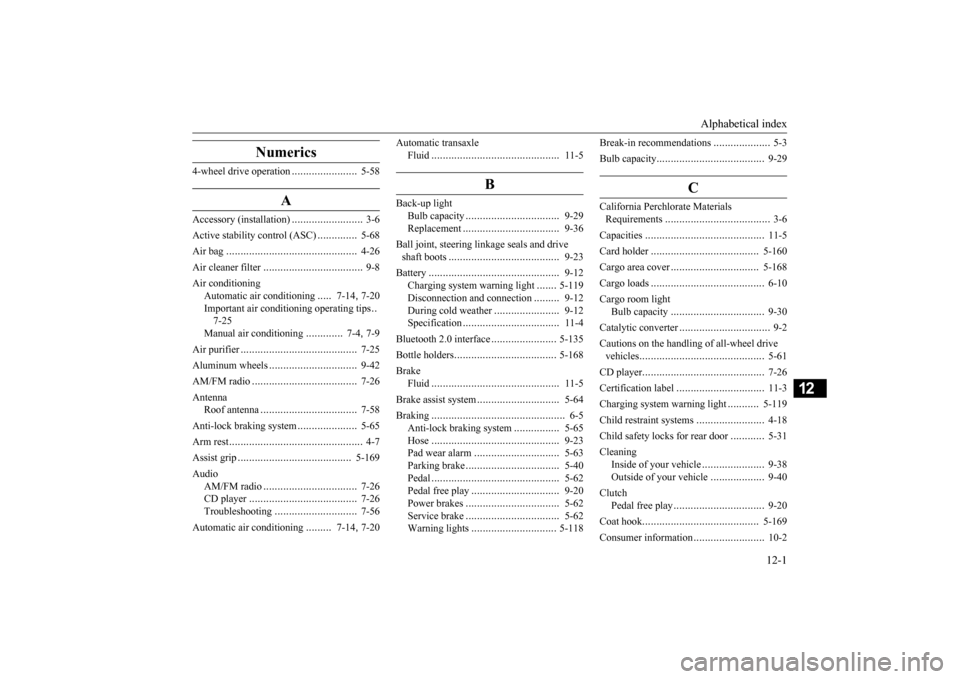
Alphabetical index
12-1
12
Numerics
4-wheel drive operation
.......................
5-58
A
Accessory (installation)
.........................
3-6
Active stability control (ASC)
..............
5-68
Air bag
......................
........................
4-26
Air cleaner filter
...................
................
9-8
Air conditioning
Automatic air conditioning
.....
7-14
, 7-20
Important air conditioning operating tips
..
7-25Manual air conditioning
.............
7-4
, 7-9
Air purifier
....................
.....................
7-25
Aluminum wheels
...............................
9-42
AM/FM radio
....................
.................
7-26
Antenna
Roof antenna
.................
.................
7-58
Anti-lock braking system
.....................
5-65
Arm rest
........................
.......................
4-7
Assist grip
.....................
...................
5-169
Audio
AM/FM radio
................
.................
7-26
CD player
.....................
.................
7-26
Troubleshooting
.............................
7-56
Automatic air conditioning
.........
7-14
, 7-20
Automatic transaxle
Fluid
.......................
......................
11-5
B
Back-up light
Bulb capacity
..................
...............
9-29
Replacement
...................
...............
9-36
Ball joint, steering linkage seals and drive shaft boots
.....................
..................
9-23
Battery
........................
......................
9-12
Charging system warning light
.......
5-119
Disconnection and connection
.........
9-12
During cold weather
.......................
9-12
Specification
...................
...............
11-4
Bluetooth 2.0 interface
.......................
5-135
Bottle holders
...................
.................
5-168
Brake
Fluid
.......................
......................
11-5
Brake assist system
.............................
5-64
Braking
.......................
........................
6-5
Anti-lock braking system
................
5-65
Hose
.......................
......................
9-23
Pad wear alarm
...............
...............
5-63
Parking brake
..................
...............
5-40
Pedal
.......................
......................
5-62
Pedal free play
................
...............
9-20
Power brakes
..................
...............
5-62
Service brake
..................
...............
5-62
Warning lights
..............................
5-118
Break-in recommendations
....................
5-3
Bulb capacity
.....................
.................
9-29
C
California Perchlorate Materials Requirements
.....................
................
3-6
Capacities
.....................
.....................
11-5
Card holder
...................
...................
5-160
Cargo area cover
................
...............
5-168
Cargo loads
...................
.....................
6-10
Cargo room light
Bulb capacity
................
.................
9-30
Catalytic converter
................
................
9-2
Cautions on the handling of all-wheel drive vehicles
.......................
.....................
5-61
CD player
......................
.....................
7-26
Certification label
...............................
11-3
Charging system warning light
...........
5-119
Child restraint systems
........................
4-18
Child safety locks for rear door
............
5-31
Cleaning
Inside of your vehicle
......................
9-38
Outside of your vehicle
...................
9-40
Clutch
Pedal free play
...............
.................
9-20
Coat hook
......................
...................
5-169
Consumer information
.........................
10-2
BK0206700US.bo
ok 1 ページ 2014年3月25日 火曜日 午後4時42分